背景
在 浅解 Junit 4 第三篇:Suite 一文中,我们探讨了 Suite (测试套件) 是如何把测试类对应的 Runner(运行器) 组织起来的。简要的思维导图如下 ⬇️
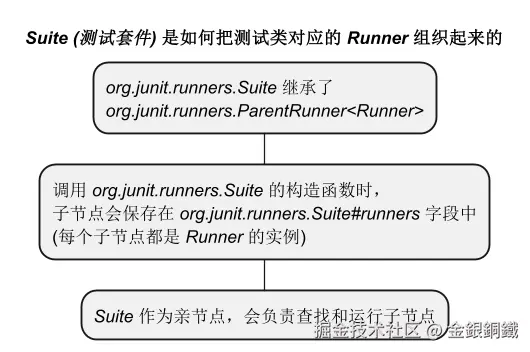
那么随之而来的一个问题是,org.junit.runners.Suite 是怎么构建出来的呢 ?本文会对 Suite 的构建过程进行探讨。
要点
Suite 继承了 ParentRunner<Runner>,简要的类图如下 👇 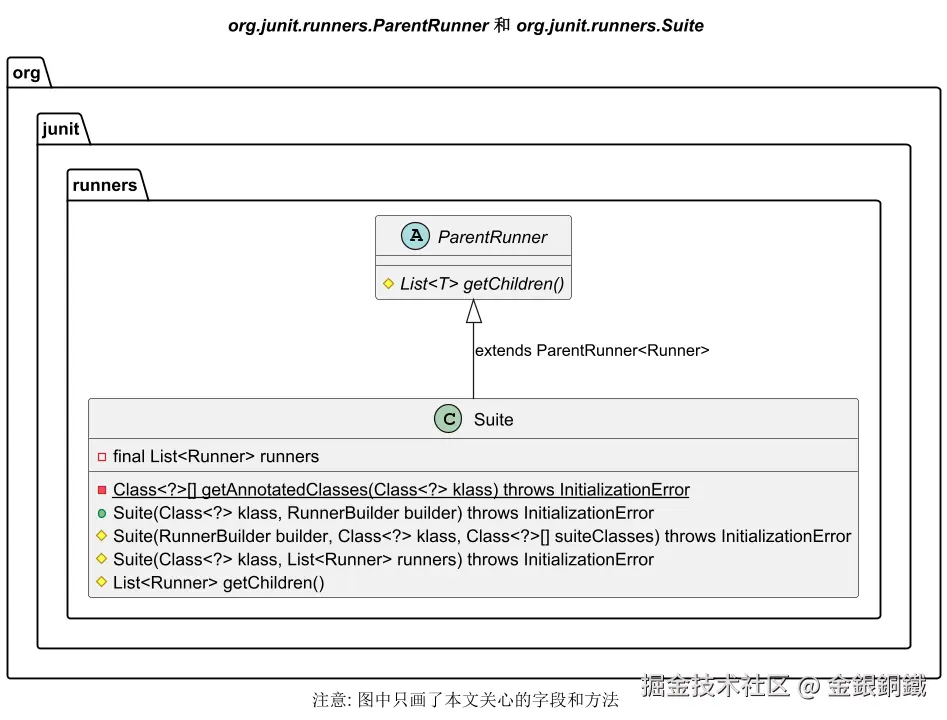
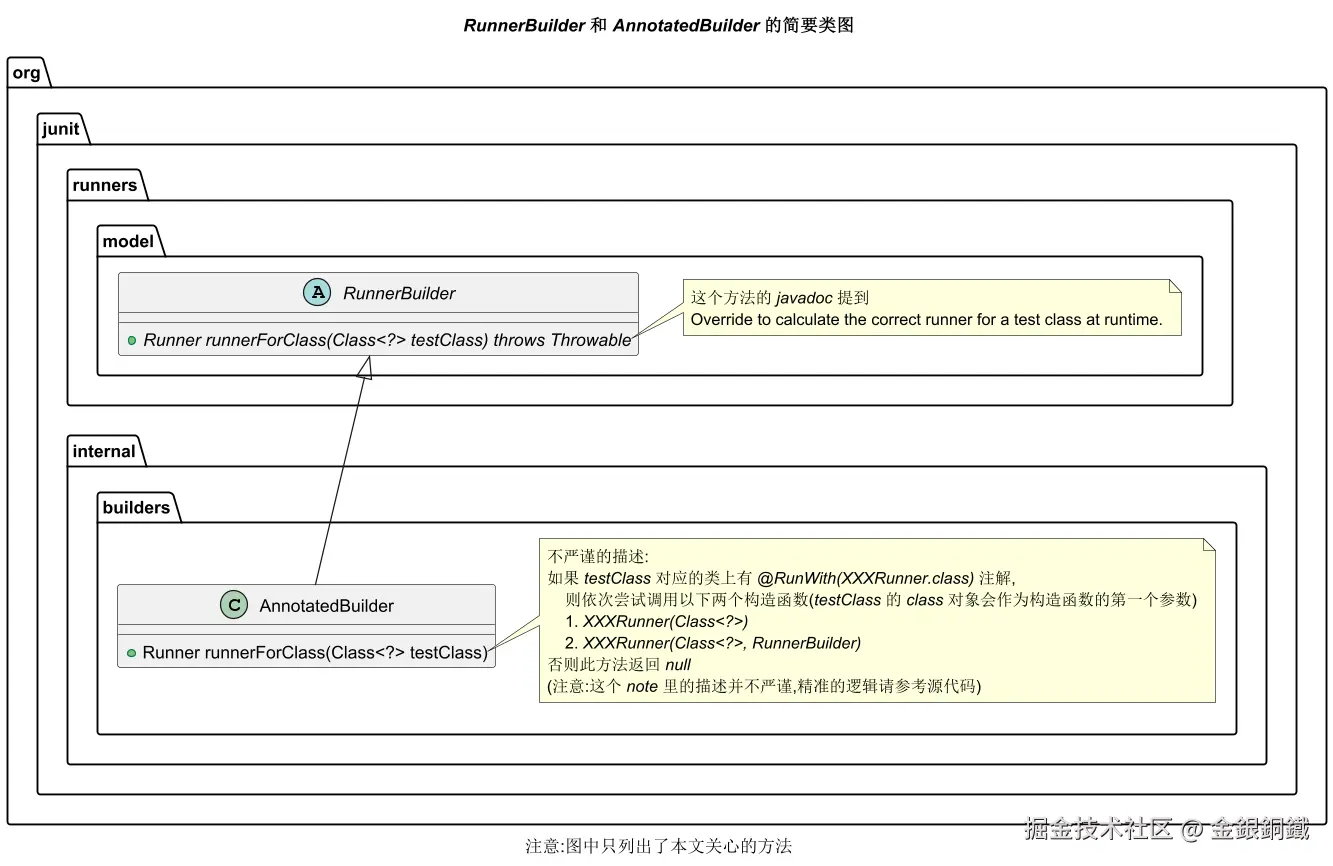
AnnotatedBuilder 继承了 RunnerBuilder,简要的类图如下 👇
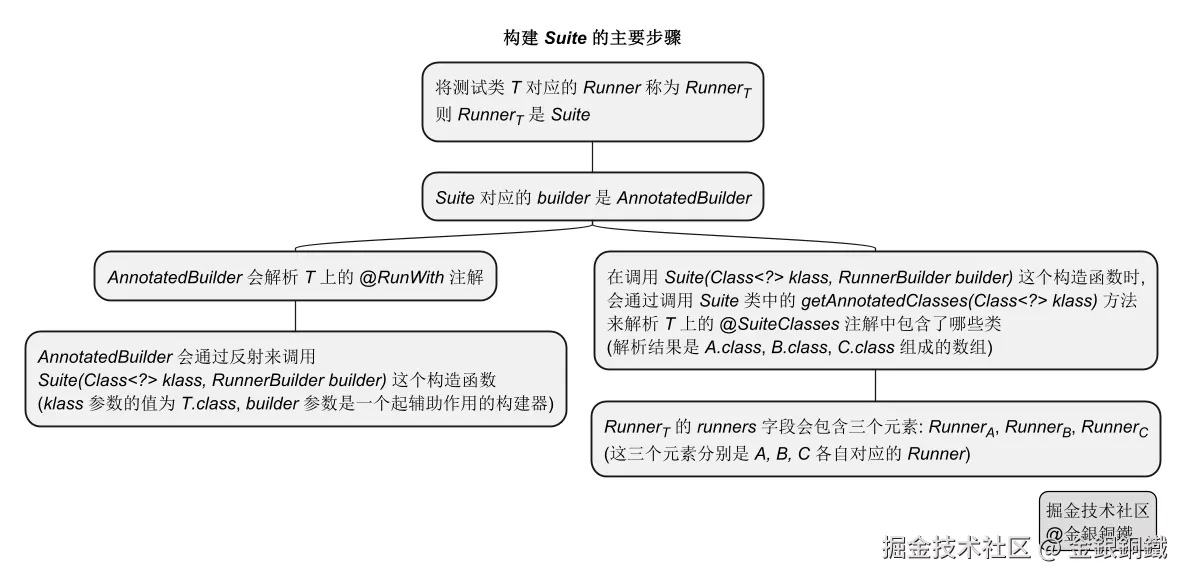
我们用一个杜撰的例子来说明构建 Suite 的主要步骤 👇
java
@RunWith(Suite.class)
@Suite.SuiteClasses({X.class, Y.class, Z.class})
public class T {
}
T, X, Y, Z 都是测试类(但是 T 中没有显式定义任何方法),我们希望通过 T 将 X, Y, Z 组织为一个测试套件(Suite)。
参考 浅解 Junit 4 第四篇:类上的 @Ignore 注解,我们还可以将以下两种情况进行对比
- 测试类 T1 上带有
@Ignore注解 - 测试类 T2 上带有
@RunWith(Suite.class)注解
| 测试类 | T1 | T2 |
|---|---|---|
| 测试类的特点 | T1 上带有 @Ignore 注解 |
T2 上带有 @RunWith(Suite.class) 注解 |
对应的 Runner |
IgnoredClassRunner(它继承自 Runner 类) |
Suite(它继承自 ParentRunner 类) |
对应的 RunnerBuilder |
IgnoredBuilder |
AnnotatedBuilder |
一些类的全限定类名
文中提到 JUnit 4 中的类,它们的全限定类名一般都比较长,所以文中有时候会用简略的写法(例如将 org.junit.runners.Suite 写成 Suite)。我在这一小节把简略类名和全限定类名的对应关系列出来
| 简略的类名 | 全限定类名(Fully Qualified Class Name) |
|---|---|
| AnnotatedBuilder | org.junit.internal.builders.AnnotatedBuilder |
| ParentRunner | org.junit.runners.ParentRunner |
| Runner | org.junit.runner.Runner |
| RunnerBuilder | org.junit.runners.model.RunnerBuilder |
| Suite | org.junit.runners.Suite |
正文
项目结构
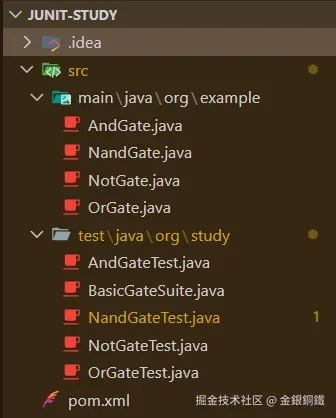
探讨本文的问题,不需要在项目中加入新的 java 代码,项目中已有的代码在 浅解 Junit 4 第三篇:Suite 一文中的 一个具体的场景: 用 Nand 来实现 Not/And/Or 这一小节有具体的描述,这里就不赘述了。项目结构如下图所示(.idea/ 目录是 Intellij IDEA 生成的,可以忽略它)
Suite 是怎么构建出来的?
浅解 Junit 4 第五篇:IgnoredBuilder 和 RunnerBuilder 一文提到 ⬇️
- 可以使用构建者(
builder)设计模式来构建Runner
Runner的构建者(builder)是RunnerBuilderRunnerBuilder是抽象类,我们需要用它的子类来执行具体的构建逻辑- 类上有
@Ignore的测试类,它对应的Runner是IgnoredClassRunner,而IgnoredClassRunner对应的构建者(builder)是IgnoredBuilder
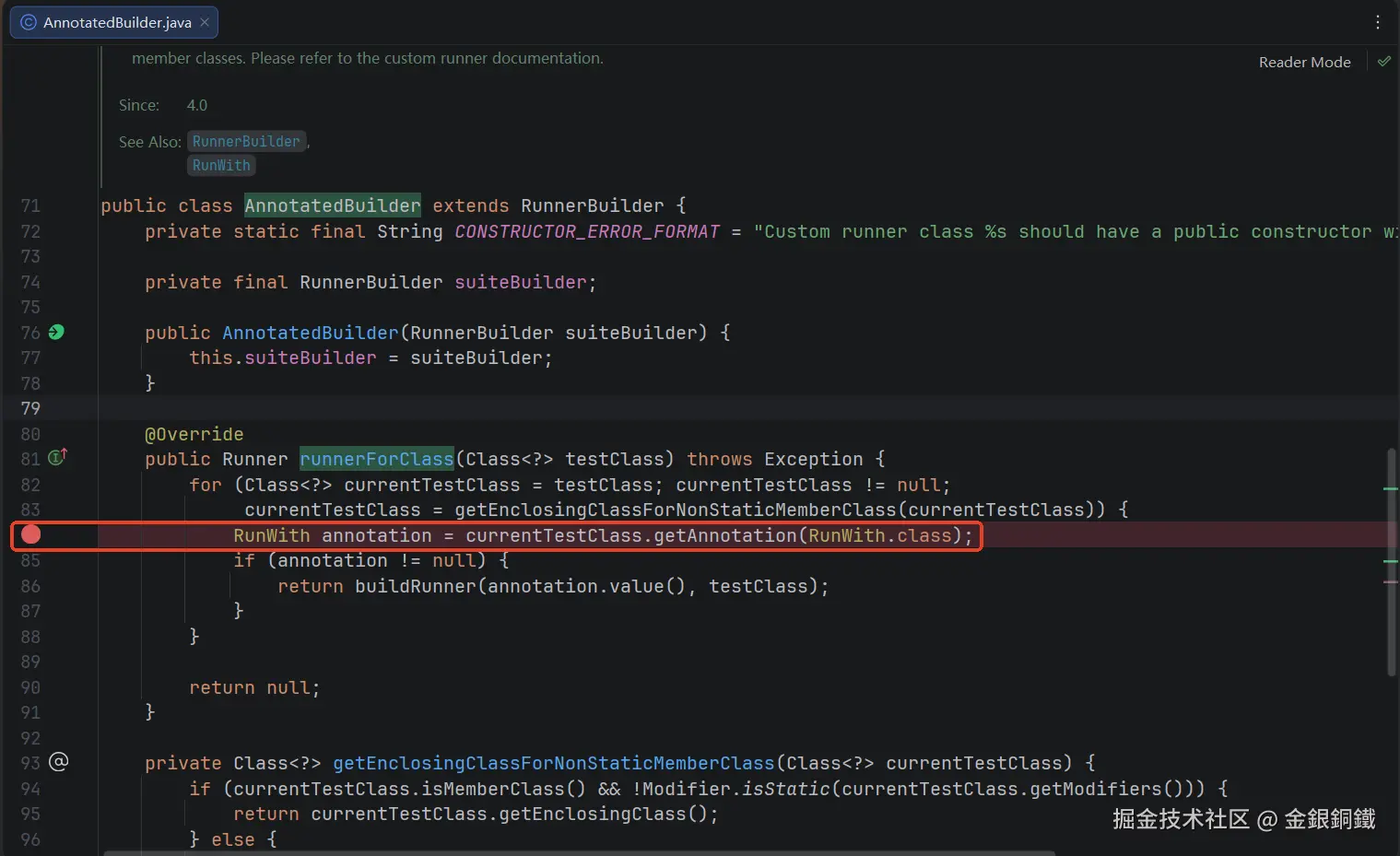
org.junit.runners.Suite 继承了 ParentRunner<Runner>,它也有对应的 RunnerBuilder。和 Suite 对应的 RunnerBuilder 是 org.junit.internal.builders.AnnotatedBuilder。我们在AnnotatedBuilder 类的 runnerForClass(Class<?>) 方法里打一个断点,位置如下图所示
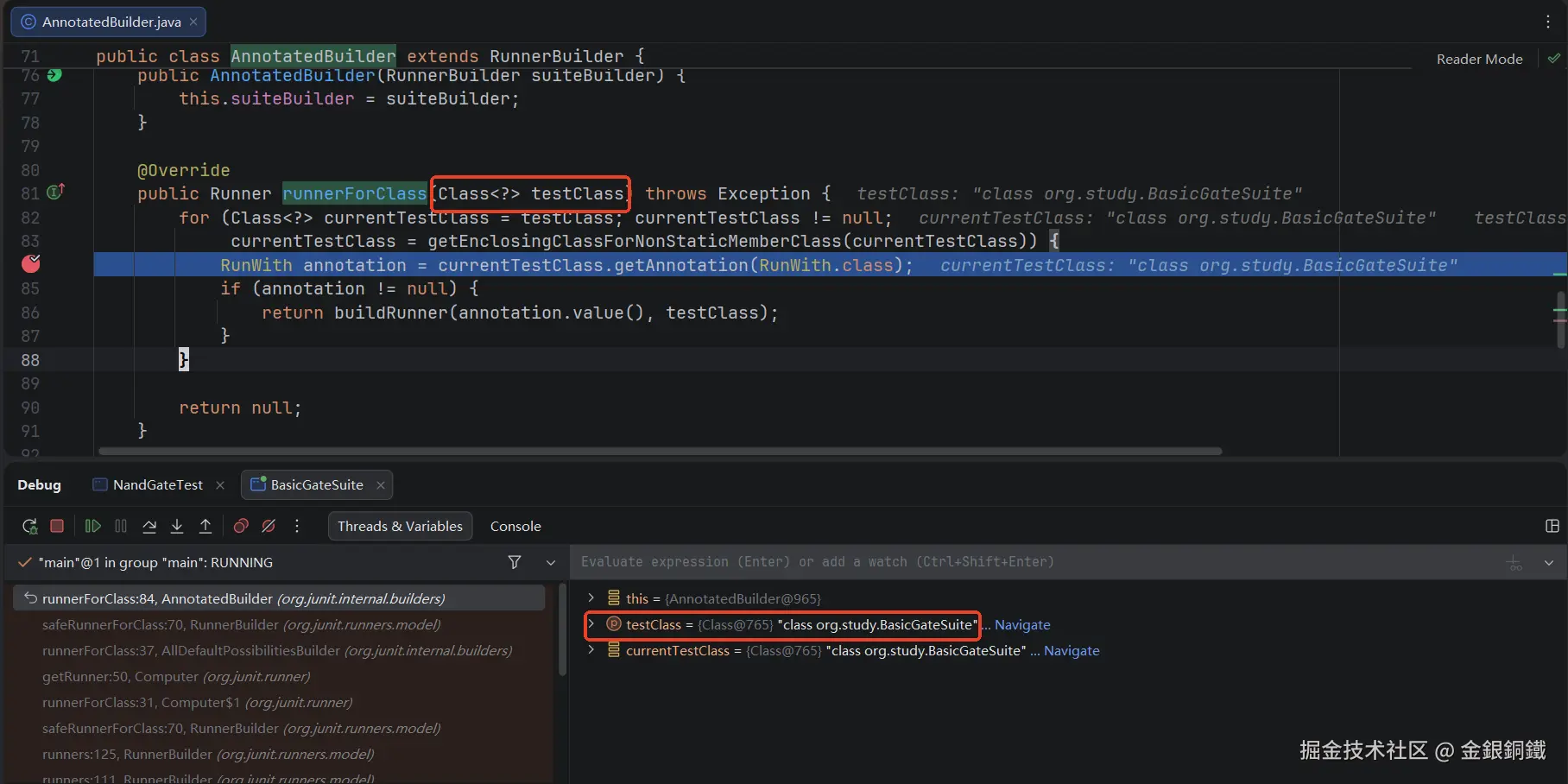
然后 debug BasicGateSuite 的 main 方法。在断点处,会看到 testClass 参数的值为 org.study.BasicGateSuite.class(如下图所示)
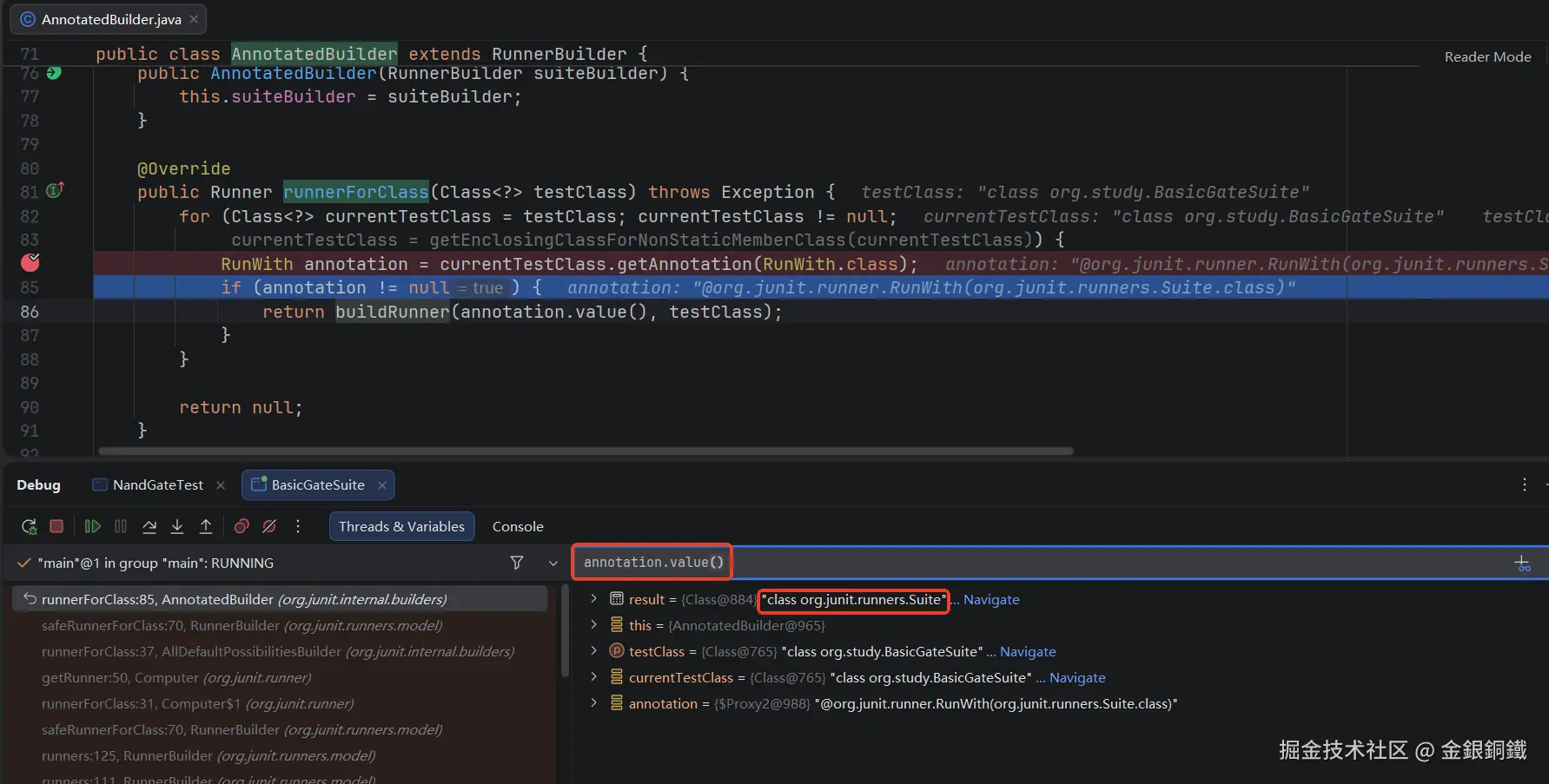
往后运行一行,从下图可以看出 annotation.value() 的值为 org.junit.runners.Suite.class
继续运行,会来到 buildRunner(Class<? extends Runner> runnerClass, Class<?> testClass) 方法。从名称来看,这个方法会构建 Runner。这个方法的代码如下
java
public Runner buildRunner(Class<? extends Runner> runnerClass,
        Class<?> testClass) throws Exception {
    try {
        return runnerClass.getConstructor(Class.class).newInstance(testClass);
    } catch (NoSuchMethodException e) {
        try {
            return runnerClass.getConstructor(Class.class,
                    RunnerBuilder.class).newInstance(testClass, suiteBuilder);
        } catch (NoSuchMethodException e2) {
            String simpleName = runnerClass.getSimpleName();
            throw new InitializationError(String.format(
                    CONSTRUCTOR_ERROR_FORMAT, simpleName, simpleName));
        }
    }
}从代码逻辑来看,这个方法会依次尝试调用下面两个构造函数(XXXRunner 表示某个 Runner)
XXXRunner(Class<?>)(为了便于描述,我们把它简称为A类型构造函数)XXXRunner(Class<?>, RunnerBuilder)(为了便于描述,我们把它简称为B类型构造函数)
就 Suite 而言,它没有 A 类型构造函数,但是有 B 类型构造函数(如下图第 69 行所示)。
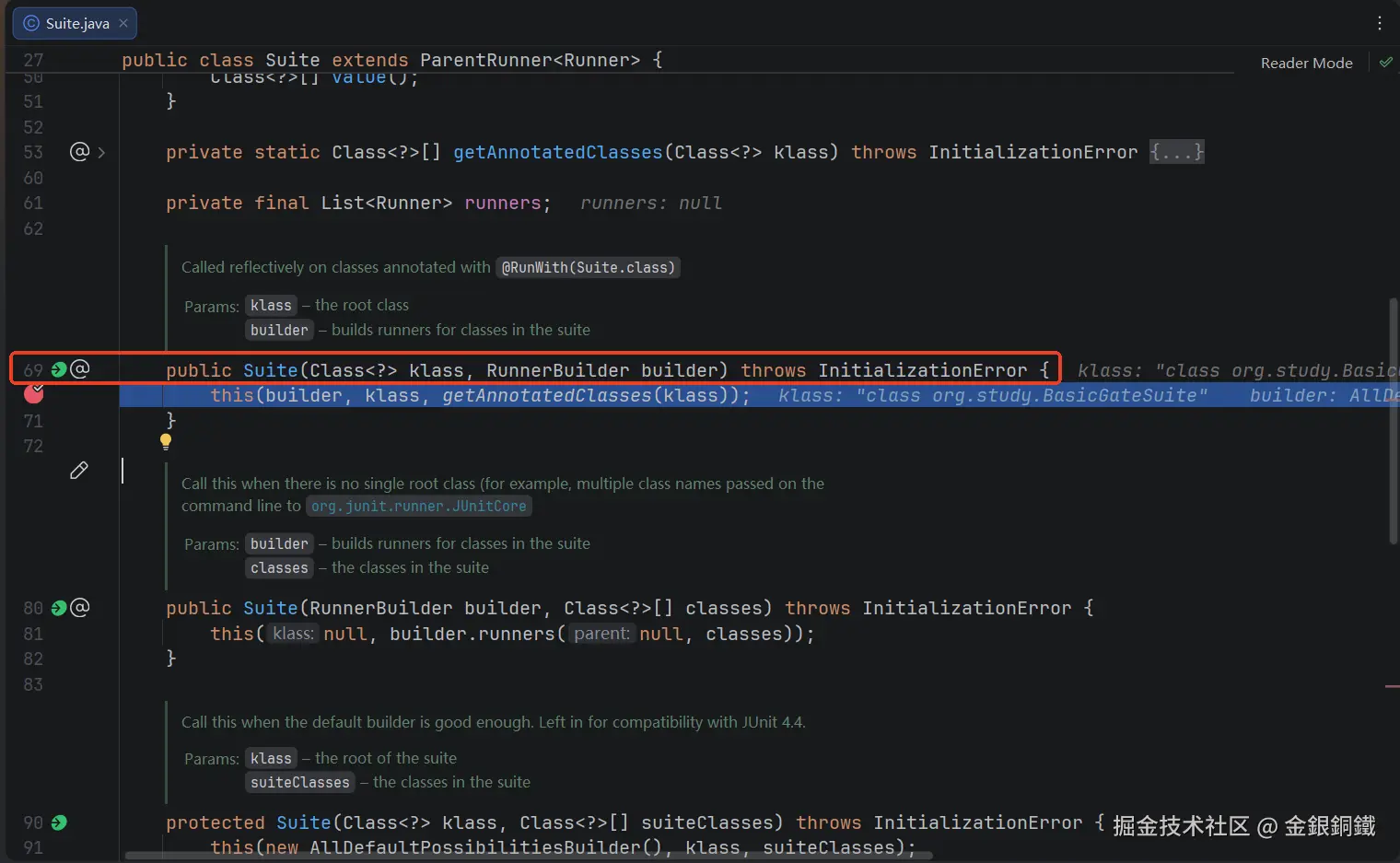
我们在上图第 70 行打一个断点,当代码运行到这个断点时,会看到 klass 参数的值为 org.study.BasicGateSuite.class(如下图所示)
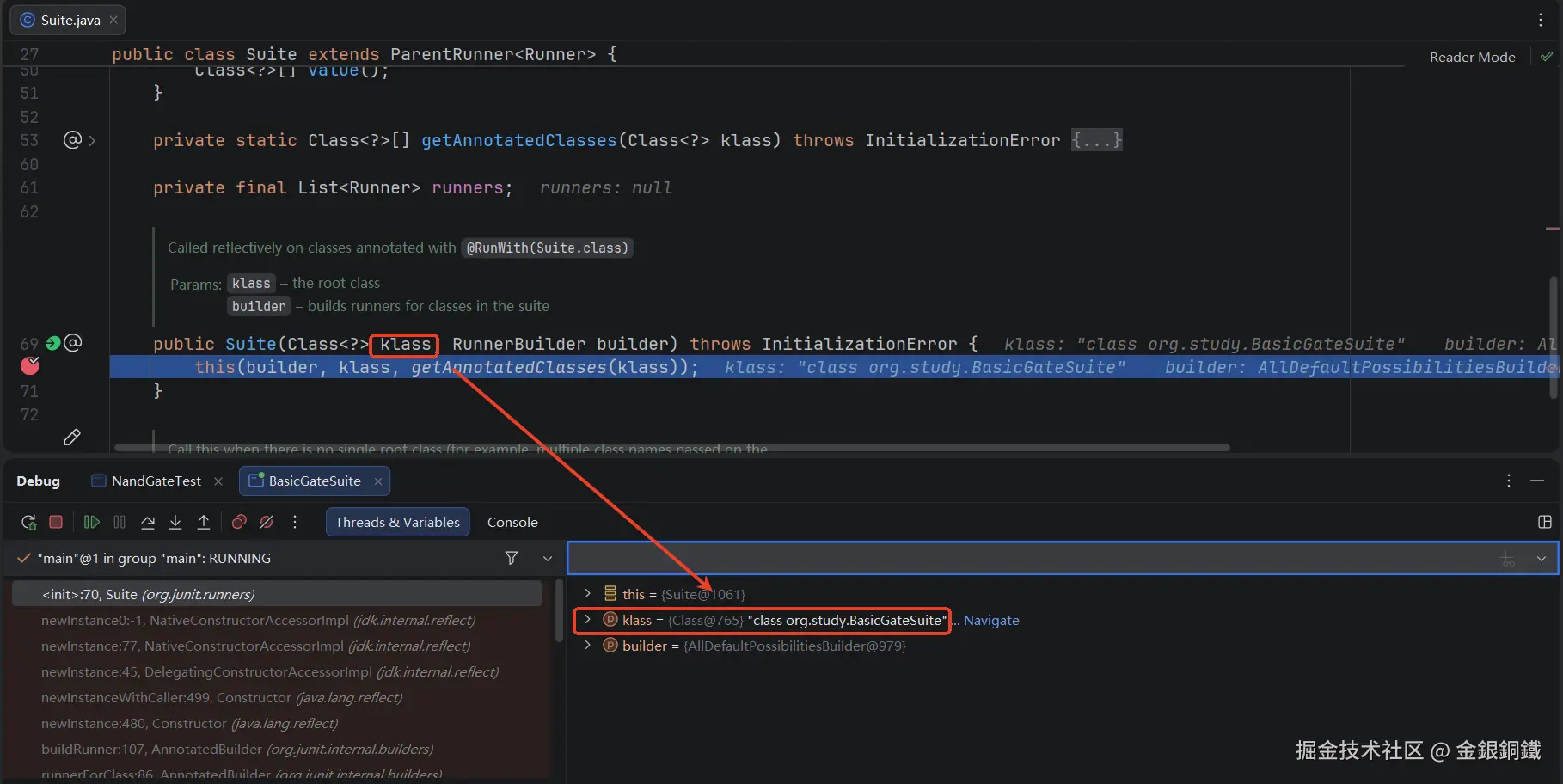
而 builder 参数里是 org.junit.internal.builders.AllDefaultPossibilitiesBuilder 的一个实例,至于这个参数是怎么来的,我们到下一篇再分析吧,否则本文的内容就有点多了。现在可以简单将 builder 参数理解为一个起辅助作用的 RunnerBuilder,我们会这个 builder 来构建 Suite 的各个子节点(注意: Suite 继承了 ParentRunner<Runner>,所以它的子节点都是 Runner)。
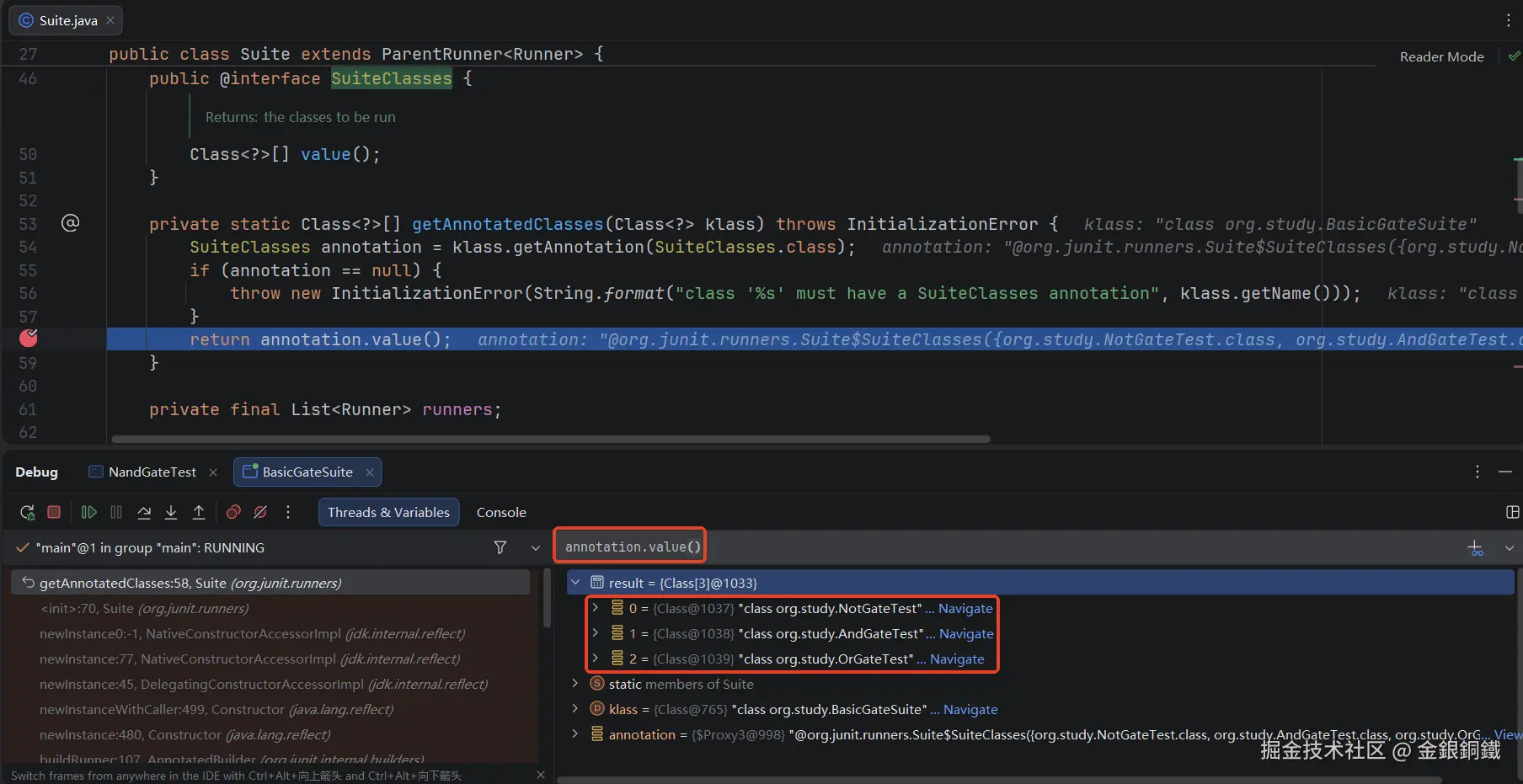
至于上图中第 70 行调用的 getAnnotatedClasses(Class<?>) 方法,它会负责解析测试类上的 org.junit.runners.Suite.SuiteClasses 注解。我们可以在这个方法里打一个断点(如下图第 58 行所示)。当程序运行到断点这里时,可以验证 annotation.value 的值是以下三个元素组成的数组
org.study.NotGateTest.classorg.study.AndGateTest.classorg.study.OrGateTest.class
(下图红框里展示的是一种验证方式)
Suite 类中的另一个构造函数会被调用,这个构造函数如下图红框所示。
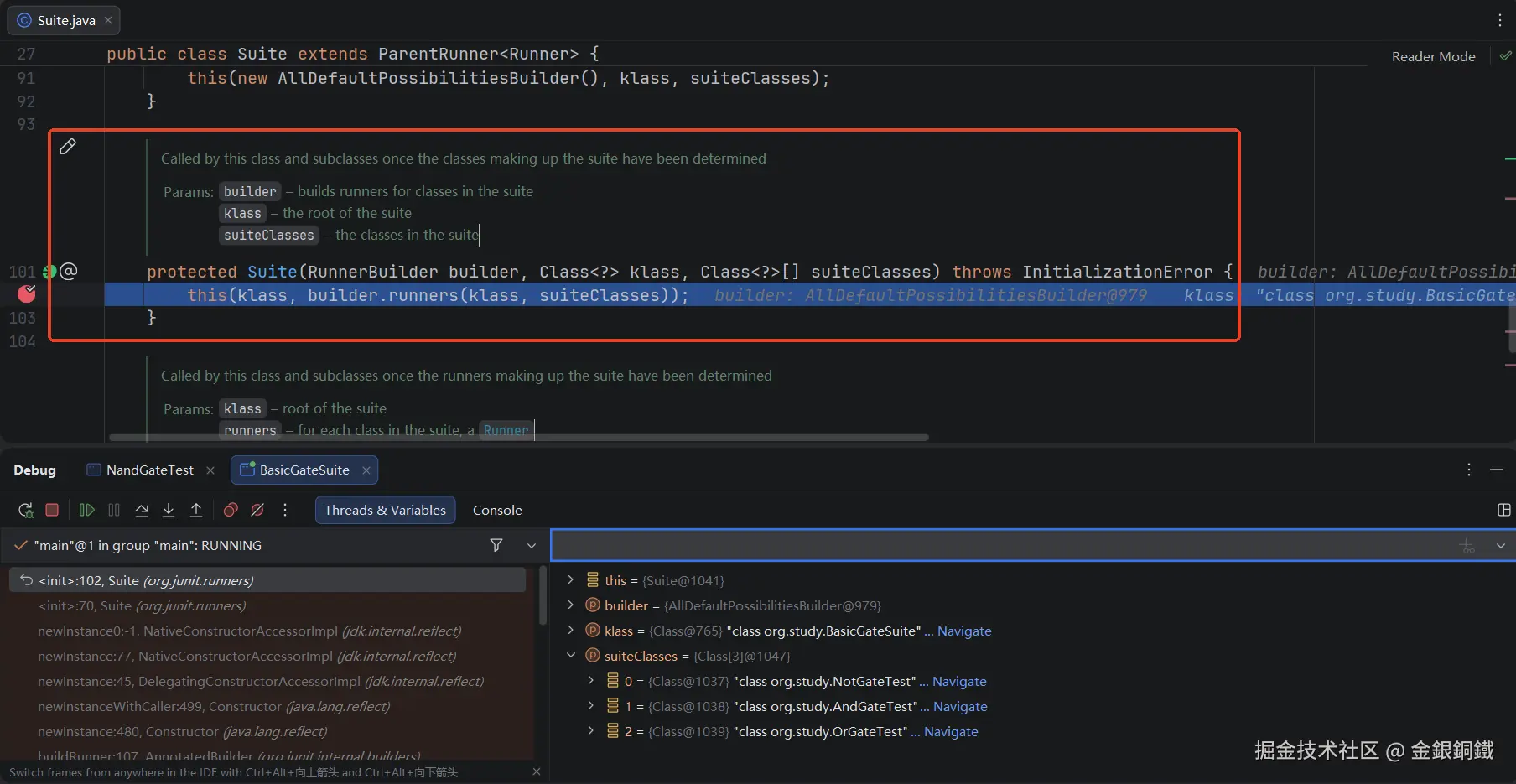
我们可以在第 102 行打一个断点(如上图所示)。当程序运行到断点处时,可以验证 suiteClasses 数组中包含了以下元素
org.study.NotGateTest.classorg.study.AndGateTest.classorg.study.OrGateTest.class
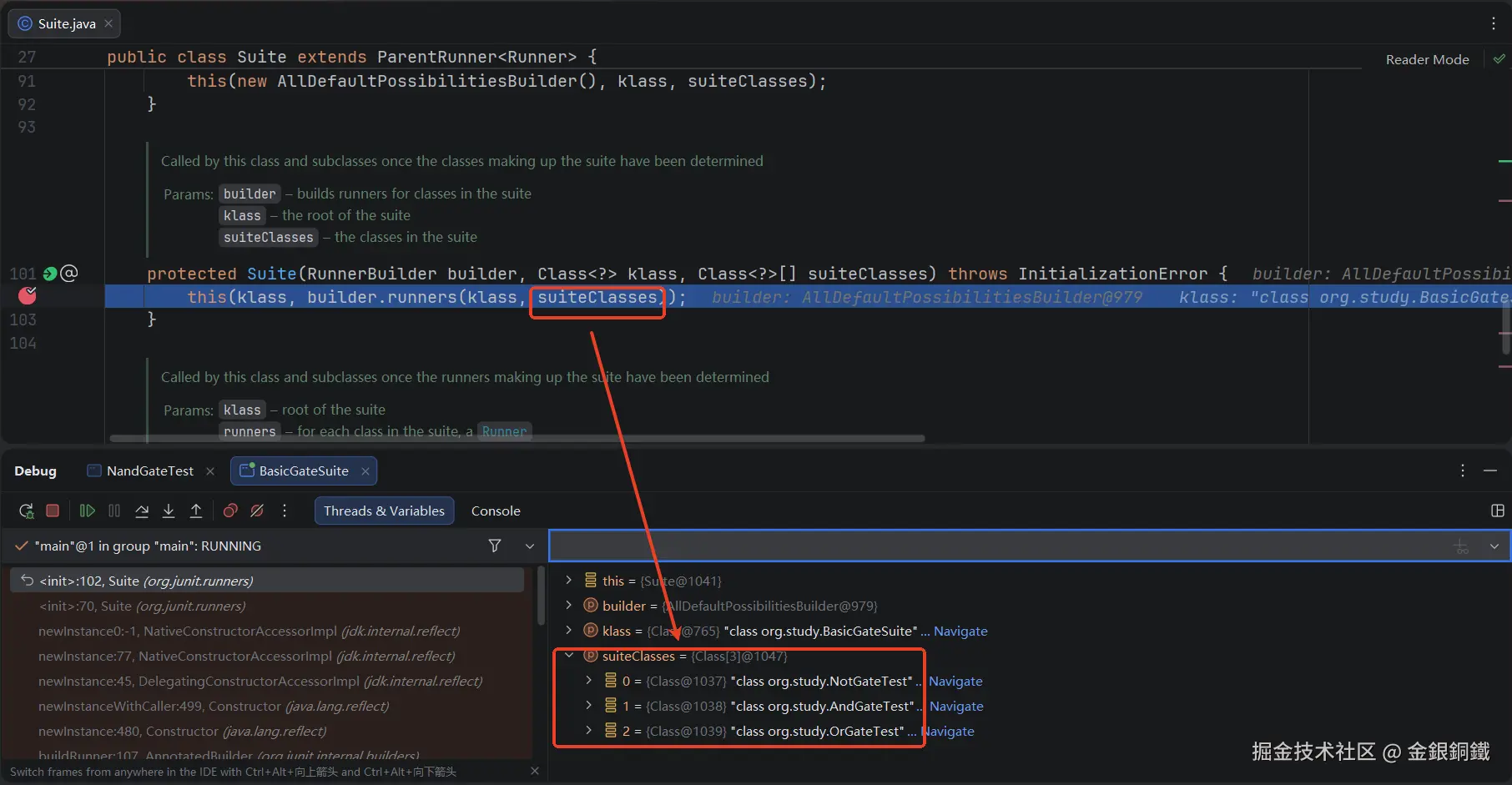
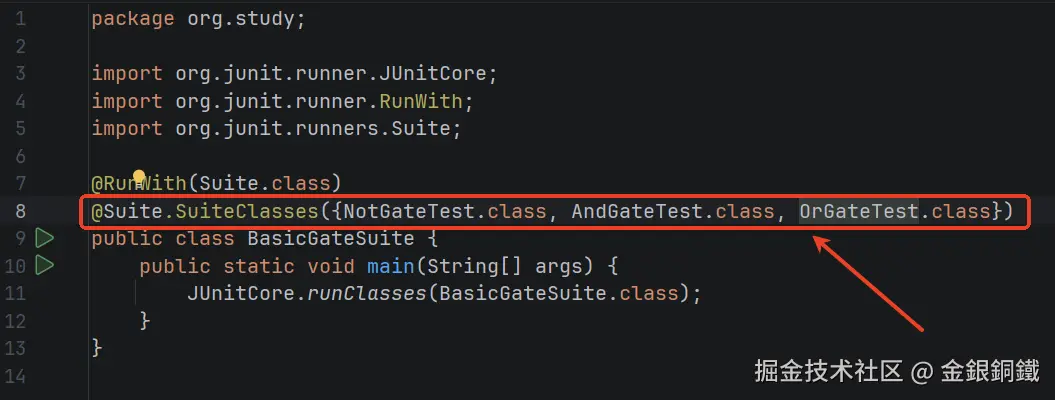
这三个元素来自 BasicGateSuite 类上 @SuiteClasses 注解(如下图红框所示)
其他
"Suite (测试套件) 是如何把测试类对应的 Runner 组织起来的"这张图是如何画出来的?
我用了 PlantUML 来画这张图,具体的代码如下
puml
@startmindmap
'https://plantuml.com/mindmap-diagram

top to bottom direction

title <i>Suite (测试套件)</i> 是如何把测试类对应的 <i>Runner</i> 组织起来的

*:<i>org.junit.runners.Suite</i> 继承了
<i>org.junit.runners.ParentRunner<Runner></i>;
**:调用 <i>org.junit.runners.Suite</i> 的构造函数时,
子节点会保存在 <i>org.junit.runners.Suite#runners</i> 字段中
(每个子节点都是 <i>Runner</i> 的实例);
*** <i>Suite</i> 作为亲节点,会负责查找和运行子节点


@endmindmap"org.junit.runners.ParentRunner 和 org.junit.runners.Suite"这张图是如何画出来的?
我用了 PlantUML 来画这张图,具体的代码如下
puml
@startuml
'https://plantuml.com/class-diagram

title <i>org.junit.runners.ParentRunner</i> 和 <i>org.junit.runners.Suite</i>
caption 注意: 图中只画了本文关心的字段和方法

abstract class org.junit.runners.ParentRunner

org.junit.runners.ParentRunner <|-- org.junit.runners.Suite: extends ParentRunner<Runner>

abstract class org.junit.runners.ParentRunner {
    #{abstract} List<T> getChildren()
}

class org.junit.runners.Suite {
    -final List<Runner> runners
    -{static} Class<?>[] getAnnotatedClasses(Class<?> klass) throws InitializationError
    +Suite(Class<?> klass, RunnerBuilder builder) throws InitializationError
    #Suite(RunnerBuilder builder, Class<?> klass, Class<?>[] suiteClasses) throws InitializationError
    #Suite(Class<?> klass, List<Runner> runners) throws InitializationError
    #List<Runner> getChildren()
}


@enduml"RunnerBuilder 和 AnnotatedBuilder 的简要类图"这张图是如何画出来的?
我用了 PlantUML 来画这张图,具体的代码如下
puml
@startuml
'https://plantuml.com/class-diagram

title <i>RunnerBuilder</i> 和 <i>AnnotatedBuilder</i> 的简要类图

abstract class org.junit.runners.model.RunnerBuilder
class org.junit.internal.builders.AnnotatedBuilder

org.junit.runners.model.RunnerBuilder <|-- org.junit.internal.builders.AnnotatedBuilder

abstract class org.junit.runners.model.RunnerBuilder {
    +{abstract}Runner runnerForClass(Class<?> testClass) throws Throwable
}

class org.junit.internal.builders.AnnotatedBuilder {
    +Runner runnerForClass(Class<?> testClass)
}

note right of org.junit.runners.model.RunnerBuilder::runnerForClass
这个方法的 <i>javadoc</i> 提到
Override to calculate the correct runner for a test class at runtime.
end note

note right of org.junit.internal.builders.AnnotatedBuilder::runnerForClass
不严谨的描述:
如果 <i>testClass</i> 对应的类上有 <i>@RunWith(XXXRunner.class)</i> 注解,
    则依次尝试调用以下两个构造函数(<i>testClass</i> 的 <i>class</i> 对象会作为构造函数的第一个参数)
    1. <i>XXXRunner(Class<?>)</i>
    2. <i>XXXRunner(Class<?>, RunnerBuilder)</i>
否则此方法返回 <i>null</i>
(注意:这个 <i>note</i> 里的描述并不严谨,精准的逻辑请参考源代码)
end note

caption 注意:图中只列出了本文关心的方法

@enduml
"构建 Suite 的主要步骤"这张图是如何画出来的?
我用了 PlantUML 来画这张图,具体的代码如下
puml
@startmindmap
'https://plantuml.com/mindmap-diagram

top to bottom direction

title 构建 <i>Suite</i> 的主要步骤

*:将测试类 <i>T</i> 对应的 <i>Runner</i> 称为 <i>Runner<sub>T</sub></i>
则 <i>Runner<sub>T</sub></i> 是 <i>Suite</i>;
** <i>Suite</i> 对应的 <i>builder</i> 是 <i>AnnotatedBuilder</i>
*** <i>AnnotatedBuilder</i> 会解析 <i>T</i> 上的 <i>@RunWith</i> 注解
****:<i>AnnotatedBuilder</i> 会通过反射来调用
<i>Suite(Class<?> klass, RunnerBuilder builder)</i> 这个构造函数
(<i>klass</i> 参数的值为 <i>T.class</i>, <i>builder</i> 参数是一个起辅助作用的构建器);

***:在调用 <i>Suite(Class<?> klass, RunnerBuilder builder)</i> 这个构造函数时,
会通过调用 <i>Suite</i> 类中的 <i>getAnnotatedClasses(Class<?> klass)</i> 方法
来解析 <i>T</i> 上的 <i>@SuiteClasses</i> 注解中包含了哪些类
(解析结果是 <i>A.class</i>, <i>B.class</i>, <i>C.class</i> 组成的数组);
****:<i>Runner<sub>T</sub></i> 的 <i>runners</i> 字段会包含三个元素: <i>Runner<sub>A</sub></i>, <i>Runner<sub>B</sub></i>, <i>Runner<sub>C</sub></i>
(这三个元素分别是 <i>A, B, C</i> 各自对应的 <i>Runner</i>);

legend right
掘金技术社区
@金銀銅鐵
endlegend

@endmindmap