基于YOLOv8的实时目标检测与追踪系统实战
欢迎关注B站:麦麦大数据
编号:F071
一、项目概述
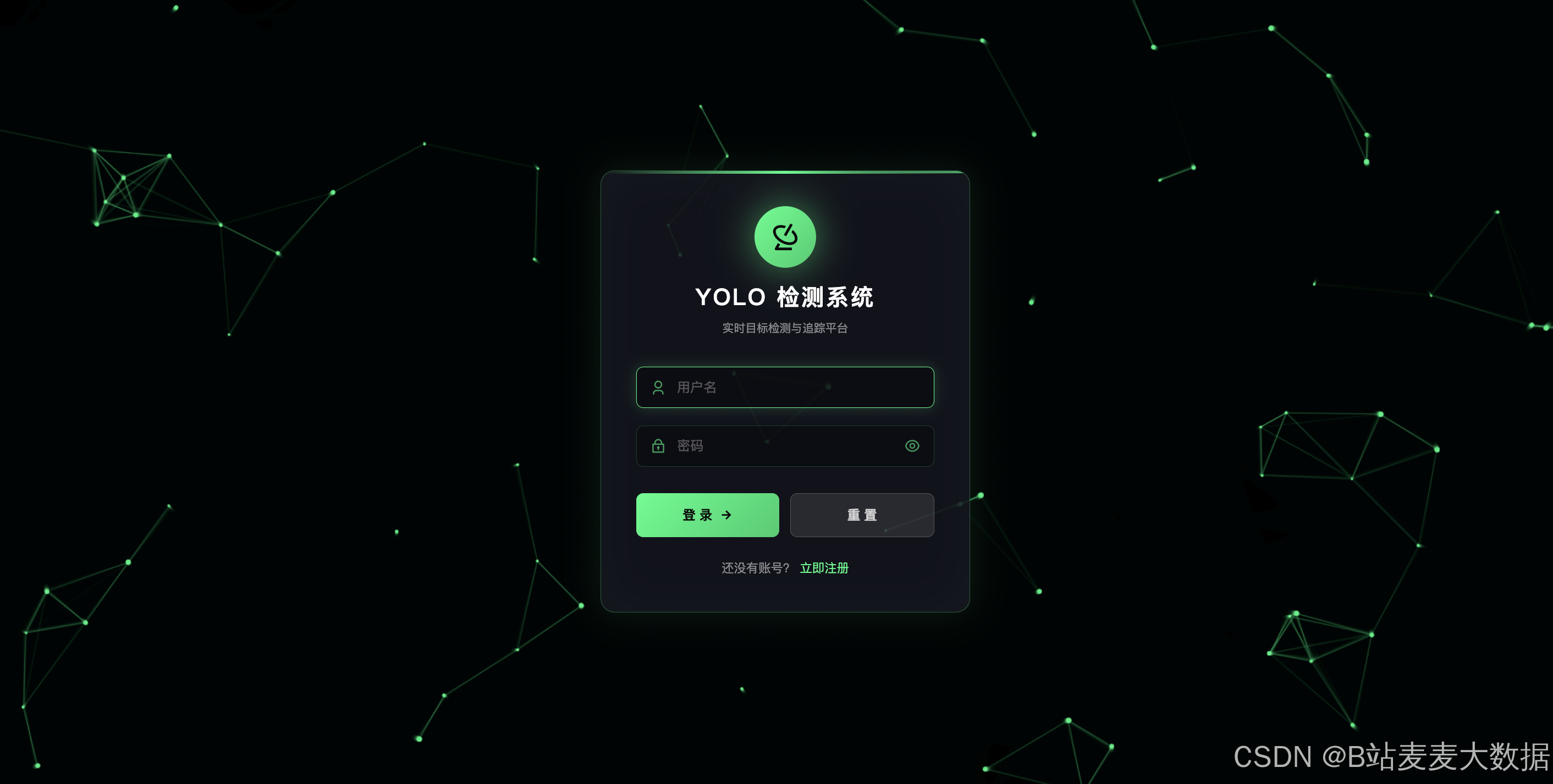
本系统是一个基于YOLOv8的实时目标检测与追踪平台,采用前后端分离架构设计。后端使用Flask构建RESTful API,前端使用Vue.js + Element UI构建用户界面。系统支持图片、视频的目标检测,并提供任务队列管理、实时系统监控、大模型对话等功能。
技术栈
| 层级 | 技术选型 |
|---|---|
| 后端框架 | Flask |
| 前端框架 | Vue.js 2.x + Element UI |
| 数据库 | MySQL + SQLAlchemy ORM |
| 任务队列 | Redis + RQ (Redis Queue) |
| 目标检测 | Ultralytics YOLOv8 |
| 数据可视化 | ECharts |
| 大语言模型 | SiliconFlow API / Ollama |
系统功能模块
┌─────────────────────────────────────────────────────────────┐
│                      系统功能模块                            │
├─────────────────────────────────────────────────────────────┤
│  用户管理    │  用户注册、登录、个人信息管理、头像上传       │
├─────────────────────────────────────────────────────────────┤
│  YOLO检测   │  图片检测、视频检测、实时流检测               │
├─────────────────────────────────────────────────────────────┤
│  任务管理    │  任务提交、状态查询、结果查看                │
├─────────────────────────────────────────────────────────────┤
│  智能对话    │  大模型对话(流式/非流式)                  │
├─────────────────────────────────────────────────────────────┤
│  数据统计    │  任务类型分布、状态统计、趋势分析            │
├─────────────────────────────────────────────────────────────┤
│  系统监控    │  CPU/内存/GPU监控、任务队列管理             │
└─────────────────────────────────────────────────────────────┘
二、系统架构设计
2.1 整体架构图
┌─────────────────────────────────────────────────────────────────────┐
│                          Vue.js Frontend (Port 8081)                │
│  ┌──────────┐  ┌──────────┐  ┌──────────┐  ┌──────────────┐        │
│  │  Login   │  │  YOLO    │  │  Charts  │  │    Chat      │        │
│  │  Register│  │  Demo    │  │  01/02   │  │   (LLM)      │        │
│  └──────────┘  └──────────┘  └──────────┘  └──────────────┘        │
└────────────────────────────────┬────────────────────────────────────┘
                                 │ HTTP / SSE / WebSocket
┌────────────────────────────────┴────────────────────────────────────┐
│                          Flask API (Port 8080)                      │
│  ┌──────────┐  ┌──────────┐  ┌──────────┐  ┌──────────────┐         │
│  │  /user   │  │  /yolo   │  │  /chart  │  │    /chat     │         │
│  │ Routes   │  │ Routes   │  │ Routes   │  │   Routes     │         │
│  └──────────┘  └──────────┘  └──────────┘  └──────────────┘         │
└────────────────────────────────┬────────────────────────────────────┘
                                 │
        ┌────────────────────────┼────────────────────────┐
        │                        │                        │
        ▼                        ▼                        ▼
┌───────────────┐      ┌───────────────┐       ┌───────────────┐
│    MySQL      │      │    Redis      │       │   YOLO        │
│   (Port 3306) │      │  (Queue)     │       │   Worker      │
└───────────────┘      └───────────────┘       └───────────────┘
三、核心功能实现
3.1 用户管理模块
3.1.1 用户注册
接口路径: POST /api/user/register
python
# app/routes/user_route.py
@user_bp.route('/register', methods=['POST'])
def register():
    data = request.json
    username = data.get('username')
    password = data.get('password')

    # 检查用户名是否已存在
    if User.query.filter_by(username=username).first():
        return make_response(code=1, message='username exists')

    # 密码哈希存储
    hashed_password = generate_password_hash(password)
    new_user = User(username=username, password=hashed_password,
                   deleted=0, roles='normal')

    db.session.add(new_user)
    db.session.commit()

    return make_response(code=0, message='register success',
                       data=user_schema.dump(new_user))
3.1.2 用户登录
接口路径: POST /api/user/login
python
@user_bp.route('/login', methods=['POST'])
def login():
    data = request.json
    username = data.get('username')
    password = data.get('password')

    user = User.query.filter_by(username=username).first()
    if not user or not check_password_hash(user.password, password):
        return make_response(code=1, message='用户或密码错误')

    return make_response(code=0, message='登录成功',
                       data=user_schema.dump(user))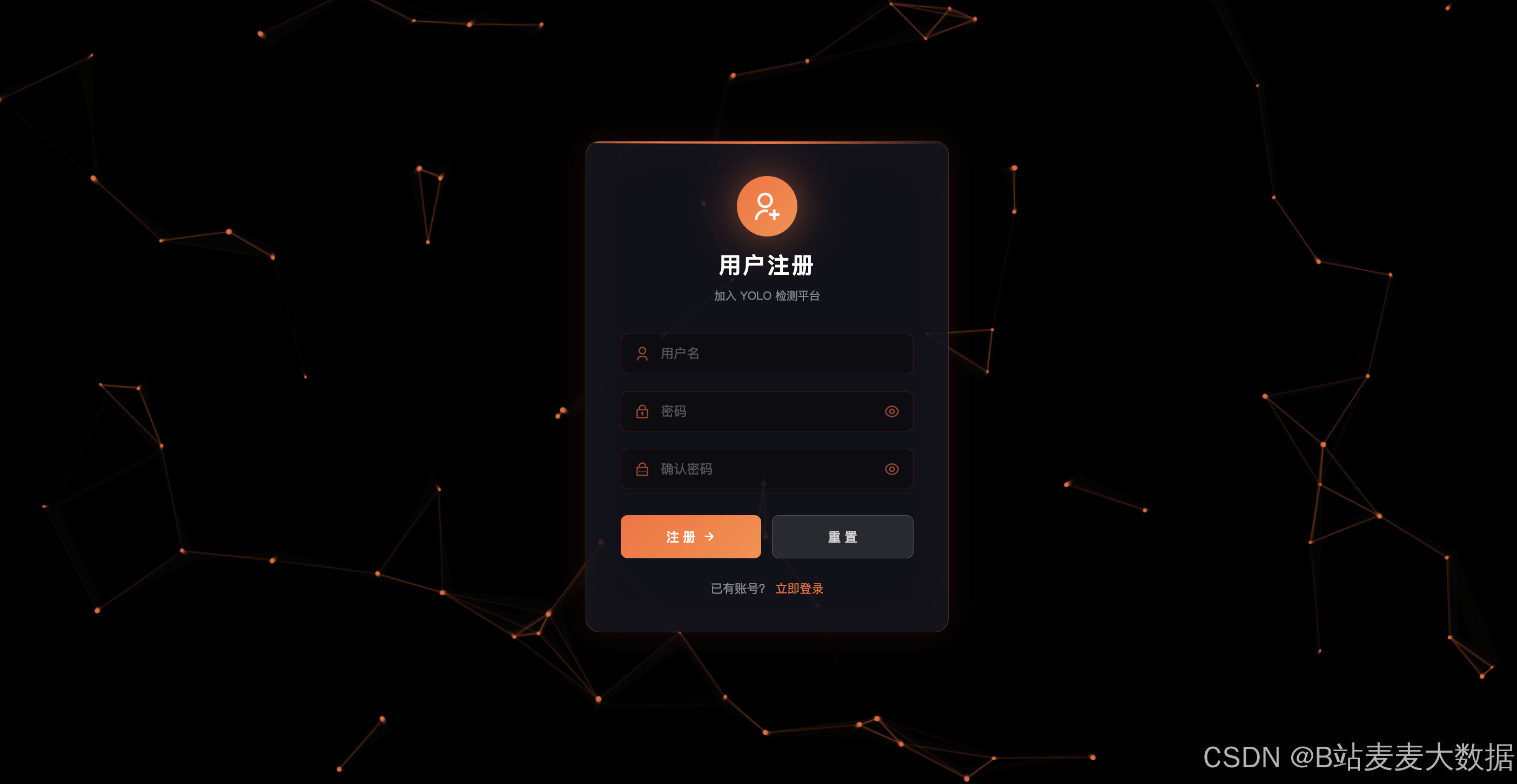
3.2 YOLO目标检测模块
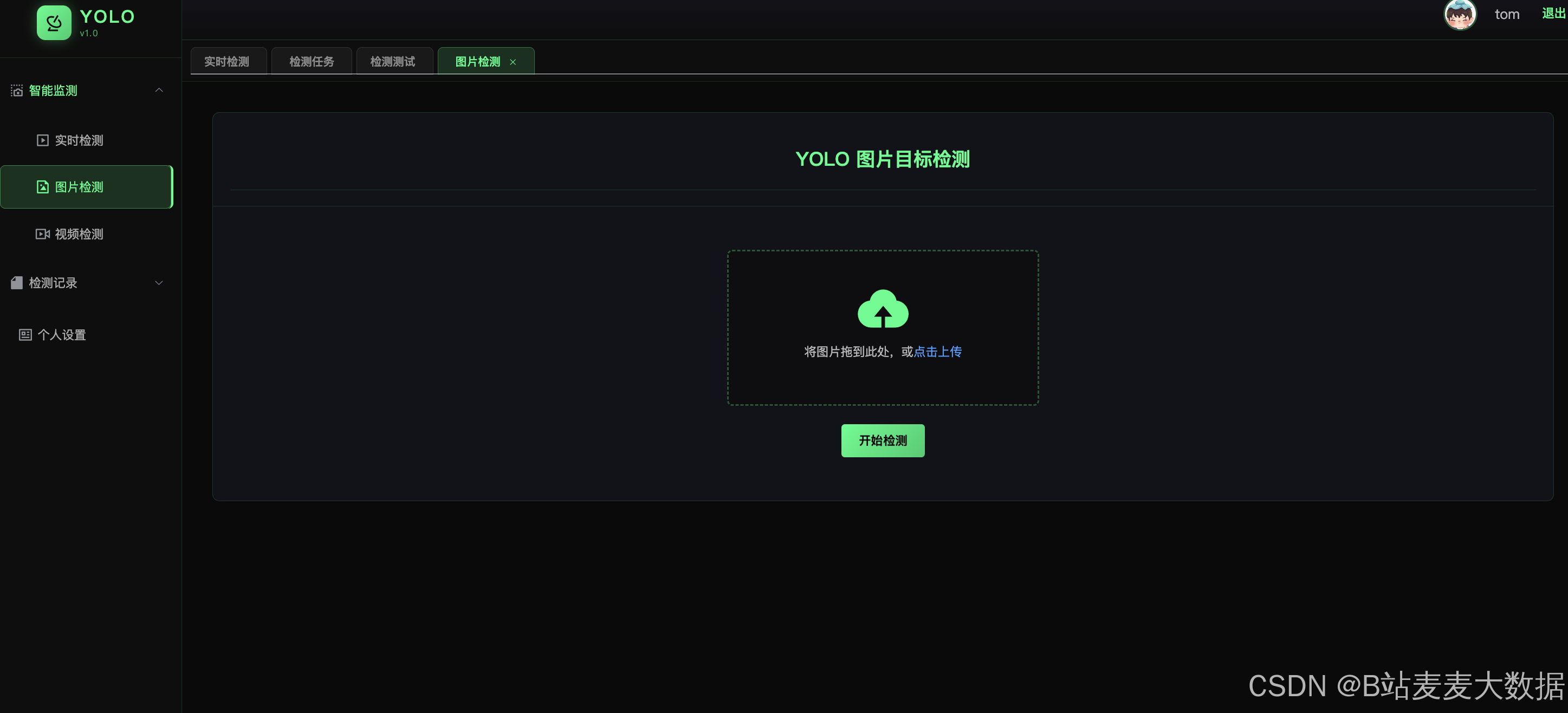
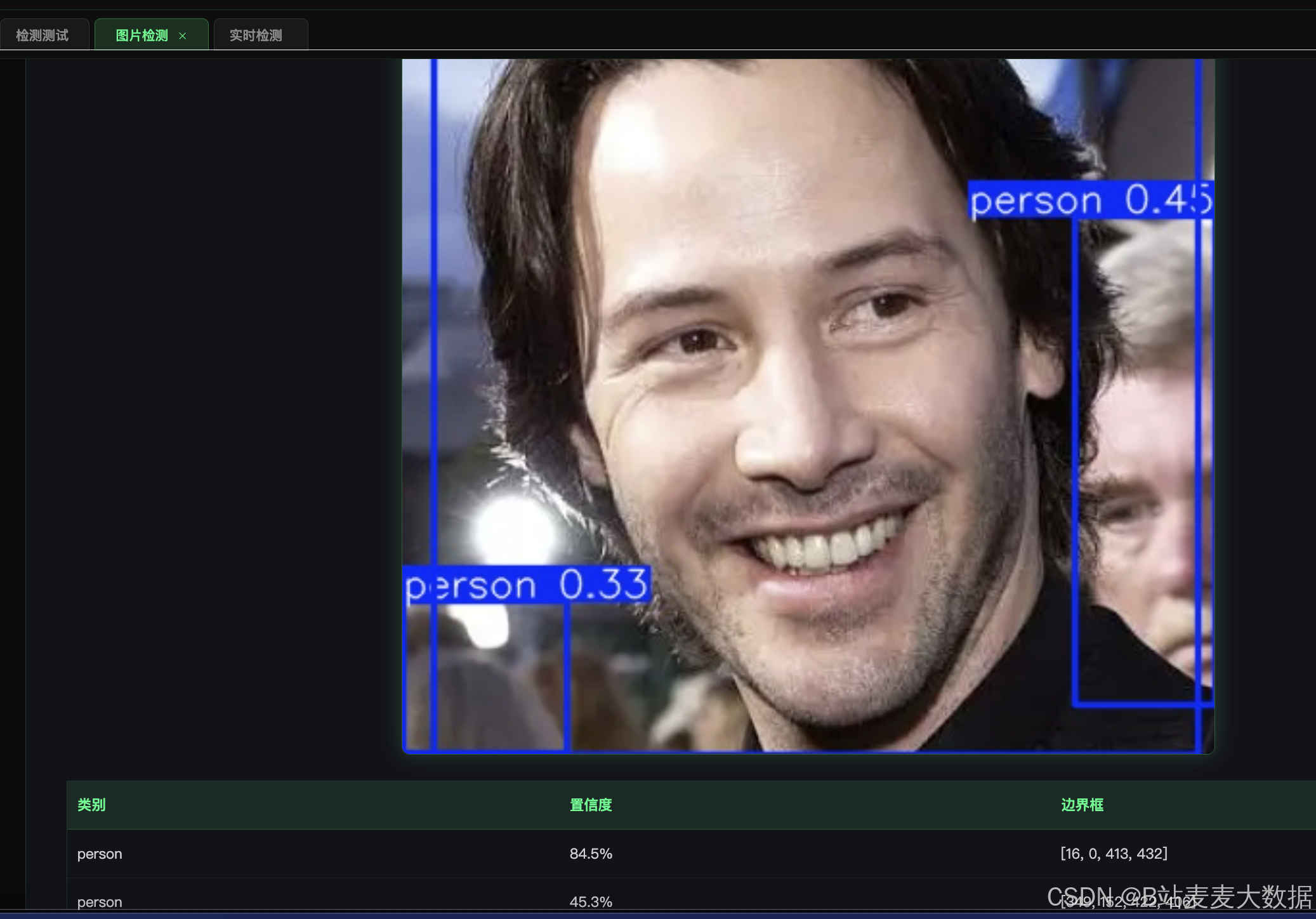
3.2.1 图片检测
接口路径: POST /api/yolo/detect_image
功能说明:
- 接收前端上传的图片文件
- 使用YOLOv8模型进行目标检测
- 在图片上绘制边界框和类别标签
- 返回检测结果和带框图片
后端实现代码:
python
# app/routes/yolo_route.py
@yolo_bp.route('/detect_image', methods=['POST'])
def detect_image():
    # 1. 获取用户ID
    user_id = request.form.get('user_id')

    # 2. 文件校验
    if 'file' not in request.files:
        return make_response(code=1, message='No file part')

    file = request.files['file']
    ALLOWED_EXTENSIONS = {'png', 'jpg', 'jpeg', 'bmp'}

    # 3. 保存原始图片
    original_filename = f"{uuid.uuid4().hex}.{ext}"
    original_path = os.path.join(UPLOAD_FOLDER, original_filename)
    file.save(original_path)

    # 4. 创建Task记录
    new_task = Task(
        task_type='image',
        source_url=original_path,
        user_id=user_id,
        status='completed'
    )
    db.session.add(new_task)
    db.session.flush()

    # 5. 加载模型并检测
    model = get_yolo_model()
    img = cv2.imread(original_path)
    results = model(img)
    annotated_img = results[0].plot()

    # 6. 保存结果图
    result_filename = f"result_{new_task.id}.jpg"
    result_path = os.path.join(UPLOAD_FOLDER, result_filename)
    cv2.imwrite(result_path, annotated_img)

    # 7. 写入Detection表
    boxes = results[0].boxes
    detections = []
    for box in boxes:
        x1, y1, x2, y2 = map(int, box.xyxy[0].tolist())
        cls_id = int(box.cls.item())
        conf = float(box.conf.item())
        class_name = results[0].names[cls_id]

        detection = Detection(
            task_id=new_task.id,
            frame_index=0,
            object_class=class_name,
            confidence=conf,
            bbox_x1=x1, bbox_y1=y1, bbox_x2=x2, bbox_y2=y2
        )
        db.session.add(detection)
        detections.append({
            "object_class": class_name,
            "confidence": round(conf, 4),
            "bbox": [x1, y1, x2, y2]
        })

    new_task.result_url = result_filename
    db.session.commit()

    return make_response(code=0, data={
        "task_id": new_task.id,
        "image_url": f"/api/user/upload/{result_filename}",
        "detections": detections
    })
3.2.2 视频流检测(实时预览)
接口路径: GET /api/yolo/stream_detection/<task_id>
功能说明: 使用MJPEG流式传输,每3帧处理一次,实时返回检测结果
python
# app/routes/yolo_route.py
@yolo_bp.route('/stream_detection/<task_id>', methods=['GET'])
def stream_detection(task_id):
    filepath = os.path.join(UPLOAD_FOLDER, task_id)

    def generate_frames():
        cap = cv2.VideoCapture(filepath)
        model = get_yolo_model()
        frame_count = 0

        while cap.isOpened():
            ret, frame = cap.read()
            if not ret:
                break

            # 每3帧处理一次
            if frame_count % 3 == 0:
                results = model(frame, verbose=False)
                annotated_frame = results[0].plot()

                # 编码为JPEG
                _, buffer = cv2.imencode('.jpg', annotated_frame,
                                        [cv2.IMWRITE_JPEG_QUALITY, 70])
                img_bytes = buffer.tobytes()
                yield (b'--frame\r\n'
                       b'Content-Type: image/jpeg\r\n\r\n' + img_bytes + b'\r\n')

            frame_count += 1

        cap.release()

    return Response(
        generate_frames(),
        mimetype='multipart/x-mixed-replace; boundary=frame'
    )
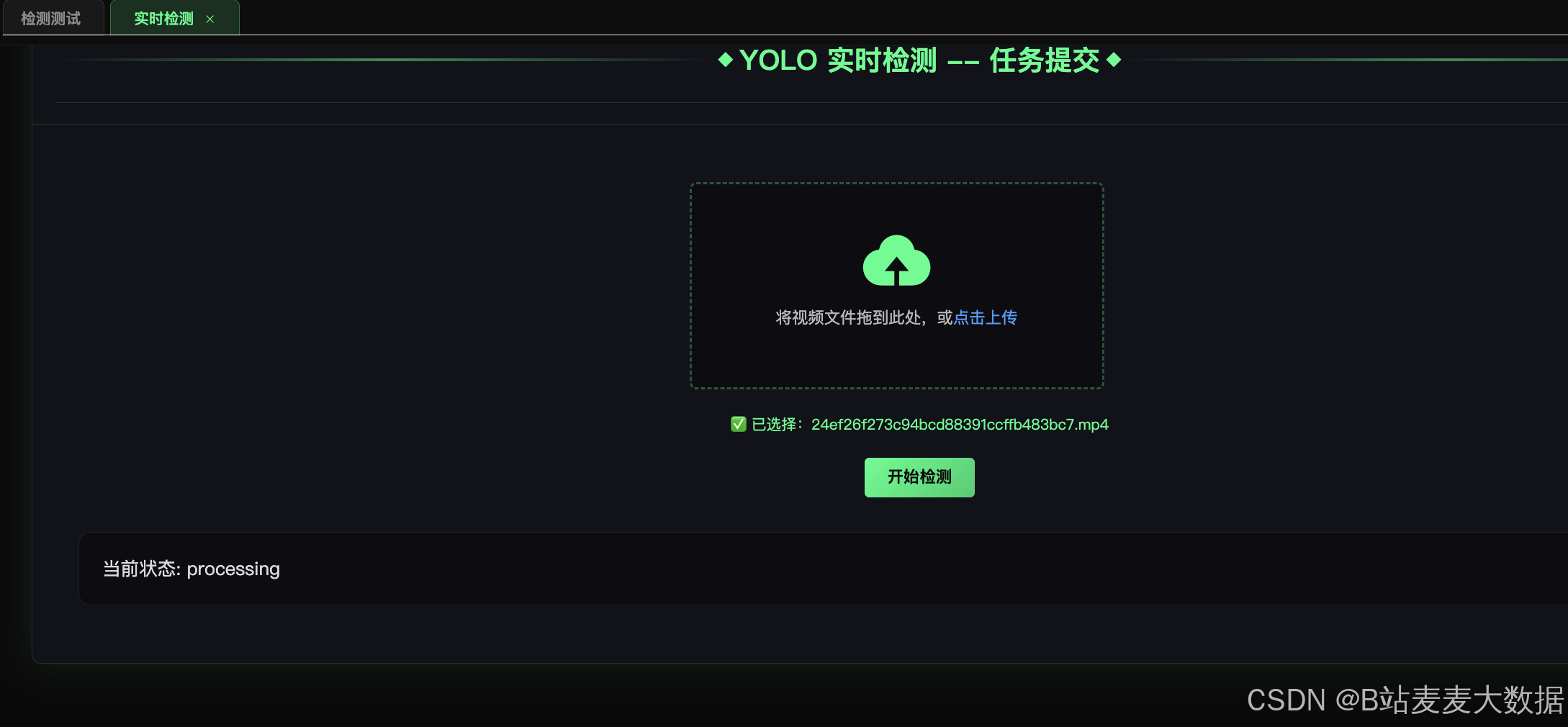
3.2.3 异步视频任务处理
使用RQ任务队列实现异步处理:
python
# app/worker.py
def process_task(task_id):
    """异步处理视频检测任务"""
    app = create_app()
    with app.app_context():
        task = Task.query.get(task_id)
        task.status = 'processing'
        task.started_at = db.func.now()
        db.session.commit()

        model = get_yolo_model()
        cap = cv2.VideoCapture(task.source_url)

        # 创建输出视频
        output_filename = f"output_{task_id}.mp4"
        output_path = os.path.join(app.config['UPLOAD_FOLDER'], output_filename)
        out = cv2.VideoWriter(output_path, fourcc, fps, (width, height))

        frame_idx = 0
        while cap.isOpened():
            ret, frame = cap.read()
            if not ret:
                break

            # 每10帧处理一次
            if frame_idx % 10 == 0:
                results = model(frame)
                annotated_frame = results[0].plot()

                # 保存检测结果到数据库
                boxes = results[0].boxes
                for box in boxes:
                    detection = Detection(
                        task_id=task_id,
                        frame_index=frame_idx,
                        object_class=class_name,
                        confidence=conf,
                        bbox_x1=x1, bbox_y1=y1, bbox_x2=x2, bbox_y2=y2
                    )
                    db.session.add(detection)
                db.session.commit()
            else:
                annotated_frame = frame

            out.write(annotated_frame)
            frame_idx += 1

        cap.release()
        out.release()

        task.status = 'completed'
        task.result_url = output_filename
        task.finished_at = db.func.now()
        db.session.commit()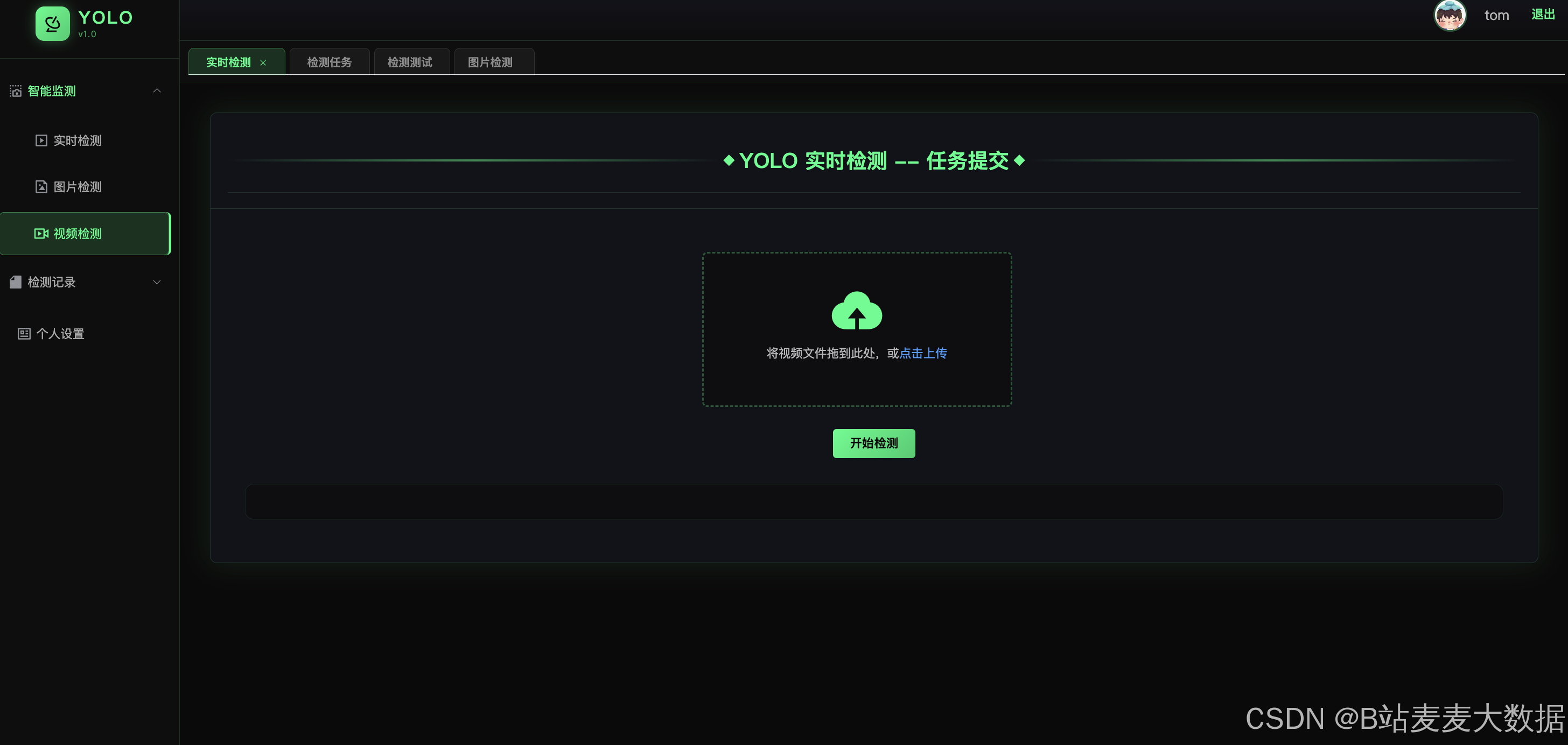
3.2.4 前端实时检测页面
vue
<!-- yolo-vue/src/views/YoloDemo.vue -->
<template>
  <div class="yolo-demo-container">
    <el-card class="yolo-card">
      <div slot="header" class="header-section">
        <span class="header-title">YOLO 实时检测</span>
      </div>

      <div class="demo-content">
        <!-- 上传区域 -->
        <div class="upload-section">
          <el-upload
              ref="uploadRef"
              :auto-upload="false"
              :show-file-list="false"
              :on-change="handleFileChange"
              accept="video/mp4,video/avi,video/mov,video/mkv"
              drag
          >
            <i class="el-icon-upload"></i>
            <div class="el-upload__text">将视频拖到此处或点击上传</div>
          </el-upload>

          <div class="action-buttons">
            <el-button type="primary" @click="startDetection"
                       :disabled="!selectedFile || isStreaming">
              开始检测
            </el-button>
            <el-button @click="togglePause" :disabled="!isStreaming">
              {{ isPaused ? '继续' : '暂停' }}
            </el-button>
            <el-button @click="stopStream" :disabled="!isStreaming">
              停止
            </el-button>
          </div>
        </div>

        <!-- 结果显示区域 -->
        <div class="result-section">
          <div v-if="!streamUrl && !pausedFrame" class="video-placeholder">
            <i class="el-icon-video-camera"></i>
            <p>检测结果将在此显示</p>
          </div>
          <div v-else-if="isPaused && pausedFrame" class="paused-container">
            <img :src="pausedFrame" class="detection-stream"/>
            <div class="paused-overlay">已暂停</div>
          </div>
          <img v-else ref="streamImage" :src="streamUrl"
               class="detection-stream" @load="captureFrame"/>
        </div>
      </div>
    </el-card>
  </div>
</template>

<script>
import { upload_video, getStreamUrl } from '@/api/yolo'

export default {
  data() {
    return {
      selectedFile: null,
      streamUrl: '',
      isStreaming: false,
      isPaused: false,
      pausedFrame: null
    }
  },
  methods: {
    async startDetection() {
      const formData = new FormData()
      formData.append('file', this.selectedFile)

      const res = await upload_video(formData)
      if (res.data.code === 0) {
        this.currentTaskId = res.data.data.task_id
        this.streamUrl = getStreamUrl(this.currentTaskId)
        this.isStreaming = true
      }
    },
    togglePause() {
      this.isPaused = !this.isPaused
      if (this.isPaused) {
        const imgEl = this.$refs.streamImage
        if (imgEl && imgEl.src) this.pausedFrame = imgEl.src
        this.streamUrl = ''
      } else {
        this.pausedFrame = null
        this.streamUrl = getStreamUrl(this.currentTaskId) + '&t=' + Date.now()
      }
    },
    stopStream() {
      this.streamUrl = ''
      this.isStreaming = false
      this.isPaused = false
      this.pausedFrame = null
    }
  }
}
</script>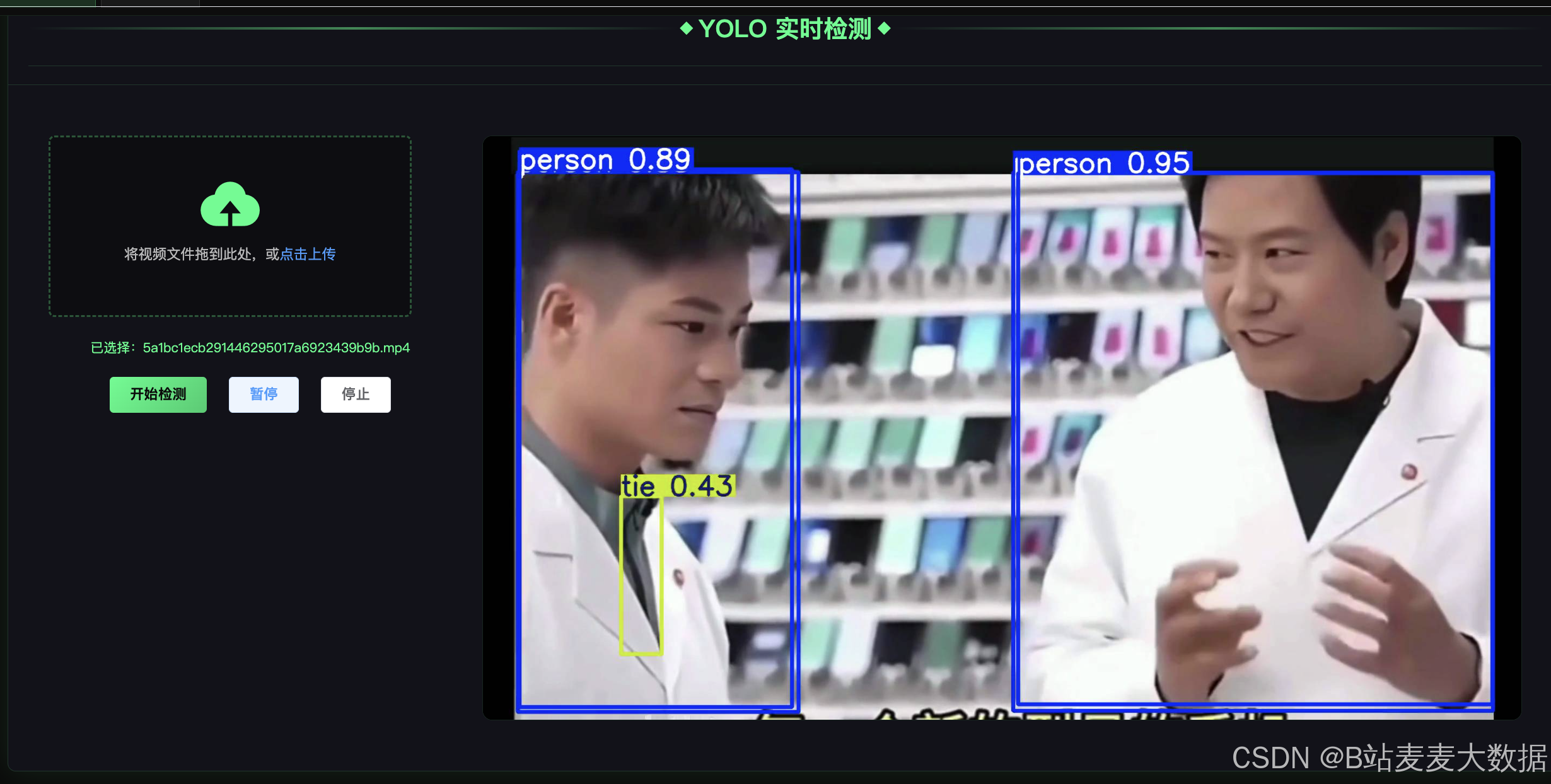
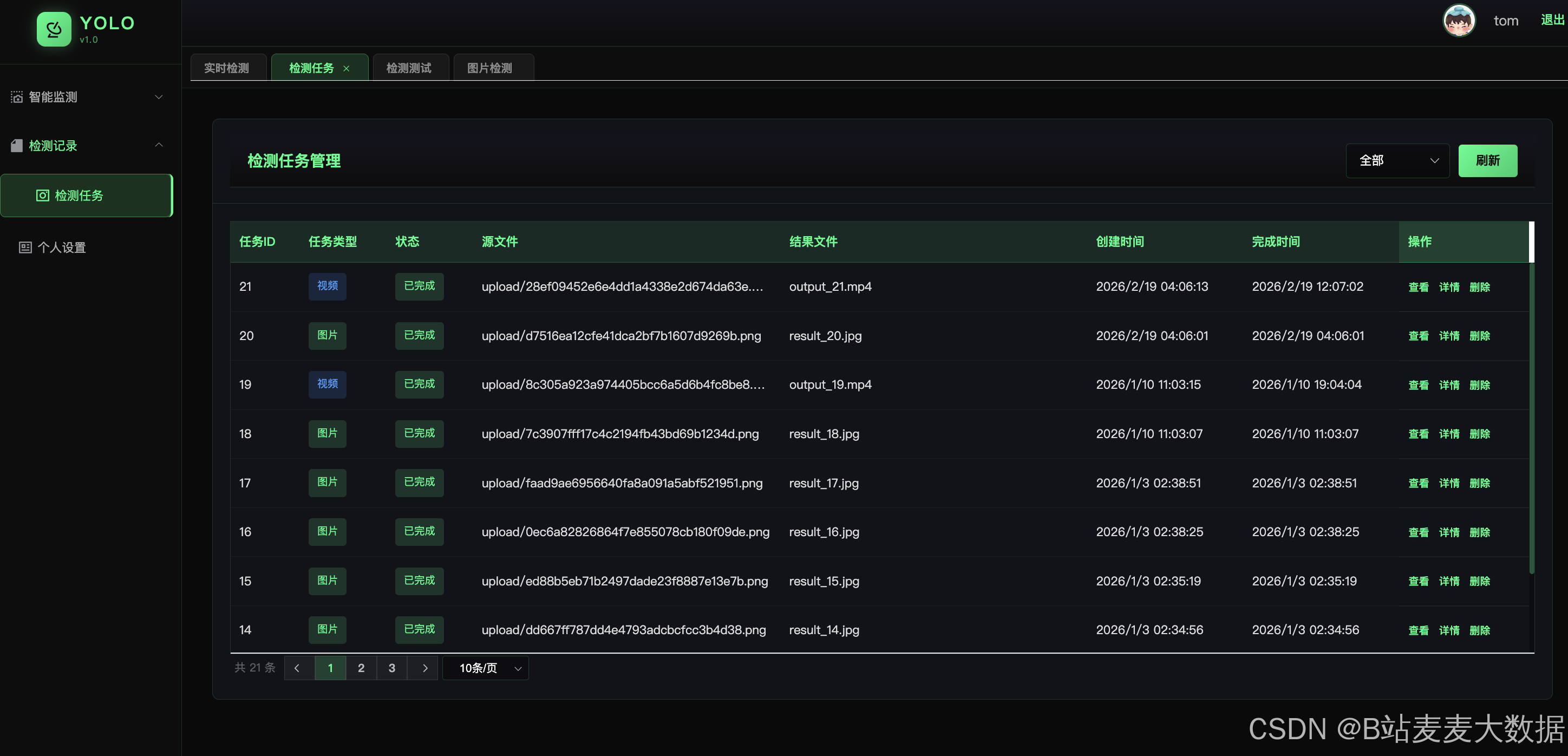
3.3 任务管理模块
3.3.1 任务提交
python
# app/routes/yolo_route.py
@yolo_bp.route('/submit_task', methods=['POST'])
def submit_task():
    task_type = request.form.get('task_type')
    user_id = request.form.get('user_id')
    file = request.files.get('file')

    # 保存文件
    filename = f"{uuid.uuid4().hex}.mp4"
    filepath = os.path.join(UPLOAD_FOLDER, filename)
    file.save(filepath)

    # 创建任务
    new_task = Task(
        task_type=task_type,
        source_url=filepath,
        user_id=user_id,
        status='pending'
    )
    db.session.add(new_task)
    db.session.commit()

    # 入队异步处理
    q.enqueue('app.worker.process_task', new_task.id, job_timeout='10m')

    return make_response(code=0, data={'task_id': new_task.id})
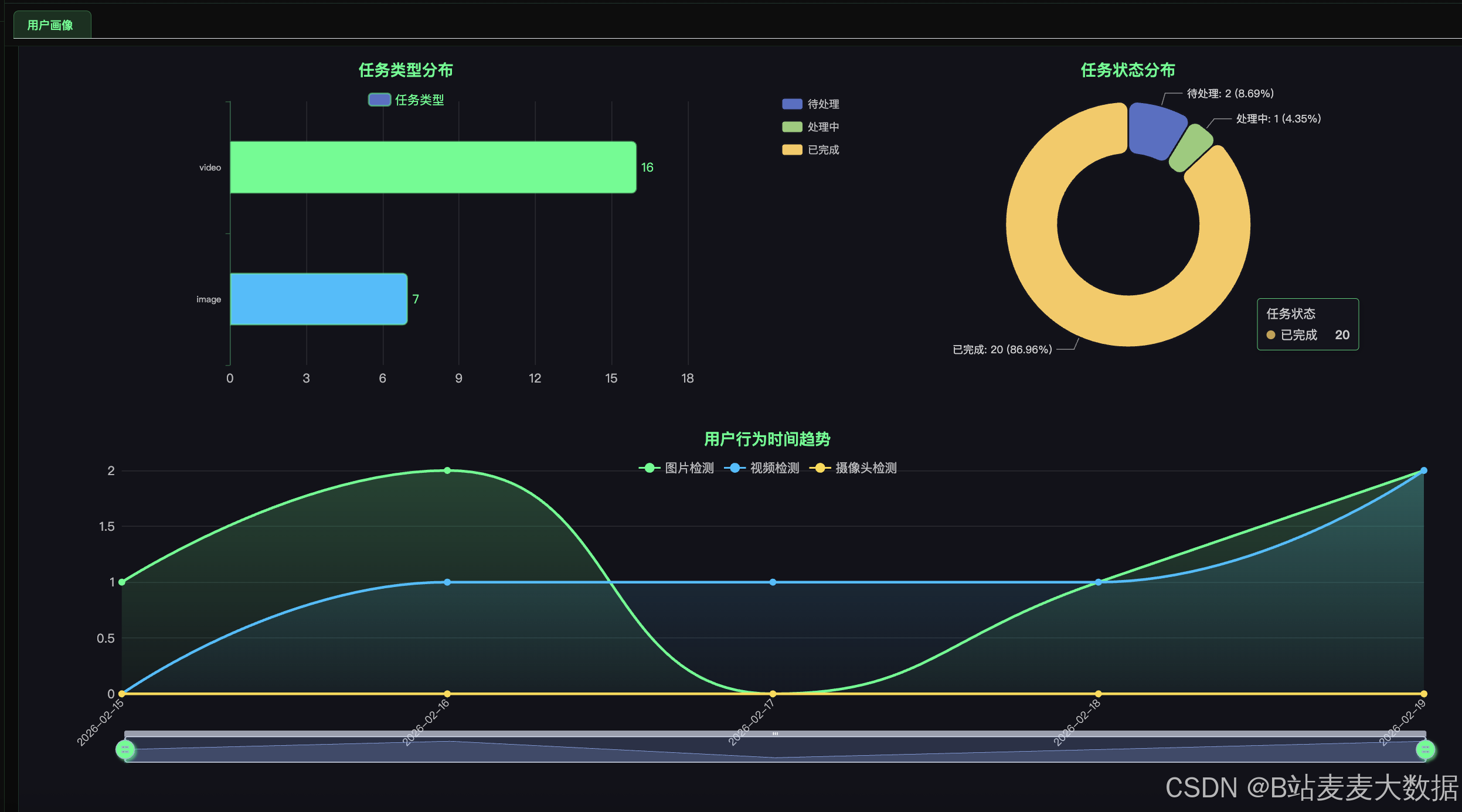
3.5 数据统计模块
3.5.1 任务类型统计(柱状图)
python
# app/routes/chart_route.py
@chart_bp.route('/getC1', methods=['GET'])
def getC1():
    user_id = request.args.get('user_id', type=int)

    query = db.session.query(
        Task.task_type,
        func.count(Task.id).label('count')
    )

    if user_id is not None:
        query = query.filter(Task.user_id == user_id)

    result = query.group_by(Task.task_type).all()
    data = [{'name': item[0], 'value': item[1]} for item in result]

    return make_response(code=0, data=data)
3.5.2 任务状态统计(饼图)
python
@chart_bp.route('/getC2', methods=['GET'])
def getC2():
    user_id = request.args.get('user_id', type=int)

    query = db.session.query(
        Task.status,
        func.count(Task.id).label('count')
    )

    if user_id is not None:
        query = query.filter(Task.user_id == user_id)

    result = query.group_by(Task.status).all()
    total = sum(item[1] for item in result)

    data = []
    for status, count in result:
        pct = round((count / total) * 100, 2) if total > 0 else 0
        data.append({
            'name': status,
            'value': count,
            'percentage': pct
        })

    return make_response(code=0, data=data)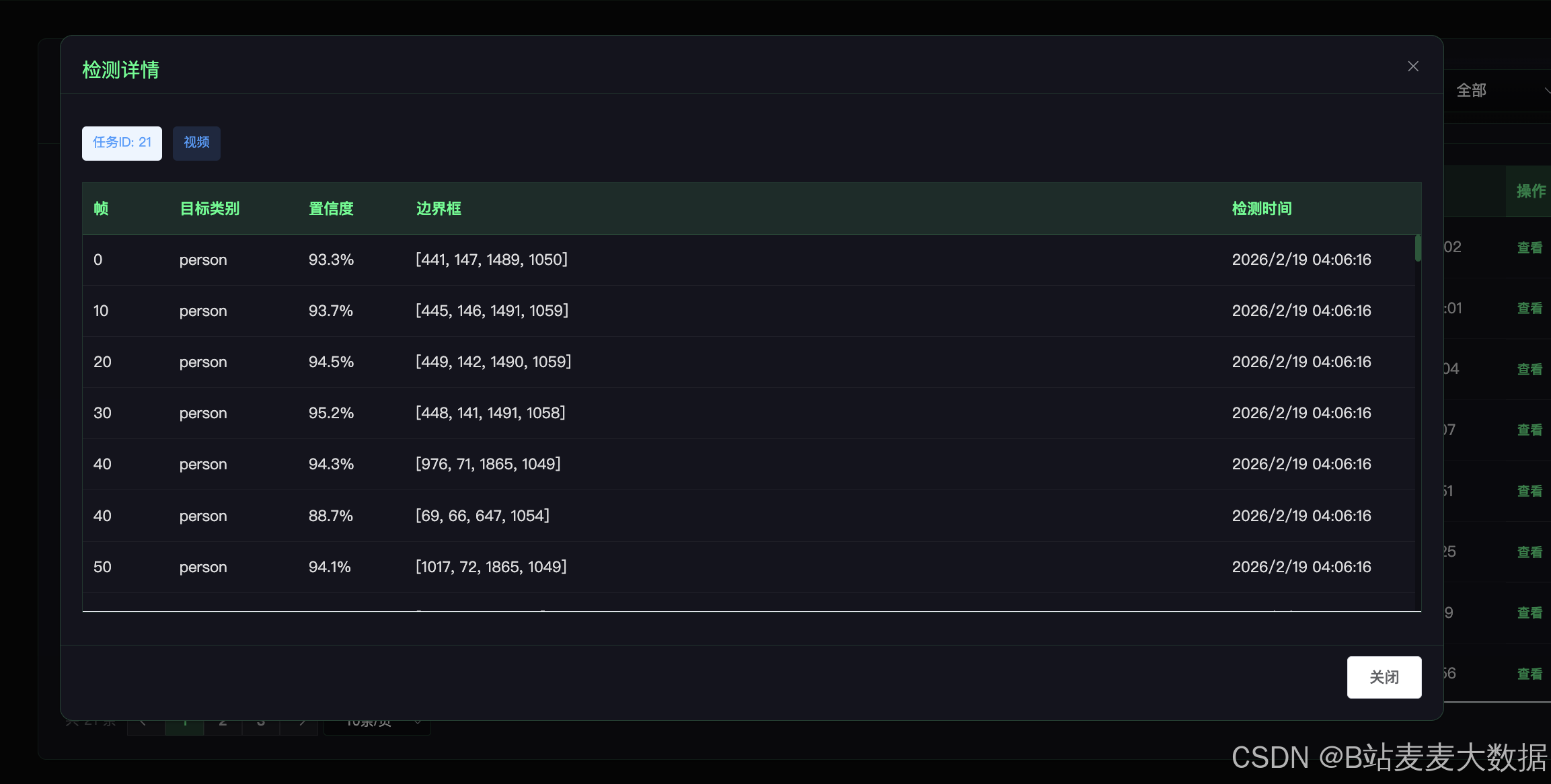
3.6 系统监控模块
3.6.1 后台系统负载记录
python
# app/__init__.py
def record_system_load(app):
    with app.app_context():
        while True:
            from app.models import SystemLoad
            from app.tasks import q

            load = SystemLoad(
                cpu_percent=psutil.cpu_percent(),
                memory_percent=psutil.virtual_memory().percent,
                queue_length=len(q)
            )
            db.session.add(load)
            db.session.commit()

            time.sleep(360)  # 每6分钟记录一次

# 启动后台线程
Thread(target=record_system_load, args=(app, ), daemon=True).start()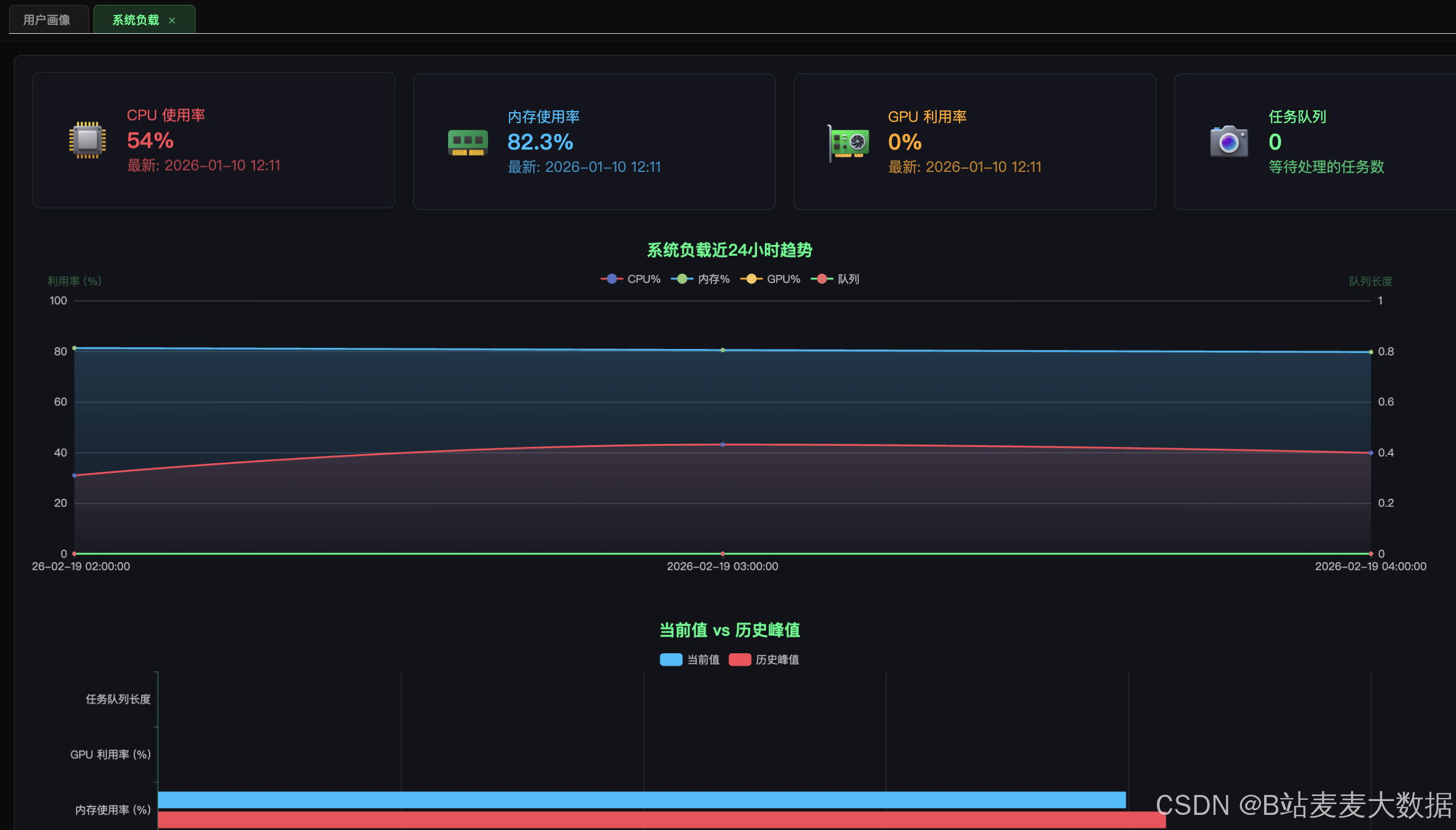
四、关键技术亮点
4.1 异步任务处理
使用Redis Queue (RQ)实现任务队列,将耗时的视频检测任务异步处理,提升用户体验。
4.2 流式响应
使用SSE (Server-Sent Events)实现大模型流式输出,实时显示AI生成内容。
4.3 MJPEG视频流
使用multipart/x-mixed-replace实现实时视频流推送,无需WebSocket。
4.4 模型缓存
在Worker启动时全局加载YOLOv8模型,避免重复加载,提升处理效率。
4.5 暗色主题UI
统一的暗色主题设计,配合霓虹绿配色,符合科技感视觉风格。
五、部署说明
5.1 环境要求
- Python 3.8+
- Node.js 16+
- MySQL 8.0+
- Redis 6.0+
5.2 后端部署
bash
# 1. 进入后端目录
cd yolo-flask

# 2. 安装依赖
pip install -r requirements.txt

# 3. 配置环境变量
cp .env.example .env
# 编辑 .env 填入数据库、Redis等配置

# 4. 启动Redis
redis-server

# 5. 启动RQ Worker
rq worker

# 6. 启动Flask服务
python run.py
5.3 前端部署
bash
# 1. 进入前端目录
cd yolo-vue

# 2. 安装依赖
npm install

# 3. 启动开发服务器
npm run serve

# 或构建生产版本
npm run build
5.4 端口说明
| 服务 | 端口 |
|---|---|
| Flask API | 8080 |
| Vue.js | 8081 |
| MySQL | 3306 |
| Redis | 6379 |
六、总结
本文详细介绍了基于YOLOv8的实时目标检测与追踪系统的完整实现,涵盖了用户管理、YOLO目标检测、任务队列管理、大模型对话、数据统计和系统监控等核心功能。系统采用前后端分离架构,结合Redis队列实现异步任务处理,通过MJPEG流和SSE实现实时视频流和流式响应,为用户提供了一个功能完善、性能优异的AI检测平台。
源码获取 :联系麦麦大数据获取
欢迎关注B站:麦麦大数据