前言
欢迎加入开源鸿蒙跨平台社区:https://openharmonycrossplatform.csdn.net
"没有测试的代码就是遗留代码"------Michael Feathers的这句话在Flutter Plugin开发中尤其适用。Plugin涉及Dart层和原生层两部分代码,加上跨进程的MethodChannel通信,任何一个环节出问题都可能导致功能异常。
flutter_speech的测试策略需要覆盖三个层面:Dart层的单元测试、MethodChannel的Mock测试、以及真机上的集成测试。今天我们逐一讲解。
一、Flutter Plugin 测试策略概述
1.1 测试金字塔
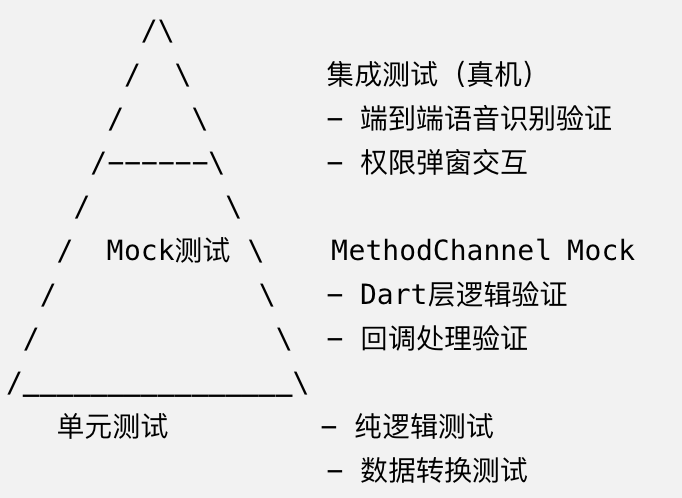
| 测试类型 | 覆盖范围 | 运行环境 | 速度 | 可靠性 |
|---|---|---|---|---|
| 单元测试 | Dart纯逻辑 | 本地 | 快 | 高 |
| Mock测试 | Dart+Channel | 本地 | 快 | 高 |
| 集成测试 | 全链路 | 真机 | 慢 | 中 |
1.2 flutter_speech的测试重点
| 测试项 | 优先级 | 测试方式 |
|---|---|---|
| MethodChannel方法名一致性 | ⭐⭐⭐⭐⭐ | Mock测试 |
| 回调分发正确性 | ⭐⭐⭐⭐⭐ | Mock测试 |
| 参数传递正确性 | ⭐⭐⭐⭐ | Mock测试 |
| 状态管理正确性 | ⭐⭐⭐⭐ | 单元测试 |
| 真机识别功能 | ⭐⭐⭐⭐ | 集成测试 |
| 权限处理 | ⭐⭐⭐ | 集成测试 |
| 错误恢复 | ⭐⭐⭐ | Mock测试 |
二、MethodChannel Mock 测试实现
2.1 测试原理
Flutter提供了TestDefaultBinaryMessengerBinding来Mock MethodChannel的通信。我们可以拦截Dart层发出的方法调用,返回预设的结果,模拟原生端的行为。
2.2 基础Mock设置
dart
// test/flutter_speech_test.dart
import 'package:flutter/services.dart';
import 'package:flutter_test/flutter_test.dart';
import 'package:flutter_speech/flutter_speech.dart';

void main() {
  TestWidgetsFlutterBinding.ensureInitialized();

  const MethodChannel channel = MethodChannel('com.flutter.speech_recognition');
  late SpeechRecognition speech;
  List<MethodCall> log = [];

  setUp(() {
    log.clear();
    speech = SpeechRecognition();

    // Mock原生端的响应
    TestDefaultBinaryMessengerBinding.instance.defaultBinaryMessenger
        .setMockMethodCallHandler(channel, (MethodCall methodCall) async {
      log.add(methodCall);
      switch (methodCall.method) {
        case 'speech.activate':
          return true;
        case 'speech.listen':
          return true;
        case 'speech.cancel':
          return true;
        case 'speech.stop':
          return true;
        default:
          return null;
      }
    });
  });

  tearDown(() {
    TestDefaultBinaryMessengerBinding.instance.defaultBinaryMessenger
        .setMockMethodCallHandler(channel, null);
  });
}
2.3 测试activate方法
dart
test('activate sends correct method and locale', () async {
  final result = await speech.activate('zh_CN');

  expect(result, true);
  expect(log.length, 1);
  expect(log[0].method, 'speech.activate');
  expect(log[0].arguments, 'zh_CN');
});

test('activate with different locales', () async {
  await speech.activate('en_US');
  expect(log[0].arguments, 'en_US');

  await speech.activate('fr_FR');
  expect(log[1].arguments, 'fr_FR');
});
2.4 测试listen/cancel/stop
dart
test('listen sends correct method', () async {
  final result = await speech.listen();

  expect(result, true);
  expect(log.length, 1);
  expect(log[0].method, 'speech.listen');
  expect(log[0].arguments, isNull);
});

test('cancel sends correct method', () async {
  await speech.cancel();

  expect(log.length, 1);
  expect(log[0].method, 'speech.cancel');
});

test('stop sends correct method', () async {
  await speech.stop();

  expect(log.length, 1);
  expect(log[0].method, 'speech.stop');
});
2.5 测试回调分发
dart
test('onSpeechAvailability callback', () async {
  bool? availability;
  speech.setAvailabilityHandler((bool result) {
    availability = result;
  });

  // 模拟原生端发送事件
  await TestDefaultBinaryMessengerBinding.instance.defaultBinaryMessenger
      .handlePlatformMessage(
    'com.flutter.speech_recognition',
    const StandardMethodCodec().encodeMethodCall(
      const MethodCall('speech.onSpeechAvailability', true),
    ),
    (ByteData? data) {},
  );

  expect(availability, true);
});

test('onSpeech callback with text', () async {
  String? recognizedText;
  speech.setRecognitionResultHandler((String text) {
    recognizedText = text;
  });

  await TestDefaultBinaryMessengerBinding.instance.defaultBinaryMessenger
      .handlePlatformMessage(
    'com.flutter.speech_recognition',
    const StandardMethodCodec().encodeMethodCall(
      const MethodCall('speech.onSpeech', '你好世界'),
    ),
    (ByteData? data) {},
  );

  expect(recognizedText, '你好世界');
});

test('onRecognitionComplete callback', () async {
  String? completedText;
  speech.setRecognitionCompleteHandler((String text) {
    completedText = text;
  });

  await TestDefaultBinaryMessengerBinding.instance.defaultBinaryMessenger
      .handlePlatformMessage(
    'com.flutter.speech_recognition',
    const StandardMethodCodec().encodeMethodCall(
      const MethodCall('speech.onRecognitionComplete', '识别完成'),
    ),
    (ByteData? data) {},
  );

  expect(completedText, '识别完成');
});

test('onError callback', () async {
  bool errorCalled = false;
  speech.setErrorHandler(() {
    errorCalled = true;
  });

  await TestDefaultBinaryMessengerBinding.instance.defaultBinaryMessenger
      .handlePlatformMessage(
    'com.flutter.speech_recognition',
    const StandardMethodCodec().encodeMethodCall(
      const MethodCall('speech.onError', 1),
    ),
    (ByteData? data) {},
  );

  expect(errorCalled, true);
});
2.6 测试完整流程
dart
test('full recognition flow', () async {
  String transcription = '';
  bool isComplete = false;

  speech.setRecognitionResultHandler((String text) {
    transcription = text;
  });
  speech.setRecognitionCompleteHandler((String text) {
    transcription = text;
    isComplete = true;
  });

  // 1. activate
  await speech.activate('zh_CN');
  expect(log[0].method, 'speech.activate');

  // 2. listen
  await speech.listen();
  expect(log[1].method, 'speech.listen');

  // 3. 模拟部分结果
  await _simulateNativeEvent('speech.onSpeech', '你好');
  expect(transcription, '你好');
  expect(isComplete, false);

  // 4. 模拟最终结果
  await _simulateNativeEvent('speech.onRecognitionComplete', '你好世界');
  expect(transcription, '你好世界');
  expect(isComplete, true);
});
三、平台端单元测试编写
3.1 ArkTS测试框架
OpenHarmony使用@ohos.test框架进行单元测试:
typescript
// test/FlutterSpeechPluginTest.ets
import { describe, it, expect } from '@ohos/hypium';

describe('FlutterSpeechPlugin', () => {

  it('convertLocale should replace underscore with hyphen', () => {
    const plugin = new FlutterSpeechPlugin();
    // 注意:convertLocale是private方法,需要通过反射或改为internal测试
    expect(plugin['convertLocale']('zh_CN')).assertEqual('zh-CN');
    expect(plugin['convertLocale']('en_US')).assertEqual('en-US');
    expect(plugin['convertLocale']('fr_FR')).assertEqual('fr-FR');
  });

  it('isSupportedLocale should accept Chinese locales', () => {
    const plugin = new FlutterSpeechPlugin();
    expect(plugin['isSupportedLocale']('zh-CN')).assertTrue();
    expect(plugin['isSupportedLocale']('zh-TW')).assertTrue();
    expect(plugin['isSupportedLocale']('zh')).assertTrue();
  });

  it('isSupportedLocale should reject non-Chinese locales', () => {
    const plugin = new FlutterSpeechPlugin();
    expect(plugin['isSupportedLocale']('en-US')).assertFalse();
    expect(plugin['isSupportedLocale']('fr-FR')).assertFalse();
    expect(plugin['isSupportedLocale']('ja-JP')).assertFalse();
  });

  it('getUniqueClassName should return correct name', () => {
    const plugin = new FlutterSpeechPlugin();
    expect(plugin.getUniqueClassName()).assertEqual('FlutterSpeechPlugin');
  });
});
3.2 测试private方法的策略
flutter_speech的核心方法(activate、startListening等)都是private的,不能直接在测试中调用。有几种解决方案:
| 方案 | 优点 | 缺点 |
|---|---|---|
| 通过MethodCall间接测试 | 最接近真实场景 | 需要Mock FlutterPluginBinding |
| 改为internal可见性 | 直接测试 | 改变了API设计 |
| 提取纯逻辑为工具函数 | 可独立测试 | 需要重构 |
| 通过反射访问 | 不改代码 | 脆弱,不推荐 |
推荐方案是提取纯逻辑为工具函数:
typescript
// 提取为独立的工具函数(可测试)
export function convertLocale(locale: string): string {
  return locale.replace('_', '-');
}

export function isSupportedLocale(locale: string): boolean {
  return locale.startsWith('zh');
}

// 插件中使用
import { convertLocale, isSupportedLocale } from './utils';
四、集成测试:真机语音识别验证
4.1 集成测试的特殊性
语音识别的集成测试比较特殊------需要真实的语音输入。这意味着:
- 必须在真机上运行
- 需要真实的麦克风输入
- 测试结果受环境噪音影响
- 难以完全自动化
4.2 Flutter集成测试框架
dart
// integration_test/speech_test.dart
import 'package:flutter_test/flutter_test.dart';
import 'package:integration_test/integration_test.dart';
import 'package:flutter_speech_example/main.dart' as app;

void main() {
  IntegrationTestWidgetsFlutterBinding.ensureInitialized();

  testWidgets('app launches and shows UI', (tester) async {
    app.main();
    await tester.pumpAndSettle();

    // 验证UI元素存在
    expect(find.text('SpeechRecognition'), findsOneWidget);
    expect(find.text('Listen (zh_CN)'), findsOneWidget);
    expect(find.text('Cancel'), findsOneWidget);
    expect(find.text('Stop'), findsOneWidget);
  });

  testWidgets('activate enables listen button', (tester) async {
    app.main();
    await tester.pumpAndSettle();

    // 等待activate完成(需要权限已授予)
    await tester.pump(Duration(seconds: 5));

    // Listen按钮应该可点击
    final listenButton = find.text('Listen (zh_CN)');
    expect(listenButton, findsOneWidget);
    // 验证按钮不是disabled状态
  });
}
4.3 半自动化测试方案
对于语音识别这种需要真实输入的功能,推荐半自动化测试:
dart
testWidgets('manual speech recognition test', (tester) async {
  app.main();
  await tester.pumpAndSettle();

  // 自动化部分:点击Listen按钮
  await tester.tap(find.text('Listen (zh_CN)'));
  await tester.pumpAndSettle();

  // 手动部分:测试人员对着麦克风说话
  print('>>> 请对着麦克风说"你好世界",等待5秒...');
  await tester.pump(Duration(seconds: 8));

  // 自动化部分:验证结果
  // 注意:由于语音识别结果不确定,这里只验证有结果
  final textWidgets = find.byType(Text);
  // 检查是否有非空的识别结果
});
4.4 测试Checklist
- App能正常启动
- 权限弹窗能正常显示
- 授权后Listen按钮变为可点击
- 点击Listen后显示"Listening..."
- 说话时文本区域实时更新
- 停止说话后显示最终结果
- Cancel按钮能正常取消
- Stop按钮能正常停止
- 语言选择菜单能正常弹出
- 选择非中文语言时显示提示(OpenHarmony)
- 错误后能自动恢复
五、CI/CD 中的自动化测试配置
5.1 Dart层测试(可完全自动化)
yaml
# .github/workflows/test.yml
name: Flutter Tests
on: [push, pull_request]

jobs:
  test:
    runs-on: ubuntu-latest
    steps:
      - uses: actions/checkout@v3
      - uses: subosito/flutter-action@v2
        with:
          flutter-version: '3.35.7'
      - run: flutter pub get
      - run: flutter test
5.2 测试目录结构
flutter_speech_recognition/
├── test/
│   ├── flutter_speech_test.dart      # Dart层Mock测试
│   └── speech_recognition_test.dart  # 单元测试
├── integration_test/
│   └── speech_test.dart              # 集成测试(真机)
└── ohos/
    └── test/
        └── FlutterSpeechPluginTest.ets  # ArkTS单元测试
5.3 运行测试
bash
# 运行Dart层测试
flutter test

# 运行特定测试文件
flutter test test/flutter_speech_test.dart

# 运行集成测试(需要连接设备)
flutter test integration_test/speech_test.dart
5.4 测试覆盖率
bash
# 生成覆盖率报告
flutter test --coverage

# 查看覆盖率
genhtml coverage/lcov.info -o coverage/html
open coverage/html/index.html
六、测试最佳实践
6.1 测试命名规范
dart
// 格式:被测方法_场景_期望结果
test('activate_withChineseLocale_returnsTrue', () async { ... });
test('activate_withUnsupportedLocale_throwsError', () async { ... });
test('listen_whenEngineNotInitialized_throwsError', () async { ... });
test('onSpeech_withText_callsResultHandler', () async { ... });
6.2 测试隔离
每个测试应该是独立的,不依赖其他测试的执行顺序:
dart
setUp(() {
  // 每个测试前重置状态
  log.clear();
  speech = SpeechRecognition();
  // 重新设置Mock
});
6.3 边界场景测试
dart
test('activate with empty locale', () async { ... });
test('listen when already listening', () async { ... });
test('stop when not listening', () async { ... });
test('cancel when not listening', () async { ... });
test('multiple rapid activate calls', () async { ... });
总结
本文讲解了flutter_speech的测试策略:
- Mock测试 :通过
setMockMethodCallHandler模拟原生端,测试Dart层逻辑 - 回调测试 :通过
handlePlatformMessage模拟原生端事件,验证回调分发 - 平台端测试:提取纯逻辑为工具函数,用ArkTS测试框架测试
- 集成测试:真机半自动化测试,验证端到端功能
- CI/CD:Dart层测试可完全自动化,集成测试需要真机
下一篇我们讲pubspec.yaml多平台配置------插件的多平台声明和版本管理。
如果这篇文章对你有帮助,欢迎点赞、收藏、关注,你的支持是我持续创作的动力!
相关资源: