根据上一篇文章中对OLE文件的\x01Ole10Native流的结构分析,采用struct库分析流数据。struct库是标准库中处理二进制数据与 Python 基本数据类型转换的核心工具,它模拟了 C 语言结构体的概念,可以将数字、字符串等打包成字节串,也可以从字节串中还原出数据,常用于网络编程、文件格式解析、硬件通信等场景。
下面的示例代码及运行结果用于从\x01Ole10Native流中提取文件名称、原始数据等信息。
python
import olefile
import struct
import os

filename='oleObject1.bin'

def extract_olenative_from_ole(ole_filepath, output_file=None,encoding_type='utf-8'):
    # 从 OLE 文件中提取 1Ole10Native 流中的嵌入文件
    try:
        with olefile.OleFileIO(ole_filepath) as ole:
            # 检查是否存在 1Ole10Native 流
            if not ole.exists('\x01Ole10Native'):
                print("未找到 1Ole10Native 流")
                return None

            # 读取 1Ole10Native 流数据
            stream_data = ole.openstream('\x01Ole10Native').read()

            if len(stream_data) < 4:
                print("流数据过短")
                return None

            # 解析 OLE10Native 结构
            # 前4字节:嵌入文件大小
            stream_size = struct.unpack('<I', stream_data[:4])[0]
            print(f"stream_size:{stream_size}")

            # 跳过前六个字节
            offset = 6

            # 读取文件名(以null结尾的字符串)
            filename_end = stream_data.find(b'\x00', offset)
            if filename_end == -1:
                print("文件名格式错误")
                return None

            filename = stream_data[offset:filename_end].decode(encoding_type, errors='ignore')
            print(f"filename:{filename}")
            offset = filename_end + 1

            # 读取文件路径(可选,同样以null结尾)
            path_end = stream_data.find(b'\x00', offset)
            if path_end != -1:
                filepath = stream_data[offset:path_end].decode(encoding_type, errors='ignore')
                print(f"filepath:{filepath}")
                offset = path_end + 1

            # 读取文件路径1(可选,同样以null结尾)
            offset = offset + 4
            data_size = struct.unpack('<I', stream_data[offset:(offset+4)])[0]
            print(f"data_size:{data_size}")
            offset = offset + 4
            filepath1 = stream_data[offset:(offset+data_size)].decode(encoding_type, errors='ignore')
            print(f"filepath1:{filepath1}")
            offset = offset+data_size

            # 提取嵌入文件的原始数据
            data_size = struct.unpack('<I', stream_data[offset:(offset+4)])[0]
            print(f"data_size:{data_size}")
            offset = offset + 4
            embedded_data = stream_data[offset:(offset+data_size)]

            # 保存到文件
            if output_file:
                with open(output_file, 'wb') as f:
                    f.write(embedded_data)
                print(f"文件已保存到: {output_file}")

            return {
                'filename': filename,
                'data': embedded_data
            }

    except Exception as e:
        print(f"处理 OLE 文件时出错: {e}")
        return None

# 使用示例
result = extract_olenative_from_ole(
    ole_filepath=filename,
    output_file='111.xml',
    encoding_type='uft-8'
)

# 如果需要进一步处理提取的数据
if result:
    print(f"提取的文件类型: {result['filename'].split('.')[-1] if '.' in result['filename'] else '未知'}")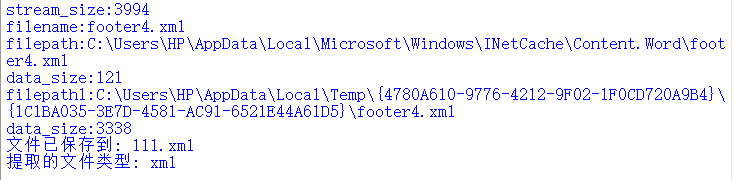
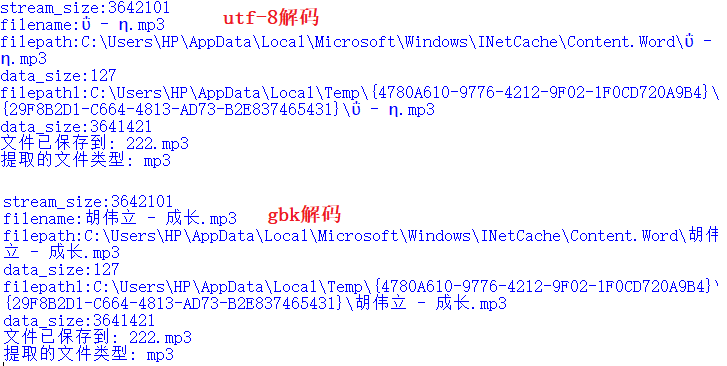
经过多次验证,如果ole文件中的原始文件名称是中文,采用gbk编码可以正常解码,运行效果如下所示:
参考文献:
1https://www.modb.pro/db/585135