Statement对象
1. 概述
在java.sql包中有三个接口分别定义了对数据库的调用的不同方式:
- Statement:用于执行静态sql语句并返回结果
- PreparedStatement:sql语句被预编译并存储在此对象中,可以使用此对象多次高效的执行该sql语句;
- CallableStatement:用于执行存储过程。
2. Statement和PreparedStatement 的区别
- PreparedStatement 是 Statement的子类;
- Statement 是sql拼串,有sql注入的问题;
- PreparedStatement ,使用sql预编译,随后再填充占位符,解决了sql注入的问题;
- PreparedStatement 可以操作Blob类型的数据;
- PreparedStatement 可以批量操作;
3. Statement的弊端(sql注入攻击)
接下来用一个例子演示,数据表如下
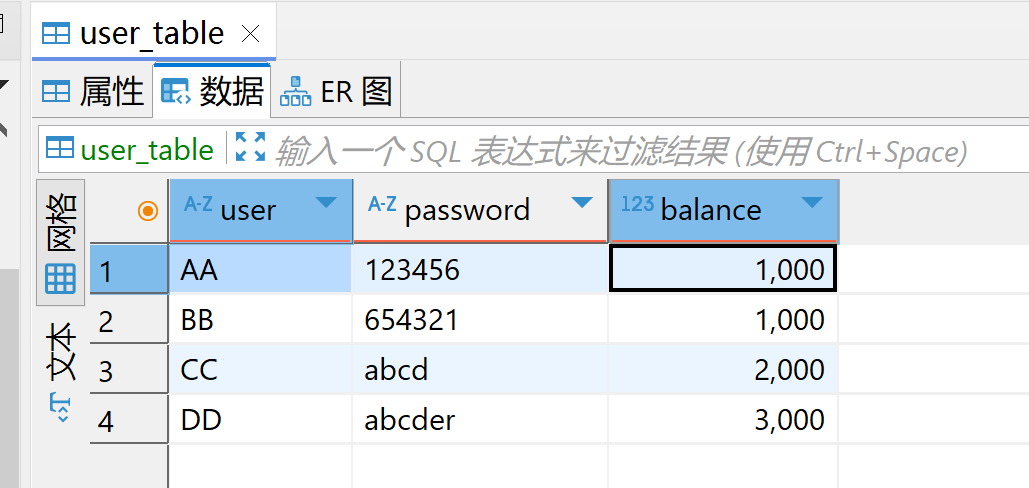
java
public class StatementTest {

    @Test
    public void test() throws Exception {
        Connection connection = JDBCUtils.getConnection();

        Statement statement = connection.createStatement();

        String username = "AA";
        String password = "123456";
        String sql = "SELECT user,password,balance FROM user_table WHERE USER = '" + username + "' AND PASSWORD = '" + password + "'";

        ResultSet resultSet = statement.executeQuery(sql);

        while (resultSet.next()) {

            String user = resultSet.getString(1);
            String pwd = resultSet.getString(2);

            User user1 = new User(user, pwd);
            System.out.println(user1);

        }

        JDBCUtils.close(connection,statement);
    }
}
可以成功查询到数据:
java
User{user='AA', password='123456', balance=1000}但是如果修改一下输入信息:
java
String username = "1' or ";
String password = " ='1' or '1' = '1";
java
public class StatementTest {

    @Test
    public void test() throws Exception {
        Connection connection = JDBCUtils.getConnection();

        Statement statement = connection.createStatement();

        String username = "1' or ";
        String password = " ='1' or '1' = '1";
        String sql = "SELECT user,password,balance FROM user_table WHERE USER = '" + username + "' AND PASSWORD = '" + password + "'";

        ResultSet resultSet = statement.executeQuery(sql);

        while (resultSet.next()) {

            String user = resultSet.getString(1);
            String pwd = resultSet.getString(2);
            int balance = resultSet.getInt(3);

            User user1 = new User(user, pwd, balance);
            System.out.println(user1);

        }

        JDBCUtils.close(connection,statement);
    }
}
输出结果:将所有数据都查出来了
java
User{user='AA', password='123456', balance=1000}
User{user='BB', password='654321', balance=1000}
User{user='CC', password='abcd', balance=2000}
User{user='DD', password='abcder', balance=3000}
相当于执行了以下sql
sql
SELECT user,password,balance FROM user_table WHERE USER = '1' or ' AND PASSWORD = ' ='1' or '1' = '1'