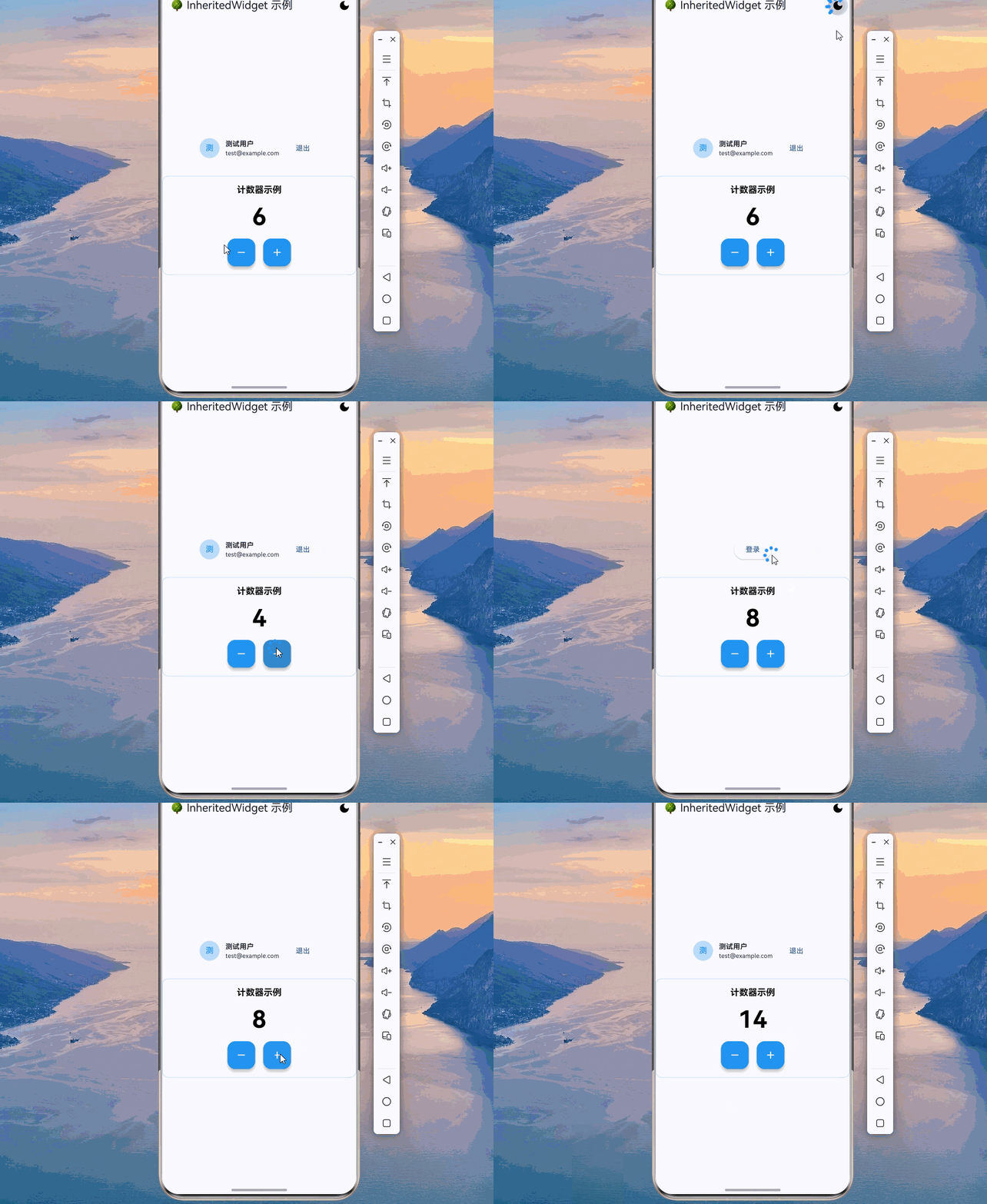
欢迎加入开源鸿蒙跨平台社区:https://openharmonycrossplatform.csdn.net
🌳 欢迎来到 Flutter for OpenHarmony 社区!本文将通过一个完整的数据共享案例,深入讲解 InheritedWidget 组件的使用方法与最佳实践,帮助你构建专业级的跨组件通信系统。
一、场景引入:为什么需要跨组件数据共享?
在移动应用开发中,跨组件数据共享是一个常见需求。想象一下这样的场景:你正在开发一个多语言应用,用户切换语言后,整个应用的所有文本都需要更新;或者你在开发一个用户登录系统,登录状态需要在多个页面中共享;又或者你在开发一个主题系统,主题配置需要在整个应用中传递。这些场景都需要一种高效、优雅的跨组件数据共享方案。
这就是为什么我们需要 InheritedWidget 。InheritedWidget 是 Flutter 提供的数据传递机制,它允许数据在 Widget 树中向下传递,任何子组件都可以获取到祖先组件中的数据,而且当数据变化时,依赖该数据的子组件会自动重建。
📱 1.1 跨组件数据共享的典型应用场景
在现代移动应用中,跨组件数据共享的需求非常广泛:
主题管理:应用的主题配置(颜色、字体、圆角等)需要在整个应用中共享,任何页面都能获取当前主题,切换主题时所有页面自动更新。
用户状态管理:用户的登录状态、用户信息、权限等需要在多个页面中共享,登录/登出时相关页面自动更新。
多语言支持:当前语言设置需要在整个应用中传递,切换语言时所有文本自动更新。
配置管理:应用的配置信息(API 地址、环境配置等)需要在多个地方访问。
购物车状态:购物车数量和总价需要在商品列表、商品详情、购物车页面等多个地方显示和更新。
1.2 InheritedWidget 与其他数据传递方案对比
Flutter 提供了多种数据传递方案:
| 方案 | 适用场景 | 传递方向 | 性能 | 学习成本 |
|---|---|---|---|---|
| 构造函数参数 | 简单数据传递 | 父→子 | 高 | 低 |
| 回调函数 | 子→父通信 | 子→父 | 高 | 低 |
| InheritedWidget | 跨层级共享 | 祖先→后代 | 高 | 中 |
| 全局变量 | 全局共享 | 任意 | 低 | 低 |
| 单例模式 | 全局状态 | 任意 | 中 | 低 |
| Provider | 状态管理 | 任意 | 高 | 中 |
对于跨层级数据共享 场景,InheritedWidget 是最佳选择:
高效传递:数据可以跨越多层组件传递,不需要逐层传递参数。
自动更新:当数据变化时,依赖该数据的组件会自动重建。
类型安全:通过泛型获取数据,编译时类型检查。
Flutter 原生:是 Flutter 框架的一部分,无需引入第三方库。
1.3 InheritedWidget 核心概念
理解 InheritedWidget 的核心概念是掌握跨组件数据共享的关键:
InheritedWidget :Flutter 提供的特殊 Widget,用于在 Widget 树中传递数据。子组件可以通过 dependOnInheritedWidgetOfExactType 方法获取祖先的 InheritedWidget。
BuildContext:构建上下文,提供了访问 Widget 树的能力。通过 context 可以向上查找祖先 Widget。
dependOnInheritedWidgetOfExactType:获取指定类型的 InheritedWidget,并建立依赖关系。当 InheritedWidget 变化时,调用此方法的组件会自动重建。
updateShouldNotify:InheritedWidget 的方法,用于判断是否需要通知依赖者重建。通常比较新旧数据是否相同。
二、技术架构设计
在正式编写代码之前,我们需要设计一个清晰的架构。良好的架构设计可以让代码更易于理解、维护和扩展。
🏛️ 2.1 数据传递架构设计
┌─────────────────────────────────────────────────────────────┐
│                    祖先组件层                                │
│  ┌─────────────────────────────────────────────────────┐    │
│  │           InheritedWidget                          │    │
│  │  - 存储共享数据 data                                │    │
│  │  - 提供 of 方法获取数据                             │    │
│  │  - 实现 updateShouldNotify                         │    │
│  └─────────────────────────────────────────────────────┘    │
│                              │                               │
│                              │ 向下传递                       │
│                              ▼                               │
│  ┌─────────────────────────────────────────────────────┐    │
│  │           中间组件 (不需要知道数据)                   │    │
│  │  - 不传递任何参数                                    │    │
│  │  - 不依赖共享数据                                    │    │
│  └─────────────────────────────────────────────────────┘    │
│                              │                               │
│                              │ 向下传递                       │
│                              ▼                               │
│  ┌─────────────────────────────────────────────────────┐    │
│  │           子组件                                    │    │
│  │  - 通过 of 方法获取数据                              │    │
│  │  - 自动建立依赖关系                                  │    │
│  │  - 数据变化时自动重建                                │    │
│  └─────────────────────────────────────────────────────┘    │
└─────────────────────────────────────────────────────────────┘
🎯 2.2 InheritedWidget 工作流程
创建 InheritedWidget
      │
      ▼
包裹子组件树
      │
      ▼
子组件调用 of 方法
      │
      ├──▶ dependOnInheritedWidgetOfExactType
      │    │
      │    └──▶ 建立依赖关系
      │
      ├──▶ 返回共享数据
      │
      └──▶ 数据变化时
            │
            ├──▶ updateShouldNotify 返回 true
            │
            └──▶ 通知所有依赖者重建
📐 2.3 InheritedWidget 与 StatefulWidget 组合
通常 InheritedWidget 需要与 StatefulWidget 组合使用:
StatefulWidget (管理状态)
      │
      ├──▶ State (持有可变数据)
      │
      └──▶ InheritedWidget (传递数据)
            │
            └──▶ 子组件树
三、核心功能实现
🔧 3.1 基础 InheritedWidget 实现
dart
import 'package:flutter/material.dart';

/// 共享数据模型
class SharedData {
  final int counter;
  final String message;

  const SharedData({
    this.counter = 0,
    this.message = 'Hello',
  });

  SharedData copyWith({
    int? counter,
    String? message,
  }) {
    return SharedData(
      counter: counter ?? this.counter,
      message: message ?? this.message,
    );
  }

  @override
  bool operator ==(Object other) {
    if (identical(this, other)) return true;
    return other is SharedData &&
        other.counter == counter &&
        other.message == message;
  }

  @override
  int get hashCode => counter.hashCode ^ message.hashCode;
}

/// InheritedWidget 实现
class DataInheritedWidget extends InheritedWidget {
  final SharedData data;

  const DataInheritedWidget({
    super.key,
    required this.data,
    required super.child,
  });

  /// 提供静态方法获取数据
  static SharedData of(BuildContext context) {
    final widget = context.dependOnInheritedWidgetOfExactType<DataInheritedWidget>();
    if (widget == null) {
      throw FlutterError('DataInheritedWidget not found in context');
    }
    return widget.data;
  }

  /// 提供不建立依赖的获取方法
  static SharedData read(BuildContext context) {
    final widget = context.getInheritedWidgetOfExactType<DataInheritedWidget>();
    if (widget == null) {
      throw FlutterError('DataInheritedWidget not found in context');
    }
    return widget.data;
  }

  @override
  bool updateShouldNotify(DataInheritedWidget oldWidget) {
    return data != oldWidget.data;
  }
}

/// 使用示例
class BasicInheritedPage extends StatelessWidget {
  const BasicInheritedPage({super.key});

  @override
  Widget build(BuildContext context) {
    return DataInheritedWidget(
      data: const SharedData(counter: 10, message: 'Hello World'),
      child: const ChildWidget(),
    );
  }
}

class ChildWidget extends StatelessWidget {
  const ChildWidget({super.key});

  @override
  Widget build(BuildContext context) {
    // 获取共享数据
    final data = DataInheritedWidget.of(context);

    return Column(
      children: [
        Text('Counter: ${data.counter}'),
        Text('Message: ${data.message}'),
      ],
    );
  }
}
🔄 3.2 可变状态管理
dart
/// 状态管理器
class StateContainer extends StatefulWidget {
  final Widget child;

  const StateContainer({
    super.key,
    required this.child,
  });

  @override
  State<StateContainer> createState() => StateContainerState();
}

class StateContainerState extends State<StateContainer> {
  SharedData _data = const SharedData();

  SharedData get data => _data;

  void updateData(SharedData newData) {
    setState(() {
      _data = newData;
    });
  }

  void incrementCounter() {
    updateData(_data.copyWith(counter: _data.counter + 1));
  }

  void updateMessage(String message) {
    updateData(_data.copyWith(message: message));
  }

  void reset() {
    updateData(const SharedData());
  }

  @override
  Widget build(BuildContext context) {
    return _StateInheritedWidget(
      data: _data,
      state: this,
      child: widget.child,
    );
  }
}

/// 内部 InheritedWidget
class _StateInheritedWidget extends InheritedWidget {
  final SharedData data;
  final StateContainerState state;

  const _StateInheritedWidget({
    required this.data,
    required this.state,
    required super.child,
  });

  static StateContainerState of(BuildContext context) {
    final widget = context.dependOnInheritedWidgetOfExactType<_StateInheritedWidget>();
    if (widget == null) {
      throw FlutterError('StateContainer not found in context');
    }
    return widget.state;
  }

  static StateContainerState read(BuildContext context) {
    final widget = context.getInheritedWidgetOfExactType<_StateInheritedWidget>();
    if (widget == null) {
      throw FlutterError('StateContainer not found in context');
    }
    return widget.state;
  }

  @override
  bool updateShouldNotify(_StateInheritedWidget oldWidget) {
    return data != oldWidget.data;
  }
}

/// 使用示例
class StateManagementPage extends StatelessWidget {
  const StateManagementPage({super.key});

  @override
  Widget build(BuildContext context) {
    return StateContainer(
      child: Scaffold(
        appBar: AppBar(title: const Text('状态管理')),
        body: const Center(child: DataDisplay()),
        floatingActionButton: const ActionButtons(),
      ),
    );
  }
}

class DataDisplay extends StatelessWidget {
  const DataDisplay({super.key});

  @override
  Widget build(BuildContext context) {
    final state = _StateInheritedWidget.of(context);

    return Column(
      mainAxisAlignment: MainAxisAlignment.center,
      children: [
        Text(
          'Counter: ${state.data.counter}',
          style: const TextStyle(fontSize: 32),
        ),
        const SizedBox(height: 16),
        Text(
          'Message: ${state.data.message}',
          style: const TextStyle(fontSize: 18),
        ),
      ],
    );
  }
}

class ActionButtons extends StatelessWidget {
  const ActionButtons({super.key});

  @override
  Widget build(BuildContext context) {
    final state = _StateInheritedWidget.read(context);

    return Column(
      mainAxisSize: MainAxisSize.min,
      children: [
        FloatingActionButton(
          heroTag: 'increment',
          onPressed: state.incrementCounter,
          child: const Icon(Icons.add),
        ),
        const SizedBox(height: 8),
        FloatingActionButton(
          heroTag: 'reset',
          onPressed: state.reset,
          child: const Icon(Icons.refresh),
        ),
      ],
    );
  }
}
🎨 3.3 主题管理实现
dart
/// 应用主题配置
class AppTheme {
  final Color primaryColor;
  final Color secondaryColor;
  final Color backgroundColor;
  final Color textColor;
  final double borderRadius;
  final bool isDarkMode;

  const AppTheme({
    this.primaryColor = Colors.blue,
    this.secondaryColor = Colors.orange,
    this.backgroundColor = Colors.white,
    this.textColor = Colors.black,
    this.borderRadius = 8,
    this.isDarkMode = false,
  });

  AppTheme copyWith({
    Color? primaryColor,
    Color? secondaryColor,
    Color? backgroundColor,
    Color? textColor,
    double? borderRadius,
    bool? isDarkMode,
  }) {
    return AppTheme(
      primaryColor: primaryColor ?? this.primaryColor,
      secondaryColor: secondaryColor ?? this.secondaryColor,
      backgroundColor: backgroundColor ?? this.backgroundColor,
      textColor: textColor ?? this.textColor,
      borderRadius: borderRadius ?? this.borderRadius,
      isDarkMode: isDarkMode ?? this.isDarkMode,
    );
  }

  factory AppTheme.dark() {
    return const AppTheme(
      primaryColor: Colors.blue,
      secondaryColor: Colors.orange,
      backgroundColor: Color(0xFF1A1A1A),
      textColor: Colors.white,
      borderRadius: 8,
      isDarkMode: true,
    );
  }

  factory AppTheme.light() {
    return const AppTheme();
  }
}

/// 主题容器
class ThemeContainer extends StatefulWidget {
  final Widget child;

  const ThemeContainer({
    super.key,
    required this.child,
  });

  @override
  State<ThemeContainer> createState() => ThemeContainerState();
}

class ThemeContainerState extends State<ThemeContainer> {
  AppTheme _theme = AppTheme.light();

  AppTheme get theme => _theme;

  void setTheme(AppTheme theme) {
    setState(() {
      _theme = theme;
    });
  }

  void toggleDarkMode() {
    setTheme(_theme.isDarkMode ? AppTheme.light() : AppTheme.dark());
  }

  @override
  Widget build(BuildContext context) {
    return _ThemeInheritedWidget(
      theme: _theme,
      state: this,
      child: widget.child,
    );
  }
}

class _ThemeInheritedWidget extends InheritedWidget {
  final AppTheme theme;
  final ThemeContainerState state;

  const _ThemeInheritedWidget({
    required this.theme,
    required this.state,
    required super.child,
  });

  static ThemeContainerState of(BuildContext context) {
    final widget = context.dependOnInheritedWidgetOfExactType<_ThemeInheritedWidget>();
    if (widget == null) {
      throw FlutterError('ThemeContainer not found in context');
    }
    return widget.state;
  }

  @override
  bool updateShouldNotify(_ThemeInheritedWidget oldWidget) {
    return theme != oldWidget.theme;
  }
}

/// 主题感知组件
class ThemedContainer extends StatelessWidget {
  final Widget child;
  final EdgeInsetsGeometry? padding;
  final EdgeInsetsGeometry? margin;

  const ThemedContainer({
    super.key,
    required this.child,
    this.padding,
    this.margin,
  });

  @override
  Widget build(BuildContext context) {
    final theme = _ThemeInheritedWidget.of(context).theme;

    return Container(
      margin: margin,
      padding: padding ?? const EdgeInsets.all(16),
      decoration: BoxDecoration(
        color: theme.backgroundColor,
        borderRadius: BorderRadius.circular(theme.borderRadius),
        border: Border.all(color: theme.primaryColor.withOpacity(0.3)),
      ),
      child: DefaultTextStyle(
        style: TextStyle(color: theme.textColor),
        child: child,
      ),
    );
  }
}

/// 主题切换按钮
class ThemeToggleButton extends StatelessWidget {
  const ThemeToggleButton({super.key});

  @override
  Widget build(BuildContext context) {
    final state = _ThemeInheritedWidget.of(context);
    final theme = state.theme;

    return IconButton(
      icon: Icon(
        theme.isDarkMode ? Icons.light_mode : Icons.dark_mode,
        color: theme.textColor,
      ),
      onPressed: state.toggleDarkMode,
    );
  }
}
👤 3.4 用户状态管理
dart
/// 用户信息
class UserInfo {
  final String id;
  final String name;
  final String email;
  final String avatar;
  final bool isLoggedIn;

  const UserInfo({
    this.id = '',
    this.name = 'Guest',
    this.email = '',
    this.avatar = '',
    this.isLoggedIn = false,
  });

  UserInfo copyWith({
    String? id,
    String? name,
    String? email,
    String? avatar,
    bool? isLoggedIn,
  }) {
    return UserInfo(
      id: id ?? this.id,
      name: name ?? this.name,
      email: email ?? this.email,
      avatar: avatar ?? this.avatar,
      isLoggedIn: isLoggedIn ?? this.isLoggedIn,
    );
  }

  static UserInfo loggedIn({
    required String id,
    required String name,
    required String email,
    String avatar = '',
  }) {
    return UserInfo(
      id: id,
      name: name,
      email: email,
      avatar: avatar,
      isLoggedIn: true,
    );
  }
}

/// 用户状态容器
class UserContainer extends StatefulWidget {
  final Widget child;

  const UserContainer({
    super.key,
    required this.child,
  });

  @override
  State<UserContainer> createState() => UserContainerState();
}

class UserContainerState extends State<UserContainer> {
  UserInfo _user = const UserInfo();

  UserInfo get user => _user;
  bool get isLoggedIn => _user.isLoggedIn;

  void login({
    required String id,
    required String name,
    required String email,
    String avatar = '',
  }) {
    setState(() {
      _user = UserInfo.loggedIn(
        id: id,
        name: name,
        email: email,
        avatar: avatar,
      );
    });
  }

  void logout() {
    setState(() {
      _user = const UserInfo();
    });
  }

  void updateProfile({
    String? name,
    String? avatar,
  }) {
    if (!_user.isLoggedIn) return;

    setState(() {
      _user = _user.copyWith(
        name: name ?? _user.name,
        avatar: avatar ?? _user.avatar,
      );
    });
  }

  @override
  Widget build(BuildContext context) {
    return _UserInheritedWidget(
      user: _user,
      state: this,
      child: widget.child,
    );
  }
}

class _UserInheritedWidget extends InheritedWidget {
  final UserInfo user;
  final UserContainerState state;

  const _UserInheritedWidget({
    required this.user,
    required this.state,
    required super.child,
  });

  static UserContainerState of(BuildContext context) {
    final widget = context.dependOnInheritedWidgetOfExactType<_UserInheritedWidget>();
    if (widget == null) {
      throw FlutterError('UserContainer not found in context');
    }
    return widget.state;
  }

  static UserContainerState read(BuildContext context) {
    final widget = context.getInheritedWidgetOfExactType<_UserInheritedWidget>();
    if (widget == null) {
      throw FlutterError('UserContainer not found in context');
    }
    return widget.state;
  }

  @override
  bool updateShouldNotify(_UserInheritedWidget oldWidget) {
    return user != oldWidget.user;
  }
}

/// 用户信息显示组件
class UserAvatar extends StatelessWidget {
  final double size;

  const UserAvatar({super.key, this.size = 40});

  @override
  Widget build(BuildContext context) {
    final user = _UserInheritedWidget.of(context).user;

    return CircleAvatar(
      radius: size / 2,
      backgroundColor: Colors.grey.shade300,
      backgroundImage: user.avatar.isNotEmpty
          ? NetworkImage(user.avatar)
          : null,
      child: user.avatar.isEmpty
          ? Text(
              user.name.isNotEmpty ? user.name[0].toUpperCase() : '?',
              style: TextStyle(fontSize: size * 0.4),
            )
          : null,
    );
  }
}

/// 登录状态组件
class LoginStatusWidget extends StatelessWidget {
  const LoginStatusWidget({super.key});

  @override
  Widget build(BuildContext context) {
    final state = _UserInheritedWidget.of(context);
    final user = state.user;

    if (user.isLoggedIn) {
      return Row(
        children: [
          UserAvatar(),
          const SizedBox(width: 8),
          Column(
            crossAxisAlignment: CrossAxisAlignment.start,
            children: [
              Text(user.name, style: const TextStyle(fontWeight: FontWeight.bold)),
              Text(user.email, style: const TextStyle(fontSize: 12)),
            ],
          ),
          const Spacer(),
          TextButton(
            onPressed: state.logout,
            child: const Text('退出'),
          ),
        ],
      );
    } else {
      return ElevatedButton(
        onPressed: () => _showLoginDialog(context, state),
        child: const Text('登录'),
      );
    }
  }

  void _showLoginDialog(BuildContext context, UserContainerState state) {
    showDialog(
      context: context,
      builder: (context) => AlertDialog(
        title: const Text('登录'),
        content: Column(
          mainAxisSize: MainAxisSize.min,
          children: [
            TextField(
              decoration: const InputDecoration(labelText: '用户名'),
            ),
            TextField(
              decoration: const InputDecoration(labelText: '邮箱'),
            ),
          ],
        ),
        actions: [
          TextButton(
            onPressed: () => Navigator.pop(context),
            child: const Text('取消'),
          ),
          ElevatedButton(
            onPressed: () {
              state.login(
                id: '1',
                name: '测试用户',
                email: 'test@example.com',
              );
              Navigator.pop(context);
            },
            child: const Text('登录'),
          ),
        ],
      ),
    );
  }
}
四、完整应用示例
下面是一个完整的多语言应用示例:
dart
import 'package:flutter/material.dart';

void main() {
  runApp(const InheritedWidgetApp());
}

class InheritedWidgetApp extends StatelessWidget {
  const InheritedWidgetApp({super.key});

  @override
  Widget build(BuildContext context) {
    return ThemeContainer(
      child: UserContainer(
        child: MaterialApp(
          debugShowCheckedModeBanner: false,
          theme: ThemeData(
            colorScheme: ColorScheme.fromSeed(seedColor: Colors.blue),
            useMaterial3: true,
          ),
          home: const HomePage(),
        ),
      ),
    );
  }
}

/// 首页
class HomePage extends StatelessWidget {
  const HomePage({super.key});

  @override
  Widget build(BuildContext context) {
    return Scaffold(
      appBar: AppBar(
        title: const Text('🌳 InheritedWidget 示例'),
        actions: const [ThemeToggleButton()],
      ),
      body: const Center(
        child: Column(
          mainAxisAlignment: MainAxisAlignment.center,
          children: [
            LoginStatusWidget(),
            SizedBox(height: 32),
            _CounterSection(),
          ],
        ),
      ),
    );
  }
}

/// 计数器部分
class _CounterSection extends StatelessWidget {
  const _CounterSection();

  @override
  Widget build(BuildContext context) {
    return ThemedContainer(
      child: Column(
        children: [
          const Text(
            '计数器示例',
            style: TextStyle(fontSize: 18, fontWeight: FontWeight.bold),
          ),
          const SizedBox(height: 16),
          const _CounterDisplay(),
          const SizedBox(height: 16),
          Row(
            mainAxisAlignment: MainAxisAlignment.center,
            children: [
              _CounterButton(icon: Icons.remove, isIncrement: false),
              const SizedBox(width: 16),
              _CounterButton(icon: Icons.add, isIncrement: true),
            ],
          ),
        ],
      ),
    );
  }
}

class _CounterDisplay extends StatelessWidget {
  const _CounterDisplay();

  @override
  Widget build(BuildContext context) {
    final state = _StateInheritedWidget.of(context);

    return Text(
      '${state.data.counter}',
      style: const TextStyle(fontSize: 48, fontWeight: FontWeight.bold),
    );
  }
}

class _CounterButton extends StatelessWidget {
  final IconData icon;
  final bool isIncrement;

  const _CounterButton({
    required this.icon,
    required this.isIncrement,
  });

  @override
  Widget build(BuildContext context) {
    final state = _StateInheritedWidget.read(context);
    final theme = _ThemeInheritedWidget.read(context).theme;

    return FloatingActionButton(
      heroTag: isIncrement ? 'increment' : 'decrement',
      backgroundColor: theme.primaryColor,
      onPressed: isIncrement ? state.incrementCounter : () {
        if (state.data.counter > 0) {
          state.updateData(state.data.copyWith(counter: state.data.counter - 1));
        }
      },
      child: Icon(icon, color: Colors.white),
    );
  }
}

/// 简化的状态容器(用于计数器)
class _StateInheritedWidget extends InheritedWidget {
  final SharedData data;
  final StateContainerState state;

  const _StateInheritedWidget({
    required this.data,
    required this.state,
    required super.child,
  });

  static StateContainerState of(BuildContext context) {
    final widget = context.dependOnInheritedWidgetOfExactType<_StateInheritedWidget>();
    if (widget == null) {
      throw FlutterError('StateContainer not found');
    }
    return widget.state;
  }

  static StateContainerState read(BuildContext context) {
    final widget = context.getInheritedWidgetOfExactType<_StateInheritedWidget>();
    if (widget == null) {
      throw FlutterError('StateContainer not found');
    }
    return widget.state;
  }

  @override
  bool updateShouldNotify(_StateInheritedWidget oldWidget) {
    return data != oldWidget.data;
  }
}
五、进阶技巧
🌟 5.1 性能优化:分离读写
dart
/// 分离读写的 InheritedWidget
class OptimizedInheritedWidget<T> extends InheritedWidget {
  final T data;

  const OptimizedInheritedWidget({
    super.key,
    required this.data,
    required super.child,
  });

  /// 建立依赖,数据变化时会重建
  static T watch<T>(BuildContext context) {
    final widget = context.dependOnInheritedWidgetOfExactType<OptimizedInheritedWidget<T>>();
    return widget!.data;
  }

  /// 不建立依赖,数据变化时不会重建
  static T read<T>(BuildContext context) {
    final widget = context.getInheritedWidgetOfExactType<OptimizedInheritedWidget<T>>();
    return widget!.data;
  }

  @override
  bool updateShouldNotify(OptimizedInheritedWidget<T> oldWidget) {
    return data != oldWidget.data;
  }
}
🔄 5.2 多 InheritedWidget 组合
dart
/// 组合多个 InheritedWidget
class AppProviders extends StatelessWidget {
  final Widget child;

  const AppProviders({super.key, required this.child});

  @override
  Widget build(BuildContext context) {
    return ThemeContainer(
      child: UserContainer(
        child: StateContainer(
          child: child,
        ),
      ),
    );
  }
}

/// 便捷访问类
class App {
  static ThemeContainerState theme(BuildContext context) {
    return _ThemeInheritedWidget.of(context);
  }

  static UserContainerState user(BuildContext context) {
    return _UserInheritedWidget.of(context);
  }

  static StateContainerState state(BuildContext context) {
    return _StateInheritedWidget.of(context);
  }
}
⚡ 5.3 懒加载 InheritedWidget
dart
/// 懒加载数据
class LazyInheritedWidget<T> extends InheritedWidget {
  final T Function() loader;
  T? _cachedData;

  LazyInheritedWidget({
    super.key,
    required this.loader,
    required super.child,
  });

  T get data {
    _cachedData ??= loader();
    return _cachedData as T;
  }

  static T of<T>(BuildContext context) {
    final widget = context.dependOnInheritedWidgetOfExactType<LazyInheritedWidget<T>>();
    return widget!.data;
  }

  @override
  bool updateShouldNotify(LazyInheritedWidget<T> oldWidget) {
    return false; // 懒加载数据通常不会变化
  }
}
六、完整代码示例
下面是一个完整的 InheritedWidget 应用示例,整合了主题管理和用户状态管理功能:
dart
import 'package:flutter/material.dart';

void main() {
  runApp(const MyApp());
}

/// 共享数据模型
class SharedData {
  final int counter;
  final String message;

  const SharedData({
    this.counter = 0,
    this.message = 'Hello',
  });

  SharedData copyWith({
    int? counter,
    String? message,
  }) {
    return SharedData(
      counter: counter ?? this.counter,
      message: message ?? this.message,
    );
  }

  @override
  bool operator ==(Object other) {
    if (identical(this, other)) return true;
    return other is SharedData &&
        other.counter == counter &&
        other.message == message;
  }

  @override
  int get hashCode => counter.hashCode ^ message.hashCode;
}

/// 应用主题配置
class AppTheme {
  final Color primaryColor;
  final Color backgroundColor;
  final Color textColor;
  final bool isDarkMode;

  const AppTheme({
    this.primaryColor = Colors.blue,
    this.backgroundColor = Colors.white,
    this.textColor = Colors.black,
    this.isDarkMode = false,
  });

  AppTheme copyWith({
    Color? primaryColor,
    Color? backgroundColor,
    Color? textColor,
    bool? isDarkMode,
  }) {
    return AppTheme(
      primaryColor: primaryColor ?? this.primaryColor,
      backgroundColor: backgroundColor ?? this.backgroundColor,
      textColor: textColor ?? this.textColor,
      isDarkMode: isDarkMode ?? this.isDarkMode,
    );
  }

  factory AppTheme.dark() {
    return const AppTheme(
      primaryColor: Colors.blue,
      backgroundColor: Color(0xFF1A1A1A),
      textColor: Colors.white,
      isDarkMode: true,
    );
  }

  factory AppTheme.light() {
    return const AppTheme();
  }

  @override
  bool operator ==(Object other) {
    if (identical(this, other)) return true;
    return other is AppTheme &&
        other.primaryColor == primaryColor &&
        other.backgroundColor == backgroundColor &&
        other.textColor == textColor &&
        other.isDarkMode == isDarkMode;
  }

  @override
  int get hashCode {
    return primaryColor.hashCode ^
        backgroundColor.hashCode ^
        textColor.hashCode ^
        isDarkMode.hashCode;
  }
}

/// 用户信息
class UserInfo {
  final String id;
  final String name;
  final String email;
  final bool isLoggedIn;

  const UserInfo({
    this.id = '',
    this.name = 'Guest',
    this.email = '',
    this.isLoggedIn = false,
  });

  UserInfo copyWith({
    String? id,
    String? name,
    String? email,
    bool? isLoggedIn,
  }) {
    return UserInfo(
      id: id ?? this.id,
      name: name ?? this.name,
      email: email ?? this.email,
      isLoggedIn: isLoggedIn ?? this.isLoggedIn,
    );
  }

  @override
  bool operator ==(Object other) {
    if (identical(this, other)) return true;
    return other is UserInfo &&
        other.id == id &&
        other.name == name &&
        other.email == email &&
        other.isLoggedIn == isLoggedIn;
  }

  @override
  int get hashCode {
    return id.hashCode ^ name.hashCode ^ email.hashCode ^ isLoggedIn.hashCode;
  }
}

/// 主题容器
class ThemeContainer extends StatefulWidget {
  final Widget child;

  const ThemeContainer({
    super.key,
    required this.child,
  });

  @override
  State<ThemeContainer> createState() => ThemeContainerState();
}

class ThemeContainerState extends State<ThemeContainer> {
  AppTheme _theme = AppTheme.light();

  AppTheme get theme => _theme;

  void toggleDarkMode() {
    setState(() {
      _theme = _theme.isDarkMode ? AppTheme.light() : AppTheme.dark();
    });
  }

  @override
  Widget build(BuildContext context) {
    return _ThemeInheritedWidget(
      theme: _theme,
      state: this,
      child: widget.child,
    );
  }
}

class _ThemeInheritedWidget extends InheritedWidget {
  final AppTheme theme;
  final ThemeContainerState state;

  const _ThemeInheritedWidget({
    required this.theme,
    required this.state,
    required super.child,
  });

  static ThemeContainerState of(BuildContext context) {
    final widget = context.dependOnInheritedWidgetOfExactType<_ThemeInheritedWidget>();
    if (widget == null) {
      throw FlutterError('ThemeContainer not found in context');
    }
    return widget.state;
  }

  static ThemeContainerState read(BuildContext context) {
    final widget = context.getInheritedWidgetOfExactType<_ThemeInheritedWidget>();
    if (widget == null) {
      throw FlutterError('ThemeContainer not found in context');
    }
    return widget.state;
  }

  @override
  bool updateShouldNotify(_ThemeInheritedWidget oldWidget) {
    return theme != oldWidget.theme;
  }
}

/// 用户容器
class UserContainer extends StatefulWidget {
  final Widget child;

  const UserContainer({
    super.key,
    required this.child,
  });

  @override
  State<UserContainer> createState() => UserContainerState();
}

class UserContainerState extends State<UserContainer> {
  UserInfo _user = const UserInfo();

  UserInfo get user => _user;
  bool get isLoggedIn => _user.isLoggedIn;

  void login({
    required String id,
    required String name,
    required String email,
  }) {
    setState(() {
      _user = UserInfo(
        id: id,
        name: name,
        email: email,
        isLoggedIn: true,
      );
    });
  }

  void logout() {
    setState(() {
      _user = const UserInfo();
    });
  }

  @override
  Widget build(BuildContext context) {
    return _UserInheritedWidget(
      user: _user,
      state: this,
      child: widget.child,
    );
  }
}

class _UserInheritedWidget extends InheritedWidget {
  final UserInfo user;
  final UserContainerState state;

  const _UserInheritedWidget({
    required this.user,
    required this.state,
    required super.child,
  });

  static UserContainerState of(BuildContext context) {
    final widget = context.dependOnInheritedWidgetOfExactType<_UserInheritedWidget>();
    if (widget == null) {
      throw FlutterError('UserContainer not found in context');
    }
    return widget.state;
  }

  static UserContainerState read(BuildContext context) {
    final widget = context.getInheritedWidgetOfExactType<_UserInheritedWidget>();
    if (widget == null) {
      throw FlutterError('UserContainer not found in context');
    }
    return widget.state;
  }

  @override
  bool updateShouldNotify(_UserInheritedWidget oldWidget) {
    return user != oldWidget.user;
  }
}

/// 状态容器
class StateContainer extends StatefulWidget {
  final Widget child;

  const StateContainer({
    super.key,
    required this.child,
  });

  @override
  State<StateContainer> createState() => StateContainerState();
}

class StateContainerState extends State<StateContainer> {
  SharedData _data = const SharedData();

  SharedData get data => _data;

  void incrementCounter() {
    setState(() {
      _data = _data.copyWith(counter: _data.counter + 1);
    });
  }

  void updateMessage(String message) {
    setState(() {
      _data = _data.copyWith(message: message);
    });
  }

  void reset() {
    setState(() {
      _data = const SharedData();
    });
  }

  @override
  Widget build(BuildContext context) {
    return _StateInheritedWidget(
      data: _data,
      state: this,
      child: widget.child,
    );
  }
}

class _StateInheritedWidget extends InheritedWidget {
  final SharedData data;
  final StateContainerState state;

  const _StateInheritedWidget({
    required this.data,
    required this.state,
    required super.child,
  });

  static StateContainerState of(BuildContext context) {
    final widget = context.dependOnInheritedWidgetOfExactType<_StateInheritedWidget>();
    if (widget == null) {
      throw FlutterError('StateContainer not found in context');
    }
    return widget.state;
  }

  static StateContainerState read(BuildContext context) {
    final widget = context.getInheritedWidgetOfExactType<_StateInheritedWidget>();
    if (widget == null) {
      throw FlutterError('StateContainer not found in context');
    }
    return widget.state;
  }

  @override
  bool updateShouldNotify(_StateInheritedWidget oldWidget) {
    return data != oldWidget.data;
  }
}

/// 主题切换按钮
class ThemeToggleButton extends StatelessWidget {
  const ThemeToggleButton({super.key});

  @override
  Widget build(BuildContext context) {
    final state = _ThemeInheritedWidget.of(context);
    final theme = state.theme;

    return IconButton(
      icon: Icon(
        theme.isDarkMode ? Icons.light_mode : Icons.dark_mode,
        color: theme.textColor,
      ),
      onPressed: state.toggleDarkMode,
    );
  }
}

/// 主题感知容器
class ThemedContainer extends StatelessWidget {
  final Widget child;
  final EdgeInsetsGeometry? padding;

  const ThemedContainer({
    super.key,
    required this.child,
    this.padding,
  });

  @override
  Widget build(BuildContext context) {
    final theme = _ThemeInheritedWidget.of(context).theme;

    return Container(
      padding: padding ?? const EdgeInsets.all(16),
      decoration: BoxDecoration(
        color: theme.backgroundColor,
        borderRadius: BorderRadius.circular(12),
        border: Border.all(color: theme.primaryColor.withOpacity(0.3)),
      ),
      child: DefaultTextStyle(
        style: TextStyle(color: theme.textColor),
        child: child,
      ),
    );
  }
}

/// 登录状态组件
class LoginStatusWidget extends StatelessWidget {
  const LoginStatusWidget({super.key});

  @override
  Widget build(BuildContext context) {
    final userState = _UserInheritedWidget.of(context);
    final user = userState.user;
    final theme = _ThemeInheritedWidget.of(context).theme;

    if (user.isLoggedIn) {
      return Row(
        children: [
          CircleAvatar(
            backgroundColor: theme.primaryColor,
            child: Text(
              user.name.isNotEmpty ? user.name[0].toUpperCase() : 'U',
              style: TextStyle(color: theme.backgroundColor),
            ),
          ),
          const SizedBox(width: 12),
          Column(
            crossAxisAlignment: CrossAxisAlignment.start,
            children: [
              Text(
                user.name,
                style: TextStyle(
                  fontWeight: FontWeight.bold,
                  color: theme.textColor,
                ),
              ),
              Text(
                user.email,
                style: TextStyle(
                  fontSize: 12,
                  color: theme.textColor.withOpacity(0.7),
                ),
              ),
            ],
          ),
          const Spacer(),
          TextButton(
            onPressed: userState.logout,
            child: const Text('退出'),
          ),
        ],
      );
    }

    return ElevatedButton(
      onPressed: () {
        userState.login(
          id: '1',
          name: 'Test User',
          email: 'test@example.com',
        );
      },
      child: const Text('登录'),
    );
  }
}

/// 主应用
class MyApp extends StatelessWidget {
  const MyApp({super.key});

  @override
  Widget build(BuildContext context) {
    return ThemeContainer(
      child: Builder(
        builder: (context) {
          final theme = _ThemeInheritedWidget.read(context).theme;

          return MaterialApp(
            theme: ThemeData(
              colorScheme: ColorScheme.fromSeed(
                seedColor: theme.primaryColor,
                brightness: theme.isDarkMode ? Brightness.dark : Brightness.light,
              ),
              useMaterial3: true,
            ),
            home: UserContainer(
              child: StateContainer(
                child: const HomePage(),
              ),
            ),
          );
        },
      ),
    );
  }
}

/// 主页面
class HomePage extends StatelessWidget {
  const HomePage({super.key});

  @override
  Widget build(BuildContext context) {
    final theme = _ThemeInheritedWidget.of(context).theme;

    return Scaffold(
      backgroundColor: theme.backgroundColor,
      appBar: AppBar(
        title: const Text('InheritedWidget 示例'),
        actions: const [
          ThemeToggleButton(),
        ],
      ),
      body: SingleChildScrollView(
        padding: const EdgeInsets.all(16),
        child: Column(
          crossAxisAlignment: CrossAxisAlignment.start,
          children: [
            const Text(
              '🔐 用户状态',
              style: TextStyle(fontSize: 20, fontWeight: FontWeight.bold),
            ),
            const SizedBox(height: 12),
            const ThemedContainer(
              child: LoginStatusWidget(),
            ),
            const SizedBox(height: 24),
            const Text(
              '📊 计数器状态',
              style: TextStyle(fontSize: 20, fontWeight: FontWeight.bold),
            ),
            const SizedBox(height: 12),
            const CounterDisplay(),
            const SizedBox(height: 24),
            const Text(
              '📝 消息状态',
              style: TextStyle(fontSize: 20, fontWeight: FontWeight.bold),
            ),
            const SizedBox(height: 12),
            const MessageDisplay(),
          ],
        ),
      ),
      floatingActionButton: const ActionButtons(),
    );
  }
}

/// 计数器显示
class CounterDisplay extends StatelessWidget {
  const CounterDisplay({super.key});

  @override
  Widget build(BuildContext context) {
    final state = _StateInheritedWidget.of(context);
    final theme = _ThemeInheritedWidget.of(context).theme;

    return ThemedContainer(
      child: Column(
        children: [
          Text(
            '当前计数: ${state.data.counter}',
            style: TextStyle(
              fontSize: 32,
              fontWeight: FontWeight.bold,
              color: theme.textColor,
            ),
          ),
          const SizedBox(height: 16),
          Row(
            mainAxisAlignment: MainAxisAlignment.spaceEvenly,
            children: [
              ElevatedButton.icon(
                onPressed: state.incrementCounter,
                icon: const Icon(Icons.add),
                label: const Text('增加'),
              ),
              ElevatedButton.icon(
                onPressed: state.reset,
                icon: const Icon(Icons.refresh),
                label: const Text('重置'),
              ),
            ],
          ),
        ],
      ),
    );
  }
}

/// 消息显示
class MessageDisplay extends StatelessWidget {
  const MessageDisplay({super.key});

  @override
  Widget build(BuildContext context) {
    final state = _StateInheritedWidget.of(context);
    final theme = _ThemeInheritedWidget.of(context).theme;

    return ThemedContainer(
      child: Column(
        crossAxisAlignment: CrossAxisAlignment.start,
        children: [
          Text(
            '当前消息: ${state.data.message}',
            style: TextStyle(
              fontSize: 18,
              color: theme.textColor,
            ),
          ),
          const SizedBox(height: 16),
          TextField(
            decoration: const InputDecoration(
              labelText: '输入新消息',
              border: OutlineInputBorder(),
            ),
            onSubmitted: (value) {
              if (value.isNotEmpty) {
                state.updateMessage(value);
              }
            },
          ),
        ],
      ),
    );
  }
}

/// 操作按钮
class ActionButtons extends StatelessWidget {
  const ActionButtons({super.key});

  @override
  Widget build(BuildContext context) {
    final state = _StateInheritedWidget.read(context);

    return Column(
      mainAxisSize: MainAxisSize.min,
      children: [
        FloatingActionButton(
          heroTag: 'increment',
          onPressed: state.incrementCounter,
          child: const Icon(Icons.add),
        ),
        const SizedBox(height: 8),
        FloatingActionButton(
          heroTag: 'reset',
          onPressed: state.reset,
          child: const Icon(Icons.refresh),
        ),
      ],
    );
  }
}
七、最佳实践与注意事项
✅ 7.1 性能优化建议
-
分离读写 :使用
of建立依赖,使用read只读取数据。 -
缩小重建范围 :只在需要更新的组件中使用
of方法。 -
实现 updateShouldNotify:正确比较新旧数据,避免不必要的重建。
-
使用 const 构造函数:对于不变的子组件,使用 const 减少重建。
-
避免过度嵌套:合理组织 InheritedWidget 层级。
⚠️ 7.2 常见问题与解决方案
| 问题 | 原因 | 解决方案 |
|---|---|---|
| 找不到 InheritedWidget | Widget 不在树中 | 检查 Widget 层级结构 |
| 过度重建 | 所有子组件都依赖 | 分离读写,缩小范围 |
| 数据不更新 | 未调用 setState | 使用 StatefulWidget 管理状态 |
| 性能问题 | updateShouldNotify 总返回 true | 正确比较新旧数据 |
| 内存泄漏 | 未正确释放资源 | 在 State.dispose 中清理 |
📝 7.3 代码规范建议
-
命名规范 :使用
XxxContainer+XxxInheritedWidget的命名模式。 -
提供静态方法 :提供
of和read静态方法方便访问。 -
封装数据模型 :使用不可变数据模型,实现
copyWith方法。 -
添加文档注释:为公共 API 添加文档注释。
-
错误处理 :在
of方法中处理找不到 Widget 的情况。
八、总结
本文详细介绍了 Flutter 中 InheritedWidget 组件的使用方法,从基础概念到高级技巧,帮助你掌握跨组件数据共享的核心能力。
核心要点回顾:
📌 InheritedWidget 基础:理解数据向下传递和自动更新机制
📌 与 StatefulWidget 组合:实现可变状态管理
📌 实际应用:主题管理、用户状态、配置管理等典型场景
📌 进阶技巧:分离读写、多 Widget 组合、懒加载等
📌 最佳实践:性能优化、错误处理、代码规范
通过本文的学习,你应该能够独立开发跨组件数据共享功能,并理解 Provider 等状态管理库的底层原理。