文章目录
-
- 一、什么是字典?
-
- [1.1 字典的基本概念](#1.1 字典的基本概念)
- [1.2 字典的特性](#1.2 字典的特性)
- 二、字典的创建方法
-
- [2.1 多种创建方式](#2.1 多种创建方式)
- [2.2 嵌套字典的创建](#2.2 嵌套字典的创建)
- 三、字典的基本操作
-
- [3.1 访问字典元素](#3.1 访问字典元素)
- [3.2 添加和修改元素](#3.2 添加和修改元素)
- [3.3 删除元素](#3.3 删除元素)
- 四、字典的遍历操作
-
- [4.1 各种遍历方式](#4.1 各种遍历方式)
- [4.2 遍历时的修改操作](#4.2 遍历时的修改操作)
- 五、字典的常用方法
-
- [5.1 查询和检查方法](#5.1 查询和检查方法)
- [5.2 字典的复制](#5.2 字典的复制)
- 六、字典的高级用法
-
- [6.1 字典推导式](#6.1 字典推导式)
- [6.2 defaultdict的使用](#6.2 defaultdict的使用)
- [6.3 OrderedDict的使用](#6.3 OrderedDict的使用)
- 七、字典的实际应用场景
-
- [7.1 配置管理](#7.1 配置管理)
- [7.2 缓存系统](#7.2 缓存系统)
- [7.3 数据分组和统计](#7.3 数据分组和统计)
- [7.4 图结构实现](#7.4 图结构实现)
- 八、字典的性能特性
-
- [8.1 时间复杂度分析](#8.1 时间复杂度分析)
- [8.2 内存使用分析](#8.2 内存使用分析)
- 九、字典与其他数据结构的对比
-
- [9.1 字典 vs 列表](#9.1 字典 vs 列表)
- [9.2 字典 vs 集合](#9.2 字典 vs 集合)
- 十、最佳实践和常见陷阱
-
- [10.1 常见陷阱](#10.1 常见陷阱)
- [10.2 最佳实践](#10.2 最佳实践)
- 十一、总结
-
- [11.1 字典核心要点](#11.1 字典核心要点)
- [11.2 速查表](#11.2 速查表)
一、什么是字典?
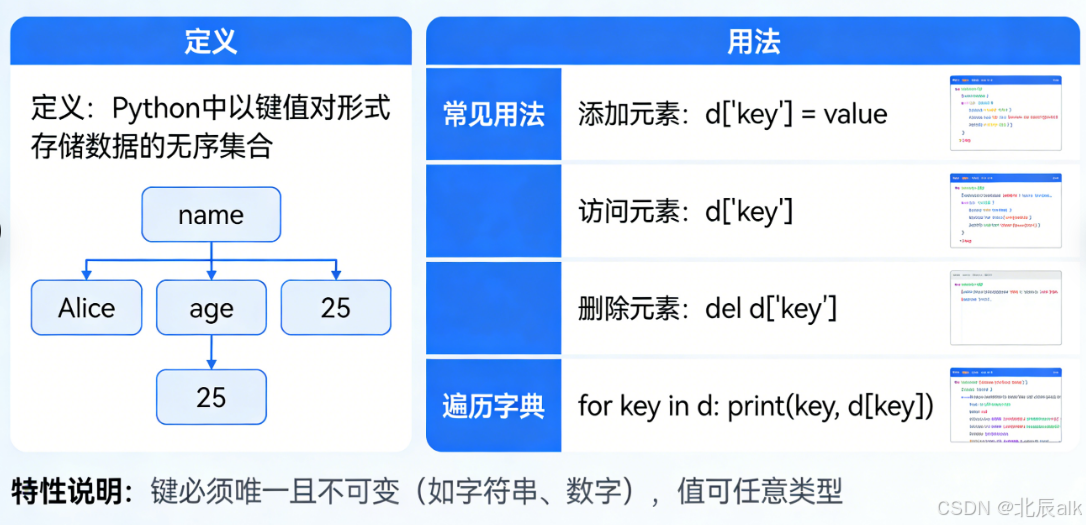
字典(Dictionary)是Python中最重要、最常用的数据结构之一。它是一种可变、无序的键值对(key-value)集合,提供了快速的数据查找和插入功能。
1.1 字典的基本概念
python
# 字典的基本形式
my_dict = {
    "name": "张三",
    "age": 25,
    "city": "北京"
}

# 键值对说明:
# "name" 是键(key),"张三" 是值(value)
# "age" 是键(key),25 是值(value)
# "city" 是键(key),"北京" 是值(value)
1.2 字典的特性
python
# 1. 键必须是不可变类型
valid_dict = {
    "name": "张三",      # 字符串作为键 ✅
    1: "整数键",         # 整数作为键 ✅
    (1, 2): "元组键",    # 元组作为键 ✅
    # [1, 2]: "列表键"   # 列表作为键 ❌ 会报错
}

# 2. 值可以是任意类型
complex_dict = {
    "number": 42,                    # 整数
    "text": "hello",                  # 字符串
    "list": [1, 2, 3],                # 列表
    "dict": {"a": 1},                  # 嵌套字典
    "tuple": (1, 2),                   # 元组
    "function": lambda x: x * 2        # 函数
}

# 3. 字典是无序的(Python 3.6+ 保持插入顺序)
order_dict = {}
order_dict["first"] = 1
order_dict["second"] = 2
order_dict["third"] = 3
print("保持插入顺序:", order_dict)  # {'first': 1, 'second': 2, 'third': 3}
字典内部结构图:
字典结构
哈希值1
键:'name'
值:'张三'
哈希值2
键:'age'
值:25
哈希值3
键:'city'
值:'北京'
二、字典的创建方法
2.1 多种创建方式
python
# 方法1:使用花括号 {}
dict1 = {"name": "张三", "age": 25}

# 方法2:使用dict()构造函数
dict2 = dict(name="李四", age=30)  # 键不需要引号
dict3 = dict([("name", "王五"), ("age", 35)])  # 从键值对列表创建
dict4 = dict(zip(["name", "age"], ["赵六", 40]))  # 配合zip使用

# 方法3:使用fromkeys()方法
keys = ["name", "age", "city"]
dict5 = dict.fromkeys(keys)  # 值默认为None
dict6 = dict.fromkeys(keys, "未知")  # 指定默认值

# 方法4:字典推导式
squares = {x: x**2 for x in range(1, 6)}
even_squares = {x: x**2 for x in range(1, 11) if x % 2 == 0}

# 方法5:使用大括号创建空字典
empty_dict1 = {}

# 方法6:使用dict()创建空字典
empty_dict2 = dict()

print("=== 各种创建方式 ===")
print(f"dict1: {dict1}")
print(f"dict2: {dict2}")
print(f"dict3: {dict3}")
print(f"dict4: {dict4}")
print(f"dict5: {dict5}")
print(f"dict6: {dict6}")
print(f"squares: {squares}")
print(f"even_squares: {even_squares}")
2.2 嵌套字典的创建
python
# 多层嵌套字典
users = {
    "user1": {
        "name": "张三",
        "age": 25,
        "contact": {
            "email": "zhangsan@example.com",
            "phone": "13800138000",
            "address": {
                "city": "北京",
                "street": "长安街",
                "number": 100
            }
        }
    },
    "user2": {
        "name": "李四",
        "age": 30,
        "contact": {
            "email": "lisi@example.com",
            "phone": "13900139000"
        }
    }
}

print("=== 嵌套字典 ===")
print(f"张三的邮箱:{users['user1']['contact']['email']}")
print(f"李四的城市:{users['user2']['contact'].get('address', {}).get('city', '未知')}")
三、字典的基本操作
3.1 访问字典元素
python
person = {"name": "张三", "age": 25, "city": "北京"}

# 方法1:使用方括号 [](键不存在会抛出KeyError)
print(f"name: {person['name']}")
# print(person['gender'])  # KeyError: 'gender'

# 方法2:使用get()方法(键不存在返回None或默认值)
print(f"age: {person.get('age')}")
print(f"gender: {person.get('gender')}")  # 返回None
print(f"gender: {person.get('gender', '未知')}")  # 返回默认值

# 方法3:使用setdefault()(键不存在时设置默认值)
city = person.setdefault('city', '上海')  # 键已存在,返回原值
gender = person.setdefault('gender', '男')  # 键不存在,设置并返回
print(f"修改后的person: {person}")
3.2 添加和修改元素
python
student = {"name": "小明", "score": 85}

# 添加新键值对
student["age"] = 18
student["grade"] = "高一"

# 修改现有键的值
student["score"] = 90

# 使用update()方法批量更新
student.update({
    "class": "3班",
    "teacher": "王老师",
    "score": 95  # 会覆盖原有的score
})

# update()也可以使用键值对参数
student.update(rank=5, hobby="篮球")

print("=== 添加和修改 ===")
print(f"学生信息: {student}")
3.3 删除元素
python
inventory = {
    "apple": 50,
    "banana": 30,
    "orange": 40,
    "grape": 25,
    "watermelon": 10
}

print("原始库存:", inventory)

# 方法1:del语句
del inventory["grape"]
print("删除grape后:", inventory)

# 方法2:pop()方法(返回被删除的值)
removed = inventory.pop("orange")
print(f"删除orange (数量{removed}):", inventory)

# 方法3:popitem()方法(删除并返回最后一个键值对)
last_item = inventory.popitem()
print(f"删除最后一项 {last_item}:", inventory)

# 方法4:clear()方法(清空字典)
temp_dict = inventory.copy()
temp_dict.clear()
print("清空后的temp_dict:", temp_dict)

# 安全删除(使用pop带默认值)
result = inventory.pop("nonexistent", "不存在")
print(f"安全删除: {result}")
四、字典的遍历操作
4.1 各种遍历方式
python
scores = {
    "张三": 85,
    "李四": 92,
    "王五": 78,
    "赵六": 88,
    "钱七": 95
}

print("=== 字典遍历方式 ===")

# 方式1:遍历键
print("\n1. 遍历键:")
for name in scores.keys():
    print(f"  学生:{name}")

# 方式2:遍历值
print("\n2. 遍历值:")
for score in scores.values():
    print(f"  分数:{score}")

# 方式3:遍历键值对
print("\n3. 遍历键值对:")
for name, score in scores.items():
    print(f"  {name}: {score}分")

# 方式4:带索引的遍历
print("\n4. 带索引的遍历:")
for i, (name, score) in enumerate(scores.items(), 1):
    print(f"  {i}. {name}: {score}分")

# 方式5:条件遍历
print("\n5. 条件遍历(分数>=90):")
for name, score in scores.items():
    if score >= 90:
        print(f"  {name}: {score}分(优秀)")
4.2 遍历时的修改操作
python
# 遍历时修改值
prices = {"apple": 5, "banana": 3, "orange": 4}
print("原始价格:", prices)

# 方法1:创建新字典(推荐)
new_prices = {item: price * 1.1 for item, price in prices.items()}
print("涨价10%后:", new_prices)

# 方法2:遍历键修改值(不推荐在遍历时修改原字典)
for item in list(prices.keys()):  # 使用list()创建副本
    prices[item] *= 1.1
print("直接修改后:", prices)

# 方法3:根据条件过滤
filtered = {k: v for k, v in prices.items() if v > 4}
print("价格>4的商品:", filtered)
五、字典的常用方法
5.1 查询和检查方法
python
user = {
    "username": "admin",
    "password": "123456",
    "email": "admin@example.com",
    "active": True
}

print("=== 查询和检查方法 ===")

# 检查键是否存在
print(f"'username' in user: {'username' in user}")
print(f"'age' in user: {'age' in user}")
print(f"'admin' in user: {'admin' in user}")  # 检查值要用values()

# 获取所有键
print(f"keys(): {list(user.keys())}")

# 获取所有值
print(f"values(): {list(user.values())}")

# 获取所有键值对
print(f"items(): {list(user.items())}")

# 获取字典长度
print(f"len(): {len(user)}")

# 获取指定键的值(带默认值)
email = user.get("email", "未设置")
phone = user.get("phone", "未设置")
print(f"email: {email}")
print(f"phone: {phone}")
5.2 字典的复制
python
original = {"a": 1, "b": 2, "c": [1, 2, 3]}

# 浅复制
shallow_copy1 = original.copy()
shallow_copy2 = dict(original)

# 深复制
import copy
deep_copy = copy.deepcopy(original)

# 修改测试
original["c"].append(4)
original["d"] = 4

print("=== 复制对比 ===")
print(f"original: {original}")
print(f"浅复制1: {shallow_copy1}")  # c列表被修改了
print(f"浅复制2: {shallow_copy2}")  # c列表被修改了
print(f"深复制: {deep_copy}")       # c列表保持不变
六、字典的高级用法
6.1 字典推导式
python
# 基础字典推导式
numbers = [1, 2, 3, 4, 5]
square_dict = {n: n**2 for n in numbers}
print(f"平方字典: {square_dict}")

# 带条件的字典推导式
even_squares = {n: n**2 for n in numbers if n % 2 == 0}
print(f"偶数的平方: {even_squares}")

# 从两个列表创建字典
names = ["张三", "李四", "王五"]
ages = [25, 30, 35]
name_age = {name: age for name, age in zip(names, ages)}
print(f"姓名-年龄: {name_age}")

# 交换键值
original = {"a": 1, "b": 2, "c": 3}
swapped = {value: key for key, value in original.items()}
print(f"交换键值: {swapped}")

# 嵌套字典推导式
matrix = {i: {j: i*j for j in range(1, 4)} for i in range(1, 4)}
print("乘法表:")
for key, value in matrix.items():
    print(f"  {key}: {value}")
6.2 defaultdict的使用
python
from collections import defaultdict

# 普通字典的问题
word_count = {}
words = ["apple", "banana", "apple", "orange", "banana", "apple"]

# 需要检查键是否存在
for word in words:
    if word in word_count:
        word_count[word] += 1
    else:
        word_count[word] = 1
print(f"普通字典计数: {word_count}")

# 使用defaultdict
word_count2 = defaultdict(int)  # 默认值为0
for word in words:
    word_count2[word] += 1
print(f"defaultdict计数: {dict(word_count2)}")

# 更复杂的默认值
group_by_length = defaultdict(list)
for word in words:
    group_by_length[len(word)].append(word)
print(f"按长度分组: {dict(group_by_length)}")

# 自定义默认值
def default_value():
    return {"count": 0, "items": []}

stats = defaultdict(default_value)
for word in words:
    stats[word]["count"] += 1
    stats[word]["items"].append(word)
print(f"复杂统计: {dict(stats)}")
6.3 OrderedDict的使用
python
from collections import OrderedDict

# Python 3.7+ 普通字典也保持顺序,但OrderedDict提供额外功能
ordered = OrderedDict()
ordered["first"] = 1
ordered["second"] = 2
ordered["third"] = 3

# 移动到末尾
ordered.move_to_end("first")
print(f"移动'first'到末尾: {ordered}")

# 移动到开头
ordered.move_to_end("second", last=False)
print(f"移动'second'到开头: {ordered}")

# 弹出最后一项
last = ordered.popitem(last=True)
print(f"弹出最后一项: {last}")
print(f"剩余: {ordered}")

# 弹出第一项
ordered["new"] = 4
first = ordered.popitem(last=False)
print(f"弹出第一项: {first}")
print(f"剩余: {ordered}")
七、字典的实际应用场景
7.1 配置管理
python
class ConfigManager:
    """配置管理器"""

    def __init__(self):
        self._config = {}
        self._defaults = {
            "host": "localhost",
            "port": 8000,
            "debug": False,
            "timeout": 30,
            "max_connections": 100
        }

    def load_from_file(self, filename):
        """从文件加载配置"""
        import json
        try:
            with open(filename, 'r') as f:
                self._config = json.load(f)
        except FileNotFoundError:
            self._config = {}

    def get(self, key, default=None):
        """获取配置项"""
        # 优先返回用户配置,没有则返回默认值
        return self._config.get(key, self._defaults.get(key, default))

    def set(self, key, value):
        """设置配置项"""
        self._config[key] = value

    def update(self, **kwargs):
        """批量更新配置"""
        self._config.update(kwargs)

    def reset(self):
        """重置配置"""
        self._config = {}

    def to_dict(self):
        """获取完整配置"""
        return {**self._defaults, **self._config}

# 使用示例
config = ConfigManager()
config.set("host", "192.168.1.100")
config.set("port", 8080)
config.update(debug=True, timeout=60)

print("=== 配置管理 ===")
print(f"host: {config.get('host')}")
print(f"port: {config.get('port')}")
print(f"debug: {config.get('debug')}")
print(f"max_connections: {config.get('max_connections')}")
print(f"完整配置: {config.to_dict()}")
7.2 缓存系统
python
import time
import hashlib
import json

class Cache:
    """简单的缓存系统"""

    def __init__(self, ttl=60):
        self._cache = {}
        self._ttl = ttl  # 默认过期时间(秒)

    def _get_key(self, *args, **kwargs):
        """生成缓存键"""
        key_data = {
            "args": args,
            "kwargs": kwargs
        }
        key_str = json.dumps(key_data, sort_keys=True)
        return hashlib.md5(key_str.encode()).hexdigest()

    def get(self, key):
        """获取缓存"""
        if key in self._cache:
            value, timestamp = self._cache[key]
            if time.time() - timestamp < self._ttl:
                return value
            else:
                # 过期删除
                del self._cache[key]
        return None

    def set(self, key, value):
        """设置缓存"""
        self._cache[key] = (value, time.time())

    def cached(self, ttl=None):
        """缓存装饰器"""
        def decorator(func):
            def wrapper(*args, **kwargs):
                cache_key = self._get_key(*args, **kwargs)
                result = self.get(cache_key)

                if result is None:
                    result = func(*args, **kwargs)
                    self.set(cache_key, result)
                    print(f"缓存未命中,计算新值: {result}")
                else:
                    print(f"缓存命中: {result}")

                return result
            return wrapper
        return decorator

    def clear(self):
        """清空缓存"""
        self._cache.clear()

    def stats(self):
        """获取缓存统计"""
        total = len(self._cache)
        expired = 0
        for key, (_, timestamp) in self._cache.items():
            if time.time() - timestamp >= self._ttl:
                expired += 1

        return {
            "total": total,
            "active": total - expired,
            "expired": expired
        }

# 使用示例
cache = Cache(ttl=5)

@cache.cached()
def expensive_operation(n):
    """模拟耗时操作"""
    time.sleep(1)  # 模拟耗时
    return n * n

print("=== 缓存系统演示 ===")
print("第一次调用(需要计算):")
result = expensive_operation(5)

print("\n第二次调用(缓存命中):")
result = expensive_operation(5)

print("\n缓存统计:")
print(cache.stats())

print("\n等待缓存过期...")
time.sleep(6)
result = expensive_operation(5)
print(cache.stats())
7.3 数据分组和统计
python
from collections import defaultdict
from datetime import datetime

class SalesAnalyzer:
    """销售数据分析器"""

    def __init__(self):
        self.sales_data = []

    def add_sale(self, product, amount, category, date=None):
        """添加销售记录"""
        if date is None:
            date = datetime.now()

        self.sales_data.append({
            "product": product,
            "amount": amount,
            "category": category,
            "date": date
        })

    def analyze_by_category(self):
        """按类别分析"""
        result = defaultdict(lambda: {
            "total_amount": 0,
            "count": 0,
            "products": set(),
            "avg_amount": 0
        })

        for sale in self.sales_data:
            cat = sale["category"]
            result[cat]["total_amount"] += sale["amount"]
            result[cat]["count"] += 1
            result[cat]["products"].add(sale["product"])

        # 计算平均值
        for cat in result:
            if result[cat]["count"] > 0:
                result[cat]["avg_amount"] = (
                    result[cat]["total_amount"] / result[cat]["count"]
                )
            result[cat]["products"] = list(result[cat]["products"])

        return dict(result)

    def analyze_by_month(self):
        """按月分析"""
        result = defaultdict(list)

        for sale in self.sales_data:
            month_key = sale["date"].strftime("%Y-%m")
            result[month_key].append({
                "product": sale["product"],
                "amount": sale["amount"],
                "category": sale["category"]
            })

        # 添加每月统计
        monthly_stats = {}
        for month, sales in result.items():
            total = sum(s["amount"] for s in sales)
            monthly_stats[month] = {
                "total": total,
                "count": len(sales),
                "average": total / len(sales) if sales else 0,
                "details": sales
            }

        return monthly_stats

    def top_products(self, n=3):
        """销量前N的商品"""
        product_sales = defaultdict(float)

        for sale in self.sales_data:
            product_sales[sale["product"]] += sale["amount"]

        # 排序并返回前N个
        sorted_products = sorted(
            product_sales.items(),
            key=lambda x: x[1],
            reverse=True
        )[:n]

        return dict(sorted_products)

# 使用示例
analyzer = SalesAnalyzer()

# 添加测试数据
analyzer.add_sale("iPhone 13", 6999, "电子产品", datetime(2023, 1, 15))
analyzer.add_sale("MacBook Pro", 12999, "电子产品", datetime(2023, 1, 20))
analyzer.add_sale("机械键盘", 399, "配件", datetime(2023, 1, 25))
analyzer.add_sale("iPhone 13", 6999, "电子产品", datetime(2023, 2, 10))
analyzer.add_sale("鼠标", 129, "配件", datetime(2023, 2, 15))
analyzer.add_sale("显示器", 1999, "电子产品", datetime(2023, 2, 20))

print("=== 销售数据分析 ===")

print("\n按类别统计:")
import pprint
pprint.pprint(analyzer.analyze_by_category())

print("\n按月统计:")
pprint.pprint(analyzer.analyze_by_month())

print("\n热销商品TOP 3:")
pprint.pprint(analyzer.top_products(3))
7.4 图结构实现
python
class Graph:
    """使用字典实现图结构"""

    def __init__(self):
        self.graph = defaultdict(list)
        self.weights = {}

    def add_edge(self, u, v, weight=1):
        """添加边"""
        self.graph[u].append(v)
        self.graph[v].append(u)  # 无向图
        self.weights[(u, v)] = weight
        self.weights[(v, u)] = weight

    def add_directed_edge(self, u, v, weight=1):
        """添加有向边"""
        self.graph[u].append(v)
        self.weights[(u, v)] = weight

    def get_neighbors(self, node):
        """获取邻居节点"""
        return self.graph.get(node, [])

    def get_weight(self, u, v):
        """获取边的权重"""
        return self.weights.get((u, v), float('inf'))

    def bfs(self, start):
        """广度优先搜索"""
        visited = set()
        queue = [start]
        result = []

        while queue:
            node = queue.pop(0)
            if node not in visited:
                visited.add(node)
                result.append(node)
                queue.extend([n for n in self.graph[node] if n not in visited])

        return result

    def dfs(self, start):
        """深度优先搜索"""
        visited = set()
        result = []

        def _dfs(node):
            visited.add(node)
            result.append(node)
            for neighbor in self.graph[node]:
                if neighbor not in visited:
                    _dfs(neighbor)

        _dfs(start)
        return result

    def shortest_path(self, start, end):
        """Dijkstra最短路径算法"""
        import heapq

        # 初始化距离字典
        distances = {node: float('inf') for node in self.graph}
        distances[start] = 0
        previous = {node: None for node in self.graph}

        # 优先队列
        pq = [(0, start)]

        while pq:
            current_dist, current = heapq.heappop(pq)

            if current == end:
                break

            if current_dist > distances[current]:
                continue

            for neighbor in self.graph[current]:
                distance = current_dist + self.get_weight(current, neighbor)
                if distance < distances[neighbor]:
                    distances[neighbor] = distance
                    previous[neighbor] = current
                    heapq.heappush(pq, (distance, neighbor))

        # 重构路径
        path = []
        current = end
        while current is not None:
            path.append(current)
            current = previous[current]
        path.reverse()

        return path, distances[end]

# 使用示例
g = Graph()

# 添加边
g.add_edge("A", "B", 4)
g.add_edge("A", "C", 2)
g.add_edge("B", "C", 1)
g.add_edge("B", "D", 5)
g.add_edge("C", "D", 8)
g.add_edge("C", "E", 10)
g.add_edge("D", "E", 2)

print("=== 图结构演示 ===")
print(f"从A出发的BFS: {g.bfs('A')}")
print(f"从A出发的DFS: {g.dfs('A')}")

path, distance = g.shortest_path("A", "E")
print(f"A到E的最短路径: {' -> '.join(path)},距离: {distance}")
八、字典的性能特性
8.1 时间复杂度分析
python
import time
import random

def performance_test():
    """字典性能测试"""

    # 创建大型字典
    n = 1000000
    test_dict = {i: f"value_{i}" for i in range(n)}

    # 测试查找性能
    start = time.time()
    for _ in range(1000):
        _ = test_dict[random.randint(0, n-1)]
    lookup_time = time.time() - start

    # 测试插入性能
    start = time.time()
    for i in range(n, n+1000):
        test_dict[i] = f"new_value_{i}"
    insert_time = time.time() - start

    # 测试删除性能
    start = time.time()
    for i in range(1000):
        test_dict.pop(random.randint(n, n+999), None)
    delete_time = time.time() - start

    print("=== 字典性能测试 ===")
    print(f"查找1000次: {lookup_time:.4f}秒")
    print(f"插入1000次: {insert_time:.4f}秒")
    print(f"删除1000次: {delete_time:.4f}秒")
    print("\n字典操作时间复杂度:")
    print("  - 查找: O(1) 平均, O(n) 最坏")
    print("  - 插入: O(1) 平均, O(n) 最坏")
    print("  - 删除: O(1) 平均, O(n) 最坏")
    print("  - 遍历: O(n)")

# 运行性能测试
performance_test()
8.2 内存使用分析
python
import sys

def memory_analysis():
    """内存使用分析"""

    # 不同大小字典的内存占用
    sizes = [100, 1000, 10000, 100000]

    print("=== 字典内存使用分析 ===")
    print(f"{'元素数量':<12} {'内存占用':<12} {'每个元素平均':<12}")
    print("-" * 36)

    for size in sizes:
        d = {i: f"value_{i}" for i in range(size)}
        memory = sys.getsizeof(d)
        per_item = memory / size if size > 0 else 0

        print(f"{size:<12} {memory:<12} {per_item:<12.2f}")

    print("\n内存使用说明:")
    print("  - 字典本身有固定开销")
    print("  - 每个键值对大约72字节(64位系统)")
    print("  - 字符串和整数对象额外占用内存")

# 运行内存分析
memory_analysis()
九、字典与其他数据结构的对比
9.1 字典 vs 列表
python
def compare_dict_vs_list():
    """字典与列表对比"""

    # 场景1:查找性能
    n = 100000
    test_list = list(range(n))
    test_dict = {i: i for i in range(n)}

    # 列表查找
    start = time.time()
    for i in range(1000):
        _ = i in test_list
    list_lookup = time.time() - start

    # 字典查找
    start = time.time()
    for i in range(1000):
        _ = i in test_dict
    dict_lookup = time.time() - start

    print("=== 字典 vs 列表 ===")
    print(f"列表查找1000次: {list_lookup:.4f}秒")
    print(f"字典查找1000次: {dict_lookup:.4f}秒")

    # 使用场景对比
    print("\n使用场景对比:")
    print("""
    使用字典的场景:
        - 需要快速查找(通过键)
        - 数据有明确的键值关系
        - 需要频繁插入和删除

    使用列表的场景:
        - 需要保持顺序
        - 需要通过索引访问
        - 需要存储简单的序列
        - 内存占用更重要
    """)

# 运行对比
compare_dict_vs_list()
9.2 字典 vs 集合
python
def compare_dict_vs_set():
    """字典与集合对比"""

    print("=== 字典 vs 集合 ===")
    print("""
    相似之处:
        - 都使用哈希表实现
        - 查找都是O(1)
        - 元素都必须可哈希

    不同之处:
        字典:
            - 存储键值对
            - 可以通过键访问值
            - 占用更多内存

        集合:
            - 只存储键(没有值)
            - 适合去重和成员检查
            - 支持集合运算(并集、交集等)
    """)

    # 示例
    data = [1, 2, 3, 2, 1, 4, 5, 3]

    # 使用字典计数
    count_dict = {}
    for x in data:
        count_dict[x] = count_dict.get(x, 0) + 1

    # 使用集合去重
    unique_set = set(data)

    print(f"原始数据: {data}")
    print(f"字典计数: {count_dict}")
    print(f"集合去重: {unique_set}")

# 运行对比
compare_dict_vs_set()
十、最佳实践和常见陷阱
10.1 常见陷阱
python
class DictPitfalls:
    """字典常见陷阱"""

    @staticmethod
    def demonstrate():
        print("=== 字典常见陷阱 ===")

        # 陷阱1:使用可变对象作为键
        print("\n1. 使用可变对象作为键(错误示范):")
        try:
            bad_dict = {}
            key = [1, 2, 3]  # 列表是可变的
            bad_dict[key] = "value"  # TypeError
        except TypeError as e:
            print(f"  错误: {e}")

        # 陷阱2:默认值参数的可变性问题
        print("\n2. 默认值参数的可变性问题:")
        def add_to_dict(key, value, target={}):  # 危险!
            target[key] = value
            return target

        print(f"  第一次调用: {add_to_dict('a', 1)}")
        print(f"  第二次调用: {add_to_dict('b', 2)}")  # 同一个字典!

        # 正确做法
        def add_to_dict_safe(key, value, target=None):
            if target is None:
                target = {}
            target[key] = value
            return target

        print(f"  安全版本第一次: {add_to_dict_safe('a', 1)}")
        print(f"  安全版本第二次: {add_to_dict_safe('b', 2)}")

        # 陷阱3:遍历时修改字典
        print("\n3. 遍历时修改字典:")
        d = {'a': 1, 'b': 2, 'c': 3}
        print(f"  原始字典: {d}")

        # 错误方式
        try:
            for key in d:
                if key == 'b':
                    del d[key]  # RuntimeError
        except RuntimeError as e:
            print(f"  错误: {e}")

        # 正确方式
        d = {'a': 1, 'b': 2, 'c': 3}
        for key in list(d.keys()):  # 创建副本
            if key == 'b':
                del d[key]
        print(f"  正确修改后: {d}")

        # 陷阱4:键的存在性检查
        print("\n4. 键的存在性检查:")
        d = {'a': 0, 'b': None, 'c': False}

        print("  错误方式:")
        if d.get('a'):  # 0被认为是False
            print("    'a'存在且有值")
        else:
            print("    'a'可能不存在或值为假")

        print("  正确方式:")
        if 'a' in d:
            print(f"    'a'存在,值为{d['a']}")

# 运行陷阱演示
DictPitfalls.demonstrate()
10.2 最佳实践
python
class DictBestPractices:
    """字典最佳实践"""

    @staticmethod
    def demonstrate():
        print("=== 字典最佳实践 ===")

        # 1. 使用get()安全访问
        print("\n1. 安全访问:")
        user = {"name": "张三"}
        age = user.get("age", 0)
        print(f"  年龄: {age}")

        # 2. 使用setdefault()初始化
        print("\n2. 初始化嵌套结构:")
        data = {}
        data.setdefault("users", []).append("张三")
        data.setdefault("users", []).append("李四")
        print(f"  data: {data}")

        # 3. 使用defaultdict处理缺失键
        print("\n3. 使用defaultdict:")
        from collections import defaultdict
        word_count = defaultdict(int)
        words = ["apple", "banana", "apple"]
        for word in words:
            word_count[word] += 1
        print(f"  词频: {dict(word_count)}")

        # 4. 使用字典推导式
        print("\n4. 字典推导式:")
        squares = {x: x**2 for x in range(5)}
        print(f"  平方: {squares}")

        # 5. 合并字典的正确方式
        print("\n5. 合并字典:")
        d1 = {"a": 1, "b": 2}
        d2 = {"b": 3, "c": 4}

        # Python 3.5+
        merged = {**d1, **d2}
        print(f"  合并结果: {merged}")

        # Python 3.9+
        merged2 = d1 | d2
        print(f"  使用|操作符: {merged2}")

        # 6. 使用字典作为switch/case
        print("\n6. 字典作为switch/case:")
        def switch_example(operation, x, y):
            operations = {
                'add': x + y,
                'subtract': x - y,
                'multiply': x * y,
                'divide': x / y if y != 0 else float('inf')
            }
            return operations.get(operation, "未知操作")

        print(f"  add: {switch_example('add', 10, 5)}")
        print(f"  multiply: {switch_example('multiply', 10, 5)}")

        # 7. 使用字典缓存计算结果
        print("\n7. 使用字典缓存:")
        def fibonacci(n, cache={}):
            if n in cache:
                return cache[n]
            if n <= 1:
                return n
            cache[n] = fibonacci(n-1) + fibonacci(n-2)
            return cache[n]

        print(f"  fibonacci(10): {fibonacci(10)}")
        print(f"  fibonacci(20): {fibonacci(20)}")

# 运行最佳实践演示
DictBestPractices.demonstrate()
十一、总结
11.1 字典核心要点
python
class DictSummary:
    """字典总结"""

    @staticmethod
    def summary():
        print("""
        ========== Python字典总结 ==========

        1. 基本特性
           - 键值对集合,可变、可迭代
           - 键必须是不可变类型
           - 值可以是任意类型
           - Python 3.7+ 保持插入顺序

        2. 创建方式
           - {} 字面量
           - dict() 构造函数
           - 字典推导式
           - fromkeys() 方法

        3. 常用操作
           - 访问:dict[key], get(), setdefault()
           - 修改:dict[key]=value, update()
           - 删除:del, pop(), popitem(), clear()
           - 遍历:keys(), values(), items()

        4. 高级特性
           - 字典推导式
           - defaultdict
           - OrderedDict
           - 嵌套字典

        5. 性能特点
           - 查找:O(1) 平均
           - 插入:O(1) 平均
           - 删除:O(1) 平均
           - 遍历:O(n)

        6. 适用场景
           - 配置管理
           - 缓存系统
           - 数据分组统计
           - 图结构实现
           - JSON数据处理
           - 对象属性存储

        7. 最佳实践
           - 使用get()安全访问
           - 使用defaultdict处理缺失键
           - 使用字典推导式简化代码
           - 避免在遍历时修改
           - 注意键的可哈希性
        """)

# 运行总结
DictSummary.summary()
11.2 速查表
python
class DictCheatSheet:
    """字典速查表"""

    @staticmethod
    def print_cheat_sheet():
        print("""
        ========== Python字典速查表 ==========

        创建字典:
        ----------------------------------------
        {}                          # 空字典
        {'a': 1, 'b': 2}            # 字面量
        dict(a=1, b=2)              # 关键字参数
        dict([('a',1), ('b',2)])    # 键值对列表
        dict(zip(['a','b'], [1,2]))  # zip对象
        {x: x**2 for x in range(5)}  # 推导式

        访问元素:
        ----------------------------------------
        d[key]                       # 直接访问(键不存在会报错)
        d.get(key)                   # 安全访问(不存在返回None)
        d.get(key, default)          # 带默认值
        d.setdefault(key, default)   # 不存在时设置默认值

        修改字典:
        ----------------------------------------
        d[key] = value               # 添加或修改
        d.update(other_dict)         # 批量更新
        d.update(key1=value1, key2=value2)  # 使用关键字

        删除元素:
        ----------------------------------------
        del d[key]                    # 删除指定键
        value = d.pop(key)            # 删除并返回值
        value = d.pop(key, default)   # 安全删除
        key, value = d.popitem()      # 删除并返回最后一项
        d.clear()                      # 清空字典

        查询操作:
        ----------------------------------------
        len(d)                        # 字典大小
        key in d                       # 键是否存在
        list(d.keys())                 # 所有键
        list(d.values())               # 所有值
        list(d.items())                # 所有键值对

        复制字典:
        ----------------------------------------
        d.copy()                       # 浅复制
        dict(d)                        # 浅复制
        copy.deepcopy(d)               # 深复制

        常用模式:
        ----------------------------------------
        # 计数
        for item in items:
            count[item] = count.get(item, 0) + 1

        # 分组
        groups = {}
        for item in items:
            groups.setdefault(key_func(item), []).append(item)

        # 默认值
        from collections import defaultdict
        d = defaultdict(list)
        d = defaultdict(int)
        d = defaultdict(lambda: default_value)

        # 合并字典
        merged = {**d1, **d2}          # Python 3.5+
        merged = d1 | d2                # Python 3.9+
        """)

# 打印速查表
DictCheatSheet.print_cheat_sheet()
通过以上详细的讲解和丰富的示例,我们可以看到字典是Python中最强大、最灵活的数据结构之一。它提供了快速的查找能力、灵活的操作方式,以及广泛的应用场景。掌握字典的各种用法,对于编写高效、优雅的Python代码至关重要。