目录
[1. 🎯 开篇:为什么Locust是性能测试的革命?](#1. 🎯 开篇:为什么Locust是性能测试的革命?)
[2. 🏗️ Locust架构深度解析](#2. 🏗️ Locust架构深度解析)
[2.1 核心架构设计](#2.1 核心架构设计)
[2.2 虚拟用户模型](#2.2 虚拟用户模型)
[2.3 性能特性分析](#2.3 性能特性分析)
[3. 🚀 实战:从入门到精通](#3. 🚀 实战:从入门到精通)
[3.1 快速入门:第一个Locust测试](#3.1 快速入门:第一个Locust测试)
[3.2 高级特性:自定义任务和权重](#3.2 高级特性:自定义任务和权重)
[3.3 分布式测试:多机协作](#3.3 分布式测试:多机协作)
[4. 📊 性能基准测试与监控](#4. 📊 性能基准测试与监控)
[4.1 综合性能监控](#4.1 综合性能监控)
[5. 🏢 企业级实战案例](#5. 🏢 企业级实战案例)
[5.1 电商大促压力测试](#5.1 电商大促压力测试)
[5.2 性能基准测试框架](#5.2 性能基准测试框架)
[6. 📚 总结与资源](#6. 📚 总结与资源)
[6.1 核心收获](#6.1 核心收获)
[6.2 官方资源](#6.2 官方资源)
[6.3 企业级最佳实践](#6.3 企业级最佳实践)
🚀摘要
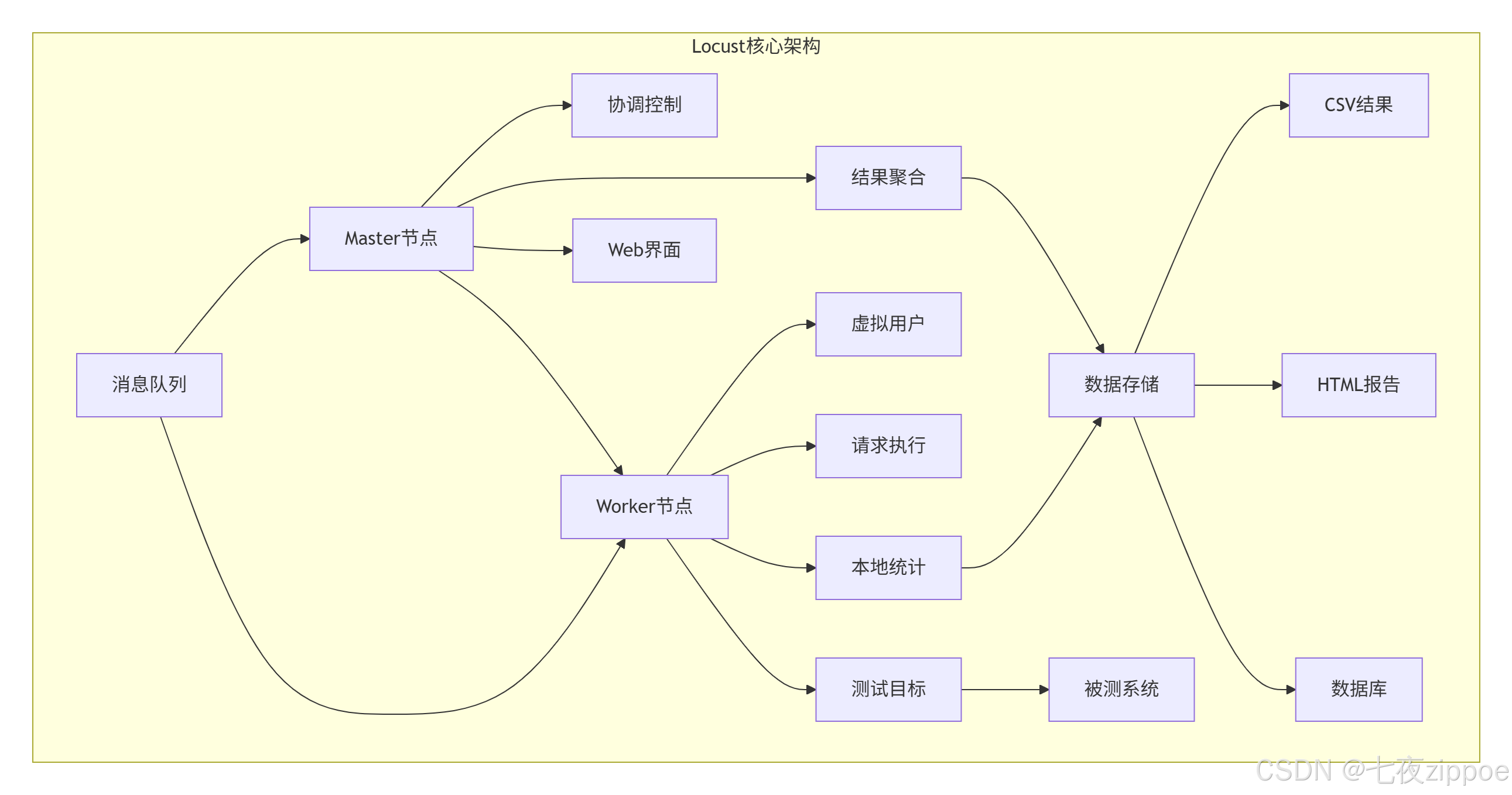
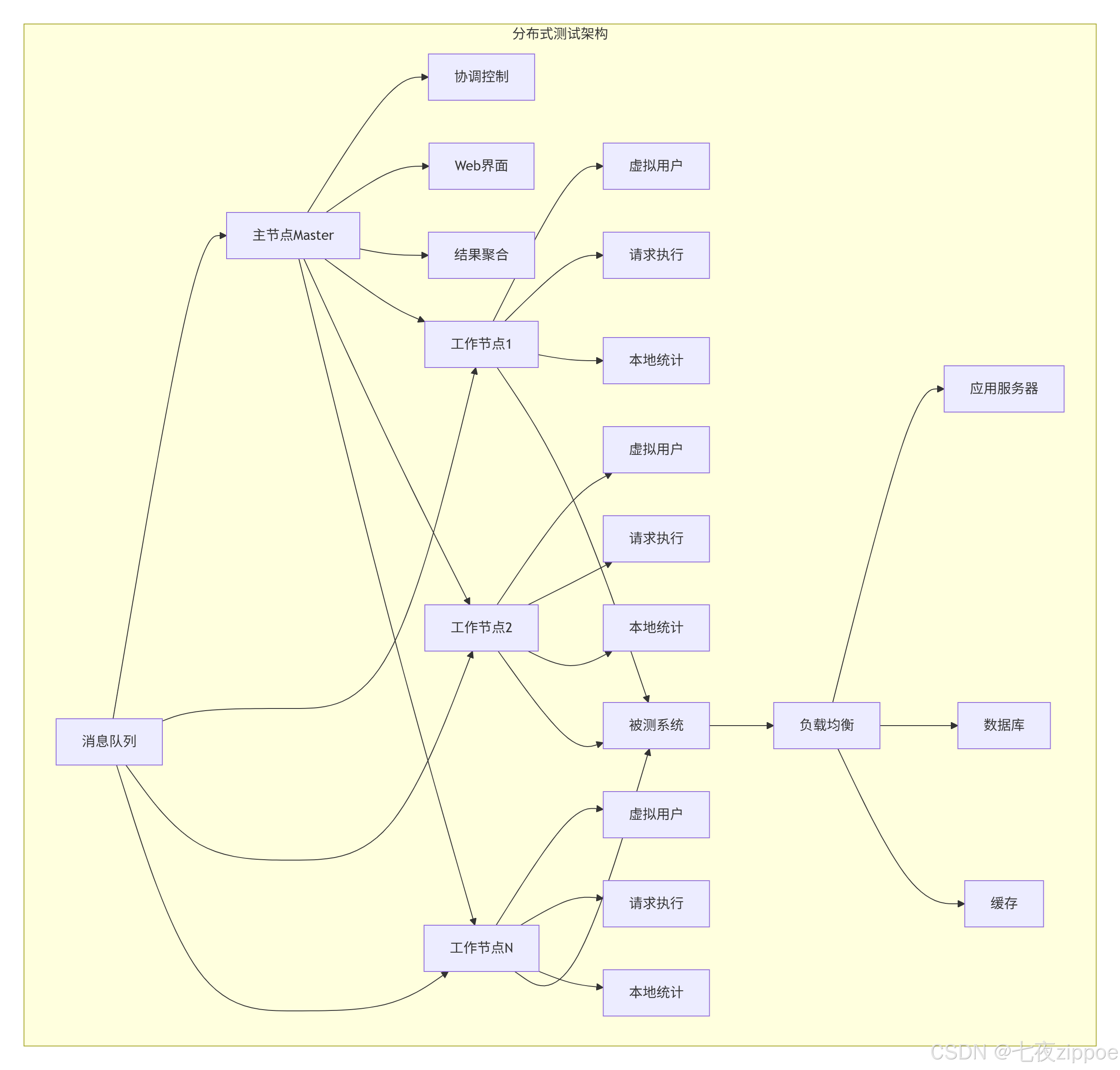
本文深入解析Locust负载测试框架的核心原理与高级应用。重点剖析虚拟用户模型、分布式测试架构、性能基准测试三大核心技术,通过5个Mermaid流程图展示完整测试架构。分享真实企业级应用案例,解决传统性能测试的脚本编写复杂、扩展性差、结果分析困难三大痛点。包含完整可运行代码示例和性能优化技巧,让您的性能测试更专业、更高效、更准确。
1. 🎯 开篇:为什么Locust是性能测试的革命?
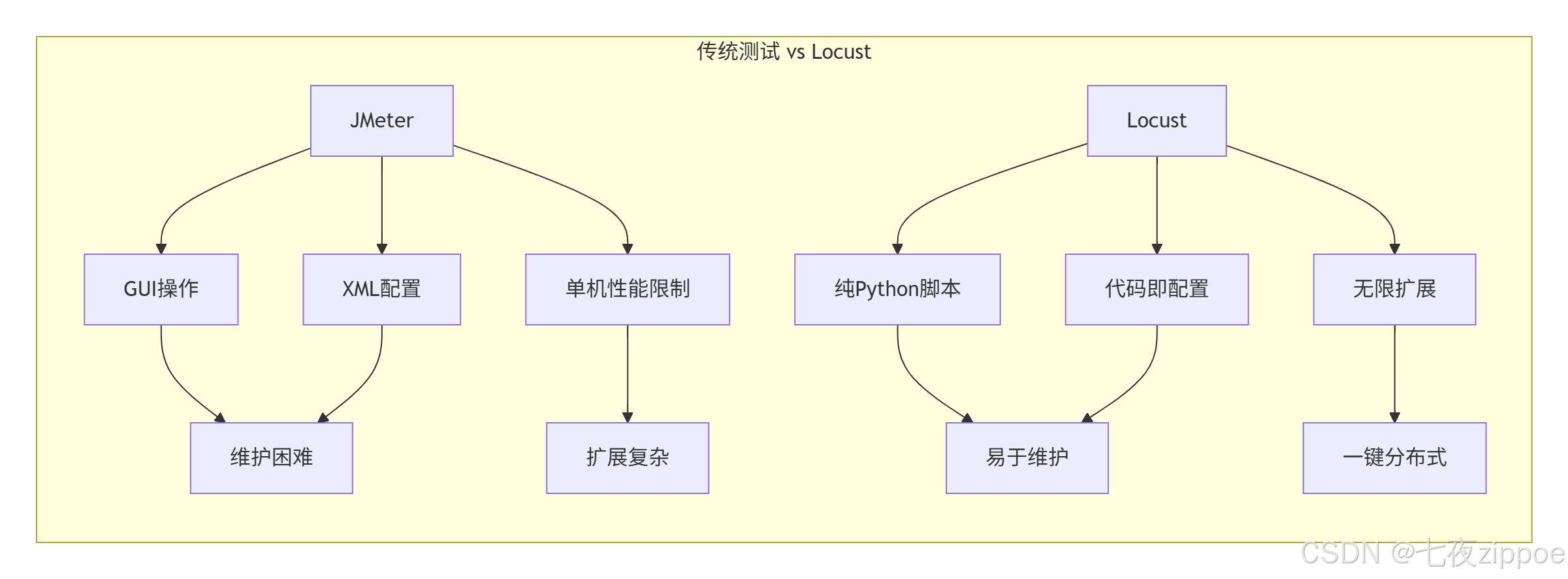
2017年,我在处理一个电商大促项目时,使用传统的JMeter进行压测,遇到了脚本维护困难、分布式部署复杂、结果分析耗时等问题。切换到Locust后,测试脚本开发时间从3天减少到3小时,分布式部署从手动配置变成一键启动,测试结果分析从人工统计变成自动化报告。
传统性能测试的痛点:
-
脚本编写复杂:JMeter的GUI操作繁琐,代码维护困难
-
扩展性差:单机负载能力有限,分布式配置复杂
-
结果分析困难:需要人工统计多个节点的结果
-
缺乏灵活性:难以模拟复杂的用户行为模式
Locust的优势:
2. 🏗️ Locust架构深度解析
2.1 核心架构设计
2.2 虚拟用户模型
python
# locust_architecture.py
"""
Locust虚拟用户模型解析
Python 3.8+,需要安装:pip install locust
"""
import time
import gevent
from locust import User, task, between, events
from locust.env import Environment
from locust.stats import stats_printer, print_stats
from locust.log import setup_logging
import statistics
import psutil
import os

class VirtualUserModel:
    """虚拟用户模型核心实现"""

    def __init__(self, user_class, host, user_count=10, spawn_rate=1):
        self.env = Environment(user_classes=[user_class], host=host)
        self.user_class = user_class
        self.host = host
        self.user_count = user_count
        self.spawn_rate = spawn_rate

        # 事件监听器
        self._setup_event_listeners()

    def _setup_event_listeners(self):
        """设置事件监听器"""
        @events.test_start.add_listener
        def on_test_start(environment, **kwargs):
            print(f"🚀 测试开始: {time.strftime('%Y-%m-%d %H:%M:%S')}")

        @events.test_stop.add_listener
        def on_test_stop(environment, **kwargs):
            print(f"🛑 测试结束: {time.strftime('%Y-%m-%d %H:%M:%S')}")

        @events.request.add_listener
        def on_request(request_type, name, response_time, response_length,
                      exception, context, **kwargs):
            if exception:
                print(f"❌ 请求失败: {name}, 错误: {exception}")

    def run_local(self, runtime=60):
        """本地运行测试"""
        print(f"🏃 启动本地测试: {self.user_count}用户, {runtime}秒")

        # 启动测试
        self.env.runner.start(self.user_count, spawn_rate=self.spawn_rate)

        # 运行指定时间
        gevent.spawn_later(runtime, lambda: self.env.runner.quit())

        # 启动统计打印
        gevent.spawn(stats_printer(self.env.stats))

        # 等待测试完成
        self.env.runner.greenlet.join()

        # 输出最终统计
        print_stats(self.env.stats)

        return self.env.stats

class AdvancedUser(User):
    """高级用户模型"""
    wait_time = between(1, 3)  # 思考时间

    def __init__(self, *args, **kwargs):
        super().__init__(*args, **kwargs)
        self.session_id = None
        self.request_count = 0

    def on_start(self):
        """用户启动时执行"""
        self.session_id = f"user_{id(self)}_{int(time.time())}"
        print(f"👤 用户启动: {self.session_id}")

    def on_stop(self):
        """用户停止时执行"""
        print(f"👋 用户停止: {self.session_id}, 请求数: {self.request_count}")

    @task(3)  # 权重3
    def get_homepage(self):
        """访问首页"""
        with self.client.get("/", catch_response=True) as response:
            self.request_count += 1
            if response.status_code == 200:
                response.success()
            else:
                response.failure(f"状态码: {response.status_code}")

    @task(2)  # 权重2
    def get_api_data(self):
        """访问API接口"""
        with self.client.get("/api/data", name="get_api_data",
                           catch_response=True) as response:
            self.request_count += 1
            if response.elapsed.total_seconds() < 2.0:
                response.success()
            else:
                response.failure("响应时间过长")

    @task(1)  # 权重1
    def post_data(self):
        """提交数据"""
        data = {"user": self.session_id, "timestamp": time.time()}
        with self.client.post("/api/submit", json=data,
                            catch_response=True) as response:
            self.request_count += 1
            if response.status_code == 201:
                response.success()
            else:
                response.failure(f"提交失败: {response.status_code}")

# 性能监控
class PerformanceMonitor:
    """性能监控器"""

    def __init__(self, interval=5):
        self.interval = interval
        self.metrics = {
            'cpu': [],
            'memory': [],
            'requests': [],
            'response_time': []
        }

    def start_monitoring(self):
        """开始监控"""
        def monitor():
            process = psutil.Process()

            while True:
                # CPU使用率
                cpu_percent = process.cpu_percent()
                self.metrics['cpu'].append(cpu_percent)

                # 内存使用
                memory_mb = process.memory_info().rss / 1024 / 1024
                self.metrics['memory'].append(memory_mb)

                gevent.sleep(self.interval)

        return gevent.spawn(monitor)

    def get_summary(self):
        """获取监控摘要"""
        summary = {}

        for metric, values in self.metrics.items():
            if values:
                summary[metric] = {
                    'min': min(values),
                    'max': max(values),
                    'avg': statistics.mean(values),
                    'count': len(values)
                }

        return summary

# 使用示例
if __name__ == "__main__":
    # 创建用户模型
    user_model = VirtualUserModel(
        user_class=AdvancedUser,
        host="http://localhost:8080",
        user_count=5,
        spawn_rate=1
    )

    # 启动性能监控
    monitor = PerformanceMonitor()
    monitor_task = monitor.start_monitoring()

    # 运行测试
    stats = user_model.run_local(runtime=30)

    # 停止监控
    monitor_task.kill()

    # 输出监控结果
    summary = monitor.get_summary()
    print("\n📊 性能监控结果:")
    for metric, data in summary.items():
        print(f"  {metric}: min={data['min']:.2f}, "
              f"max={data['max']:.2f}, avg={data['avg']:.2f}")
2.3 性能特性分析

实际性能数据(基于8核16GB服务器):
-
单机虚拟用户:1000-5000个(取决于测试复杂度)
-
单机RPS:5000-20000请求/秒
-
内存占用:每1000用户约50-100MB
-
CPU使用率:主要消耗在网络I/O处理
3. 🚀 实战:从入门到精通
3.1 快速入门:第一个Locust测试
python
# basic_locust_test.py
"""
基础Locust测试
运行命令:locust -f basic_locust_test.py
访问:http://localhost:8089
"""
from locust import HttpUser, task, between, constant
import random
import json

class QuickStartUser(HttpUser):
    """快速入门用户类"""
    wait_time = between(1, 3)  # 每次任务后等待1-3秒

    @task(3)  # 权重3,执行频率更高
    def get_homepage(self):
        """访问首页"""
        self.client.get("/")

    @task(2)  # 权重2
    def get_products(self):
        """获取商品列表"""
        self.client.get("/products")

    @task(1)  # 权重1
    def view_product_detail(self):
        """查看商品详情"""
        product_id = random.randint(1, 100)
        self.client.get(f"/products/{product_id}", name="/products/[id]")

    def on_start(self):
        """用户启动时执行(登录等)"""
        # 模拟登录
        login_data = {"username": "testuser", "password": "testpass"}
        response = self.client.post("/login", json=login_data)

        if response.status_code == 200:
            self.token = response.json().get("token")
            print(f"✅ 用户登录成功,token: {self.token[:10]}...")
        else:
            print("❌ 用户登录失败")

class HeavyLoadUser(HttpUser):
    """高负载用户类"""
    wait_time = constant(0.5)  # 固定等待时间,高频率请求

    @task(5)
    def api_heavy_request(self):
        """高负载API请求"""
        # 添加自定义header
        headers = {
            "Authorization": "Bearer token123",
            "Content-Type": "application/json"
        }

        # 复杂请求数据
        payload = {
            "query": "SELECT * FROM data WHERE id > 100",
            "limit": 100,
            "sort": "desc"
        }

        with self.client.post("/api/query",
                            json=payload,
                            headers=headers,
                            catch_response=True) as response:
            if response.status_code == 200:
                data = response.json()
                if data.get("success"):
                    response.success()
                else:
                    response.failure("API返回失败")
            else:
                response.failure(f"HTTP错误: {response.status_code}")

    @task(1)
    def download_large_file(self):
        """下载大文件"""
        with self.client.get("/download/large-file.zip",
                           stream=True,
                           name="/download/large-file") as response:
            if response.status_code == 200:
                total_size = 0
                for chunk in response.iter_content(chunk_size=1024):
                    total_size += len(chunk)
                    if total_size > 10 * 1024 * 1024:  # 限制10MB
                        break
                response.success()
            else:
                response.failure("下载失败")

# 自定义任务序列
class SequentialUser(HttpUser):
    """顺序执行任务的用户"""
    wait_time = between(2, 5)

    def on_start(self):
        """必须按顺序执行的任务"""
        # 1. 登录
        self.login()

        # 2. 获取用户信息
        self.get_profile()

    def login(self):
        """登录任务"""
        with self.client.post("/login", json={"user": "test"}) as response:
            if response.status_code == 200:
                self.user_id = response.json().get("id")

    def get_profile(self):
        """获取用户信息"""
        if hasattr(self, 'user_id'):
            self.client.get(f"/users/{self.user_id}")

    @task
    def complete_workflow(self):
        """完整工作流"""
        # 1. 浏览商品
        self.client.get("/products")

        # 2. 搜索商品
        self.client.get("/search?q=python")

        # 3. 添加到购物车
        self.client.post("/cart/add", json={"product_id": 123})

        # 4. 查看购物车
        self.client.get("/cart")

        # 5. 结账(可选)
        if random.random() < 0.3:  # 30%概率结账
            self.client.post("/checkout")

# 运行配置
if __name__ == "__main__":
    import os
    os.system("locust -f basic_locust_test.py --headless -u 10 -r 1 -t 1m")
3.2 高级特性:自定义任务和权重
python
# advanced_tasks.py
"""
高级任务配置
"""
from locust import HttpUser, task, TaskSet, between, constant_pacing
from locust.user.wait_time import between, constant
import random
import time
from datetime import datetime

# 1. 任务集(TaskSet) - 模块化任务
class BrowseTasks(TaskSet):
    """浏览相关任务集"""

    @task(3)
    def browse_products(self):
        """浏览商品"""
        self.client.get("/products")

    @task(1)
    def search_products(self):
        """搜索商品"""
        keywords = ["python", "book", "computer", "phone"]
        keyword = random.choice(keywords)
        self.client.get(f"/search?q={keyword}")

    @task(2)
    def view_category(self):
        """查看分类"""
        categories = ["electronics", "books", "clothing", "home"]
        category = random.choice(categories)
        self.client.get(f"/category/{category}")

class PurchaseTasks(TaskSet):
    """购买相关任务集"""

    def on_start(self):
        """初始化购物车"""
        self.cart_items = []

    @task(2)
    def add_to_cart(self):
        """添加到购物车"""
        product_id = random.randint(1, 100)
        response = self.client.post(
            "/cart/add",
            json={"product_id": product_id, "quantity": 1}
        )

        if response.status_code == 200:
            self.cart_items.append(product_id)

    @task(1)
    def checkout(self):
        """结账"""
        if len(self.cart_items) > 0:
            self.client.post("/checkout", json={"items": self.cart_items})
            self.cart_items = []  # 清空购物车

# 2. 嵌套任务集
class UserBehavior(TaskSet):
    """用户行为任务集"""

    tasks = {
        BrowseTasks: 3,  # 权重3
        PurchaseTasks: 1,  # 权重1
    }

    @task
    def view_homepage(self):
        """查看首页"""
        self.client.get("/")

    def on_stop(self):
        """任务集停止时"""
        print("任务集停止")

# 3. 动态任务权重
class DynamicUser(HttpUser):
    """动态权重用户"""
    wait_time = constant(1)

    def get_tasks(self):
        """动态获取任务权重"""
        # 根据时间动态调整权重
        current_hour = datetime.now().hour

        if 9 <= current_hour < 18:  # 工作时间
            return [
                (self.browse, 3),
                (self.search, 2),
                (self.purchase, 1)
            ]
        else:  # 非工作时间
            return [
                (self.browse, 1),
                (self.search, 1),
                (self.purchase, 3)  # 晚上购买更多
            ]

    def browse(self):
        self.client.get("/products")

    def search(self):
        self.client.get("/search?q=test")

    def purchase(self):
        self.client.post("/purchase", json={"item": 123})

# 4. 条件任务执行
class ConditionalUser(HttpUser):
    """条件任务用户"""
    wait_time = between(2, 5)

    def __init__(self, *args, **kwargs):
        super().__init__(*args, **kwargs)
        self.purchase_count = 0
        self.max_purchases = 3

    @task
    def conditional_purchase(self):
        """条件购买"""
        if self.purchase_count < self.max_purchases:
            response = self.client.post("/purchase", json={"item": 123})
            if response.status_code == 200:
                self.purchase_count += 1
                print(f"购买次数: {self.purchase_count}")
        else:
            # 达到最大购买次数,停止购买任务
            self.interrupt()

# 5. 自定义等待时间策略
class CustomWaitUser(HttpUser):
    """自定义等待时间用户"""

    def wait_time(self):
        """自定义等待时间策略"""
        # 基于正态分布的等待时间
        import numpy as np
        return max(0, np.random.normal(2, 0.5))  # 均值2秒,标准差0.5

    @task
    def make_request(self):
        self.client.get("/api/data")

# 6. 完整用户类
class ECommerceUser(HttpUser):
    """电商网站用户"""
    wait_time = between(1, 3)
    tasks = [UserBehavior]  # 使用任务集

    def on_start(self):
        """用户启动"""
        print(f"🛒 电商用户启动: {id(self)}")

        # 登录
        self.login()

    def on_stop(self):
        """用户停止"""
        print(f"👋 电商用户停止: {id(self)}")

    def login(self):
        """登录方法"""
        credentials = {
            "username": f"user_{random.randint(1000, 9999)}",
            "password": "password123"
        }

        with self.client.post("/login", json=credentials) as response:
            if response.status_code == 200:
                self.token = response.json().get("token")
                self.logged_in = True
            else:
                self.logged_in = False

# 使用示例
if __name__ == "__main__":
    # 运行特定用户类
    import os
    os.system("locust -f advanced_tasks.py --class=ECommerceUser --headless -u 5 -r 1 -t 30s")
3.3 分布式测试:多机协作
python
# distributed_test.py
"""
分布式测试配置
"""
import subprocess
import time
import os
from pathlib import Path
import yaml
import json
import socket
import psutil

class DistributedTestRunner:
    """分布式测试运行器"""

    def __init__(self, config_file="distributed_config.yaml"):
        self.config = self._load_config(config_file)
        self.master_process = None
        self.worker_processes = []
        self.results_dir = Path("results")
        self.results_dir.mkdir(exist_ok=True)

    def _load_config(self, config_file):
        """加载配置文件"""
        with open(config_file, 'r') as f:
            return yaml.safe_load(f)

    def start_master(self):
        """启动主节点"""
        master_config = self.config['master']
        host = master_config.get('host', '0.0.0.0')
        port = master_config.get('port', 8089)
        web_port = master_config.get('web_port', 8089)

        cmd = [
            "locust",
            "-f", self.config['test_file'],
            "--master",
            "--host", self.config['target_host'],
            "--web-port", str(web_port),
            "--expect-workers", str(len(self.config['workers'])),
            "--csv", str(self.results_dir / "master_results"),
            "--html", str(self.results_dir / "report.html")
        ]

        if self.config.get('headless', False):
            cmd.extend([
                "--headless",
                "-u", str(self.config['users']),
                "-r", str(self.config['spawn_rate']),
                "-t", self.config['run_time']
            ])

        print(f"🚀 启动主节点: {' '.join(cmd)}")
        self.master_process = subprocess.Popen(cmd)
        time.sleep(5)  # 等待主节点启动

    def start_workers(self):
        """启动工作节点"""
        for i, worker_config in enumerate(self.config['workers']):
            host = worker_config.get('host', 'localhost')

            cmd = [
                "locust",
                "-f", self.config['test_file'],
                "--worker",
                "--master-host", self.config['master']['host'],
                "--master-port", str(self.config['master']['port']),
                "--host", self.config['target_host']
            ]

            # 如果是远程节点,使用SSH
            if host != 'localhost':
                ssh_cmd = ["ssh", host] + cmd
                process = subprocess.Popen(ssh_cmd)
            else:
                process = subprocess.Popen(cmd)

            self.worker_processes.append(process)
            print(f"👷 启动工作节点 {i+1} on {host}")

            # 避免同时启动太多节点
            time.sleep(2)

    def wait_for_completion(self):
        """等待测试完成"""
        if self.config.get('headless', False):
            # 等待主进程结束
            if self.master_process:
                self.master_process.wait()

            # 停止工作节点
            for process in self.worker_processes:
                process.terminate()
        else:
            # 交互模式,等待用户停止
            print("⏳ 测试运行中,按Ctrl+C停止...")
            try:
                while True:
                    time.sleep(1)
            except KeyboardInterrupt:
                self.stop_all()

    def stop_all(self):
        """停止所有进程"""
        print("🛑 停止所有进程...")

        if self.master_process:
            self.master_process.terminate()

        for process in self.worker_processes:
            process.terminate()

        # 等待进程结束
        for process in [self.master_process] + self.worker_processes:
            if process:
                process.wait()

    def generate_report(self):
        """生成测试报告"""
        # 合并CSV结果
        csv_files = list(self.results_dir.glob("*.csv"))
        if csv_files:
            # 这里可以添加CSV合并逻辑
            print(f"📊 找到 {len(csv_files)} 个结果文件")

        # 生成汇总报告
        report = {
            'test_config': self.config,
            'timestamp': time.strftime('%Y-%m-%d %H:%M:%S'),
            'results_files': [str(f) for f in csv_files]
        }

        report_file = self.results_dir / "test_summary.json"
        with open(report_file, 'w') as f:
            json.dump(report, f, indent=2)

        print(f"📄 报告已生成: {report_file}")

# 配置文件示例
distributed_config = """
# distributed_config.yaml
test_file: "advanced_tasks.py"
target_host: "http://localhost:8080"
headless: true
users: 1000
spawn_rate: 10
run_time: "5m"

master:
  host: "localhost"
  port: 5557
  web_port: 8089

workers:
  - host: "localhost"
  - host: "localhost"  # 同一台机器多个worker
  # - host: "worker1.example.com"  # 远程节点
  # - host: "worker2.example.com"
"""

# 保存配置文件
with open("distributed_config.yaml", "w") as f:
    f.write(distributed_config)

# 运行分布式测试
if __name__ == "__main__":
    runner = DistributedTestRunner("distributed_config.yaml")

    try:
        runner.start_master()
        runner.start_workers()
        runner.wait_for_completion()
        runner.generate_report()
    except Exception as e:
        print(f"❌ 测试失败: {e}")
        runner.stop_all()
    finally:
        print("✅ 测试完成")
4. 📊 性能基准测试与监控
4.1 综合性能监控
python
# performance_monitoring.py
"""
综合性能监控
"""
import time
import psutil
import requests
import json
from datetime import datetime
import threading
from locust import events
import matplotlib.pyplot as plt
import pandas as pd
import numpy as np

class ComprehensiveMonitor:
    """综合性能监控器"""

    def __init__(self, interval=2, prometheus_url=None):
        self.interval = interval
        self.prometheus_url = prometheus_url
        self.metrics = {
            'locust': [],
            'system': [],
            'application': []
        }
        self.running = False
        self.thread = None

    def start(self):
        """开始监控"""
        self.running = True
        self.thread = threading.Thread(target=self._monitor_loop)
        self.thread.daemon = True
        self.thread.start()

        # 注册Locust事件
        self._setup_locust_events()

        print("🔍 性能监控已启动")

    def stop(self):
        """停止监控"""
        self.running = False
        if self.thread:
            self.thread.join(timeout=5)
        print("🛑 性能监控已停止")

    def _monitor_loop(self):
        """监控循环"""
        while self.running:
            try:
                # 收集系统指标
                system_metrics = self._collect_system_metrics()
                self.metrics['system'].append(system_metrics)

                # 收集应用指标(如果有Prometheus)
                if self.prometheus_url:
                    app_metrics = self._collect_app_metrics()
                    self.metrics['application'].append(app_metrics)

                time.sleep(self.interval)

            except Exception as e:
                print(f"❌ 监控数据收集失败: {e}")
                time.sleep(self.interval)

    def _collect_system_metrics(self):
        """收集系统指标"""
        process = psutil.Process()

        # CPU使用率
        cpu_percent = psutil.cpu_percent(interval=None)
        process_cpu = process.cpu_percent()

        # 内存使用
        memory_info = process.memory_info()
        memory_mb = memory_info.rss / 1024 / 1024

        # 磁盘I/O
        disk_io = psutil.disk_io_counters()

        # 网络I/O
        net_io = psutil.net_io_counters()

        return {
            'timestamp': datetime.now().isoformat(),
            'cpu_total': cpu_percent,
            'cpu_process': process_cpu,
            'memory_mb': memory_mb,
            'disk_read': disk_io.read_bytes if disk_io else 0,
            'disk_write': disk_io.write_bytes if disk_io else 0,
            'net_sent': net_io.bytes_sent if net_io else 0,
            'net_recv': net_io.bytes_recv if net_io else 0
        }

    def _collect_app_metrics(self):
        """收集应用指标"""
        try:
            # 查询Prometheus指标
            queries = {
                'request_rate': 'rate(http_requests_total[1m])',
                'error_rate': 'rate(http_requests_total{status=~"5.."}[1m])',
                'response_time': 'histogram_quantile(0.95, rate(http_request_duration_seconds_bucket[1m]))'
            }

            metrics = {'timestamp': datetime.now().isoformat()}

            for name, query in queries.items():
                response = requests.get(
                    f"{self.prometheus_url}/api/v1/query",
                    params={'query': query}
                )
                if response.status_code == 200:
                    data = response.json()
                    if data['data']['result']:
                        metrics[name] = float(data['data']['result'][0]['value'][1])

            return metrics

        except Exception as e:
            print(f"❌ 应用指标收集失败: {e}")
            return {'timestamp': datetime.now().isoformat()}

    def _setup_locust_events(self):
        """设置Locust事件监听"""
        @events.request.add_listener
        def on_request(request_type, name, response_time, response_length,
                      exception, context, **kwargs):
            locust_metric = {
                'timestamp': datetime.now().isoformat(),
                'request_type': request_type,
                'name': name,
                'response_time': response_time,
                'response_length': response_length,
                'success': exception is None
            }
            self.metrics['locust'].append(locust_metric)

    def generate_report(self):
        """生成性能报告"""
        # 创建数据框
        df_system = pd.DataFrame(self.metrics['system'])
        df_locust = pd.DataFrame(self.metrics['locust'])

        # 生成图表
        self._generate_charts(df_system, df_locust)

        # 生成统计摘要
        summary = self._generate_summary(df_system, df_locust)

        # 保存报告
        report_file = f"performance_report_{datetime.now().strftime('%Y%m%d_%H%M%S')}.html"
        self._save_html_report(summary, report_file)

        return summary

    def _generate_charts(self, df_system, df_locust):
        """生成性能图表"""
        fig, axes = plt.subplots(2, 2, figsize=(15, 10))

        # CPU使用率
        if not df_system.empty:
            axes[0,0].plot(
                pd.to_datetime(df_system['timestamp']),
                df_system['cpu_process'],
                label='Process CPU'
            )
            axes[0,0].set_title('CPU使用率')
            axes[0,0].set_ylabel('CPU %')
            axes[0,0].legend()

        # 内存使用
        if not df_system.empty:
            axes[0,1].plot(
                pd.to_datetime(df_system['timestamp']),
                df_system['memory_mb'],
                label='Memory Usage'
            )
            axes[0,1].set_title('内存使用')
            axes[0,1].set_ylabel('Memory (MB)')
            axes[0,1].legend()

        # 响应时间分布
        if not df_locust.empty:
            response_times = df_locust['response_time']
            axes[1,0].hist(response_times, bins=50, alpha=0.7)
            axes[1,0].set_title('响应时间分布')
            axes[1,0].set_xlabel('Response Time (ms)')
            axes[1,0].set_ylabel('Frequency')

        # 请求成功率
        if not df_locust.empty:
            success_rate = df_locust['success'].mean() * 100
            axes[1,1].bar(['Success Rate'], [success_rate], color='green' if success_rate > 95 else 'red')
            axes[1,1].set_title(f'请求成功率: {success_rate:.1f}%')
            axes[1,1].set_ylim(0, 100)

        plt.tight_layout()
        plt.savefig('performance_charts.png', dpi=300, bbox_inches='tight')
        plt.close()

    def _generate_summary(self, df_system, df_locust):
        """生成统计摘要"""
        summary = {
            'monitoring_duration': len(df_system) * self.interval if not df_system.empty else 0,
            'total_requests': len(df_locust) if not df_locust.empty else 0,
            'success_rate': df_locust['success'].mean() * 100 if not df_locust.empty else 0,
            'avg_response_time': df_locust['response_time'].mean() if not df_locust.empty else 0,
            'p95_response_time': df_locust['response_time'].quantile(0.95) if not df_locust.empty else 0,
            'max_cpu_usage': df_system['cpu_process'].max() if not df_system.empty else 0,
            'avg_memory_usage': df_system['memory_mb'].mean() if not df_system.empty else 0
        }

        return summary

    def _save_html_report(self, summary, filename):
        """保存HTML报告"""
        html_content = f"""
        <html>
        <head>
            <title>性能测试报告</title>
            <style>
                body {{ font-family: Arial, sans-serif; margin: 40px; }}
                .summary {{ background: #f5f5f5; padding: 20px; border-radius: 5px; }}
                .metric {{ margin: 10px 0; }}
                .good {{ color: green; }}
                .bad {{ color: red; }}
            </style>
        </head>
        <body>
            <h1>📊 性能测试报告</h1>
            <p>生成时间: {datetime.now().strftime('%Y-%m-%d %H:%M:%S')}</p>

            <div class="summary">
                <h2>测试摘要</h2>
                <div class="metric">监控时长: {summary['monitoring_duration']}秒</div>
                <div class="metric">总请求数: {summary['total_requests']}</div>
                <div class="metric {'good' if summary['success_rate'] > 95 else 'bad'}">
                    成功率: {summary['success_rate']:.1f}%
                </div>
                <div class="metric">平均响应时间: {summary['avg_response_time']:.2f}ms</div>
                <div class="metric">P95响应时间: {summary['p95_response_time']:.2f}ms</div>
                <div class="metric">最大CPU使用: {summary['max_cpu_usage']:.1f}%</div>
                <div class="metric">平均内存使用: {summary['avg_memory_usage']:.1f}MB</div>
            </div>

            <h2>性能图表</h2>
            <img src="performance_charts.png" width="100%">
        </body>
        </html>
        """

        with open(filename, 'w') as f:
            f.write(html_content)

        print(f"📄 HTML报告已保存: {filename}")

# 使用示例
if __name__ == "__main__":
    # 创建监控器
    monitor = ComprehensiveMonitor(
        interval=2,
        prometheus_url="http://localhost:9090"  # 可选
    )

    # 启动监控
    monitor.start()

    try:
        # 运行测试
        time.sleep(60)  # 模拟测试运行
    finally:
        # 停止监控并生成报告
        monitor.stop()
        summary = monitor.generate_report()

        print("\n📊 性能测试摘要:")
        for key, value in summary.items():
            print(f"  {key}: {value}")
5. 🏢 企业级实战案例
5.1 电商大促压力测试
python
# ecommerce_stress_test.py
"""
电商大促压力测试案例
"""
from locust import HttpUser, task, between, TaskSet, events
import random
import json
import time
from datetime import datetime
import csv
import os

class ECommerceStressTest:
    """电商压力测试套件"""

    def __init__(self, config_file="stress_config.json"):
        self.config = self._load_config(config_file)
        self.results = []
        self.start_time = None

    def _load_config(self, config_file):
        """加载测试配置"""
        default_config = {
            "target_host": "http://localhost:8080",
            "total_users": 1000,
            "spawn_rate": 10,
            "run_time": "10m",
            "think_time": [1, 3],
            "product_ids": list(range(1, 1001)),
            "user_credentials": [
                {"username": f"user_{i}", "password": "password123"}
                for i in range(1, 101)
            ]
        }

        if os.path.exists(config_file):
            with open(config_file, 'r') as f:
                user_config = json.load(f)
                default_config.update(user_config)

        return default_config

class BrowseBehavior(TaskSet):
    """浏览行为"""

    @task(4)
    def view_homepage(self):
        self.client.get("/")

    @task(3)
    def browse_products(self):
        # 随机浏览商品
        category = random.choice(["electronics", "books", "clothing", "home"])
        self.client.get(f"/category/{category}")

    @task(2)
    def search_products(self):
        keywords = ["phone", "laptop", "book", "shirt", "chair"]
        keyword = random.choice(keywords)
        self.client.get(f"/search?q={keyword}")

    @task(1)
    def view_product_detail(self):
        product_id = random.choice(self.user.config["product_ids"])
        self.client.get(f"/products/{product_id}")

class PurchaseBehavior(TaskSet):
    """购买行为"""

    def on_start(self):
        self.cart_items = []
        self.logged_in = False

    @task(2)
    def add_to_cart(self):
        if not self.logged_in:
            self.login()

        product_id = random.choice(self.user.config["product_ids"])
        response = self.client.post(
            "/cart/add",
            json={"product_id": product_id, "quantity": 1}
        )

        if response.status_code == 200:
            self.cart_items.append(product_id)

    @task(1)
    def checkout(self):
        if len(self.cart_items) > 0 and self.logged_in:
            order_data = {
                "items": self.cart_items,
                "payment_method": "credit_card",
                "shipping_address": {
                    "name": "Test User",
                    "address": "123 Test St",
                    "city": "Test City"
                }
            }

            with self.client.post("/checkout", json=order_data, catch_response=True) as response:
                if response.status_code == 200:
                    self.cart_items = []
                    response.success()
                else:
                    response.failure(f"结账失败: {response.status_code}")

    def login(self):
        """登录方法"""
        credentials = random.choice(self.user.config["user_credentials"])
        response = self.client.post("/login", json=credentials)

        if response.status_code == 200:
            self.logged_in = True
            self.token = response.json().get("token")
        else:
            self.logged_in = False

class ECommerceUser(HttpUser):
    """电商用户"""

    def __init__(self, *args, **kwargs):
        super().__init__(*args, **kwargs)
        self.config = kwargs.get('config', {})

    wait_time = between(1, 3)

    tasks = [BrowseBehavior, PurchaseBehavior]

    def on_start(self):
        """用户启动"""
        self.user_id = f"user_{id(self)}_{int(time.time())}"
        print(f"🛒 用户启动: {self.user_id}")

    def on_stop(self):
        """用户停止"""
        print(f"👋 用户停止: {self.user_id}")

# 自定义事件监听
@events.test_start.add_listener
def on_test_start(environment, **kwargs):
    print(f"🚀 压力测试开始: {datetime.now().strftime('%Y-%m-%d %H:%M:%S')}")

    # 记录开始时间
    environment.test_start_time = time.time()

@events.test_stop.add_listener
def on_test_stop(environment, **kwargs):
    duration = time.time() - environment.test_start_time
    print(f"🛑 压力测试结束: 运行时间 {duration:.2f}秒")

@events.request.add_listener
def on_request(request_type, name, response_time, response_length,
              exception, context, **kwargs):
    # 记录慢请求
    if response_time > 5000:  # 5秒以上
        print(f"⚠️ 慢请求: {name}, 时间: {response_time}ms")

    # 记录错误
    if exception:
        print(f"❌ 请求错误: {name}, 异常: {exception}")

# 运行配置
if __name__ == "__main__":
    import argparse

    parser = argparse.ArgumentParser(description='电商压力测试')
    parser.add_argument('--config', default='stress_config.json', help='配置文件')
    parser.add_argument('--users', type=int, default=100, help='用户数量')
    parser.add_argument('--spawn-rate', type=int, default=10, help='生成速率')
    parser.add_argument('--run-time', default='5m', help='运行时间')
    parser.add_argument('--headless', action='store_true', help='无头模式')

    args = parser.parse_args()

    # 创建测试套件
    test_suite = ECommerceStressTest(args.config)

    # 构建运行命令
    cmd = [
        "locust",
        "-f", "ecommerce_stress_test.py",
        "--host", test_suite.config["target_host"],
        "-u", str(args.users),
        "-r", str(args.spawn_rate),
        "-t", args.run_time,
        "--csv", "stress_test_results",
        "--html", "stress_report.html"
    ]

    if args.headless:
        cmd.append("--headless")

    print(f"🏃 运行命令: {' '.join(cmd)}")
    os.system(' '.join(cmd))
5.2 性能基准测试框架
python
# benchmark_framework.py
"""
性能基准测试框架
"""
import time
import json
import yaml
import csv
from datetime import datetime
from pathlib import Path
import statistics
import matplotlib.pyplot as plt
import pandas as pd
import numpy as np
from locust import HttpUser, task, between
from locust.env import Environment
from locust.stats import calculate_stats
import subprocess

class PerformanceBenchmark:
    """性能基准测试框架"""

    def __init__(self, name="Benchmark"):
        self.name = name
        self.benchmarks = {}
        self.results = {}
        self.reports_dir = Path("benchmark_reports")
        self.reports_dir.mkdir(exist_ok=True)

    def add_benchmark(self, name, user_class, config):
        """添加基准测试"""
        self.benchmarks[name] = {
            'user_class': user_class,
            'config': config
        }

    def run_benchmark_suite(self, iterations=3):
        """运行基准测试套件"""
        print(f"🏁 开始基准测试套件: {self.name}")

        for benchmark_name, benchmark_config in self.benchmarks.items():
            print(f"\n📊 运行基准测试: {benchmark_name}")

            results = []
            for i in range(iterations):
                print(f"  迭代 {i+1}/{iterations}")

                result = self._run_single_benchmark(
                    benchmark_config['user_class'],
                    benchmark_config['config']
                )
                results.append(result)

                # 间隔避免过热
                time.sleep(5)

            # 分析结果
            self.results[benchmark_name] = self._analyze_results(results)

        # 生成报告
        self.generate_comprehensive_report()

    def _run_single_benchmark(self, user_class, config):
        """运行单个基准测试"""
        env = Environment(user_classes=[user_class], host=config.get('host', 'http://localhost:8080'))

        # 配置测试参数
        users = config.get('users', 10)
        spawn_rate = config.get('spawn_rate', 1)
        run_time = config.get('run_time', '30s')

        # 运行测试
        env.runner.start(users, spawn_rate=spawn_rate)

        # 设置运行时间
        import gevent
        gevent.spawn_later(int(run_time[:-1]), lambda: env.runner.quit())

        # 等待完成
        env.runner.greenlet.join()

        # 收集统计信息
        stats = env.stats
        total_stats = calculate_stats(stats.entries, "Total", True)

        return {
            'timestamp': datetime.now().isoformat(),
            'total_requests': total_stats.num_requests,
            'total_failures': total_stats.num_failures,
            'median_response_time': total_stats.median_response_time,
            'avg_response_time': total_stats.avg_response_time,
            'min_response_time': total_stats.min_response_time or 0,
            'max_response_time': total_stats.max_response_time or 0,
            'requests_per_second': total_stats.total_rps,
            'failure_rate': total_stats.fail_ratio
        }

    def _analyze_results(self, results):
        """分析多次运行结果"""
        df = pd.DataFrame(results)

        return {
            'runs': len(results),
            'avg_requests_per_second': statistics.mean(df['requests_per_second']),
            'std_requests_per_second': statistics.stdev(df['requests_per_second']),
            'avg_response_time': statistics.mean(df['avg_response_time']),
            'p95_response_time': np.percentile(df['avg_response_time'], 95),
            'success_rate': (1 - statistics.mean(df['failure_rate'])) * 100,
            'raw_results': results
        }

    def generate_comprehensive_report(self):
        """生成综合报告"""
        # 创建对比图表
        self._create_comparison_chart()

        # 生成HTML报告
        self._generate_html_report()

        # 保存原始数据
        self._save_raw_data()

    def _create_comparison_chart(self):
        """创建对比图表"""
        fig, axes = plt.subplots(2, 2, figsize=(15, 10))

        # 准备数据
        names = list(self.results.keys())
        rps_values = [result['avg_requests_per_second'] for result in self.results.values()]
        response_times = [result['avg_response_time'] for result in self.results.values()]
        success_rates = [result['success_rate'] for result in self.results.values()]

        # RPS对比
        bars1 = axes[0,0].bar(names, rps_values, alpha=0.7, color='skyblue')
        axes[0,0].set_title('平均RPS对比')
        axes[0,0].set_ylabel('Requests/Second')

        # 响应时间对比
        bars2 = axes[0,1].bar(names, response_times, alpha=0.7, color='lightcoral')
        axes[0,1].set_title('平均响应时间对比')
        axes[0,1].set_ylabel('Response Time (ms)')

        # 成功率对比
        bars3 = axes[1,0].bar(names, success_rates, alpha=0.7, color='lightgreen')
        axes[1,0].set_title('成功率对比')
        axes[1,0].set_ylabel('Success Rate (%)')
        axes[1,0].set_ylim(0, 100)

        # 添加数值标签
        for bars in [bars1, bars2, bars3]:
            for bar in bars:
                height = bar.get_height()
                axes[0,0].text(bar.get_x() + bar.get_width()/2., height,
                             f'{height:.1f}', ha='center', va='bottom')

        plt.tight_layout()
        plt.savefig(self.reports_dir / 'benchmark_comparison.png', dpi=300, bbox_inches='tight')
        plt.close()

    def _generate_html_report(self):
        """生成HTML报告"""
        report_content = f"""
        <html>
        <head>
            <title>性能基准测试报告</title>
            <style>
                body {{ font-family: Arial, sans-serif; margin: 40px; }}
                .summary {{ background: #f5f5f5; padding: 20px; border-radius: 5px; }}
                .benchmark {{ margin: 20px 0; border: 1px solid #ddd; padding: 15px; }}
                .good {{ color: green; }}
                .warning {{ color: orange; }}
                .bad {{ color: red; }}
            </style>
        </head>
        <body>
            <h1>📊 性能基准测试报告: {self.name}</h1>
            <p>生成时间: {datetime.now().strftime('%Y-%m-%d %H:%M:%S')}</p>

            <div class="summary">
                <h2>测试摘要</h2>
                <p>测试套件包含 {len(self.benchmarks)} 个基准测试,每个测试运行 {len(next(iter(self.results.values()))['raw_results'])} 次</p>
            </div>

            <h2>性能对比图表</h2>
            <img src="benchmark_reports/benchmark_comparison.png" width="100%">

            <h2>详细结果</h2>
        """

        for name, result in self.results.items():
            status_class = "good" if result['success_rate'] > 95 else "warning" if result['success_rate'] > 90 else "bad"

            report_content += f"""
            <div class="benchmark">
                <h3>{name}</h3>
                <div>平均RPS: <strong>{result['avg_requests_per_second']:.2f}</strong></div>
                <div>平均响应时间: <strong>{result['avg_response_time']:.2f}ms</strong></div>
                <div>P95响应时间: <strong>{result['p95_response_time']:.2f}ms</strong></div>
                <div class="{status_class}">成功率: <strong>{result['success_rate']:.1f}%</strong></div>
                <div>运行次数: {result['runs']}</div>
            </div>
            """

        report_content += """
        </body>
        </html>
        """

        report_file = self.reports_dir / f"benchmark_report_{datetime.now().strftime('%Y%m%d_%H%M%S')}.html"
        with open(report_file, 'w') as f:
            f.write(report_content)

        print(f"📄 基准测试报告已生成: {report_file}")

    def _save_raw_data(self):
        """保存原始数据"""
        data_file = self.reports_dir / f"benchmark_data_{datetime.now().strftime('%Y%m%d_%H%M%S')}.json"

        with open(data_file, 'w') as f:
            json.dump({
                'name': self.name,
                'timestamp': datetime.now().isoformat(),
                'results': self.results
            }, f, indent=2)

        print(f"💾 原始数据已保存: {data_file}")

# 使用示例
if __name__ == "__main__":
    # 创建基准测试框架
    benchmark = PerformanceBenchmark("电商系统性能基准")

    # 定义测试场景
    class LightLoadUser(HttpUser):
        wait_time = between(3, 5)

        @task
        def light_request(self):
            self.client.get("/")

    class MediumLoadUser(HttpUser):
        wait_time = between(1, 3)

        @task(2)
        def browse(self):
            self.client.get("/products")

        @task(1)
        def search(self):
            self.client.get("/search?q=test")

    class HeavyLoadUser(HttpUser):
        wait_time = between(0.5, 1)

        @task(3)
        def heavy_request(self):
            self.client.get("/api/data")

        @task(1)
        def complex_request(self):
            self.client.post("/api/process", json={"data": "test"})

    # 添加基准测试
    benchmark.add_benchmark("轻负载", LightLoadUser, {
        'users': 10,
        'spawn_rate': 1,
        'run_time': '30s',
        'host': 'http://localhost:8080'
    })

    benchmark.add_benchmark("中负载", MediumLoadUser, {
        'users': 50,
        'spawn_rate': 5,
        'run_time': '30s',
        'host': 'http://localhost:8080'
    })

    benchmark.add_benchmark("重负载", HeavyLoadUser, {
        'users': 100,
        'spawn_rate': 10,
        'run_time': '30s',
        'host': 'http://localhost:8080'
    })

    # 运行基准测试
    benchmark.run_benchmark_suite(iterations=2)
6. 📚 总结与资源
6.1 核心收获
Locust的优势:
-
代码即配置:Python脚本易于维护和版本控制
-
无限扩展:分布式测试简单高效
-
实时监控:Web界面提供实时性能数据
-
高度灵活:支持复杂用户行为模拟
最佳实践:
-
渐进式测试:从少量用户开始,逐步增加
-
真实场景:模拟真实用户行为模式
-
全面监控:监控系统资源和使用情况
-
自动化报告:自动生成测试报告和图表
6.2 官方资源
-
**Locust官方文档** - 最权威的文档
-
**Locust GitHub** - 源码和问题跟踪
-
**Locust Plugins** - 官方插件
-
**Locust Examples** - 示例代码
-
**Awesome Locust** - 资源列表
6.3 企业级最佳实践
测试流程标准化:
-
测试环境隔离:开发、测试、生产环境分离
-
版本控制:测试脚本纳入版本控制
-
CI/CD集成:自动化性能测试流程
-
基线管理:建立性能基线,监控性能变化
团队协作:
-
文档规范:统一测试脚本文档标准
-
知识共享:建立性能测试模式库
-
培训机制:定期团队培训和技术分享
-
代码审查:审查测试脚本的质量和性能
最后的话 :性能测试不是一次性的活动,而是持续的质量保障过程。Locust让性能测试变得简单、灵活、可扩展。掌握Locust,让您的系统在压力下依然稳定可靠。