欢迎加入开源鸿蒙跨平台社区:https://openharmonycrossplatform.csdn.net
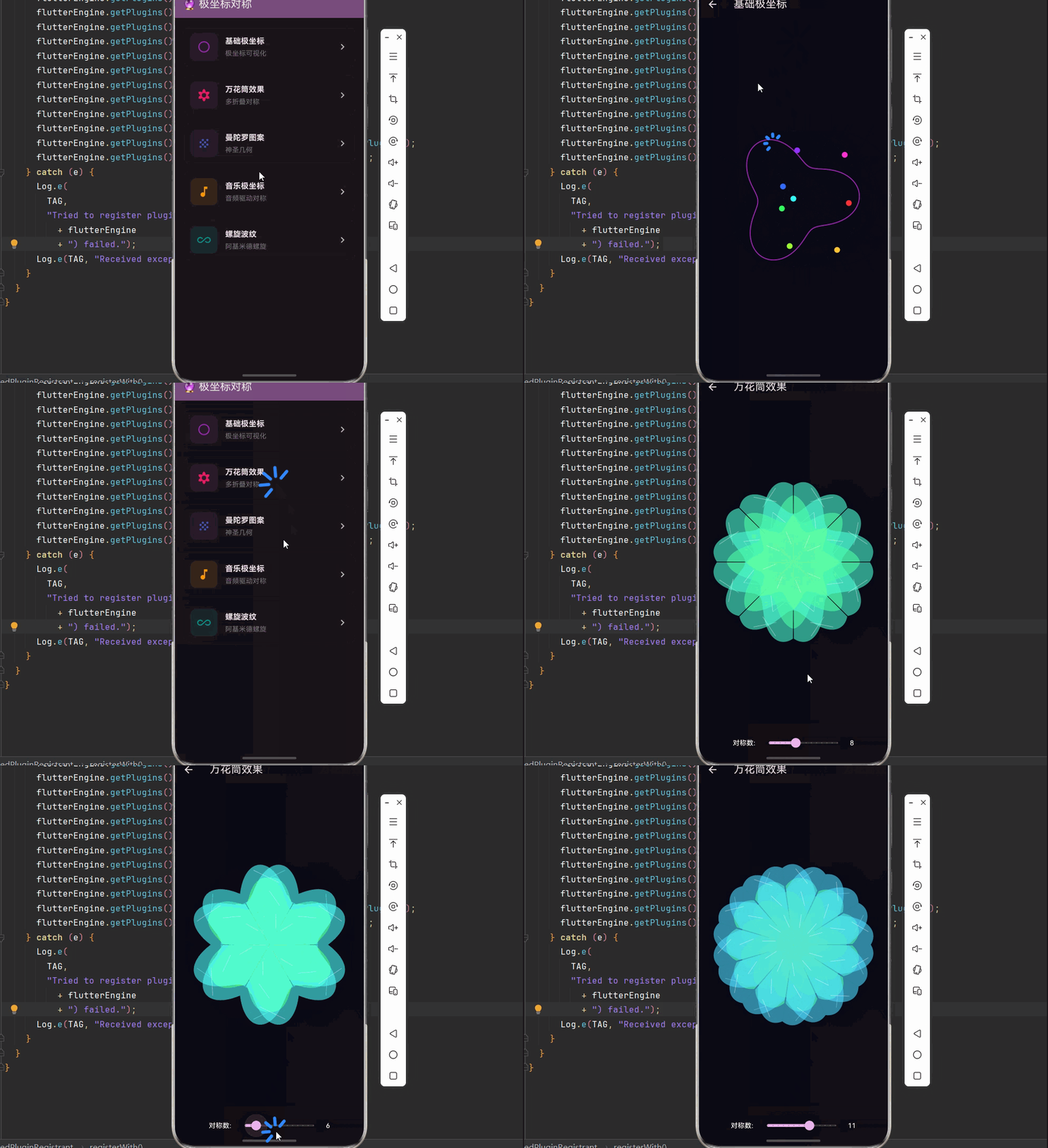
🔮 一、极坐标对称投影:数学之美
📚 1.1 极坐标系统
极坐标是一种二维坐标系统,使用半径 r 和角度 θ 来表示平面上的点,与笛卡尔坐标(x, y)形成互补。
坐标转换公式:
极坐标 → 笛卡尔坐标:
x = r × cos(θ)
y = r × sin(θ)

笛卡尔坐标 → 极坐标:
r = √(x² + y²)
θ = atan2(y, x)示意图:
        y轴
         ↑
         │    • P(r, θ)
         │   ╱
         │  ╱ r
         │ ╱
         │╱ θ
    ─────┼─────────→ x轴
         │O (原点)

P 点的极坐标:(r, θ)
P 点的直角坐标:(r·cos(θ), r·sin(θ))
📐 1.2 对称性原理
对称是自然界中最基本的美学原则之一。在极坐标系统中,对称性可以通过角度变换来实现:
| 对称类型 | 变换规则 | 特点 |
|---|---|---|
| 🔄 旋转对称 | θ → θ + 2π/n | n 重旋转对称 |
| ↕️ 反射对称 | θ → -θ | 镜像对称 |
| 🔀 滑动对称 | θ → θ + π/n, r → r | 平移+反射 |
| 🌀 螺旋对称 | θ → θ + α, r → r + d | 旋转+缩放 |
n 重旋转对称示意:
n = 3 (三重对称)      n = 6 (六重对称)
      ╱╲                  ╱╲
     ╱  ╲                ╱  ╲
    ╱    ╲              ╱╲  ╱╲
   ────────            ────────
    ╲    ╱              ╲╱  ╲╱
     ╲  ╱
      ╲╱
🔬 1.3 万花筒原理
万花筒利用镜面反射原理,将简单的图案通过多次反射产生复杂的对称图案。
万花筒数学模型:
对于 n 面镜片的万花筒:

1. 将角度 θ 映射到基本扇形区域:
   θ' = θ mod (2π/n)

2. 根据扇形内的位置决定是否反射:
   如果 θ' > π/n,则 θ' = 2π/n - θ'

3. 应用图案变换:
图案在基本扇形内绘制,然后复制到所有对称位置万花筒效果示意:
原始图案:          6折万花筒:
    ◆                  ◆ ◆ ◆
                       ◆ ◆ ◆
                      ◆ ◆ ◆ ◆ ◆
                       ◆ ◆ ◆
                        ◆ ◆
🎯 1.4 极坐标在艺术中的应用
| 应用领域 | 效果 | 示例 |
|---|---|---|
| 🌸 曼陀罗 | 圆形对称图案 | 宗教艺术 |
| ❄️ 雪花 | 六重对称 | 自然界 |
| 🎨 装饰艺术 | 伊斯兰几何 | 建筑装饰 |
| 🎵 音乐可视化 | 节奏对称 | 音频响应 |
| 🌊 波纹效果 | 同心圆扩散 | 水波模拟 |
🔧 二、极坐标对称的 Dart 实现
🧮 2.1 极坐标工具类
dart
import 'dart:math';
import 'dart:typed_data';

/// 极坐标点
class PolarPoint {
  final double r;
  final double theta;

  const PolarPoint(this.r, this.theta);

  /// 从笛卡尔坐标创建
  factory PolarPoint.fromCartesian(double x, double y) {
    return PolarPoint(
      sqrt(x * x + y * y),
      atan2(y, x),
    );
  }

  /// 转换为笛卡尔坐标
  Point<double> toCartesian() {
    return Point(r * cos(theta), r * sin(theta));
  }

  /// 旋转
  PolarPoint rotate(double angle) {
    return PolarPoint(r, theta + angle);
  }

  /// 缩放
  PolarPoint scale(double factor) {
    return PolarPoint(r * factor, theta);
  }
}

/// 极坐标变换器
class PolarTransform {
  final double centerX;
  final double centerY;
  final double scale;

  const PolarTransform({
    required this.centerX,
    required this.centerY,
    this.scale = 1.0,
  });

  /// 笛卡尔坐标转极坐标
  PolarPoint toPolar(double x, double y) {
    final dx = (x - centerX) / scale;
    final dy = (y - centerY) / scale;
    return PolarPoint.fromCartesian(dx, dy);
  }

  /// 极坐标转笛卡尔坐标
  Point<double> toCartesian(PolarPoint polar) {
    final cartesian = polar.toCartesian();
    return Point(
      cartesian.x * scale + centerX,
      cartesian.y * scale + centerY,
    );
  }

  /// 规范化角度到 [0, 2π)
  static double normalizeAngle(double theta) {
    while (theta < 0) theta += 2 * pi;
    while (theta >= 2 * pi) theta -= 2 * pi;
    return theta;
  }

  /// 将角度映射到 n 重对称的基本扇形
  static double foldAngle(double theta, int folds) {
    final sectorAngle = 2 * pi / folds;
    var normalized = normalizeAngle(theta);

    // 映射到基本扇形
    final sectorIndex = (normalized / sectorAngle).floor();
    normalized = normalized - sectorIndex * sectorAngle;

    // 在扇形内反射
    if (sectorIndex % 2 == 1) {
      normalized = sectorAngle - normalized;
    }

    return normalized;
  }
}
⚡ 2.2 对称图案生成器
dart
/// 对称图案生成器
class SymmetryGenerator {
  final int foldCount;
  final double radius;
  final PolarTransform transform;

  SymmetryGenerator({
    required this.foldCount,
    required this.radius,
    required this.transform,
  });

  /// 生成对称点集
  List<Point<double>> generateSymmetricPoints(PolarPoint base) {
    final points = <Point<double>>[];
    final sectorAngle = 2 * pi / foldCount;

    for (int i = 0; i < foldCount; i++) {
      // 原始点
      final rotated = base.rotate(i * sectorAngle);
      points.add(transform.toCartesian(rotated));

      // 镜像点
      final mirrored = PolarPoint(base.r, -base.theta);
      final mirroredRotated = mirrored.rotate(i * sectorAngle);
      points.add(transform.toCartesian(mirroredRotated));
    }

    return points;
  }

  /// 生成对称路径
  Path generateSymmetricPath(List<PolarPoint> basePoints) {
    final path = Path();
    final sectorAngle = 2 * pi / foldCount;

    for (int i = 0; i < foldCount; i++) {
      // 原始路径
      for (int j = 0; j < basePoints.length; j++) {
        final rotated = basePoints[j].rotate(i * sectorAngle);
        final cartesian = transform.toCartesian(rotated);

        if (j == 0 && i == 0) {
          path.moveTo(cartesian.x, cartesian.y);
        } else {
          path.lineTo(cartesian.x, cartesian.y);
        }
      }

      // 镜像路径
      for (int j = basePoints.length - 1; j >= 0; j--) {
        final mirrored = PolarPoint(basePoints[j].r, -basePoints[j].theta);
        final rotated = mirrored.rotate(i * sectorAngle);
        final cartesian = transform.toCartesian(rotated);
        path.lineTo(cartesian.x, cartesian.y);
      }
    }

    path.close();
    return path;
  }

  /// 生成放射状图案
  List<Point<double>> generateRadialPattern({
    required int rings,
    required int pointsPerRing,
    required double innerRadius,
    required double outerRadius,
  }) {
    final points = <Point<double>>[];

    for (int ring = 0; ring < rings; ring++) {
      final r = innerRadius + (outerRadius - innerRadius) * ring / (rings - 1);

      for (int i = 0; i < pointsPerRing; i++) {
        final theta = 2 * pi * i / pointsPerRing;
        final polar = PolarPoint(r, theta);
        points.add(transform.toCartesian(polar));
      }
    }

    return points;
  }
}

/// 万花筒效果生成器
class KaleidoscopeGenerator {
  final int segments;
  final double radius;
  final Offset center;

  KaleidoscopeGenerator({
    required this.segments,
    required this.radius,
    required this.center,
  });

  /// 应用万花筒变换
  List<Offset> transform(Offset point) {
    final results = <Offset>[];
    final dx = point.dx - center.dx;
    final dy = point.dy - center.dy;
    final r = sqrt(dx * dx + dy * dy);
    var theta = atan2(dy, dx);

    final sectorAngle = 2 * pi / segments;

    for (int i = 0; i < segments; i++) {
      // 原始
      final newTheta1 = theta + i * sectorAngle;
      results.add(Offset(
        center.dx + r * cos(newTheta1),
        center.dy + r * sin(newTheta1),
      ));

      // 镜像
      final newTheta2 = -theta + i * sectorAngle;
      results.add(Offset(
        center.dx + r * cos(newTheta2),
        center.dy + r * sin(newTheta2),
      ));
    }

    return results;
  }

  /// 生成万花筒路径
  Path generatePath(List<Offset> basePoints, {bool closed = true}) {
    final path = Path();

    for (final point in basePoints) {
      final transformed = transform(point);
      for (int i = 0; i < transformed.length; i++) {
        if (i == 0) {
          path.moveTo(transformed[i].dx, transformed[i].dy);
        } else {
          path.lineTo(transformed[i].dx, transformed[i].dy);
        }
      }
    }

    if (closed) path.close();
    return path;
  }
}
🎨 2.3 音频驱动的极坐标可视化
dart
import 'package:flutter/material.dart';
import 'package:just_audio_ohos/just_audio_ohos.dart';
import 'package:audio_session/audio_session.dart';

/// 音频驱动的极坐标可视化控制器
class AudioPolarController extends ChangeNotifier {
  final AudioPlayer _player = AudioPlayer();

  bool _isPlaying = false;
  Duration _position = Duration.zero;
  Duration _duration = Duration.zero;

  Float32List _audioData = Float32List(128);
  double _energy = 0;
  double _bass = 0;
  double _mid = 0;
  double _treble = 0;

  double _time = 0;
  int _foldCount = 6;
  double _rotation = 0;
  double _pulsePhase = 0;

  bool get isPlaying => _isPlaying;
  Duration get position => _position;
  Duration get duration => _duration;
  Float32List get audioData => _audioData;
  double get energy => _energy;
  double get bass => _bass;
  double get mid => _mid;
  double get treble => _treble;
  int get foldCount => _foldCount;
  double get rotation => _rotation;
  double get pulsePhase => _pulsePhase;
  AudioPlayer get player => _player;

  /// 初始化
  Future<void> initialize() async {
    final session = await AudioSession.instance;
    await session.configure(const AudioSessionConfiguration.music());

    _player.playerStateStream.listen((state) {
      _isPlaying = state.playing;
      notifyListeners();
    });

    _player.positionStream.listen((position) {
      _position = position;
      notifyListeners();
    });

    _player.durationStream.listen((duration) {
      _duration = duration ?? Duration.zero;
      notifyListeners();
    });
  }

  /// 加载网络音频
  Future<void> loadAudio(String url) async {
    try {
      await _player.setUrl(url);
    } catch (e) {
      debugPrint('加载音频失败: $e');
    }
  }

  /// 更新
  void update(double dt) {
    _time += dt;
    _pulsePhase += dt * 2;

    // 更新音频数据
    _updateAudioData();

    // 计算音频特征
    _calculateAudioFeatures();

    // 更新旋转
    _rotation += dt * (0.5 + _energy * 2);

    // 更新折叠数
    _updateFoldCount();

    notifyListeners();
  }

  void _updateAudioData() {
    final random = Random();

    for (int i = 0; i < 128; i++) {
      if (_isPlaying) {
        final freq = (i / 128) * 8 + 1;
        final wave1 = sin(_time * freq) * 0.4;
        final wave2 = sin(_time * freq * 1.5 + pi / 3) * 0.3;
        final noise = (random.nextDouble() - 0.5) * 0.15;
        final bassBoost = i < 32 ? 0.3 : 0;

        _audioData[i] = _audioData[i] * 0.85 +
            (wave1 + wave2 + noise + bassBoost) * 0.15;
      } else {
        _audioData[i] *= 0.95;
      }
    }
  }

  void _calculateAudioFeatures() {
    double totalEnergy = 0;
    double bassEnergy = 0;
    double midEnergy = 0;
    double trebleEnergy = 0;

    for (int i = 0; i < 128; i++) {
      final value = _audioData[i].abs();
      totalEnergy += value;

      if (i < 32) {
        bassEnergy += value;
      } else if (i < 96) {
        midEnergy += value;
      } else {
        trebleEnergy += value;
      }
    }

    _energy = totalEnergy / 128;
    _bass = bassEnergy / 32;
    _mid = midEnergy / 64;
    _treble = trebleEnergy / 32;
  }

  void _updateFoldCount() {
    // 根据中频能量调整对称数
    final targetFolds = 4 + (_mid * 8).toInt();
    if (targetFolds != _foldCount && Random().nextDouble() < 0.02) {
      _foldCount = targetFolds.clamp(3, 12);
    }
  }

  /// 设置折叠数
  void setFoldCount(int count) {
    _foldCount = count.clamp(3, 16);
    notifyListeners();
  }

  /// 播放/暂停音频
  Future<void> togglePlay() async {
    if (_isPlaying) {
      await _player.pause();
    } else {
      await _player.play();
    }
  }

  /// 跳转
  Future<void> seek(Duration position) async {
    await _player.seek(position);
  }

  @override
  void dispose() {
    _player.dispose();
    super.dispose();
  }
}
📦 三、完整示例代码
以下是完整的极坐标对称投影音乐可视化示例代码:
dart
import 'package:flutter/material.dart';
import 'package:just_audio_ohos/just_audio_ohos.dart';
import 'package:audio_session/audio_session.dart';
import 'dart:math';
import 'dart:typed_data';

void main() {
  runApp(const PolarSymmetryApp());
}

class PolarSymmetryApp extends StatelessWidget {
  const PolarSymmetryApp({super.key});

  @override
  Widget build(BuildContext context) {
    return MaterialApp(
      title: '极坐标对称投影',
      theme: ThemeData(
        colorScheme: ColorScheme.fromSeed(seedColor: Colors.purple, brightness: Brightness.dark),
        useMaterial3: true,
      ),
      home: const PolarHomePage(),
      debugShowCheckedModeBanner: false,
    );
  }
}

class PolarHomePage extends StatelessWidget {
  const PolarHomePage({super.key});

  @override
  Widget build(BuildContext context) {
    return Scaffold(
      appBar: AppBar(title: const Text('🔮 极坐标对称'), backgroundColor: Theme.of(context).colorScheme.inversePrimary),
      body: ListView(padding: const EdgeInsets.all(16), children: [
        _buildCard(context, title: '基础极坐标', description: '极坐标可视化', icon: Icons.circle_outlined, color: Colors.purple,
            onTap: () => Navigator.push(context, MaterialPageRoute(builder: (_) => const BasicPolarDemo()))),
        _buildCard(context, title: '万花筒效果', description: '多折叠对称', icon: Icons.filter_vintage, color: Colors.pink,
            onTap: () => Navigator.push(context, MaterialPageRoute(builder: (_) => const KaleidoscopeDemo()))),
        _buildCard(context, title: '曼陀罗图案', description: '神圣几何', icon: Icons.grain, color: Colors.indigo,
            onTap: () => Navigator.push(context, MaterialPageRoute(builder: (_) => const MandalaDemo()))),
        _buildCard(context, title: '音乐极坐标', description: '音频驱动对称', icon: Icons.music_note, color: Colors.orange,
            onTap: () => Navigator.push(context, MaterialPageRoute(builder: (_) => const MusicPolarDemo()))),
        _buildCard(context, title: '螺旋波纹', description: '阿基米德螺旋', icon: Icons.all_inclusive, color: Colors.teal,
            onTap: () => Navigator.push(context, MaterialPageRoute(builder: (_) => const SpiralDemo()))),
      ]),
    );
  }

  Widget _buildCard(BuildContext context, {required String title, required String description, required IconData icon,
      required Color color, required VoidCallback onTap}) {
    return Card(
      margin: const EdgeInsets.only(bottom: 12),
      shape: RoundedRectangleBorder(borderRadius: BorderRadius.circular(16)),
      child: InkWell(
        onTap: onTap,
        borderRadius: BorderRadius.circular(16),
        child: Padding(
          padding: const EdgeInsets.all(16),
          child: Row(children: [
            Container(width: 56, height: 56, decoration: BoxDecoration(color: color.withOpacity(0.1), borderRadius: BorderRadius.circular(12)),
                child: Icon(icon, color: color, size: 28)),
            const SizedBox(width: 16),
            Expanded(child: Column(crossAxisAlignment: CrossAxisAlignment.start, children: [
              Text(title, style: const TextStyle(fontSize: 16, fontWeight: FontWeight.bold)),
              const SizedBox(height: 4),
              Text(description, style: TextStyle(color: Colors.grey[600], fontSize: 14)),
            ])),
            Icon(Icons.chevron_right, color: Colors.grey[400]),
          ]),
        ),
      ),
    );
  }
}

/// 极坐标点
class PolarPoint {
  final double r, theta;
  const PolarPoint(this.r, this.theta);

  factory PolarPoint.fromCartesian(double x, double y) =>
      PolarPoint(sqrt(x * x + y * y), atan2(y, x));

  Point<double> toCartesian() => Point(r * cos(theta), r * sin(theta));
  PolarPoint rotate(double angle) => PolarPoint(r, theta + angle);
  PolarPoint scale(double factor) => PolarPoint(r * factor, theta);
}

/// 基础极坐标演示
class BasicPolarDemo extends StatefulWidget {
  const BasicPolarDemo({super.key});
  @override
  State<BasicPolarDemo> createState() => _BasicPolarDemoState();
}

class _BasicPolarDemoState extends State<BasicPolarDemo> with SingleTickerProviderStateMixin {
  late AnimationController _controller;
  double _time = 0;

  @override
  void initState() {
    super.initState();
    _controller = AnimationController(vsync: this, duration: const Duration(milliseconds: 16))..repeat();
    _controller.addListener(() { _time += 0.016; setState(() {}); });
  }

  @override
  void dispose() {
    _controller.dispose();
    super.dispose();
  }

  @override
  Widget build(BuildContext context) {
    return Scaffold(
      appBar: AppBar(title: const Text('基础极坐标')),
      body: CustomPaint(painter: BasicPolarPainter(_time), size: Size.infinite),
    );
  }
}

class BasicPolarPainter extends CustomPainter {
  final double time;
  BasicPolarPainter(this.time);

  @override
  void paint(Canvas canvas, Size size) {
    final center = Offset(size.width / 2, size.height / 2);
    final maxR = min(size.width, size.height) / 2 - 20;

    canvas.drawRect(Rect.fromLTWH(0, 0, size.width, size.height), Paint()..color = const Color(0xFF0a0a15));

    // 绘制极坐标网格
    for (int r = 20; r <= maxR; r += 40) {
      canvas.drawCircle(center, r.toDouble(), Paint()..color = Colors.white10..style = PaintingStyle.stroke);
    }

    for (int i = 0; i < 12; i++) {
      final angle = i * pi / 6;
      canvas.drawLine(center, Offset(center.dx + maxR * cos(angle), center.dy + maxR * sin(angle)),
          Paint()..color = Colors.white10);
    }

    // 绘制极坐标曲线
    final path = Path();
    for (double theta = 0; theta <= 4 * pi; theta += 0.02) {
      final r = maxR * 0.6 * (1 + 0.3 * sin(3 * theta + time * 2));
      final x = center.dx + r * cos(theta);
      final y = center.dy + r * sin(theta);

      if (theta == 0) path.moveTo(x, y);
      else path.lineTo(x, y);
    }

    canvas.drawPath(path, Paint()..color = Colors.purple..style = PaintingStyle.stroke..strokeWidth = 2);

    // 绘制动态点
    for (int i = 0; i < 8; i++) {
      final theta = time + i * pi / 4;
      final r = maxR * 0.8 * (0.5 + 0.5 * sin(time * 2 + i));
      final x = center.dx + r * cos(theta);
      final y = center.dy + r * sin(theta);

      canvas.drawCircle(Offset(x, y), 6, Paint()..color = HSVColor.fromAHSV(1, ((i * 45 + time * 50) % 360).abs(), 0.8, 1).toColor());
    }
  }

  @override
  bool shouldRepaint(covariant BasicPolarPainter old) => true;
}

/// 万花筒效果演示
class KaleidoscopeDemo extends StatefulWidget {
  const KaleidoscopeDemo({super.key});
  @override
  State<KaleidoscopeDemo> createState() => _KaleidoscopeDemoState();
}

class _KaleidoscopeDemoState extends State<KaleidoscopeDemo> with SingleTickerProviderStateMixin {
  late AnimationController _controller;
  double _time = 0;
  int _segments = 8;

  @override
  void initState() {
    super.initState();
    _controller = AnimationController(vsync: this, duration: const Duration(milliseconds: 16))..repeat();
    _controller.addListener(() { _time += 0.016; setState(() {}); });
  }

  @override
  void dispose() {
    _controller.dispose();
    super.dispose();
  }

  @override
  Widget build(BuildContext context) {
    return Scaffold(
      appBar: AppBar(title: const Text('万花筒效果')),
      body: Column(children: [
        Expanded(child: CustomPaint(painter: KaleidoscopePainter(_time, _segments), size: Size.infinite)),
        _buildControls(),
      ]),
    );
  }

  Widget _buildControls() {
    return Container(
      padding: const EdgeInsets.all(16),
      color: Colors.black12,
      child: Row(mainAxisAlignment: MainAxisAlignment.center, children: [
        const Text('对称数: ', style: TextStyle(color: Colors.white)),
        Slider(value: _segments.toDouble(), min: 3, max: 16, divisions: 13,
            onChanged: (v) => setState(() => _segments = v.toInt())),
        Text('$_segments', style: const TextStyle(color: Colors.white)),
      ]),
    );
  }
}

class KaleidoscopePainter extends CustomPainter {
  final double time;
  final int segments;

  KaleidoscopePainter(this.time, this.segments);

  @override
  void paint(Canvas canvas, Size size) {
    final center = Offset(size.width / 2, size.height / 2);
    final maxR = min(size.width, size.height) / 2 - 10;

    canvas.drawRect(Rect.fromLTWH(0, 0, size.width, size.height), Paint()..color = const Color(0xFF0a0a15));

    final sectorAngle = 2 * pi / segments;

    for (int seg = 0; seg < segments; seg++) {
      canvas.save();
      canvas.translate(center.dx, center.dy);
      canvas.rotate(seg * sectorAngle);

      // 绘制扇形内的图案
      _drawSectorPattern(canvas, maxR, sectorAngle);

      // 绘制镜像
      canvas.scale(1, -1);
      _drawSectorPattern(canvas, maxR, sectorAngle);

      canvas.restore();
    }
  }

  void _drawSectorPattern(Canvas canvas, double maxR, double sectorAngle) {
    // 绘制多层花瓣
    for (int layer = 0; layer < 5; layer++) {
      final r = maxR * (0.3 + layer * 0.15);
      final hue = ((layer * 40 + time * 30) % 360).abs();

      final path = Path();
      for (double t = 0; t <= sectorAngle; t += 0.02) {
        final wave = r * (0.8 + 0.2 * sin(time * 3 + layer + t * 5));
        final x = wave * cos(t);
        final y = wave * sin(t);

        if (t == 0) path.moveTo(x, y);
        else path.lineTo(x, y);
      }
      path.lineTo(0, 0);
      path.close();

      canvas.drawPath(path, Paint()..color = HSVColor.fromAHSV(0.6, hue.toDouble(), 0.7, 1).toColor());
    }

    // 绘制装饰线条
    for (int i = 0; i < 3; i++) {
      final r1 = maxR * (0.2 + i * 0.25);
      final r2 = maxR * (0.35 + i * 0.25);
      final angle = sectorAngle * (0.3 + i * 0.2);

      canvas.drawLine(Offset(r1 * cos(angle * 0.5), r1 * sin(angle * 0.5)),
          Offset(r2 * cos(angle), r2 * sin(angle)),
          Paint()..color = Colors.white.withOpacity(0.5)..strokeWidth = 1);
    }
  }

  @override
  bool shouldRepaint(covariant KaleidoscopePainter old) => true;
}

/// 曼陀罗图案演示
class MandalaDemo extends StatefulWidget {
  const MandalaDemo({super.key});
  @override
  State<MandalaDemo> createState() => _MandalaDemoState();
}

class _MandalaDemoState extends State<MandalaDemo> with SingleTickerProviderStateMixin {
  late AnimationController _controller;
  double _time = 0;
  int _petals = 12;

  @override
  void initState() {
    super.initState();
    _controller = AnimationController(vsync: this, duration: const Duration(milliseconds: 16))..repeat();
    _controller.addListener(() { _time += 0.016; setState(() {}); });
  }

  @override
  void dispose() {
    _controller.dispose();
    super.dispose();
  }

  @override
  Widget build(BuildContext context) {
    return Scaffold(
      appBar: AppBar(title: const Text('曼陀罗图案')),
      body: Column(children: [
        Expanded(child: CustomPaint(painter: MandalaPainter(_time, _petals), size: Size.infinite)),
        _buildControls(),
      ]),
    );
  }

  Widget _buildControls() {
    return Container(
      padding: const EdgeInsets.all(16),
      color: Colors.black12,
      child: Row(mainAxisAlignment: MainAxisAlignment.center, children: [
        const Text('花瓣数: ', style: TextStyle(color: Colors.white)),
        Slider(value: _petals.toDouble(), min: 4, max: 24, divisions: 20,
            onChanged: (v) => setState(() => _petals = v.toInt())),
        Text('$_petals', style: TextStyle(color: Colors.white)),
      ]),
    );
  }
}

class MandalaPainter extends CustomPainter {
  final double time;
  final int petals;

  MandalaPainter(this.time, this.petals);

  @override
  void paint(Canvas canvas, Size size) {
    final center = Offset(size.width / 2, size.height / 2);
    final maxR = min(size.width, size.height) / 2 - 20;

    canvas.drawRect(Rect.fromLTWH(0, 0, size.width, size.height), Paint()..color = const Color(0xFF0a0a15));

    // 绘制多层曼陀罗
    for (int layer = 5; layer >= 0; layer--) {
      final r = maxR * (0.2 + layer * 0.16);
      final hue = (layer * 30 + time * 20) % 360;

      _drawPetalRing(canvas, center, r, petals + layer * 2, hue.toDouble(), layer);
    }

    // 绘制中心
    canvas.drawCircle(center, maxR * 0.1, Paint()..color = Colors.white.withOpacity(0.8));
    canvas.drawCircle(center, maxR * 0.05, Paint()..color = Colors.purple);
  }

  void _drawPetalRing(Canvas canvas, Offset center, double r, int count, double hue, int layer) {
    final angleStep = 2 * pi / count;
    final petalLength = r * 0.3;
    final petalWidth = r * 0.15;

    for (int i = 0; i < count; i++) {
      final angle = i * angleStep + time * (layer % 2 == 0 ? 0.2 : -0.2);

      final path = Path();
      path.moveTo(center.dx, center.dy);

      // 绘制花瓣形状
      final tipX = center.dx + r * cos(angle);
      final tipY = center.dy + r * sin(angle);

      final ctrl1X = center.dx + (r - petalLength * 0.5) * cos(angle) + petalWidth * cos(angle + pi / 2);
      final ctrl1Y = center.dy + (r - petalLength * 0.5) * sin(angle) + petalWidth * sin(angle + pi / 2);

      final ctrl2X = center.dx + (r - petalLength * 0.5) * cos(angle) - petalWidth * cos(angle + pi / 2);
      final ctrl2Y = center.dy + (r - petalLength * 0.5) * sin(angle) - petalWidth * sin(angle + pi / 2);

      path.quadraticBezierTo(ctrl1X, ctrl1Y, tipX, tipY);
      path.quadraticBezierTo(ctrl2X, ctrl2Y, center.dx, center.dy);

      final paint = Paint()..color = HSVColor.fromAHSV(0.7, hue, 0.6, 1).toColor();
      canvas.drawPath(path, paint);

      // 绘制轮廓
      canvas.drawPath(path, Paint()..color = Colors.white.withOpacity(0.3)..style = PaintingStyle.stroke..strokeWidth = 0.5);
    }
  }

  @override
  bool shouldRepaint(covariant MandalaPainter old) => true;
}

/// 音乐极坐标演示
class MusicPolarDemo extends StatefulWidget {
  const MusicPolarDemo({super.key});
  @override
  State<MusicPolarDemo> createState() => _MusicPolarDemoState();
}

class _MusicPolarDemoState extends State<MusicPolarDemo> with TickerProviderStateMixin {
  late AnimationController _animController;
  late AudioPlayer _audioPlayer;
  Float32List _audioData = Float32List(128);
  bool _isPlaying = false;
  Duration _position = Duration.zero;
  Duration _duration = Duration.zero;
  double _energy = 0, _bass = 0, _mid = 0;
  double _time = 0, _rotation = 0;
  int _folds = 6;

  static const String _audioUrl = 'https://www.soundhelix.com/examples/mp3/SoundHelix-Song-1.mp3';

  @override
  void initState() {
    super.initState();
    _initAudio();
    _animController = AnimationController(vsync: this, duration: const Duration(milliseconds: 16))..repeat();
    _animController.addListener(_update);
  }

  Future<void> _initAudio() async {
    _audioPlayer = AudioPlayer();
    final session = await AudioSession.instance;
    await session.configure(const AudioSessionConfiguration.music());

    _audioPlayer.playerStateStream.listen((s) => setState(() => _isPlaying = s.playing));
    _audioPlayer.positionStream.listen((p) => setState(() => _position = p));
    _audioPlayer.durationStream.listen((d) => setState(() => _duration = d ?? Duration.zero));

    try { await _audioPlayer.setUrl(_audioUrl); } catch (e) { debugPrint('加载失败: $e'); }
  }

  void _update() {
    _time += 0.016;

    for (int i = 0; i < 128; i++) {
      if (_isPlaying) {
        final freq = (i / 128) * 8 + 1;
        final wave = sin(_time * freq) * 0.4 + sin(_time * freq * 1.5) * 0.3;
        final bass = i < 32 ? 0.3 : 0;
        _audioData[i] = _audioData[i] * 0.85 + (wave + bass) * 0.15;
      } else {
        _audioData[i] *= 0.95;
      }
    }

    double total = 0, bassE = 0, midE = 0;
    for (int i = 0; i < 128; i++) {
      total += _audioData[i].abs();
      if (i < 32) bassE += _audioData[i].abs();
      else if (i < 96) midE += _audioData[i].abs();
    }
    _energy = total / 128;
    _bass = bassE / 32;
    _mid = midE / 64;

    _rotation += 0.016 * (0.5 + _energy * 2);

    setState(() {});
  }

  @override
  void dispose() {
    _animController.dispose();
    _audioPlayer.dispose();
    super.dispose();
  }

  @override
  Widget build(BuildContext context) {
    return Scaffold(
      appBar: AppBar(title: const Text('音乐极坐标')),
      body: Stack(children: [
        CustomPaint(painter: MusicPolarPainter(_time, _rotation, _folds, _audioData, _energy, _bass), size: Size.infinite),
        Positioned(bottom: 30, left: 20, right: 20, child: _buildControls()),
      ]),
    );
  }

  Widget _buildControls() {
    return Container(
      padding: const EdgeInsets.all(16),
      decoration: BoxDecoration(color: Colors.black.withOpacity(0.7), borderRadius: BorderRadius.circular(16)),
      child: Column(
        mainAxisSize: MainAxisSize.min,
        children: [
          const Text('🎵 SoundHelix - Song 1', style: TextStyle(color: Colors.white, fontSize: 14)),
          const SizedBox(height: 12),
          Slider(value: _duration.inMilliseconds > 0 ? _position.inMilliseconds.toDouble().clamp(0, _duration.inMilliseconds.toDouble()) : 0,
              max: _duration.inMilliseconds > 0 ? _duration.inMilliseconds.toDouble() : 1,
              onChanged: (v) => _audioPlayer.seek(Duration(milliseconds: v.toInt()))),
          Row(mainAxisAlignment: MainAxisAlignment.center, children: [
            const Text('对称: ', style: TextStyle(color: Colors.white70)),
            Slider(value: _folds.toDouble(), min: 3, max: 12, divisions: 9,
                onChanged: (v) => setState(() => _folds = v.toInt())),
            Text('$_folds', style: const TextStyle(color: Colors.white)),
            const SizedBox(width: 20),
            IconButton(icon: Icon(_isPlaying ? Icons.pause : Icons.play_arrow, color: Colors.orange, size: 36),
                onPressed: () => _isPlaying ? _audioPlayer.pause() : _audioPlayer.play()),
          ]),
        ],
      ),
    );
  }
}

class MusicPolarPainter extends CustomPainter {
  final double time, rotation;
  final int folds;
  final Float32List audioData;
  final double energy, bass;

  MusicPolarPainter(this.time, this.rotation, this.folds, this.audioData, this.energy, this.bass);

  @override
  void paint(Canvas canvas, Size size) {
    final center = Offset(size.width / 2, size.height / 2);
    final maxR = min(size.width, size.height) / 2 - 30;

    final bgColor = Color.lerp(const Color(0xFF0a0a15), const Color(0xFF150a20), energy)!;
    canvas.drawRect(Rect.fromLTWH(0, 0, size.width, size.height), Paint()..color = bgColor);

    canvas.save();
    canvas.translate(center.dx, center.dy);
    canvas.rotate(rotation);

    final sectorAngle = 2 * pi / folds;

    // 绘制音频波形环
    for (int ring = 0; ring < 3; ring++) {
      final baseR = maxR * (0.3 + ring * 0.25);
      final hue = ((ring * 60 + time * 30) % 360).abs();

      for (int seg = 0; seg < folds; seg++) {
        canvas.save();
        canvas.rotate(seg * sectorAngle);

        final path = Path();
        for (int i = 0; i <= 32; i++) {
          final t = i * sectorAngle / 32;
          final audioIndex = (seg * 32 + i) % audioData.length;
          final audioVal = audioData[audioIndex].abs();
          final r = baseR * (1 + audioVal * 0.5 + bass * 0.3);

          final x = r * cos(t);
          final y = r * sin(t);

          if (i == 0) path.moveTo(x, y);
          else path.lineTo(x, y);
        }

        path.lineTo(0, 0);
        path.close();

        final paint = Paint()..color = HSVColor.fromAHSV(0.6 - ring * 0.15, hue, 0.7, 1).toColor();
        if (energy > 0.3) paint.maskFilter = MaskFilter.blur(BlurStyle.normal, 2);

        canvas.drawPath(path, paint);

        canvas.restore();
      }
    }

    // 绘制中心脉冲
    final pulseR = maxR * 0.15 * (1 + bass * 0.5);
    canvas.drawCircle(Offset.zero, pulseR, Paint()..color = Colors.white.withOpacity(0.8));
    canvas.drawCircle(Offset.zero, pulseR * 0.6, Paint()..color = Colors.purple.withOpacity(0.9));

    canvas.restore();
  }

  @override
  bool shouldRepaint(covariant MusicPolarPainter old) => true;
}

/// 螺旋波纹演示
class SpiralDemo extends StatefulWidget {
  const SpiralDemo({super.key});
  @override
  State<SpiralDemo> createState() => _SpiralDemoState();
}

class _SpiralDemoState extends State<SpiralDemo> with SingleTickerProviderStateMixin {
  late AnimationController _controller;
  double _time = 0;
  int _arms = 5;
  double _tightness = 0.3;

  @override
  void initState() {
    super.initState();
    _controller = AnimationController(vsync: this, duration: const Duration(milliseconds: 16))..repeat();
    _controller.addListener(() { _time += 0.016; setState(() {}); });
  }

  @override
  void dispose() {
    _controller.dispose();
    super.dispose();
  }

  @override
  Widget build(BuildContext context) {
    return Scaffold(
      appBar: AppBar(title: const Text('螺旋波纹')),
      body: Column(children: [
        Expanded(child: CustomPaint(painter: SpiralPainter(_time, _arms, _tightness), size: Size.infinite)),
        _buildControls(),
      ]),
    );
  }

  Widget _buildControls() {
    return Container(
      padding: const EdgeInsets.all(16),
      color: Colors.black12,
      child: Column(children: [
        Row(children: [
          const Text('臂数: ', style: TextStyle(color: Colors.white)),
          Slider(value: _arms.toDouble(), min: 1, max: 12, divisions: 11,
              onChanged: (v) => setState(() => _arms = v.toInt())),
          Text('$_arms', style: const TextStyle(color: Colors.white)),
        ]),
        Row(children: [
          const Text('紧密度: ', style: TextStyle(color: Colors.white)),
          Slider(value: _tightness, min: 0.1, max: 1,
              onChanged: (v) => setState(() => _tightness = v)),
          Text(_tightness.toStringAsFixed(2), style: const TextStyle(color: Colors.white)),
        ]),
      ]),
    );
  }
}

class SpiralPainter extends CustomPainter {
  final double time;
  final int arms;
  final double tightness;

  SpiralPainter(this.time, this.arms, this.tightness);

  @override
  void paint(Canvas canvas, Size size) {
    final center = Offset(size.width / 2, size.height / 2);
    final maxR = min(size.width, size.height) / 2 - 20;

    canvas.drawRect(Rect.fromLTWH(0, 0, size.width, size.height), Paint()..color = const Color(0xFF0a0a15));

    for (int arm = 0; arm < arms; arm++) {
      final armAngle = arm * 2 * pi / arms;
      final hue = (arm * 360 / arms + time * 20) % 360;

      final path = Path();
      for (double t = 0; t <= 8 * pi; t += 0.05) {
        final r = maxR * tightness * t / (8 * pi);
        final angle = t + armAngle + time * 0.5;

        final x = center.dx + r * cos(angle);
        final y = center.dy + r * sin(angle);

        if (t == 0) path.moveTo(x, y);
        else path.lineTo(x, y);
      }

      final paint = Paint()
        ..color = HSVColor.fromAHSV(0.8, hue, 0.7, 1).toColor()
        ..style = PaintingStyle.stroke
        ..strokeWidth = 2
        ..strokeCap = StrokeCap.round;

      canvas.drawPath(path, paint);
    }

    // 绘制波纹
    for (int i = 0; i < 5; i++) {
      final phase = (time * 2 + i * 0.5) % 3;
      final r = maxR * phase / 3;
      final alpha = (1 - phase / 3) * 0.5;

      canvas.drawCircle(center, r, Paint()..color = Colors.white.withOpacity(alpha)..style = PaintingStyle.stroke..strokeWidth = 1);
    }
  }

  @override
  bool shouldRepaint(covariant SpiralPainter old) => true;
}
📝 四、数学原理深入解析
📐 4.1 极坐标曲线方程
极坐标系统中有许多经典的数学曲线,它们在音乐可视化中可以产生独特的视觉效果:
玫瑰曲线(Rose Curves):
r = a × cos(n × θ)

当 n 为奇数:n 个花瓣
当 n 为偶数:2n 个花瓣

示例:
n = 3: 三叶玫瑰        n = 4: 八叶玫瑰
     ╱╲                   ╲╱╲╱
    ╱  ╲                  ╱  ╲
   ╱    ╲                ╱    ╲
  ────────              ────────
   ╲    ╱                ╲    ╱
    ╲  ╱                  ╲  ╱
╲╱ ╲╱阿基米德螺旋:
r = a + b × θ

特点:相邻两圈之间的距离相等
应用:唱片纹路、弹簧

     ╱╱╱╱╱
    ╱╱╱╱╱╱
   ╱╱╱╱╱╱╱
  ╱╱╱╱╱╱╱╱
╱╱╱╱╱╱╱╱╱对数螺旋:
r = a × e^(b × θ)

特点:角度等量增加,半径按比例增加
自然界:鹦鹉螺、银河系旋臂

     ╱╱╱╱
    ╱╱╱╱╱
   ╱╱╱╱╱╱
╱╱╱╱╱╱╱心形线(Cardioid):
r = a × (1 + cos(θ))

形状:心形
应用:麦克风指向性、声学

    ╱╲
   ╱  ╲
  ╱    ╲
 ╱      ╲
╱        ╲
╲        ╱
 ╲      ╱
  ╲____╱
🔄 4.2 对称群理论
对称性在数学中由群论描述,不同的对称操作构成不同的群:
常见对称群:
| 群名 | 符号 | 描述 | 示例 |
|---|---|---|---|
| 循环群 | Cn | n 重旋转对称 | 雪花 C6 |
| 二面体群 | Dn | n 重旋转 + 反射 | 正多边形 |
| 群 | T | 四面体对称 | 甲烷分子 |
| 八面体群 | O | 立方体对称 | 正方体 |
| 二十面体群 | I | 二十面体对称 | 足球 |
对称操作的数学表示:
旋转变换矩阵(绕原点旋转角度 θ):
R(θ) = | cos(θ)  -sin(θ) |
       | sin(θ)   cos(θ) |

反射变换矩阵(关于 x 轴反射):
M = | 1   0 |
    | 0  -1 |

n 重旋转对称的组合:
Cn = {R(0), R(2π/n), R(4π/n), ..., R(2π(n-1)/n)}
🌸 4.3 曼陀罗几何学
曼陀罗(Mandala)源自梵语,意为"圆"或"中心",是一种具有深刻精神意义的几何图案。
曼陀罗的数学结构:
层级结构:
第 1 层:中心点(本源)
第 2 层:内圆(自我)
第 3 层:花瓣(展开)
第 4 层:外环(世界)
第 5 层:边界(界限)

半径公式:
r_n = r_0 × (1 + n × Δr)

花瓣角度分布:
θ_k = 2π × k / petalCount花瓣形状的数学描述:
单瓣花瓣(使用极坐标):
r(θ) = r_base + A × cos(p × θ) × exp(-k × θ²)

其中:
- r_base: 基础半径
- A: 花瓣振幅
- p: 花瓣形状参数
- k: 衰减系数

多瓣组合:
for i in 0..petalCount:
    θ_offset = i × 2π / petalCount
    drawPetal(θ_offset)
🎵 4.4 音频特征与极坐标映射
将音频特征映射到极坐标参数,可以创造出丰富的视觉效果:
映射策略:
| 音频特征 | 极坐标参数 | 效果 |
|---|---|---|
| 能量 (Energy) | 半径 r | 整体缩放 |
| 低频 (Bass) | 中心大小 | 脉冲效果 |
| 中频 (Mid) | 花瓣数 | 形态变化 |
| 高频 (Treble) | 旋转速度 | 动态感 |
| 音色 (Timbre) | 颜色 | 氛围变化 |
音频驱动的参数方程:
dart
// 极坐标半径受音频调制
double r = baseRadius * (1 + energy * 0.5 + bass * 0.3);

// 花瓣数量随中频变化
int petals = 4 + (mid * 8).toInt();

// 旋转速度与高频相关
double rotationSpeed = 0.5 + treble * 2;

// 颜色随音色变化
double hue = (baseHue + timbre * 60) % 360;
🔬 五、高级应用场景
🎨 5.1 实时音乐可视化
极坐标对称投影在实时音乐可视化中有独特优势:
优势分析:
- 视觉平衡:中心对称天然具有视觉平衡感
- 节奏表达:旋转速度可以表达音乐节奏
- 层次分明:不同半径环可以表示不同频段
- 计算高效:对称性减少计算量
实现架构:
音频输入 → FFT分析 → 特征提取 → 参数映射 → 极坐标渲染
    ↓           ↓           ↓           ↓           ↓
  PCM数据    频谱数据    能量/频段    半径/角度    对称绘制
🌐 5.2 交互式艺术装置
极坐标对称投影适合创建交互式艺术装置:
交互方式:
| 输入 | 映射 | 视觉反馈 |
|---|---|---|
| 触摸位置 | 极坐标角度 | 图案变形 |
| 触摸压力 | 半径大小 | 图案缩放 |
| 手势旋转 | 整体旋转 | 动态旋转 |
| 多点触控 | 对称数 | 图案变化 |
📱 5.3 鸿蒙多端适配
在鸿蒙系统上实现极坐标可视化需要考虑多端适配:
适配策略:
dart
// 响应式尺寸计算
double calculateRadius(BuildContext context) {
  final size = MediaQuery.of(context).size;
  final minDimension = min(size.width, size.height);
  return minDimension * 0.4; // 留出边距
}

// 设备性能适配
int calculateDetailLevel() {
  // 根据设备性能调整细节层次
  if (DevicePerformance.isHigh) return 128;
  if (DevicePerformance.isMedium) return 64;
  return 32;
}

// 多窗口适配
@override
void didChangeMetrics() {
  setState(() {
    // 窗口尺寸变化时重新计算
    _updateLayout();
  });
}
📊 六、性能优化策略
⚡ 6.1 渲染优化
极坐标对称渲染的性能优化技巧:
减少重绘区域:
dart
// 使用 RepaintBoundary 隔离重绘
RepaintBoundary(
  child: CustomPaint(
    painter: PolarPainter(...),
  ),
)预计算对称点:
dart
// 预计算对称角度,避免每帧重复计算
List<double> _symmetryAngles = [];

void initSymmetry(int folds) {
  _symmetryAngles = List.generate(
    folds * 2,
    (i) => i * pi / folds,
  );
}
使用 Isolate 进行复杂计算:
dart
// 在后台 Isolate 中计算复杂图案
Future<List<Point>> computePattern(PatternParams params) async {
  return await compute(_generatePattern, params);
}
💾 6.2 内存优化
对象复用:
dart
// 复用 Float32List 避免频繁分配
class AudioDataPool {
  Float32List? _buffer;

  Float32List getBuffer(int size) {
    _buffer ??= Float32List(size);
    return _buffer!;
  }
}图片缓存:
dart
// 缓存静态背景图案
class PatternCache {
  static final Map<String, ui.Image> _cache = {};

  static Future<ui.Image> getPattern(String key) async {
    return _cache.putIfAbsent(key, () => _generatePattern(key));
  }
}
🎓 七、学习资源与拓展
📚 推荐阅读
| 主题 | 资源 | 难度 |
|---|---|---|
| 极坐标数学 | 《极坐标与参数方程》 | ⭐⭐ |
| 对称群论 | 《群论与对称性》 | ⭐⭐⭐ |
| 分形几何 | 《分形几何:数学基础与应用》 | ⭐⭐⭐ |
| 音频处理 | 《数字信号处理》 | ⭐⭐⭐ |
| 计算机图形学 | 《计算机图形学原理》 | ⭐⭐⭐ |
🔗 相关项目
- Processing:极坐标可视化的经典工具
- p5.js:Web 端创意编程库
- TouchDesigner:实时视觉编程环境
- Max/MSP:音频可视化专业工具
📝 八、总结
本篇文章深入探讨了极坐标对称投影在音乐可视化中的应用,从基础极坐标变换到多折叠对称,构建了万花筒般的几何动画效果。
✅ 核心知识点回顾
| 知识点 | 说明 |
|---|---|
| 📐 极坐标系统 | r, θ 表示法,坐标转换 |
| 🔄 对称变换 | 旋转、反射对称,群论基础 |
| 🔮 万花筒效果 | 多折叠对称,镜像复制 |
| 🌸 曼陀罗图案 | 花瓣环绘制,层级结构 |
| 🎵 音频驱动 | 能量映射半径,频率映射形态 |
| ⚡ 性能优化 | 对象复用,预计算,缓存 |
⭐ 最佳实践要点
- ✅ 使用极坐标简化圆形图案
- ✅ 对称减少计算量
- ✅ 音频特征控制参数
- ✅ 添加发光效果增强视觉
🚀 进阶方向
- 🔮 3D 极坐标投影
- ✨ 交互式万花筒
- 👆 触摸绘制图案
- ⚡ GPU 着色器加速