欢迎加入开源鸿蒙跨平台社区:https://openharmonycrossplatform.csdn.net
📊 一、傅里叶变换:连接时域与频域的桥梁
📚 1.1 傅里叶变换的历史渊源
傅里叶变换是数学史上最美丽的发现之一,它揭示了任何复杂的周期函数都可以分解为简单正弦波的叠加。
历史里程碑:
| 年份 | 人物 | 贡献 |
|---|---|---|
| 1807 | 约瑟夫·傅里叶 | 提出傅里叶级数,研究热传导 |
| 1822 | 傅里叶 | 出版《热的解析理论》 |
| 1829 | 狄利克雷 | 给出傅里叶级数收敛条件 |
| 1965 | Cooley & Tukey | 发明快速傅里叶变换(FFT) |
| 1970s | 数字信号处理兴起 | FFT 成为 DSP 核心 |
| 现代 | 音频可视化 | 频谱分析成为标配 |
傅里叶的核心洞见:
"任何周期函数,无论多么复杂,都可以表示为
一系列正弦和余弦函数的和。"

------ 约瑟夫·傅里叶(1768-1830)这个看似简单的陈述,实际上揭示了自然界的一个深刻秘密:复杂可以由简单构建。
🎵 1.2 从声音到数学:为什么需要傅里叶变换?
声音的本质:
声音是空气压力的周期性变化,可以用波形来表示。但原始的时域波形很难直观地告诉我们声音的"音色"特征。
时域波形(振幅 vs 时间):

    /\    /\    /\
   /  \  /  \  /  \
  /    \/    \/    \____
 /                    \
/                      \

问题:你能从这个波形中看出:
- 有哪些频率成分?
- 哪个频率最强?
- 音色特征是什么?

答案:很难直观判断!频域的优势:
傅里叶变换将时域信号转换到频域,让我们能够清晰地看到各个频率成分的强度。
频域频谱(幅度 vs 频率):

幅度
  ↑
  │    █
  │    █
  │  █ █   █
  │  █ █ █ █
  │█ █ █ █ █
  └──────────→ 频率 (Hz)
    100 200 300 400 500

优势:
✅ 清晰显示各频率成分
✅ 可以识别基频和谐波
✅ 便于分析音色特征
📐 1.3 傅里叶级数:周期信号的分解
对于周期信号,傅里叶级数提供了完美的数学描述:
傅里叶级数公式:
f(t) = a₀/2 + Σ[aₙcos(nω₀t) + bₙsin(nω₀t)]
       n=1 to ∞

其中:
- a₀:直流分量(平均值)
- aₙ:余弦系数
- bₙ:正弦系数
- ω₀:基频角频率 = 2π/T
- T:周期系数计算公式:
a₀ = (1/T) ∫₀ᵀ f(t) dt

aₙ = (2/T) ∫₀ᵀ f(t)cos(nω₀t) dt

bₙ = (2/T) ∫₀ᵀ f(t)sin(nω₀t) dt直观理解:
方波的傅里叶分解:

原始方波:          分解后:
┌──┐  ┌──┐        ~~~ + ~~~ + ~~~
│  │  │  │   =    sin(ωt) + sin(3ωt)/3 + sin(5ωt)/5 + ...
│  │  │  │
└──┘  └──┘

方波 = Σ sin((2k+1)ωt)/(2k+1)
       k=0 to ∞

项数越多,越接近方波:
1 项:~~~
3 项:~~~ + ~~~
5 项:~~~ + ~~~ + ~~~
→ 逐渐趋近方波
🔄 1.4 傅里叶变换:非周期信号的推广
对于非周期信号,傅里叶级数推广为傅里叶变换:
连续傅里叶变换:
正变换(时域 → 频域):
F(ω) = ∫₋∞^∞ f(t)e^(-jωt) dt

逆变换(频域 → 时域):
f(t) = (1/2π) ∫₋∞^∞ F(ω)e^(jωt) dω

其中:
- j = √(-1)(虚数单位)
- ω = 2πf(角频率)
- e^(jωt) = cos(ωt) + j·sin(ωt)(欧拉公式)欧拉公式的美妙:
e^(jθ) = cos(θ) + j·sin(θ)

这个公式将指数函数与三角函数联系起来:

当 θ = π 时:
e^(jπ) = cos(π) + j·sin(π) = -1 + 0 = -1

即:e^(jπ) + 1 = 0

这就是著名的欧拉恒等式,将五个最重要的数学常数
(e, j, π, 1, 0)联系在一起!
💻 1.5 离散傅里叶变换(DFT)
在计算机中,我们处理的是离散信号,因此需要离散傅里叶变换:
DFT 公式:
X[k] = Σ x[n]·e^(-j2πkn/N)
       n=0 to N-1

其中:
- x[n]:输入序列(时域)
- X[k]:输出序列(频域)
- N:序列长度
- k:频率索引(0 到 N-1)频率分辨率的计算:
频率分辨率 = 采样率 / N

例如:
采样率 = 44100 Hz
N = 1024

频率分辨率 = 44100 / 1024 ≈ 43 Hz

这意味着每个频谱 bin 代表约 43 Hz 的频率范围。
DFT 的计算复杂度:
直接计算 DFT:O(N²)

对于 N = 1024:
需要 1024 × 1024 = 1,048,576 次复数乘法!

这对于实时音频处理来说太慢了...
⚡ 1.6 快速傅里叶变换(FFT)
FFT 是 DFT 的高效算法,将复杂度从 O(N²) 降低到 O(N·log N):
Cooley-Tukey 算法原理:
FFT 利用对称性和周期性:

e^(j2πkn/N) 的性质:
1. 对称性:W_N^(k+N/2) = -W_N^k
2. 周期性:W_N^(k+N) = W_N^k

其中 W_N = e^(-j2π/N)

分治策略:
DFT(N) = DFT(N/2) + DFT(N/2)
       = 2 × DFT(N/4) + 2 × DFT(N/4)
       = ...

递归分解直到 N = 1复杂度对比:
| N | DFT (N²) | FFT (N·log N) | 加速比 |
|---|---|---|---|
| 256 | 65,536 | 2,048 | 32× |
| 1024 | 1,048,576 | 10,240 | 102× |
| 4096 | 16,777,216 | 49,152 | 341× |
| 16384 | 268,435,456 | 229,376 | 1,170× |
FFT 的历史意义:
FFT 的发明被认为是 20 世纪最重要的算法之一。

没有 FFT,就没有:
- 实时音频处理
- MP3 压缩
- JPEG 图像压缩
- MRI 医学成像
- 5G 通信
- 雷达信号处理

FFT 让傅里叶变换从理论走向实践!
🎼 二、音频频谱分析
📊 2.1 音频信号的特性
音频信号的频域特征:
| 声音类型 | 频率范围 | 特点 |
|---|---|---|
| 🔊 人声 | 80-1000 Hz | 基频 + 共振峰 |
| 🎸 吉他 | 80-1200 Hz | 丰富的谐波 |
| 🎹 钢琴 | 27-4200 Hz | 宽频带 |
| 🥁 鼓 | 40-200 Hz | 低频冲击 |
| 🎻 小提琴 | 200-3000 Hz | 高频泛音 |
| 🎺 小号 | 150-1500 Hz | 明亮音色 |
谐波结构:
基频(Fundamental):决定音高
谐波(Harmonics):决定音色

例如:A4 音符(440 Hz)

基频:    440 Hz  ████████████████
2次谐波:  880 Hz  ████████████
3次谐波: 1320 Hz  ████████
4次谐波: 1760 Hz  ██████
5次谐波: 2200 Hz  ████
...

不同乐器的谐波强度分布不同,
这就是为什么不同乐器演奏同一音符
听起来音色不同的原因!
🎚️ 2.2 频谱类型与应用
不同类型的频谱显示:
| 类型 | 描述 | 应用场景 |
|---|---|---|
| 线性频谱 | 频率线性分布 | 精确频率分析 |
| 对数频谱 | 频率对数分布 | 音乐可视化 |
| 倍频程频谱 | 按倍频程分组 | 声学测量 |
| 声谱图 | 时间-频率-强度 | 语音识别 |
| 瀑布图 | 3D 频谱演化 | 动态分析 |
线性 vs 对数频谱:
线性频谱(适合工程分析):
│█
│█
│█ █
│█ █ █
│█ █ █ █
└──────────→ Hz
0  1k 2k 3k 4k

对数频谱(适合音乐可视化):
│    █
│    █
│  █ █
│  █ █ █
│█ █ █ █
└──────────→ Hz
20  200 2k  20k

对数频谱更符合人耳的听觉特性!
🔢 2.3 频谱数据的处理
窗函数的应用:
直接对信号进行 FFT 会产生频谱泄漏。

窗函数可以减少泄漏效应:

常用窗函数:
- 矩形窗:主瓣窄,旁瓣高
- 汉宁窗:主瓣宽,旁瓣低
- 汉明窗:折中方案
- 布莱克曼窗:旁瓣最低

汉宁窗公式:
w(n) = 0.5 × (1 - cos(2πn/N))

效果对比:
无窗:    ~~~╱╲╱╲~~~  (频谱泄漏严重)
汉宁窗: ~~~╱╲~~~ (泄漏减少)频谱平滑:
dart
// 频谱平滑算法
Float32List smoothSpectrum(Float32List input, int smoothing) {
  final output = Float32List(input.length);

  for (int i = 0; i < input.length; i++) {
    double sum = 0;
    int count = 0;

    for (int j = max(0, i - smoothing); j <= min(input.length - 1, i + smoothing); j++) {
      sum += input[j];
      count++;
    }

    output[i] = sum / count;
  }

  return output;
}分贝转换:
人耳对声音强度的感知是对数的:

dB = 20 × log₁₀(amplitude / reference)

例如:
幅度 1.0 → 0 dB
幅度 0.5 → -6 dB
幅度 0.1 → -20 dB
幅度 0.01 → -40 dB

分贝转换让频谱显示更符合听觉感知!
🔧 三、Dart/Flutter 中的 FFT 实现
📦 3.1 FFT 算法的 Dart 实现
dart
import 'dart:math';
import 'dart:typed_data';

/// 复数类
class Complex {
  final double real;
  final double imaginary;

  const Complex(this.real, this.imaginary);

  Complex operator +(Complex other) => Complex(
    real + other.real,
    imaginary + other.imaginary,
  );

  Complex operator -(Complex other) => Complex(
    real - other.real,
    imaginary - other.imaginary,
  );

  Complex operator *(Complex other) => Complex(
    real * other.real - imaginary * other.imaginary,
    real * other.imaginary + imaginary * other.real,
  );

  double get magnitude => sqrt(real * real + imaginary * imaginary);
  double get phase => atan2(imaginary, real);

  static const Complex zero = Complex(0, 0);
}

/// FFT 处理器
class FFTProcessor {
  final int size;
  late final List<int> _bitReverseIndices;
  late final List<Complex> _twiddleFactors;

  FFTProcessor(this.size) {
    assert(_isPowerOfTwo(size), 'Size must be power of 2');
    _bitReverseIndices = _computeBitReverseIndices();
    _twiddleFactors = _computeTwiddleFactors();
  }

  static bool _isPowerOfTwo(int n) => n > 0 && (n & (n - 1)) == 0;

  List<int> _computeBitReverseIndices() {
    final indices = List<int>.filled(size, 0);
    final bits = (log(size) / log(2)).floor();

    for (int i = 0; i < size; i++) {
      int reversed = 0;
      for (int j = 0; j < bits; j++) {
        if ((i & (1 << j)) != 0) {
          reversed |= 1 << (bits - 1 - j);
        }
      }
      indices[i] = reversed;
    }

    return indices;
  }

  List<Complex> _computeTwiddleFactors() {
    final factors = <Complex>[];
    for (int k = 0; k < size / 2; k++) {
      final angle = -2 * pi * k / size;
      factors.add(Complex(cos(angle), sin(angle)));
    }
    return factors;
  }

  /// 执行 FFT
  List<Complex> transform(List<double> input) {
    // 位反转排列
    final output = List<Complex>.generate(
      size,
      (i) => Complex(input[_bitReverseIndices[i]], 0),
    );

    // 蝶形运算
    for (int stage = 1; stage <= log(size) / log(2); stage++) {
      final butterflySize = 1 << stage;
      final halfSize = butterflySize ~/ 2;

      for (int group = 0; group < size; group += butterflySize) {
        for (int pair = 0; pair < halfSize; pair++) {
          final index1 = group + pair;
          final index2 = index1 + halfSize;

          final twiddleIndex = pair * (size ~/ butterflySize);
          final twiddle = _twiddleFactors[twiddleIndex];

          final even = output[index1];
          final odd = output[index2] * twiddle;

          output[index1] = even + odd;
          output[index2] = even - odd;
        }
      }
    }

    return output;
  }

  /// 获取幅度谱
  Float32List getMagnitudes(List<Complex> spectrum) {
    final magnitudes = Float32List(size ~/ 2);
    for (int i = 0; i < magnitudes.length; i++) {
      magnitudes[i] = spectrum[i].magnitude / size;
    }
    return magnitudes;
  }

  /// 获取功率谱
  Float32List getPowerSpectrum(List<Complex> spectrum) {
    final power = Float32List(size ~/ 2);
    for (int i = 0; i < power.length; i++) {
      final mag = spectrum[i].magnitude / size;
      power[i] = mag * mag;
    }
    return power;
  }
}
🎨 3.2 频谱可视化组件
dart
import 'package:flutter/material.dart';

/// 频谱可视化器
class SpectrumVisualizer extends StatelessWidget {
  final Float32List spectrum;
  final Color color;
  final int barCount;
  final double barWidth;
  final double barSpacing;
  final bool showGradient;
  final bool showReflection;

  const SpectrumVisualizer({
    super.key,
    required this.spectrum,
    this.color = Colors.purple,
    this.barCount = 64,
    this.barWidth = 4,
    this.barSpacing = 2,
    this.showGradient = true,
    this.showReflection = false,
  });

  @override
  Widget build(BuildContext context) {
    return CustomPaint(
      painter: SpectrumPainter(
        spectrum: spectrum,
        color: color,
        barCount: barCount,
        barWidth: barWidth,
        barSpacing: barSpacing,
        showGradient: showGradient,
        showReflection: showReflection,
      ),
      size: Size.infinite,
    );
  }
}

class SpectrumPainter extends CustomPainter {
  final Float32List spectrum;
  final Color color;
  final int barCount;
  final double barWidth;
  final double barSpacing;
  final bool showGradient;
  final bool showReflection;

  SpectrumPainter({
    required this.spectrum,
    required this.color,
    required this.barCount,
    required this.barWidth,
    required this.barSpacing,
    required this.showGradient,
    required this.showReflection,
  });

  @override
  void paint(Canvas canvas, Size size) {
    final totalWidth = barCount * (barWidth + barSpacing) - barSpacing;
    final startX = (size.width - totalWidth) / 2;
    final maxBarHeight = size.height * (showReflection ? 0.45 : 0.9);

    // 计算每个条对应的频谱数据
    final samplesPerBar = (spectrum.length / barCount).floor();

    for (int i = 0; i < barCount; i++) {
      // 计算该条的平均值
      double sum = 0;
      for (int j = 0; j < samplesPerBar; j++) {
        final index = i * samplesPerBar + j;
        if (index < spectrum.length) {
          sum += spectrum[index];
        }
      }
      final value = (sum / samplesPerBar).clamp(0.0, 1.0);

      final barHeight = maxBarHeight * value;
      final x = startX + i * (barWidth + barSpacing);
      final y = size.height / 2 - barHeight;

      // 绘制渐变条
      final paint = Paint();
      if (showGradient) {
        final hue = (i / barCount * 120 + 240) % 360;
        paint.shader = LinearGradient(
          begin: Alignment.bottomCenter,
          end: Alignment.topCenter,
          colors: [
            HSVColor.fromAHSV(1, hue, 0.8, 0.6).toColor(),
            HSVColor.fromAHSV(1, hue, 0.9, 1).toColor(),
          ],
        ).createShader(Rect.fromLTWH(x, y, barWidth, barHeight));
      } else {
        paint.color = color.withOpacity(0.5 + value * 0.5);
      }

      // 绘制主条
      canvas.drawRRect(
        RRect.fromRectAndRadius(
          Rect.fromLTWH(x, y, barWidth, barHeight),
          const Radius.circular(2),
        ),
        paint,
      );

      // 绘制反射
      if (showReflection && value > 0.05) {
        final reflectionPaint = Paint()
          ..color = color.withOpacity(0.2 * value);
        canvas.drawRRect(
          RRect.fromRectAndRadius(
            Rect.fromLTWH(x, size.height / 2 + 5, barWidth, barHeight * 0.3),
            const Radius.circular(2),
          ),
          reflectionPaint,
        );
      }
    }
  }

  @override
  bool shouldRepaint(covariant SpectrumPainter old) {
    if (spectrum.length != old.spectrum.length) return true;
    for (int i = 0; i < spectrum.length; i++) {
      if ((spectrum[i] - old.spectrum[i]).abs() > 0.01) return true;
    }
    return false;
  }
}
🎵 3.3 音频驱动的频谱分析器
dart
import 'package:flutter/material.dart';
import 'package:just_audio_ohos/just_audio_ohos.dart';
import 'package:audio_session/audio_session.dart';
import 'dart:math';
import 'dart:typed_data';

/// 音频频谱分析器
class AudioSpectrumAnalyzer extends StatefulWidget {
  const AudioSpectrumAnalyzer({super.key});

  @override
  State<AudioSpectrumAnalyzer> createState() => _AudioSpectrumAnalyzerState();
}

class _AudioSpectrumAnalyzerState extends State<AudioSpectrumAnalyzer> with TickerProviderStateMixin {
  late AnimationController _animController;
  late AudioPlayer _audioPlayer;

  Float32List _spectrum = Float32List(128);
  Float32List _smoothedSpectrum = Float32List(128);
  Float32List _peakValues = Float32List(128);

  bool _isPlaying = false;
  Duration _position = Duration.zero;
  Duration _duration = Duration.zero;

  double _energy = 0;
  double _bass = 0;
  double _mid = 0;
  double _treble = 0;

  double _time = 0;
  int _visualizationMode = 0;
  double _smoothing = 0.8;
  double _sensitivity = 1.0;

  static const String _audioUrl = 'https://www.soundhelix.com/examples/mp3/SoundHelix-Song-1.mp3';

  @override
  void initState() {
    super.initState();
    _initAudio();
    _animController = AnimationController(vsync: this, duration: const Duration(milliseconds: 16))..repeat();
    _animController.addListener(_update);

    // 初始化峰值
    for (int i = 0; i < _peakValues.length; i++) {
      _peakValues[i] = 0;
    }
  }

  Future<void> _initAudio() async {
    _audioPlayer = AudioPlayer();
    final session = await AudioSession.instance;
    await session.configure(const AudioSessionConfiguration.music());

    _audioPlayer.playerStateStream.listen((s) => setState(() => _isPlaying = s.playing));
    _audioPlayer.positionStream.listen((p) => setState(() => _position = p));
    _audioPlayer.durationStream.listen((d) => setState(() => _duration = d ?? Duration.zero));

    try { await _audioPlayer.setUrl(_audioUrl); } catch (e) { debugPrint('加载失败: $e'); }
  }

  void _update() {
    _time += 0.016;

    // 生成模拟频谱数据
    _generateSpectrum();

    // 平滑处理
    _smoothSpectrum();

    // 更新峰值
    _updatePeaks();

    // 计算频段能量
    _calculateBandEnergy();

    setState(() {});
  }

  void _generateSpectrum() {
    final random = Random();

    for (int i = 0; i < 128; i++) {
      if (_isPlaying) {
        // 模拟不同频段的特性
        final freq = (i / 128) * 10 + 1;
        final phase = _time * freq * 0.5;

        // 基础波形
        double value = sin(phase) * 0.3 + sin(phase * 1.618) * 0.2;

        // 低频增强
        if (i < 20) {
          value += 0.4 * sin(_time * 2) * (1 - i / 20);
        }

        // 中频调制
        if (i >= 20 && i < 60) {
          value += 0.2 * sin(_time * 4 + i * 0.1);
        }

        // 高频闪烁
        if (i >= 60) {
          value += 0.15 * sin(_time * 8 + i * 0.2);
        }

        // 添加噪声
        value += (random.nextDouble() - 0.5) * 0.1;

        _spectrum[i] = (value * _sensitivity).clamp(0.0, 1.0);
      } else {
        _spectrum[i] *= 0.95;
      }
    }
  }

  void _smoothSpectrum() {
    for (int i = 0; i < 128; i++) {
      _smoothedSpectrum[i] = _smoothedSpectrum[i] * _smoothing + _spectrum[i] * (1 - _smoothing);
    }
  }

  void _updatePeaks() {
    for (int i = 0; i < 128; i++) {
      if (_smoothedSpectrum[i] > _peakValues[i]) {
        _peakValues[i] = _smoothedSpectrum[i];
      } else {
        _peakValues[i] *= 0.98; // 峰值衰减
      }
    }
  }

  void _calculateBandEnergy() {
    double total = 0, bassE = 0, midE = 0, trebleE = 0;

    for (int i = 0; i < 128; i++) {
      final value = _smoothedSpectrum[i];
      total += value;

      if (i < 20) bassE += value;
      else if (i < 60) midE += value;
      else trebleE += value;
    }

    _energy = total / 128;
    _bass = bassE / 20;
    _mid = midE / 40;
    _treble = trebleE / 48;
  }

  @override
  void dispose() {
    _animController.dispose();
    _audioPlayer.dispose();
    super.dispose();
  }

  @override
  Widget build(BuildContext context) {
    return Scaffold(
      appBar: AppBar(title: const Text('频谱分析器')),
      body: Stack(children: [
        CustomPaint(
          painter: SpectrumVisualizationPainter(
            spectrum: _smoothedSpectrum,
            peaks: _peakValues,
            energy: _energy,
            bass: _bass,
            mid: _mid,
            treble: _treble,
            time: _time,
            mode: _visualizationMode,
          ),
          size: Size.infinite,
        ),
        Positioned(bottom: 30, left: 20, right: 20, child: _buildControls()),
      ]),
    );
  }

  Widget _buildControls() {
    return Container(
      padding: const EdgeInsets.all(16),
      decoration: BoxDecoration(color: Colors.black.withOpacity(0.8), borderRadius: BorderRadius.circular(16)),
      child: Column(
        mainAxisSize: MainAxisSize.min,
        children: [
          Row(children: [
            const Icon(Icons.music_note, color: Colors.purple),
            const SizedBox(width: 8),
            const Expanded(child: Text('SoundHelix - Song 1', style: TextStyle(color: Colors.white, fontSize: 14))),
            Container(
              padding: const EdgeInsets.symmetric(horizontal: 8, vertical: 4),
              decoration: BoxDecoration(
                color: _isPlaying ? Colors.purple : Colors.grey[800],
                borderRadius: BorderRadius.circular(12),
              ),
              child: Text(_isPlaying ? '播放中' : '暂停', style: const TextStyle(color: Colors.white, fontSize: 12)),
            ),
          ]),
          const SizedBox(height: 12),
          Slider(
            value: _duration.inMilliseconds > 0 ? _position.inMilliseconds.toDouble().clamp(0, _duration.inMilliseconds.toDouble()) : 0,
            max: _duration.inMilliseconds > 0 ? _duration.inMilliseconds.toDouble() : 1,
            onChanged: (v) => _audioPlayer.seek(Duration(milliseconds: v.toInt())),
            activeColor: Colors.purple,
          ),
          const SizedBox(height: 8),
          Row(children: [
            IconButton(
              icon: Icon(_isPlaying ? Icons.pause : Icons.play_arrow, color: Colors.purple, size: 36),
              onPressed: () => _isPlaying ? _audioPlayer.pause() : _audioPlayer.play(),
            ),
            const SizedBox(width: 16),
            Expanded(
              child: Column(children: [
                Row(children: [
                  const Text('模式:', style: TextStyle(color: Colors.white70, fontSize: 12)),
                  for (int i = 0; i < 4; i++)
                    GestureDetector(
                      onTap: () => setState(() => _visualizationMode = i),
                      child: Container(
                        width: 24, height: 24,
                        margin: const EdgeInsets.symmetric(horizontal: 4),
                        decoration: BoxDecoration(
                          color: _visualizationMode == i ? Colors.white : Colors.grey[700],
                          borderRadius: BorderRadius.circular(6),
                          border: Border.all(color: [Colors.purple, Colors.cyan, Colors.orange, Colors.pink][i], width: 2),
                        ),
                      ),
                    ),
                ]),
                Row(children: [
                  const Text('平滑:', style: TextStyle(color: Colors.white70, fontSize: 12)),
                  Expanded(child: Slider(value: _smoothing, min: 0.5, max: 0.95, onChanged: (v) => setState(() => _smoothing = v), activeColor: Colors.teal)),
                ]),
              ]),
            ),
          ]),
          const SizedBox(height: 8),
          _buildBandMeters(),
        ],
      ),
    );
  }

  Widget _buildBandMeters() {
    return Row(children: [
      Expanded(child: _buildMeter('低频', _bass, Colors.red)),
      const SizedBox(width: 8),
      Expanded(child: _buildMeter('中频', _mid, Colors.yellow)),
      const SizedBox(width: 8),
      Expanded(child: _buildMeter('高频', _treble, Colors.cyan)),
      const SizedBox(width: 8),
      Expanded(child: _buildMeter('总能量', _energy, Colors.purple)),
    ]);
  }

  Widget _buildMeter(String label, double value, Color color) {
    return Column(children: [
      Text(label, style: const TextStyle(color: Colors.white70, fontSize: 10)),
      const SizedBox(height: 4),
      Container(
        height: 50,
        decoration: BoxDecoration(color: Colors.grey[800], borderRadius: BorderRadius.circular(4)),
        child: Align(
          alignment: Alignment.bottomCenter,
          child: AnimatedContainer(
            duration: const Duration(milliseconds: 50),
            height: (value * 50).clamp(2.0, 50.0),
            decoration: BoxDecoration(color: color, borderRadius: BorderRadius.circular(4)),
          ),
        ),
      ),
    ]);
  }
}

class SpectrumVisualizationPainter extends CustomPainter {
  final Float32List spectrum;
  final Float32List peaks;
  final double energy;
  final double bass;
  final double mid;
  final double treble;
  final double time;
  final int mode;

  SpectrumVisualizationPainter({
    required this.spectrum,
    required this.peaks,
    required this.energy,
    required this.bass,
    required this.mid,
    required this.treble,
    required this.time,
    required this.mode,
  });

  @override
  void paint(Canvas canvas, Size size) {
    // 绘制背景
    final bgColor = Color.lerp(
      const Color(0xFF0a0a15),
      Color.lerp(const Color(0xFF150020), const Color(0xFF001520), mid)!,
      energy * 0.3,
    )!;
    canvas.drawRect(Rect.fromLTWH(0, 0, size.width, size.height), Paint()..color = bgColor);

    switch (mode) {
      case 0:
        _drawBarSpectrum(canvas, size);
        break;
      case 1:
        _drawWaveformSpectrum(canvas, size);
        break;
      case 2:
        _drawCircularSpectrum(canvas, size);
        break;
      case 3:
        _drawSpectrogram(canvas, size);
        break;
    }
  }

  void _drawBarSpectrum(Canvas canvas, Size size) {
    const barCount = 64;
    final barWidth = (size.width - 40) / barCount - 2;
    final maxBarHeight = size.height * 0.7;

    for (int i = 0; i < barCount; i++) {
      final spectrumIndex = (i * spectrum.length / barCount).floor();
      final value = spectrum[spectrumIndex];
      final peak = peaks[spectrumIndex];

      final barHeight = maxBarHeight * value;
      final x = 20 + i * (barWidth + 2);
      final y = size.height - barHeight - 100;

      // 绘制条形
      final hue = (i / barCount * 120 + 240) % 360;
      final paint = Paint()..shader = LinearGradient(
        begin: Alignment.bottomCenter,
        end: Alignment.topCenter,
        colors: [
          HSVColor.fromAHSV(0.8, hue, 0.9, 0.6).toColor(),
          HSVColor.fromAHSV(1, hue, 0.8, 1).toColor(),
        ],
      ).createShader(Rect.fromLTWH(x, y, barWidth, barHeight));

      canvas.drawRRect(
        RRect.fromRectAndRadius(Rect.fromLTWH(x, y, barWidth, barHeight), const Radius.circular(2)),
        paint,
      );

      // 绘制峰值指示器
      if (peak > 0.05) {
        final peakY = size.height - maxBarHeight * peak - 100;
        canvas.drawRect(
          Rect.fromLTWH(x, peakY, barWidth, 3),
          Paint()..color = Colors.white.withOpacity(0.8),
        );
      }
    }
  }

  void _drawWaveformSpectrum(Canvas canvas, Size size) {
    final path = Path();
    final centerY = size.height / 2;
    final amplitude = size.height * 0.35;

    for (int i = 0; i < spectrum.length; i++) {
      final x = (i / spectrum.length) * size.width;
      final y = centerY + spectrum[i] * amplitude * sin(time * 5 + i * 0.1);

      if (i == 0) path.moveTo(x, y);
      else path.lineTo(x, y);
    }

    final hue = (time * 30) % 360;
    canvas.drawPath(
      path,
      Paint()
        ..color = HSVColor.fromAHSV(0.8, hue, 0.8, 1).toColor()
        ..style = PaintingStyle.stroke
        ..strokeWidth = 2,
    );

    // 绘制镜像
    final mirrorPath = Path();
    for (int i = 0; i < spectrum.length; i++) {
      final x = (i / spectrum.length) * size.width;
      final y = centerY - spectrum[i] * amplitude * sin(time * 5 + i * 0.1);

      if (i == 0) mirrorPath.moveTo(x, y);
      else mirrorPath.lineTo(x, y);
    }

    canvas.drawPath(
      mirrorPath,
      Paint()
        ..color = HSVColor.fromAHSV(0.5, (hue + 180) % 360, 0.8, 1).toColor()
        ..style = PaintingStyle.stroke
        ..strokeWidth = 2,
    );
  }

  void _drawCircularSpectrum(Canvas canvas, Size size) {
    final center = Offset(size.width / 2, size.height / 2);
    final maxRadius = min(size.width, size.height) / 2 - 50;
    final minRadius = maxRadius * 0.3;

    canvas.save();
    canvas.translate(center.dx, center.dy);
    canvas.rotate(time * 0.2);

    for (int i = 0; i < spectrum.length; i++) {
      final angle = i * 2 * pi / spectrum.length;
      final value = spectrum[i];
      final radius = minRadius + (maxRadius - minRadius) * value;

      final x1 = minRadius * cos(angle);
      final y1 = minRadius * sin(angle);
      final x2 = radius * cos(angle);
      final y2 = radius * sin(angle);

      final hue = (i / spectrum.length * 360 + time * 20) % 360;
      canvas.drawLine(
        Offset(x1, y1),
        Offset(x2, y2),
        Paint()
          ..color = HSVColor.fromAHSV(0.8, hue, 0.8, 1).toColor()
          ..strokeWidth = 2
          ..strokeCap = StrokeCap.round,
      );
    }

    // 绘制中心圆
    canvas.drawCircle(
      Offset.zero,
      minRadius * 0.8,
      Paint()..color = Colors.white.withOpacity(0.1 + energy * 0.2),
    );

    canvas.restore();
  }

  void _drawSpectrogram(Canvas canvas, Size size) {
    // 简化的声谱图效果
    final cellWidth = size.width / 32;
    final cellHeight = size.height / 32;

    for (int y = 0; y < 32; y++) {
      for (int x = 0; x < 32; x++) {
        final spectrumIndex = (x * spectrum.length / 32).floor();
        final value = spectrum[spectrumIndex] * (1 - y / 32);

        final hue = (240 - value * 240).clamp(0.0, 360.0);
        final alpha = (value * 0.9).clamp(0.0, 1.0);

        canvas.drawRect(
          Rect.fromLTWH(x * cellWidth, y * cellHeight, cellWidth - 1, cellHeight - 1),
          Paint()..color = HSVColor.fromAHSV(alpha, hue, 0.9, 1).toColor(),
        );
      }
    }
  }

  @override
  bool shouldRepaint(covariant SpectrumVisualizationPainter old) => true;
}
📊 四、高级频谱可视化技术
🌈 4.1 声谱图(Spectrogram)
声谱图是一种三维数据表示,显示频率随时间的变化:
声谱图的数学原理:
声谱图 = 短时傅里叶变换(STFT)的幅度

STFT 公式:
X(t, ω) = ∫ x(τ)·w(τ-t)·e^(-jωτ) dτ

其中:
- w(τ-t):窗函数
- t:时间偏移
- ω:角频率

声谱图显示:
- 横轴:时间
- 纵轴:频率
- 颜色/亮度:幅度声谱图的应用:
| 应用领域 | 用途 |
|---|---|
| 🎤 语音识别 | 音素分析 |
| 🎵 音乐分析 | 乐器识别 |
| 🔊 声学测量 | 噪声分析 |
| 🐋 生物声学 | 鲸鱼叫声 |
| 📡 无线电 | 信号监测 |
🎚️ 4.2 倍频程分析
倍频程分析将频率按对数尺度分组,更符合人耳感知:
倍频程频带:
标准倍频程频带(以 1kHz 为中心):

频带号 | 中心频率 | 频率范围
-------|----------|------------
  1    |   31.5 Hz| 22-44 Hz
  2    |   63 Hz  | 44-88 Hz
  3    |  125 Hz  | 88-177 Hz
  4    |  250 Hz  | 177-354 Hz
  5    |  500 Hz  | 354-707 Hz
  6    |    1 kHz | 707-1414 Hz
  7    |    2 kHz | 1.4-2.8 kHz
  8    |    4 kHz | 2.8-5.7 kHz
  9    |    8 kHz | 5.7-11.3 kHz
 10    |   16 kHz | 11.3-22.6 kHz

每个频带的上限频率 = 下限频率 × 2
1/3 倍频程:
1/3 倍频程将每个倍频程分为 3 个更细的频带:

倍频程:     |--------|--------|--------|
1/3倍频程:  |--|--|--|--|--|--|--|--|--|

更精细的频率分析!
🔢 4.3 Mel 频谱与 MFCC
Mel 频率尺度模拟人耳的非线性频率感知:
Mel 频率公式:
Mel 频率 = 2595 × log₁₀(1 + f/700)

其中 f 是线性频率(Hz)

示例:
100 Hz  → 150 Mel
1000 Hz → 1000 Mel
10000 Hz → 3073 Mel

Mel 尺度特点:
- 低频段:线性关系
- 高频段:对数关系
- 模拟人耳感知
MFCC(Mel 频率倒谱系数):
MFCC 提取流程:

音频信号 → 预加重 → 分帧 → 加窗 → FFT → Mel 滤波器组 → 对数 → DCT → MFCC

应用:
- 语音识别
- 说话人识别
- 音乐分类
- 情感识别
🎨 五、可视化美学设计
🌈 5.1 颜色映射策略
频谱可视化的颜色选择对视觉效果至关重要:
常用颜色映射:
| 映射名称 | 颜色范围 | 适用场景 |
|---|---|---|
| Jet | 蓝→青→黄→红 | 科学可视化 |
| Hot | 黑→红→黄→白 | 热力图 |
| Viridis | 紫→蓝→绿→黄 | 色盲友好 |
| Rainbow | 完整彩虹 | 音乐可视化 |
| Cool | 青→紫 | 冷色调风格 |
自定义颜色映射:
dart
Color getSpectrumColor(double value, double hue) {
  // value: 0-1 的归一化值
  // hue: 基础色调

  final saturation = 0.7 + value * 0.3;
  final brightness = 0.5 + value * 0.5;

  return HSVColor.fromAHSV(1, hue, saturation, brightness).toColor();
}
📐 5.2 布局与动画设计
频谱可视化布局原则:
1. 对称性
   - 水平对称:经典频谱条
   - 圆形对称:环形频谱
   - 径向对称:花瓣频谱

2. 动态性
   - 平滑过渡:避免跳跃
   - 峰值保持:突出峰值
   - 自然衰减:符合物理直觉

3. 层次性
   - 背景:低饱和度
   - 主体:高对比度
- 高光:吸引注意力动画缓动函数:
dart
// 频谱值缓动
double easeSpectrum(double current, double target, double factor) {
  // 指数缓动:上升快,下降慢
  if (target > current) {
    return current + (target - current) * 0.3; // 快速上升
  } else {
    return current + (target - current) * 0.1; // 缓慢下降
  }
}

// 峰值衰减
double decayPeak(double peak, double decay) {
  return peak * (1 - decay);
}
📊 六、性能优化与实时处理
⚡ 6.1 实时处理策略
帧率与延迟权衡:
采样率:44100 Hz
帧大小:1024 samples
帧率:44100 / 1024 ≈ 43 FPS

延迟计算:
- 算法延迟:1024 / 44100 ≈ 23 ms
- 显示延迟:1-2 帧 ≈ 23-46 ms
- 总延迟:约 50-70 ms

对于音乐可视化,这个延迟是可以接受的。优化技巧:
dart
// 1. 避免每帧创建新对象
class SpectrumBuffer {
  Float32List _buffer = Float32List(128);

  Float32List get buffer => _buffer;

  void update(int index, double value) {
    _buffer[index] = value;
  }
}

// 2. 使用 SIMD 优化(如果平台支持)
// Flutter 目前不直接支持 SIMD,但可以使用 Isolate

// 3. 减少重绘区域
RepaintBoundary(
  child: CustomPaint(painter: SpectrumPainter(...)),
)
💾 6.2 内存管理
内存优化策略:
dart
// 对象池模式
class Float32ListPool {
  static final List<Float32List> _pool = [];

  static Float32List acquire(int size) {
    for (int i = 0; i < _pool.length; i++) {
      if (_pool[i].length == size) {
        final list = _pool.removeAt(i);
        return list;
      }
    }
    return Float32List(size);
  }

  static void release(Float32List list) {
    _pool.add(list);
  }
}

// 避免频繁的内存分配
class SpectrumAnalyzer {
  Float32List _spectrum = Float32List(128);
  Float32List _smoothed = Float32List(128);

  // 复用缓冲区,不创建新对象
  void process() {
    // 处理数据...
  }
}
🎓 七、学习资源与拓展
📚 推荐阅读
| 主题 | 资源 | 难度 |
|---|---|---|
| 傅里叶分析 | 《傅里叶分析导论》Stein | ⭐⭐⭐ |
| 数字信号处理 | 《数字信号处理》Oppenheim | ⭐⭐⭐ |
| 音频处理 | 《音频信号处理》Zölzer | ⭐⭐⭐ |
| 可视化设计 | 《信息可视化》Ware | ⭐⭐ |
| Flutter 动画 | 《Flutter 动画指南》 | ⭐⭐ |
🔗 相关项目
- Web Audio API:浏览器端音频处理
- FFTW:高性能 FFT 库
- Essentia:音频分析库
- librosa:Python 音频分析
- Processing Sound:创意音频编程
💻 九、完整代码实现
以下是完整的可运行代码,可以直接替换到 main.dart 中使用:
dart
import 'package:flutter/material.dart';
import 'package:just_audio_ohos/just_audio_ohos.dart';
import 'package:audio_session/audio_session.dart';
import 'dart:math';
import 'dart:typed_data';
void main() {
runApp(const SpectrumApp());
}
class SpectrumApp extends StatelessWidget {
const SpectrumApp({super.key});
@override
Widget build(BuildContext context) {
return MaterialApp(
title: '频谱分析器',
theme: ThemeData(
colorScheme: ColorScheme.fromSeed(seedColor: Colors.purple, brightness: Brightness.dark),
useMaterial3: true,
),
home: const SpectrumHomePage(),
debugShowCheckedModeBanner: false,
);
}
}
class SpectrumHomePage extends StatelessWidget {
const SpectrumHomePage({super.key});
@override
Widget build(BuildContext context) {
return Scaffold(
appBar: AppBar(title: const Text('📊 频谱可视化'), backgroundColor: Theme.of(context).colorScheme.inversePrimary),
body: ListView(padding: const EdgeInsets.all(16), children: [
_buildCard(context, title: '频谱分析器', description: 'FFT频谱与多模式可视化', icon: Icons.equalizer, color: Colors.purple,
onTap: () => Navigator.push(context, MaterialPageRoute(builder: (_) => const AudioSpectrumAnalyzer()))),
_buildCard(context, title: '实时波形', description: '时域波形显示', icon: Icons.show_chart, color: Colors.cyan,
onTap: () => Navigator.push(context, MaterialPageRoute(builder: (_) => const WaveformDemo()))),
_buildCard(context, title: '声谱图', description: '时频联合分析', icon: Icons.grid_on, color: Colors.orange,
onTap: () => Navigator.push(context, MaterialPageRoute(builder: (_) => const SpectrogramDemo()))),
_buildCard(context, title: '倍频程分析', description: '对数频率分布', icon: Icons.bar_chart, color: Colors.teal,
onTap: () => Navigator.push(context, MaterialPageRoute(builder: (_) => const OctaveBandDemo()))),
_buildCard(context, title: 'FFT演示', description: '傅里叶变换原理', icon: Icons.functions, color: Colors.pink,
onTap: () => Navigator.push(context, MaterialPageRoute(builder: (_) => const FFTDemo()))),
]),
);
}
Widget _buildCard(BuildContext context, {required String title, required String description, required IconData icon,
required Color color, required VoidCallback onTap}) {
return Card(
margin: const EdgeInsets.only(bottom: 12),
shape: RoundedRectangleBorder(borderRadius: BorderRadius.circular(16)),
child: InkWell(
onTap: onTap,
borderRadius: BorderRadius.circular(16),
child: Padding(
padding: const EdgeInsets.all(16),
child: Row(children: [
Container(width: 56, height: 56, decoration: BoxDecoration(color: color.withOpacity(0.1), borderRadius: BorderRadius.circular(12)),
child: Icon(icon, color: color, size: 28)),
const SizedBox(width: 16),
Expanded(child: Column(crossAxisAlignment: CrossAxisAlignment.start, children: [
Text(title, style: const TextStyle(fontSize: 16, fontWeight: FontWeight.bold)),
const SizedBox(height: 4),
Text(description, style: TextStyle(color: Colors.grey[600], fontSize: 14)),
])),
Icon(Icons.chevron_right, color: Colors.grey[400]),
]),
),
),
);
}
}
/// 复数类 - 用于FFT计算
class Complex {
final double real;
final double imaginary;
const Complex(this.real, this.imaginary);
Complex operator +(Complex other) => Complex(
real + other.real,
imaginary + other.imaginary,
);
Complex operator -(Complex other) => Complex(
real - other.real,
imaginary - other.imaginary,
);
Complex operator *(Complex other) => Complex(
real * other.real - imaginary * other.imaginary,
real * other.imaginary + imaginary * other.real,
);
double get magnitude => sqrt(real * real + imaginary * imaginary);
double get phase => atan2(imaginary, real);
static const Complex zero = Complex(0, 0);
}
/// FFT处理器 - 快速傅里叶变换实现
class FFTProcessor {
final int size;
late final List<int> _bitReverseIndices;
late final List<Complex> _twiddleFactors;
FFTProcessor(this.size) {
assert(_isPowerOfTwo(size), 'Size must be power of 2');
_bitReverseIndices = _computeBitReverseIndices();
_twiddleFactors = _computeTwiddleFactors();
}
static bool _isPowerOfTwo(int n) => n > 0 && (n & (n - 1)) == 0;
List<int> _computeBitReverseIndices() {
final indices = List<int>.filled(size, 0);
final bits = (log(size) / log(2)).floor();
for (int i = 0; i < size; i++) {
int reversed = 0;
for (int j = 0; j < bits; j++) {
if ((i & (1 << j)) != 0) {
reversed |= 1 << (bits - 1 - j);
}
}
indices[i] = reversed;
}
return indices;
}
List<Complex> _computeTwiddleFactors() {
final factors = <Complex>[];
for (int k = 0; k < size / 2; k++) {
final angle = -2 * pi * k / size;
factors.add(Complex(cos(angle), sin(angle)));
}
return factors;
}
List<Complex> transform(List<double> input) {
final output = List<Complex>.generate(
size,
(i) => Complex(input[_bitReverseIndices[i]], 0),
);
for (int stage = 1; stage <= log(size) / log(2); stage++) {
final butterflySize = 1 << stage;
final halfSize = butterflySize ~/ 2;
for (int group = 0; group < size; group += butterflySize) {
for (int pair = 0; pair < halfSize; pair++) {
final index1 = group + pair;
final index2 = index1 + halfSize;
final twiddleIndex = pair * (size ~/ butterflySize);
final twiddle = _twiddleFactors[twiddleIndex];
final even = output[index1];
final odd = output[index2] * twiddle;
output[index1] = even + odd;
output[index2] = even - odd;
}
}
}
return output;
}
Float32List getMagnitudes(List<Complex> spectrum) {
final magnitudes = Float32List(size ~/ 2);
for (int i = 0; i < magnitudes.length; i++) {
magnitudes[i] = spectrum[i].magnitude / size;
}
return magnitudes;
}
}
/// 音频频谱分析器 - 主演示页面
class AudioSpectrumAnalyzer extends StatefulWidget {
const AudioSpectrumAnalyzer({super.key});
@override
State<AudioSpectrumAnalyzer> createState() => _AudioSpectrumAnalyzerState();
}
class _AudioSpectrumAnalyzerState extends State<AudioSpectrumAnalyzer> with TickerProviderStateMixin {
late AnimationController _animController;
late AudioPlayer _audioPlayer;
Float32List _spectrum = Float32List(128);
Float32List _smoothedSpectrum = Float32List(128);
Float32List _peakValues = Float32List(128);
bool _isPlaying = false;
Duration _position = Duration.zero;
Duration _duration = Duration.zero;
double _energy = 0;
double _bass = 0;
double _mid = 0;
double _treble = 0;
double _time = 0;
int _visualizationMode = 0;
double _smoothing = 0.8;
double _sensitivity = 1.0;
static const String _audioUrl = 'https://www.soundhelix.com/examples/mp3/SoundHelix-Song-1.mp3';
@override
void initState() {
super.initState();
_initAudio();
_animController = AnimationController(vsync: this, duration: const Duration(milliseconds: 16))..repeat();
_animController.addListener(_update);
for (int i = 0; i < _peakValues.length; i++) {
_peakValues[i] = 0;
}
}
Future<void> _initAudio() async {
_audioPlayer = AudioPlayer();
final session = await AudioSession.instance;
await session.configure(const AudioSessionConfiguration.music());
_audioPlayer.playerStateStream.listen((s) => setState(() => _isPlaying = s.playing));
_audioPlayer.positionStream.listen((p) => setState(() => _position = p));
_audioPlayer.durationStream.listen((d) => setState(() => _duration = d ?? Duration.zero));
try { await _audioPlayer.setUrl(_audioUrl); } catch (e) { debugPrint('加载失败: $e'); }
}
void _update() {
_time += 0.016;
_generateSpectrum();
_smoothSpectrum();
_updatePeaks();
_calculateBandEnergy();
setState(() {});
}
void _generateSpectrum() {
final random = Random();
for (int i = 0; i < 128; i++) {
if (_isPlaying) {
final freq = (i / 128) * 10 + 1;
final phase = _time * freq * 0.5;
double value = sin(phase) * 0.3 + sin(phase * 1.618) * 0.2;
if (i < 20) {
value += 0.4 * sin(_time * 2) * (1 - i / 20);
}
if (i >= 20 && i < 60) {
value += 0.2 * sin(_time * 4 + i * 0.1);
}
if (i >= 60) {
value += 0.15 * sin(_time * 8 + i * 0.2);
}
value += (random.nextDouble() - 0.5) * 0.1;
_spectrum[i] = (value * _sensitivity).clamp(0.0, 1.0);
} else {
_spectrum[i] *= 0.95;
}
}
}
void _smoothSpectrum() {
for (int i = 0; i < 128; i++) {
_smoothedSpectrum[i] = _smoothedSpectrum[i] * _smoothing + _spectrum[i] * (1 - _smoothing);
}
}
void _updatePeaks() {
for (int i = 0; i < 128; i++) {
if (_smoothedSpectrum[i] > _peakValues[i]) {
_peakValues[i] = _smoothedSpectrum[i];
} else {
_peakValues[i] *= 0.98;
}
}
}
void _calculateBandEnergy() {
double total = 0, bassE = 0, midE = 0, trebleE = 0;
for (int i = 0; i < 128; i++) {
final value = _smoothedSpectrum[i];
total += value;
if (i < 20) bassE += value;
else if (i < 60) midE += value;
else trebleE += value;
}
_energy = total / 128;
_bass = bassE / 20;
_mid = midE / 40;
_treble = trebleE / 48;
}
@override
void dispose() {
_animController.dispose();
_audioPlayer.dispose();
super.dispose();
}
@override
Widget build(BuildContext context) {
return Scaffold(
appBar: AppBar(title: const Text('频谱分析器')),
body: Stack(children: [
CustomPaint(
painter: SpectrumVisualizationPainter(
spectrum: _smoothedSpectrum,
peaks: _peakValues,
energy: _energy,
bass: _bass,
mid: _mid,
treble: _treble,
time: _time,
mode: _visualizationMode,
),
size: Size.infinite,
),
Positioned(bottom: 30, left: 20, right: 20, child: _buildControls()),
]),
);
}
Widget _buildControls() {
return Container(
padding: const EdgeInsets.all(16),
decoration: BoxDecoration(color: Colors.black.withOpacity(0.8), borderRadius: BorderRadius.circular(16)),
child: Column(
mainAxisSize: MainAxisSize.min,
children: [
Row(children: [
const Icon(Icons.music_note, color: Colors.purple),
const SizedBox(width: 8),
const Expanded(child: Text('SoundHelix - Song 1', style: TextStyle(color: Colors.white, fontSize: 14))),
Container(
padding: const EdgeInsets.symmetric(horizontal: 8, vertical: 4),
decoration: BoxDecoration(
color: _isPlaying ? Colors.purple : Colors.grey[800],
borderRadius: BorderRadius.circular(12),
),
child: Text(_isPlaying ? '播放中' : '暂停', style: const TextStyle(color: Colors.white, fontSize: 12)),
),
]),
const SizedBox(height: 12),
Slider(
value: _duration.inMilliseconds > 0 ? _position.inMilliseconds.toDouble().clamp(0, _duration.inMilliseconds.toDouble()) : 0,
max: _duration.inMilliseconds > 0 ? _duration.inMilliseconds.toDouble() : 1,
onChanged: (v) => _audioPlayer.seek(Duration(milliseconds: v.toInt())),
activeColor: Colors.purple,
),
const SizedBox(height: 8),
Row(children: [
IconButton(
icon: Icon(_isPlaying ? Icons.pause : Icons.play_arrow, color: Colors.purple, size: 36),
onPressed: () => _isPlaying ? _audioPlayer.pause() : _audioPlayer.play(),
),
const SizedBox(width: 16),
Expanded(
child: Column(children: [
Row(children: [
const Text('模式:', style: TextStyle(color: Colors.white70, fontSize: 12)),
for (int i = 0; i < 4; i++)
GestureDetector(
onTap: () => setState(() => _visualizationMode = i),
child: Container(
width: 24, height: 24,
margin: const EdgeInsets.symmetric(horizontal: 4),
decoration: BoxDecoration(
color: _visualizationMode == i ? Colors.white : Colors.grey[700],
borderRadius: BorderRadius.circular(6),
border: Border.all(color: [Colors.purple, Colors.cyan, Colors.orange, Colors.pink][i], width: 2),
),
),
),
]),
Row(children: [
const Text('平滑:', style: TextStyle(color: Colors.white70, fontSize: 12)),
Expanded(child: Slider(value: _smoothing, min: 0.5, max: 0.95, onChanged: (v) => setState(() => _smoothing = v), activeColor: Colors.teal)),
]),
]),
),
]),
const SizedBox(height: 8),
_buildBandMeters(),
],
),
);
}
Widget _buildBandMeters() {
return Row(children: [
Expanded(child: _buildMeter('低频', _bass, Colors.red)),
const SizedBox(width: 8),
Expanded(child: _buildMeter('中频', _mid, Colors.yellow)),
const SizedBox(width: 8),
Expanded(child: _buildMeter('高频', _treble, Colors.cyan)),
const SizedBox(width: 8),
Expanded(child: _buildMeter('总能量', _energy, Colors.purple)),
]);
}
Widget _buildMeter(String label, double value, Color color) {
return Column(children: [
Text(label, style: const TextStyle(color: Colors.white70, fontSize: 10)),
const SizedBox(height: 4),
Container(
height: 50,
decoration: BoxDecoration(color: Colors.grey[800], borderRadius: BorderRadius.circular(4)),
child: Align(
alignment: Alignment.bottomCenter,
child: AnimatedContainer(
duration: const Duration(milliseconds: 50),
height: (value * 50).clamp(2.0, 50.0),
decoration: BoxDecoration(color: color, borderRadius: BorderRadius.circular(4)),
),
),
),
]);
}
}
class SpectrumVisualizationPainter extends CustomPainter {
final Float32List spectrum;
final Float32List peaks;
final double energy;
final double bass;
final double mid;
final double treble;
final double time;
final int mode;
SpectrumVisualizationPainter({
required this.spectrum,
required this.peaks,
required this.energy,
required this.bass,
required this.mid,
required this.treble,
required this.time,
required this.mode,
});
@override
void paint(Canvas canvas, Size size) {
final bgColor = Color.lerp(
const Color(0xFF0a0a15),
Color.lerp(const Color(0xFF150020), const Color(0xFF001520), mid)!,
energy * 0.3,
)!;
canvas.drawRect(Rect.fromLTWH(0, 0, size.width, size.height), Paint()..color = bgColor);
switch (mode) {
case 0:
_drawBarSpectrum(canvas, size);
break;
case 1:
_drawWaveformSpectrum(canvas, size);
break;
case 2:
_drawCircularSpectrum(canvas, size);
break;
case 3:
_drawSpectrogram(canvas, size);
break;
}
}
void _drawBarSpectrum(Canvas canvas, Size size) {
const barCount = 64;
final barWidth = (size.width - 40) / barCount - 2;
final maxBarHeight = size.height * 0.7;
for (int i = 0; i < barCount; i++) {
final spectrumIndex = (i * spectrum.length / barCount).floor();
final value = spectrum[spectrumIndex];
final peak = peaks[spectrumIndex];
final barHeight = maxBarHeight * value;
final x = 20 + i * (barWidth + 2);
final y = size.height - barHeight - 100;
final hue = (i / barCount * 120 + 240) % 360;
final paint = Paint()..shader = LinearGradient(
begin: Alignment.bottomCenter,
end: Alignment.topCenter,
colors: [
HSVColor.fromAHSV(0.8, hue, 0.9, 0.6).toColor(),
HSVColor.fromAHSV(1, hue, 0.8, 1).toColor(),
],
).createShader(Rect.fromLTWH(x, y, barWidth, barHeight));
canvas.drawRRect(
RRect.fromRectAndRadius(Rect.fromLTWH(x, y, barWidth, barHeight), const Radius.circular(2)),
paint,
);
if (peak > 0.05) {
final peakY = size.height - maxBarHeight * peak - 100;
canvas.drawRect(
Rect.fromLTWH(x, peakY, barWidth, 3),
Paint()..color = Colors.white.withOpacity(0.8),
);
}
}
}
void _drawWaveformSpectrum(Canvas canvas, Size size) {
final path = Path();
final centerY = size.height / 2;
final amplitude = size.height * 0.35;
for (int i = 0; i < spectrum.length; i++) {
final x = (i / spectrum.length) * size.width;
final y = centerY + spectrum[i] * amplitude * sin(time * 5 + i * 0.1);
if (i == 0) path.moveTo(x, y);
else path.lineTo(x, y);
}
final hue = (time * 30) % 360;
canvas.drawPath(
path,
Paint()
..color = HSVColor.fromAHSV(0.8, hue, 0.8, 1).toColor()
..style = PaintingStyle.stroke
..strokeWidth = 2,
);
final mirrorPath = Path();
for (int i = 0; i < spectrum.length; i++) {
final x = (i / spectrum.length) * size.width;
final y = centerY - spectrum[i] * amplitude * sin(time * 5 + i * 0.1);
if (i == 0) mirrorPath.moveTo(x, y);
else mirrorPath.lineTo(x, y);
}
canvas.drawPath(
mirrorPath,
Paint()
..color = HSVColor.fromAHSV(0.5, (hue + 180) % 360, 0.8, 1).toColor()
..style = PaintingStyle.stroke
..strokeWidth = 2,
);
}
void _drawCircularSpectrum(Canvas canvas, Size size) {
final center = Offset(size.width / 2, size.height / 2);
final maxRadius = min(size.width, size.height) / 2 - 50;
final minRadius = maxRadius * 0.3;
canvas.save();
canvas.translate(center.dx, center.dy);
canvas.rotate(time * 0.2);
for (int i = 0; i < spectrum.length; i++) {
final angle = i * 2 * pi / spectrum.length;
final value = spectrum[i];
final radius = minRadius + (maxRadius - minRadius) * value;
final x1 = minRadius * cos(angle);
final y1 = minRadius * sin(angle);
final x2 = radius * cos(angle);
final y2 = radius * sin(angle);
final hue = (i / spectrum.length * 360 + time * 20) % 360;
canvas.drawLine(
Offset(x1, y1),
Offset(x2, y2),
Paint()
..color = HSVColor.fromAHSV(0.8, hue, 0.8, 1).toColor()
..strokeWidth = 2
..strokeCap = StrokeCap.round,
);
}
canvas.drawCircle(
Offset.zero,
minRadius * 0.8,
Paint()..color = Colors.white.withOpacity(0.1 + energy * 0.2),
);
canvas.restore();
}
void _drawSpectrogram(Canvas canvas, Size size) {
final cellWidth = size.width / 32;
final cellHeight = size.height / 32;
for (int y = 0; y < 32; y++) {
for (int x = 0; x < 32; x++) {
final spectrumIndex = (x * spectrum.length / 32).floor();
final value = spectrum[spectrumIndex] * (1 - y / 32);
final hue = (240 - value * 240).clamp(0.0, 360.0);
final alpha = (value * 0.9).clamp(0.0, 1.0);
canvas.drawRect(
Rect.fromLTWH(x * cellWidth, y * cellHeight, cellWidth - 1, cellHeight - 1),
Paint()..color = HSVColor.fromAHSV(alpha, hue, 0.9, 1).toColor(),
);
}
}
}
@override
bool shouldRepaint(covariant SpectrumVisualizationPainter old) => true;
}
/// 实时波形演示
class WaveformDemo extends StatefulWidget {
const WaveformDemo({super.key});
@override
State<WaveformDemo> createState() => _WaveformDemoState();
}
class _WaveformDemoState extends State<WaveformDemo> with SingleTickerProviderStateMixin {
late AnimationController _controller;
final Float32List _waveform = Float32List(256);
double _time = 0;
double _frequency = 2;
double _amplitude = 0.8;
int _waveType = 0;
@override
void initState() {
super.initState();
_controller = AnimationController(vsync: this, duration: const Duration(milliseconds: 16))..repeat();
_controller.addListener(() { _time += 0.016; _updateWaveform(); setState(() {}); });
}
void _updateWaveform() {
for (int i = 0; i < 256; i++) {
final t = i / 256;
double value;
switch (_waveType) {
case 0: // 正弦波
value = sin(2 * pi * _frequency * t + _time * 5);
break;
case 1: // 方波
value = sin(2 * pi * _frequency * t + _time * 5) > 0 ? 1 : -1;
break;
case 2: // 锯齿波
value = 2 * ((t * _frequency + _time) % 1) - 1;
break;
case 3: // 三角波
final phase = (t * _frequency + _time) % 1;
value = phase < 0.5 ? 4 * phase - 1 : 3 - 4 * phase;
break;
default:
value = 0;
}
_waveform[i] = value * _amplitude;
}
}
@override
void dispose() {
_controller.dispose();
super.dispose();
}
@override
Widget build(BuildContext context) {
return Scaffold(
appBar: AppBar(title: const Text('实时波形')),
body: Column(children: [
Expanded(child: CustomPaint(painter: WaveformPainter(_waveform, _time), size: Size.infinite)),
_buildControls(),
]),
);
}
Widget _buildControls() {
return Container(
padding: const EdgeInsets.all(16),
color: Colors.black12,
child: Column(children: [
Row(children: [
const Text('波形: ', style: TextStyle(color: Colors.white)),
for (int i = 0; i < 4; i++)
GestureDetector(
onTap: () => setState(() => _waveType = i),
child: Container(
padding: const EdgeInsets.symmetric(horizontal: 12, vertical: 6),
margin: const EdgeInsets.symmetric(horizontal: 4),
decoration: BoxDecoration(
color: _waveType == i ? Colors.cyan : Colors.grey[700],
borderRadius: BorderRadius.circular(8),
),
child: Text(['正弦', '方波', '锯齿', '三角'][i], style: const TextStyle(color: Colors.white, fontSize: 12)),
),
),
]),
Row(children: [
const Text('频率: ', style: TextStyle(color: Colors.white)),
Expanded(child: Slider(value: _frequency, min: 0.5, max: 10, onChanged: (v) => setState(() => _frequency = v))),
]),
Row(children: [
const Text('振幅: ', style: TextStyle(color: Colors.white)),
Expanded(child: Slider(value: _amplitude, min: 0.1, max: 1, onChanged: (v) => setState(() => _amplitude = v))),
]),
]),
);
}
}
class WaveformPainter extends CustomPainter {
final Float32List waveform;
final double time;
WaveformPainter(this.waveform, this.time);
@override
void paint(Canvas canvas, Size size) {
canvas.drawRect(Rect.fromLTWH(0, 0, size.width, size.height), Paint()..color = const Color(0xFF0a0a15));
// 绘制网格
final gridPaint = Paint()..color = Colors.white.withOpacity(0.1)..strokeWidth = 1;
for (int i = 0; i <= 8; i++) {
final y = size.height * i / 8;
canvas.drawLine(Offset(0, y), Offset(size.width, y), gridPaint);
}
for (int i = 0; i <= 16; i++) {
final x = size.width * i / 16;
canvas.drawLine(Offset(x, 0), Offset(x, size.height), gridPaint);
}
// 绘制中心线
canvas.drawLine(
Offset(0, size.height / 2),
Offset(size.width, size.height / 2),
Paint()..color = Colors.white.withOpacity(0.3)..strokeWidth = 1,
);
// 绘制波形
final path = Path();
final centerY = size.height / 2;
final amplitude = size.height * 0.4;
for (int i = 0; i < waveform.length; i++) {
final x = (i / waveform.length) * size.width;
final y = centerY - waveform[i] * amplitude;
if (i == 0) path.moveTo(x, y);
else path.lineTo(x, y);
}
final hue = (time * 20) % 360;
canvas.drawPath(
path,
Paint()
..color = HSVColor.fromAHSV(1, hue, 0.8, 1).toColor()
..style = PaintingStyle.stroke
..strokeWidth = 2,
);
}
@override
bool shouldRepaint(covariant WaveformPainter old) => true;
}
/// 声谱图演示
class SpectrogramDemo extends StatefulWidget {
const SpectrogramDemo({super.key});
@override
State<SpectrogramDemo> createState() => _SpectrogramDemoState();
}
class _SpectrogramDemoState extends State<SpectrogramDemo> with SingleTickerProviderStateMixin {
late AnimationController _controller;
final List<Float32List> _history = [];
double _time = 0;
int _historyLength = 100;
@override
void initState() {
super.initState();
_controller = AnimationController(vsync: this, duration: const Duration(milliseconds: 16))..repeat();
_controller.addListener(() {
_time += 0.016;
_updateHistory();
setState(() {});
});
}
void _updateHistory() {
final spectrum = Float32List(64);
for (int i = 0; i < 64; i++) {
final freq = (i / 64) * 8 + 1;
spectrum[i] = (sin(_time * freq) * 0.5 + 0.5) * (1 - i / 80);
}
_history.add(spectrum);
if (_history.length > _historyLength) {
_history.removeAt(0);
}
}
@override
void dispose() {
_controller.dispose();
super.dispose();
}
@override
Widget build(BuildContext context) {
return Scaffold(
appBar: AppBar(title: const Text('声谱图')),
body: CustomPaint(painter: SpectrogramPainter(_history), size: Size.infinite),
);
}
}
class SpectrogramPainter extends CustomPainter {
final List<Float32List> history;
SpectrogramPainter(this.history);
@override
void paint(Canvas canvas, Size size) {
canvas.drawRect(Rect.fromLTWH(0, 0, size.width, size.height), Paint()..color = const Color(0xFF0a0a15));
if (history.isEmpty) return;
final cellWidth = size.width / history.length;
final cellHeight = size.height / 64;
for (int x = 0; x < history.length; x++) {
final spectrum = history[x];
for (int y = 0; y < 64; y++) {
final value = spectrum[y];
final hue = (240 - value * 240).clamp(0.0, 360.0);
final alpha = (value * 0.9).clamp(0.0, 1.0);
canvas.drawRect(
Rect.fromLTWH(x * cellWidth, (63 - y) * cellHeight, cellWidth, cellHeight),
Paint()..color = HSVColor.fromAHSV(alpha, hue, 0.9, 1).toColor(),
);
}
}
}
@override
bool shouldRepaint(covariant SpectrogramPainter old) => true;
}
/// 倍频程分析演示
class OctaveBandDemo extends StatefulWidget {
const OctaveBandDemo({super.key});
@override
State<OctaveBandDemo> createState() => _OctaveBandDemoState();
}
class _OctaveBandDemoState extends State<OctaveBandDemo> with SingleTickerProviderStateMixin {
late AnimationController _controller;
final List<double> _bandLevels = List.filled(10, 0);
double _time = 0;
@override
void initState() {
super.initState();
_controller = AnimationController(vsync: this, duration: const Duration(milliseconds: 16))..repeat();
_controller.addListener(() {
_time += 0.016;
_updateBands();
setState(() {});
});
}
void _updateBands() {
final frequencies = [31.5, 63, 125, 250, 500, 1000, 2000, 4000, 8000, 16000];
for (int i = 0; i < 10; i++) {
final freq = frequencies[i] / 1000;
_bandLevels[i] = (sin(_time * freq * 2) * 0.3 + 0.5 + (10 - i) * 0.03).clamp(0.0, 1.0);
}
}
@override
void dispose() {
_controller.dispose();
super.dispose();
}
@override
Widget build(BuildContext context) {
return Scaffold(
appBar: AppBar(title: const Text('倍频程分析')),
body: CustomPaint(painter: OctaveBandPainter(_bandLevels, _time), size: Size.infinite),
);
}
}
class OctaveBandPainter extends CustomPainter {
final List<double> bandLevels;
final double time;
OctaveBandPainter(this.bandLevels, this.time);
@override
void paint(Canvas canvas, Size size) {
canvas.drawRect(Rect.fromLTWH(0, 0, size.width, size.height), Paint()..color = const Color(0xFF0a0a15));
final labels = ['31.5', '63', '125', '250', '500', '1k', '2k', '4k', '8k', '16k'];
final barWidth = (size.width - 40) / 10 - 8;
final maxBarHeight = size.height * 0.7;
for (int i = 0; i < 10; i++) {
final barHeight = maxBarHeight * bandLevels[i];
final x = 20 + i * (barWidth + 8);
final y = size.height - barHeight - 80;
final hue = (i / 10 * 120 + 180) % 360;
canvas.drawRRect(
RRect.fromRectAndRadius(Rect.fromLTWH(x, y, barWidth, barHeight), const Radius.circular(4)),
Paint()..shader = LinearGradient(
begin: Alignment.bottomCenter,
end: Alignment.topCenter,
colors: [
HSVColor.fromAHSV(0.9, hue, 0.9, 0.6).toColor(),
HSVColor.fromAHSV(1, hue, 0.8, 1).toColor(),
],
).createShader(Rect.fromLTWH(x, y, barWidth, barHeight)),
);
final textPainter = TextPainter(
text: TextSpan(text: labels[i], style: const TextStyle(color: Colors.white70, fontSize: 10)),
textDirection: TextDirection.ltr,
)..layout();
textPainter.paint(canvas, Offset(x + (barWidth - textPainter.width) / 2, size.height - 70));
}
final titlePainter = TextPainter(
text: const TextSpan(text: '倍频程频谱 (Hz)', style: TextStyle(color: Colors.white, fontSize: 14)),
textDirection: TextDirection.ltr,
)..layout();
titlePainter.paint(canvas, Offset((size.width - titlePainter.width) / 2, 20));
}
@override
bool shouldRepaint(covariant OctaveBandPainter old) => true;
}
/// FFT演示
class FFTDemo extends StatefulWidget {
const FFTDemo({super.key});
@override
State<FFTDemo> createState() => _FFTDemoState();
}
class _FFTDemoState extends State<FFTDemo> with SingleTickerProviderStateMixin {
late AnimationController _controller;
late FFTProcessor _fft;
final int _fftSize = 64;
List<double> _timeSignal = [];
List<Complex> _frequencySpectrum = [];
double _time = 0;
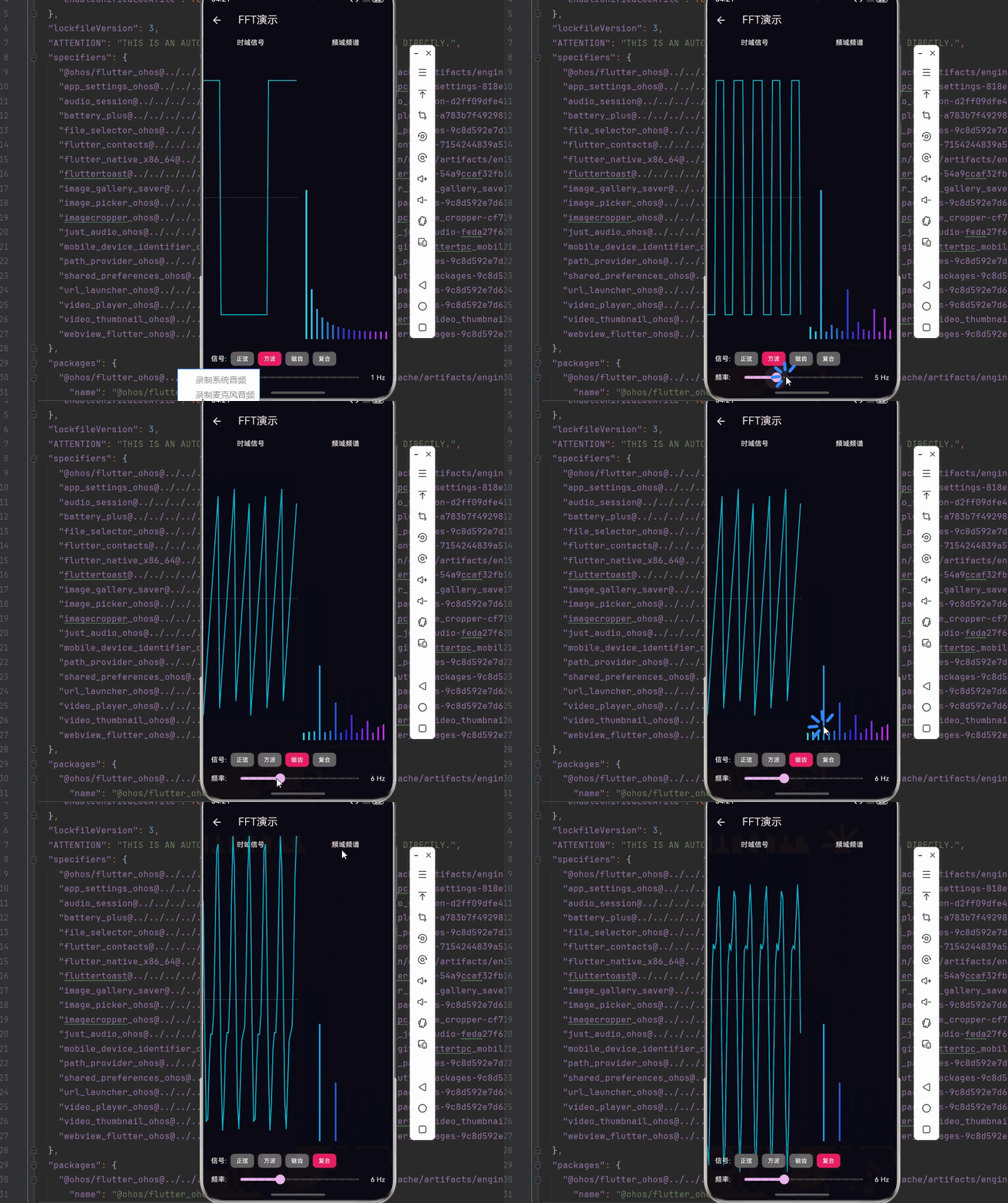
int _signalType = 0;
double _frequency = 4;
@override
void initState() {
super.initState();
_fft = FFTProcessor(_fftSize);
_controller = AnimationController(vsync: this, duration: const Duration(milliseconds: 16))..repeat();
_controller.addListener(() {
_time += 0.016;
_generateSignal();
_frequencySpectrum = _fft.transform(_timeSignal);
setState(() {});
});
}
void _generateSignal() {
_timeSignal = List.generate(_fftSize, (i) {
final t = i / _fftSize;
switch (_signalType) {
case 0: return sin(2 * pi * _frequency * t + _time);
case 1: return sin(2 * pi * _frequency * t + _time) > 0 ? 1.0 : -1.0;
case 2: final phase = (t * _frequency) % 1; return 2 * phase - 1;
case 3: return sin(2 * pi * _frequency * t + _time) + sin(2 * pi * _frequency * 2 * t + _time) * 0.5;
default: return 0.0;
}
});
}
@override
void dispose() {
_controller.dispose();
super.dispose();
}
@override
Widget build(BuildContext context) {
return Scaffold(
appBar: AppBar(title: const Text('FFT演示')),
body: Column(children: [
Expanded(child: Row(children: [
Expanded(child: Column(children: [
const Padding(padding: EdgeInsets.all(8), child: Text('时域信号', style: TextStyle(color: Colors.white, fontSize: 14))),
Expanded(child: CustomPaint(painter: TimeSignalPainter(_timeSignal), size: Size.infinite)),
])),
Expanded(child: Column(children: [
const Padding(padding: EdgeInsets.all(8), child: Text('频域频谱', style: TextStyle(color: Colors.white, fontSize: 14))),
Expanded(child: CustomPaint(painter: FrequencySpectrumPainter(_frequencySpectrum, _fftSize), size: Size.infinite)),
])),
])),
_buildControls(),
]),
);
}
Widget _buildControls() {
return Container(
padding: const EdgeInsets.all(16),
color: Colors.black12,
child: Column(children: [
Row(children: [
const Text('信号: ', style: TextStyle(color: Colors.white)),
for (int i = 0; i < 4; i++)
GestureDetector(
onTap: () => setState(() => _signalType = i),
child: Container(
padding: const EdgeInsets.symmetric(horizontal: 12, vertical: 6),
margin: const EdgeInsets.symmetric(horizontal: 4),
decoration: BoxDecoration(
color: _signalType == i ? Colors.pink : Colors.grey[700],
borderRadius: BorderRadius.circular(8),
),
child: Text(['正弦', '方波', '锯齿', '复合'][i], style: const TextStyle(color: Colors.white, fontSize: 12)),
),
),
]),
Row(children: [
const Text('频率: ', style: TextStyle(color: Colors.white)),
Expanded(child: Slider(value: _frequency, min: 1, max: 16, divisions: 15, onChanged: (v) => setState(() => _frequency = v))),
Text('${_frequency.toInt()} Hz', style: const TextStyle(color: Colors.white)),
]),
]),
);
}
}
class TimeSignalPainter extends CustomPainter {
final List<double> signal;
TimeSignalPainter(this.signal);
@override
void paint(Canvas canvas, Size size) {
canvas.drawRect(Rect.fromLTWH(0, 0, size.width, size.height), Paint()..color = const Color(0xFF0a0a15));
canvas.drawLine(Offset(0, size.height / 2), Offset(size.width, size.height / 2),
Paint()..color = Colors.white.withOpacity(0.2)..strokeWidth = 1);
if (signal.isEmpty) return;
final path = Path();
final centerY = size.height / 2;
final amplitude = size.height * 0.4;
for (int i = 0; i < signal.length; i++) {
final x = (i / signal.length) * size.width;
final y = centerY - signal[i] * amplitude;
if (i == 0) path.moveTo(x, y);
else path.lineTo(x, y);
}
canvas.drawPath(path, Paint()..color = Colors.cyan..style = PaintingStyle.stroke..strokeWidth = 2);
}
@override
bool shouldRepaint(covariant TimeSignalPainter old) => true;
}
class FrequencySpectrumPainter extends CustomPainter {
final List<Complex> spectrum;
final int fftSize;
FrequencySpectrumPainter(this.spectrum, this.fftSize);
@override
void paint(Canvas canvas, Size size) {
canvas.drawRect(Rect.fromLTWH(0, 0, size.width, size.height), Paint()..color = const Color(0xFF0a0a15));
if (spectrum.isEmpty) return;
final barCount = fftSize ~/ 2;
final barWidth = (size.width - 20) / barCount - 2;
final maxBarHeight = size.height * 0.8;
for (int i = 0; i < barCount; i++) {
final magnitude = spectrum[i].magnitude / fftSize;
final barHeight = maxBarHeight * magnitude;
final x = 10 + i * (barWidth + 2);
final y = size.height - barHeight - 10;
final hue = (i / barCount * 120 + 180) % 360;
canvas.drawRect(
Rect.fromLTWH(x, y, barWidth, barHeight),
Paint()..color = HSVColor.fromAHSV(0.9, hue, 0.8, 1).toColor(),
);
}
}
@override
bool shouldRepaint(covariant FrequencySpectrumPainter old) => true;
}📝 十、总结
本篇文章深入探讨了傅里叶变换在音乐可视化中的应用,从数学原理到频谱渲染,构建了从时域到频域的视觉翻译系统。
✅ 核心知识点回顾
| 知识点 | 说明 |
|---|---|
| 📐 傅里叶变换 | 时域到频域的转换 |
| ⚡ FFT 算法 | O(N log N) 高效计算 |
| 🎵 频谱分析 | 频率成分识别 |
| 🎨 可视化设计 | 颜色映射、动画设计 |
| ⚡ 性能优化 | 实时处理策略 |
⭐ 最佳实践要点
- ✅ 使用 FFT 进行高效的频谱计算
- ✅ 应用窗函数减少频谱泄漏
- ✅ 实现平滑处理提升视觉效果
- ✅ 设计符合听觉感知的颜色映射
- ✅ 优化内存使用避免 GC 压力