1.keepalived****简介
vrrp 协议的软件实现,原生设计目的为了高可用 ipvs服务
官网:http://keepalived.org/
功能:
基于vrrp协议完成地址流动
为vip地址所在的节点生成ipvs规则(在配置文件中预先定义)
为ipvs集群的各RS做健康状态检测
基于脚本调用接口完成脚本中定义的功能,进而影响集群事务,以此支持nginx、haproxy等服务
2.Keepalived****架构
官方文档:
https://keepalived.org/doc/
http://keepalived.org/documentation.html
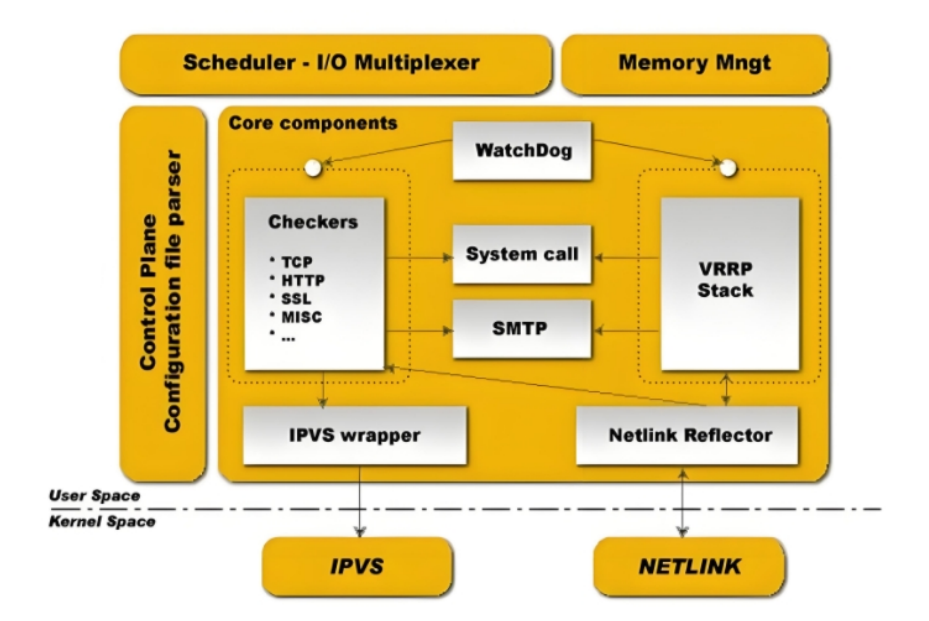
用户空间核心组件:
vrrp stack:VIP消息通告
checkers:监测real server
system call:实现 vrrp 协议状态转换时调用脚本的功能
SMTP:邮件组件
IPVS wrapper:生成IPVS规则
Netlink Reflector:网络接口
WatchDog:监控进程
控制组件:提供keepalived.conf 的解析器,完成Keepalived配置
IO复用器:针对网络目的而优化的自己的线程抽象
内存管理组件:为某些通用的内存管理功能(例如分配,重新分配,发布等)提供访问权限
3.Keepalived****环境准备
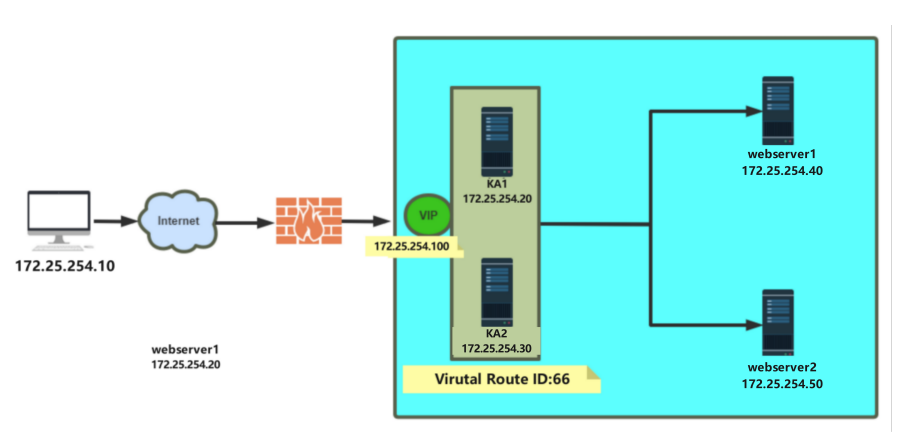
各节点时间必须同步:ntp, chrony
关闭防火墙及SELinux
各节点之间可通过主机名互相通信:非必须
建议使用/etc/hosts文件实现:非必须
各节点之间的root用户可以基于密钥认证的ssh服务完成互相通信:非必须
4.Keepalived****相关文件
软件包名:keepalived
主程序文件:/usr/sbin/keepalived
主配置文件:/etc/keepalived/keepalived.conf
配置文件示例:/usr/share/doc/keepalived/
Unit File:/lib/systemd/system/keepalived.service
Unit File的环境配置文件:/etc/sysconfig/keepalived
5.Keepalived实验环境设定
5.1.环境设定图
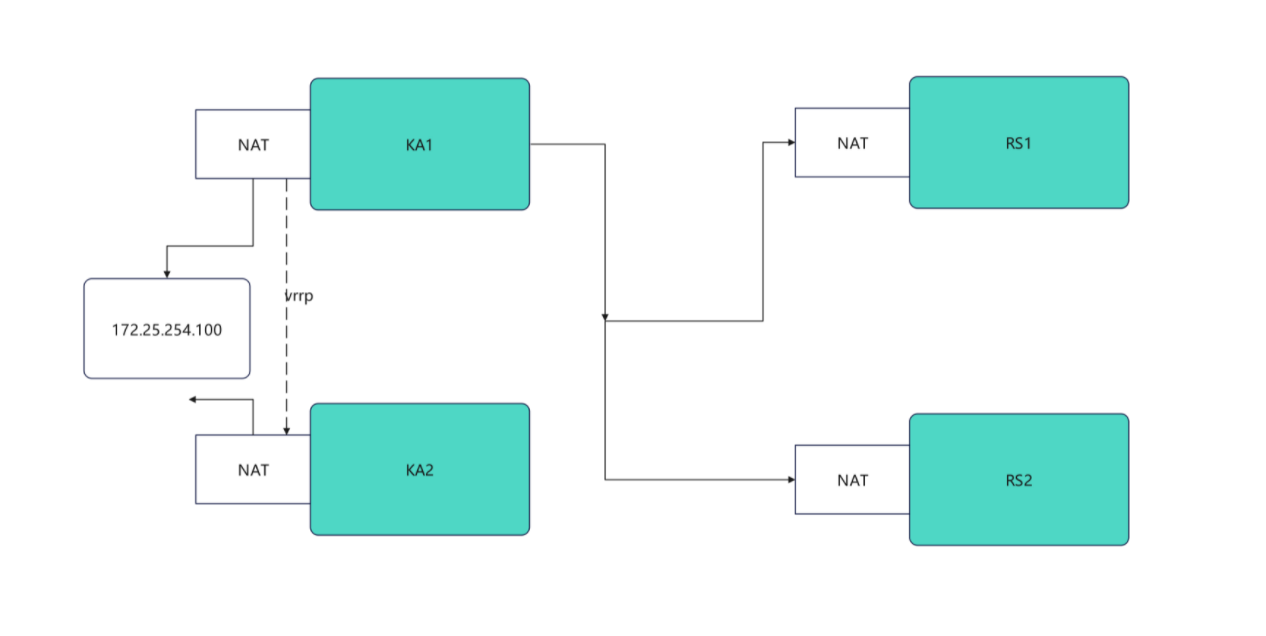
5.2.环境设定
bash
#部署rs1和rs2(单网卡NAT模式)
[root@rs1 ~]# vmset.sh eth0 172.25.254.10 rs1
[root@rs1 ~]# dnf install httpd -y
[root@rs1 ~]# echo RS1 - 172.25.254.10 > /var/www/html/index.html
[root@rs1 ~]# systemctl enable --now httpd

[root@rs2 ~]# vmset.sh eth0 172.25.254.20 rs2
[root@rs2 ~]# dnf install httpd -y
[root@rs2 ~]# echo RS2 - 172.25.254.20 > /var/www/html/index.html
[root@rs2 ~]# systemctl enable --now httpd


#测试:
[Administrator.DESKTOP-VJ307M3] ➤ curl 172.25.254.10
RS1 - 172.25.254.10
                                                                                                    ✔
─────────────────────────────────────────────────────────────────────────────────────────────────────
[2026-01-28 10:36.42]  ~
[Administrator.DESKTOP-VJ307M3] ➤ curl 172.25.254.20
RS2 - 172.25.254.20


#设定ka1和ka2
[root@KA1 ~]# vmset.sh eth0 172.25.254.50 KA1
[root@KA2 ~]# vmset.sh eth0 172.25.254.60 KA6


#设定本地解析
[root@KA1 ~]# vim /etc/hosts
127.0.0.1   localhost localhost.localdomain localhost4 localhost4.localdomain4
::1         localhost localhost.localdomain localhost6 localhost6.localdomain6
172.25.254.50     KA1
172.25.254.60     KA2
172.25.254.10     rs1
172.25.254.20     rs2


[root@KA1 ~]# for i in 60 10 20
> do
> scp /etc/hosts 172.25.254.$i:/etc/hosts
> done

#在所有主机中查看/etc/hosts


#在ka1中开启时间同步服务
[root@KA1 ~]# vim /etc/chrony.conf
 26 allow 0.0.0.0/0
 29 local stratum 10

[root@KA1 ~]# systemctl restart chronyd
[root@KA1 ~]# systemctl enable --now chronyd


#在ka2中使用ka1的时间同步服务
[root@KA2 ~]# vim /etc/chrony.conf
pool 172.25.254.50 iburst

[root@KA2 ~]# systemctl restart chronyd
[root@KA2 ~]# systemctl enable --now chronyd

[root@KA2 ~]# chronyc sources -v

  .-- Source mode  '^' = server, '=' = peer, '#' = local clock.
 / .- Source state '*' = current best, '+' = combined, '-' = not combined,
| /             'x' = may be in error, '~' = too variable, '?' = unusable.
||                                                 .- xxxx [ yyyy ] +/- zzzz
||      Reachability register (octal) -.           |  xxxx = adjusted offset,
||      Log2(Polling interval) --.      |          |  yyyy = measured offset,
||                                \     |          |  zzzz = estimated error.
||                                 |    |           \
MS Name/IP address         Stratum Poll Reach LastRx Last sample
===============================================================================
^* KA1                           3   6    17    13   +303ns[+6125ns] +/-   69ms
6.Keepalived虚拟路由配置
6.1.Keepalived安装
bash
[root@KA1 ~]# dnf install keepalived.x86_64 -y
[root@KA2 ~]#  dnf install keepalived.x86_64 -y
6.2.配置虚拟路由
bash
#在master
[root@KA1 ~]# vim /etc/keepalived/keepalived.conf
global_defs {
   notification_email {
     timinglee_zln@163.com
   }
   notification_email_from timinglee_zln@163.com
   smtp_server 127.0.0.1
   smtp_connect_timeout 30
   router_id KA1
   vrrp_skip_check_adv_addr
   #vrrp_strict
   vrrp_garp_interval 1
   vrrp_gna_interval 1
   vrrp_mcast_group4 224.0.0.44
}
vrrp_instance WEB_VIP {
    state MASTER
    interface eth0
    virtual_router_id 51
    priority 100
    advert_int 1
    authentication {
        auth_type PASS
        auth_pass 1111
    }
    virtual_ipaddress {
        172.25.254.100/24 dev eth0 label eth0:0
    }
}

[root@KA1 ~]# systemctl enable --now keepalived.service
Created symlink /etc/systemd/system/multi-user.target.wants/keepalived.service → /usr/lib/systemd/system/keepalived.service.

#在KA2中设定
[root@KA2 ~]# vim /etc/keepalived/keepalived.conf
global_defs {
   notification_email {
     timinglee_zln@163.com
   }
   notification_email_from timinglee_zln@163.com
   smtp_server 127.0.0.1
   smtp_connect_timeout 30
   router_id KA1
   vrrp_skip_check_adv_addr
   #vrrp_strict
   vrrp_garp_interval 1
   vrrp_gna_interval 1
   vrrp_mcast_group4 224.0.0.44
}
vrrp_instance WEB_VIP {
    state BACKUP
    interface eth0
    virtual_router_id 51
    priority 80
    advert_int 1
    authentication {
        auth_type PASS
        auth_pass 1111
    }
    virtual_ipaddress {
        172.25.254.100/24 dev eth0 label eth0:0
    }
}

[root@KA2 ~]# systemctl enable --now keepalived.service
Created symlink /etc/systemd/system/multi-user.target.wants/keepalived.service → /usr/lib/systemd/system/keepalived.service.


#验证
[root@KA1 ~]# tcpdump -i eth0 -nn host 224.0.0.44
11:38:46.183386 IP 172.25.254.50 > 224.0.0.44: VRRPv2, Advertisement, vrid 51, prio 100, authtype simple, intvl 1s, length 20
11:38:47.184051 IP 172.25.254.50 > 224.0.0.44: VRRPv2, Advertisement, vrid 51, prio 100, authtype simple, intvl 1s, length 20
11:38:48.184610 IP 172.25.254.50 > 224.0.0.44: VRRPv2, Advertisement, vrid 51, prio 100, authtype simple, intvl 1s, length 20
11:38:49.185084 IP 172.25.254.50 > 224.0.0.44: VRRPv2, Advertisement, vrid 51, prio 100, authtype simple, intvl 1s, length 20


[root@KA1 ~]# ifconfig
eth0: flags=4163<UP,BROADCAST,RUNNING,MULTICAST>  mtu 1500
        inet 172.25.254.50  netmask 255.255.255.0  broadcast 172.25.254.255
        inet6 fe80::3901:aeea:786a:7227  prefixlen 64  scopeid 0x20<link>
        ether 00:0c:29:26:33:d9  txqueuelen 1000  (Ethernet)
        RX packets 5847  bytes 563634 (550.4 KiB)
        RX errors 0  dropped 0  overruns 0  frame 0
        TX packets 5224  bytes 698380 (682.0 KiB)
        TX errors 0  dropped 0 overruns 0  carrier 0  collisions 0

eth0:0: flags=4163<UP,BROADCAST,RUNNING,MULTICAST>  mtu 1500
        inet 172.25.254.100  netmask 255.255.255.0  broadcast 0.0.0.0
        ether 00:0c:29:26:33:d9  txqueuelen 1000  (Ethernet)

lo: flags=73<UP,LOOPBACK,RUNNING>  mtu 65536
        inet 127.0.0.1  netmask 255.0.0.0
        inet6 ::1  prefixlen 128  scopeid 0x10<host>
        loop  txqueuelen 1000  (Local Loopback)
        RX packets 42  bytes 3028 (2.9 KiB)
        RX errors 0  dropped 0  overruns 0  frame 0
        TX packets 42  bytes 3028 (2.9 KiB)
        TX errors 0  dropped 0 overruns 0  carrier 0  collisions 0


#测试故障
#在一个独立的shell中执行
[root@KA1 ~]# tcpdump -i eth0 -nn host 224.0.0.44

#在kA1中模拟故障
[root@KA1 ~]# systemctl stop keepalived.service

#在KA2中看vip是否被迁移到当前主机
[root@KA2 ~]# ifconfig
eth0: flags=4163<UP,BROADCAST,RUNNING,MULTICAST>  mtu 1500
        inet 172.25.254.60  netmask 255.255.255.0  broadcast 172.25.254.255
        inet6 fe80::26df:35e5:539:56bc  prefixlen 64  scopeid 0x20<link>
        ether 00:0c:29:1e:fd:7a  txqueuelen 1000  (Ethernet)
        RX packets 2668  bytes 237838 (232.2 KiB)
        RX errors 0  dropped 0  overruns 0  frame 0
        TX packets 2229  bytes 280474 (273.9 KiB)
        TX errors 0  dropped 0 overruns 0  carrier 0  collisions 0

eth0:0: flags=4163<UP,BROADCAST,RUNNING,MULTICAST>  mtu 1500
        inet 172.25.254.100  netmask 255.255.255.0  broadcast 0.0.0.0
        ether 00:0c:29:1e:fd:7a  txqueuelen 1000  (Ethernet)

lo: flags=73<UP,LOOPBACK,RUNNING>  mtu 65536
        inet 127.0.0.1  netmask 255.0.0.0
        inet6 ::1  prefixlen 128  scopeid 0x10<host>
        loop  txqueuelen 1000  (Local Loopback)
        RX packets 52  bytes 3528 (3.4 KiB)
        RX errors 0  dropped 0  overruns 0  frame 0
        TX packets 52  bytes 3528 (3.4 KiB)
        TX errors 0  dropped 0 overruns 0  carrier 0  collisions 0
7.Keepalived日志分离
默认情况下。keepalived的日志会被保存在/var/log/messages文件中,这个文件中除了含有keepalived的日志外,还有其他服务的日志信息,这样不利于对于keepalived的日志进行查看
bash
[root@KA1 ~]# vim /etc/sysconfig/keepalived
KEEPALIVED_OPTIONS="-D -S 6"
[root@KA1 ~]# systemctl restart keepalived.service

[root@KA1 ~]# vim /etc/rsyslog.conf
local6.*                                                /var/log/keepalived.log
[root@KA1 ~]# systemctl restart rsyslog.service


#测试
[root@KA1 log]# ls -l /var/log/keepalived.log
ls: 无法访问 'keepalived.log': 没有那个文件或目录

[root@KA1 log]# ls keepalived.log
keepalived.log
8.Keepalived的子配置文件设定
在主配置文件中如果写入过多的配置不利于对于主配置文件的阅读
bash
[root@KA1 ~]# vim /etc/keepalived/keepalived.conf
! Configuration File for keepalived

global_defs {
   notification_email {
     timinglee_zln@163.com
   }
   notification_email_from timinglee_zln@163.com
   smtp_server 127.0.0.1
   smtp_connect_timeout 30
   router_id KA1
   vrrp_skip_check_adv_addr
   #vrrp_strict
   vrrp_garp_interval 1
   vrrp_gna_interval 1
   vrrp_mcast_group4 224.0.0.44
}

include /etc/keepalived/conf.d/*.conf			#指定独立子配置文件

[root@KA1 ~]# mkdir  /etc/keepalived/conf.d -p
[root@KA1 ~]# vim /etc/keepalived/conf.d/webvip.conf
vrrp_instance WEB_VIP {
    state MASTER
    interface eth0
    virtual_router_id 51
    priority 100
    advert_int 1
    authentication {
        auth_type PASS
        auth_pass 1111
    }
    virtual_ipaddress {
        172.25.254.100/24 dev eth0 label eth0:0
    }
}

[root@KA1 ~]# keepalived -t -f /etc/keepalived/keepalived.conf
[root@KA1 ~]# systemctl restart keepalived.service
[root@KA1 ~]# ifconfig
eth0: flags=4163<UP,BROADCAST,RUNNING,MULTICAST>  mtu 1500
        inet 172.25.254.50  netmask 255.255.255.0  broadcast 172.25.254.255
        inet6 fe80::3901:aeea:786a:7227  prefixlen 64  scopeid 0x20<link>
        ether 00:0c:29:26:33:d9  txqueuelen 1000  (Ethernet)
        RX packets 17383  bytes 1417554 (1.3 MiB)
        RX errors 0  dropped 0  overruns 0  frame 0
        TX packets 32593  bytes 3135052 (2.9 MiB)
        TX errors 0  dropped 0 overruns 0  carrier 0  collisions 0

eth0:0: flags=4163<UP,BROADCAST,RUNNING,MULTICAST>  mtu 1500
        inet 172.25.254.100  netmask 255.255.255.0  broadcast 0.0.0.0
        ether 00:0c:29:26:33:d9  txqueuelen 1000  (Ethernet)

lo: flags=73<UP,LOOPBACK,RUNNING>  mtu 65536
        inet 127.0.0.1  netmask 255.0.0.0
        inet6 ::1  prefixlen 128  scopeid 0x10<host>
        loop  txqueuelen 1000  (Local Loopback)
        RX packets 118  bytes 6828 (6.6 KiB)
        RX errors 0  dropped 0  overruns 0  frame 0
        TX packets 118  bytes 6828 (6.6 KiB)
        TX errors 0  dropped 0 overruns 0  carrier 0  collisions 0
9.抢占模式
9.1.抢占模式( 默认的,谁优先级高就把vip放到哪里)
9.2.非抢占模式(持有vip只要vrrp通告正常就不做vip迁移)
bash
#kA1中
[root@KA1 ~]# vim /etc/keepalived/keepalived.conf
vrrp_instance WEB_VIP {
    state BACKUP			#非抢占模式互为backup
    interface eth0
    virtual_router_id 51
    nopreempt				#启动非抢占模式
    priority 100
    advert_int 1
    authentication {
        auth_type PASS
        auth_pass 1111
    }
    virtual_ipaddress {
        172.25.254.100/24 dev eth0 label eth0:0
    }
}

[root@KA1 ~]# systemctl stop keepalived.service

#KA2中
[root@KA2 ~]# vim /etc/keepalived/keepalived.conf
vrrp_instance WEB_VIP {
    state BACKUP
    interface eth0
    virtual_router_id 51
    nopreempt				#开启非抢占模式
    priority 80
    advert_int 1
    authentication {
        auth_type PASS
        auth_pass 1111
    }
    virtual_ipaddress {
        172.25.254.100/24 dev eth0 label eth0:0
    }
}
[root@KA2 ~]# systemctl stop keepalived.service

#测试:
[root@KA1 ~]# systemctl start keepalived.service
[root@KA2 ~]# systemctl start keepalived.service

[root@KA1 ~]# ifconfig
eth0: flags=4163<UP,BROADCAST,RUNNING,MULTICAST>  mtu 1500
        inet 172.25.254.50  netmask 255.255.255.0  broadcast 172.25.254.255
        inet6 fe80::3901:aeea:786a:7227  prefixlen 64  scopeid 0x20<link>
        ether 00:0c:29:26:33:d9  txqueuelen 1000  (Ethernet)
        RX packets 18917  bytes 1546417 (1.4 MiB)
        RX errors 0  dropped 0  overruns 0  frame 0
        TX packets 34775  bytes 3349412 (3.1 MiB)
        TX errors 0  dropped 0 overruns 0  carrier 0  collisions 0

eth0:0: flags=4163<UP,BROADCAST,RUNNING,MULTICAST>  mtu 1500
        inet 172.25.254.100  netmask 255.255.255.0  broadcast 0.0.0.0
        ether 00:0c:29:26:33:d9  txqueuelen 1000  (Ethernet)

lo: flags=73<UP,LOOPBACK,RUNNING>  mtu 65536
        inet 127.0.0.1  netmask 255.0.0.0
        inet6 ::1  prefixlen 128  scopeid 0x10<host>
        loop  txqueuelen 1000  (Local Loopback)
        RX packets 162  bytes 9028 (8.8 KiB)
        RX errors 0  dropped 0  overruns 0  frame 0
        TX packets 162  bytes 9028 (8.8 KiB)
        TX errors 0  dropped 0 overruns 0  carrier 0  collisions 0


[root@KA1 ~]# systemctl stop keepalived.service

[root@KA2 ~]# ifconfig
eth0: flags=4163<UP,BROADCAST,RUNNING,MULTICAST>  mtu 1500
        inet 172.25.254.60  netmask 255.255.255.0  broadcast 172.25.254.255
        inet6 fe80::26df:35e5:539:56bc  prefixlen 64  scopeid 0x20<link>
        ether 00:0c:29:1e:fd:7a  txqueuelen 1000  (Ethernet)
        RX packets 22521  bytes 1553701 (1.4 MiB)
        RX errors 0  dropped 0  overruns 0  frame 0
        TX packets 18517  bytes 1535122 (1.4 MiB)
        TX errors 0  dropped 0 overruns 0  carrier 0  collisions 0

eth0:0: flags=4163<UP,BROADCAST,RUNNING,MULTICAST>  mtu 1500
        inet 172.25.254.100  netmask 255.255.255.0  broadcast 0.0.0.0
        ether 00:0c:29:1e:fd:7a  txqueuelen 1000  (Ethernet)

lo: flags=73<UP,LOOPBACK,RUNNING>  mtu 65536
        inet 127.0.0.1  netmask 255.0.0.0
        inet6 ::1  prefixlen 128  scopeid 0x10<host>
        loop  txqueuelen 1000  (Local Loopback)
        RX packets 84  bytes 5128 (5.0 KiB)
        RX errors 0  dropped 0  overruns 0  frame 0
        TX packets 84  bytes 5128 (5.0 KiB)
        TX errors 0  dropped 0 overruns 0  carrier 0  collisions 0


#开启KA1的服务ip不会被抢占到1中
[root@KA1 ~]# ifconfig
eth0: flags=4163<UP,BROADCAST,RUNNING,MULTICAST>  mtu 1500
        inet 172.25.254.50  netmask 255.255.255.0  broadcast 172.25.254.255
        inet6 fe80::3901:aeea:786a:7227  prefixlen 64  scopeid 0x20<link>
        ether 00:0c:29:26:33:d9  txqueuelen 1000  (Ethernet)
        RX packets 19102  bytes 1561277 (1.4 MiB)
        RX errors 0  dropped 0  overruns 0  frame 0
        TX packets 35034  bytes 3375682 (3.2 MiB)
        TX errors 0  dropped 0 overruns 0  carrier 0  collisions 0

lo: flags=73<UP,LOOPBACK,RUNNING>  mtu 65536
        inet 127.0.0.1  netmask 255.0.0.0
        inet6 ::1  prefixlen 128  scopeid 0x10<host>
        loop  txqueuelen 1000  (Local Loopback)
        RX packets 162  bytes 9028 (8.8 KiB)
        RX errors 0  dropped 0  overruns 0  frame 0
        TX packets 162  bytes 9028 (8.8 KiB)
        TX errors 0  dropped 0 overruns 0  carrier 0  collisions 0
9.3.延迟抢占
bash
#kA1中
[root@KA1 ~]# vim /etc/keepalived/keepalived.conf
vrrp_instance WEB_VIP {
    state BACKUP			#非抢占模式互为backup
    interface eth0
    virtual_router_id 51
    preempt_delay 10				#启动延迟抢占,延迟10s抢占
    priority 100
    advert_int 1
    authentication {
        auth_type PASS
        auth_pass 1111
    }
    virtual_ipaddress {
        172.25.254.100/24 dev eth0 label eth0:0
    }
}

[root@KA1 ~]# systemctl stop keepalived.service

#KA2中
[root@KA2 ~]# vim /etc/keepalived/keepalived.conf
vrrp_instance WEB_VIP {
    state BACKUP
    interface eth0
    virtual_router_id 51
    preempt_delay 10				#启动延迟抢占,延迟10s抢占
    priority 80
    advert_int 1
    authentication {
        auth_type PASS
        auth_pass 1111
    }
    virtual_ipaddress {
        172.25.254.100/24 dev eth0 label eth0:0
    }
}
[root@KA2 ~]# systemctl stop keepalived.service

#测试:
[root@KA1 ~]# systemctl start keepalived.service
[root@KA2 ~]# systemctl start keepalived.service

#在一个独立的shell中开启ip的监控
[root@KA1 ~]# watch -n 1 ifconfig

#在KA1另外的shell中关闭keepalived
[root@KA1 ~]# systemctl stop keepalived.service

[root@KA1 ~]# systemctl start  keepalived.service
#操作完毕后观察监控中vip的迁移延迟过程
10.keepalived的单播模式
为什么要单播,组播模式使用的网址资源最少,但是不能跨网络,如果主备两台主机是跨网络的,那么只能启用单播来实现vrrp通告
bash
#在KA1中
[root@KA1 ~]# vim /etc/keepalived/keepalived.conf
! Configuration File for keepalived

global_defs {
   notification_email {
     timinglee_zln@163.com
   }
   notification_email_from timinglee_zln@163.com
   smtp_server 127.0.0.1
   smtp_connect_timeout 30
   router_id KA1
   vrrp_skip_check_adv_addr
   #vrrp_strict
   vrrp_garp_interval 1
   vrrp_gna_interval 1
   #vrrp_mcast_group4 224.0.0.44			#关闭组播
}

vrrp_instance WEB_VIP {
    state MASTER
    interface eth0
    virtual_router_id 51
    priority 100
    advert_int 1
    unicast_src_ip 172.25.254.50		#指定单播源地址,通常是本机IP
    unicast_peer {
      172.25.254.60						#指定单播接收地址
    }
    authentication {
        auth_type PASS
        auth_pass 1111
    }
    virtual_ipaddress {
        172.25.254.100/24 dev eth0 label eth0:0
    }
}

#在KA2中
[root@KA2 ~]# vim /etc/keepalived/keepalived.conf
! Configuration File for keepalived

global_defs {
   notification_email {
     timinglee_zln@163.com
   }
   notification_email_from timinglee_zln@163.com
   smtp_server 127.0.0.1
   smtp_connect_timeout 30
   router_id KA1
   vrrp_skip_check_adv_addr
   #vrrp_strict
   vrrp_garp_interval 1
   vrrp_gna_interval 1
   #vrrp_mcast_group4 224.0.0.44			#关闭组播
}

vrrp_instance WEB_VIP {
    state BACKUP
    interface eth0
    virtual_router_id 51
    priority 80
    advert_int 1
    unicast_src_ip 172.25.254.60		#指定单播源地址,通常是本机IP
    unicast_peer {
      172.25.254.50						#指定单播接收地址
    }
    authentication {
        auth_type PASS
        auth_pass 1111
    }
    virtual_ipaddress {
        172.25.254.100/24 dev eth0 label eth0:0
    }
}

[root@KA1 ~]# systemctl restart keepalived.service
[root@KA2 ~]# systemctl restart keepalived.service

#测试
#在KA1中开启独立shell监控播报信息
[root@KA1 ~]# tcpdump -i eth0 -nn src host 172.25.254.50 and dst 172.25.254.60

#在KA2中开启独立shell监控播报信息
[root@KA2 ~]# tcpdump -i eth0 -nn src host 172.25.254.60 and dst 172.25.254.50


#在KA1正常时
#ka2播报信息不显示通告内容

[root@KA1 ~]# systemctl stop keepalived.service

#vip会被迁移到KA2,KA2上开始显示播报内容

[root@KA1 ~]# systemctl start keepalived.service

#vip因为优先级被KA1抢占,KA2中播报停止
11.Keepalived业务vip迁移告警
11.1.邮件告警环境构建
bash
#安装邮件软件
[root@KA1 ~]#  dnf install s-nail postfix   -y
[root@KA2 ~]#  dnf install s-nail postfix   -y


#启动邮件代理
[root@KA1 ~]# systemctl start postfix.service
[root@KA2 ~]# systemctl start postfix.service

#设定sendmail可以通过公网邮箱发送邮件下面方式任选其一

bash
#在Linux主机中配置mailrc(KA1+KA2)
[root@KA1+KA2 ~]# vim /etc/mail.rc
set smtp=smtp.163.com
set smtp-auth=login
set smtp-auth-user=timinglee_zln@163.com
set smtp-auth-password=TGfdKaJT7EB
set from=timinglee_zln@163.com
set ssl-verify=ignore

#测试邮件
[root@KA1 mail]# echo hello | mailx -s test 1122334455@qq.com

[root@KA1 mail]# mailq		#查看邮件队列
Mail queue is empty


[root@KA1 mail]# mail		#查看是否又退信
s-nail version v14.9.22.  Type `?' for help
/var/spool/mail/root: 1 message
▸   1 Mail Delivery Subsys  2026-01-28 16:26   69/2210  "Returned mail: see transcript for details  "
&q 退出


#查看对应邮箱是否有邮件收到
11.2.设定keepalived告警脚本
bash
[root@KA1 ~]# mkdir  -p /etc/keepalived/scripts
[root@KA2 ~]#  mkdir  -p /etc/keepalived/scripts

#编写告警脚本
[root@KA1+2 ~]#  vim /etc/keepalived/scripts/waring.sh
#!/bin/bash
mail_dest='594233887@qq.com'

mail_send()
{
    mail_subj="$HOSTNAME to be $1 vip 转移"
    mail_mess="`date +%F\ %T`: vrrp 转移,$HOSTNAME 变为 $1"
    echo "$mail_mess" | mail -s "$mail_subj" $mail_dest
}
case $1 in
    master)
    mail_send master
    ;;
    backup)
    mail_send backup
    ;;
    fault)
    mail_send fault
    ;;
    *)
    exit 1
    ;;
esac


[root@KA1+2 ~]# chmod  +x /etc/keepalived/scripts/waring.sh

[root@KA1 ~]# /etc/keepalived/scripts/waring.sh master

#对应邮箱中会出现邮件
11.3.配置keepalived告警
bash
#在KA1和KA2中设定配置文件
! Configuration File for keepalived

global_defs {
   notification_email {
     timinglee_zln@163.com
   }
   notification_email_from timinglee_zln@163.com
   smtp_server 127.0.0.1
   smtp_connect_timeout 30
   router_id KA1
   vrrp_skip_check_adv_addr
   #vrrp_strict
   vrrp_garp_interval 1
   vrrp_gna_interval 1
   vrrp_mcast_group4 224.0.0.44
   enable_script_security
   script_user root
}
vrrp_instance WEB_VIP {
    state MASTER
    interface eth0
    virtual_router_id 51
    priority 100
    advert_int 1
  # unicast_src_ip 172.25.254.50
  # unicast_peer {
  #   172.25.254.60
#   }
    authentication {
        auth_type PASS
        auth_pass 1111
    }
    virtual_ipaddress {
        172.25.254.100/24 dev eth0 label eth0:0
    }
    notify_master "/etc/keepalived/scripts/waring.sh master"
    notify_backup "/etc/keepalived/scripts/waring.sh backup"
    notify_fault "/etc/keepalived/scripts/waring.sh fault"
}


[root@KA1+2 ~]# systemctl restart keepalived.service


#测试
[root@KA1 ~]# systemctl stop keepalived.service		#停止服务后查看邮件
[root@KA1 ~]# systemctl start keepalived.service	#开启服务后查看邮件
12.Keepalived双主模式
bash
#在KA1中
[root@KA1 ~]# vim /etc/keepalived/keepalived.conf
vrrp_instance WEB_VIP {						#第一个虚拟路由,以master身份设定
    state MASTER
    interface eth0
    virtual_router_id 51
    priority 100
    advert_int 1
    authentication {
        auth_type PASS
        auth_pass 1111
    }
    virtual_ipaddress {
        172.25.254.100/24 dev eth0 label eth0:0
    }
}

vrrp_instance DB_VIP {				#第二个虚拟路由。以backup身份设定
    state BACKUP
    interface eth0
    virtual_router_id 52
    priority 80
    advert_int 1
    authentication {
        auth_type PASS
        auth_pass 1111
    }
    virtual_ipaddress {
        172.25.254.200/24 dev eth0 label eth0:1
    }
}


#KA2中
[root@KA2 ~]# vim /etc/keepalived/keepalived.conf
vrrp_instance WEB_VIP {
    state BACKUP
    interface eth0
    virtual_router_id 51
    preempt_delay 10
    priority 80
    advert_int 1
    authentication {
        auth_type PASS
        auth_pass 1111
    }
    virtual_ipaddress {
      172.25.254.100/24 dev eth0 label eth0:0
    }
}
vrrp_instance DB_VIP {
    state MASTER
    interface eth0
    virtual_router_id 52
    preempt_delay 10
    priority 100
    advert_int 1
    authentication {
        auth_type PASS
        auth_pass 1111
    }
    virtual_ipaddress {
      172.25.254.200/24 dev eth0 label eth0:1
    }
}
[root@KA1 ~]# systemctl restart keepalived.service
[root@KA2 ~]# systemctl restart keepalived.service


#测试
[root@KA1 ~]# ifconfig
eth0: flags=4163<UP,BROADCAST,RUNNING,MULTICAST>  mtu 1500
        inet 172.25.254.50  netmask 255.255.255.0  broadcast 172.25.254.255
        inet6 fe80::3901:aeea:786a:7227  prefixlen 64  scopeid 0x20<link>
        ether 00:0c:29:26:33:d9  txqueuelen 1000  (Ethernet)
        RX packets 38766  bytes 3548249 (3.3 MiB)
        RX errors 0  dropped 0  overruns 0  frame 0
        TX packets 67456  bytes 6209788 (5.9 MiB)
        TX errors 0  dropped 2 overruns 0  carrier 0  collisions 0

eth0:0: flags=4163<UP,BROADCAST,RUNNING,MULTICAST>  mtu 1500
        inet 172.25.254.100  netmask 255.255.255.0  broadcast 0.0.0.0
        ether 00:0c:29:26:33:d9  txqueuelen 1000  (Ethernet)

lo: flags=73<UP,LOOPBACK,RUNNING>  mtu 65536
        inet 127.0.0.1  netmask 255.0.0.0
        inet6 ::1  prefixlen 128  scopeid 0x10<host>
        loop  txqueuelen 1000  (Local Loopback)
        RX packets 782  bytes 60465 (59.0 KiB)
        RX errors 0  dropped 0  overruns 0  frame 0
        TX packets 782  bytes 60465 (59.0 KiB)
        TX errors 0  dropped 0 overruns 0  carrier 0  collisions 0


[root@KA2 ~]# ifconfig
eth0: flags=4163<UP,BROADCAST,RUNNING,MULTICAST>  mtu 1500
        inet 172.25.254.60  netmask 255.255.255.0  broadcast 172.25.254.255
        inet6 fe80::26df:35e5:539:56bc  prefixlen 64  scopeid 0x20<link>
        ether 00:0c:29:1e:fd:7a  txqueuelen 1000  (Ethernet)
        RX packets 46164  bytes 3559703 (3.3 MiB)
        RX errors 0  dropped 0  overruns 0  frame 0
        TX packets 38170  bytes 3306899 (3.1 MiB)
        TX errors 0  dropped 0 overruns 0  carrier 0  collisions 0

eth0:1: flags=4163<UP,BROADCAST,RUNNING,MULTICAST>  mtu 1500
        inet 172.25.254.200  netmask 255.255.255.0  broadcast 0.0.0.0
        ether 00:0c:29:1e:fd:7a  txqueuelen 1000  (Ethernet)

lo: flags=73<UP,LOOPBACK,RUNNING>  mtu 65536
        inet 127.0.0.1  netmask 255.0.0.0
        inet6 ::1  prefixlen 128  scopeid 0x10<host>
        loop  txqueuelen 1000  (Local Loopback)
        RX packets 532  bytes 39588 (38.6 KiB)
        RX errors 0  dropped 0  overruns 0  frame 0
        TX packets 532  bytes 39588 (38.6 KiB)
        TX errors 0  dropped 0 overruns 0  carrier 0  collisions 0


[root@KA1 ~]# systemctl stop keepalived.service
[root@KA2 ~]# ifconfig
eth0: flags=4163<UP,BROADCAST,RUNNING,MULTICAST>  mtu 1500
        inet 172.25.254.60  netmask 255.255.255.0  broadcast 172.25.254.255
        inet6 fe80::26df:35e5:539:56bc  prefixlen 64  scopeid 0x20<link>
        ether 00:0c:29:1e:fd:7a  txqueuelen 1000  (Ethernet)
        RX packets 46204  bytes 3562823 (3.3 MiB)
        RX errors 0  dropped 0  overruns 0  frame 0
        TX packets 38240  bytes 3313319 (3.1 MiB)
        TX errors 0  dropped 0 overruns 0  carrier 0  collisions 0

eth0:0: flags=4163<UP,BROADCAST,RUNNING,MULTICAST>  mtu 1500
        inet 172.25.254.100  netmask 255.255.255.0  broadcast 0.0.0.0
        ether 00:0c:29:1e:fd:7a  txqueuelen 1000  (Ethernet)

eth0:1: flags=4163<UP,BROADCAST,RUNNING,MULTICAST>  mtu 1500
        inet 172.25.254.200  netmask 255.255.255.0  broadcast 0.0.0.0
        ether 00:0c:29:1e:fd:7a  txqueuelen 1000  (Ethernet)


[root@KA2 ~]# systemctl stop keepalived.service
[root@KA1 ~]# ifconfig
eth0: flags=4163<UP,BROADCAST,RUNNING,MULTICAST>  mtu 1500
        inet 172.25.254.50  netmask 255.255.255.0  broadcast 172.25.254.255
        inet6 fe80::3901:aeea:786a:7227  prefixlen 64  scopeid 0x20<link>
        ether 00:0c:29:26:33:d9  txqueuelen 1000  (Ethernet)
        RX packets 39277  bytes 3653121 (3.4 MiB)
        RX errors 0  dropped 0  overruns 0  frame 0
        TX packets 67902  bytes 6264989 (5.9 MiB)
        TX errors 0  dropped 2 overruns 0  carrier 0  collisions 0

eth0:0: flags=4163<UP,BROADCAST,RUNNING,MULTICAST>  mtu 1500
        inet 172.25.254.100  netmask 255.255.255.0  broadcast 0.0.0.0
        ether 00:0c:29:26:33:d9  txqueuelen 1000  (Ethernet)

eth0:1: flags=4163<UP,BROADCAST,RUNNING,MULTICAST>  mtu 1500
        inet 172.25.254.200  netmask 255.255.255.0  broadcast 0.0.0.0
        ether 00:0c:29:26:33:d9  txqueuelen 1000  (Ethernet)
13.实现IPVS的高可用性
13.1.配置RS
bash
[root@rs1+2 ~]# cd /etc/NetworkManager/system-connections/
[root@rs1+2 system-connections]# ls
eth0.nmconnection
[root@rs1+2 system-connections]# cp eth0.nmconnection lo.nmconnection -p
[root@rs1+2 system-connections]# vim lo.nmconnection

[connection]
id=lo
type=loopback
interface-name=lo


[ipv4]
method=manual
address1=127.0.0.1/8
address2=172.25.254.100/32


[root@rs1+2 system-connections]# nmcli connection reload
[root@rs1+2 system-connections]# nmcli connection up lo
[root@rs1+2 system-connections]# ip a
1: lo: <LOOPBACK,UP,LOWER_UP> mtu 65536 qdisc noqueue state UNKNOWN group default qlen 1000
    link/loopback 00:00:00:00:00:00 brd 00:00:00:00:00:00
    inet 127.0.0.1/8 scope host lo
       valid_lft forever preferred_lft forever
    inet 172.25.254.100/32 scope global lo
       valid_lft forever preferred_lft forever
    inet6 ::1/128 scope host
       valid_lft forever preferred_lft forever
2: eth0: <BROADCAST,MULTICAST,UP,LOWER_UP> mtu 1500 qdisc mq state UP group default qlen 1000
    link/ether 00:0c:29:1a:e2:01 brd ff:ff:ff:ff:ff:ff
    altname enp3s0
    altname ens160
    inet 172.25.254.10/24 brd 172.25.254.255 scope global noprefixroute eth0
       valid_lft forever preferred_lft forever
    inet6 fe80::ac3b:5c1c:bb2a:628e/64 scope link noprefixroute
       valid_lft forever preferred_lft forever


[root@rs1+2 system-connections]# vim /etc/sysctl.conf
net.ipv4.conf.all.arp_ignore=1
net.ipv4.conf.all.arp_announce=2
net.ipv4.conf.lo.arp_announce=2
net.ipv4.conf.lo.arp_ignore=1

[root@rs1+2 system-connections]# sysctl  -p
net.ipv4.conf.all.arp_ignore = 1
net.ipv4.conf.all.arp_announce = 2
net.ipv4.conf.lo.arp_announce = 2
net.ipv4.conf.lo.arp_ignore = 1


#安装ipvsadm
[root@KA1+KA2 ~]# dnf install ipvsadm -y
13.2.实现方式
bash
#在keepalived的所有主机中
[root@KA1 ~]# vim /etc/keepalived/keepalived.conf
virtual_server 172.25.254.100 80 {
    delay_loop 6
    lb_algo rr
    lb_kind DR
    protocol TCP

    real_server 172.25.254.10 80 {
        weight 1
        HTTP_GET {
            url {
              path /
              status_code 200
            }
            connect_timeout 1
            retry 3
            delay_before_retry 1
      }
    }

    real_server 172.25.254.20 80 {
        weight 1
        TCP_CHECK {
          connect_timeout 5
          retry 3
          delay_before_retry 3
          connect_port 80
      }
    }
}

[root@KA1 ~]# systemctl restart keepalived.service
13.3.测试
bash
#友情提示:不要再KA1和KA2中访问vip,会检测不出效果

#在ka1中开启独立的shell
[root@KA1 ~]# watch -n 1 ipvsadm -Ln

#在RS1中关闭wen服务查看lvs策略是否变化

#把ka1中的keepalived关闭查看ka2中是否自动生成lvs策略
14.双主模式代理不同业务实现高可用
14.1.实验环境
bash
#web服务设定再个实验已经设定完成
#在rs中设定lo添加vip2 172.25.254.200、32
#在rs中搭建数据库
[root@rs1+2 ~]# dnf install mariadb-server -y
[root@rs1+2 ~]# systemctl enable --now mariadb
[root@rs1+2 ~]# mysql
Welcome to the MariaDB monitor.  Commands end with ; or \g.
Your MariaDB connection id is 3
Server version: 10.5.27-MariaDB MariaDB Server

Copyright (c) 2000, 2018, Oracle, MariaDB Corporation Ab and others.

Type 'help;' or '\h' for help. Type '\c' to clear the current input statement.

MariaDB [(none)]> CREATE USER lee@'%' identified by 'lee';
Query OK, 0 rows affected (0.001 sec)

MariaDB [(none)]> GRANT ALL ON *.* TO lee@'%';
Query OK, 0 rows affected (0.001 sec)

#测试
[root@rs1 ~]# mysql -ulee -plee -h172.25.254.10
Welcome to the MariaDB monitor.  Commands end with ; or \g.
Your MariaDB connection id is 4
Server version: 10.5.27-MariaDB MariaDB Server

Copyright (c) 2000, 2018, Oracle, MariaDB Corporation Ab and others.

Type 'help;' or '\h' for help. Type '\c' to clear the current input statement.

MariaDB [(none)]> quit

[root@rs1 ~]# mysql -ulee -plee -h172.25.254.20
Welcome to the MariaDB monitor.  Commands end with ; or \g.
Your MariaDB connection id is 4
Server version: 10.5.27-MariaDB MariaDB Server

Copyright (c) 2000, 2018, Oracle, MariaDB Corporation Ab and others.

Type 'help;' or '\h' for help. Type '\c' to clear the current input statement.

MariaDB [(none)]> quit
14.2.实现不同vip代理不同业务
bash
#KA1和KA2
[root@KA1+2 ~]# vim /etc/keepalived/keepalived.conf
include /etc/keepalived/conf.d/webserver.conf
include /etc/keepalived/conf.d/datebase.conf

[root@KA1+2 ~]# vim /etc/keepalived/conf.d/webserver.conf
virtual_server 172.25.254.100 80 {
    delay_loop 6
    lb_algo rr
    lb_kind DR
    protocol TCP

    real_server 172.25.254.10 80 {
        weight 1
        HTTP_GET {
            url {
              path /
              status_code 200
            }
            connect_timeout 1
            retry 3
            delay_before_retry 1
      }
    }

    real_server 172.25.254.20 80 {
        weight 1
        TCP_CHECK {
          connect_timeout 5
          retry 3
          delay_before_retry 3
          connect_port 80
      }
    }
}
[root@KA1 ~]# vim /etc/keepalived/conf.d/datebase.conf
virtual_server 172.25.254.200 3306 {
    delay_loop 6
    lb_algo rr
    lb_kind DR
    protocol TCP

    real_server 172.25.254.10 3306 {
        weight 1
        TCP_CHECK {
          connect_timeout 5
          retry 3
          delay_before_retry 3
          connect_port 3306
      }
    }

    real_server 172.25.254.20 3306 {
        weight 1
        TCP_CHECK {
          connect_timeout 5
          retry 3
          delay_before_retry 3
          connect_port 3306
      }
    }
}

[root@KA1+2 ~]# systemctl restart keepalived.service
14.3.测试
bash
[root@rs2 ~]# mysql -ulee  -plee  -h172.25.254.200
Welcome to the MariaDB monitor.  Commands end with ; or \g.
Your MariaDB connection id is 89
Server version: 10.5.27-MariaDB MariaDB Server

Copyright (c) 2000, 2018, Oracle, MariaDB Corporation Ab and others.

Type 'help;' or '\h' for help. Type '\c' to clear the current input statement.

MariaDB [(none)]>


[Administrator.DESKTOP-VJ307M3] ➤ curl 172.25.254.100
RS1 - 172.25.254.10
                                                                                                    ✔
─────────────────────────────────────────────────────────────────────────────────────────────────────
[2026-01-29 11:58.55]  ~
[Administrator.DESKTOP-VJ307M3] ➤ curl 172.25.254.100
RS2 - 172.25.254.20
15.利用VRRP Script 实现全能高可用
15.1.实验环境
bash
#在KA1和KA2中安装haproxy
[root@KA1+2 ~]# dnf install haproxy-2.4.22-4.el9.x86_64  -y
[root@KA1 ~]# vim /etc/sysctl.conf

[root@KA1+2 ~]# vim /etc/sysctl.conf
net.ipv4.ip_nonlocal_bind=1

[root@KA1+2 ~]# vim /etc/haproxy/haproxy.cfg
listen webserver
    bind 172.25.254.100:80
    mode http
    server web1 172.25.254.10:80 check
    server web2 172.25.254.20:80 check

[root@KA1+2 ~]# systemctl enable --now haproxy.service
15.2.利用案例理解vrrp_scripts
bash
#在KA1主机中
[root@KA1 ~]# vim /etc/keepalived/scripts/test.sh
#!/bin/bash
[ ! -f "/mnt/lee" ]

[root@KA1 ~]# vim /etc/keepalived/keepalived.conf
vrrp_script check_lee {
    script "/etc/keepalived/scripts/test.sh"
    interval 1
    weight -30
    fall 2
    rise 2
    timeout 2
    user root
}
vrrp_instance DB_VIP {
    state MASTER
    interface eth0
    virtual_router_id 51
    priority 100
    advert_int 1
    authentication {
        auth_type PASS
        auth_pass 1111
    }
    virtual_ipaddress {
        172.25.254.100/24 dev eth0 label eth0:1
    }
    track_script {
        check_lee
    }
}

[root@KA1 ~]# systemctl restart keepalived.service


#测试:
[root@KA1 ~]# ifconfig
eth0: flags=4163<UP,BROADCAST,RUNNING,MULTICAST>  mtu 1500
        inet 172.25.254.50  netmask 255.255.255.0  broadcast 172.25.254.255
        inet6 fe80::3901:aeea:786a:7227  prefixlen 64  scopeid 0x20<link>
        ether 00:0c:29:26:33:d9  txqueuelen 1000  (Ethernet)
        RX packets 98198  bytes 9235557 (8.8 MiB)
        RX errors 0  dropped 0  overruns 0  frame 0
        TX packets 145101  bytes 12247386 (11.6 MiB)
        TX errors 0  dropped 9 overruns 0  carrier 0  collisions 0

eth0:0: flags=4163<UP,BROADCAST,RUNNING,MULTICAST>  mtu 1500
        inet 172.25.254.100  netmask 255.255.255.0  broadcast 0.0.0.0
        ether 00:0c:29:26:33:d9  txqueuelen 1000  (Ethernet)

lo: flags=73<UP,LOOPBACK,RUNNING>  mtu 65536
        inet 127.0.0.1  netmask 255.0.0.0
        inet6 ::1  prefixlen 128  scopeid 0x10<host>
        loop  txqueuelen 1000  (Local Loopback)
        RX packets 932  bytes 72195 (70.5 KiB)
        RX errors 0  dropped 0  overruns 0  frame 0
        TX packets 932  bytes 72195 (70.5 KiB)
        TX errors 0  dropped 0 overruns 0  carrier 0  collisions 0

[root@KA1 ~]# touch /mnt/lee

[root@KA1 ~]# ifconfig
eth0: flags=4163<UP,BROADCAST,RUNNING,MULTICAST>  mtu 1500
        inet 172.25.254.50  netmask 255.255.255.0  broadcast 172.25.254.255
        inet6 fe80::3901:aeea:786a:7227  prefixlen 64  scopeid 0x20<link>
        ether 00:0c:29:26:33:d9  txqueuelen 1000  (Ethernet)
        RX packets 97968  bytes 9216259 (8.7 MiB)
        RX errors 0  dropped 0  overruns 0  frame 0
        TX packets 144858  bytes 12219108 (11.6 MiB)
        TX errors 0  dropped 9 overruns 0  carrier 0  collisions 0

lo: flags=73<UP,LOOPBACK,RUNNING>  mtu 65536
        inet 127.0.0.1  netmask 255.0.0.0
        inet6 ::1  prefixlen 128  scopeid 0x10<host>
        loop  txqueuelen 1000  (Local Loopback)
        RX packets 932  bytes 72195 (70.5 KiB)
        RX errors 0  dropped 0  overruns 0  frame 0
        TX packets 932  bytes 72195 (70.5 KiB)
        TX errors 0  dropped 0 overruns 0  carrier 0  collisions 0

[root@KA1 ~]# rm -fr /mnt/lee

[root@KA1 ~]# ifconfig
eth0: flags=4163<UP,BROADCAST,RUNNING,MULTICAST>  mtu 1500
        inet 172.25.254.50  netmask 255.255.255.0  broadcast 172.25.254.255
        inet6 fe80::3901:aeea:786a:7227  prefixlen 64  scopeid 0x20<link>
        ether 00:0c:29:26:33:d9  txqueuelen 1000  (Ethernet)
        RX packets 98198  bytes 9235557 (8.8 MiB)
        RX errors 0  dropped 0  overruns 0  frame 0
        TX packets 145101  bytes 12247386 (11.6 MiB)
        TX errors 0  dropped 9 overruns 0  carrier 0  collisions 0

eth0:0: flags=4163<UP,BROADCAST,RUNNING,MULTICAST>  mtu 1500
        inet 172.25.254.100  netmask 255.255.255.0  broadcast 0.0.0.0
        ether 00:0c:29:26:33:d9  txqueuelen 1000  (Ethernet)

lo: flags=73<UP,LOOPBACK,RUNNING>  mtu 65536
        inet 127.0.0.1  netmask 255.0.0.0
        inet6 ::1  prefixlen 128  scopeid 0x10<host>
        loop  txqueuelen 1000  (Local Loopback)
        RX packets 932  bytes 72195 (70.5 KiB)
        RX errors 0  dropped 0  overruns 0  frame 0
        TX packets 932  bytes 72195 (70.5 KiB)
        TX errors 0  dropped 0 overruns 0  carrier 0  collisions 0
15.3.keepalived + haproxy
bash
[root@KA1 ~]# vim /etc/keepalived/scripts/haproxy_check.sh
#!/bin/bash
killall -0 haproxy &> /dev/null

[root@KA1 ~]# chmod +x /etc/keepalived/scripts/haproxy_check.sh
vrrp_script haporxy_check {
    script "/etc/keepalived/scripts/haproxy_check.sh"
    interval 1
    weight -30
    fall 2
    rise 2
    timeout 2
    user root
}
vrrp_instance WEB_VIP {
    state MASTER
    interface eth0
    virtual_router_id 51
    priority 100
    advert_int 1
    authentication {
        auth_type PASS
        auth_pass 1111
    }
    virtual_ipaddress {
        172.25.254.100/24 dev eth0 label eth0:0
    }
    track_script {
        haporxy_check
    }
}

[root@KA1 ~]# systemctl restart keepalived.service


#测试
通过关闭和开启haproxy来观察vip是否迁移