页面国际化(通常缩写i18n)是指将软件、网站或应用程序设计成能够轻松地适应不同的语言、文化和地区的需求,以便更广泛地面向全球用户群。
本文采用thymeleaf提供的消息表达式#{}实现注册页面的语言切换
原文登录页面(login.html)
<!DOCTYPE html>
<html lang="zh-CN" xmlns:th="http://www.thymeleaf.org">
<head>
    <meta charset="UTF-8">
    <meta name="viewport" content="width=device-width, initial-scale=1.0">
    <title>用户登录</title>
    <!-- 引入独立CSS文件 -->
    <link rel="stylesheet" th:href="@{/css/login.css}">
</head>
<body>
<div class="login-container">
    <div class="login-header">
        <h2>欢迎登录</h2>
        <p>请输入您的账号和密码</p>
    </div>

    <!-- 提示信息 -->
    <div class="msg" th:text="${msg}" th:if="${msg != null}"></div>

    <!-- 登录表单 -->
    <form action="/login" method="post">
        <div class="form-item">
            <label for="username" >用户名</label>
            <input type="text" id="username" name="username" required placeholder="请输入用户名">
        </div>
        <div class="form-item">
            <label for="password">密码</label>
            <input type="password" id="password" name="password" required placeholder="请输入密码">
        </div>
        <!-- 验证码输入框 -->
        <div class="form-item">
            <label for="captcha">验证码</label>
            <div class="captcha-container">
                <input type="text" id="captcha" name="captcha" class="captcha-input" required placeholder="请输入验证码">
                <!-- 验证码图片,点击刷新 -->
                <img src="/verication" alt="验证码" class="captcha-img" onclick="this.src='/verication?'+Math.random()">
            </div>
        </div>
        <button type="submit" class="login-btn">登录</button>
    </form>

    <div class="link-area">
        <a href="/register">还没有账号?立即注册</a>
    </div>
</div>

<!--<script>-->
<!--    // 验证码图片点击刷新(防止缓存)-->
<!--    document.querySelector('.captcha-img').addEventListener('click', function() {-->
<!--        this.src = '/verication?' + Math.random();-->
<!--    });-->
<!--</script>-->
</body>
</html>
对应的CSS文件
/* 全局样式重置 */
* {
    margin: 0;
    padding: 0;
    box-sizing: border-box;
    font-family: 'Inter', 'Microsoft YaHei', sans-serif;
}

/* 页面背景 */
body {
    background: linear-gradient(135deg, #667eea 0%, #764ba2 100%);
    min-height: 100vh;
    display: flex;
    justify-content: center;
    align-items: center;
    padding: 20px;
}

/* 登录容器 */
.login-container {
    background: rgba(255, 255, 255, 0.95);
    border-radius: 20px;
    box-shadow: 0 10px 40px rgba(0, 0, 0, 0.15);
    padding: 45px;
    width: 100%;
    max-width: 450px;
    border: 1px solid rgba(255, 255, 255, 0.2);
}

/* 登录头部 */
.login-header {
    text-align: center;
    margin-bottom: 35px;
}

.login-header h2 {
    color: #2d3748;
    font-size: 32px;
    font-weight: 600;
    margin-bottom: 10px;
}

.login-header p {
    color: #718096;
    font-size: 15px;
}

/* 提示信息 */
.msg {
    text-align: center;
    color: #e53e3e;
    font-size: 14px;
    padding: 10px;
    background: #fef2f2;
    border-radius: 8px;
    margin-bottom: 20px;
}

/* 表单项 */
.form-item {
    margin-bottom: 25px;
}

.form-item label {
    display: block;
    color: #4a5568;
    font-size: 14px;
    margin-bottom: 8px;
    font-weight: 500;
}

.form-item input {
    width: 100%;
    padding: 14px 18px;
    border: 1px solid #e2e8f0;
    border-radius: 12px;
    font-size: 15px;
    transition: all 0.3s ease;
    background: #f8fafc;
}

.form-item input:focus {
    outline: none;
    border-color: #667eea;
    box-shadow: 0 0 0 3px rgba(102, 126, 234, 0.1);
    background: #ffffff;
}

/* 验证码容器 */
.captcha-container {
    display: flex;
    gap: 10px;
}

.captcha-input {
    flex: 1;
}

.captcha-img {
    width: 120px;
    height: 48px;
    border-radius: 12px;
    cursor: pointer;
    border: 1px solid #e2e8f0;
}

/* 登录按钮 */
.login-btn {
    width: 100%;
    padding: 14px;
    background: linear-gradient(135deg, #667eea 0%, #764ba2 100%);
    color: white;
    border: none;
    border-radius: 12px;
    font-size: 16px;
    font-weight: 600;
    cursor: pointer;
    transition: all 0.3s ease;
    margin-bottom: 20px;
}

.login-btn:hover {
    transform: translateY(-2px);
    box-shadow: 0 8px 15px rgba(102, 126, 234, 0.3);
}

.login-btn:active {
    transform: translateY(0);
}

/* 链接区域 */
.link-area {
    text-align: center;
}

.link-area a {
    color: #667eea;
    text-decoration: none;
    font-size: 14px;
    font-weight: 500;
    transition: color 0.3s ease;
}

.link-area a:hover {
    color: #764ba2;
    text-decoration: underline;
}
一、修改 login.html 使用消息表达式
将页面中的硬编码文本替换为 Thymeleaf 的 #{...} 消息表达式,并添加语言切换链接。
<!DOCTYPE html>
<html lang="zh-CN" xmlns:th="http://www.thymeleaf.org">
<head>
<meta charset="UTF-8">
<meta name="viewport" content="width=device-width, initial-scale=1.0">
<title th:text="#{login.title}">用户登录</title>
<link rel="stylesheet" th:href="@{/css/login.css}">
</head>
<body>
<div class="login-container">
<div class="login-header">
<h2 th:text="#{login.welcome}">欢迎登录</h2>
<p th:text="#{login.subtitle}">请输入您的账号和密码</p>
</div>
<!-- 提示信息(后端传递的 msg 已国际化) -->
<div class="msg" th:text="${msg}" th:if="${msg != null}"></div>
<!-- 登录表单 -->
<form th:action="@{/login}" method="post">
<div class="form-item">
<label for="username" th:text="#{login.username}">用户名</label>
<input type="text" id="username" name="username" required th:placeholder="#{login.username.placeholder}">
</div>
<div class="form-item">
<label for="password" th:text="#{login.password}">密码</label>
<input type="password" id="password" name="password" required th:placeholder="#{login.password.placeholder}">
</div>
<!-- 验证码输入框 -->
<div class="form-item">
<label for="captcha" th:text="#{login.captcha}">验证码</label>
<div class="captcha-container">
<input type="text" id="captcha" name="captcha" class="captcha-input" required th:placeholder="#{login.captcha.placeholder}">
<img src="/verication" alt="验证码" class="captcha-img" onclick="this.src='/verication?'+Math.random()">
</div>
</div>
<button type="submit" class="login-btn" th:text="#{login.button}">登录</button>
</form>
<div class="link-area">
<a th:href="@{/register}" th:text="#{login.register.link}">还没有账号?立即注册</a>
</div>
<br><br>
<div class="link-area">
<p class="mt-5 mb-3 text-muted" th:text="#{footer.copyright}">© 2026-2027</p>
<br>
<!-- 语言切换链接 -->
<a class="link-area" th:href="@{/login(lang='zh_CN')}" th:text="#{lang.zh}">中文</a>
<a class="link-area" th:href="@{/login(lang='en_US')}" th:text="#{lang.en}">English</a>
</div>
</div>
<!--<script>-->
<!-- document.querySelector('.captcha-img').addEventListener('click', function() {-->
<!-- this.src = '/verication?' + Math.random();-->
<!-- });-->
<!--</script>-->
</body>
</html>修改说明:
根据login.html文件,将所有中文的文本均用
#{key}替换,并保留了原文本作为默认值(当资源文件找不到时显示)。表单的
action改为th:action="@{/login}",以支持相对路径和上下文路径。语言切换链接通过
th:href="@{/login(lang='zh_CN')}"传递lang参数,点击后将改变当前页面的语言。添加了新的消息键,如
login.title、login.welcome等。
二、创建国际化资源文件
在 src/main/resources 目录下创建i18n文件夹:
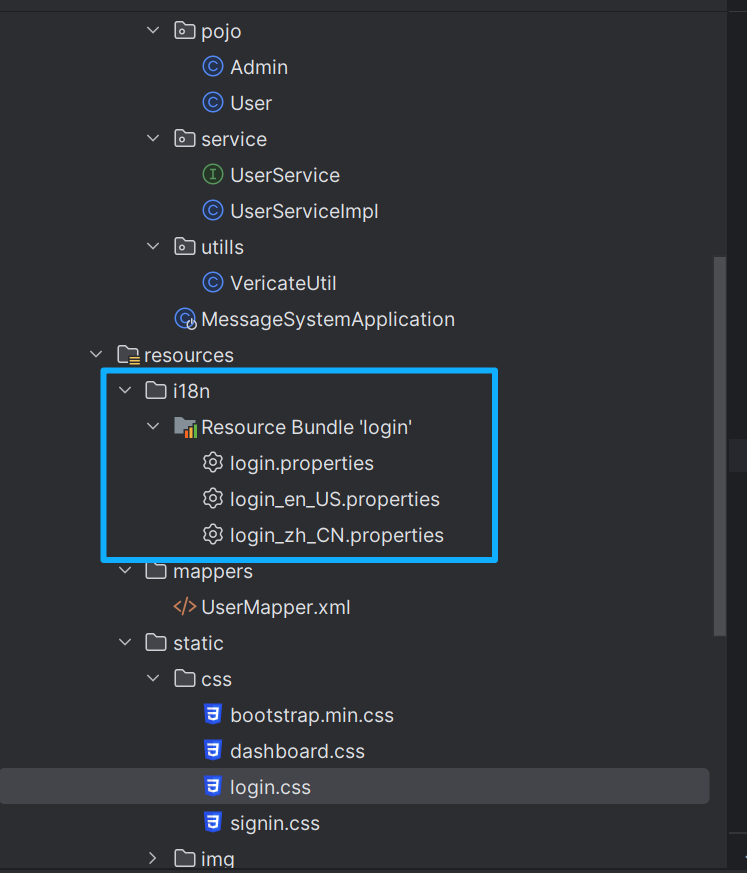
并在src/main/resources /i18n/目录下创建login.properties、login_en_Us.properties、login_zh_CN.properties三个配置文件,如上图所示
注意:SpringBoot默认识别的语言配置文件为
src/main/resources/目录下的messages.properties,但是我们这里在src/main/resources/i18n/目录下创建login.properties、login_en_Us.properties、login_zh_CN.properties三个配置文件,所以后面需要在全局配置文件application.yaml中指定如下:
#国际化文件基础名的配置(指定位置,默认resource/i18n/目录下编写login.properties)
messages:
  basename: i18n.login  //login是文件前缀
其他国际化的文件的名称必须严格按照 "文件的前缀名_语言代码_国家代码.properties"的形式命名,而且文件名"语言代码_国家代码"中间部分必须与前端代码中语言切换的@{/login(lang='zh_CN')参数一致。
<!-- 语言切换链接 --> <a class="link-area" th:href="@{/login(lang='zh_CN')}" th:text="#{lang.zh}">中文</a> <a class="link-area" th:href="@{/login(lang='en_US')}" th:text="#{lang.en}">English</a>
login.properties文件设置如下:(按照实际login.html中的对应的中文文本设计的)
# 登录页面
login.title=用户登录
login.welcome=欢迎登录
login.subtitle=请输入您的账号和密码
login.username=用户名
login.username.placeholder=请输入用户名
login.password=密码
login.password.placeholder=请输入密码
login.captcha=验证码
login.captcha.placeholder=请输入验证码
login.button=登录
login.register.link=还没有账号?立即注册

# 页脚
footer.copyright=© 2026-2027

# 语言名称
lang.zh=中文
lang.en=Englishlogin_en_Us.properties文件设置如下:
# 登录页面
login.title=User Login
login.welcome=Welcome Back
login.subtitle=Please enter your account and password
login.username=Username
login.username.placeholder=Enter username
login.password=Password
login.password.placeholder=Enter password
login.captcha=Captcha
login.captcha.placeholder=Enter captcha
login.button=Login
login.register.link=No account? Register now

# 页脚
footer.copyright=© 2026-2027

# 语言名称
lang.zh=中文
lang.en=Englishlogin_zh_CN.properties文件设置如下:
# 登录页面
login.title=用户登录
login.welcome=欢迎登录
login.subtitle=请输入您的账号和密码
login.username=用户名
login.username.placeholder=请输入用户名
login.password=密码
login.password.placeholder=请输入密码
login.captcha=验证码
login.captcha.placeholder=请输入验证码
login.button=登录
login.register.link=还没有账号?立即注册

# 页脚
footer.copyright=© 2026-2027

# 语言名称
lang.zh=中文
lang.en=English
三.在全局配置文件中指定国际化文件的信息
在application.yaml文件(更改国际化文件的默认指定位置,将指定位置改为默认resource/i18n/目录下编写login.properties)设置如下:
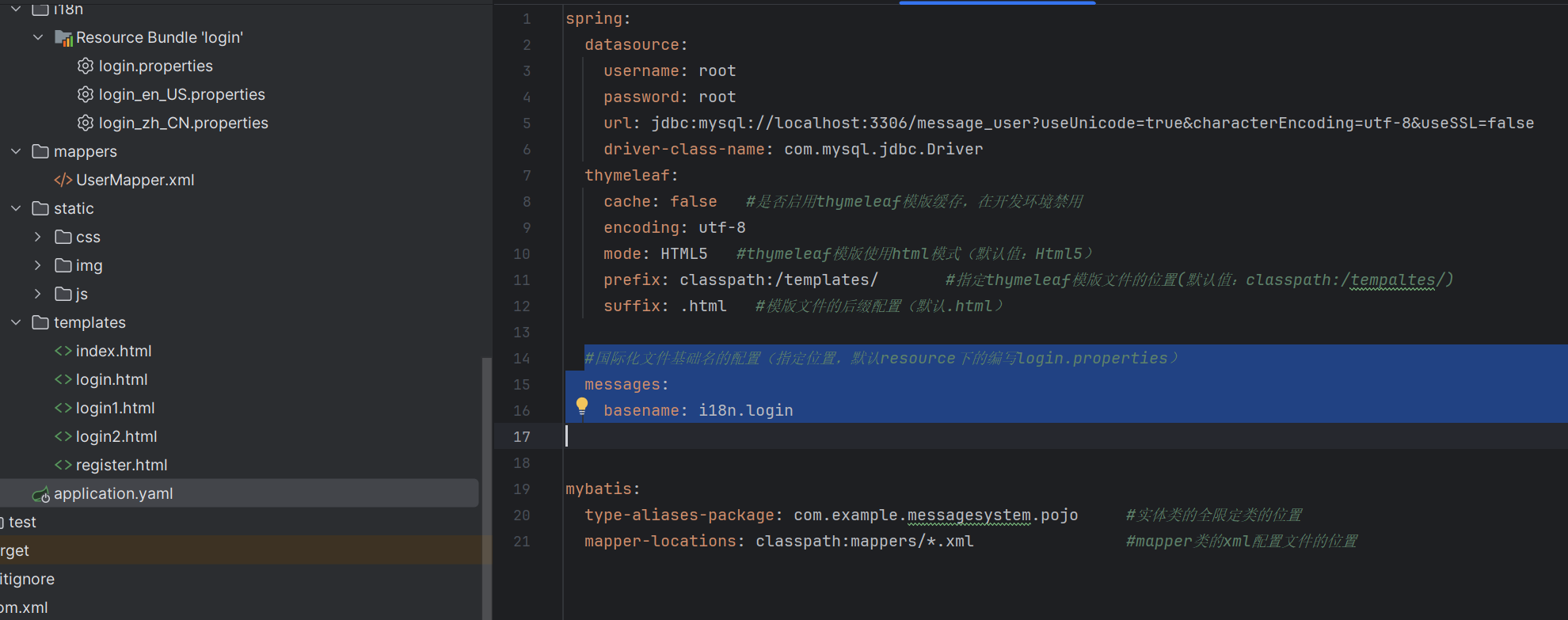
spring:
  datasource:
    username: root
    password: root
    url: jdbc:mysql://localhost:3306/message_user?useUnicode=true&characterEncoding=utf-8&useSSL=false
    driver-class-name: com.mysql.jdbc.Driver
  thymeleaf:
    cache: false   #是否启用thymeleaf模版缓存,在开发环境禁用
    encoding: utf-8
    mode: HTML5   #thymeleaf模版使用html模式(默认值:Html5)
    prefix: classpath:/templates/       #指定thymeleaf模版文件的位置(默认值:classpath:/tempaltes/)
    suffix: .html   #模版文件的后缀配置(默认.html)

  #国际化文件基础名的配置(指定位置,默认resource下的编写login.properties)
  messages:
    basename: i18n.login


mybatis:
  type-aliases-package: com.example.messagesystem.pojo     #实体类的全限定类的位置
  mapper-locations: classpath:mappers/*.xml                #mapper类的xml配置文件的位置
四、配置 LocaleChangeInterceptor
Spring 提供了 LocaleChangeInterceptor 来根据请求参数切换语言环境。在配置类中注册该拦截器,并设置参数名(例如 lang)。
创建一个配置类MyMvcConfig(如果有这个类,则直接在类中添加如下方法)
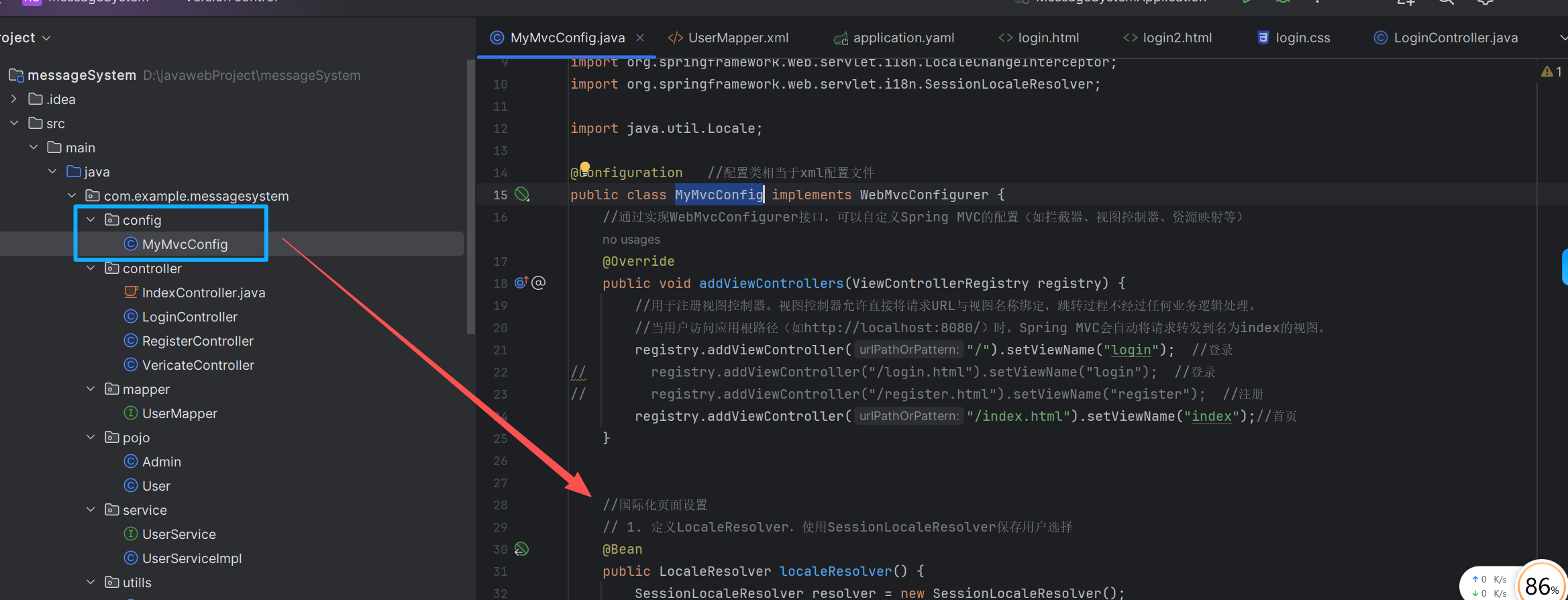
代码如下:
package com.example.messagesystem.config;

import org.springframework.context.annotation.Bean;
import org.springframework.context.annotation.Configuration;
import org.springframework.web.servlet.LocaleResolver;
import org.springframework.web.servlet.config.annotation.InterceptorRegistry;
import org.springframework.web.servlet.config.annotation.ViewControllerRegistry;
import org.springframework.web.servlet.config.annotation.WebMvcConfigurer;
import org.springframework.web.servlet.i18n.LocaleChangeInterceptor;
import org.springframework.web.servlet.i18n.SessionLocaleResolver;

import java.util.Locale;

@Configuration   //配置类相当于xml配置文件
public class MyMvcConfig implements WebMvcConfigurer {
    //通过实现WebMvcConfigurer接口,可以自定义Spring MVC的配置(如拦截器、视图控制器、资源映射等)
    @Override
    public void addViewControllers(ViewControllerRegistry registry) {
        //用于注册视图控制器。视图控制器允许直接将请求URL与视图名称绑定,跳转过程不经过任何业务逻辑处理。
        //当用户访问应用根路径(如http://localhost:8080/)时,Spring MVC会自动将请求转发到名为index的视图。
        registry.addViewController("/").setViewName("login");  //登录
//        registry.addViewController("/login.html").setViewName("login");  //登录
//        registry.addViewController("/register.html").setViewName("register");  //注册
        registry.addViewController("/index.html").setViewName("index");//首页
    }


    //国际化页面设置
    // 1. 定义LocaleResolver,使用SessionLocaleResolver保存用户选择
    @Bean
    public LocaleResolver localeResolver() {
        SessionLocaleResolver resolver = new SessionLocaleResolver();
        resolver.setDefaultLocale(Locale.SIMPLIFIED_CHINESE); // 默认中文
        return resolver;
    }

    // 2. 定义LocaleChangeInterceptor,拦截lang参数
    @Bean
    public LocaleChangeInterceptor localeChangeInterceptor() {
        LocaleChangeInterceptor interceptor = new LocaleChangeInterceptor();
        interceptor.setParamName("lang"); // 参数名为lang
        return interceptor;
    }

    // 3. 注册拦截器
    @Override
    public void addInterceptors(InterceptorRegistry registry) {
        registry.addInterceptor(localeChangeInterceptor());
    }
}说明:上述代码中
SessionLocaleResolver将语言选择存储在用户的会话中,因此切换后整个会话都会保持该语言。默认语言设置为中文(
Locale.SIMPLIFIED_CHINESE)。拦截器会检查请求参数
lang,并自动更改LocaleResolver中的语言环境。
五.检测前端login.html文件的切换设置
代码如下:
<div class="link-area"> <p class="mt-5 mb-3 text-muted" th:text="#{footer.copyright}">© 2026-2027</p> <br> <!-- 语言切换链接 --> <a class="link-area" th:href="@{/login(lang='zh_CN')}" th:text="#{lang.zh}">中文</a> <a class="link-area" th:href="@{/login(lang='en_US')}" th:text="#{lang.en}">English</a> </div>
其中th:href="@{/login(lang='zh_CN')}"前端传lang参数值"zh_CN",必须与国际化配置文件名的中间"zh_CN"一致(例如login_en_Us.properties、login_zh_CN.properties两个国际化配置文件)
六.完整测试
启动应用,访问
http://localhost:8080/,页面默认显示中文。点击底部的 English ,页面 URL 变为
http://localhost:8080/login?lang=en,所有文本切换为英文。再次点击 中文,切换回中文。
刷新页面或重新打开浏览器,语言仍然保持上次选择(因为存储在 session 中)。