分享一个APP中如何增加:AI智能聊天功能。
使用技术:SpringBoot 3.x 、Vue3
大模型使用:Deepseek
准备:申请 deepseek的 APIKey(需要deepseek充值,例如 充值1元)
1.后端开发:SpringBoot
使用IDEA创建一个SpringBoot项目,例如:aichatproject
1.1 Pom.xml 的设置
XML
<?xml version="1.0" encoding="UTF-8"?>
<project xmlns="http://maven.apache.org/POM/4.0.0" xmlns:xsi="http://www.w3.org/2001/XMLSchema-instance"
         xsi:schemaLocation="http://maven.apache.org/POM/4.0.0 https://maven.apache.org/xsd/maven-4.0.0.xsd">
    <modelVersion>4.0.0</modelVersion>
    <parent>
        <groupId>org.springframework.boot</groupId>
        <artifactId>spring-boot-starter-parent</artifactId>
        <version>3.5.15</version>
        <relativePath/> <!-- lookup parent from repository -->
    </parent>
    <groupId>com.laoma</groupId>
    <artifactId>aichatproject</artifactId>
    <version>0.0.1-SNAPSHOT</version>
    <name>aichatproject</name>
    <properties>
        <java.version>17</java.version>
    </properties>
    <dependencyManagement>
        <dependencies>
            <dependency>
                <groupId>org.springframework.ai</groupId>
                <artifactId>spring-ai-bom</artifactId>
                <version>1.0.0</version>
                <type>pom</type>
                <scope>import</scope>
            </dependency>
        </dependencies>
    </dependencyManagement>
    <dependencies>
        <dependency>
            <groupId>org.springframework.boot</groupId>
            <artifactId>spring-boot-starter</artifactId>
        </dependency>

        <dependency>
            <groupId>org.springframework.boot</groupId>
            <artifactId>spring-boot-starter-test</artifactId>
            <scope>test</scope>
        </dependency>
        <dependency>
            <groupId>org.springframework.boot</groupId>
            <artifactId>spring-boot-starter-web</artifactId>
        </dependency>
        <dependency>
            <groupId>org.springframework.ai</groupId>
            <artifactId>spring-ai-starter-model-openai</artifactId>
        </dependency>
    </dependencies>

    <build>
        <plugins>
            <plugin>
                <groupId>org.springframework.boot</groupId>
                <artifactId>spring-boot-maven-plugin</artifactId>
            </plugin>
        </plugins>
    </build>

</project>
1.2 application.yml
XML
spring:
  ai:
    openai:
      api-key: 自己的API-KEY
      base-url: https://api.deepseek.com
      chat:
        options:
          model: deepseek-chat
1.3 ChatController
java
package com.laoma.aichatproject.controller;

import org.springframework.ai.chat.client.ChatClient;
import org.springframework.ai.chat.client.advisor.MessageChatMemoryAdvisor;
import org.springframework.ai.chat.memory.ChatMemory;
import org.springframework.ai.chat.memory.InMemoryChatMemoryRepository;
import org.springframework.ai.chat.memory.MessageWindowChatMemory;
import org.springframework.http.MediaType;
import org.springframework.web.bind.annotation.GetMapping;
import org.springframework.web.bind.annotation.RequestMapping;
import org.springframework.web.bind.annotation.RequestParam;
import org.springframework.web.bind.annotation.RestController;
import org.springframework.web.servlet.mvc.method.annotation.SseEmitter;

/**
 * AI 对话接口
 * <p>
 * 对外只暴露一个接口:GET /api/chat/stream
 * 前端用 EventSource 连接,后端把大模型的回答一个字一个字地"推"过去
 * 也就是常见的"打字机效果"
 */
@RestController
@RequestMapping("/api/chat")
public class ChatController {

    // ChatClient 是 Spring AI 提供的"大模型客户端"
    // 所有跟大模型的交互都通过它来完成
    private final ChatClient chatClient;

    // 默认提示词 prompt
    private static final String BASE_SYSTEM = """
            【你能做的】==:可以修改这里的内容
            - 解答系统功能使用问题
            - 引导用户完成常见操作(如:如何下单购买、查看订单、申请退款等)
            - 解释页面上各字段、按钮的含义
            - 遇到系统故障或账号问题,引导用户联系人工客服:400-123-4567

            【你不能做的】
            - 不回答与本系统无关的问题,礼貌拒绝即可
            - 不能承诺系统未来会有某某功能
            - 不能替用户执行任何操作(只能指导)

            【回答风格】
            - 简洁友好,口语化,不超过200字
            - 操作步骤用数字列出,清晰易懂
            - 遇到不确定的问题,诚实说不知道,并提供人工客服联系方式
            """;

    /**
     * 构造方法:初始化 ChatClient
     * <p>
     * Spring Boot 启动时会自动把 ChatClient.Builder 注入进来
     * Builder 会读取 application.yml 里配置的 api-key、model 等参数
     */
    @SuppressWarnings("SpringJavaInjectionPointsAutowiringInspection")
    public ChatController(ChatClient.Builder builder) {

        // ---- 第一步:配置对话记忆 ----
        // 大模型本身是"无状态"的,每次请求它都不知道之前说过什么
        // 所以需要我们自己把历史对话存起来,每次请求时一起带过去
        // InMemoryChatMemoryRepository = 把历史记录存在内存里(重启后清空)
        // MessageWindowChatMemory = 滑动窗口,只保留最近 N 条,避免超出 token 限制
        ChatMemory chatMemory = MessageWindowChatMemory.builder()
                .chatMemoryRepository(new InMemoryChatMemoryRepository())
                .maxMessages(20)   // 最多记住最近 20 条对话(10问10答)
                .build();

        // ---- 第二步:构建 ChatClient ----
        // MessageChatMemoryAdvisor 是一个"拦截器"
        // 它会在每次发请求前,自动把历史记录塞进去
        // 在收到回复后,自动把这轮对话存进记忆里
        // 你不需要手动管理消息列表,它全帮你做了
        this.chatClient = builder
                .defaultSystem(BASE_SYSTEM)
                .defaultAdvisors(MessageChatMemoryAdvisor.builder(chatMemory).build())
                .build();
    }

    /**
     * 流式对话接口
     * <p>
     * 请求示例:GET /api/chat/stream?message=你好&sessionId=abc123
     *
     * @param message   用户发送的消息内容
     * @param sessionId 会话ID,用来区分不同用户的对话记忆
     *                  同一个 sessionId = 同一个对话上下文
     *                  前端可以用 crypto.randomUUID() 生成,每个用户一个
     */
    @GetMapping(value = "/stream", produces = MediaType.TEXT_EVENT_STREAM_VALUE)
    // produces = TEXT_EVENT_STREAM_VALUE 告诉浏览器:
    // 这个接口返回的是 SSE 格式(Server-Sent Events),不是普通 JSON
    // 浏览器的 EventSource 就是专门接收这种格式的
    public SseEmitter stream(
            @RequestParam String message,
            @RequestParam(defaultValue = "default") String sessionId) {

        // SseEmitter 是 Spring MVC 提供的 SSE 推送工具
        // 可以理解为一根"水管",后端往里写数据,前端实时收到
        // 180_000L = 超时时间 180秒,超时后连接自动断开
        SseEmitter emitter = new SseEmitter(180_000L);

        chatClient.prompt()
                .user(message)    // 用户这次发送的消息内容
                // 把本次请求绑定到对应的会话 ID
                // MessageChatMemoryAdvisor 会根据这个 ID:
                //   1. 发请求前:自动把该会话的历史记录拼进去
                //   2. 收到回复后:自动把本轮对话存进记忆
                .advisors(a -> a.param(ChatMemory.CONVERSATION_ID, sessionId))
                // 开启流式模式
                // 大模型每生成一个 token 就立刻返回,而不是等全部生成完再返回
                // 这样前端才能实现"打字机"效果
                .stream()
                .content()
                // subscribe 订阅这个数据流,类似于"监听"
                // 大模型每吐出一段文字,就会触发下面对应的回调
                .subscribe(
                        // ① 每收到一个 token(一个字或几个字)就立刻推给前端
                        token -> {
                            try {
                                emitter.send(token);
                            } catch (Exception e) {
                                // 发送失败(比如用户关闭了页面),终止推送
                                emitter.completeWithError(e);
                            }
                        },
                        // ② 大模型返回报错时,把错误通知前端并关闭连接
                        emitter::completeWithError,
                        // ③ 大模型全部回答完毕,正常关闭连接
                        emitter::complete
                );

        // 立刻返回 emitter,连接保持打开
        // 后续数据会通过上面的 subscribe 回调异步推送
        return emitter;
    }
}
1.4 配置跨域
config/CorsConfig.java
java
package com.laoma.aichatproject.config;

import org.springframework.context.annotation.Configuration;
import org.springframework.web.servlet.config.annotation.CorsRegistry;
import org.springframework.web.servlet.config.annotation.WebMvcConfigurer;

@Configuration
public class CorsConfig implements WebMvcConfigurer {

    @Override
    public void addCorsMappings(CorsRegistry registry) {
        registry.addMapping("/**")  // 所有接口
                //.allowedOrigins("http://localhost:5173")
                .allowedOriginPatterns("*")  // 允许所有来源
                .allowedMethods("GET", "POST", "PUT", "DELETE", "OPTIONS") // 允许请求方式
                .allowCredentials(true) // 允许携带Cookie/Token
                .maxAge(3600); // 预检请求有效期
    }
}
2.前端开发:Vue
2.1 创建Vue3项目
npm create vite@latest
2.2 删除HelloWorld.vue
2.3 安装依赖
2.3.1 安装富文本渲染组件 markdown-it
npm install markdown-it
2.3.2 安装element-plus
npm install element-plus
npm install @element-plus/icons-vue
2.4 配置 main.js
javascript
import { createApp } from 'vue'
import './style.css'
import App from './App.vue'
// 1. 引入 Element Plus
import ElementPlus from 'element-plus'
import 'element-plus/dist/index.css'
// 2. 引入所有图标并全局注册
import * as ElementPlusIconsVue from '@element-plus/icons-vue'

const app = createApp(App)

// 遍历注册所有图标
for (const [key, component] of Object.entries(ElementPlusIconsVue)) {
  app.component(key, component)
}

app.use(ElementPlus)
app.mount('#app')
2.5 项目根目录下,创建 .env.development 文件,内容如下:
javascript
VITE_BASE_URL=http://localhost:80802.6 在compoments下创建 AiChat.vue,内容如下:(这个代码是让AI生成的)
javascript
<template>
  <div class="ai-chat-fab" @click="openPanel" v-show="!visible">
    <el-icon :size="24" color="white"><ChatDotRound /></el-icon>
    <span v-if="unread > 0" class="fab-badge">{{ unread }}</span>
  </div>

  <!-- 面板改用 v-show,不再销毁 DOM -->
  <div :class="['ai-chat-panel', { fullscreen: isFullscreen, 'panel-enter': panelEnter, 'panel-leave': panelLeave }]"
       v-show="panelVisible">
    <div class="panel-header">
      <div class="header-avatar">
        <el-icon :size="18" color="white"><Avatar /></el-icon>
      </div>
      <div class="header-info">
        <span class="header-title">AI 智能助手</span>
        <span class="header-sub"><i class="online-dot" />在线</span>
      </div>
      <div class="header-actions">
        <el-icon class="action-icon" @click="clearMessages"><Delete /></el-icon>
        <el-icon class="action-icon" @click="toggleFullscreen">
          <FullScreen v-if="!isFullscreen" />
          <Aim v-else />
        </el-icon>
        <el-icon class="action-icon" @click.stop="closePanel"><Close /></el-icon>
      </div>
    </div>

    <div class="suggest-bar" v-if="messages.length <= 1">
      <span v-for="s in SUGGESTIONS" :key="s" class="suggest-tag" @click="sendSuggestion(s)">
        {{ s }}
      </span>
    </div>

    <div class="message-list" ref="messageListRef">
      <div v-for="(msg, index) in messages" :key="index" :class="['msg-row', msg.role]">
        <div class="msg-avatar">
          <el-icon v-if="msg.role === 'assistant'"><Cpu /></el-icon>
          <el-icon v-else><User /></el-icon>
        </div>
        <!-- assistant 用 v-html 渲染 md,user 保持纯文本 -->
        <div v-if="msg.role === 'assistant'" class="bubble assistant">
          <span v-html="renderMd(msg.content)"></span>
          <span v-if="index === messages.length - 1 && streaming" class="cursor-blink">|</span>
        </div>
        <div v-else class="bubble user">
          {{ msg.content }}
        </div>
      </div>
      <div class="msg-row assistant" v-if="waiting">
        <div class="msg-avatar"><el-icon><Cpu /></el-icon></div>
        <div class="bubble assistant typing-bubble">
          <span class="dot" /><span class="dot" /><span class="dot" />
        </div>
      </div>
    </div>

    <div class="input-area">
      <el-input
          v-model="inputText"
          type="textarea"
          :autosize="{ minRows: 1, maxRows: 4 }"
          placeholder="输入消息,Enter 发送"
          resize="none"
          @keydown.enter.exact.prevent="sendMessage"
          :disabled="streaming || waiting"
          class="chat-input"
      />
      <el-button
          type="primary"
          :icon="Promotion"
          circle
          :disabled="!inputText.trim() || streaming || waiting"
          @click="sendMessage"
          class="send-btn"
      />
    </div>
  </div>
</template>

<script setup>
import { ref, nextTick } from 'vue'
import { ChatDotRound, Avatar, Delete, Close, Cpu, User, Promotion, FullScreen, Aim } from '@element-plus/icons-vue'
import MarkdownIt from 'markdown-it'

const API_URL = import.meta.env.VITE_BASE_URL + '/api/chat/stream'
const GREETING = '你好!我是校园小卖部的智能客服小智😊,有什么可以帮你的吗?'
const SUGGESTIONS = ['如何下单购买', '查看订单', '申请退款', '联系人工客服']
const SESSION_ID = crypto.randomUUID()

const visible = ref(false)      // 控制 FAB 显隐
const panelVisible = ref(false) // 控制面板 v-show(包含动画期间)
const panelEnter = ref(false)
const panelLeave = ref(false)
const isFullscreen = ref(false)
const inputText = ref('')
const streaming = ref(false)
const waiting = ref(false)
const unread = ref(0)
const messageListRef = ref(null)
const messages = ref([{ role: 'assistant', content: GREETING }])
const md = new MarkdownIt()

function toggleFullscreen() {
  isFullscreen.value = !isFullscreen.value
  nextTick(scrollToBottom)
}

function openPanel() {
  visible.value = true
  panelVisible.value = true
  unread.value = 0
  // 触发入场动画
  nextTick(() => {
    panelEnter.value = true
    panelLeave.value = false
    nextTick(scrollToBottom)
  })
}

function closePanel() {
  // 1. 立即让 FAB 不可点击(pointer-events),避免穿透
  visible.value = false
  // 2. 触发离场动画
  panelEnter.value = false
  panelLeave.value = true
  // 3. 动画结束后才真正隐藏面板
  setTimeout(() => {
    panelVisible.value = false
    panelLeave.value = false
    isFullscreen.value = false
    // 动画彻底结束后才让 FAB 重新可见
    visible.value = false
  }, 200)
}

function clearMessages() {
  messages.value = [{ role: 'assistant', content: GREETING }]
}

function sendSuggestion(text) {
  inputText.value = text
  sendMessage()
}

async function sendMessage() {
  const text = inputText.value.trim()
  if (!text || streaming.value || waiting.value) return

  messages.value.push({ role: 'user', content: text })
  inputText.value = ''
  waiting.value = true
  await nextTick(scrollToBottom)

  const es = new EventSource(
      `${API_URL}?message=${encodeURIComponent(text)}&sessionId=${SESSION_ID}`
  )

  messages.value.push({ role: 'assistant', content: '' })
  const lastIdx = messages.value.length - 1
  waiting.value = false
  streaming.value = true

  es.onmessage = async ({ data }) => {
    messages.value[lastIdx].content += data
    console.log('当前content:', messages.value[lastIdx].content)  // 加这行
    await nextTick(scrollToBottom)
  }

  es.onerror = () => {
    es.close()
    streaming.value = false
    if (!visible.value) unread.value++
  }
}

function scrollToBottom() {
  if (messageListRef.value)
    messageListRef.value.scrollTop = messageListRef.value.scrollHeight
}

function renderMd(content) {
  return md.render(content || '')
}
</script>

<style scoped>
.ai-chat-fab {
  position: fixed;
  bottom: 28px;
  right: 28px;
  width: 54px;
  height: 54px;
  border-radius: 50%;
  background: linear-gradient(135deg, #409eff, #1d7fe4);
  box-shadow: 0 4px 20px rgba(64, 158, 255, .5);
  display: flex;
  align-items: center;
  justify-content: center;
  cursor: pointer;
  z-index: 9997;
  transition: transform .2s, box-shadow .2s;
}

.ai-chat-fab:hover {
  transform: scale(1.1);
  box-shadow: 0 6px 28px rgba(64, 158, 255, .65);
}

.fab-badge {
  position: absolute;
  top: 0;
  right: 0;
  min-width: 18px;
  height: 18px;
  padding: 0 4px;
  border-radius: 9px;
  background: #f56c6c;
  border: 2px solid white;
  font-size: 11px;
  color: white;
  font-weight: 600;
  display: flex;
  align-items: center;
  justify-content: center;
}

.ai-chat-panel {
  position: fixed;
  bottom: 96px;
  right: 28px;
  width: 360px;
  height: 520px;
  background: white;
  border-radius: 16px;
  box-shadow: 0 8px 48px rgba(0, 0, 0, .18);
  display: flex;
  flex-direction: column;
  overflow: hidden;
  z-index: 9998;
  /* 默认隐藏状态(初始无动画) */
  transform: scale(0.6) translateY(30px);
  opacity: 0;
  transform-origin: bottom right;
  pointer-events: none;
  transition: width .3s ease, height .3s ease, bottom .3s ease,
  right .3s ease, border-radius .3s ease;
}

/* 入场 */
.ai-chat-panel.panel-enter {
  animation: chatPopIn .28s cubic-bezier(.34, 1.56, .64, 1) forwards;
  pointer-events: auto;
}

/* 离场 */
.ai-chat-panel.panel-leave {
  animation: chatPopOut .2s ease-in forwards;
  pointer-events: none; /* 离场动画期间禁止点击,防止穿透 */
}

.ai-chat-panel.fullscreen {
  bottom: 0;
  right: 0;
  width: 100vw;
  height: 100vh;
  border-radius: 0;
}

@keyframes chatPopIn {
  from {
    transform: scale(.6) translateY(30px);
    opacity: 0;
    transform-origin: bottom right;
  }
  to {
    transform: scale(1) translateY(0);
    opacity: 1;
    transform-origin: bottom right;
  }
}

@keyframes chatPopOut {
  from {
    transform: scale(1) translateY(0);
    opacity: 1;
    transform-origin: bottom right;
  }
  to {
    transform: scale(.6) translateY(20px);
    opacity: 0;
    transform-origin: bottom right;
  }
}

.panel-header {
  display: flex;
  align-items: center;
  gap: 10px;
  padding: 12px 14px;
  flex-shrink: 0;
  background: linear-gradient(135deg, #409eff, #1d7fe4);
}

.header-avatar {
  width: 36px;
  height: 36px;
  border-radius: 50%;
  background: rgba(255, 255, 255, .2);
  display: flex;
  align-items: center;
  justify-content: center;
  flex-shrink: 0;
}

.header-info {
  flex: 1;
  display: flex;
  flex-direction: column;
  gap: 2px;
}

.header-title {
  font-size: 14px;
  font-weight: 600;
  color: white;
}

.header-sub {
  font-size: 11px;
  color: rgba(255, 255, 255, .75);
  display: flex;
  align-items: center;
  gap: 4px;
}

.online-dot {
  display: inline-block;
  width: 7px;
  height: 7px;
  border-radius: 50%;
  background: #67c23a;
  box-shadow: 0 0 5px #67c23a;
}

.header-actions {
  display: flex;
  align-items: center;
  gap: 8px;
}

.action-icon {
  color: rgba(255, 255, 255, .8);
  cursor: pointer;
  font-size: 16px;
  transition: color .15s;
}

.action-icon:hover {
  color: white;
}

.suggest-bar {
  display: flex;
  gap: 6px;
  padding: 8px 12px;
  overflow-x: auto;
  background: #f5f7fa;
  border-bottom: 1px solid #ebeef5;
  flex-shrink: 0;
}

.suggest-bar::-webkit-scrollbar {
  display: none;
}

.suggest-tag {
  font-size: 12px;
  padding: 4px 10px;
  white-space: nowrap;
  border: 1px solid #dcdfe6;
  border-radius: 12px;
  color: #606266;
  cursor: pointer;
  background: white;
  transition: border-color .15s, color .15s;
}

.suggest-tag:hover {
  border-color: #409eff;
  color: #409eff;
}

.message-list {
  flex: 1;
  overflow-y: auto;
  padding: 14px 12px;
  display: flex;
  flex-direction: column;
  gap: 12px;
  background: #f8f9fa;
}

.message-list::-webkit-scrollbar {
  width: 4px;
}

.message-list::-webkit-scrollbar-thumb {
  background: #dcdfe6;
  border-radius: 2px;
}

.msg-row {
  display: flex;
  align-items: flex-end;
  gap: 8px;
}

.msg-row.user {
  flex-direction: row-reverse;
}

.msg-avatar {
  width: 30px;
  height: 30px;
  border-radius: 50%;
  background: #e8f4ff;
  display: flex;
  align-items: center;
  justify-content: center;
  flex-shrink: 0;
  font-size: 14px;
  color: #409eff;
}

.bubble {
  max-width: min(600px, 60%);
  padding: 10px 13px;
  font-size: 13px;
  line-height: 1.6;
  word-break: break-word;
}

.bubble.assistant {
  background: white;
  color: #303133;
  border-radius: 2px 12px 12px 12px;
  box-shadow: 0 1px 6px rgba(0, 0, 0, .08);
}

.bubble.user {
  background: #409eff;
  color: white;
  border-radius: 12px 2px 12px 12px;
}

.typing-bubble {
  display: flex;
  align-items: center;
  gap: 5px;
  padding: 12px 16px;
}

.dot {
  display: inline-block;
  width: 7px;
  height: 7px;
  border-radius: 50%;
  background: #c0c4cc;
  animation: dotBounce 1.4s infinite ease-in-out;
}

.dot:nth-child(2) { animation-delay: .16s; }
.dot:nth-child(3) { animation-delay: .32s; }

@keyframes dotBounce {
  0%, 80%, 100% { transform: translateY(0); background: #c0c4cc; }
  40% { transform: translateY(-7px); background: #409eff; }
}

.cursor-blink {
  color: #409eff;
  animation: cursorBlink .7s infinite;
}

@keyframes cursorBlink {
  0%, 100% { opacity: 1; }
  50% { opacity: 0; }
}

.input-area {
  display: flex;
  align-items: flex-end;
  gap: 8px;
  padding: 10px 12px;
  border-top: 1px solid #ebeef5;
  background: white;
  flex-shrink: 0;
}

.chat-input { flex: 1; }

.chat-input :deep(.el-textarea__inner) {
  border-radius: 8px;
  font-size: 13px;
  line-height: 1.5;
  padding: 8px 10px;
  resize: none;
}

.send-btn {
  flex-shrink: 0;
  width: 36px;
  height: 36px;
}

@media (max-width: 480px) {
  .ai-chat-panel {
    right: 0;
    bottom: 0;
    width: 100vw;
    height: 70vh;
    border-radius: 16px 16px 0 0;
  }
  .ai-chat-fab {
    bottom: 20px;
    right: 20px;
  }
}

.bubble.assistant :deep(p) {
  margin: 0;
}
</style>
2.7 App.vue内容
javascript
<script setup>
  import AiChat from './components/AiChat.vue'
</script>

<template>
  <h1>AI智能聊天功能实现</h1>
  <AiChat/>
</template>
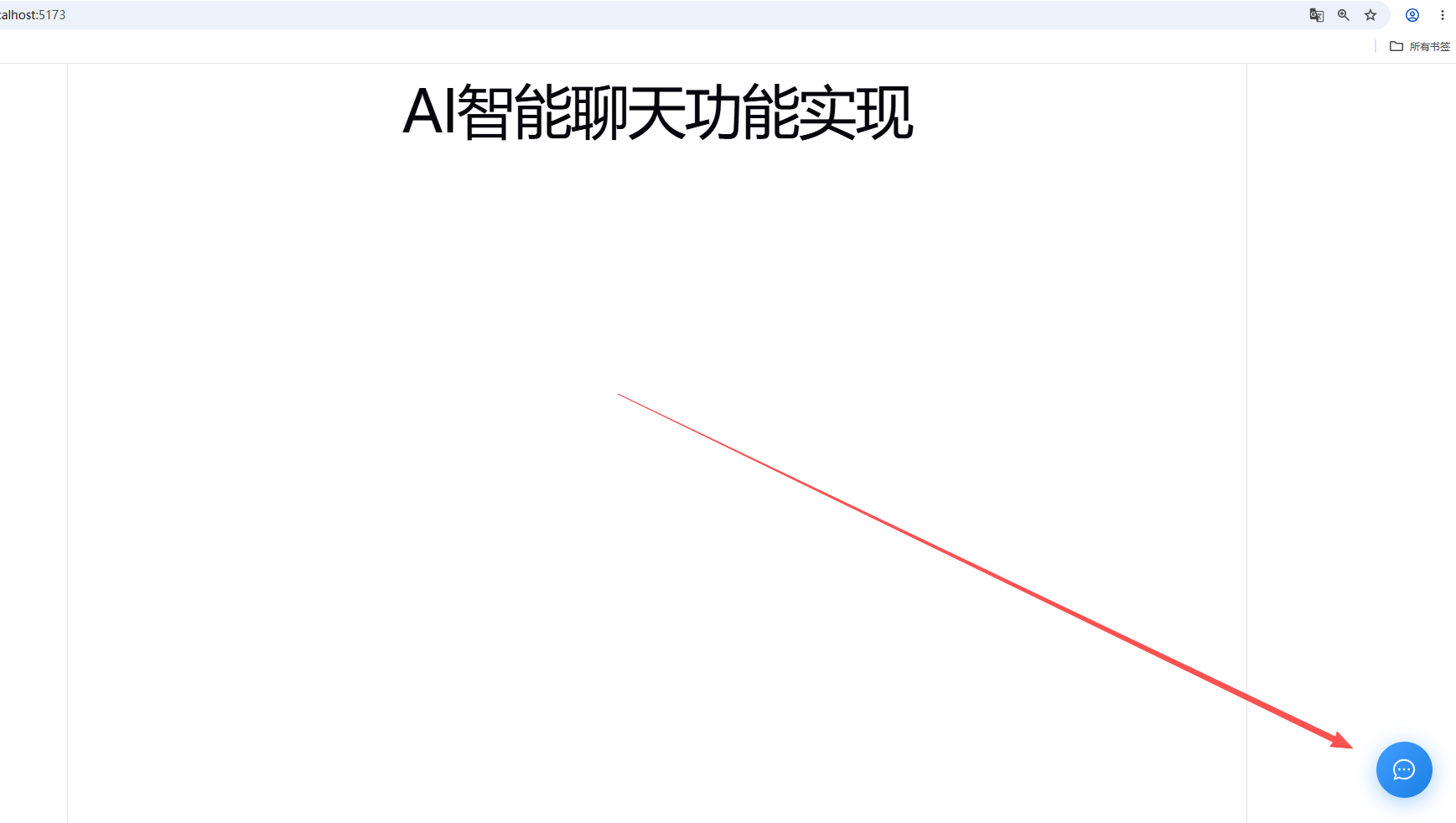
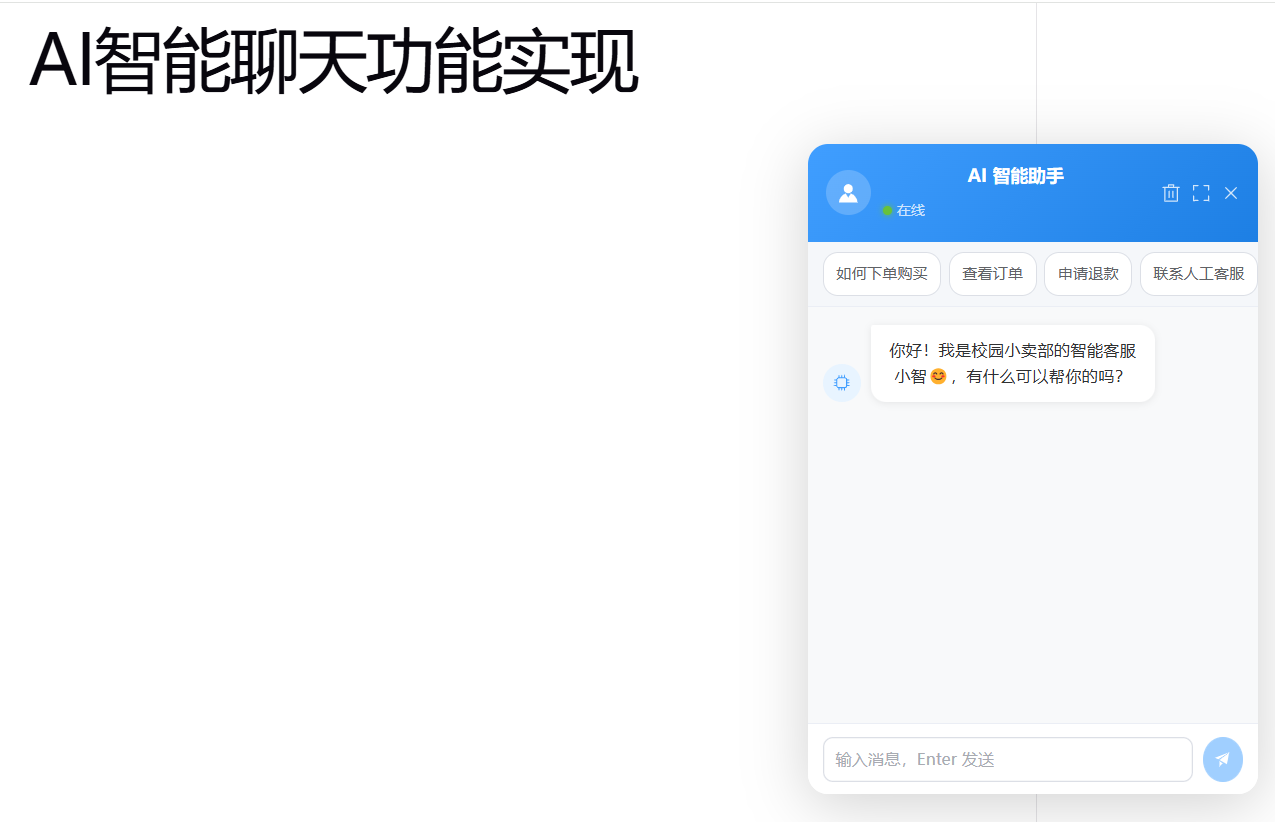
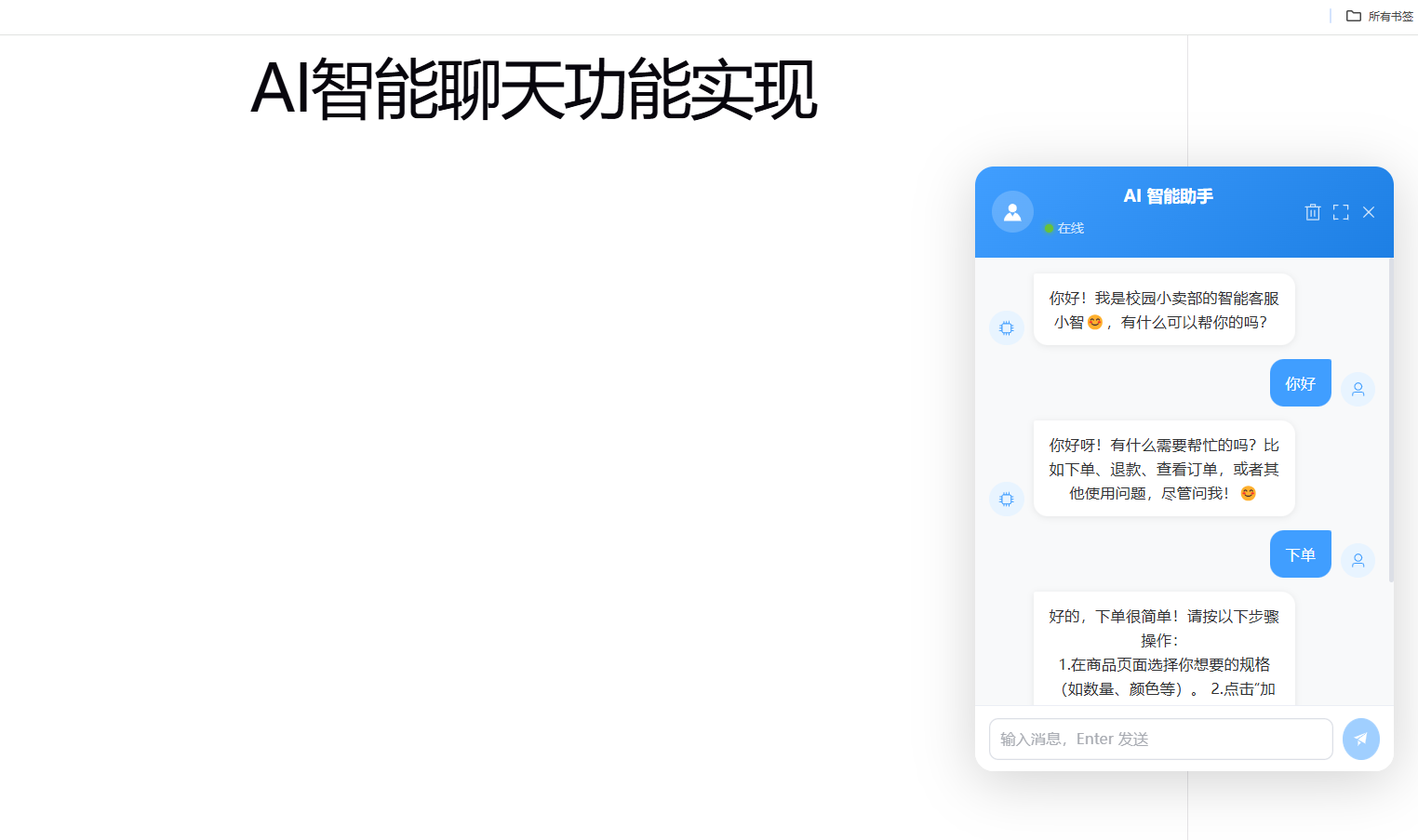
3.启动测试结果
npm run dev
到此结束!