欢迎加入开源鸿蒙跨平台社区:https://openharmonycrossplatform.csdn.net
🎯 前言:为什么需要地理编码?
在移动应用开发中,地理编码(Geocoding)和逆地理编码(Reverse Geocoding)是非常常见的需求。
实际痛点:
- 📍 地址转坐标:用户输入地址,需要在地图上显示位置
- 🗺️ 坐标转地址:获取GPS坐标后,需要显示可读的地址信息
- 🔍 地址搜索:搜索附近的地点并获取详细信息
- 📱 位置分享:分享当前位置时需要显示地址而不是坐标
- 🚗 导航应用:输入目的地地址后需要转换为坐标进行导航
实际场景需求:
- 场景一:外卖应用需要将用户输入的地址转换为坐标
- 场景二:地图应用需要显示当前GPS位置的详细地址
- 场景三:社交应用需要显示用户发布内容的位置信息
- 场景四:房产应用需要根据地址搜索房源位置
- 场景五:物流应用需要显示包裹当前位置的地址
geocoding 是解决这些问题的完美方案!它提供了:
- 🌍 地址转坐标:将文本地址转换为经纬度坐标
- 📍 坐标转地址:将经纬度坐标转换为详细地址信息
- 🌐 多语言支持:支持设置语言环境
- 📊 详细信息:获取国家、城市、街道等详细地址组件
- ⚡ 高性能:直接调用原生地理编码服务
- 🔄 服务检测:可检测地理编码服务是否可用
🚀 核心能力一览
| 功能特性 | 详细说明 | OpenHarmony 支持 |
|---|---|---|
| 地址转坐标 | 文本地址转经纬度 | ✅ |
| 坐标转地址 | 经纬度转详细地址信息 | ✅ |
| 地址转详细信息 | 文本地址转详细地址组件 | ✅ |
| 多语言支持 | 设置返回地址的语言 | ✅ |
| 服务状态检测 | 检测地理编码服务是否可用 | ✅ |
| 详细地址组件 | 国家、城市、街道等信息 | ✅ |
| 跨平台一致 | 所有平台行为一致 | ✅ |
地理编码类型说明
| 类型 | 输入 | 输出 | 说明 |
|---|---|---|---|
| 地理编码 | 文本地址 | 经纬度坐标列表 | 地址 → 坐标 |
| 逆地理编码 | 经纬度坐标 | 详细地址信息列表 | 坐标 → 地址 |
| 地址详情查询 | 文本地址 | 详细地址组件列表 | 地址 → 详细信息 |
地址组件说明
| 组件 | 说明 | 示例 |
|---|---|---|
| name | 地点名称 | "中关村大街1号" |
| street | 街道名称 | "中关村大街" |
| locality | 城市/地区 | "北京市" |
| subLocality | 区/县 | "海淀区" |
| administrativeArea | 省/州 | "北京市" |
| subAdministrativeArea | 市/县 | "海淀区" |
| postalCode | 邮政编码 | "100080" |
| country | 国家 | "中国" |
| isoCountryCode | 国家代码 | "CN" |
📱 如何运行这些示例
运行步骤
- 创建新项目或使用现有项目
- 配置依赖(见下方)
- 复制示例代码到
lib/main.dart - 运行应用:
flutter run - 输入地址或坐标进行测试
⚠️ 常见问题
-
问题:查询返回空结果
- 解决:检查网络连接,确保地址格式正确
-
问题:返回的地址语言不对
- 解决:使用 setLocaleIdentifier 设置语言环境
-
问题:查询速度慢
- 解决:这是正常现象,地理编码需要网络请求
⚙️ 环境准备:两步走
第一步:添加依赖
📄 pubspec.yaml:
yaml
dependencies:
  flutter:
    sdk: flutter

  # 添加 geocoding 依赖(OpenHarmony 适配版本)
  geocoding:
    git:
      url: https://atomgit.com/openharmony-sig/fluttertpc_geocoding.git
      path: "geocoding"
执行命令:
bash
flutter pub get第二步:导入包
在 Dart 文件中导入:
dart
import 'package:flutter/material.dart';
import 'package:geocoding_ohos/geocoding_ohos.dart';
📚 基础用法:核心功能
示例1:地址转坐标
将文本地址转换为经纬度坐标:
dart
Future<void> getLocationFromAddress(String address) async {
  try {
    GeocodingOhos geocoding = GeocodingOhos();
    List<Location> locations = await geocoding.locationFromAddress(address);

    if (locations.isNotEmpty) {
      final location = locations.first;
      print('地址: $address');
      print('纬度: ${location.latitude}');
      print('经度: ${location.longitude}');
      print('时间戳: ${location.timestamp}');
    } else {
      print('未找到该地址的坐标');
    }
  } catch (e) {
    print('地理编码失败: $e');
  }
}

// 使用示例
getLocationFromAddress('北京市海淀区中关村大街1号');核心要点:
- 返回
List<Location>,可能有多个匹配结果 Location包含 latitude(纬度)、longitude(经度)、timestamp(时间戳)- 地址格式越详细,结果越准确
示例2:坐标转地址
将经纬度坐标转换为详细地址信息:
dart
Future<void> getAddressFromCoordinates(double latitude, double longitude) async {
  try {
    GeocodingOhos geocoding = GeocodingOhos();
    List<Placemark> placemarks = await geocoding.placemarkFromCoordinates(
      latitude,
      longitude,
    );

    if (placemarks.isNotEmpty) {
      final place = placemarks.first;
      print('坐标: ($latitude, $longitude)');
      print('国家: ${place.country}');
      print('省份: ${place.administrativeArea}');
      print('城市: ${place.locality}');
      print('区县: ${place.subLocality}');
      print('街道: ${place.street}');
      print('邮编: ${place.postalCode}');
    } else {
      print('未找到该坐标的地址信息');
    }
  } catch (e) {
    print('逆地理编码失败: $e');
  }
}

// 使用示例
getAddressFromCoordinates(39.9042, 116.4074);  // 北京天安门
示例3:地址转详细信息
获取地址的详细组件信息:
dart
Future<void> getPlacemarkFromAddress(String address) async {
  try {
    GeocodingOhos geocoding = GeocodingOhos();
    List<Placemark> placemarks = await geocoding.placemarkFromAddress(address);

    if (placemarks.isNotEmpty) {
      final place = placemarks.first;
      print('地址: $address');
      print('完整信息:');
      print('  名称: ${place.name}');
      print('  街道: ${place.street}');
      print('  城市: ${place.locality}');
      print('  区县: ${place.subLocality}');
      print('  省份: ${place.administrativeArea}');
      print('  国家: ${place.country} (${place.isoCountryCode})');
      print('  邮编: ${place.postalCode}');
    }
  } catch (e) {
    print('查询失败: $e');
  }
}

// 使用示例
getPlacemarkFromAddress('上海市浦东新区陆家嘴环路1000号');
示例4:设置语言环境
设置返回地址信息的语言:
dart
Future<void> setLanguage() async {
  try {
    GeocodingOhos geocoding = GeocodingOhos();

    // 设置为中文
    await geocoding.setLocaleIdentifier('zh_CN');

    // 查询地址(返回中文)
    List<Placemark> placemarks = await geocoding.placemarkFromCoordinates(
      39.9042,
      116.4074,
    );

    if (placemarks.isNotEmpty) {
      print('中文地址: ${placemarks.first.country}');
    }

    // 设置为英文
    await geocoding.setLocaleIdentifier('en_US');

    // 再次查询(返回英文)
    placemarks = await geocoding.placemarkFromCoordinates(
      39.9042,
      116.4074,
    );

    if (placemarks.isNotEmpty) {
      print('英文地址: ${placemarks.first.country}');
    }
  } catch (e) {
    print('设置语言失败: $e');
  }
}语言代码格式:
zh_CN:简体中文en_US:美式英语nl_NL:荷兰语- 格式:
[语言代码]_[国家代码]
示例5:检测服务状态
检查地理编码服务是否可用:
dart
Future<void> checkServiceStatus() async {
  try {
    GeocodingOhos geocoding = GeocodingOhos();
    bool isAvailable = await geocoding.isPresent();

    if (isAvailable) {
      print('地理编码服务可用');
    } else {
      print('地理编码服务不可用');
    }
  } catch (e) {
    print('检测服务状态失败: $e');
  }
}
🎯 完整示例:地理编码工具
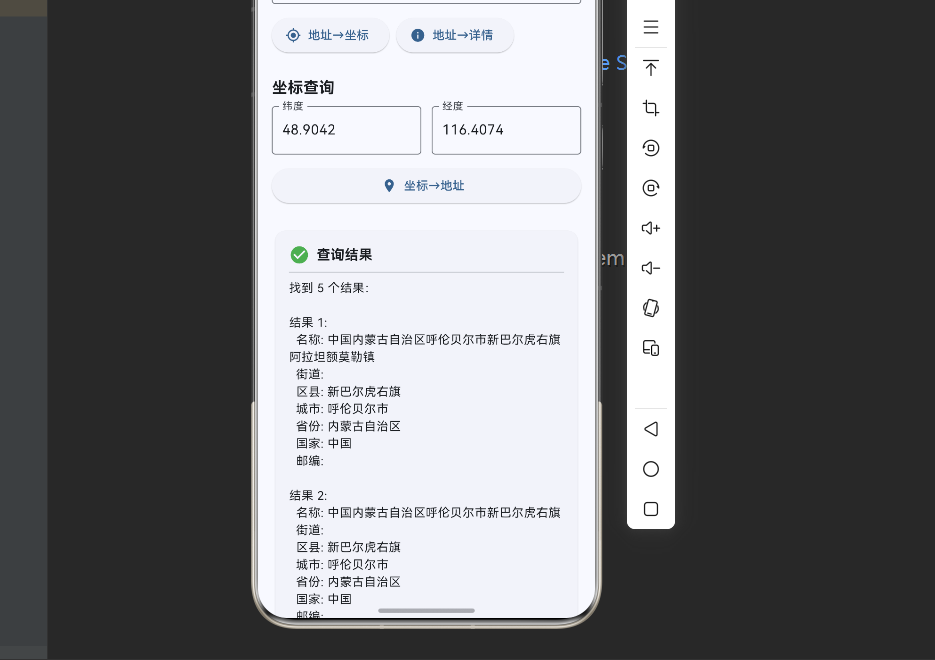
下面是一个功能完整的地理编码应用,展示了所有核心功能:
dart
import 'package:flutter/material.dart';
import 'package:geocoding_ohos/geocoding_ohos.dart';

void main() {
  runApp(const MyApp());
}

class MyApp extends StatelessWidget {
  const MyApp({super.key});

  @override
  Widget build(BuildContext context) {
    return MaterialApp(
      title: '地理编码工具',
      theme: ThemeData(
        colorScheme: ColorScheme.fromSeed(seedColor: Colors.blue),
        useMaterial3: true,
      ),
      home: const GeocodingPage(),
    );
  }
}

class GeocodingPage extends StatefulWidget {
  const GeocodingPage({super.key});

  @override
  State<GeocodingPage> createState() => _GeocodingPageState();
}

class _GeocodingPageState extends State<GeocodingPage> {
  final TextEditingController _addressController = TextEditingController();
  final TextEditingController _latitudeController = TextEditingController();
  final TextEditingController _longitudeController = TextEditingController();

  final GeocodingOhos _geocoding = GeocodingOhos();
  String _result = '';
  bool _isLoading = false;
  String _currentLocale = 'zh_CN';

  @override
  void initState() {
    super.initState();
    _addressController.text = '北京市海淀区中关村大街1号';
    _latitudeController.text = '39.9042';
    _longitudeController.text = '116.4074';
    _checkServiceStatus();
  }

  Future<void> _checkServiceStatus() async {
    try {
      final isAvailable = await _geocoding.isPresent();
      if (!isAvailable) {
        _showMessage('警告:地理编码服务不可用', isError: true);
      }
    } catch (e) {
      print('检测服务状态失败: $e');
    }
  }

  Future<void> _addressToLocation() async {
    if (_addressController.text.isEmpty) {
      _showMessage('请输入地址', isError: true);
      return;
    }

    setState(() {
      _isLoading = true;
      _result = '';
    });

    try {
      final locations = await _geocoding.locationFromAddress(
        _addressController.text,
      );

      if (locations.isEmpty) {
        setState(() {
          _result = '未找到该地址的坐标';
          _isLoading = false;
        });
        return;
      }

      final buffer = StringBuffer();
      buffer.writeln('找到 ${locations.length} 个结果:\n');

      for (int i = 0; i < locations.length; i++) {
        final location = locations[i];
        buffer.writeln('结果 ${i + 1}:');
        buffer.writeln('  纬度: ${location.latitude}');
        buffer.writeln('  经度: ${location.longitude}');
        if (location.timestamp != null) {
          buffer.writeln('  时间: ${location.timestamp}');
        }
        buffer.writeln();
      }

      setState(() {
        _result = buffer.toString();
        _isLoading = false;
      });
    } catch (e) {
      setState(() {
        _result = '查询失败: $e';
        _isLoading = false;
      });
    }
  }

  Future<void> _locationToAddress() async {
    if (_latitudeController.text.isEmpty || _longitudeController.text.isEmpty) {
      _showMessage('请输入经纬度', isError: true);
      return;
    }

    setState(() {
      _isLoading = true;
      _result = '';
    });

    try {
      final latitude = double.parse(_latitudeController.text);
      final longitude = double.parse(_longitudeController.text);

      final placemarks = await _geocoding.placemarkFromCoordinates(
        latitude,
        longitude,
      );

      if (placemarks.isEmpty) {
        setState(() {
          _result = '未找到该坐标的地址信息';
          _isLoading = false;
        });
        return;
      }

      final buffer = StringBuffer();
      buffer.writeln('找到 ${placemarks.length} 个结果:\n');

      for (int i = 0; i < placemarks.length; i++) {
        final place = placemarks[i];
        buffer.writeln('结果 ${i + 1}:');
        if (place.name != null) buffer.writeln('  名称: ${place.name}');
        if (place.street != null) buffer.writeln('  街道: ${place.street}');
        if (place.subLocality != null) buffer.writeln('  区县: ${place.subLocality}');
        if (place.locality != null) buffer.writeln('  城市: ${place.locality}');
        if (place.administrativeArea != null) buffer.writeln('  省份: ${place.administrativeArea}');
        if (place.country != null) buffer.writeln('  国家: ${place.country}');
        if (place.postalCode != null) buffer.writeln('  邮编: ${place.postalCode}');
        buffer.writeln();
      }

      setState(() {
        _result = buffer.toString();
        _isLoading = false;
      });
    } catch (e) {
      setState(() {
        _result = '查询失败: $e';
        _isLoading = false;
      });
    }
  }

  Future<void> _addressToPlacemark() async {
    if (_addressController.text.isEmpty) {
      _showMessage('请输入地址', isError: true);
      return;
    }

    setState(() {
      _isLoading = true;
      _result = '';
    });

    try {
      final placemarks = await _geocoding.placemarkFromAddress(
        _addressController.text,
      );

      if (placemarks.isEmpty) {
        setState(() {
          _result = '未找到该地址的详细信息';
          _isLoading = false;
        });
        return;
      }

      final buffer = StringBuffer();
      buffer.writeln('找到 ${placemarks.length} 个结果:\n');

      for (int i = 0; i < placemarks.length; i++) {
        final place = placemarks[i];
        buffer.writeln('结果 ${i + 1}:');
        buffer.writeln('  完整信息: ${place.toString()}');
        buffer.writeln();
      }

      setState(() {
        _result = buffer.toString();
        _isLoading = false;
      });
    } catch (e) {
      setState(() {
        _result = '查询失败: $e';
        _isLoading = false;
      });
    }
  }

  Future<void> _setLocale(String locale) async {
    try {
      await _geocoding.setLocaleIdentifier(locale);
      setState(() {
        _currentLocale = locale;
      });
      _showMessage('语言已切换为: $locale');
    } catch (e) {
      _showMessage('切换语言失败: $e', isError: true);
    }
  }

  void _showMessage(String message, {bool isError = false}) {
    ScaffoldMessenger.of(context).showSnackBar(
      SnackBar(
        content: Text(message),
        backgroundColor: isError ? Colors.red : Colors.green,
      ),
    );
  }

  @override
  Widget build(BuildContext context) {
    return Scaffold(
      appBar: AppBar(
        title: const Text('地理编码工具'),
        backgroundColor: Theme.of(context).colorScheme.inversePrimary,
        actions: [
          PopupMenuButton<String>(
            icon: const Icon(Icons.language),
            onSelected: _setLocale,
            itemBuilder: (context) => [
              const PopupMenuItem(value: 'zh_CN', child: Text('中文')),
              const PopupMenuItem(value: 'en_US', child: Text('English')),
              const PopupMenuItem(value: 'nl_NL', child: Text('Nederlands')),
            ],
          ),
        ],
      ),
      body: SingleChildScrollView(
        padding: const EdgeInsets.all(16),
        child: Column(
          crossAxisAlignment: CrossAxisAlignment.stretch,
          children: [
            // 当前语言显示
            Card(
              color: Colors.blue.shade50,
              child: Padding(
                padding: const EdgeInsets.all(12),
                child: Row(
                  children: [
                    const Icon(Icons.language, color: Colors.blue),
                    const SizedBox(width: 8),
                    Text(
                      '当前语言: $_currentLocale',
                      style: const TextStyle(fontWeight: FontWeight.bold),
                    ),
                  ],
                ),
              ),
            ),

            const SizedBox(height: 24),

            // 地址输入
            const Text(
              '地址查询',
              style: TextStyle(fontSize: 18, fontWeight: FontWeight.bold),
            ),
            const SizedBox(height: 8),
            TextField(
              controller: _addressController,
              decoration: const InputDecoration(
                labelText: '输入地址',
                hintText: '例如:北京市海淀区中关村大街1号',
                border: OutlineInputBorder(),
                prefixIcon: Icon(Icons.location_on),
              ),
            ),

            const SizedBox(height: 12),

            Wrap(
              spacing: 8,
              runSpacing: 8,
              children: [
                ElevatedButton.icon(
                  onPressed: _isLoading ? null : _addressToLocation,
                  icon: const Icon(Icons.my_location),
                  label: const Text('地址→坐标'),
                ),
                ElevatedButton.icon(
                  onPressed: _isLoading ? null : _addressToPlacemark,
                  icon: const Icon(Icons.info),
                  label: const Text('地址→详情'),
                ),
              ],
            ),

            const SizedBox(height: 24),

            // 坐标输入
            const Text(
              '坐标查询',
              style: TextStyle(fontSize: 18, fontWeight: FontWeight.bold),
            ),
            const SizedBox(height: 8),
            Row(
              children: [
                Expanded(
                  child: TextField(
                    controller: _latitudeController,
                    decoration: const InputDecoration(
                      labelText: '纬度',
                      border: OutlineInputBorder(),
                    ),
                    keyboardType: TextInputType.number,
                  ),
                ),
                const SizedBox(width: 12),
                Expanded(
                  child: TextField(
                    controller: _longitudeController,
                    decoration: const InputDecoration(
                      labelText: '经度',
                      border: OutlineInputBorder(),
                    ),
                    keyboardType: TextInputType.number,
                  ),
                ),
              ],
            ),

            const SizedBox(height: 12),

            ElevatedButton.icon(
              onPressed: _isLoading ? null : _locationToAddress,
              icon: const Icon(Icons.place),
              label: const Text('坐标→地址'),
            ),

            const SizedBox(height: 24),

            // 结果显示
            if (_isLoading)
              const Card(
                child: Padding(
                  padding: EdgeInsets.all(24),
                  child: Center(
                    child: Column(
                      children: [
                        CircularProgressIndicator(),
                        SizedBox(height: 16),
                        Text('查询中...'),
                      ],
                    ),
                  ),
                ),
              )
            else if (_result.isNotEmpty)
              Card(
                child: Padding(
                  padding: const EdgeInsets.all(16),
                  child: Column(
                    crossAxisAlignment: CrossAxisAlignment.start,
                    children: [
                      const Row(
                        children: [
                          Icon(Icons.check_circle, color: Colors.green),
                          SizedBox(width: 8),
                          Text(
                            '查询结果',
                            style: TextStyle(
                              fontSize: 16,
                              fontWeight: FontWeight.bold,
                            ),
                          ),
                        ],
                      ),
                      const Divider(),
                      Text(_result),
                    ],
                  ),
                ),
              ),
          ],
        ),
      ),
    );
  }

  @override
  void dispose() {
    _addressController.dispose();
    _latitudeController.dispose();
    _longitudeController.dispose();
    super.dispose();
  }
}完整示例说明:
- 地址转坐标:输入地址,获取经纬度坐标
- 坐标转地址:输入经纬度,获取详细地址信息
- 地址转详情:输入地址,获取完整的地址组件
- 多语言切换:支持中文、英文、荷兰语等
- 服务状态检测:自动检测地理编码服务是否可用
- 加载状态:显示查询进度
- 错误处理:友好的错误提示
📊 API 详解
GeocodingOhos 核心方法
1. locationFromAddress() - 地址转坐标
dart
Future<List<Location>> locationFromAddress(String address)参数说明:
address:文本地址(必需)
返回值:
List<Location>:坐标列表,可能包含多个匹配结果
Location 对象属性:
latitude:纬度(double)longitude:经度(double)timestamp:时间戳(int?)
使用示例:
dart
final locations = await geocoding.locationFromAddress('北京市天安门');
if (locations.isNotEmpty) {
  print('纬度: ${locations.first.latitude}');
  print('经度: ${locations.first.longitude}');
}
2. placemarkFromCoordinates() - 坐标转地址
dart
Future<List<Placemark>> placemarkFromCoordinates(
  double latitude,
  double longitude,
)参数说明:
latitude:纬度(必需)longitude:经度(必需)
返回值:
List<Placemark>:地址信息列表
Placemark 对象属性:
name:地点名称street:街道名称locality:城市/地区subLocality:区/县administrativeArea:省/州subAdministrativeArea:市/县postalCode:邮政编码country:国家isoCountryCode:国家代码
3. placemarkFromAddress() - 地址转详细信息
dart
Future<List<Placemark>> placemarkFromAddress(String address)参数说明:
address:文本地址(必需)
返回值:
List<Placemark>:详细地址信息列表
4. setLocaleIdentifier() - 设置语言环境
dart
Future<void> setLocaleIdentifier(String localeIdentifier)参数说明:
localeIdentifier:语言环境标识符(格式:语言_国家)
常用语言代码:
zh_CN:简体中文zh_TW:繁体中文en_US:美式英语en_GB:英式英语ja_JP:日语ko_KR:韩语
5. isPresent() - 检测服务状态
dart
Future<bool> isPresent()返回值:
true:地理编码服务可用false:地理编码服务不可用
💡 最佳实践
1. 处理多个结果
dart
// ✅ 正确:处理所有可能的结果
Future<void> handleMultipleResults(String address) async {
  final locations = await geocoding.locationFromAddress(address);

  if (locations.isEmpty) {
    print('未找到结果');
    return;
  }

  if (locations.length == 1) {
    // 只有一个结果,直接使用
    print('找到唯一结果: ${locations.first}');
  } else {
    // 多个结果,让用户选择
    print('找到 ${locations.length} 个结果,请选择:');
    for (int i = 0; i < locations.length; i++) {
      print('$i: ${locations[i]}');
    }
  }
}
2. 错误处理
dart
// ✅ 正确:完善的错误处理
Future<Location?> safeLocationFromAddress(String address) async {
  try {
    if (address.isEmpty) {
      print('地址不能为空');
      return null;
    }

    final locations = await geocoding.locationFromAddress(address);

    if (locations.isEmpty) {
      print('未找到该地址');
      return null;
    }

    return locations.first;
  } on FormatException catch (e) {
    print('地址格式错误: $e');
    return null;
  } catch (e) {
    print('查询失败: $e');
    return null;
  }
}
3. 缓存结果
dart
// ✅ 正确:缓存查询结果
class GeocodingCache {
  final Map<String, List<Location>> _addressCache = {};
  final Map<String, List<Placemark>> _coordinateCache = {};
  final GeocodingOhos _geocoding = GeocodingOhos();

  Future<List<Location>> locationFromAddress(String address) async {
    // 检查缓存
    if (_addressCache.containsKey(address)) {
      print('使用缓存结果');
      return _addressCache[address]!;
    }

    // 查询并缓存
    final locations = await _geocoding.locationFromAddress(address);
    _addressCache[address] = locations;
    return locations;
  }

  Future<List<Placemark>> placemarkFromCoordinates(
    double lat,
    double lng,
  ) async {
    final key = '$lat,$lng';

    if (_coordinateCache.containsKey(key)) {
      return _coordinateCache[key]!;
    }

    final placemarks = await _geocoding.placemarkFromCoordinates(lat, lng);
    _coordinateCache[key] = placemarks;
    return placemarks;
  }

  void clearCache() {
    _addressCache.clear();
    _coordinateCache.clear();
  }
}
4. 超时处理
dart
// ✅ 正确:添加超时控制
Future<List<Location>?> locationFromAddressWithTimeout(
  String address, {
  Duration timeout = const Duration(seconds: 10),
}) async {
  try {
    return await geocoding
        .locationFromAddress(address)
        .timeout(timeout);
  } on TimeoutException {
    print('查询超时');
    return null;
  } catch (e) {
    print('查询失败: $e');
    return null;
  }
}
5. 格式化地址显示
dart
// ✅ 正确:友好的地址显示
String formatPlacemark(Placemark place) {
  final parts = <String>[];

  if (place.country != null) parts.add(place.country!);
  if (place.administrativeArea != null) parts.add(place.administrativeArea!);
  if (place.locality != null) parts.add(place.locality!);
  if (place.subLocality != null) parts.add(place.subLocality!);
  if (place.street != null) parts.add(place.street!);
  if (place.name != null) parts.add(place.name!);

  return parts.join(', ');
}

// 使用示例
final placemarks = await geocoding.placemarkFromCoordinates(39.9042, 116.4074);
if (placemarks.isNotEmpty) {
  print(formatPlacemark(placemarks.first));
  // 输出: 中国, 北京市, 北京市, 东城区, 天安门广场
}
🐛 常见问题与解决方案
问题1:查询返回空结果
现象:
- locationFromAddress 返回空列表
- 明明是有效的地址却查不到
解决方案:
dart
// 1. 检查网络连接
final isAvailable = await geocoding.isPresent();
if (!isAvailable) {
  print('地理编码服务不可用,请检查网络');
  return;
}

// 2. 尝试更详细的地址
// ❌ 不好:地址太模糊
await geocoding.locationFromAddress('中关村');

// ✅ 好:地址详细
await geocoding.locationFromAddress('北京市海淀区中关村大街1号');

// 3. 尝试不同的地址格式
final addresses = [
  '北京市海淀区中关村大街1号',
  '海淀区中关村大街1号',
  '中关村大街1号',
];

for (final address in addresses) {
  final locations = await geocoding.locationFromAddress(address);
  if (locations.isNotEmpty) {
    print('找到结果: $address');
    break;
  }
}
问题2:返回的地址语言不对
现象:
- 期望中文地址,返回英文
- 地址信息语言混乱
解决方案:
dart
// 在查询前设置语言
await geocoding.setLocaleIdentifier('zh_CN');

// 然后再查询
final placemarks = await geocoding.placemarkFromCoordinates(39.9042, 116.4074);
问题3:查询速度慢
现象:
- 查询耗时长
- 用户体验差
解决方案:
dart
// 1. 显示加载提示
setState(() => isLoading = true);

try {
  final locations = await geocoding.locationFromAddress(address);
  // 处理结果
} finally {
  setState(() => isLoading = false);
}

// 2. 使用缓存(见最佳实践)

// 3. 添加超时控制
final locations = await geocoding
    .locationFromAddress(address)
    .timeout(const Duration(seconds: 10));
问题4:坐标精度问题
现象:
- 坐标不够精确
- 位置偏移
解决方案:
dart
// 1. 使用更高精度的坐标
// ❌ 不好:精度太低
final lat = 39.9;
final lng = 116.4;

// ✅ 好:使用足够的小数位
final lat = 39.904200;
final lng = 116.407396;

// 2. 检查多个结果
final placemarks = await geocoding.placemarkFromCoordinates(lat, lng);
for (final place in placemarks) {
  print('可能的地址: ${formatPlacemark(place)}');
}
📈 使用场景示例
场景1:地图标注
dart
class MapMarker {
  final double latitude;
  final double longitude;
  String? address;

  MapMarker(this.latitude, this.longitude);

  Future<void> loadAddress() async {
    final geocoding = GeocodingOhos();
    final placemarks = await geocoding.placemarkFromCoordinates(
      latitude,
      longitude,
    );

    if (placemarks.isNotEmpty) {
      address = formatPlacemark(placemarks.first);
    }
  }
}
场景2:地址搜索
dart
class AddressSearchWidget extends StatefulWidget {
  @override
  State<AddressSearchWidget> createState() => _AddressSearchWidgetState();
}

class _AddressSearchWidgetState extends State<AddressSearchWidget> {
  final _controller = TextEditingController();
  List<Location> _results = [];

  Future<void> _search() async {
    final geocoding = GeocodingOhos();
    final locations = await geocoding.locationFromAddress(_controller.text);
    setState(() => _results = locations);
  }

  @override
  Widget build(BuildContext context) {
    return Column(
      children: [
        TextField(
          controller: _controller,
          decoration: InputDecoration(
            hintText: '输入地址搜索',
            suffixIcon: IconButton(
              icon: const Icon(Icons.search),
              onPressed: _search,
            ),
          ),
        ),
        Expanded(
          child: ListView.builder(
            itemCount: _results.length,
            itemBuilder: (context, index) {
              final location = _results[index];
              return ListTile(
                title: Text('结果 ${index + 1}'),
                subtitle: Text('${location.latitude}, ${location.longitude}'),
              );
            },
          ),
        ),
      ],
    );
  }
}
🎓 总结
通过本文,你已经掌握了:
✅ geocoding 的核心概念和优势
✅ 地址转坐标的方法
✅ 坐标转地址的方法
✅ 地址详细信息查询
✅ 多语言支持的使用
✅ 完整的地理编码工具实现
✅ 最佳实践和常见问题解决方案
geocoding 让地理编码变得简单而高效!通过地址与坐标的相互转换,可以实现丰富的位置相关功能。无论是地图应用、导航应用还是社交应用,都能满足你的需求。