原文链接:使用 Microsoft Entra ID 配置 NGINX Plus 以实现 SAML SSO 转载来源:NGINX 中文社区
NGINX 唯一中文官方社区 ,尽在 nginx.org.cn
为了增强安全防护和提升用户体验,F5 NGINX Plus (R29+) 现在支持安全断言标记语言 (SAML)。SAML 是一种成熟的协议,可为 Web 应用提供单点登录 (SSO),支持身份验证供应商 (IdP) 对访问资源的用户进行身份验证,然后将这些信息传递给服务提供商 (SP) 进行授权。
本文将使用原生不支持 SAML 的 Web 应用,分步说明如何集成 NGINX 与 Microsoft Entra ID(原名为 Azure Active Directory (Azure AD)),并介绍如何实现面向应用的 SSO 并将其与 Microsoft Entra ID 生态系统相集成。通过学习本教程,您还将了解 NGINX 如何从 SAML 断言中提取声明(包括 UPN、名字、姓氏和组成员资格),然后通过 HTTP 请求头将其传递给应用。
本教程分为三步:
-
将 Microsoft Entra ID 配置为 IdP
-
配置 SAML 设置并将 NGINX Plus 配置为反向代理
-
测试配置
若要学习本教程,您需要:
-
NGINX Plus (R29+),可免费试用 30 天
-
免费或企业 Microsoft Entra ID 帐户
-
在 NGINX Plus 服务器上安装有效的 SSL/TLS 证书(本教程使用 dev.sports.com.crt 和 dev.sports.com.key)
-
验证 SAML 断言,可通过从 IdP 下载公共证书 demonginx.cer 来实现。
注:本教程不适用于 NGINX 开源版部署,因为键值存储是 NGINX Plus 的独有功能。
使用 NGINX Plus 作为 SAML 服务提供商
在此设置中,NGINX Plus 可充当 SAML SP,并与 SAML IdP(通过用户代理与 NGINX Plus 间接通信)一同实现 SSO。
下图显示了 SSO 流程,包括 SP 发起及用于请求和响应的 POST 绑定。同样需要注意的是,这种通信信道并非直接信道,而是通过用户代理进行管理。
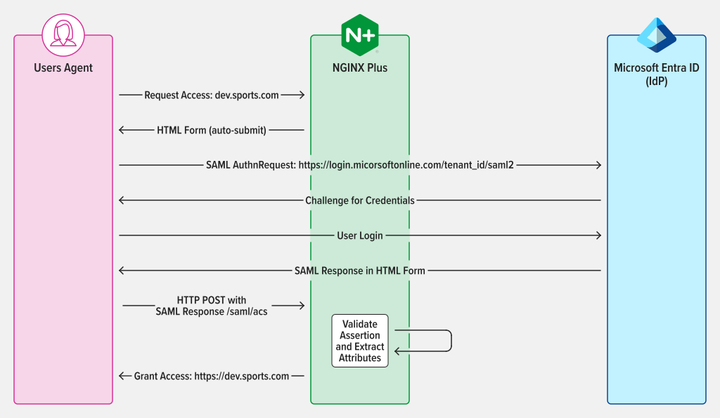
图 1:SAML SP 发起的 SSO,通过 POST binding(绑定)发送 AuthnRequest 和 Response
第 1 步:将 Microsoft Entra ID 配置为身份验证供应商
要访问 Microsoft Entra ID 管理门户,请登录并导航到左侧面板。选择 Microsoft Entra ID,然后点击需要 SSO 配置的目录标题。完成后,选择 Enterprise applications(企业应用)。
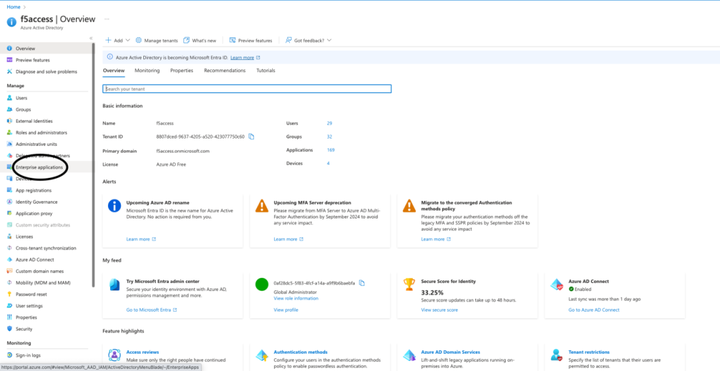
图 2:在管理门户中选择企业应用
要创建应用,点击门户页面顶部的 New application(新建应用)按钮。在本例中,我们创建了一个名为"demonginx"的应用。
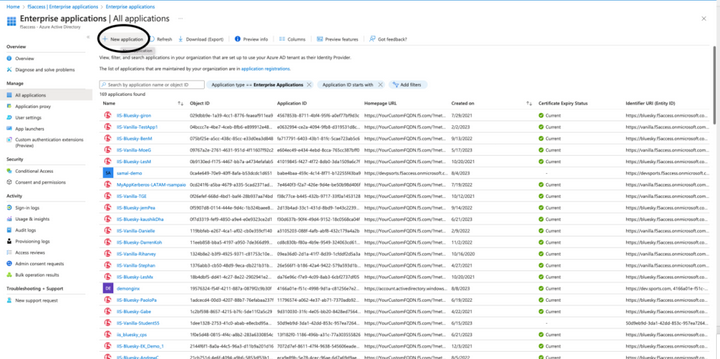
图 3:在 Microsoft Entra ID 中新建一个应用
在重定向到新建应用 Overview(概览)后,通过左侧菜单转到 Getting Started(开始),并点击 Manage(管理)下的 Single sign-on(单点登录)。然后,选择 SAML 作为单点登录方法。
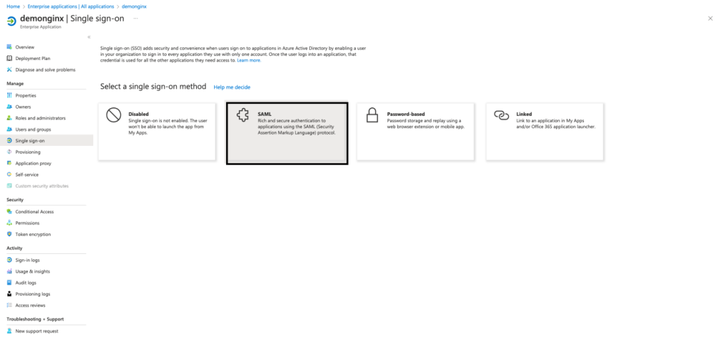
图 4:从 SSO 设置开始 SAML 配置
如需在企业应用中设置 SSO,需要在 Microsoft Entra ID 中将 NGINX Plus 注册为 SP。如图 5 所示,点击 Basic SAML Configuration(基本 SAML 配置)中 Edit(编辑)旁边的铅笔图标。
填写以下值,然后点击 Save(保存):
-
Identifier (Entity Id)(标识符(实体 ID))--- https://dev.sports.com
-
Reply URL (Assertion Consumer Service URL)(回复 URL(断言消费者服务 URL))--- https://dev.sports.com/saml/acs
-
Sign on URL(登录 URL):https://dev.sports.com
-
Logout URL (Optional)(注销 URL(可选)):https://dev.sports.com/saml/sls
可选择是否使用证书验证。启用此设置时,必须配置 NGINX 中的两个配置选项:
若要使用公钥验证签名,需要将 $saml_sp_sign_authn 设置为 true,以指示 SP 对发送给 IdP 的 AuthnRequest 进行签名。
通过配置 $saml_sp_signing_key,提供将用于此签名的私钥的路径。确保将相应的公钥证书上传到 Microsoft Entra ID 以进行签名验证。
注:在此演示中,修改了属性和声明,并添加了新的 SAML 属性。这些 SAML 属性由 IdP 发送。确保已将 NGINX 配置设置为正常接收和处理这些属性。您可以在 NGINX GitHub 仓库中查看并调整相关设置。
从 Microsoft Entra ID 下载 IdP Certificate (Raw)(证书(原始格式)),并将其保存到 NGINX Plus 实例中。
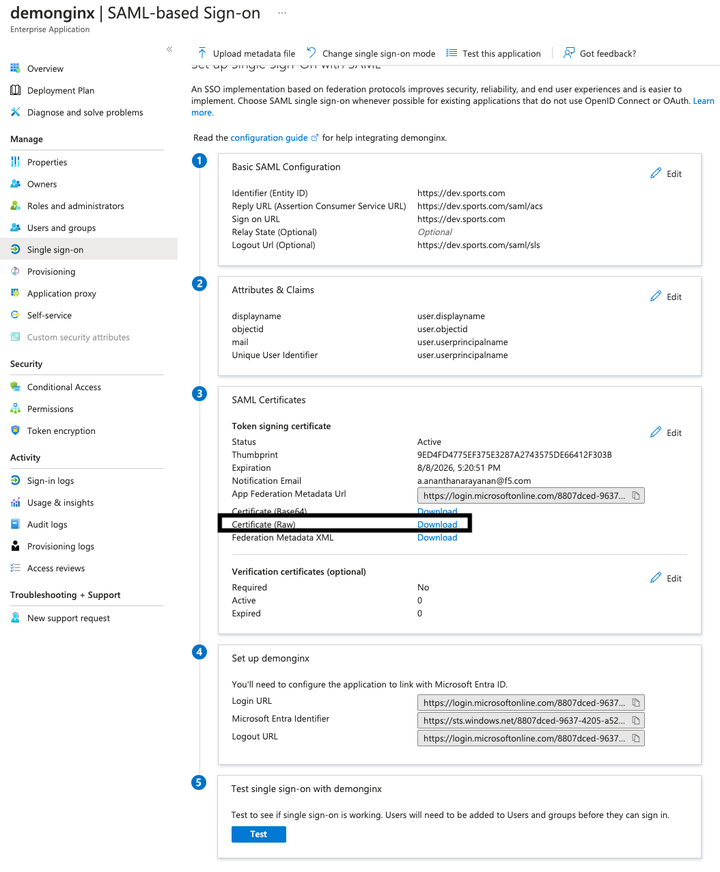
图 5:从 Microsoft Entra ID 下载 IdP 证书(原始格式)
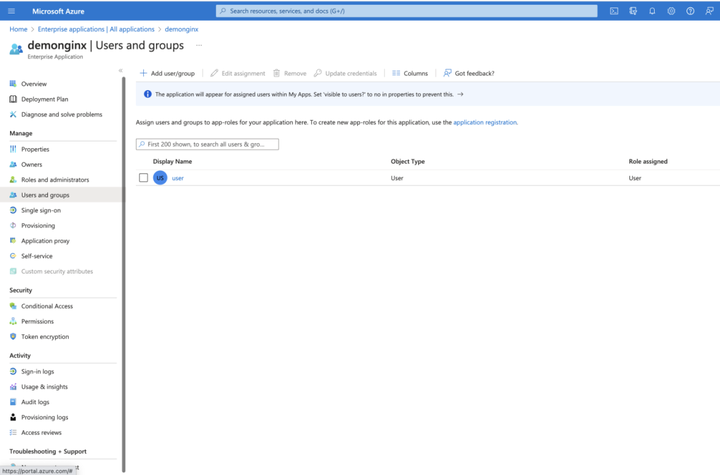
图 6:添加新用户或组
第 2 步:配置 SAML 并将 NGINX Plus 配置为反向代理
在 NGINX Plus SP 中配置文件之前,请确保您已获得必要的证书:
-
用于卸载 TLS 会话的证书(dev.sports.com.crt 和 dev.sports.com.key)
-
从 Microsoft Entra ID 下载的证书,用于 IdP 签名验证 (demonginx.cer)
注:证书必须是 SPKI 格式。
首先,请从 Microsoft Entra ID 下载 IdP 证书进行签名验证。然后,将 PEM 转换为 DER 格式:
html
openssl x509 -in demonginx.cer -outform DER -out demonginx.der提取 SPKI 格式的公钥证书:
html
openssl x509 -inform DER -in demonginx.der -pubkey -noout > demonginx.spki编辑 frontend.conf 文件,更新以下项目:
-
ssl_certificate --- 更新以添加 TLS 证书路径。
-
ssl_certificate_key --- 更新以添加 TLS 私钥路径。
在生产部署中,您可以根据业务要求使用不同的后端目的地。在本例中,后端提供了一个定制响应:
html
"Welcome to Application page\n My objectid is $http_objectid\n My email is $http_mail\n";我们修改了 Microsoft Entra ID 中的属性和声明,为用户的 mail 和 objectid 添加了新的声明。通过这些更新,您能够为应用提供更加个性化的定制响应,从而提升用户体验。
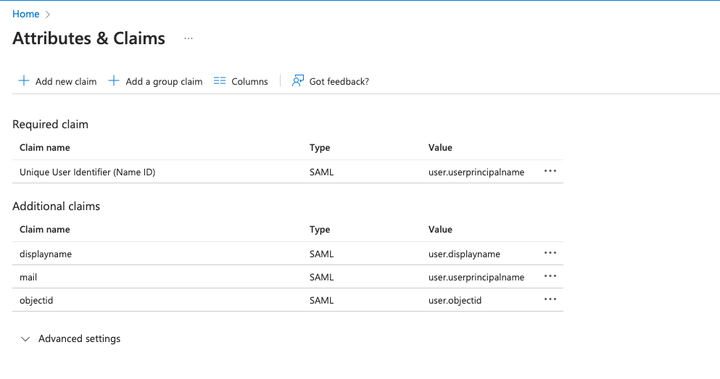
图 7:修改了 Microsoft Entra ID 中的属性和声明
下一步是配置 NGINX,它会将流量代理到后端应用。在此演示中,后端 SAML 应用可从 https://dev.sports.com 公开访问。
编辑您的 frontend.conf 文件:
html
# This is file frontend.conf
# This is the backend application we are protecting with SAML SSO
upstream my_backend {
    zone my_backend 64k;
    server dev.sports.com;
}

# Custom log format to include the 'NameID' subject in the REMOTE_USER field
log_format saml_sso '$remote_addr - $saml_name_id [$time_local] "$request" "$host" '
                    '$status $body_bytes_sent "$http_referer" '
                    '"$http_user_agent" "$http_x_forwarded_for"';

# The frontend server - reverse proxy with SAML SSO authentication
#
server {
    # Functional locations implementing SAML SSO support
    include conf.d/saml_sp.server_conf;


    # Reduce severity level as required
    error_log /var/log/nginx/error.log debug;
    listen 443 ssl;
    ssl_certificate     /home/ubuntu/dev.sports.com.crt;
    ssl_certificate_key  /home/ubuntu/dev.sports.com.key;
    ssl_session_cache shared:SSL:5m;


    location / {
        # When a user is not authenticated (i.e., the "saml_access_granted."
        # variable is not set to "1"), an HTTP 401 Unauthorized error is
        # returned, which is handled by the @do_samlsp_flow named location.
        error_page 401 = @do_samlsp_flow;

        if ($saml_access_granted != "1") {
            return 401;
        }

        # Successfully authenticated users are proxied to the backend,
        # with the NameID attribute passed as an HTTP header
        proxy_set_header mail $saml_attrib_mail;  # Microsoft Entra ID's user.mail
        proxy_set_header objectid $saml_attrib_objectid; # Microsoft Entra ID's objectid
        access_log /var/log/nginx/access.log saml_sso;
        proxy_pass http://my_backend;
        proxy_set_header Host dev.sports.com;
        return 200 "Welcome to Application page\n My objectid is $http_objectid\n My email is $http_mail\n";
        default_type text/plain;

   }
}
# vim: syntax=nginx
要在 NGINX 配置中反映 saml_attrib_mail 和 saml_attrib_ objectid 属性,更新 saml_sp_configuration.conf 的键值存储部分,如下所示:
html
keyval_zone    zone=saml_attrib_mail:1M                state=/var/lib/nginx/state/saml_attrib_email.json   timeout=1h;
keyval   $cookie_auth_token $saml_attrib_mail    zone=saml_attrib_mail;

 keyval_zone zone=saml_attrib_objectid:1M            state=/var/lib/nginx/state/saml_attrib_objectid.json   timeout=1h;
keyval   $cookie_auth_token $saml_attrib_objectid   zone=saml_attrib_objectid;
接下来,配置 SAML SSO 配置文件。该文件包含 SP 和 IdP 的主要配置。若要根据特定 SP 和 IdP 设置对其进行自定义,需要调整文件中所含的多个 map{} 代码块。
下表描述了 saml_sp_configuration.conf 中的变量:
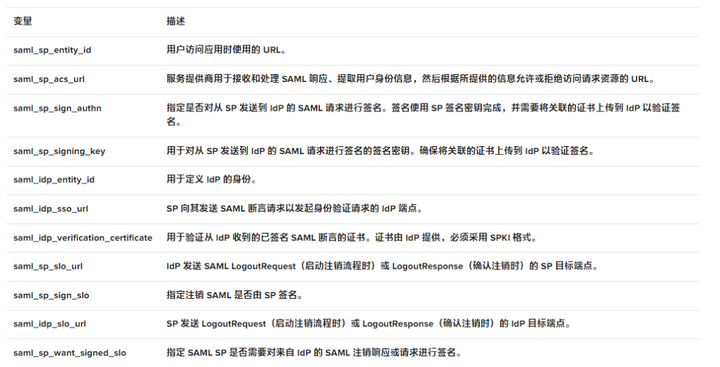
下面的代码显示了 saml_sp_configuration.conf. 中仅针对此用例编辑的值。
注:确保配置文件的其余部分(如键值存储)仍显示在文件中,以及根据部署情况适当调整 saml_sp_configuration.conf 文件中的变量。
html
# SAML SSO configuration

map $host $saml_sp_entity_id {
    # Unique identifier that identifies the SP to the IdP.
    # Must be URL or URN.
    default "https://dev.sports.com";
}

map $host $saml_sp_acs_url {
    # The ACS URL, an endpoint on the SP where the IdP
    # will redirect to with its authentication response.
    # Must match the ACS location defined in the "saml_sp.serer_conf" file.
    default "https://dev.sports.com/saml/acs";
}

map $host $saml_sp_request_binding {
    # Refers to the method by which an authentication request is sent from
    # the SP to an IdP during the Single Sign-On (SSO) process.
    # Only HTTP-POST or HTTP-Redirect methods are allowed.
    default 'HTTP-POST';
}

map $host $saml_sp_sign_authn {
    # Whether the SP should sign the AuthnRequest sent to the IdP.
    default "false";
}

map $host $saml_sp_decryption_key {
    # Specifies the private key that the SP uses to decrypt encrypted assertion
    # or NameID from the IdP.
    default "";
}

map $host $saml_sp_force_authn {
    # Whether the SP should force re-authentication of the user by the IdP.
    default "false";
}

map $host $saml_sp_nameid_format {
    # Indicates the desired format of the name identifier in the SAML assertion
    # generated by the IdP. Check section 8.3 of the SAML 2.0 Core specification
    # (http://docs.oasis-open.org/security/saml/v2.0/saml-core-2.0-os.pdf)
    # for the list of allowed NameID Formats.
    default "urn:oasis:names:tc:SAML:1.1:nameid-format:unspecified";
}

map $host $saml_sp_relay_state {
    # Relative or absolute URL the SP should redirect to
    # after successful sign on.
    default "";
}

map $host $saml_sp_want_signed_response {
    # Whether the SP wants the SAML Response from the IdP
    # to be digitally signed.
    default "false";
}

map $host $saml_sp_want_signed_assertion {
    # Whether the SP wants the SAML Assertion from the IdP
    # to be digitally signed.
    default "true";
}

map $host $saml_sp_want_encrypted_assertion {
    # Whether the SP wants the SAML Assertion from the IdP
    # to be encrypted.
    default "false";
}

map $host $saml_idp_entity_id {
    # Unique identifier that identifies the IdP to the SP.
    # Must be URL or URN.
    default "https://sts.windows.net/8807dced-9637-4205-a520-423077750c60/";
}

map $host $saml_idp_sso_url {
    # IdP endpoint that the SP will send the SAML AuthnRequest to initiate
    # an authentication process.
    default "https://login.microsoftonline.com/8807dced-9637-4205-a520-423077750c60/saml2";
}

map $host $saml_idp_verification_certificate {
    # Certificate file that will be used to verify the digital signature
    # on the SAML Response, LogoutRequest or LogoutResponse received from IdP.
    # Must be public key in PKCS#1 format. See documentation on how to convert
    # X.509 PEM to DER format.
    default "/etc/nginx/conf.d/demonginx.spki";
}

######### Single Logout (SLO) #########

map $host $saml_sp_slo_url {
    # SP endpoint that the IdP will send the SAML LogoutRequest to initiate
    # a logout process or LogoutResponse to confirm the logout.
    default "https://dev.sports.com/saml/sls";
}

map $host $saml_sp_slo_binding {
    # Refers to the method by which a LogoutRequest or LogoutResponse
    # is sent from the SP to an IdP during the Single Logout (SLO) process.
    # Only HTTP-POST or HTTP-Redirect methods are allowed.
    default 'HTTP-POST';
}

map $host $saml_sp_sign_slo {
    # Whether the SP must sign the LogoutRequest or LogoutResponse
    # sent to the IdP.
    default "false";
}

map $host $saml_idp_slo_url {
    # IdP endpoint that the SP will send the LogoutRequest to initiate
    # a logout process or LogoutResponse to confirm the logout.
    # If not set, the SAML Single Logout (SLO) feature is DISABLED and
    # requests to the 'logout' location will result in the termination
    # of the user session and a redirect to the logout landing page.
    default "https://login.microsoftonline.com/8807dced-9637-4205-a520-423077750c60/saml2";
}

map $host $saml_sp_want_signed_slo {
    # Whether the SP wants the SAML LogoutRequest or LogoutResponse from the IdP
    # to be digitally signed.
    default "true";
}

map $host $saml_logout_landing_page {
    # Where to redirect user after requesting /logout location. This can be
    # replaced with a custom logout page, or complete URL.
    default "/_logout"; # Built-in, simple logout page
}

map $proto $saml_cookie_flags {
    http  "Path=/; SameSite=lax;"; # For HTTP/plaintext testing
    https "Path=/; SameSite=lax; HttpOnly; Secure;"; # Production recommendation
}

map $http_x_forwarded_port $redirect_base {
    ""      $proto://$host:$server_port;
    default $proto://$host:$http_x_forwarded_port;
}

map $http_x_forwarded_proto $proto {
    ""      $scheme;
    default $http_x_forwarded_proto;
}
# ADVANCED CONFIGURATION BELOW THIS LINE
# Additional advanced configuration (server context) in saml_sp.server_conf

######### Shared memory zones that keep the SAML-related key-value databases

# Zone for storing AuthnRequest and LogoutRequest message identifiers (ID)
# to prevent replay attacks. (REQUIRED)
# Timeout determines how long the SP waits for a response from the IDP,
# i.e. how long the user authentication process can take.
keyval_zone zone=saml_request_id:1M                 state=/var/lib/nginx/state/saml_request_id.json                  timeout=5m;

# Zone for storing SAML Response message identifiers (ID) to prevent replay attacks. (REQUIRED)
# Timeout determines how long the SP keeps IDs to prevent reuse.
keyval_zone zone=saml_response_id:1M                state=/var/lib/nginx/state/saml_response_id.json                 timeout=1h;

# Zone for storing SAML session access information. (REQUIRED)
# Timeout determines how long the SP keeps session access decision (the session lifetime).
keyval_zone zone=saml_session_access:1M             state=/var/lib/nginx/state/saml_session_access.json              timeout=1h;

# Zone for storing SAML NameID values. (REQUIRED)
# Timeout determines how long the SP keeps NameID values. Must be equal to session lifetime.
keyval_zone zone=saml_name_id:1M                    state=/var/lib/nginx/state/saml_name_id.json                     timeout=1h;

# Zone for storing SAML NameID format values. (REQUIRED)
# Timeout determines how long the SP keeps NameID format values. Must be equal to session lifetime.
keyval_zone zone=saml_name_id_format:1M             state=/var/lib/nginx/state/saml_name_id_format.json              timeout=1h;

# Zone for storing SAML SessionIndex values. (REQUIRED)
# Timeout determines how long the SP keeps SessionIndex values. Must be equal to session lifetime.
keyval_zone zone=saml_session_index:1M              state=/var/lib/nginx/state/saml_session_index.json               timeout=1h;

# Zone for storing SAML AuthnContextClassRef values. (REQUIRED)
# Timeout determines how long the SP keeps AuthnContextClassRef values. Must be equal to session lifetime.
keyval_zone zone=saml_authn_context_class_ref:1M    state=/var/lib/nginx/state/saml_authn_context_class_ref.json     timeout=1h;

# Zones for storing SAML attributes values. (OPTIONAL)
# Timeout determines how long the SP keeps attributes values. Must be equal to session lifetime.
keyval_zone zone=saml_attrib_uid:1M                 state=/var/lib/nginx/state/saml_attrib_uid.json                  timeout=1h;
keyval_zone zone=saml_attrib_name:1M                state=/var/lib/nginx/state/saml_attrib_name.json                 timeout=1h;
keyval_zone zone=saml_attrib_memberOf:1M            state=/var/lib/nginx/state/saml_attrib_memberOf.json             timeout=1h;

######### SAML-related variables whose value is looked up by the key (session cookie) in the key-value database.

# Required:
keyval $saml_request_id     $saml_request_redeemed          zone=saml_request_id;               # SAML Request ID
keyval $saml_response_id    $saml_response_redeemed         zone=saml_response_id;              # SAML Response ID
keyval $cookie_auth_token   $saml_access_granted            zone=saml_session_access;           # SAML Access decision
keyval $cookie_auth_token   $saml_name_id                   zone=saml_name_id;                  # SAML NameID
keyval $cookie_auth_token   $saml_name_id_format            zone=saml_name_id_format;           # SAML NameIDFormat
keyval $cookie_auth_token   $saml_session_index             zone=saml_session_index;            # SAML SessionIndex
keyval $cookie_auth_token   $saml_authn_context_class_ref   zone=saml_authn_context_class_ref;  # SAML AuthnContextClassRef

# Optional:
keyval $cookie_auth_token   $saml_attrib_uid                zone=saml_attrib_uid;
keyval $cookie_auth_token   $saml_attrib_name               zone=saml_attrib_name;
keyval $cookie_auth_token   $saml_attrib_memberOf           zone=saml_attrib_memberOf;


keyval_zone    zone=saml_attrib_mail:1M                state=/var/lib/nginx/state/saml_attrib_mail.json   timeout=1h;
keyval         $cookie_auth_token $saml_attrib_mail    zone=saml_attrib_mail;

keyval $cookie_auth_token   $saml_attrib_objectid           zone=saml_attrib_objectid;
keyval_zone zone=saml_attrib_objectid:1M            state=/var/lib/nginx/state/saml_attrib_objectid.json             timeout=1h;


######### Imports a module that implements SAML SSO and SLO functionality
js_import samlsp from conf.d/saml_sp.js;
第 3 步:测试配置
测试配置分为两步:
-
验证 SAML 流
-
测试 SP 发起的注销功能
验证 SAML 流
在使用 NGINX Plus 配置 SAML SP 和使用 Microsoft Entra ID 配置 IdP 后,必须验证 SAML 流。此验证流程可确保用户通过 IdP 成功进行身份验证,并获准访问受 SP 保护的资源。
要验证 SP 发起的 SAML 流,请打开您的常用浏览器,然后在地址栏中键入https://dev.sports.com。这会将您定向到 IdP 登录页面。
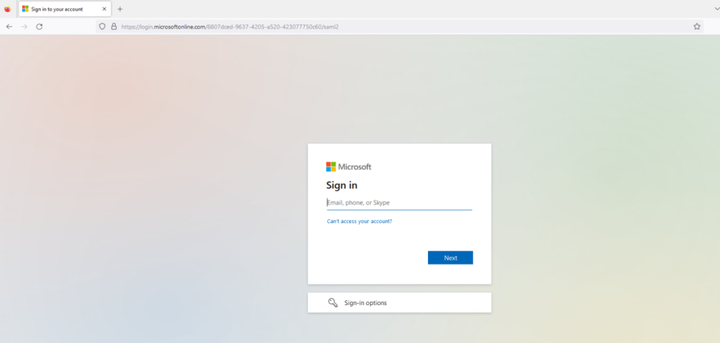
图 8:IdP 登录页面
输入在 IdP 登录页面中配置的用户的凭证。提交后,IdP 将对用户进行身份验证。
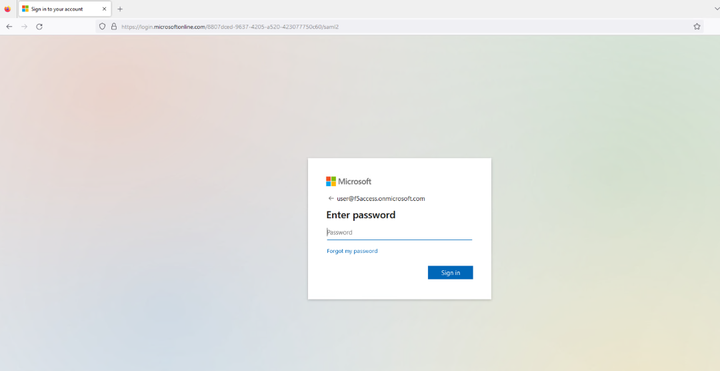
图 9:输入配置的用户凭证
成功建立会话后,用户将获准访问先前请求的受保护资源。随后,该资源将显示在用户的浏览器中。
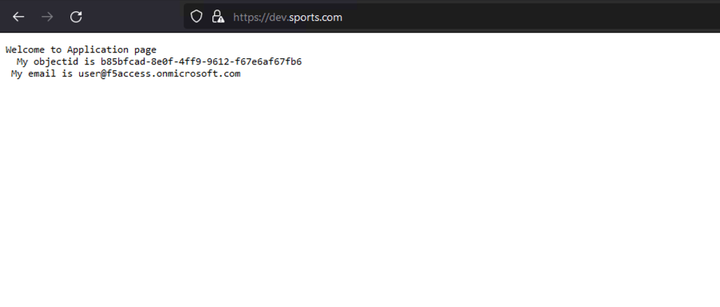
图 10:成功加载的应用页面
有关 SAML 流的详细信息可从 SP 和 IdP 日志中查看。在 SP 端 (NGINX Plus),确保正确设置 auth_token cookie。在 IdP 端 (Microsoft Entra Id),确保身份验证流程正确完成,并将 SAML 断言发送至 SP。
NGINX access.log 应如下所示:
html
127.0.0.1 - - [14/Aug/2023:21:25:49 +0000] "GET / HTTP/1.0" 200 127 "https://login.microsoftonline.com/" "Mozilla/5.0 (Macintosh; Intel Mac OS X 10_15_7) AppleWebKit/605.1.15 (KHTML, like Gecko) Version/16.1 Safari/605.1.15" "-"

99.187.244.63 - Akash Ananthanarayanan [14/Aug/2023:21:25:49 +0000] "GET / HTTP/1.1" "dev.sports.com" 200 127 "https://login.microsoftonline.com/" "Mozilla/5.0 (Macintosh; Intel Mac OS X 10_15_7) AppleWebKit/605.1.15 (KHTML, like Gecko) Version/16.1 Safari/605.1.15" "-
NGINX debug.log 应为:
html
2023/08/14 21:25:49 [info] 27513#27513: *399 js: SAML SP success, creating session _d4db9b93c415ee7b4e057a4bb195df6cd0be7e4d测试 SP 发起的注销功能
SAML 单点注销 (SLO) 允许用户只需一次操作即可注销所有相关的 IdP 和 SP。NGINX Plus 支持 SP 发起和 IdP 发起的注销方案,可增强 SSO 环境中的安全防护并提升用户体验。在本例中,我们使用 SP 发起的注销方案。
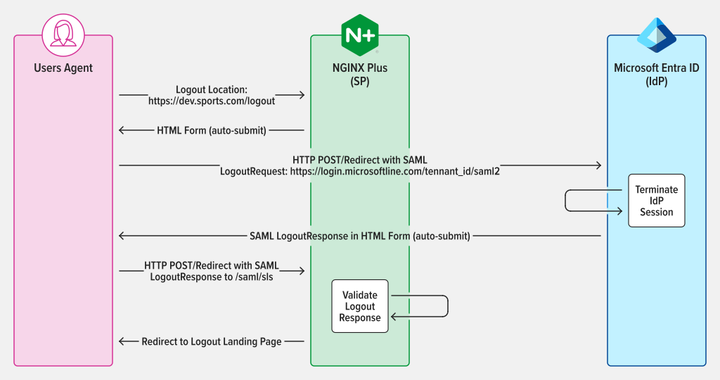
图 11:SAML SP 发起的 SLO,采用 POST/Redirect binding 发送 LogoutRequest 和 LogoutResponse
对会话进行身份验证后,访问 SP 中配置的注销 URL 便可注销。例如,如果您在 NGINX Plus 中将 https://dev.sports.com/logout 设置为注销 URL,在浏览器的地址栏中输入该 URL 即可。
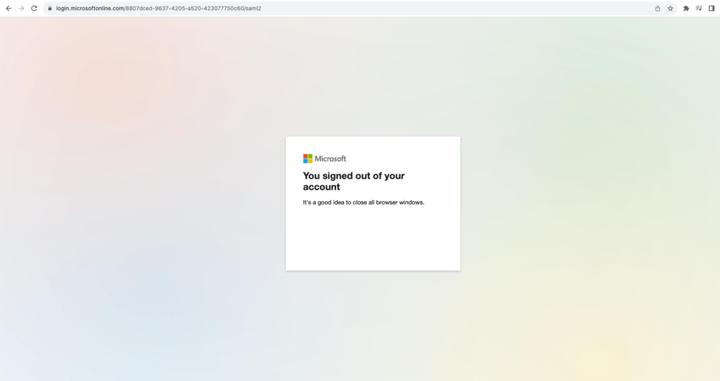
图 12:成功注销会话
结语
恭喜!现在 NGINX Plus可以充当 SAML SP,进一步提升身份验证流程的安全性和便利性了。对于重视安全防护和效率的企业而言,这一新功能使得 NGINX Plus 成为一个更为可靠和多功能的解决方案。