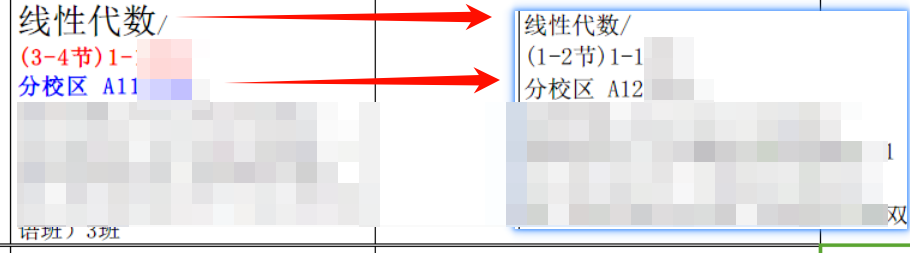
提示词:输出一个vba,对选中单元格做以下处理:
- 搜索"周"字,将"周"字前面直到符号的字体"/"加粗变红;
- 搜索"分校区",将"分校区"后面直到符号"/"的字体加粗变蓝;
- 搜索到第一个符号"/",对该符号前面的字体设置为11号大小
效果如下图
样式处理代码
bash
Sub FormatCellTextBasedOnCriteria()
    Dim cell As Range
    Dim selectedRange As Range
    Dim cellValue As String
    Dim zhouPos As Integer
    Dim slashPos As Integer
    Dim fenXiaoQuPos As Integer
    Dim startOfText As Integer
    Dim endOfText As Integer
    Dim ws As Worksheet

    ' 获取选中的范围
    Set selectedRange = Application.Selection

    ' 获取当前工作表
    Set ws = ActiveSheet

    ' 检查是否有选中的单元格
    If Not selectedRange Is Nothing Then
        ' 遍历每个选中的单元格
        For Each cell In selectedRange
            If Not IsEmpty(cell.Value) Then
                cellValue = cell.Value

                ' 查找第一个"/"的位置
                slashPos = InStr(cellValue, "/")

                If slashPos > 0 Then
                    ' 设置第一个"/"前面的文字为11号大小
                    startOfText = 1
                    endOfText = slashPos - 1
                    ws.Range(cell.Address).Characters(Start:=startOfText, Length:=endOfText - startOfText + 1).Font.Size = 11
                End If

                ' 处理"周"
                zhouPos = InStr(cellValue, "周")

                ' 只要找到"周",就继续处理
                While zhouPos > 0
                    ' 查找"/"的位置(从"周"前面开始往前查找)
                    slashPos = RevInStr(cellValue, "/", zhouPos - 1)

                    If slashPos > 0 Then
                        ' 计算需要加粗变红的文本范围
                        startOfText = slashPos + 1
                        endOfText = zhouPos + 1 ' 包括"周"字本身
                    Else
                        ' 如果没有找到"/",则从开头到"周"字
                        startOfText = 1
                        endOfText = zhouPos + 1 ' 包括"周"字本身
                    End If

                    ' 设置字体加粗并变红
                    ws.Range(cell.Address).Characters(Start:=startOfText, Length:=endOfText - startOfText + 1).Font.Bold = True
                    ws.Range(cell.Address).Characters(Start:=startOfText, Length:=endOfText - startOfText + 1).Font.ColorIndex = 3 ' 3 对应红色

                    ' 查找下一个"周"的位置
                    zhouPos = InStr(zhouPos + 1, cellValue, "周")
                Wend

                ' 处理"分校区"
                fenXiaoQuPos = InStr(cellValue, "分校区")

                ' 只要找到"分校区",就继续处理
                While fenXiaoQuPos > 0
                    ' 查找"/"的位置(从"分校区"后面开始往后查找)
                    slashPos = InStr(fenXiaoQuPos + 3, cellValue, "/")

                    If slashPos > 0 Then
                        ' 计算需要加粗变蓝的文本范围
                        startOfText = fenXiaoQuPos
                        endOfText = slashPos - 1
                    Else
                        ' 如果没有找到"/",则从"分校区"到字符串结尾
                        startOfText = fenXiaoQuPos
                        endOfText = Len(cellValue)
                    End If

                    ' 设置字体加粗并变蓝
                    ws.Range(cell.Address).Characters(Start:=startOfText, Length:=endOfText - startOfText + 1).Font.Bold = True
                    ws.Range(cell.Address).Characters(Start:=startOfText, Length:=endOfText - startOfText + 1).Font.ColorIndex = 5 ' 5 对应蓝色

                    ' 查找下一个"分校区"的位置
                    fenXiaoQuPos = InStr(fenXiaoQuPos + 6, cellValue, "分校区")
                Wend
            End If
        Next cell
    Else
        MsgBox "请先选中一些单元格。", vbExclamation
    End If
End Sub

' 自定义的反向查找函数
Function RevInStr(searchString As String, findString As String, Optional startPos As Integer = -1) As Long
    Dim i As Long
    Dim lenFind As Long

    lenFind = Len(findString)

    If startPos = -1 Then
        startPos = Len(searchString)
    End If

    For i = startPos To 1 Step -1
        If Mid(searchString, i, lenFind) = findString Then
            RevInStr = i
            Exit Function
        End If
    Next i

    RevInStr = 0
End Function
补充一个 换行 代码
bash
Sub ReplaceCommaWithCommaAndNewLineAndBoldColonText()
    Dim cell As Range
    Dim selectedRange As Range
    Dim newText As String
    Dim colonPos As Integer
    Dim ws As Worksheet

    ' 获取选中的范围
    Set selectedRange = Application.Selection

    ' 获取当前工作表
    Set ws = ActiveSheet

    ' 检查是否有选中的单元格
    If Not selectedRange Is Nothing Then
        ' 遍历每个选中的单元格
        For Each cell In selectedRange
            If Not IsEmpty(cell.Value) Then
                ' 替换"、"为"、" + CHAR(10)
                newText = Replace(cell.Value, "/", "/" & vbLf)

                ' 更新单元格内容
                cell.Value = newText

                ' 设置单元格自动换行
                cell.WrapText = True

            End If
        Next cell
    Else
        MsgBox "请先选中一些单元格。", vbExclamation
    End If
End Sub