一、拆分购物车微服务
step1). 创建模块.
在scmall下创建一个新的module,起名cart-service:
step2).添加依赖.
打开cart-service工程 \pom.xml 文件,添加依赖如下:
xml
<project xmlns="http://maven.apache.org/POM/4.0.0" xmlns:xsi="http://www.w3.org/2001/XMLSchema-instance"
         xsi:schemaLocation="http://maven.apache.org/POM/4.0.0 http://maven.apache.org/xsd/maven-4.0.0.xsd">
    <modelVersion>4.0.0</modelVersion>

    <artifactId>cart-service</artifactId>
    <packaging>jar</packaging>

    <name>cart-service</name>
    <url>http://maven.apache.org</url>

    <properties>
        <maven.compiler.source>11</maven.compiler.source>
        <maven.compiler.target>11</maven.compiler.target>
    </properties>

    <dependencies>
        <!--common-->
        <dependency>
            <groupId>com.heima</groupId>
            <artifactId>hm-common</artifactId>
            <version>1.0.0</version>
        </dependency>
        <!--web-->
        <dependency>
            <groupId>org.springframework.boot</groupId>
            <artifactId>spring-boot-starter-web</artifactId>
        </dependency>

        <!--数据库-->
        <dependency>
            <groupId>mysql</groupId>
            <artifactId>mysql-connector-java</artifactId>
        </dependency>
        <!--mybatis-->
        <dependency>
            <groupId>com.baomidou</groupId>
            <artifactId>mybatis-plus-boot-starter</artifactId>
        </dependency>
        <!--单元测试-->
        <dependency>
            <groupId>org.springframework.boot</groupId>
            <artifactId>spring-boot-starter-test</artifactId>
        </dependency>

    </dependencies>
    <build>
        <finalName>${project.artifactId}</finalName>
        <plugins>
            <plugin>
                <groupId>org.springframework.boot</groupId>
                <artifactId>spring-boot-maven-plugin</artifactId>
            </plugin>
        </plugins>
    </build>
</project>
step3). 修改启动引导类,添加注解。
CartApplication.java 添加如下注解:
java
@MapperScan("com.scmall.cart.mapper")step4). 准备配置文件。
item-service 项目的的 resources目录下,准备application.yml、application-local.yml、application-dev.yml 文件:
其中 application.yml 文件如下:
yml
server:
  port: 8082
spring:
  application:
    name: cart-service
  profiles:
    active: dev
  datasource:
    url: jdbc:mysql://${hm.db.host}:3306/hm-cart?useUnicode=true&characterEncoding=UTF-8&autoReconnect=true&serverTimezone=Asia/Shanghai
    driver-class-name: com.mysql.cj.jdbc.Driver
    username: root
    password: ${hm.db.pw}
mybatis-plus:
  configuration:
    default-enum-type-handler: com.baomidou.mybatisplus.core.handlers.MybatisEnumTypeHandler
  global-config:
    db-config:
      update-strategy: not_null
      id-type: auto
logging:
  level:
    com.hmall: debug
  pattern:
    dateformat: HH:mm:ss:SSS
  file:
    path: "logs/${spring.application.name}"
knife4j:
  enable: true
  openapi:
    title: 购物车接口文档
    description: "购物车接口文档"
    email: it@163.com
    concat: admin
    url: https://www.it.com
    version: v1.2.0
    group:
      default:
        group-name: default
        api-rule: package
        api-rule-resources:
          - com.scmall.cart.controller
step5). 代码迁移
项目 中与购物车有关的代码迁移到 cart-service 中。
- 要获取登录用户信息。
- 查询购物车时需要查询商品信息。
step6). 创建数据库表
在docker数据库中执行 SQL文件:
step7). 测试。
测试:
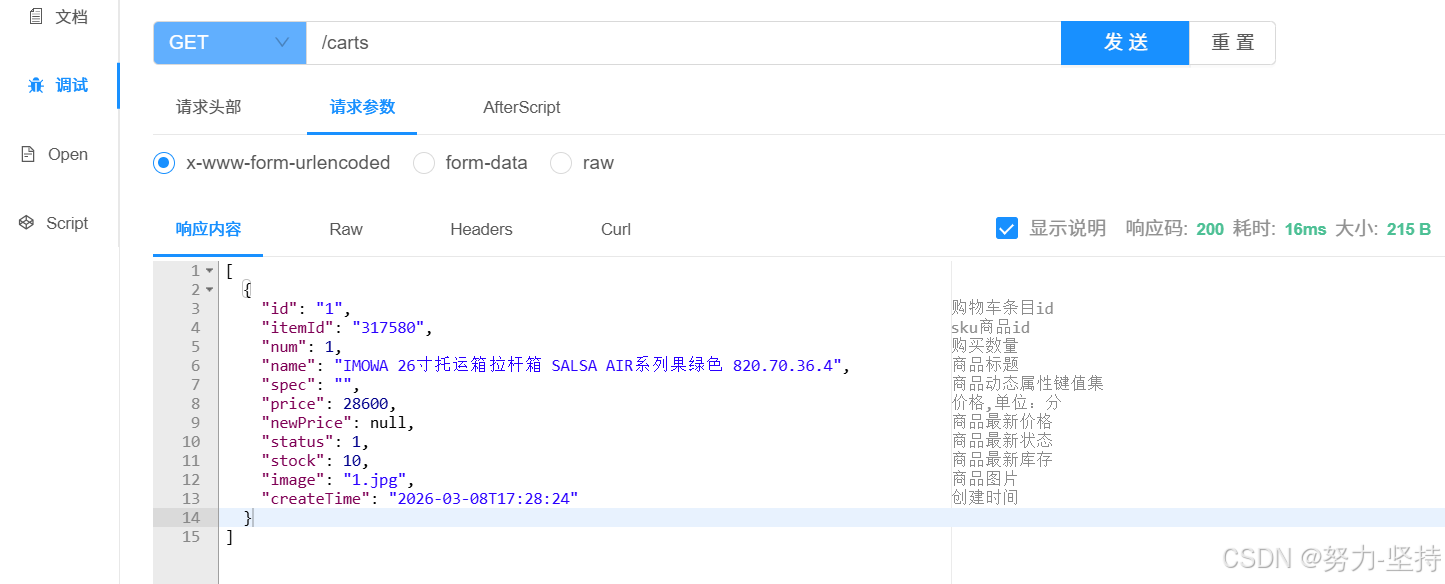
启动CartApplication,访问swagger文档:http://localhost:8082/doc.html
结果如下: