给定一个 mxn 的矩阵,如果一个元素为 0 ,则将其所在行和列的所有元素都设为 0 。请使用 原地 算法**。**

答案:
class Solution {
    public void setZeroes(int[][] matrix) {
        int m =matrix.length,n = matrix[0].length;
        boolean[] row = new boolean[m];
        boolean[] col= new boolean[n];
        //第一次遍历数组
        for(int i=0;i<m;i++){
            for(int j=0;j<n;j++){
                if(matrix[i][j]==0){
                    row[i]=col[j]=true;
                }
            }
        }
        //第二次遍历
        for(int i=0;i<m;i++){
            for(int j=0;j<n;j++){
                if(row[i]||col[j]){
                    matrix[i][j]=0;
                }
           }
        }
    }
}
可视化代码:
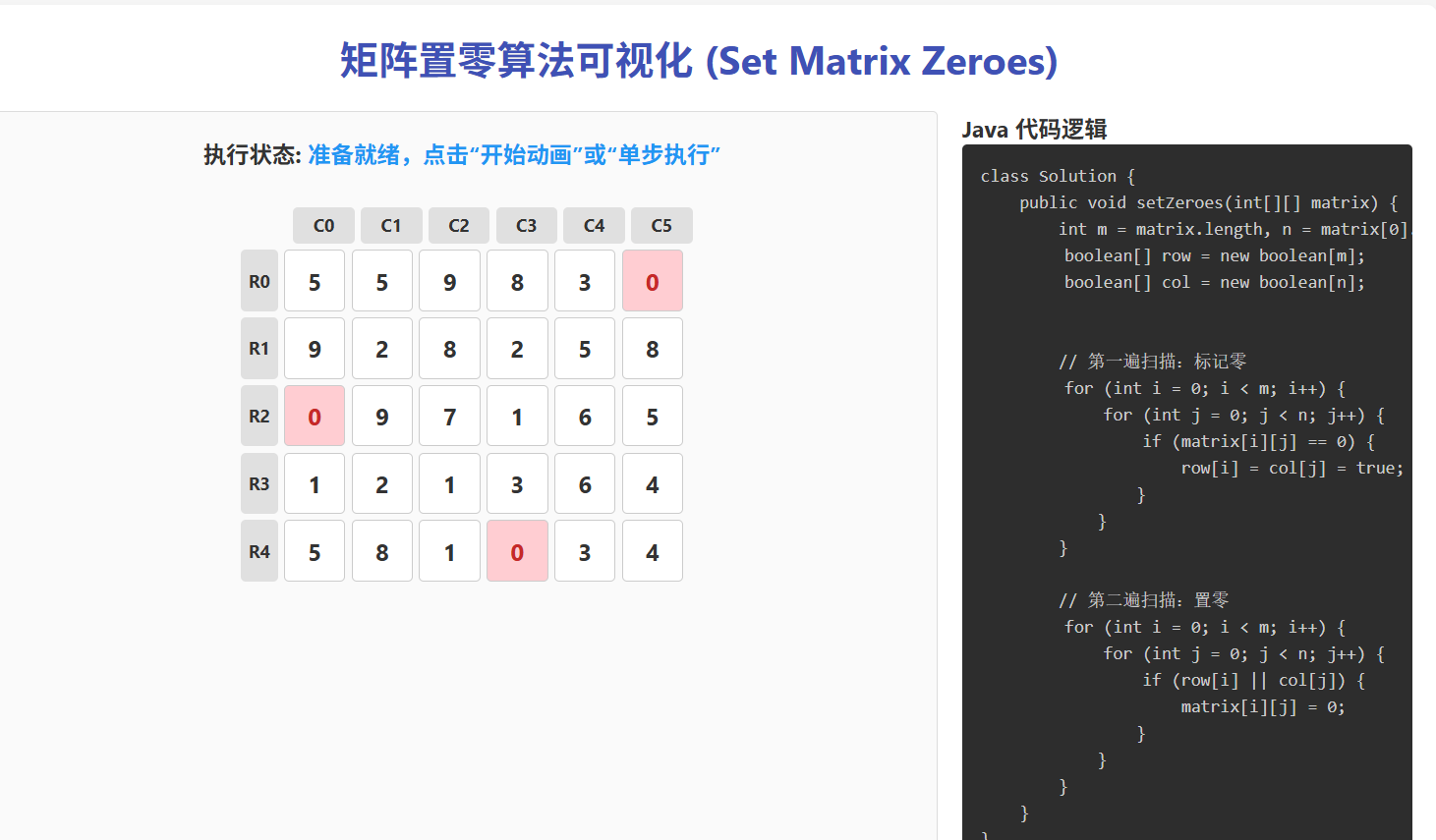

index.html文件
<!DOCTYPE html>
<html lang="zh-CN">
<head>
    <meta charset="UTF-8">
    <meta name="viewport" content="width=device-width, initial-scale=1.0">
    <title>矩阵置零算法可视化 (Set Matrix Zeroes)</title>
    <link rel="stylesheet" href="style.css">
</head>
<body>
    <div class="container">
        <h1>矩阵置零算法可视化 (Set Matrix Zeroes)</h1>

        <div class="main-wrapper">
            <div class="visualization-area">
                <div class="status-panel">
                    <h3>执行状态: <span id="status-text">准备就绪</span></h3>
                </div>

                <div class="grid-container">
                    <div class="col-indicators" id="col-indicators"></div>
                    <div class="matrix-row-container">
                        <div class="row-indicators" id="row-indicators"></div>
                        <div class="matrix" id="matrix"></div>
                    </div>
                </div>
            </div>

            <div class="code-panel">
                <h3>Java 代码逻辑</h3>
                <pre class="code-block">
class Solution {
    public void setZeroes(int[][] matrix) {
        int m = matrix.length, n = matrix[0].length;
<div id="line-row-decl" class="code-line">        boolean[] row = new boolean[m];</div><div id="line-col-decl" class="code-line">        boolean[] col = new boolean[n];</div>

        // 第一遍扫描:标记零
<div id="line-scan-loop-i" class="code-line">        for (int i = 0; i < m; i++) {</div><div id="line-scan-loop-j" class="code-line">            for (int j = 0; j < n; j++) {</div><div id="line-check-zero" class="code-line">                if (matrix[i][j] == 0) {</div><div id="line-mark-true" class="code-line">                    row[i] = col[j] = true;</div>                }
            }
        }

        // 第二遍扫描:置零
<div id="line-set-loop-i" class="code-line">        for (int i = 0; i < m; i++) {</div><div id="line-set-loop-j" class="code-line">            for (int j = 0; j < n; j++) {</div><div id="line-check-flags" class="code-line">                if (row[i] || col[j]) {</div><div id="line-set-zero" class="code-line">                    matrix[i][j] = 0;</div>                }
            }
        }
    }
}
                </pre>

                <div class="controls">
                    <button id="reset-btn" class="btn primary">生成新矩阵</button>
                    <button id="start-btn" class="btn success">开始动画</button>
                    <button id="step-btn" class="btn info">单步执行</button>
                    <button id="pause-btn" class="btn warning" disabled>暂停</button>

                    <div class="speed-control">
                        <label>动画速度:</label>
                        <input type="range" id="speed-range" min="50" max="1000" step="50" value="500">
                        <span id="speed-val">500ms</span>
                    </div>
                </div>

                <div class="legend">
                    <div class="legend-item"><div class="legend-color current"></div>当前扫描</div>
                    <div class="legend-item"><div class="legend-color zero"></div>原始零</div>
                    <div class="legend-item"><div class="legend-color marked"></div>标记为真</div>
                    <div class="legend-item"><div class="legend-color set-zero"></div>被置零</div>
                </div>
            </div>
        </div>
    </div>
    <script src="script.js"></script>
</body>
</html>
script.js文件
document.addEventListener('DOMContentLoaded', () => {
    // 状态与配置
    const config = {
        m: 5,
        n: 6,
        animationSpeed: 500,
        isRunning: false,
        isPaused: false
    };

    const state = {
        matrix: [],
        originalMatrix: [], // 存储原始状态以便重置
        rowFlags: [],
        colFlags: [],
        step: 0, // 0: init, 1: scan, 2: set
        i: 0,
        j: 0,
        timer: null
    };

    // DOM 元素
    const matrixEl = document.getElementById('matrix');
    const rowIndicatorsEl = document.getElementById('row-indicators');
    const colIndicatorsEl = document.getElementById('col-indicators');
    const statusTextEl = document.getElementById('status-text');
    const startBtn = document.getElementById('start-btn');
    const resetBtn = document.getElementById('reset-btn');
    const stepBtn = document.getElementById('step-btn');
    const pauseBtn = document.getElementById('pause-btn');
    const speedRange = document.getElementById('speed-range');
    const speedVal = document.getElementById('speed-val');

    // 初始化
    init();

    // 事件监听
    startBtn.addEventListener('click', startAnimation);
    resetBtn.addEventListener('click', resetMatrix);
    stepBtn.addEventListener('click', singleStep);
    pauseBtn.addEventListener('click', togglePause);

    speedRange.addEventListener('input', (e) => {
        config.animationSpeed = 1050 - parseInt(e.target.value); // 反向映射:值越大越快(间隔越小)
        speedVal.textContent = `${config.animationSpeed}ms`;
        // 如果正在运行,重启定时器以应用新速度
        if (config.isRunning && !config.isPaused) {
            clearTimeout(state.timer);
            runLoop();
        }
    });

    function init() {
        generateMatrix();
        renderGrid();
        updateStatus("准备就绪,点击"开始动画"或"单步执行"");
    }

    function generateMatrix() {
        state.matrix = [];
        state.originalMatrix = [];
        state.rowFlags = new Array(config.m).fill(false);
        state.colFlags = new Array(config.n).fill(false);
        state.step = 0;
        state.i = 0;
        state.j = 0;

        for (let r = 0; r < config.m; r++) {
            const row = [];
            const origRow = [];
            for (let c = 0; c < config.n; c++) {
                // 20% 概率生成 0
                const val = Math.random() < 0.2 ? 0 : Math.floor(Math.random() * 9) + 1;
                row.push(val);
                origRow.push(val);
            }
            state.matrix.push(row);
            state.originalMatrix.push(origRow);
        }
    }

    function resetMatrix() {
        stopAnimation();
        // 重新生成一个新的矩阵
        generateMatrix();
        renderGrid();
        clearHighlights();
        updateStatus("已生成新矩阵");
        enableControls(true);
    }

    function renderGrid() {
        // 渲染列指示器
        colIndicatorsEl.innerHTML = '';
        colIndicatorsEl.style.display = 'grid';
        colIndicatorsEl.style.gridTemplateColumns = `repeat(${config.n}, 1fr)`;

        for (let c = 0; c < config.n; c++) {
            const div = document.createElement('div');
            div.className = 'col-indicator';
            div.id = `col-ind-${c}`;
            div.textContent = `C${c}`;
            colIndicatorsEl.appendChild(div);
        }

        // 渲染行指示器
        rowIndicatorsEl.innerHTML = '';
        for (let r = 0; r < config.m; r++) {
            const div = document.createElement('div');
            div.className = 'row-indicator';
            div.id = `row-ind-${r}`;
            div.textContent = `R${r}`;
            rowIndicatorsEl.appendChild(div);
        }

        // 渲染矩阵
        matrixEl.innerHTML = '';
        matrixEl.style.gridTemplateColumns = `repeat(${config.n}, 1fr)`;

        for (let r = 0; r < config.m; r++) {
            for (let c = 0; c < config.n; c++) {
                const cell = document.createElement('div');
                cell.className = 'cell';
                if (state.matrix[r][c] === 0) {
                    cell.classList.add('zero');
                }
                cell.id = `cell-${r}-${c}`;
                cell.textContent = state.matrix[r][c];
                matrixEl.appendChild(cell);
            }
        }
    }

    function startAnimation() {
        if (config.isRunning) return;
        config.isRunning = true;
        config.isPaused = false;
        disableControlsForRun();
        runLoop();
    }

    function stopAnimation() {
        config.isRunning = false;
        config.isPaused = false;
        clearTimeout(state.timer);
        enableControls(true);
    }

    function togglePause() {
        if (!config.isRunning) return;

        config.isPaused = !config.isPaused;
        pauseBtn.textContent = config.isPaused ? "继续" : "暂停";

        if (!config.isPaused) {
            runLoop();
        } else {
            clearTimeout(state.timer);
            updateStatus("已暂停");
        }
    }

    function singleStep() {
        if (!config.isRunning) {
            config.isRunning = true;
            disableControlsForRun();
            // 立即暂停,等待下一次点击
            config.isPaused = true;
            pauseBtn.textContent = "继续";
        }

        processStep();
    }

    function runLoop() {
        if (!config.isRunning || config.isPaused) return;

        processStep();

        if (config.isRunning && !config.isPaused) {
            state.timer = setTimeout(runLoop, config.animationSpeed);
        }
    }

    function processStep() {
        clearHighlights();

        // 状态机
        if (state.step === 0) {
            // 初始化阶段,进入第一遍扫描
            highlightLine('line-row-decl');
            highlightLine('line-col-decl');
            updateStatus("初始化标记数组 row[] 和 col[]");
            state.step = 1;
            state.i = 0;
            state.j = 0;
            return;
        }

        if (state.step === 1) {
            // 第一遍扫描逻辑
            handleFirstPass();
        } else if (state.step === 2) {
            // 第二遍置零逻辑
            handleSecondPass();
        } else if (state.step === 3) {
            // 完成
            updateStatus("算法执行完成!");
            stopAnimation();
        }
    }

    function handleFirstPass() {
        if (state.i >= config.m) {
            // 第一遍扫描结束,进入第二遍
            state.step = 2;
            state.i = 0;
            state.j = 0;
            updateStatus("第一遍扫描完成,准备开始置零");
            return;
        }

        const i = state.i;
        const j = state.j;

        // 高亮当前单元格和循环行
        highlightCell(i, j);
        highlightLine('line-scan-loop-j');

        // 检查是否为0
        highlightLine('line-check-zero');

        if (state.matrix[i][j] === 0) {
            updateStatus(`发现 0 在 [${i},${j}],标记 row[${i}] 和 col[${j}] 为 true`);
            highlightLine('line-mark-true');

            // 标记逻辑
            state.rowFlags[i] = true;
            state.colFlags[j] = true;

            // 更新UI标记
            document.getElementById(`row-ind-${i}`).classList.add('indicator-true');
            document.getElementById(`col-ind-${j}`).classList.add('indicator-true');
        } else {
            updateStatus(`扫描 [${i},${j}]... 非零,跳过`);
        }

        // 移动到下一个
        state.j++;
        if (state.j >= config.n) {
            state.j = 0;
            state.i++;
        }
    }

    function handleSecondPass() {
        if (state.i >= config.m) {
            state.step = 3; // 完成
            return;
        }

        const i = state.i;
        const j = state.j;

        highlightCell(i, j);
        highlightLine('line-set-loop-j');
        highlightLine('line-check-flags');

        const rowMarked = state.rowFlags[i];
        const colMarked = state.colFlags[j];

        if (rowMarked || colMarked) {
            let msg = "因为 ";
            if (rowMarked) {
                msg += `row[${i}] `;
                highlightIndicator(`row-ind-${i}`);
            }
            if (colMarked) {
                msg += (rowMarked ? "或 " : "") + `col[${j}] `;
                highlightIndicator(`col-ind-${j}`);
            }
            msg += "为真,置零";
            updateStatus(msg);

            highlightLine('line-set-zero');

            // 修改数据
            state.matrix[i][j] = 0;
            // 更新UI
            const cell = document.getElementById(`cell-${i}-${j}`);
            cell.textContent = 0;
            cell.classList.add('set-zero');
            // 如果原本不是0,加上灰色背景区分
            if (!cell.classList.contains('zero')) {
                cell.style.backgroundColor = '#e0e0e0';
            }
        } else {
            updateStatus(`[${i},${j}] 所在行/列未被标记,保持原值`);
        }

        // 移动到下一个
        state.j++;
        if (state.j >= config.n) {
            state.j = 0;
            state.i++;
        }
    }

    // UI 辅助函数
    function highlightCell(r, c) {
        const cell = document.getElementById(`cell-${r}-${c}`);
        if (cell) cell.classList.add('current');
    }

    function highlightIndicator(id) {
        const el = document.getElementById(id);
        if (el) el.classList.add('indicator-highlight');
    }

    function highlightLine(id) {
        const el = document.getElementById(id);
        if (el) el.classList.add('highlight-line');
    }

    function clearHighlights() {
        // 清除单元格高亮
        document.querySelectorAll('.cell').forEach(el => el.classList.remove('current'));
        // 清除指示器高亮边框 (不清除红色背景)
        document.querySelectorAll('.row-indicator').forEach(el => el.classList.remove('indicator-highlight'));
        document.querySelectorAll('.col-indicator').forEach(el => el.classList.remove('indicator-highlight'));
        // 清除代码高亮
        document.querySelectorAll('.code-line').forEach(el => el.classList.remove('highlight-line'));
    }

    function updateStatus(text) {
        statusTextEl.textContent = text;
    }

    function disableControlsForRun() {
        startBtn.disabled = true;
        resetBtn.disabled = true;
        // stepBtn 仍然可用,如果是暂停状态的话
        pauseBtn.disabled = false;
        pauseBtn.textContent = "暂停";
    }

    function enableControls(fullReset) {
        startBtn.disabled = false;
        resetBtn.disabled = false;
        pauseBtn.disabled = true;
        pauseBtn.textContent = "暂停";
        if (fullReset) {
            statusTextEl.textContent = "准备就绪";
        }
    }
});
style.css文件
:root {
    --primary-color: #3f51b5;
    --success-color: #4caf50;
    --warning-color: #ff9800;
    --danger-color: #f44336;
    --info-color: #2196f3;
    --bg-color: #f5f5f5;
    --text-color: #333;
    --grid-size: 50px;
    --gap-size: 5px;
}

* {
    box-sizing: border-box;
    margin: 0;
    padding: 0;
}

body {
    font-family: 'Segoe UI', Tahoma, Geneva, Verdana, sans-serif;
    background-color: var(--bg-color);
    color: var(--text-color);
    padding: 20px;
    display: flex;
    justify-content: center;
}

.container {
    max-width: 1200px;
    width: 100%;
    background-color: white;
    padding: 20px;
    border-radius: 8px;
    box-shadow: 0 4px 6px rgba(0,0,0,0.1);
}

h1 {
    text-align: center;
    margin-bottom: 20px;
    color: var(--primary-color);
}

.main-wrapper {
    display: flex;
    gap: 20px;
    flex-wrap: wrap;
}

.visualization-area {
    flex: 2;
    min-width: 400px;
    display: flex;
    flex-direction: column;
    align-items: center;
    padding: 20px;
    border: 1px solid #ddd;
    border-radius: 4px;
    background-color: #fafafa;
}

.status-panel {
    width: 100%;
    margin-bottom: 10px;
    text-align: center;
}

#status-text {
    font-weight: bold;
    color: var(--info-color);
}

.grid-container {
    display: flex;
    flex-direction: column;
    align-items: center;
    margin-top: 20px;
}

.col-indicators {
    display: flex;
    margin-left: calc(var(--grid-size) + var(--gap-size)); /* Offset for row indicators */
    margin-bottom: var(--gap-size);
}

.col-indicator {
    width: var(--grid-size);
    height: 30px;
    margin-right: var(--gap-size);
    display: flex;
    justify-content: center;
    align-items: center;
    font-size: 0.9rem;
    font-weight: bold;
    background-color: #e0e0e0;
    border-radius: 4px;
    transition: all 0.3s;
}

.matrix-row-container {
    display: flex;
    align-items: flex-start;
}

.row-indicators {
    display: flex;
    flex-direction: column;
    margin-right: var(--gap-size);
}

.row-indicator {
    width: 30px;
    height: var(--grid-size);
    margin-bottom: var(--gap-size);
    display: flex;
    justify-content: center;
    align-items: center;
    font-size: 0.9rem;
    font-weight: bold;
    background-color: #e0e0e0;
    border-radius: 4px;
    transition: all 0.3s;
}

.indicator-true {
    background-color: var(--danger-color);
    color: white;
}

.indicator-highlight {
    border: 2px solid var(--primary-color);
    transform: scale(1.1);
}

.matrix {
    display: grid;
    gap: var(--gap-size);
}

.cell {
    width: var(--grid-size);
    height: var(--grid-size);
    border: 1px solid #ccc;
    background-color: white;
    display: flex;
    justify-content: center;
    align-items: center;
    font-size: 1.2rem;
    font-weight: bold;
    border-radius: 4px;
    transition: all 0.3s ease;
}

.cell.zero {
    background-color: #ffcdd2; /* Light red for original zeroes */
    color: #c62828;
}

.cell.current {
    border: 3px solid var(--primary-color);
    box-shadow: 0 0 10px rgba(63, 81, 181, 0.5);
    z-index: 10;
}

.cell.set-zero {
    background-color: #bdbdbd; /* Grey for new zeroes */
    color: #424242;
}

.code-panel {
    flex: 1;
    min-width: 300px;
    display: flex;
    flex-direction: column;
}

.code-block {
    background-color: #2d2d2d;
    color: #ccc;
    padding: 15px;
    border-radius: 4px;
    font-family: 'Consolas', 'Monaco', monospace;
    font-size: 0.9rem;
    overflow-x: auto;
    margin-bottom: 20px;
    line-height: 1.5;
}

.code-line {
    padding: 0 5px;
    border-radius: 2px;
}

.highlight-line {
    background-color: #4caf50;
    color: white;
    font-weight: bold;
}

.controls {
    display: flex;
    flex-wrap: wrap;
    gap: 10px;
    margin-bottom: 20px;
    align-items: center;
}

.btn {
    padding: 8px 16px;
    border: none;
    border-radius: 4px;
    cursor: pointer;
    font-weight: bold;
    color: white;
    transition: opacity 0.2s;
}

.btn:disabled {
    opacity: 0.5;
    cursor: not-allowed;
}

.btn.primary { background-color: var(--primary-color); }
.btn.success { background-color: var(--success-color); }
.btn.warning { background-color: var(--warning-color); }
.btn.info { background-color: var(--info-color); }

.speed-control {
    display: flex;
    align-items: center;
    gap: 5px;
    width: 100%;
    margin-top: 10px;
}

input[type=range] {
    flex-grow: 1;
}

.legend {
    display: flex;
    gap: 15px;
    flex-wrap: wrap;
    margin-top: 10px;
    font-size: 0.9rem;
}

.legend-item {
    display: flex;
    align-items: center;
    gap: 5px;
}

.legend-color {
    width: 16px;
    height: 16px;
    border-radius: 2px;
    border: 1px solid #ccc;
}

.legend-color.current { border: 2px solid var(--primary-color); background: white; }
.legend-color.zero { background-color: #ffcdd2; }
.legend-color.marked { background-color: var(--danger-color); }
.legend-color.set-zero { background-color: #bdbdbd; }