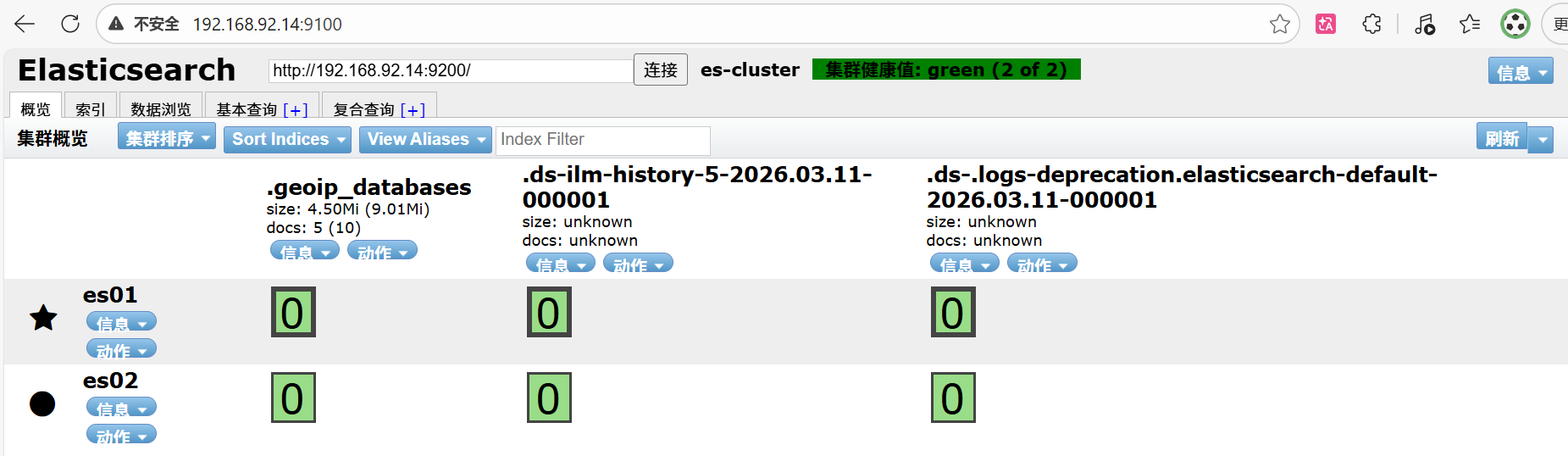
一、elk典型架构部署-安装elasticsearch-head 安装elasticsearch-head插件
curl http://192.168.92.14:9200/_cat/nodes?pretty
curl http://192.168.92.14:9200/_cluster/health?pretty
[root@es01 ~]# curl http://192.168.92.14:9200/_cluster/health?pretty
{
  "cluster_name" : "es-cluster",   #集群名称
  "status" : "green",  #集群健康状态
  "timed_out" : false,   #检测集群是否超时
  "number_of_nodes" : 2,  #集群节点总数
  "number_of_data_nodes" : 2,    #集群中能存放数据的数据节点的数量
  "active_primary_shards" : 3,   #活跃主分片数量
  "active_shards" : 6,    #所有的活跃的分片数量
  "relocating_shards" : 0,   #正在迁移的分片数量
  "initializing_shards" : 0,     #正在初始化的分片数量
  "unassigned_shards" : 0,   #没有被分配的分片数量
  "delayed_unassigned_shards" : 0,     #由于延迟策略而暂未分配的分片
  "number_of_pending_tasks" : 0,
  "number_of_in_flight_fetch" : 0,
  "task_max_waiting_in_queue_millis" : 0,
  "active_shards_percent_as_number" : 100.0
}
[root@es01 ~]#
上述查看集群的方式,及其不方便,我们可以通过安装elasticsearch-head插件后,来查看管理集群。
(1)修改ES配置文件(建议es01,es02都配置)
修改主配置文件(添加elasticsearch-head调试支持)
vi /etc/elasticsearch/elasticsearch.yml
#追加到文件末尾
http.cors.enabled: true   #开启跨域访问支持
http.cors.allow-origin: "*"  #跨域访问允许的域名地址

systemctl restart elasticsearch
(2)安装elasticsearch-head插件(这里只需要修改es01主节点)
插件下载地址:https://github.com/mobz/elasticsearch-head
安装epel源
yum install epel-release -y首先安装依赖包
yum install git nodejs openssl-devel npm -y克隆elasticsearch-head项目(有时下载不下来,多试几次)
注意:长时间拉取失败,可检查自身网络、防火墙;都没问题还是拉取失败可以去下载区拉取资料
cd /etc/elasticsearch/
git clone https://github.com/mobz/elasticsearch-head.git
cd elasticsearch-head
npm install phantomjs-prebuilt --ignore-scripts
npm install
注意:在执行npm语句时会出现下列警告信息,忽视即可
这里是一个非常缓慢的过程。而且会有一些警告信息,不用管
npm WARN EBADENGINE Unsupported engine {
npm WARN EBADENGINE   package: 'http2@3.3.7',
npm WARN EBADENGINE   required: { node: '>=0.12.0 <9.0.0' },
npm WARN EBADENGINE   current: { node: 'v16.20.2', npm: '8.19.4' }
npm WARN EBADENGINE }
npm WARN EBADENGINE Unsupported engine {
npm WARN EBADENGINE   package: 'karma@1.3.0',
npm WARN EBADENGINE   required: { node: '0.10 || 0.12 || 4 || 5 || 6' },
npm WARN EBADENGINE   current: { node: 'v16.20.2', npm: '8.19.4' }
npm WARN EBADENGINE }

up to date, audited 537 packages in 3s

28 packages are looking for funding
  run `npm fund` for details

52 vulnerabilities (1 low, 13 moderate, 26 high, 12 critical)

To address issues that do not require attention, run:
  npm audit fix

To address all issues possible (including breaking changes), run:
  npm audit fix --force

Some issues need review, and may require choosing
a different dependency.

Run `npm audit` for details.
启动elasticsearch-head服务
cd elasticsearch-head/
npm run start &
说明:Ctrl+a Ctrl+d将进程放置到后台 查看端口只要9100被监听,说明启动成功。
[root@es01 elasticsearch-head]# netstat -anpt | grep 9100
tcp        0      0 0.0.0.0:9100            0.0.0.0:*               LISTEN      16946/grunt