使用OpenClaw与Elasticsearch实现智能数据操作与分析
OpenClaw是一个强大的数据操作框架,结合Elasticsearch的搜索和分析能力,可以构建高效的数据处理管道。以下是实现这一集成的详细方案:
1. 系统架构概述
[数据源] → [OpenClaw数据处理] → [Elasticsearch存储/索引] → [分析与可视化]
       ↑                                      ↓
[外部系统] ← [API查询/智能分析] ← [Kibana/自定义应用]
2. OpenClaw与Elasticsearch集成实现
2.1 环境准备(使用openclaw即可)
安装openclaw https://liuyunshengsir.blog.csdn.net/article/details/158125669?spm=1011.2415.3001.5331
(1)直接告诉openclaw 让他安装
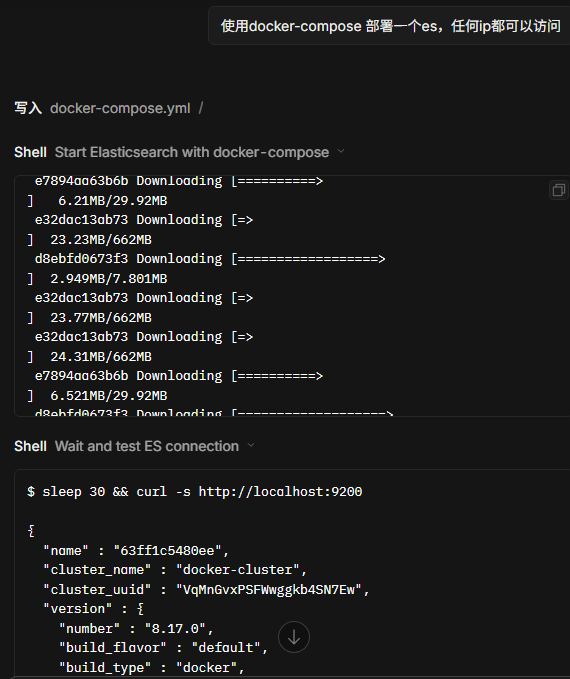
自动生成了docker-compose.yml 并执行
version: '3.8'

services:
  elasticsearch:
    image: docker.elastic.co/elasticsearch/elasticsearch:8.17.0
    container_name: elasticsearch
    environment:
      - discovery.type=single-node
      - xpack.security.enabled=false
      - "ES_JAVA_OPTS=-Xms512m -Xmx512m"
      - network.host=0.0.0.0
    ports:
      - "9200:9200"
      - "9300:9300"
    volumes:
      - es_data:/usr/share/elasticsearch/data
    restart: unless-stopped

volumes:
  es_data:
    driver: local
(2)连接es 进行数据操作与分析
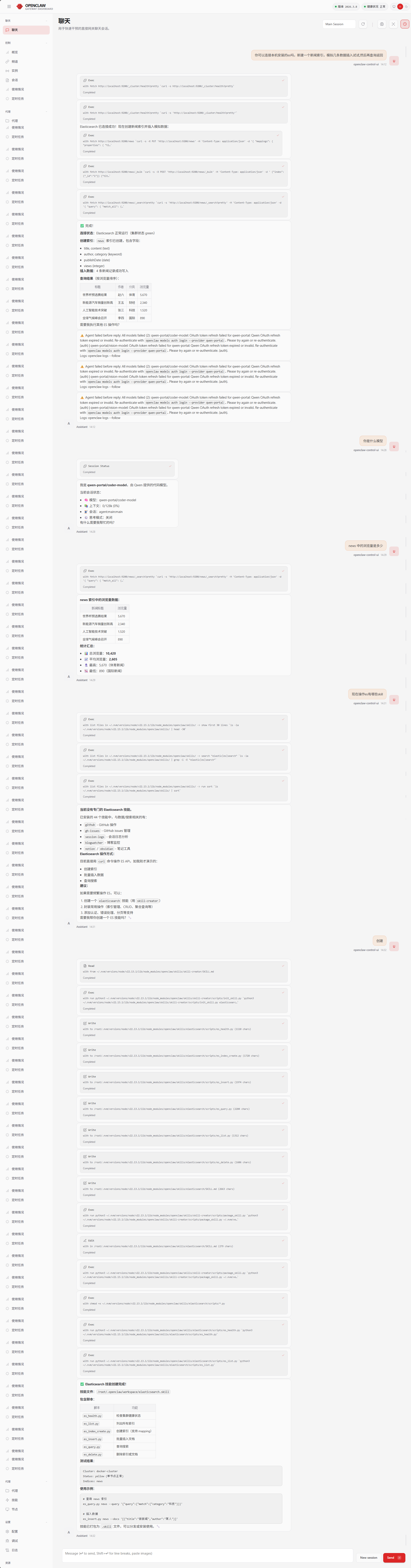
(3)创建skills
✅ Elasticsearch 技能创建完成!
技能文件 :/root/.openclaw/workspace/elasticsearch.skill
包含脚本:
| 脚本 | 功能 |
|---|---|
es_health.py |
检查集群健康状态 |
es_list.py |
列出所有索引 |
es_index_create.py |
创建索引(支持 mapping) |
es_insert.py |
批量插入文档 |
es_query.py |
查询搜索 |
es_delete.py |
删除索引或文档 |
测试结果:
Cluster: docker-cluster
Status: yellow (单节点正常)
Indices: news使用示例:
bash
# 查询 news 索引
es_query.py news --query '{"query":{"match":{"category":"科技"}}}'

# 插入数据
es_insert.py news --docs '[{"title":"新新闻","author":"某人"}]'
技能已打包为 .skill 文件,可以分发或安装使用。🔧
python
# 安装必要库
pip install openclaw elasticsearch python-dotenv
2.2 基础连接配置
python
from openclaw import DataPipeline
from elasticsearch import Elasticsearch
from dotenv import load_dotenv
import os

load_dotenv()

# 初始化Elasticsearch连接
es = Elasticsearch(
    clouds_id=os.getenv('ES_CLOUD_ID'),
    http_auth=(os.getenv('ES_USERNAME'), os.getenv('ES_PASSWORD'))
)

# 验证连接
if not es.ping():
    raise ValueError("无法连接到Elasticsearch")
2.3 数据摄取管道
python
def create_data_pipeline():
    pipeline = DataPipeline()

    # 添加数据源(可以是数据库、API、文件等)
    pipeline.add_source("csv", path="data/input.csv")

    # 数据转换处理
    pipeline.add_transform("clean_data", lambda df: df.dropna())
    pipeline.add_transform("normalize", lambda df: (df - df.mean()) / df.std())

    # 自定义Elasticsearch写入器
    def es_sink(df, index_name="processed_data"):
        for _, row in df.iterrows():
            es.index(index=index_name, document=row.to_dict())

    pipeline.add_sink("elasticsearch", es_sink)

    return pipeline
2.4 智能查询与分析
python
def search_es(query, index="processed_data"):
    # 简单查询
    res = es.search(index=index, query={"match_all": {}})

    # 复杂查询示例
    complex_query = {
        "query": {
            "bool": {
                "must": [
                    {"match": {"category": "electronics"}},
                    {"range": {"price": {"gte": 100, "lte": 1000}}}
                ],
                "filter": [
                    {"term": {"in_stock": True}}
                ]
            }
        },
        "aggs": {
            "avg_price": {"avg": {"field": "price"}},
            "category_count": {"terms": {"field": "category.keyword"}}
        }
    }

    return es.search(index=index, body=complex_query)
3. 高级功能实现
3.1 实时数据处理
python
from openclaw.realtime import StreamProcessor

def setup_realtime_pipeline():
    stream = StreamProcessor(es_host="localhost", es_port=9200)

    # 定义处理函数
    def process_event(event):
        # 增强数据
        event['processed_at'] = datetime.now()
        event['sentiment'] = analyze_sentiment(event['text'])
        return event

    # 设置处理流程
    stream.source("kafka", topic="raw_data") \
          .map(process_event) \
          .sink("elasticsearch", index="realtime_events")

    stream.start()
3.2 机器学习集成
python
from sklearn.ensemble import RandomForestClassifier
import joblib

def train_and_deploy_model():
    # 从ES获取训练数据
    train_data = es.search(
        index="training_data",
        size=10000,
        _source=["features", "label"]
    )

    # 训练模型
    X = [hit["_source"]["features"] for hit in train_data["hits"]["hits"]]
    y = [hit["_source"]["label"] for hit in train_data["hits"]["hits"]]

    model = RandomForestClassifier()
    model.fit(X, y)

    # 保存模型到ES
    model_bytes = joblib.dumps(model)
    es.index(
        index="ml_models",
        id="rf_classifier_v1",
        body={
            "model": model_bytes.decode('latin1'),
            "metadata": {
                "type": "classification",
                "version": "1.0",
                "trained_at": datetime.now()
            }
        }
    )

def predict_with_model(features):
    # 从ES加载最新模型
    model_doc = es.get(index="ml_models", id="rf_classifier_v1")
    model = joblib.loads(model_doc["_source"]["model"].encode('latin1'))

    # 进行预测
    return model.predict([features])
4. 性能优化策略
- 批量操作:
python
from elasticsearch.helpers import bulk

def bulk_index_data(df, index_name):
    actions = [
        {
            "_index": index_name,
            "_source": row.to_dict()
        }
        for _, row in df.iterrows()
    ]
bulk(es, actions)- 索引优化:
python
def create_optimized_index(index_name):
    settings = {
        "settings": {
            "number_of_shards": 3,
            "number_of_replicas": 1,
            "refresh_interval": "30s",
            "index.mapping.total_fields.limit": 1000
        },
        "mappings": {
            "properties": {
                "timestamp": {"type": "date"},
                "text": {"type": "text", "analyzer": "english"},
                "numeric_field": {"type": "float"}
            }
        }
    }
    es.indices.create(index=index_name, body=settings)
5. 监控与维护
python
def setup_monitoring():
    # 集群健康检查
    health = es.cluster.health()

    # 索引统计
    stats = es.indices.stats(index="processed_data")

    # 设置监控警报
    def check_disk_space():
        disk_usage = es.cat.allocation(format="json")
        for node in disk_usage:
            if float(node['disk.percent']) > 80:
                send_alert(f"节点 {node['node']} 磁盘使用率过高")

    # 定期重新索引策略
    def reindex_strategy():
        # 创建新索引
        new_index = f"processed_data_{datetime.now().strftime('%Y%m%d')}"
        create_optimized_index(new_index)

        # 重新索引数据
        es.reindex(
            body={
                "source": {"index": "processed_data"},
                "dest": {"index": new_index}
            }
        )

        # 切换别名
        es.indices.put_alias(index=new_index, name="processed_data")
6. 最佳实践
-
数据建模:
- 根据查询模式设计索引结构
- 合理使用嵌套对象和父子文档关系
- 为常用查询字段设置适当的分词器
-
管道优化:
- 在OpenClaw中尽早过滤不必要的数据
- 使用Elasticsearch的批量API减少网络开销
- 考虑使用Elasticsearch的ingest pipeline进行数据转换
-
扩展性考虑:
- 对于大规模数据,考虑使用Elasticsearch的滚动索引模式
- 实现自动分片和副本调整策略
- 使用Elasticsearch的跨集群复制(CCR)实现灾难恢复
通过这种集成架构,您可以充分利用OpenClaw的数据处理能力和Elasticsearch的搜索分析功能,构建强大的智能数据处理系统。