1 概念定义
适配器模式是一种结构型设计模式,它允许不兼容的接口能够一起工作。适配器作为两个不兼容接口之间的桥梁,将一个类的接口转换成客户端期望的另一个接口。
2 核心思想:
-
接口转换:将现有类的接口转换为目标接口
-
复用现有功能:让不兼容的类能够协同工作
-
透明性:客户端通过目标接口操作,不知道适配器的存在
-
解耦:将客户端与适配者解耦
3 主要角色:
-
Target(目标接口):客户端期望的接口
-
Adaptee(适配者):需要被适配的已有接口
-
Adapter(适配器):将适配者接口转换为目标接口
-
Client(客户端):通过目标接口与对象交互
两种实现方式:
类适配器:使用多重继承(C++支持)
对象适配器:使用对象组合(推荐方式)
4 应用场景
以多媒体播放器系统为例:
系统原本只支持MP3格式播放
需要集成第三方音频库(支持WAV、FLAC、AAC)
需要集成视频库(支持MP4、AVI、MKV)
各种库的接口完全不同
不能修改现有代码,需要适配不同的媒体格式
5 UML
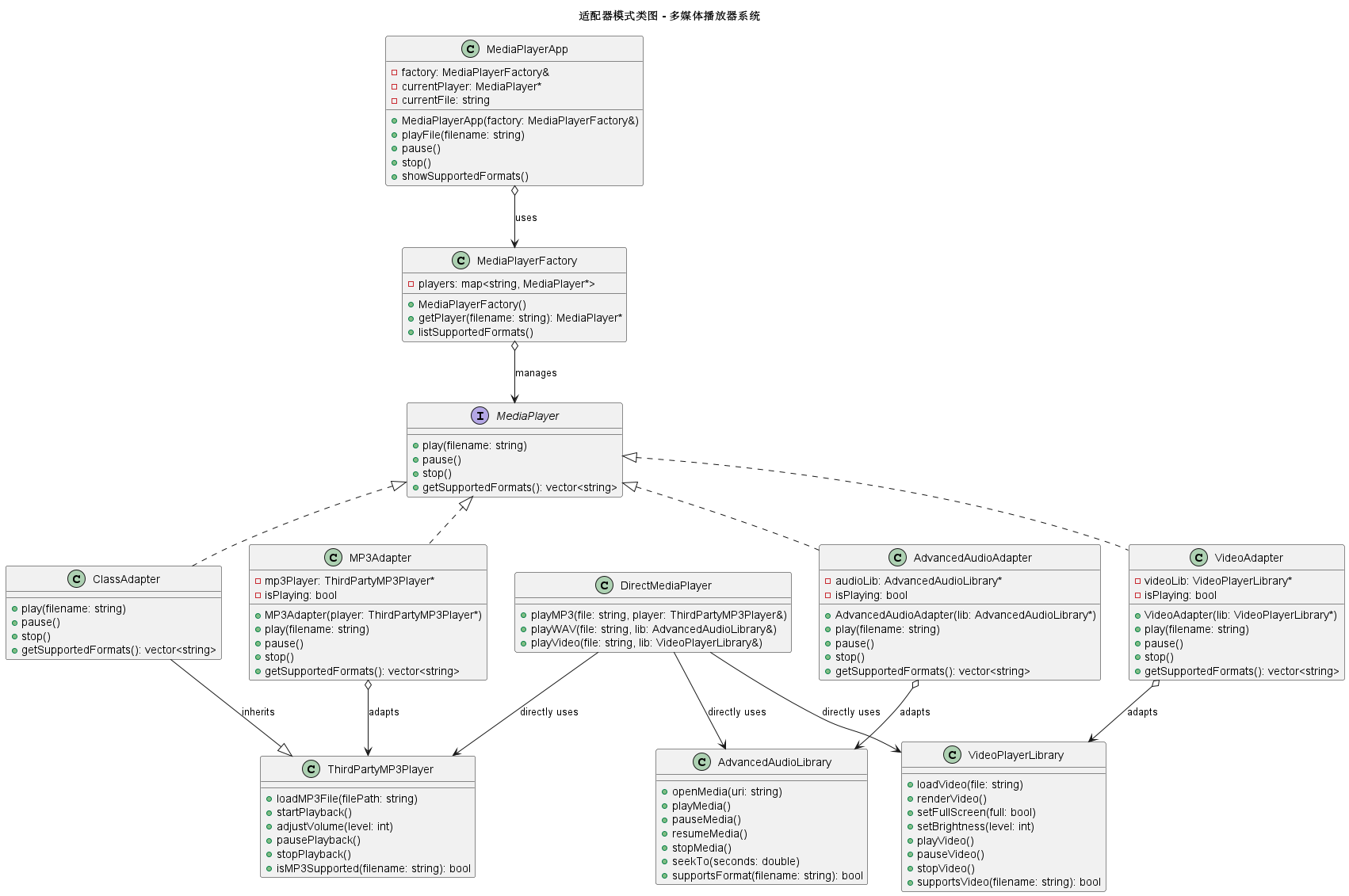
6 C++ 代码实现
cpp
#include <iostream>
#include <string>
#include <memory>
#include <map>
#include <vector>
using namespace std;

// ========== 目标接口:媒体播放器 ==========
class MediaPlayer {
public:
    virtual ~MediaPlayer() = default;

    // 播放媒体文件
    virtual void play(const string& filename) = 0;

    // 暂停播放
    virtual void pause() = 0;

    // 停止播放
    virtual void stop() = 0;

    // 获取支持的格式
    virtual vector<string> getSupportedFormats() = 0;
};

// ========== 适配者1:第三方MP3库 ==========
class ThirdPartyMP3Player {
private:
    bool isPlaying;
    string currentFile;
    int volume;

public:
    ThirdPartyMP3Player() : isPlaying(false), volume(50) {}

    // 第三方库有自己的接口
    void loadMP3File(const string& filePath) {
        cout << "[第三方MP3库] 加载MP3文件: " << filePath << endl;
        currentFile = filePath;
    }

    void startPlayback() {
        if (!currentFile.empty()) {
            isPlaying = true;
            cout << "[第三方MP3库] 开始播放: " << currentFile << endl;
        }
    }

    void adjustVolume(int level) {
        volume = level;
        cout << "[第三方MP3库] 调整音量到: " << volume << endl;
    }

    void pausePlayback() {
        if (isPlaying) {
            isPlaying = false;
            cout << "[第三方MP3库] 暂停播放" << endl;
        }
    }

    void stopPlayback() {
        isPlaying = false;
        cout << "[第三方MP3库] 停止播放" << endl;
    }

    bool isMP3Supported(const string& filename) {
        return filename.size() > 4 &&
               filename.substr(filename.size() - 4) == ".mp3";
    }
};

// ========== 适配者2:高级音频库(支持多种格式) ==========
class AdvancedAudioLibrary {
private:
    string currentTrack;
    double position;  // 播放位置(秒)
    bool isPaused;

public:
    AdvancedAudioLibrary() : position(0), isPaused(false) {}

    // 完全不同的接口
    void openMedia(const string& uri) {
        cout << "[高级音频库] 打开媒体: " << uri << endl;
        currentTrack = uri;
    }

    void playMedia() {
        if (!currentTrack.empty()) {
            cout << "[高级音频库] 播放媒体,从位置 " << position << "秒开始" << endl;
        }
    }

    void pauseMedia() {
        isPaused = true;
        cout << "[高级音频库] 暂停媒体" << endl;
    }

    void resumeMedia() {
        if (isPaused) {
            isPaused = false;
            cout << "[高级音频库] 继续播放" << endl;
        }
    }

    void stopMedia() {
        position = 0;
        cout << "[高级音频库] 停止播放" << endl;
    }

    void seekTo(double seconds) {
        position = seconds;
        cout << "[高级音频库] 跳转到 " << seconds << "秒" << endl;
    }

    bool supportsFormat(const string& filename) {
        string ext = filename.substr(filename.find_last_of('.') + 1);
        return ext == "wav" || ext == "flac" || ext == "aac" || ext == "ogg";
    }
};

// ========== 适配者3:视频播放库 ==========
class VideoPlayerLibrary {
private:
    string videoFile;
    bool isFullScreen;
    int brightness;

public:
    VideoPlayerLibrary() : isFullScreen(false), brightness(50) {}

    // 视频库的独特接口
    void loadVideo(const string& file) {
        cout << "[视频库] 加载视频: " << file << endl;
        videoFile = file;
    }

    void renderVideo() {
        if (!videoFile.empty()) {
            cout << "[视频库] 渲染视频,亮度: " << brightness << "%" << endl;
        }
    }

    void setFullScreen(bool full) {
        isFullScreen = full;
        cout << "[视频库] " << (full ? "全屏模式" : "窗口模式") << endl;
    }

    void setBrightness(int level) {
        brightness = level;
        cout << "[视频库] 设置亮度: " << level << "%" << endl;
    }

    void playVideo() {
        cout << "[视频库] 播放视频: " << videoFile << endl;
    }

    void pauseVideo() {
        cout << "[视频库] 暂停视频" << endl;
    }

    void stopVideo() {
        cout << "[视频库] 停止视频" << endl;
    }

    bool supportsVideo(const string& filename) {
        string ext = filename.substr(filename.find_last_of('.') + 1);
        return ext == "mp4" || ext == "avi" || ext == "mkv" || ext == "mov";
    }
};

// ========== 对象适配器:MP3适配器 ==========
class MP3Adapter : public MediaPlayer {
private:
    // 使用对象组合
    ThirdPartyMP3Player* mp3Player;
    bool isPlaying;

public:
    MP3Adapter(ThirdPartyMP3Player* player) : mp3Player(player), isPlaying(false) {
        cout << "创建MP3适配器" << endl;
    }

    ~MP3Adapter() {
        delete mp3Player;
    }

    void play(const string& filename) override {
        // 转换接口调用
        mp3Player->loadMP3File(filename);
        mp3Player->startPlayback();
        mp3Player->adjustVolume(70);  // 设置默认音量
        isPlaying = true;
    }

    void pause() override {
        if (isPlaying) {
            mp3Player->pausePlayback();
            isPlaying = false;
        }
    }

    void stop() override {
        mp3Player->stopPlayback();
        isPlaying = false;
    }

    vector<string> getSupportedFormats() override {
        return {".mp3"};
    }
};

// ========== 对象适配器:高级音频适配器 ==========
class AdvancedAudioAdapter : public MediaPlayer {
private:
    AdvancedAudioLibrary* audioLib;
    bool isPlaying;

public:
    AdvancedAudioAdapter(AdvancedAudioLibrary* lib) : audioLib(lib), isPlaying(false) {
        cout << "创建高级音频适配器" << endl;
    }

    ~AdvancedAudioAdapter() {
        delete audioLib;
    }

    void play(const string& filename) override {
        // 转换接口调用
        audioLib->openMedia(filename);
        audioLib->playMedia();
        isPlaying = true;
    }

    void pause() override {
        if (isPlaying) {
            audioLib->pauseMedia();
            isPlaying = false;
        }
    }

    void stop() override {
        audioLib->stopMedia();
        isPlaying = false;
    }

    vector<string> getSupportedFormats() override {
        return {".wav", ".flac", ".aac", ".ogg"};
    }
};

// ========== 对象适配器:视频适配器 ==========
class VideoAdapter : public MediaPlayer {
private:
    VideoPlayerLibrary* videoLib;
    bool isPlaying;

public:
    VideoAdapter(VideoPlayerLibrary* lib) : videoLib(lib), isPlaying(false) {
        cout << "创建视频适配器" << endl;
    }

    ~VideoAdapter() {
        delete videoLib;
    }

    void play(const string& filename) override {
        // 转换接口调用
        videoLib->loadVideo(filename);
        videoLib->setFullScreen(true);  // 视频默认全屏
        videoLib->setBrightness(60);
        videoLib->playVideo();
        videoLib->renderVideo();
        isPlaying = true;
    }

    void pause() override {
        if (isPlaying) {
            videoLib->pauseVideo();
            isPlaying = false;
        }
    }

    void stop() override {
        videoLib->stopVideo();
        isPlaying = false;
    }

    vector<string> getSupportedFormats() override {
        return {".mp4", ".avi", ".mkv", ".mov"};
    }
};

// ========== 类适配器:使用多重继承(C++特有) ==========
class ClassAdapter : public MediaPlayer, private ThirdPartyMP3Player {
public:
    ClassAdapter() {
        cout << "创建类适配器" << endl;
    }

    void play(const string& filename) override {
        // 直接使用父类的方法
        loadMP3File(filename);
        startPlayback();
        adjustVolume(70);
    }

    void pause() override {
        pausePlayback();
    }

    void stop() override {
        stopPlayback();
    }

    vector<string> getSupportedFormats() override {
        return {".mp3"};
    }
};

// ========== 适配器工厂:媒体播放器工厂 ==========
class MediaPlayerFactory {
private:
    map<string, MediaPlayer*> players;

public:
    MediaPlayerFactory() {
        // 注册各种适配器
        players[".mp3"] = new MP3Adapter(new ThirdPartyMP3Player());
        players[".wav"] = new AdvancedAudioAdapter(new AdvancedAudioLibrary());
        players[".flac"] = new AdvancedAudioAdapter(new AdvancedAudioLibrary());
        players[".aac"] = new AdvancedAudioAdapter(new AdvancedAudioLibrary());
        players[".ogg"] = new AdvancedAudioAdapter(new AdvancedAudioLibrary());
        players[".mp4"] = new VideoAdapter(new VideoPlayerLibrary());
        players[".avi"] = new VideoAdapter(new VideoPlayerLibrary());
        players[".mkv"] = new VideoAdapter(new VideoPlayerLibrary());
        players[".mov"] = new VideoAdapter(new VideoPlayerLibrary());
    }

    ~MediaPlayerFactory() {
        for (auto& pair : players) {
            delete pair.second;
        }
    }

    MediaPlayer* getPlayer(const string& filename) {
        string ext = filename.substr(filename.find_last_of('.'));
        auto it = players.find(ext);
        if (it != players.end()) {
            cout << "找到适配器 for " << ext << " 格式" << endl;
            return it->second;
        }
        return nullptr;
    }

    void listSupportedFormats() {
        cout << "\n支持的格式:" << endl;
        for (const auto& pair : players) {
            cout << "  " << pair.first;
        }
        cout << endl;
    }
};

// ========== 客户端:媒体播放器应用 ==========
class MediaPlayerApp {
private:
    MediaPlayerFactory& factory;
    MediaPlayer* currentPlayer;
    string currentFile;

public:
    MediaPlayerApp(MediaPlayerFactory& f) : factory(f), currentPlayer(nullptr) {}

    void playFile(const string& filename) {
        cout << "\n=== 尝试播放文件: " << filename << " ===" << endl;

        // 获取对应的播放器
        currentPlayer = factory.getPlayer(filename);
        if (!currentPlayer) {
            cout << "错误: 不支持的文件格式!" << endl;
            return;
        }

        currentFile = filename;
        currentPlayer->play(filename);
    }

    void pause() {
        if (currentPlayer) {
            cout << "\n暂停播放" << endl;
            currentPlayer->pause();
        }
    }

    void stop() {
        if (currentPlayer) {
            cout << "\n停止播放" << endl;
            currentPlayer->stop();
        }
    }

    void showSupportedFormats() {
        factory.listSupportedFormats();
    }
};

// ========== 不使用适配器模式的直接调用(对比) ==========
class DirectMediaPlayer {
public:
    // 问题:客户端需要了解所有库的细节
    void playMP3(const string& file, ThirdPartyMP3Player& player) {
        if (player.isMP3Supported(file)) {
            player.loadMP3File(file);
            player.startPlayback();
        }
    }

    void playWAV(const string& file, AdvancedAudioLibrary& lib) {
        if (lib.supportsFormat(file)) {
            lib.openMedia(file);
            lib.playMedia();
        }
    }

    void playVideo(const string& file, VideoPlayerLibrary& lib) {
        if (lib.supportsVideo(file)) {
            lib.loadVideo(file);
            lib.playVideo();
        }
    }

    // 问题:每个新格式都需要新方法
    // 问题:客户端需要管理多个不同的对象
    // 问题:接口不统一,使用复杂
};

// ========== 主函数 ==========
int main() {
    cout << "=== 适配器模式演示:多媒体播放器 ===\n" << endl;

    // 创建工厂
    MediaPlayerFactory factory;
    factory.listSupportedFormats();

    // 创建播放器应用
    MediaPlayerApp app(factory);

    // 播放各种格式的文件
    cout << "\n【场景1:播放MP3】" << endl;
    app.playFile("song.mp3");
    app.pause();
    app.stop();

    cout << "\n【场景2:播放FLAC(高级音频)】" << endl;
    app.playFile("concert.flac");
    app.pause();
    app.stop();

    cout << "\n【场景3:播放MP4视频】" << endl;
    app.playFile("movie.mp4");
    app.pause();
    app.stop();

    cout << "\n【场景4:尝试不支持的格式】" << endl;
    app.playFile("document.pdf");

    // 演示类适配器
    cout << "\n=== 类适配器演示 ===" << endl;
    ClassAdapter classAdapter;
    classAdapter.play("song.mp3");
    classAdapter.pause();
    classAdapter.stop();

    // 对比:不使用适配器模式的复杂度
    cout << "\n=== 对比:不使用适配器模式 ===" << endl;
    DirectMediaPlayer directPlayer;
    ThirdPartyMP3Player mp3;
    AdvancedAudioLibrary audio;
    VideoPlayerLibrary video;

    cout << "\n直接调用需要知道每种库的接口:" << endl;
    directPlayer.playMP3("song.mp3", mp3);
    directPlayer.playWAV("sound.wav", audio);
    directPlayer.playVideo("movie.mp4", video);

    return 0;
}
7 总结
不使用适配器模式的坏处
如果不使用适配器模式,可能会采用以下几种实现方式:
方式1:直接修改客户端代码
cpp
// 问题:客户端代码需要了解所有库的细节
class MediaApp {
private:
    ThirdPartyMP3Player mp3Player;
    AdvancedAudioLibrary audioLib;
    VideoPlayerLibrary videoLib;

public:
    void playFile(const string& filename) {
        string ext = filename.substr(filename.find_last_of('.') + 1);

        // 到处都是条件判断
        if (ext == "mp3") {
            // 需要知道MP3库的接口
            if (mp3Player.isMP3Supported(filename)) {
                mp3Player.loadMP3File(filename);
                mp3Player.startPlayback();
            }
        }
        else if (ext == "wav" || ext == "flac" || ext == "aac") {
            // 需要知道高级音频库的接口
            if (audioLib.supportsFormat(filename)) {
                audioLib.openMedia(filename);
                audioLib.playMedia();
            }
        }
        else if (ext == "mp4" || ext == "avi" || ext == "mkv") {
            // 需要知道视频库的接口
            if (videoLib.supportsVideo(filename)) {
                videoLib.loadVideo(filename);
                videoLib.playVideo();
            }
        }
        else {
            cout << "不支持的格式" << endl;
        }
    }

    // 问题:添加新格式需要修改这个方法
    // 问题:暂停、停止等操作更难统一处理
};
问题:
-
客户端与所有第三方库紧耦合
-
添加新格式需要修改客户端代码
-
代码重复,每个操作都要写条件判断
-
违反开闭原则
方式2:为每个格式创建不同的播放器类
cpp
// 问题:类爆炸
class MP3FilePlayer {
public:
    void playMP3(const string& file) {
        ThirdPartyMP3Player player;
        player.loadMP3File(file);
        player.startPlayback();
    }
};

class WAVFilePlayer {
public:
    void playWAV(const string& file) {
        AdvancedAudioLibrary lib;
        lib.openMedia(file);
        lib.playMedia();
    }
};

class MP4FilePlayer {
public:
    void playMP4(const string& file) {
        VideoPlayerLibrary lib;
        lib.loadVideo(file);
        lib.playVideo();
    }
};

// 客户端需要知道用哪个类
class Client {
public:
    void play(const string& file, const string& type) {
        if (type == "mp3") {
            MP3FilePlayer().playMP3(file);
        } else if (type == "wav") {
            WAVFilePlayer().playWAV(file);
        }
        // ...
    }
};
问题:
-
类的数量随着格式增加而增加
-
接口不统一,客户端需要了解每个类的不同方法
-
难以实现统一的操作(如暂停所有播放器)
方式3:使用函数指针或回调
cpp
// 问题:复杂且容易出错
typedef void (*PlayFunction)(const string&);
typedef void (*PauseFunction)();

map<string, pair<PlayFunction, PauseFunction>> formatHandlers;

void playMP3Handler(const string& file) {
    ThirdPartyMP3Player player;
    player.loadMP3File(file);
    player.startPlayback();
}

void playWAVHandler(const string& file) {
    AdvancedAudioLibrary lib;
    lib.openMedia(file);
    lib.playMedia();
}

// 注册处理器
formatHandlers[".mp3"] = {playMP3Handler, nullptr};
formatHandlers[".wav"] = {playWAVHandler, nullptr};

// 使用
void playFile(const string& file) {
    string ext = file.substr(file.find_last_of('.'));
    auto it = formatHandlers.find(ext);
    if (it != formatHandlers.end()) {
        it->second.first(file);
    }
}
问题:
-
类型不安全
-
难以处理有状态的对象
-
暂停、停止等操作难以统一管理
-
调试困难
适配器模式的优势
-
接口统一:为不同的类提供统一的访问接口
-
解耦:客户端与具体实现解耦
-
复用现有功能:无需修改现有代码就能使用
-
开闭原则:添加新功能时无需修改现有代码
-
灵活性:可以选择对象适配器或类适配器
-
透明性:客户端不知道适配器的存在
-
责任单一:适配器只负责接口转换
8. 适配器模式的使用场景
-
使用第三方库:将第三方库的接口适配为自己的接口
-
集成旧系统:将旧系统的接口适配到新系统
-
统一多个类的接口:将多个不同接口统一为一个
-
API版本升级:兼容新旧版本的API
-
跨平台开发:适配不同平台的API
-
测试和模拟:为难以测试的类创建适配器