YOLOs-CPP:一个免费开源的YOLO全系列C++推理库(以YOLO26为例)
- 前言
- 环境要求
- 相关介绍
-
-
- C++简介
- ONNX简介
- [ONNX Runtime 简介](#ONNX Runtime 简介)
- YOLOs-CPP简介
-
- Windows下使用YOLOs-CPP
- 参考
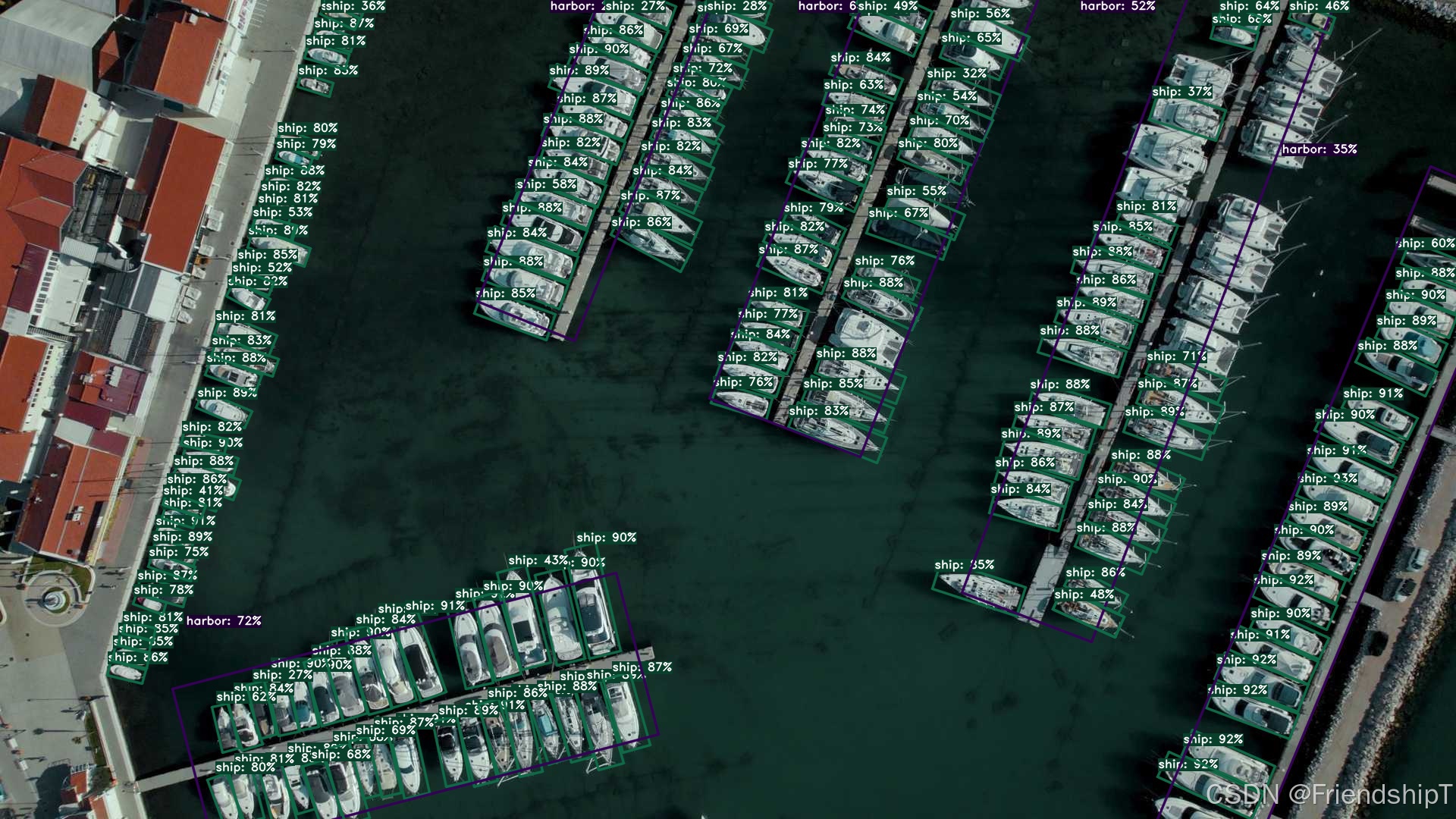
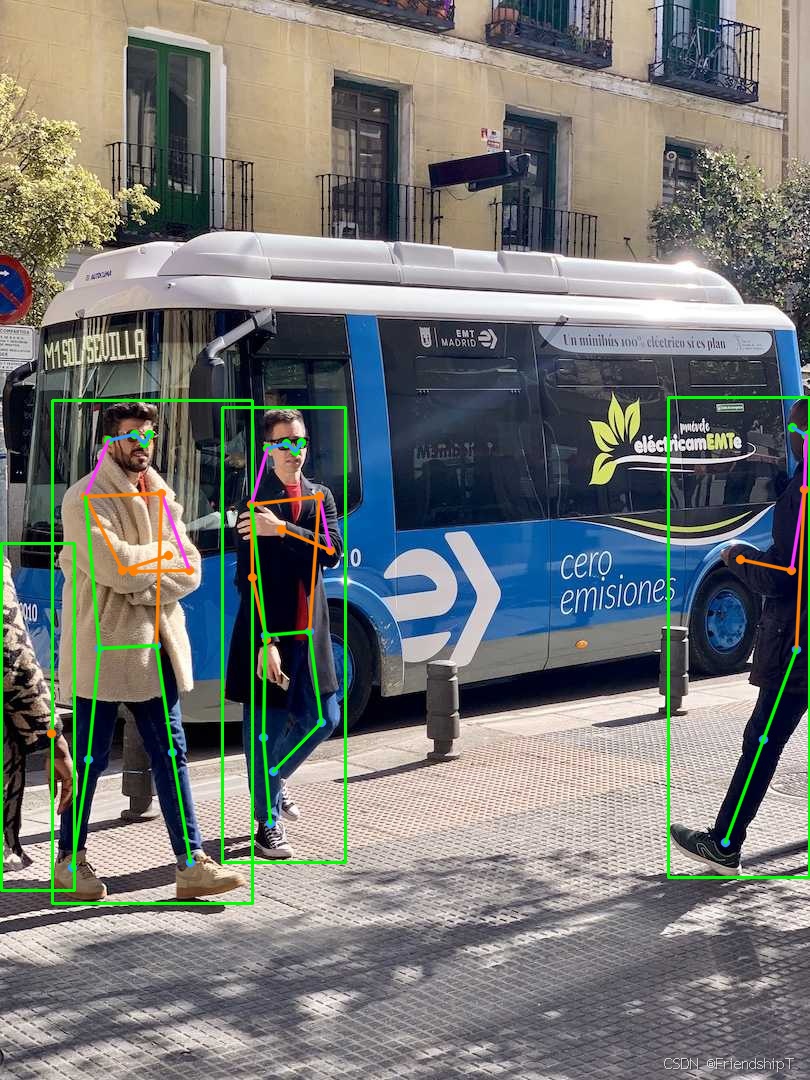
前言
- 由于本人水平有限,难免出现错漏,敬请批评改正。
- 更多精彩内容,可点击进入Python日常小操作专栏、OpenCV-Python小应用专栏、YOLO系列专栏、自然语言处理专栏、人工智能混合编程实践专栏或我的个人主页查看
- Ultralytics:使用 YOLO11 进行速度估计
- Ultralytics:使用 YOLO11 进行物体追踪
- Ultralytics:使用 YOLO11 进行物体计数
- Ultralytics:使用 YOLO11 进行目标打码
- 人工智能混合编程实践:C++调用Python ONNX进行YOLOv8推理
- 人工智能混合编程实践:C++调用封装好的DLL进行YOLOv8实例分割
- 人工智能混合编程实践:C++调用Python ONNX进行图像超分重建
- 人工智能混合编程实践:C++调用Python AgentOCR进行文本识别
- 通过计算实例简单地理解PatchCore异常检测
- Python将YOLO格式实例分割数据集转换为COCO格式实例分割数据集
- YOLOv8 Ultralytics:使用Ultralytics框架训练RT-DETR实时目标检测模型
- 基于DETR的人脸伪装检测
- YOLOv7训练自己的数据集(口罩检测)
- YOLOv8训练自己的数据集(足球检测)
- YOLOv5:TensorRT加速YOLOv5模型推理
- YOLOv5:IoU、GIoU、DIoU、CIoU、EIoU
- 玩转Jetson Nano(五):TensorRT加速YOLOv5目标检测
- YOLOv5:添加SE、CBAM、CoordAtt、ECA注意力机制
- YOLOv5:yolov5s.yaml配置文件解读、增加小目标检测层
- Python将COCO格式实例分割数据集转换为YOLO格式实例分割数据集
- YOLOv5:使用7.0版本训练自己的实例分割模型(车辆、行人、路标、车道线等实例分割)
- 使用Kaggle GPU资源免费体验Stable Diffusion开源项目
- Stable Diffusion:在服务器上部署使用Stable Diffusion WebUI进行AI绘图(v2.0)
- Stable Diffusion:使用自己的数据集微调训练LoRA模型(v2.0)
环境要求
- Windows 10
- VS2019
- C++17 compatible compiler
- CMake (version 3.10 or higher)
- OpenCV (version 4.5.5 or higher)
- ONNX Runtime (version 1.15.0 or higher, with optional GPU support)
相关介绍
C++简介
C++ 是一种广泛使用的编程语言,最初由丹麦计算机科学家Bjarne Stroustrup于1979年在贝尔实验室开发,作为C语言的扩展。C++的设计目标是提供一种能够高效利用硬件资源,同时支持面向对象编程(OOP)特性的语言。随着时间的发展,C++也引入了泛型编程和函数式编程的支持,使其成为一种多范式编程语言。
ONNX简介
ONNX(Open Neural Network Exchange) 是一个开放的生态系统,旨在促进不同框架之间深度学习模型的互操作性。通过ONNX,开发者可以更容易地在不同的深度学习框架(如PyTorch、TensorFlow等)间共享和部署模型。ONNX定义了一种通用的模型文件格式,使得训练好的模型可以在各种硬件平台上高效运行,无论是服务器端还是边缘设备。这有助于加速机器学习技术的研发和应用。
ONNX Runtime 简介
ONNX Runtime 是一个用于高效执行 ONNX(Open Neural Network Exchange)格式机器学习模型的引擎。它旨在简化模型部署,并支持多种硬件加速选项。
核心特点
- 跨平台:支持 Windows、Linux 和 macOS。
- 多硬件支持:包括 CPU、NVIDIA GPU(通过 CUDA)、AMD GPU 等。
- 高性能:通过图优化和硬件特定优化提高推理速度。
- 框架兼容性:支持从 TensorFlow、PyTorch 等转换的 ONNX 模型。
- 易用API:提供 C++, Python, C#, Java 等语言接口。
- 量化支持:减少模型大小并加快推理速度。
YOLOs-CPP简介
YOLOs-CPP 是一款生产级推理引擎,将完整的 YOLO 生态系统引入 C++ 领域。不同于分散的实现方案,YOLOs-CPP 为所有 YOLO 版本和任务提供了统一、一致的 API。
核心能力
- 高性能:零拷贝预处理、优化NMS算法、GPU加速
- 精准匹配:与Ultralytics Python版本结果完全一致(经36项自动化测试验证)
- 自包含:无需Python运行时环境,运行时无外部依赖
- 易集成:基于头文件的库,采用现代C++17 API
- 灵活:支持CPU/GPU并行,动态/静态输入形状,可配置阈值
Windows下使用YOLOs-CPP
下载YOLOs-CPP项目
Windows
bash
git clone https://github.com/Geekgineer/YOLOs-CPP.git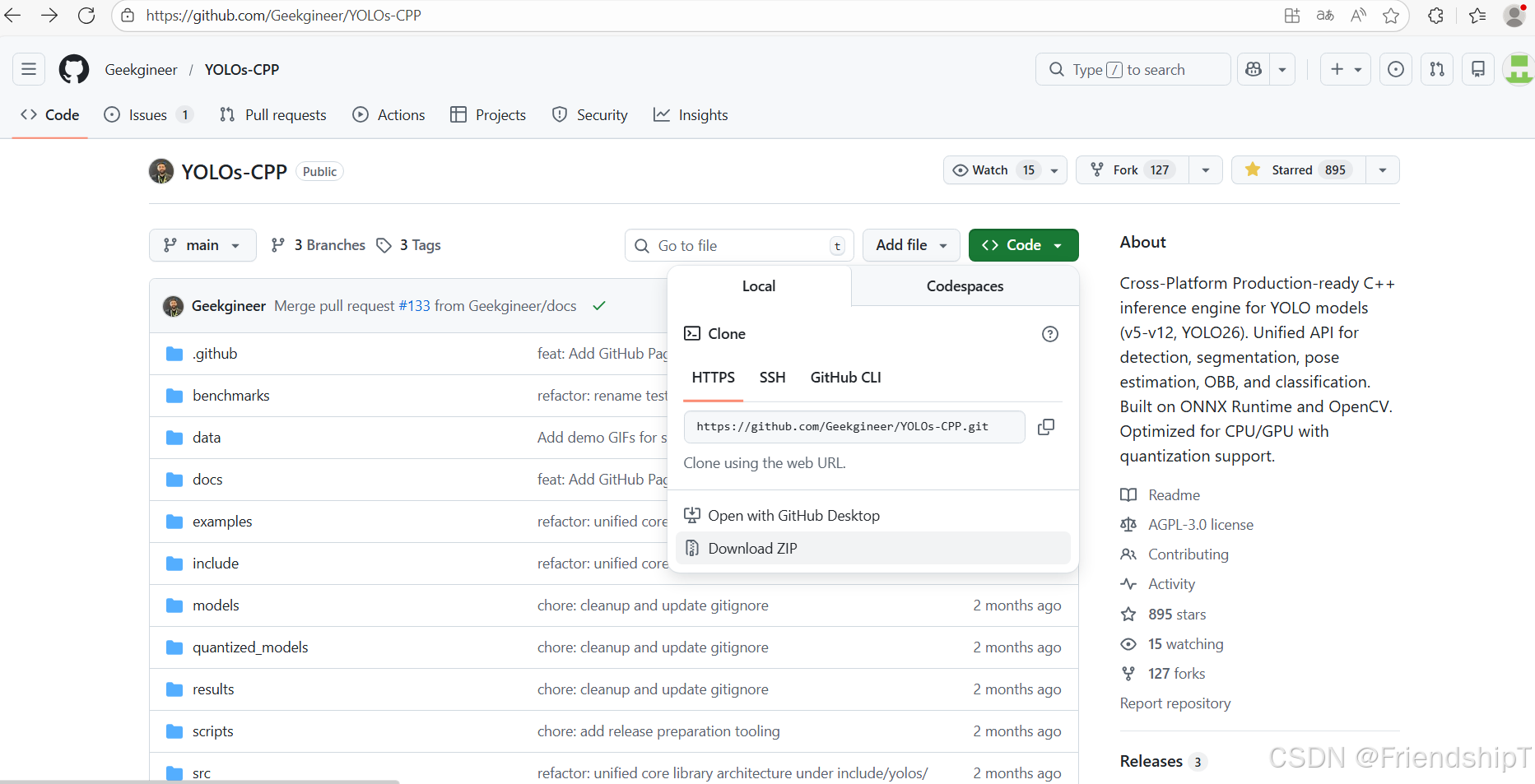
YOLOs-CPP项目结构
bash
YOLOs-CPP/
├── include/yolos/           # Core library
│   ├── core/                # Shared utilities
│   │   ├── types.hpp        # Detection, Segmentation result types
│   │   ├── preprocessing.hpp # Letterbox, normalization
│   │   ├── nms.hpp          # Non-maximum suppression
│   │   ├── drawing.hpp      # Visualization utilities
│   │   └── version.hpp      # YOLO version detection
│   ├── tasks/               # Task implementations
│   │   ├── detection.hpp    # Object detection
│   │   ├── segmentation.hpp # Instance segmentation
│   │   ├── pose.hpp         # Pose estimation
│   │   ├── obb.hpp          # Oriented bounding boxes
│   │   └── classification.hpp
│   └── yolos.hpp            # Main include (includes all)
├── src/                     # Example applications
├── examples/                # Task-specific examples
├── tests/                   # Automated test suite
├── benchmarks/              # Performance benchmarking
└── models/                  # Sample models & labels
导出ONNX
python
from ultralytics import YOLO
# Load the yolo26s model
model = YOLO("yolo26s.pt")
# Export the model to ONNX format
success = model.export(format="onnx")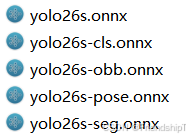
使用VS2019编译运行C++推理
- 由于我的windows电脑使用CMake构建项目,报错了。因此,我直接使用VS2019创建了一个项目,里面的核心文件与YOLOs-CPP的一致。
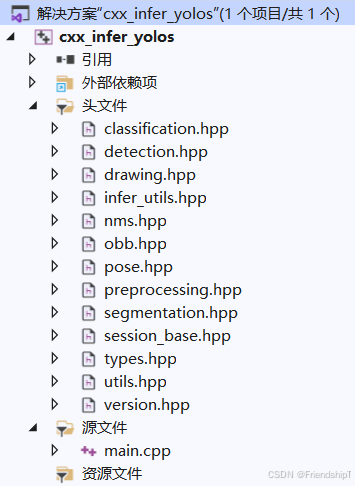
infer_utils.hpp
cpp
/**
 * @file utils.hpp
 * @brief Utility functions for examples (timestamps, file saving, argument parsing)
 */

#ifndef UTILS_HPP
#define UTILS_HPP

#include <string>
#include <chrono>
#include <iomanip>
#include <sstream>
#include <filesystem>
#include <algorithm>
#include <opencv2/opencv.hpp>

namespace utils {

    /**
     * @brief Get current timestamp string in format: YYYYMMDD_HHMMSS
     * @return Timestamp string
     */
    inline std::string getTimestamp() {
        auto now = std::chrono::system_clock::now();
        auto time_t_now = std::chrono::system_clock::to_time_t(now);
        std::tm tm_now;

        // Cross-platform localtime
#ifdef _WIN32
        localtime_s(&tm_now, &time_t_now);  // Windows
#else
        localtime_r(&time_t_now, &tm_now);  // POSIX (Linux/macOS)
#endif

        std::ostringstream oss;
        oss << std::put_time(&tm_now, "%Y%m%d_%H%M%S");
        return oss.str();
    }

    /**
     * @brief Generate output filename with timestamp
     * @param inputPath Original input file path
     * @param outputDir Output directory (e.g., "outputs/det/")
     * @param suffix Additional suffix (e.g., "_result")
     * @return Full output path with timestamp
     */
    inline std::string getOutputPath(const std::string& inputPath,
        const std::string& outputDir,
        const std::string& suffix = "_result") {
        namespace fs = std::filesystem;

        // Ensure output directory exists
        fs::create_directories(outputDir);

        // Get input filename without extension
        fs::path inputFilePath(inputPath);
        std::string baseName = inputFilePath.stem().string();
        std::string extension = inputFilePath.extension().string();

        // Create output filename: basename_timestamp_suffix.ext
        std::string timestamp = getTimestamp();
        std::string outputFilename = baseName + "_" + timestamp + suffix + extension;

        return (fs::path(outputDir) / outputFilename).string();
    }

    /**
     * @brief Save image with timestamp
     * @param image Image to save
     * @param inputPath Original input path
     * @param outputDir Output directory
     * @return Path where image was saved
     */
    inline std::string saveImage(const cv::Mat& image,
        const std::string& inputPath,
        const std::string& outputDir) {
        std::string outputPath = getOutputPath(inputPath, outputDir);
        cv::imwrite(outputPath, image);
        return outputPath;
    }

    /**
     * @brief Save video writer output path with timestamp
     * @param inputPath Original input path
     * @param outputDir Output directory
     * @return Output path for video
     */
    inline std::string getVideoOutputPath(const std::string& inputPath,
        const std::string& outputDir) {
        return getOutputPath(inputPath, outputDir, "_result");
    }

    /**
     * @brief Print performance metrics
     * @param taskName Name of the task
     * @param durationMs Duration in milliseconds
     * @param fps Frames per second (optional)
     */
    inline void printMetrics(const std::string& taskName,
        int64_t durationMs,
        double fps = -1) {
        std::cout << "\n═══════════════════════════════════════" << std::endl;
        std::cout << "  " << taskName << " Metrics" << std::endl;
        std::cout << "═══════════════════════════════════════" << std::endl;
        std::cout << "  Inference Time: " << durationMs << " ms" << std::endl;
        if (fps > 0) {
            std::cout << "  FPS: " << std::fixed << std::setprecision(2) << fps << std::endl;
        }
        std::cout << "═══════════════════════════════════════\n" << std::endl;
    }

    /**
     * @brief Check if file extension is supported image format
     */
    inline bool isImageFile(const std::string& path) {
        std::string ext = std::filesystem::path(path).extension().string();
        std::transform(ext.begin(), ext.end(), ext.begin(), ::tolower);
        return (ext == ".jpg" || ext == ".jpeg" || ext == ".png" ||
            ext == ".bmp" || ext == ".tiff" || ext == ".tif");
    }

    /**
     * @brief Check if file extension is supported video format
     */
    inline bool isVideoFile(const std::string& path) {
        std::string ext = std::filesystem::path(path).extension().string();
        std::transform(ext.begin(), ext.end(), ext.begin(), ::tolower);
        return (ext == ".mp4" || ext == ".avi" || ext == ".mov" ||
            ext == ".mkv" || ext == ".flv" || ext == ".wmv");
    }

    /**
     * @brief Print usage information
     */
    inline void printUsage(const std::string& programName,
        const std::string& taskType,
        const std::string& defaultModel,
        const std::string& defaultInput,
        const std::string& defaultLabels) {
        std::cout << "\n╔════════════════════════════════════════════════════╗" << std::endl;
        std::cout << "║  YOLOs-CPP " << taskType << " Example" << std::endl;
        std::cout << "╚════════════════════════════════════════════════════╝" << std::endl;
        std::cout << "\nUsage: " << programName << " [model_path] [input_path] [labels_path]" << std::endl;
        std::cout << "\nArguments:" << std::endl;
        std::cout << "  model_path   : Path to ONNX model (default: " << defaultModel << ")" << std::endl;
        std::cout << "  input_path   : Image/video file or directory (default: " << defaultInput << ")" << std::endl;
        std::cout << "  labels_path  : Path to class labels file (default: " << defaultLabels << ")" << std::endl;
        std::cout << "\nExamples:" << std::endl;
        std::cout << "  " << programName << std::endl;
        std::cout << "  " << programName << " ../models/yolo11n.onnx" << std::endl;
        std::cout << "  " << programName << " ../models/yolo11n.onnx ../data/image.jpg" << std::endl;
        std::cout << "  " << programName << " ../models/yolo11n.onnx ../data/ ../models/coco.names" << std::endl;
        std::cout << std::endl;
    }

} // namespace utils

#endif // UTILS_HPP
main.cpp
cpp
/**
 * @file example_image_det.cpp
 * @brief Standard object detection on images using YOLO models
 * @details Loads a YOLO detection model and performs inference on images
 */

#include <opencv2/opencv.hpp>
#include <iostream>
#include <iomanip>
#include <chrono>
#include <filesystem>
#include <vector>
#include "classification.hpp"
#include "detection.hpp"
#include "segmentation.hpp"
#include "obb.hpp"
#include "pose.hpp"
#include "infer_utils.hpp"

using namespace yolos::cls;
using namespace yolos::det;
using namespace yolos::seg;
using namespace yolos::obb;
using namespace yolos::pose;

int main(int argc, char* argv[]) {
    namespace fs = std::filesystem;

    // Default configuration
    std::string inputPath = "src";
    std::string outputDir = "dst/";

    std::string modelPath = "./models/yolo26s.onnx";
    std::string labelsPath = "./models/coco.names";

    // Default configuration
    std::string cls_modelPath = "./models/yolo26s-cls.onnx";
    std::string cls_labelsPath = "./models/ImageNet.names";

    // Default configuration
    std::string seg_modelPath = "./models/yolo26s-seg.onnx";

    // Default configuration
    std::string obb_modelPath = "./models/yolo26s-obb.onnx";
    std::string obb_labelsPath = "./models/Dota.names";

    // Default configuration
    std::string pose_modelPath = "./models/yolo26s-pose.onnx";

    // Collect image files
    std::vector<std::string> imageFiles;
    try {
        if (fs::is_directory(inputPath)) {
            for (const auto& entry : fs::directory_iterator(inputPath)) {
                if (entry.is_regular_file() && utils::isImageFile(entry.path().string())) {
                    imageFiles.push_back(fs::absolute(entry.path()).string());
                }
            }
            if (imageFiles.empty()) {
                std::cerr << "❌ No image files found in: " << inputPath << std::endl;
                return -1;
            }
        }
        else if (fs::is_regular_file(inputPath)) {
            imageFiles.push_back(inputPath);
        }
        else {
            std::cerr << "❌ Invalid path: " << inputPath << std::endl;
            return -1;
        }
    }
    catch (const fs::filesystem_error& e) {
        std::cerr << "❌ Filesystem error: " << e.what() << std::endl;
        return -1;
    }

    // Initialize YOLO detector
    //bool useGPU = false; // CPU by default
    bool useGPU = true; // CPU by default
    std::cout << "🔄 Loading detection model: " << modelPath << std::endl;

    try {
        YOLODetector detector(modelPath, labelsPath, useGPU);
        std::cout << "✅ Model loaded successfully!" << std::endl;

        // Process each image
        for (const auto& imgPath : imageFiles) {
            std::cout << "\n📷 Processing: " << imgPath << std::endl;

            // Load image
            cv::Mat image = cv::imread(imgPath);
            if (image.empty()) {
                std::cerr << "❌ Could not load image: " << imgPath << std::endl;
                continue;
            }

            // Run detection with timing
            auto start = std::chrono::high_resolution_clock::now();
            std::vector<Detection> detections = detector.detect(image);
            auto duration = std::chrono::duration_cast<std::chrono::milliseconds>(
                std::chrono::high_resolution_clock::now() - start);

            // Print results
            std::cout << "✅ Detection completed!" << std::endl;
            std::cout << "📊 Found " << detections.size() << " objects" << std::endl;

            for (size_t i = 0; i < detections.size(); ++i) {
                std::cout << "   [" << i << "] Class=" << detections[i].classId
                    << ", Confidence=" << std::fixed << std::setprecision(2) << detections[i].conf
                    << ", Box=(" << detections[i].box.x << "," << detections[i].box.y << ","
                    << detections[i].box.width << "x" << detections[i].box.height << ")" << std::endl;
            }

            // Draw detections
            cv::Mat resultImage = image.clone();
            detector.drawDetections(resultImage, detections);

            // Save output with timestamp
            std::string outputPath = utils::saveImage(resultImage, imgPath, outputDir);
            std::cout << "💾 Saved result to: " << outputPath << std::endl;

            // Display metrics
            utils::printMetrics("Detection", duration.count());

            //// Display result
            //cv::imshow("YOLO Detection", resultImage);
            //std::cout << "Press any key to continue..." << std::endl;
            //cv::waitKey(0);
        }

        cv::destroyAllWindows();
        std::cout << "\n✅ All images processed successfully!" << std::endl;

    }
    catch (const std::exception& e) {
        std::cerr << "❌ Error: " << e.what() << std::endl;
        return -1;
    }


    // Initialize YOLO classifier
    //bool useGPU = false; // CPU by default
    std::cout << "🔄 Loading classification model: " << cls_modelPath << std::endl;

    try {
        // Use YOLO11 version by default
        YOLOClassifier classifier(cls_modelPath, cls_labelsPath, useGPU);
        std::cout << "✅ Model loaded successfully!" << std::endl;
        std::cout << "📐 Input shape: " << classifier.getInputShape() << std::endl;

        // Process each image
        for (const auto& imgPath : imageFiles) {
            std::cout << "\n📷 Processing: " << imgPath << std::endl;

            // Load image
            cv::Mat image = cv::imread(imgPath);
            if (image.empty()) {
                std::cerr << "❌ Could not load image: " << imgPath << std::endl;
                continue;
            }

            // Run classification with timing
            auto start = std::chrono::high_resolution_clock::now();
            ClassificationResult result = classifier.classify(image);
            auto duration = std::chrono::duration_cast<std::chrono::milliseconds>(
                std::chrono::high_resolution_clock::now() - start);

            // Print results
            std::cout << "✅ Classification completed!" << std::endl;
            std::cout << "📊 Result: " << result.className
                << " (ID: " << result.classId << ")"
                << " with confidence: " << std::fixed << std::setprecision(4)
                << (result.confidence * 100.0f) << "%" << std::endl;

            // Draw result on image
            cv::Mat resultImage = image.clone();
            classifier.drawResult(resultImage, result, cv::Point(10, 30));

            // Save output with timestamp
            std::string outputPath = utils::saveImage(resultImage, imgPath, outputDir);
            std::cout << "💾 Saved result to: " << outputPath << std::endl;

            // Display metrics
            utils::printMetrics("Classification", duration.count());

            //// Display result
            //cv::imshow("YOLO Classification", resultImage);
            //std::cout << "Press any key to continue..." << std::endl;
            //cv::waitKey(0);
        }

        cv::destroyAllWindows();
        std::cout << "\n✅ All images processed successfully!" << std::endl;

    }
    catch (const std::exception& e) {
        std::cerr << "❌ Error: " << e.what() << std::endl;
        return -1;
    }

    // Initialize YOLO segmentation detector
    //bool useGPU = false; // CPU by default
    std::cout << "🔄 Loading segmentation model: " << seg_modelPath << std::endl;

    try {
        YOLOSegDetector detector(seg_modelPath, labelsPath, useGPU);
        std::cout << "✅ Model loaded successfully!" << std::endl;

        // Process each image
        for (const auto& imgPath : imageFiles) {
            std::cout << "\n📷 Processing: " << imgPath << std::endl;

            // Load image
            cv::Mat image = cv::imread(imgPath);
            if (image.empty()) {
                std::cerr << "❌ Could not load image: " << imgPath << std::endl;
                continue;
            }

            // Run segmentation with timing
            auto start = std::chrono::high_resolution_clock::now();
            std::vector<Segmentation> results = detector.segment(image);
            auto duration = std::chrono::duration_cast<std::chrono::milliseconds>(
                std::chrono::high_resolution_clock::now() - start);

            // Print results
            std::cout << "✅ Segmentation completed!" << std::endl;
            std::cout << "📊 Found " << results.size() << " segments" << std::endl;

            for (size_t i = 0; i < results.size(); ++i) {
                std::cout << "   [" << i << "] Class=" << results[i].classId
                    << ", Confidence=" << std::fixed << std::setprecision(2) << results[i].conf
                    << ", Box=(" << results[i].box.x << "," << results[i].box.y << ","
                    << results[i].box.width << "x" << results[i].box.height << ")"
                    << ", Mask size=" << results[i].mask.size() << std::endl;
            }

            // Draw segmentations with boxes and masks
            cv::Mat resultImage = image.clone();
            detector.drawSegmentations(resultImage, results);

            // Save output with timestamp
            std::string outputPath = utils::saveImage(resultImage, imgPath, outputDir);
            std::cout << "💾 Saved result to: " << outputPath << std::endl;

            // Display metrics
            utils::printMetrics("Segmentation", duration.count());

            //// Display result
            //cv::imshow("YOLO Segmentation", resultImage);
            //std::cout << "Press any key to continue..." << std::endl;
            //cv::waitKey(0);
        }

        cv::destroyAllWindows();
        std::cout << "\n✅ All images processed successfully!" << std::endl;

    }
    catch (const std::exception& e) {
        std::cerr << "❌ Error: " << e.what() << std::endl;
        return -1;
    }

    std::cout << "🔄 Loading OBB model: " << obb_modelPath << std::endl;

    try {
        YOLOOBBDetector detector(obb_modelPath, obb_labelsPath, useGPU);
        std::cout << "✅ Model loaded successfully!" << std::endl;

        // Process each image
        for (const auto& imgPath : imageFiles) {
            std::cout << "\n📷 Processing: " << imgPath << std::endl;

            // Load image
            cv::Mat image = cv::imread(imgPath);
            if (image.empty()) {
                std::cerr << "❌ Could not load image: " << imgPath << std::endl;
                continue;
            }

            // Run OBB detection with timing
            auto start = std::chrono::high_resolution_clock::now();
            std::vector<OBBResult> detections = detector.detect(image);
            auto duration = std::chrono::duration_cast<std::chrono::milliseconds>(
                std::chrono::high_resolution_clock::now() - start);

            // Print results
            std::cout << "✅ OBB detection completed!" << std::endl;
            std::cout << "📊 Found " << detections.size() << " oriented boxes" << std::endl;

            for (size_t i = 0; i < detections.size(); ++i) {
                std::cout << "   [" << i << "] Class=" << detections[i].classId
                    << ", Confidence=" << std::fixed << std::setprecision(2) << detections[i].conf
                    << ", Center=(" << detections[i].box.x << "," << detections[i].box.y << ")"
                    << ", Size=(" << detections[i].box.width << "x" << detections[i].box.height << ")"
                    << ", Angle=" << (detections[i].box.angle * 180.0 / CV_PI) << "°" << std::endl;
            }

            // Draw oriented bounding boxes
            cv::Mat resultImage = image.clone();
            detector.drawDetections(resultImage, detections);

            // Save output with timestamp
            std::string outputPath = utils::saveImage(resultImage, imgPath, outputDir);
            std::cout << "💾 Saved result to: " << outputPath << std::endl;

            // Display metrics
            utils::printMetrics("OBB Detection", duration.count());

            //// Display result
            //cv::imshow("YOLO OBB Detection", resultImage);
            //std::cout << "Press any key to continue..." << std::endl;
            //cv::waitKey(0);
        }

        cv::destroyAllWindows();
        std::cout << "\n✅ All images processed successfully!" << std::endl;

    }
    catch (const std::exception& e) {
        std::cerr << "❌ Error: " << e.what() << std::endl;
        return -1;
    }

    std::cout << "🔄 Loading pose estimation model: " << pose_modelPath << std::endl;

    try {
        YOLOPoseDetector detector(pose_modelPath, labelsPath, useGPU);
        std::cout << "✅ Model loaded successfully!" << std::endl;

        // Process each image
        for (const auto& imgPath : imageFiles) {
            std::cout << "\n📷 Processing: " << imgPath << std::endl;

            // Load image
            cv::Mat image = cv::imread(imgPath);
            if (image.empty()) {
                std::cerr << "❌ Could not load image: " << imgPath << std::endl;
                continue;
            }

            // Run pose detection with timing
            auto start = std::chrono::high_resolution_clock::now();
            std::vector<PoseResult> detections = detector.detect(image, 0.4f, 0.5f);
            auto duration = std::chrono::duration_cast<std::chrono::milliseconds>(
                std::chrono::high_resolution_clock::now() - start);

            // Print results
            std::cout << "✅ Pose detection completed!" << std::endl;
            std::cout << "📊 Found " << detections.size() << " person(s)" << std::endl;

            for (size_t i = 0; i < detections.size(); ++i) {
                std::cout << "   [" << i << "] Confidence=" << std::fixed << std::setprecision(2)
                    << detections[i].conf
                    << ", Box=(" << detections[i].box.x << "," << detections[i].box.y << ","
                    << detections[i].box.width << "x" << detections[i].box.height << ")"
                    << ", Keypoints=" << detections[i].keypoints.size() << std::endl;
            }

            // Draw pose keypoints and skeleton
            cv::Mat resultImage = image.clone();
            detector.drawPoses(resultImage, detections);

            // Save output with timestamp
            std::string outputPath = utils::saveImage(resultImage, imgPath, outputDir);
            std::cout << "💾 Saved result to: " << outputPath << std::endl;

            // Display metrics
            utils::printMetrics("Pose Estimation", duration.count());

            //// Display result
            //cv::imshow("YOLO Pose Estimation", resultImage);
            //std::cout << "Press any key to continue..." << std::endl;
            //cv::waitKey(0);
        }

        cv::destroyAllWindows();
        std::cout << "\n✅ All images processed successfully!" << std::endl;

    }
    catch (const std::exception& e) {
        std::cerr << "❌ Error: " << e.what() << std::endl;
        return -1;
    }

    return 0;
}
推理结果(以YOLO26为例))
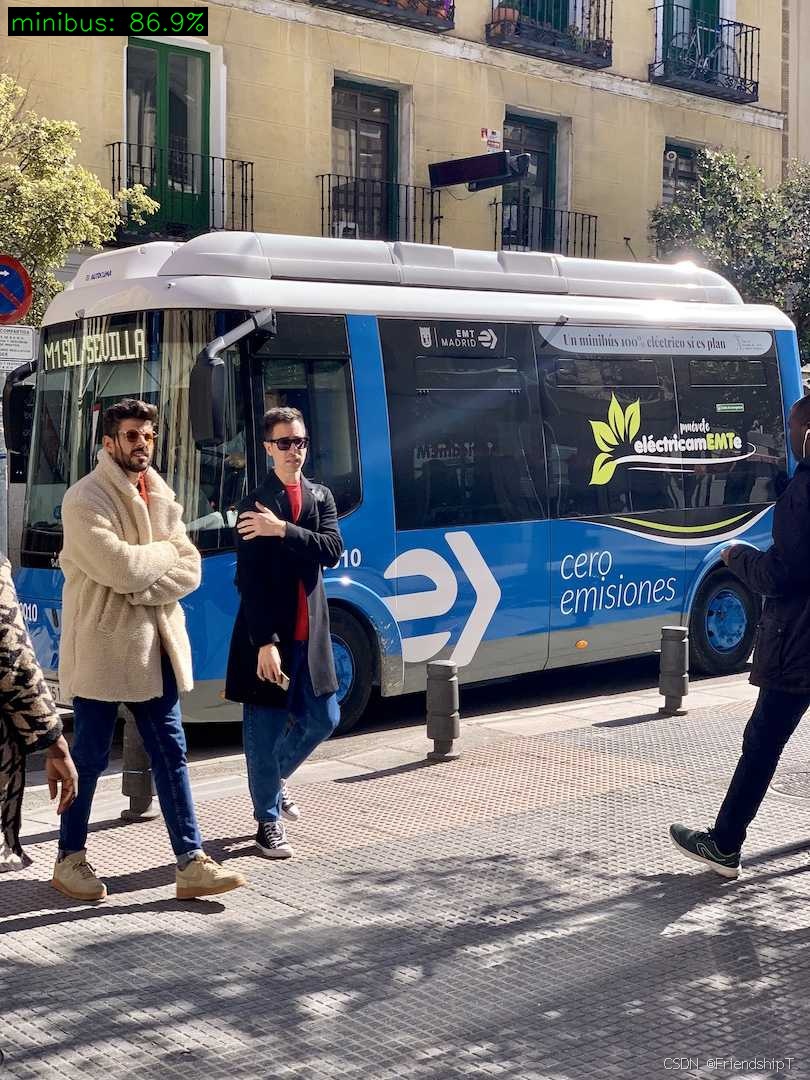
图像分类
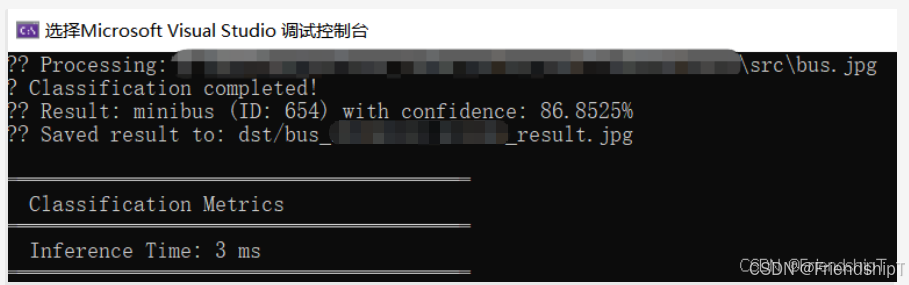
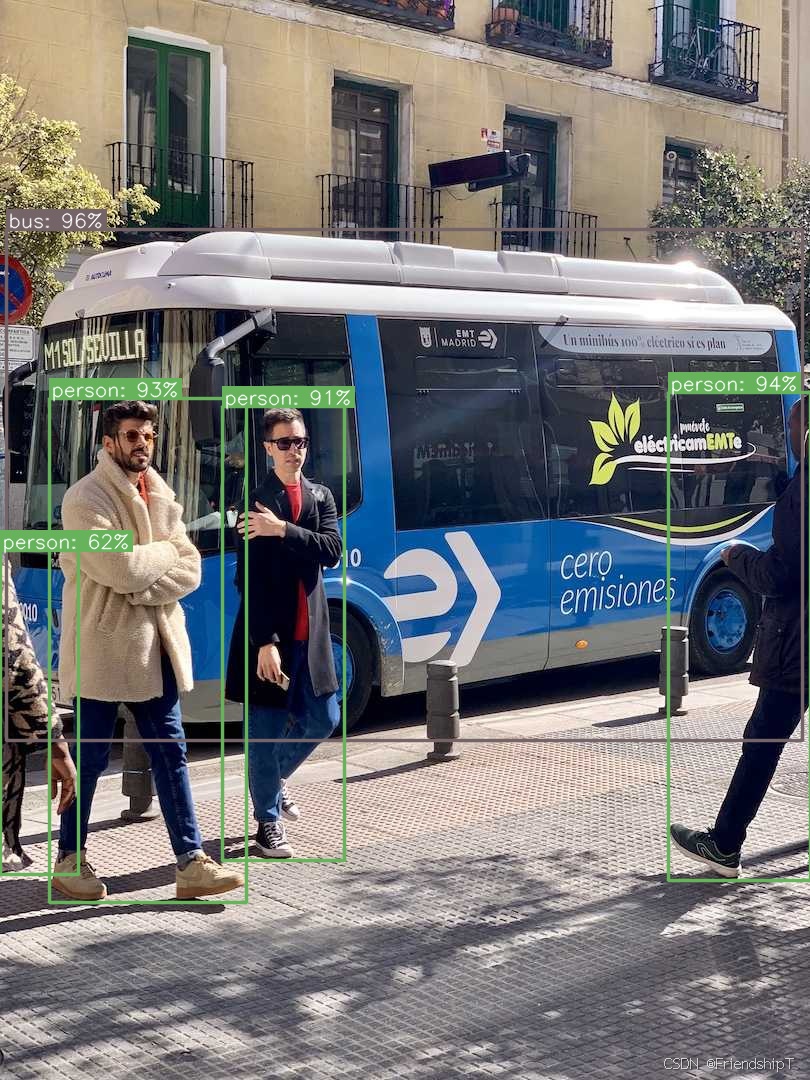
目标检测
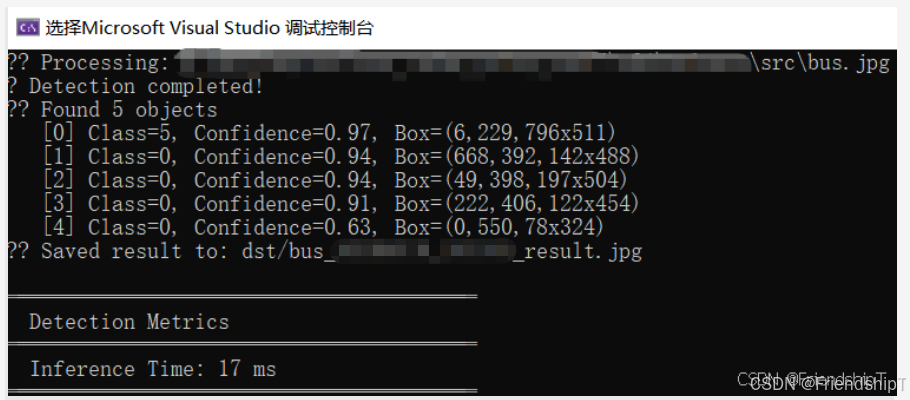
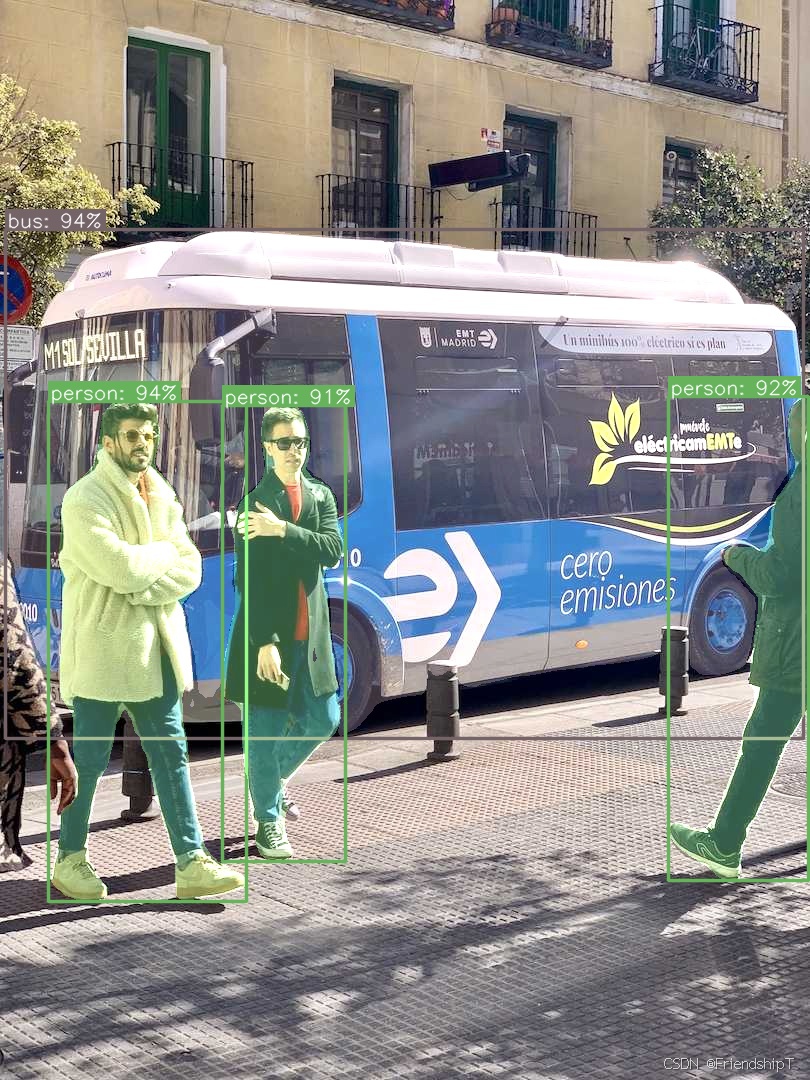
实例分割
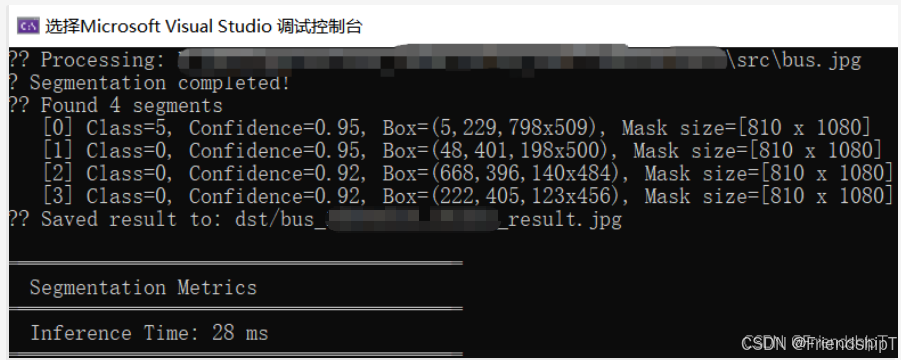
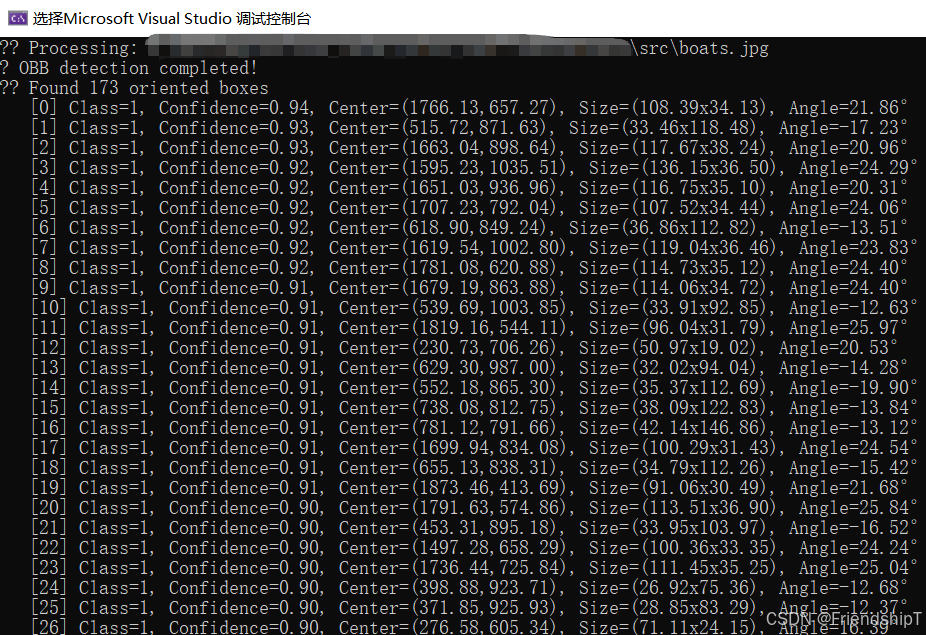
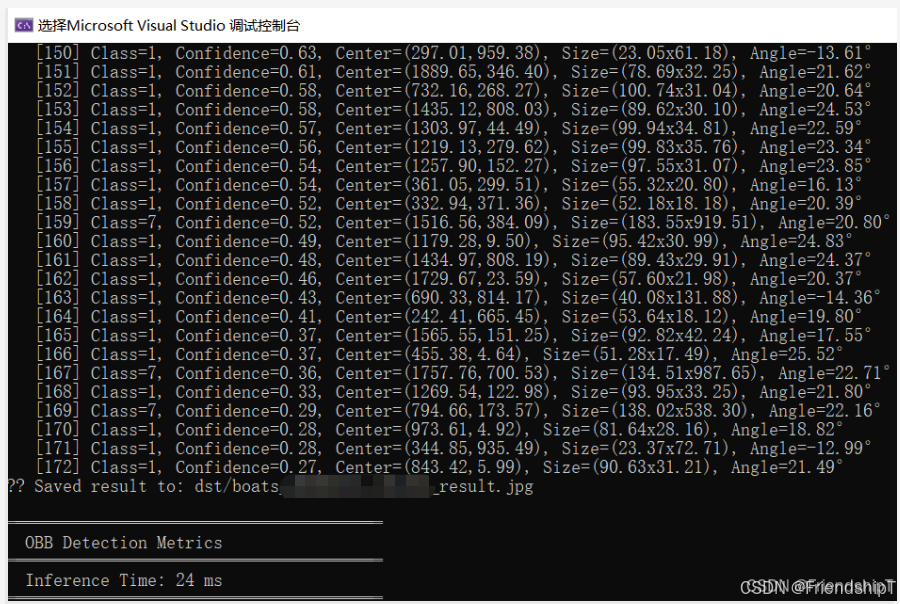
旋转框检测
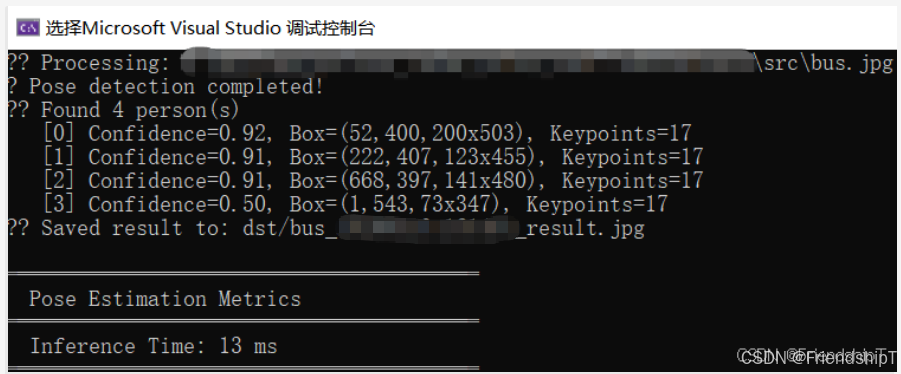
姿势估计
更多功能
- 更多功能可查阅官方项目代码中的相关文档,自行探索。
参考
1 https://github.com/Geekgineer/YOLOs-CPP.git
- 由于本人水平有限,难免出现错漏,敬请批评改正。
- 更多精彩内容,可点击进入Python日常小操作专栏、OpenCV-Python小应用专栏、YOLO系列专栏、自然语言处理专栏、人工智能混合编程实践专栏或我的个人主页查看
- Ultralytics:使用 YOLO11 进行速度估计
- Ultralytics:使用 YOLO11 进行物体追踪
- Ultralytics:使用 YOLO11 进行物体计数
- Ultralytics:使用 YOLO11 进行目标打码
- 人工智能混合编程实践:C++调用Python ONNX进行YOLOv8推理
- 人工智能混合编程实践:C++调用封装好的DLL进行YOLOv8实例分割
- 人工智能混合编程实践:C++调用Python ONNX进行图像超分重建
- 人工智能混合编程实践:C++调用Python AgentOCR进行文本识别
- 通过计算实例简单地理解PatchCore异常检测
- Python将YOLO格式实例分割数据集转换为COCO格式实例分割数据集
- YOLOv8 Ultralytics:使用Ultralytics框架训练RT-DETR实时目标检测模型
- 基于DETR的人脸伪装检测
- YOLOv7训练自己的数据集(口罩检测)
- YOLOv8训练自己的数据集(足球检测)
- YOLOv5:TensorRT加速YOLOv5模型推理
- YOLOv5:IoU、GIoU、DIoU、CIoU、EIoU
- 玩转Jetson Nano(五):TensorRT加速YOLOv5目标检测
- YOLOv5:添加SE、CBAM、CoordAtt、ECA注意力机制
- YOLOv5:yolov5s.yaml配置文件解读、增加小目标检测层
- Python将COCO格式实例分割数据集转换为YOLO格式实例分割数据集
- YOLOv5:使用7.0版本训练自己的实例分割模型(车辆、行人、路标、车道线等实例分割)
- 使用Kaggle GPU资源免费体验Stable Diffusion开源项目
- Stable Diffusion:在服务器上部署使用Stable Diffusion WebUI进行AI绘图(v2.0)
- Stable Diffusion:使用自己的数据集微调训练LoRA模型(v2.0)