新增:
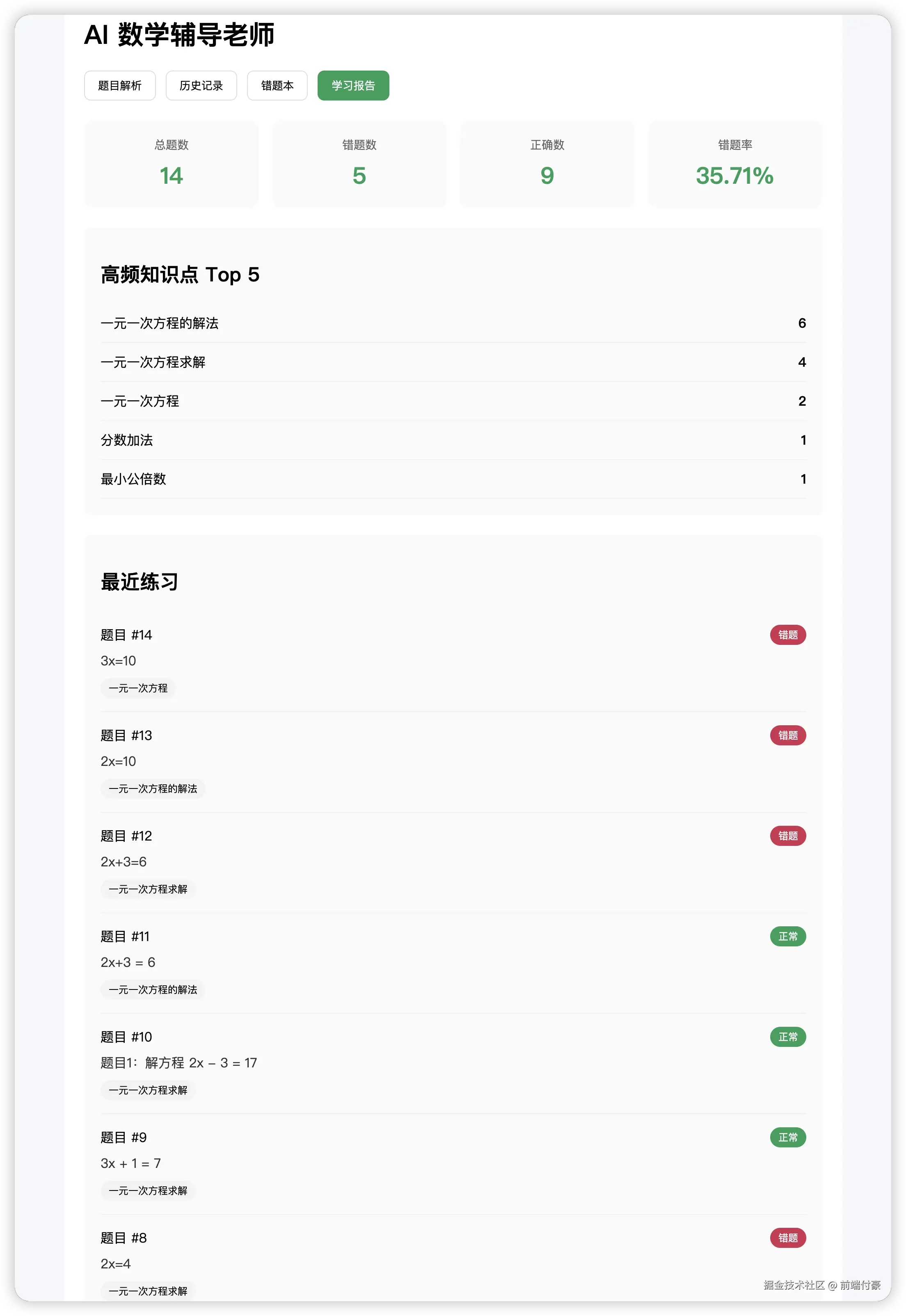
- 总题目数
- 错题数
- 错题率
- 最常出现知识点 Top5
- 最近 7 条做题记录简表
后端 schema 新增
修改 backend/app/schemas.py
新增这些结构:
python
class KnowledgeStatItem(BaseModel):
    name: str
    count: int


class RecentRecordItem(BaseModel):
    id: int
    question: str
    is_wrong: bool
    knowledge_points: List[str]


class LearningReportResponse(BaseModel):
    total_count: int
    wrong_count: int
    correct_count: int
    wrong_rate: float
    top_knowledge_points: List[KnowledgeStatItem]
    recent_records: List[RecentRecordItem]
新增统计服务
新增 backend/app/report_service.py
python
import json
from collections import Counter
from sqlalchemy.orm import Session
from app.models import QuestionHistory


def build_learning_report(db: Session):
    rows = db.query(QuestionHistory).order_by(QuestionHistory.id.desc()).all()

    total_count = len(rows)
    wrong_count = sum(1 for row in rows if row.is_wrong)
    correct_count = total_count - wrong_count
    wrong_rate = round((wrong_count / total_count * 100), 2) if total_count > 0 else 0.0

    kp_counter = Counter()
    for row in rows:
        try:
            knowledge_points = json.loads(row.knowledge_points or "[]")
        except Exception:
            knowledge_points = []

        for kp in knowledge_points:
            if kp:
                kp_counter[kp] += 1

    top_knowledge_points = [
        {"name": name, "count": count}
        for name, count in kp_counter.most_common(5)
    ]

    recent_records = []
    for row in rows[:7]:
        try:
            knowledge_points = json.loads(row.knowledge_points or "[]")
        except Exception:
            knowledge_points = []

        recent_records.append({
            "id": row.id,
            "question": row.question,
            "is_wrong": row.is_wrong,
            "knowledge_points": knowledge_points,
        })

    return {
        "total_count": total_count,
        "wrong_count": wrong_count,
        "correct_count": correct_count,
        "wrong_rate": wrong_rate,
        "top_knowledge_points": top_knowledge_points,
        "recent_records": recent_records,
    }
后端主接口新增
修改 backend/app/main.py
1)补充 import
javascript
from app.report_service import build_learning_report
from app.schemas import LearningReportResponse
2)新增学习报告接口
把这个接口加到 main.py 里:
less
@app.get("/api/report", response_model=LearningReportResponse)
def get_learning_report(db: Session = Depends(get_db)):
    try:
        result = build_learning_report(db)
        return LearningReportResponse(**result)
    except Exception as e:
        raise HTTPException(status_code=500, detail=str(e))
前端 API 新增
修改 frontend/src/api/math.ts
新增类型:
typescript
export interface KnowledgeStatItem {
  name: string
  count: number
}

export interface RecentRecordItem {
  id: number
  question: string
  is_wrong: boolean
  knowledge_points: string[]
}

export interface LearningReportResponse {
  total_count: number
  wrong_count: number
  correct_count: number
  wrong_rate: number
  top_knowledge_points: KnowledgeStatItem[]
  recent_records: RecentRecordItem[]
}
新增请求方法:
csharp
export function getLearningReport() {
  return request.get<LearningReportResponse>('/api/report')
}
前端页面状态新增
修改 frontend/src/App.vue
1)先补充 import
把 api import 改成补上这个:
python
import {
  solveMathQuestion,
  solveMathImage,
  getHistoryList,
  getWrongQuestionList,
  markWrongQuestion,
  generatePracticeByKnowledge,
  regenerateQuestion,
  getLearningReport,
  type SolveResponse,
  type HistoryItem,
  type PracticeQuestionItem,
  type LearningReportResponse,
} from './api/math'
2)新增一个 tab
把 activeTab 类型改成:
csharp
const activeTab = ref<'solve' | 'history' | 'wrong' | 'report'>('solve')3)新增报告状态
在 script setup 里新增:
csharp
const reportLoading = ref(false)
const learningReport = ref<LearningReportResponse | null>(null)
4)新增加载报告方法
在 script setup 里新增:
typescript
const loadReport = async () => {
  reportLoading.value = true
  try {
    const { data } = await getLearningReport()
    learningReport.value = data
  } catch (error: any) {
    console.error('加载学习报告失败:', error)
    alert(error?.response?.data?.detail || '加载学习报告失败')
  } finally {
    reportLoading.value = false
  }
}

const switchToReport = async () => {
  activeTab.value = 'report'
  await loadReport()
}
5)在这些操作后刷新报告
在下面几个方法成功后,末尾都补一行:
handleSubmit
在成功后补:
scss
await loadReport()handleImageChange
在成功后补:
scss
await loadReport()toggleWrong
在成功后补:
scss
await loadReport()前端模板新增"学习报告"按钮
修改 frontend/src/App.vue
在 tabs 那里新增一个按钮:
ini
<button
  :class="['tab-btn', activeTab === 'report' ? 'active' : '']"
  @click="switchToReport"
>
  学习报告
</button>
前端模板新增"学习报告"页面
修改 frontend/src/App.vue
在最下面的 template 分支里,
把原来的最后一个 v-else 改成 v-else-if="activeTab === 'wrong'",
然后再新增一个 v-else 作为 report 页面。
1)先把错题本分支改成:
arduino
<template v-else-if="activeTab === 'wrong'">2)然后在它后面新增报告分支:
ini
<template v-else>
  <div v-if="reportLoading" class="empty">学习报告加载中...</div>

  <div v-else-if="learningReport" class="report-panel">
    <div class="report-summary">
      <div class="summary-card">
        <div class="summary-label">总题数</div>
        <div class="summary-value">{{ learningReport.total_count }}</div>
      </div>

      <div class="summary-card">
        <div class="summary-label">错题数</div>
        <div class="summary-value">{{ learningReport.wrong_count }}</div>
      </div>

      <div class="summary-card">
        <div class="summary-label">正确数</div>
        <div class="summary-value">{{ learningReport.correct_count }}</div>
      </div>

      <div class="summary-card">
        <div class="summary-label">错题率</div>
        <div class="summary-value">{{ learningReport.wrong_rate }}%</div>
      </div>
    </div>

    <div class="result-card">
      <h2>高频知识点 Top 5</h2>
      <div v-if="learningReport.top_knowledge_points.length === 0" class="empty">
        暂无知识点统计
      </div>
      <ul v-else class="stat-list">
        <li
          v-for="(item, index) in learningReport.top_knowledge_points"
          :key="index"
          class="stat-item"
        >
          <span>{{ item.name }}</span>
          <strong>{{ item.count }}</strong>
        </li>
      </ul>
    </div>

    <div class="result-card">
      <h2>最近练习</h2>
      <div v-if="learningReport.recent_records.length === 0" class="empty">
        暂无记录
      </div>

      <div
        v-for="item in learningReport.recent_records"
        :key="item.id"
        class="recent-item"
      >
        <div class="recent-header">
          <span>题目 #{{ item.id }}</span>
          <span :class="['status-tag', item.is_wrong ? 'wrong' : 'correct']">
            {{ item.is_wrong ? '错题' : '正常' }}
          </span>
        </div>

        <div class="recent-question">{{ item.question }}</div>

        <div class="recent-kp">
          <span
            v-for="(kp, idx) in item.knowledge_points"
            :key="idx"
            class="kp-tag"
          >
            {{ kp }}
          </span>
        </div>
      </div>
    </div>
  </div>
</template>
前端样式补充
修改 frontend/src/App.vue
在 style scoped 里新增:
css
.report-panel {
  margin-top: 24px;
}

.report-summary {
  display: grid;
  grid-template-columns: repeat(4, 1fr);
  gap: 16px;
  margin-bottom: 24px;
}

.summary-card {
  padding: 20px;
  background: #fafafa;
  border-radius: 12px;
  text-align: center;
}

.summary-label {
  color: #666;
  font-size: 14px;
  margin-bottom: 8px;
}

.summary-value {
  font-size: 28px;
  font-weight: 700;
  color: #18a058;
}

.stat-list {
  padding: 0;
  margin: 0;
  list-style: none;
}

.stat-item {
  display: flex;
  justify-content: space-between;
  padding: 12px 0;
  border-bottom: 1px solid #eee;
}

.recent-item {
  padding: 16px 0;
  border-bottom: 1px solid #eee;
}

.recent-header {
  display: flex;
  justify-content: space-between;
  align-items: center;
  margin-bottom: 8px;
}

.recent-question {
  margin-bottom: 10px;
  color: #333;
}

.recent-kp {
  display: flex;
  gap: 8px;
  flex-wrap: wrap;
}

.kp-tag {
  display: inline-block;
  padding: 4px 10px;
  background: #f3f3f3;
  border-radius: 999px;
  font-size: 12px;
}

.status-tag {
  display: inline-block;
  padding: 4px 10px;
  border-radius: 999px;
  font-size: 12px;
  color: #fff;
}

.status-tag.wrong {
  background: #d03050;
}

.status-tag.correct {
  background: #18a058;
}
初始化时加载报告
修改 onMounted
scss
onMounted(async () => {
  await loadHistory()
  await loadWrongList()
  await loadReport()
})
重启看效果
重启后端
lua
uvicorn app.main:app --reload --port 8000重启前端
arduino
npm run dev
nice !