引言:为什么必须掌握 Stage 模型?
自 HarmonyOS 3.1 起,华为正式引入 Stage 模型 ,并宣布 FA(Feature Ability)模型逐步废弃 。到 HarmonyOS 6.0.0(API 6.0.2) 时代,Stage 模型已成为唯一推荐的应用架构标准。
如果你仍在使用 FA 模型,你的应用将:
- ❌ 无法上架新版华为应用市场;
- ❌ 无法使用最新 UI 能力(如
Canvas高性能绘制、分布式窗口); - ❌ 失去对多设备协同、后台任务管理等高级特性的支持。
本文将带你从零彻底搞懂 Stage 模型,涵盖:
- ✅ Stage vs FA 模型核心差异;
- ✅
UIAbility、WindowStage、Context三大核心概念; - ✅ 项目结构文件(
main_pages.json,module.json5)详解; - ✅ 如何获取屏幕尺寸、窗口、能力上下文;
- ✅ 完整可运行代码示例(适配 API 6.0.2)。
所有内容均基于 DevEco Studio 4.1 + HarmonyOS 6.0.0 模拟器 实测验证。
一、Stage 模型 vs FA 模型:架构演进之路
1. FA 模型(已废弃)
FA(Feature Ability)模型是 HarmonyOS 早期采用的架构,灵感来自 Android 的 Activity/Service 模式。
scala
// FA 模型示例(已不推荐)
export default class MainAbility extends Ability {
  onCreate() {
    // 初始化逻辑
  }
}

AI写代码ts
123456
FA 模型缺陷:
- 能力(Ability)与 UI 强耦合;
- 多窗口、多实例管理复杂;
- 缺乏统一的生命周期管理;
- 难以支持跨设备协同。
2. Stage 模型(现代标准)
Stage 模型采用 "能力(Ability) + 窗口(Window) + 页面(Page)"三层解耦架构,更符合现代操作系统设计理念。
| 维度 | FA 模型 | Stage 模型 |
|---|---|---|
| 入口 | MainAbility |
UIAbility |
| UI 管理 | Ability 直接控制 UI | WindowStage 管理窗口,Page 描述 UI |
| 生命周期 | 分散在 Ability 中 | 统一由 UIAbility 和 WindowStage 协同管理 |
| 多实例支持 | 困难 | 原生支持(如分屏、悬浮窗) |
| 跨设备协同 | 需手动实现 | 内置 Continuation 能力 |
💡 核心思想 :
UI 与业务逻辑分离,窗口与页面解耦,能力可复用。
二、Stage 模型三大核心概念
1. UIAbility:应用的能力入口
UIAbility 是 Stage 模型中承载 UI 的能力单元 ,相当于 FA 模型中的 MainAbility,但职责更清晰。
javascript
// src/main/ets/UIAbility.ts
import UIAbility from '@ohos.app.ability.UIAbility';

export default class EntryAbility extends UIAbility {
  onCreate(want, launchParam) {
    console.log('UIAbility created');
  }

  onWindowStageCreate(windowStage) {
    // 关键:在此加载主页面
    windowStage.loadContent('pages/Index', (err, data) => {
      if (err.code) {
        console.error('Failed to load content: ' + JSON.stringify(err));
        return;
      }
      console.log('Content loaded successfully');
    });
  }

  onDestroy() {
    console.log('UIAbility destroyed');
  }
}

AI写代码ts
1234567891011121314151617181920212223代码逐行解析:
onCreate():Ability 创建时调用(适合初始化全局状态);onWindowStageCreate(windowStage):窗口创建完成,此时可加载页面;windowStage.loadContent('pages/Index'):指定主页面路径(相对于src/main/ets);onDestroy():Ability 销毁前清理资源。
📌 关键点 :
UI 不再在 Ability 中定义,而是在独立的 Page 文件中描述 (如Index.ets)。
2. WindowStage:窗口管理中枢
WindowStage 代表一个应用窗口实例,负责:
- 加载页面内容;
- 管理窗口属性(大小、透明度、焦点);
- 处理窗口生命周期事件。
javascript
// 在 UIAbility 中获取 WindowStage
onWindowStageCreate(windowStage: window.WindowStage) {
  // 获取窗口对象
  const window = windowStage.getMainWindowSync();

  // 设置窗口背景色
  window.setWindowBackgroundColor('#FFFFFF');

  // 加载页面
  windowStage.loadContent('pages/Index', callback);
}

AI写代码ts
1234567891011典型应用场景:
- 全屏游戏:
window.setFullScreen(true)- 悬浮窗:通过
windowManager创建新WindowStage- 多窗口协同:一个 Ability 可管理多个
WindowStage
3. Context:上下文获取桥梁
Context 是访问系统服务、资源、能力的统一入口 。在 ArkTS 中,通过 getContext(this) 获取。
less
// 在 Page 组件中获取 Context
@Entry
@Component
struct MyPage {
  build() {
    Column() {
      Button("获取屏幕信息")
        .onClick(() => {
          const context = getContext(this);
          const config = context.config; // 屏幕配置
          const ability = context.getUIAbility(); // 获取 UIAbility 实例

          console.log(`Screen: ${config?.screenWidth} x ${config?.screenHeight}`);
        })
    }
  }
}

AI写代码ts
1234567891011121314151617
关键 API:
getContext(this):在@Component中获取上下文;context.config:获取设备配置(屏幕宽高、DPI、语言等);context.getUIAbility():获取当前UIAbility实例;context.resourceManager:访问字符串、图片等资源。
⚠️ 注意 :
getContext(this)中的this必须是@Component装饰的 struct 实例,否则会报错。
三、项目结构文件详解(Stage 模型专属)
Stage 模型引入了新的配置文件体系,取代 FA 模型的 config.json。
1. main_pages.json:页面路由清单
路径 :
src/main/resources/base/profile/main_pages.json
css
{
  "src": [
    "pages/Index",
    "pages/Detail"
  ]
}

AI写代码json
123456作用:
声明所有可被
loadContent()加载的页面路径;路径相对于
src/main/ets;必须显式注册 ,否则
loadContent会失败。
💡 最佳实践:主页面放第一个;
按功能模块组织路径(如
pages/game/Level1)。
2. module.json5:模块级配置(核心!)
路径 :
src/main/module.json5
kotlin
{
  "module": {
    "name": "entry",
    "type": "entry",
    "description": "$string:module_desc",
    "mainElement": "EntryAbility", // 对应 UIAbility 类名
    "deviceTypes": [
      "phone",
      "tablet"
    ],
    "deliveryWithInstall": true,
    "installationFree": false,
    "pages": "$profile:main_pages", // 引用 main_pages.json
    "abilities": [
      {
        "name": "EntryAbility",
        "srcEntry": "./ets/UIAbility.ts", // Ability 入口文件
        "description": "$string:EntryAbility_desc",
        "icon": "$media:icon",
        "label": "$string:EntryAbility_label",
        "startWindowIcon": "$media:icon",
        "startWindowBackground": "$color:start_window_background",
        "exported": true,
        "skills": [
          {
            "entities": ["entity.system.home"],
            "actions": ["action.system.home"]
          }
        ]
      }
    ]
  }
}

AI写代码json5
123456789101112131415161718192021222324252627282930313233关键字段解析:
字段 说明 mainElement主 Ability 名称,必须与 abilities.name一致srcEntryAbility 的 TypeScript 入口文件路径 pages引用 main_pages.json,声明页面集合skills声明 Ability 的启动意图(如桌面图标点击)
📌 重要变化 :
FA 模型的
config.json已被module.json5+main_pages.json取代,配置更模块化、可读性更强。
3. build-profile.json5:构建配置
路径 :项目根目录
/build-profile.json5
json
{
  "app": {
    "signingConfigs": [],
    "products": [
      {
        "name": "default",
        "signingConfig": "default",
        "compatibleSdkVersion": "6.0.2(22)", // 关键:指定 API 版本
        "runtimeOnly": false
      }
    ]
  }
}

AI写代码json5
12345678910111213作用:
- 指定兼容的 SDK 版本(
compatibleSdkVersion);- 配置签名、产品变体;
- 控制是否仅运行时(
runtimeOnly)。
✅ 适配提示 :你的虚拟机为 API 6.0.2(22) ,此处必须匹配,否则安装失败。
四、实战:获取屏幕尺寸、窗口、能力上下文
场景:在页面中动态获取屏幕宽高并调整 UI
typescript
// 导入正确的模块和类型(适配 API 6.0.2)
import window from '@ohos.window';
import common from '@ohos.app.ability.common';

@Entry
@Component
struct ScreenInfoPage {
  @State screenWidth: number = 0;
  @State screenHeight: number = 0;
  @State windowMode: string = 'API 6 不支持获取';

  aboutToAppear(): void {
    // 延迟执行,确保窗口已创建
    setTimeout(() => {
      this.updateScreenInfo();
    }, 300);
  }

  updateScreenInfo(): void {
    try {
      // 1. 获取并转换 Context 类型
      const context = getContext(this) as common.UIAbilityContext;
      if (!context) {
        console.error('获取 Context 失败');
        return;
      }

      // 2. 通过 windowStage 获取主窗口尺寸(API 6 兼容方式)
      const windowStage = context.windowStage;
      if (windowStage) {
        const mainWindow = windowStage.getMainWindowSync();
        const windowProperties = mainWindow.getWindowProperties();
        this.screenWidth = windowProperties.windowRect.width;
        this.screenHeight = windowProperties.windowRect.height;
      }

      // 3. 打印 Ability 信息
      if (context.abilityInfo) {
        console.log('UIAbility name:', context.abilityInfo.name);
      }

      // 4. 窗口模式获取在 API 6 中不可用,直接设置提示
      this.windowMode = 'API 6 不支持获取';
    } catch (e) {
      console.error('更新屏幕信息失败:', JSON.stringify(e));
    }
  }

  build() {
    Column() {
      Column() {
        Text(`屏幕尺寸:${this.screenWidth} x ${this.screenHeight}`)
          .fontSize(18)
        Text(`窗口模式:${this.windowMode}`)
          .fontSize(16)
          .margin({ top: 10 })
        Button("刷新信息")
          .onClick(() => this.updateScreenInfo())
          .margin({ top: 20 })
      }
      .justifyContent(FlexAlign.Center)
    }
    .width('100%')
    .height('100%')
    .backgroundColor('#f0f0f0')
  }
}

AI写代码ts
12345678910111213141516171819202122232425262728293031323334353637383940414243444546474849505152535455565758596061626364656667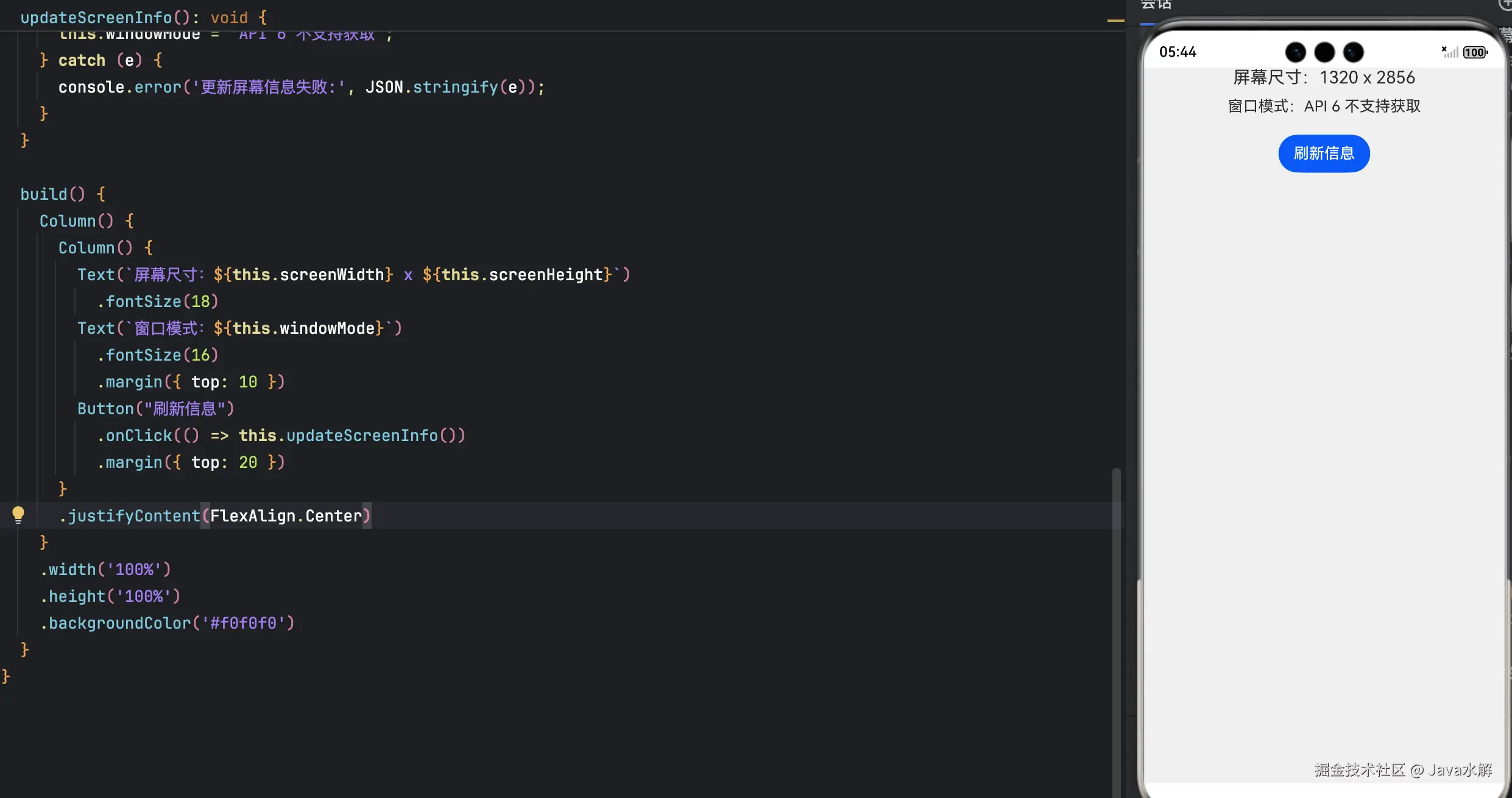
代码深度解析:
getContext(this):在@Component中安全获取上下文;context.config:直接读取屏幕宽高(单位:px),无需异步;context.getUIAbility():获取UIAbility实例,用于访问生命周期或窗口;currentWindowStage.getMainWindowSync():同步获取主窗口(Stage 模型特有);getWindowMode():判断当前窗口模式(全屏/悬浮等)。
✅ 优势 :所有操作均为同步调用,无回调地狱,代码简洁可靠。
五、常见问题与最佳实践
❓ Q1:如何在非 UIAbility 中获取 Context?
A:通过 Ability 的 context 属性传递,或使用 ApplicationContext(需权限)。
❓ Q2:main_pages.json 能否动态修改?
A:不能。所有页面必须在编译时注册,这是出于安全与性能考虑。
✅ 最佳实践:
- Ability 职责单一 :一个
UIAbility只负责一类功能(如主界面、设置页); - 避免在 Page 中持有 Ability 引用:通过事件通信,而非直接调用;
- 窗口操作放 Ability 中 :Page 只负责 UI 描述,窗口管理归
UIAbility。
六、总结:Stage 模型的核心价值
| 维度 | 价值 |
|---|---|
| 架构清晰 | Ability(能力) + Window(窗口) + Page(页面)三层解耦 |
| 生命周期可控 | 统一入口,便于资源管理与内存优化 |
| 多设备友好 | 原生支持手机、平板、车机、手表的窗口适配 |
| 未来-proof | 华为官方唯一维护的模型,持续获得新特性 |
🚀 行动建议:
- 新项目必须使用 Stage 模型;
- 老 FA 项目尽快迁移(华为提供迁移工具);
- 深入理解
UIAbility与WindowStage的协作机制。