目录
[三、Vscode debug launch.json 配置](#三、Vscode debug launch.json 配置)
1) php文件 debug php文件 debug)
2) php服务debug php服务debug)
一、安装相关插件
-
PHP Intelephense (intelephense.com)
-
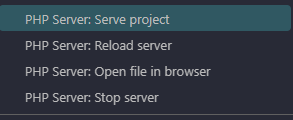
PHP Server
-
PHP Debug (xdebug.org)
vscode setting.json 文件配置
"phpserver.autoOpenOnReload": true,
  "phpserver.browser": "",
  "phpserver.ip": "localhost",
  "phpserver.phpConfigPath": "D:\\php\\8.3.30\\php.ini",
  "phpserver.port": 3000,
  "phpserver.relativePath": ".",
  "php.validate.executablePath": "D:\\php\\8.3.30\\php.exe",
  "phpserver.phpPath": "D:\\php\\8.3.30\\php.exe",
  "php.debug.executablePath": "D:\\php\\8.3.30\\php.exe",
二、配置php.ini
在php.ini 添加如下配置 (D:\php\8.3.30 php 安装目录)
  [XDebug]
    ; 确保路径正确,指向你下载的xdebug dll文件
    zend_extension="D:\php\8.3.30\ext\php_xdebug-3.5.1.dll"
    ; 调试模式
    xdebug.mode=debug
    xdebug.collect_params=1
    xdebug.collect_return=1
    xdebug.output_dir="D:/php/tmp"
    xdebug.log="D:/php/log/xdebug.log"
    xdebug.start_with_request=yes ;trigger
    xdebug.client_host=localhost
    xdebug.client_port=9003
三、Vscode debug launch.json 配置
     {
          "version": "0.2.0",
          "configurations": [
            {
              "type": "php",
              "request": "launch",
              "name": "Run using PHP executable",
              "port": 9003,  // 这里端口需要与php.ini中配置一致
              "program": "${file}",
              "runtimeExecutable": "D:/php/8.3.30/php.exe"
            }
          ]
        }
1) php文件 debug
终端中执行php文件,然后按F5打开debug调试
php test.php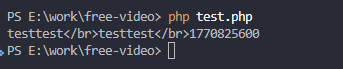
test.php 文件

2) php服务debug
launch.json 配置中添加 服务器地址监听
{
  "version": "0.2.0",
  "configurations": [
    {
      "type": "php",
      "request": "launch",
      "name": "Run using PHP executable",
      "port": 9003,
      "program": "${file}",
      "runtimeExecutable": "D:/php/8.3.30/php.exe",
      "url":"http://localhost:3000/${fileBasenameNoExtension}.php" //需要调试的服务器地址
    }
  ]
}
启动php 服务,然后按F5 唤出调试工具
##使用命令
php -S localhost:3000
##或是使用PHP Server
PHP Server: 右键 php文件