系统性学习Linux-第五讲-基础IO
- [1. 理解 "文件"](#1. 理解 "文件")
-
- [1.1 狭义理解](#1.1 狭义理解)
- [1-2 广义理解](#1-2 广义理解)
- [1-3 文件操作的归类认知](#1-3 文件操作的归类认知)
- [1.4 系统角度](#1.4 系统角度)
- [2. 回顾 C 文件接口](#2. 回顾 C 文件接口)
-
- [2.1 hello.c 打开文件](#2.1 hello.c 打开文件)
- [2.2 hello.c 写文件](#2.2 hello.c 写文件)
- [2.3 hello.c 读文件](#2.3 hello.c 读文件)
- [2.4 多种方法输出信息到显示器,你有哪些方法](#2.4 多种方法输出信息到显示器,你有哪些方法)
- [2.5 stdin & stdout & stderr](#2.5 stdin & stdout & stderr)
- [2.6 打开文件的方式](#2.6 打开文件的方式)
- [3. 系统文件 I/O](#3. 系统文件 I/O)
-
- [3.1 一种传递标志位的方法](#3.1 一种传递标志位的方法)
- [3.2 hello.c 写文件:](#3.2 hello.c 写文件:)
- [3.3 hello.c读文件](#3.3 hello.c读文件)
- [3.4 接口介绍](#3.4 接口介绍)
- [3.5 open 函数返回值](#3.5 open 函数返回值)
- [3.6 文件描述符 fd](#3.6 文件描述符 fd)
-
- [3.6.1 0 & 1 & 2](#3.6.1 0 & 1 & 2)
- [3.6.2 文件描述符的分配规则](#3.6.2 文件描述符的分配规则)
- [3.6.3 重定向](#3.6.3 重定向)
- [3.6.4 使用 dup2 系统调用(可以暂时跳过)](#3.6.4 使用 dup2 系统调用(可以暂时跳过))
- [3.6.5 在 minishell 中添加重定向功能](#3.6.5 在 minishell 中添加重定向功能)
- [4. 理解 "一切皆文件"](#4. 理解 “一切皆文件”)
- [5. 缓冲区](#5. 缓冲区)
-
- [5.1 什么是缓冲区](#5.1 什么是缓冲区)
- [5.2 为什么要引入缓冲区机制](#5.2 为什么要引入缓冲区机制)
- [5.3 缓冲类型](#5.3 缓冲类型)
- [5.4 FILE](#5.4 FILE)
本节重点
-
复习 C 文件 IO 相关操作
-
认识文件相关系统调用接口
-
认识文件描述符,理解重定向
-
对比 fd 和 FILE ,理解系统调用和库函数的关系
-
理解文件和内核文件缓冲区
-
自定义 shell 新增重定向功能
-
理解 Glibc 的 IO 库
1. 理解 "文件"
1.1 狭义理解
-
文件在磁盘里
-
磁盘是永久性存储介质,因此文件在磁盘上的存储是永久性的
-
磁盘是外设(即是输出设备也是输入设备)
-
磁盘上的文件本质是对文件的所有操作,都是对外设的输入和输出简称 IO
1-2 广义理解
- Linux 下一切皆文件(键盘、显示器、网卡、磁盘...... 这些都是抽象化的过程)(后面会讲如何去理解)
1-3 文件操作的归类认知
-
对于 0KB 的空文件是占用磁盘空间的
-
文件是文件属性(元数据)和文件内容的集合(文件 = 属性(元数据)+ 内容)
-
所有的文件操作本质是文件内容操作和文件属性操作
1.4 系统角度
-
对文件的操作本质是进程对文件的操作
-
磁盘的管理者是操作系统
-
文件的读写本质不是通过 C 语言 / C++ 的库函数来操作的(这些库函数只是为用户提供方便),而是通过文件相关的系统调用接口来实现的
2. 回顾 C 文件接口
2.1 hello.c 打开文件
cpp
#include <stdio.h>
int main()
{
	FILE *fp = fopen("myfile", "w");
	if(!fp){
		printf("fopen error!\n");
	}
	while(1);
	fclose(fp);
	return 0;
}
打开的 myfile 文件在哪个路径下?
- 在程序的当前路径下,那系统怎么知道程序的当前路径在哪里呢?
可以使用 ls /proc/[进程id] -l 命令查看当前正在运行进程的信息:
bash
[chengkl4@VM-8-12-centos io]$ ps ajx | grep myProc
506729 533463 533463 506729 pts/249 533463 R+ 1002 7:45 ./myProc
536281 536542 536541 536281 pts/250 536541 R+ 1002 0:00 grep --
color=auto myProc
[chengkl4@VM-8-12-centos io]$ ls /proc/533463 -l
total 0
......
-r--r--r-- 1 hyb hyb 0 Aug 26 17:01 cpuset
lrwxrwxrwx 1 hyb hyb 0 Aug 26 16:53 cwd -> /home/hyb/io
-r-------- 1 hyb hyb 0 Aug 26 17:01 environ
lrwxrwxrwx 1 hyb hyb 0 Aug 26 16:53 exe -> /home/hyb/io/myProc
dr-x------ 2 hyb hyb 0 Aug 26 16:54 fd
.....
其中:
-
cwd:指向当前进程运行目录的⼀个符号链接。
-
exe:指向启动当前进程的可执行文件(完整路径)的符号链接。
打开文件,本质是进程打开,所以,进程知道自己在哪里,即便文件不带路径,进程也知道。由此 OS 就能知道要创建的文件放在哪里。
2.2 hello.c 写文件
cpp
#include <stdio.h>
#include <string.h>
int main()
{
    FILE *fp = fopen("myfile", "w");
    if (!fp)
    {
        printf("fopen error!\n");
    }
    const char *msg = "hello bit!\n";
    int count = 5;
    while (count--)
    {
        fwrite(msg, strlen(msg), 1, fp);
    }
    fclose(fp);
    return 0;
}
2.3 hello.c 读文件
cpp
#include <stdio.h>
#include <string.h>
int main()
{
    FILE *fp = fopen("myfile", "r");
    if (!fp)
    {
        printf("fopen error!\n");
        return 1;
    }
    char buf[1024];
    const char *msg = "hello bit!\n";
    while (1)
    {
        // 注意返回值和参数,此处有坑,仔细查看man⼿册关于该函数的说明
        ssize_t s = fread(buf, 1, strlen(msg), fp);
        if (s > 0)
        {
            buf[s] = 0;
            printf("%s", buf);
        }
        if (feof(fp))
        {
            break;
        }
    }
    fclose(fp);
    return 0;
}
稍作修改,实现简单 cat 命令:
cpp
#include <stdio.h>
#include <string.h>
int main(int argc, char *argv[])
{
    if (argc != 2)
    {
        printf("argv error!\n");
        return 1;
    }
    FILE *fp = fopen(argv[1], "r");
    if (!fp)
    {
        printf("fopen error!\n");
        return 2;
    }
    char buf[1024];
    while (1)
    {
        int s = fread(buf, 1, sizeof(buf), fp);
        if (s > 0)
        {
            buf[s] = 0;
            printf("%s", buf);
        }
        if (feof(fp))
        {
            break;
        }
    }
    fclose(fp);
    return 0;
}
2.4 多种方法输出信息到显示器,你有哪些方法
cpp
#include <stdio.h>
#include <string.h>
int main()
{
    const char *msg = "hello fwrite\n";

    fwrite(msg, strlen(msg), 1, stdout);
    printf("hello printf\n");
    fprintf(stdout, "hello fprintf\n");

    return 0;
}
2.5 stdin & stdout & stderr
- C 默认会打开三个输入输出流,分别是 stdin、stdout、 stderr
- 仔细观察发现,这三个流的类型都是 FILE* , fopen 返回值类型,文件指针
cpp
#include <stdio.h>
extern FILE *stdin;
extern FILE *stdout;
extern FILE *stderr;
2.6 打开文件的方式
bash
r Open text file for reading.
	The stream is positioned at the beginning of the file.

r+ Open for reading and writing.
	The stream is positioned at the beginning of the file.

w Truncate(缩短) file to zero length or create text file for writing.
	The stream is positioned at the beginning of the file.

w+ Open for reading and writing.
	The file is created if it does not exist, otherwise it is truncated.
	The stream is positioned at the beginning of the file.

a Open for appending (writing at end of file).
	The file is created if it does not exist.
	The stream is positioned at the end of the file.

a+ Open for reading and appending (writing at end of file).
	The file is created if it does not exist. The initial file position
	for reading is at the beginning of the file,
	but output is always appended to the end of the file.
如上,是我们之前学的文件相关操作。还有 fseek ftell rewind 的函数,在 C 部分已经有所涉猎,请同学们自行复习。
3. 系统文件 I/O
打开文件的方式不仅仅是 fopen,ifstream 等流式,语言层的方案,其实系统才是打开文件最底层的方案。
不过,在学习系统文件 IO 之前,先要了解下如何给函数传递标志位,该方法在系统文件IO接口中会使用到:
3.1 一种传递标志位的方法
cpp
#include <stdio.h>
#define ONE 0001   // 0000 0001
#define TWO 0002   // 0000 0010
#define THREE 0004 // 0000 0100
void func(int flags)
{
    if (flags & ONE)
        printf("flags has ONE! ");
    if (flags & TWO)
        printf("flags has TWO! ");
    if (flags & THREE)
        printf("flags has THREE! ");
    printf("\n");
}

int main()
{
    func(ONE);
    func(THREE);
    func(ONE | TWO);
    func(ONE | THREE | TWO);
    return 0;
}
操作文件,除了上小节的 C 接口(当然,C++也有接口,其他语言也有),我们还可以采用系统接口来进行文件访问,
先来直接以系统代码的形式,实现和上面一模一样的代码。
3.2 hello.c 写文件:
cpp
#include <stdio.h>
#include <sys/types.h>
#include <sys/stat.h>
#include <fcntl.h>
#include <unistd.h>
#include <string.h>
int main()
{
    umask(0);
    int fd = open("myfile", O_WRONLY | O_CREAT, 0644);
    if (fd < 0)
    {
        perror("open");
        return 1;
    }
    int count = 5;
    const char *msg = "hello bit!\n";
    int len = strlen(msg);
    while (count--)
    {
        write(fd, msg, len); // fd: 后⾯讲, msg:缓冲区⾸地址, len: 本次读取,期望
                             //写⼊多少个字节的数据。 返回值:实际写了多少字节数据
    }
    close(fd);
    return 0;
}
3.3 hello.c读文件
cpp
#include <stdio.h>
#include <sys/types.h>
#include <sys/stat.h>
#include <fcntl.h>
#include <unistd.h>
#include <string.h>
int main()
{
    int fd = open("myfile", O_RDONLY);
    if (fd < 0)
    {
        perror("open");
        return 1;
    }
    const char *msg = "hello bit!\n";
    char buf[1024];
    while (1)
    {
        ssize_t s = read(fd, buf, strlen(msg)); // 类⽐write
        if (s > 0)
        {
            printf("%s", buf);
        }
        else
        {
            break;
        }
    }
    close(fd);
    return 0;
}
3.4 接口介绍
open
cpp
#include <sys/types.h>
#include <sys/stat.h>
#include <fcntl.h>
int open(const char *pathname, int flags);
int open(const char *pathname, int flags, mode_t mode);
pathname: 要打开或创建的⽬标⽂件
flags: 打开⽂件时,可以传⼊多个参数选项,⽤下⾯的⼀个或者多个常量进⾏"或"运算,构成 flags。
	参数:
		O_RDONLY: 只读打开
		O_WRONLY: 只写打开
		O_RDWR : 读,写打开
	这三个常量,必须指定⼀个且只能指定⼀个
		O_CREAT : 若⽂件不存在,则创建它。需要使⽤mode选项,来指明新⽂件的访问权限
		O_APPEND: 追加写返回值:
		成功:新打开的⽂件描述符
		失败:-1
mode_t 理解:直接 man 手册,比什么都清楚。
open 函数具体使用哪个,和具体应用场景相关,如目标文件不存在,需要 open 创建,则第三个参数表示创建文件的默认权限,
否则,使用两个参数的open。
write read close lseek ,类比 C 文件相关接口。
3.5 open 函数返回值
在认识返回值之前,先来认识一下两个概念: 系统调用 和 库函数
-
上面的 fopen fclose fread fwrite 都是 C 标准库当中的函数,我们称之为库函数(libc)。
-
而 open close read write lseek 都属于系统提供的接口,称之为系统调用接口
-
回忆一下我们讲操作系统概念时,画的一张图
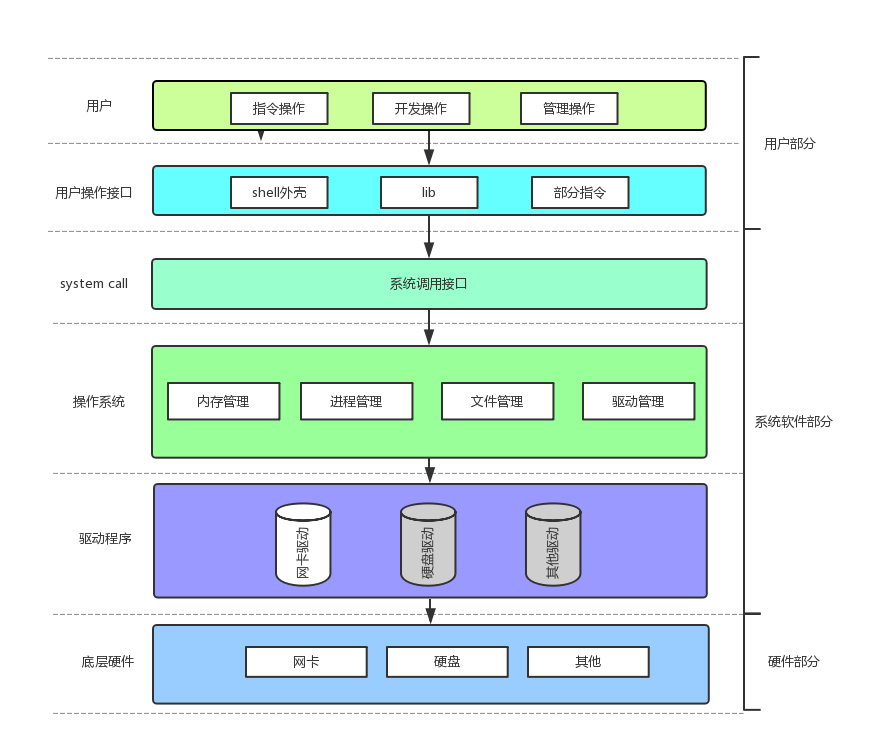
系统调用接口和库函数的关系,一目了然。
所以,可以认为, f# 系列的函数,都是对系统调用的封装,方便二次开发。
3.6 文件描述符 fd
- 通过对 open 函数的学习,我们知道了文件描述符就是一个小整数
3.6.1 0 & 1 & 2
Linux 进程默认情况下会有 3 个缺省打开的文件描述符,分别是标准输入 0 , 标准输出 1 , 标准错误 2 。
0,1,2 对应的物理设备一般是:键盘,显示器,显示器
所以输入输出还可以采用如下方式:
cpp
#include <stdio.h>
#include <sys/types.h>
#include <sys/stat.h>
#include <fcntl.h>
#include <string.h>
int main()
{
    char buf[1024];
    ssize_t s = read(0, buf, sizeof(buf));
    if (s > 0)
    {
        buf[s] = 0;
        write(1, buf, strlen(buf));
        write(2, buf, strlen(buf));
    }
    return 0;
}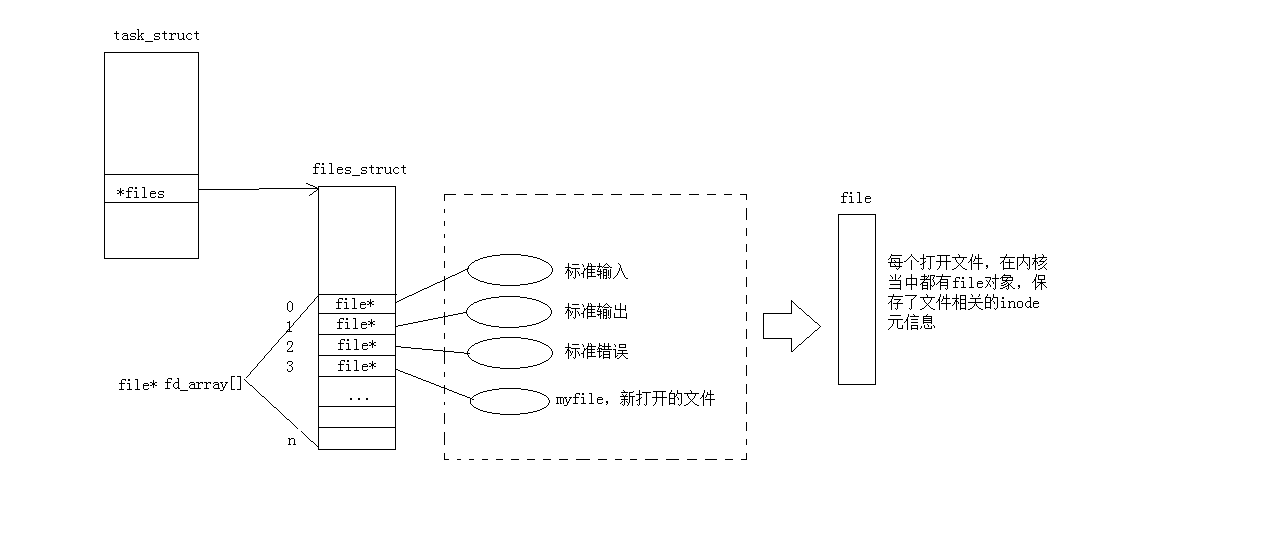
而现在知道,文件描述符就是从 0 开始的小整数。当我们打开文件时,操作系统在内存中要创建相应的数据结构,
来描述目标文件。于是就有了 file 结构体。表示一个已经打开的文件对象。而进程执行 open 系统调用,
所以必须让进程和文件关联起来。每个进程都有⼀个指针 *files ,指向一张表 files_struct ,该表最重要的部分,
就是包含一个指针数组,每个元素都是一个指向打开文件的指针!所以,本质上,文件描述符就是该数组的下标。
所以,只要拿着文件描述符,就可以找到对应的文件。
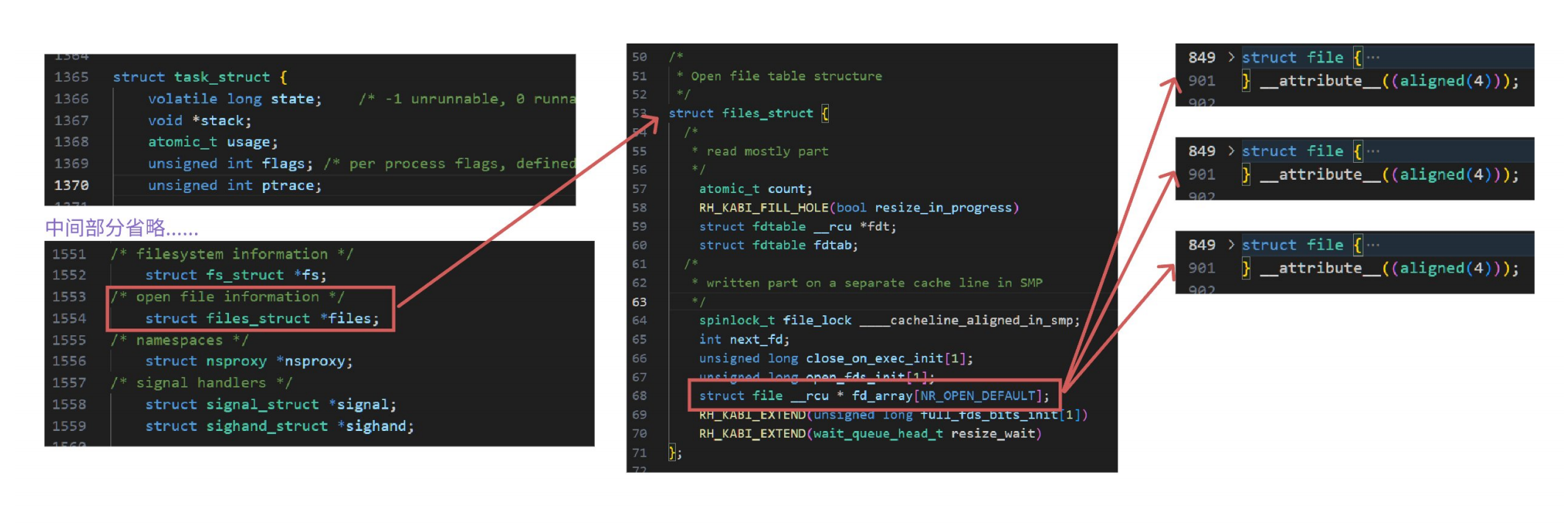
对于以上原理结论我们可通过内核源码验证:
首先要找到 task_struct 结构体在内核中为位置,地址为:
/usr/src/kernels/3.10.0-1160.71.1.el7.x86_64/include/linux/sched.h
(3.10.0-1160.71.1.el7.x86_64是内核版本,可使用 uname -a 自行查看服务器配置, 因为这个文件夹只有一个,所以也不用刻意去分辨,内核版本其实也随意)
-
要查看内容可直接用 vscode 在 windows 下打开内核源代码
-
相关结构体所在位置
-
struct task_struct : /usr/src/kernels/3.10.0-1160.71.1.el7.x86_64/include/linux/sched.h
-
struct files_struct : /usr/src/kernels/3.10.0-1160.71.1.el7.x86_64/include/linux/fdtable.h
-
struct file : /usr/src/kernels/3.10.0-1160.71.1.el7.x86_64/include/linux/fs.h
3.6.2 文件描述符的分配规则
直接看代码:
cpp
#include <stdio.h>
#include <sys/types.h>
#include <sys/stat.h>
#include <fcntl.h>
int main()
{
    int fd = open("myfile", O_RDONLY);
    if (fd < 0)
    {
        perror("open");
        return 1;
    }
    printf("fd: %d\n", fd);
    close(fd);
    return 0;
}
输出发现是 fd : 3
关闭 0 或者 2 ,再看
cpp
#include <stdio.h>
#include <sys/types.h>
#include <sys/stat.h>
#include <fcntl.h>
int main()
{
    close(0);
    // close(2);
    int fd = open("myfile", O_RDONLY);
    if (fd < 0)
    {
        perror("open");
        return 1;
    }
    printf("fd: %d\n", fd);
    close(fd);
    return 0;
}
发现是结果是 : fd : 0 或者 fd : 2 ,可见,文件描述符的分配规则:
在 files_struct 数组当中,找到当前没有被使用的最小的⼀个下标,作为新的文件描述符。
3.6.3 重定向
那如果关闭 1 呢?看代码:
cpp
#include <stdio.h>
#include <sys/types.h>
#include <sys/stat.h>
#include <fcntl.h>
#include <stdlib.h>
int main()
{
    close(1);
    int fd = open("myfile", O_WRONLY | O_CREAT, 00644);
    if (fd < 0)
    {
        perror("open");
        return 1;
    }
    printf("fd: %d\n", fd);
    fflush(stdout);
    close(fd);
    exit(0);
}
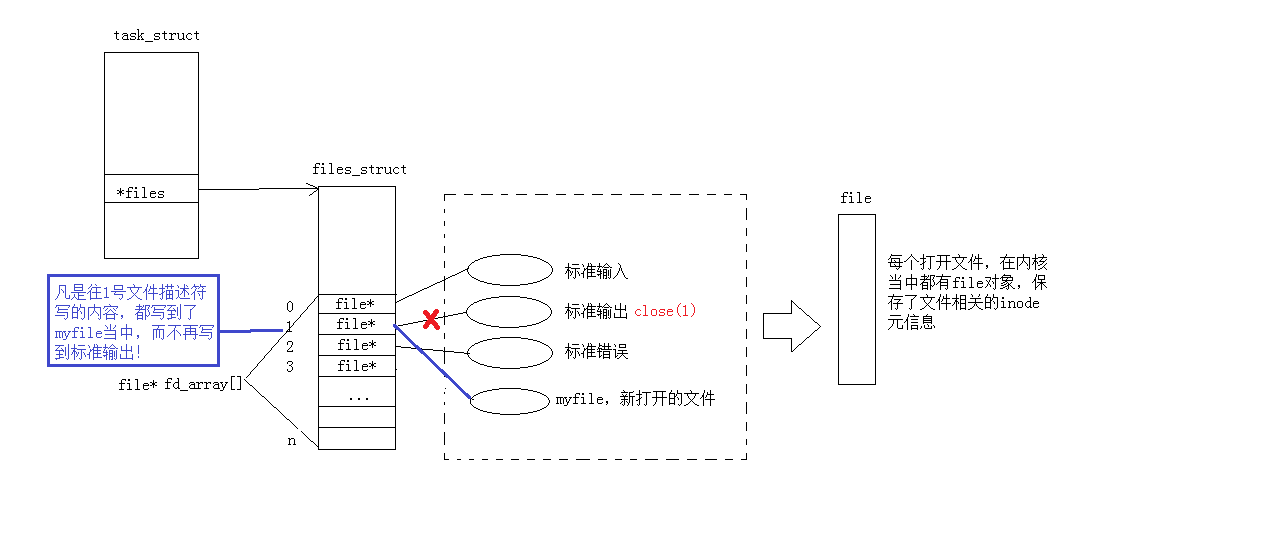
此时,我们发现,本来应该输出到显示器上的内容,输出到了文件 myfile 当中,其中,fd=1。这种现象叫做输出重定向。
常见的重定向有: > , >> , <
那重定向的本质是什么呢?
3.6.4 使用 dup2 系统调用(可以暂时跳过)
函数原型如下:
cpp
#include <unistd.h>
int dup2(int oldfd, int newfd);
示例代码:
cpp
#include <stdio.h>
#include <unistd.h>
#include <fcntl.h>
int main()
{
    int fd = open("./log", O_CREAT | O_RDWR);
    if (fd < 0)
    {
        perror("open");
        return 1;
    }

    close(1);
    dup2(fd, 1);
    for (;;)
    {
        char buf[1024] = {0};
        ssize_t read_size = read(0, buf, sizeof(buf) - 1);
        if (read_size < 0)
        {
            perror("read");
            break;
        }
        printf("%s", buf);
        fflush(stdout);
    }
    return 0;
}
printf 是 C 库当中的 IO 函数,⼀般往 stdout 中输出,但是 stdout 底层访问文件的时候,找的还是 fd:1 ,
但此时,fd:1 下标所表示内容,已经变成了 myfifile 的地址,不再是显示器文件的地址,
所以,输出的任何消息都会往文件中写入,进而完成输出重定向。那追加和输入重定向如何完成呢?
3.6.5 在 minishell 中添加重定向功能
cpp
#include <iostream>
#include <cstdio>
#include <cstdlib>
#include <cstring>
#include <string>
#include <unistd.h>
#include <sys/types.h>
#include <sys/wait.h>
#include <sys/stat.h>
#include <fcntl.h>
#include <ctype.h>
using namespace std;
const int basesize = 1024;
const int argvnum = 64;
const int envnum = 64;
// 全局的命令⾏参数表
char *gargv[argvnum];
int gargc = 0;
// 全局的变量
int lastcode = 0;
// 我的系统的环境变量
char *genv[envnum];
// 全局的当前shell⼯作路径
char pwd[basesize];
char pwdenv[basesize];
// 全局变量与重定向有关
#define NoneRedir 0
#define InputRedir 1
#define OutputRedir 2
#define AppRedir 3
int redir = NoneRedir;
char *filename = nullptr;
// " "file.txt
#define TrimSpace(pos)        \
    do                        \
    {                         \
        while (isspace(*pos)) \
        {                     \
            pos++;            \
        }                     \
    } while (0)

string GetUserName()
{
    string name = getenv("USER");
    return name.empty() ? "None" : name;
}

string GetHostName()
{
    string hostname = getenv("HOSTNAME");
    return hostname.empty() ? "None" : hostname;
}

string GetPwd()
{
    if (nullptr == getcwd(pwd, sizeof(pwd)))
        return "None";
    snprintf(pwdenv, sizeof(pwdenv), "PWD=%s", pwd);
    putenv(pwdenv); // PWD=XXX
    return pwd;
    // string pwd = getenv("PWD");
    // return pwd.empty() ? "None" : pwd;
}

string LastDir()
{
    string curr = GetPwd();
    if (curr == "/" || curr == "None")
        return curr;
    // /home/whb/XXX
    size_t pos = curr.rfind("/");
    if (pos == std::string::npos)
        return curr;
    return curr.substr(pos + 1);
}

string MakeCommandLine()
{
    // [whb@bite-alicloud myshell]$
    char command_line[basesize];
    snprintf(command_line, basesize, "[%s@%s %s]# ",
             GetUserName().c_str(), GetHostName().c_str(), LastDir().c_str());
    return command_line;
}

void PrintCommandLine() // 1. 命令⾏提⽰符
{
    printf("%s", MakeCommandLine().c_str());
    fflush(stdout);
}

bool GetCommandLine(char command_buffer[], int size) // 2. 获取⽤⼾命令
{
    // 我们认为:我们要将⽤⼾输⼊的命令⾏,当做⼀个完整的字符串
    // "ls -a -l -n"
    char *result = fgets(command_buffer, size, stdin);
    if (!result)
    {
        return false;
    }
    command_buffer[strlen(command_buffer) - 1] = 0;
    if (strlen(command_buffer) == 0)
        return false;
    return true;
}

void ResetCommandline()
{
    memset(gargv, 0, sizeof(gargv));
    gargc = 0;
    // 重定向
    redir = NoneRedir;
    filename = nullptr;
}

void ParseRedir(char command_buffer[], int len)
{
    int end = len - 1;
    while (end >= 0)
    {
        if (command_buffer[end] == '<')
        {
            redir = InputRedir;
            command_buffer[end] = 0;
            filename = &command_buffer[end] + 1;
            TrimSpace(filename);
            break;
        }
        else if (command_buffer[end] == '>')
        {
            if (command_buffer[end - 1] == '>')
            {
                redir = AppRedir;
                command_buffer[end] = 0;
                command_buffer[end - 1] = 0;
                filename = &command_buffer[end] + 1;
                TrimSpace(filename);
                break;
            }
            else
            {
                redir = OutputRedir;
                command_buffer[end] = 0;
                filename = &command_buffer[end] + 1;
                TrimSpace(filename);
                break;
            }
        }
        else
        {
            end--;
        }
    }
}

void ParseCommand(char command_buffer[])
{
    // "ls -a -l -n"
    const char *sep = " ";
    gargv[gargc++] = strtok(command_buffer, sep);
    // =是刻意写的
    while ((bool)(gargv[gargc++] = strtok(nullptr, sep)))
        ;
    gargc--;
}

void ParseCommandLine(char command_buffer[], int len) // 3. 分析命令
{
    ResetCommandline();
    ParseRedir(command_buffer, len);
    ParseCommand(command_buffer);
    // printf("command start: %s\n", command_buffer);
    //  "ls -a -l -n"
    //  "ls -a -l -n" > file.txt
    //  "ls -a -l -n" < file.txt
    //  "ls -a -l -n" >> file.txt
    // printf("redir: %d\n", redir);
    // printf("filename: %s\n", filename);
    // printf("command end: %s\n", command_buffer);
}

void debug()
{
    printf("argc: %d\n", gargc);
    for (int i = 0; gargv[i]; i++)
    {
        printf("argv[%d]: %s\n", i, gargv[i]);
    }
}

// enum
//{
//  FILE_NOT_EXISTS = 1,
//  OPEN_FILE_ERROR,
// };

void DoRedir()
{
    // 1. 重定向应该让⼦进程⾃⼰做!
    // 2. 程序替换会不会影响重定向?不会
    // 0. 先判断 && 重定向
    if (redir == InputRedir)
    {
        if (filename)
        {
            int fd = open(filename, O_RDONLY);
            if (fd < 0)
            {
                exit(2);
            }
            dup2(fd, 0);
        }
        else
        {
            exit(1);
        }
    }
    else if (redir == OutputRedir)
    {
        if (filename)
        {
            int fd = open(filename, O_CREAT | O_WRONLY | O_TRUNC, 0666);
            if (fd < 0)
            {
                exit(4);
            }
            dup2(fd, 1);
        }
        else
        {
            exit(3);
        }
    }
    else if (redir == AppRedir)
    {
        if (filename)
        {
            int fd = open(filename, O_CREAT | O_WRONLY | O_APPEND, 0666);
            if (fd < 0)
            {
                exit(6);
            }
            dup2(fd, 1);
        }
        else
        {
            exit(5);
        }
    }
    else
    {
        // 没有重定向,Do Nothong!
    }
}

// 在shell中
// 有些命令,必须由⼦进程来执⾏
// 有些命令,不能由⼦进程执⾏,要由shell⾃⼰执⾏ --- 内建命令 built command
bool ExecuteCommand() // 4. 执⾏命令
{
    // 让⼦进程进⾏执⾏
    pid_t id = fork();
    if (id < 0)
        return false;
    if (id == 0)
    {
        // ⼦进程
        DoRedir();
        // 1. 执⾏命令
        execvpe(gargv[0], gargv, genv);
        // 2. 退出
        exit(7);
    }
    int status = 0;
    pid_t rid = waitpid(id, &status, 0);
    if (rid > 0)
    {
        if (WIFEXITED(status))
        {
            lastcode = WEXITSTATUS(status);
        }
        else
        {
            lastcode = 100;
        }
        return true;
    }
    return false;
}

void AddEnv(const char *item)
{
    int index = 0;
    while (genv[index])
    {
        index++;
    }
    genv[index] = (char *)malloc(strlen(item) + 1);
    strncpy(genv[index], item, strlen(item) + 1);
    genv[++index] = nullptr;
}

// shell⾃⼰执⾏命令,本质是shell调⽤⾃⼰的函数
bool CheckAndExecBuiltCommand()
{
    if (strcmp(gargv[0], "cd") == 0)
    {
        // 内建命令
        if (gargc == 2)
        {
            chdir(gargv[1]);
            lastcode = 0;
        }
        else
        {
            lastcode = 1;
        }
        return true;
    }
    else if (strcmp(gargv[0], "export") == 0)
    {
        // export也是内建命令
        if (gargc == 2)
        {
            AddEnv(gargv[1]);
            lastcode = 0;
        }
        else
        {
            lastcode = 2;
        }
        return true;
    }
    else if (strcmp(gargv[0], "env") == 0)
    {
        for (int i = 0; genv[i]; i++)
        {
            printf("%s\n", genv[i]);
        }
        lastcode = 0;
        return true;
    }
    else if (strcmp(gargv[0], "echo") == 0)
    {
        if (gargc == 2)
        {
            // echo $?
            // echo $PATH
            // echo hello
            if (gargv[1][0] == '$')
            {
                if (gargv[1][1] == '?')
                {
                    printf("%d\n", lastcode);
                    lastcode = 0;
                }
            }
            else
            {
                printf("%s\n", gargv[1]);
                lastcode = 0;
            }
        }
        else
        {
            lastcode = 3;
        }
        return true;
    }
    return false;
}

// 作为⼀个shell,获取环境变量应该从系统的配置来
// 我们今天就直接从⽗shell中获取环境变量
void InitEnv()
{
    extern char **environ;
    int index = 0;
    while (environ[index])
    {
        genv[index] = (char *)malloc(strlen(environ[index]) + 1);
        strncpy(genv[index], environ[index], strlen(environ[index]) + 1);
        index++;
    }
    genv[index] = nullptr;
}
int main()
{
    InitEnv();
    char command_buffer[basesize];
    while (true)
    {
        PrintCommandLine(); // 1. 命令⾏提⽰符

        // command_buffer -> output
        if (!GetCommandLine(command_buffer, basesize)) // 2. 获取⽤⼾命令
        {
            continue;
        }
        // printf("%s\n", command_buffer);
        // ls
        //"ls -a -b -c -d"->"ls" "-a" "-b" "-c" "-d"
        //"ls -a -b -c -d">hello.txt
        //"ls -a -b -c -d">>hello.txt
        //"ls -a -b -c -d"<hello.txt
        ParseCommandLine(command_buffer, strlen(command_buffer)); // 3. 分析命令
        if (CheckAndExecBuiltCommand())
        {
            continue;
        }
        ExecuteCommand(); // 4. 执⾏命令
    }
    return 0;
}
4. 理解 "一切皆文件"
首先,在 windows 中文件的东西,它们在 linux 中也是文件;其次一些在 windows 中不是文件的东西,
比如进程、磁盘、显示器、键盘这样硬件设备也被抽象成了文件 ,你可以使用访问文件的方法访问它们获得信息;甚至管道,
也是文件;将来我们要学习网络编程中的 socket(套接字)这样的东西,使用的接口跟文件接口也是⼀致的。
这样做最明显的好处是,开发者仅需要使用⼀套 API 和开发工具,即可调取 Linux 系统中绝大部分的资源。举个简单的例子,
Linux 中几乎所有读(读文件,读系统状态,读PIPE)的操作都可以用 read 函数来进行;
几乎所有更改(更改文件,更改系统参数,写 PIPE)的操作都可以用 write 函数来进行。之前我们讲过,当打开⼀个文件时,
操作系统为了管理所打开的文件,都会为这个文件创建⼀个 file 结构体,该结构体定义在
/usr/src/kernels/3.10.01160.71.1.el7.x86_64/include/linux/fs.h 下,以下展示了该结构部分我们关系的内容:
cpp
struct file {
	...
	struct inode *f_inode; /* cached value */
	const struct file_operations *f_op;

	...

	atomic_long_t f_count; // 表⽰打开⽂件的引⽤计数,如果有多个⽂件指针指向它,就会增加f_count的值。
	unsigned int f_flags; // 表⽰打开⽂件的权限
	fmode_t f_mode; // 设置对⽂件的访问模式,例如:只读,只写等。所有的标志在头⽂件<fcntl.h> 中定义
	loff_t f_pos; // 表⽰当前读写⽂件的位置

	...
} __attribute__((aligned(4))); /* lest something weird decides that 2 is OK
*/
值得关注的是 struct file 中的 f_op 指针指向了⼀个 file_operations 结构体,
这个结构体中的成员除了 struct module* owner 其余都是函数指针。该结构和 struct file 都在 fs.h 下。
cpp
struct file_operations
{
    struct module *owner;
    // 指向拥有该模块的指针;
    loff_t (*llseek)(struct file *, loff_t, int);
    // llseek ⽅法⽤作改变⽂件中的当前读/写位置, 并且新位置作为(正的)返回值.
    ssize_t (*read)(struct file *, char __user *, size_t, loff_t *);
    // ⽤来从设备中获取数据. 在这个位置的⼀个空指针导致 read 系统调⽤以 - EINVAL("Invalid argument")
    //失败. ⼀个⾮负返回值代表了成功读取的字节数(返回值是⼀个"signed size" 类型,
    //常常是⽬标平台本地的整数类型)
    ssize_t (*write)(struct file *, const char __user *, size_t, loff_t *);
    // 发送数据给设备. 如果 NULL, -EINVAL 返回给调⽤ write 系统调⽤的程序. 如果⾮负,返回值代表成功写的字节数.
    ssize_t (*aio_read)(struct kiocb *, const struct iovec *, unsigned long, loff_t);
    // 初始化⼀个异步读 -- 可能在函数返回前不结束的读操作.
    ssize_t (*aio_write)(struct kiocb *, const struct iovec *, unsigned long, loff_t);
    // 初始化设备上的⼀个异步写.
    int (*readdir)(struct file *, void *, filldir_t);
    // 对于设备⽂件这个成员应当为 NULL; 它⽤来读取⽬录, 并且仅对**⽂件系统**有⽤.
    unsigned int (*poll)(struct file *, struct poll_table_struct *);
    int (*ioctl)(struct inode *, struct file *, unsigned int, unsigned long);
    long (*unlocked_ioctl)(struct file *, unsigned int, unsigned long);
    long (*compat_ioctl)(struct file *, unsigned int, unsigned long);
    int (*mmap)(struct file *, struct vm_area_struct *);
    // mmap ⽤来请求将设备内存映射到进程的地址空间. 如果这个⽅法是 NULL, mmap 系统调⽤返回 - ENODEV.int (*open)(struct inode *, struct file *);
    // 打开⼀个⽂件
    int (*flush)(struct file *, fl_owner_t id);
    // flush 操作在进程关闭它的设备⽂件描述符的拷⻉时调⽤;
    int (*release)(struct inode *, struct file *);
    // 在⽂件结构被释放时引⽤这个操作. 如同 open, release 可以为 NULL.
    int (*fsync)(struct file *, struct dentry *, int datasync);
    // ⽤⼾调⽤来刷新任何挂着的数据.
    int (*aio_fsync)(struct kiocb *, int datasync);
    int (*fasync)(int, struct file *, int);
    int (*lock)(struct file *, int, struct file_lock *);
    // lock ⽅法⽤来实现⽂件加锁; 加锁对常规⽂件是必不可少的特性, 但是设备驱动⼏乎从不实现它、
    ssize_t (*sendpage)(struct file *, struct page *, int, size_t, loff_t *, int);
    unsigned long (*get_unmapped_area)(struct file *, unsigned long, unsigned long, unsigned long, unsigned long);
    int (*check_flags)(int);
    int (*flock)(struct file *, int, struct file_lock *);
    ssize_t (*splice_write)(struct pipe_inode_info *, struct file *, loff_t *, size_t, unsigned int);
    ssize_t (*splice_read)(struct file *, loff_t *, struct pipe_inode_info *, size_t, unsigned int);
    int (*setlease)(struct file *, long, struct file_lock **);
};
file_operation 就是把系统调用和驱动程序关联起来的关键数据结构,这个结构的每一个成员都对应着一个系统调用。
读取 file_operation 中相应的函数指针,接着把控制权转交给函数,从而完成了 Linux 设备驱动程序的工作。
介绍完相关代码,一张图总结:
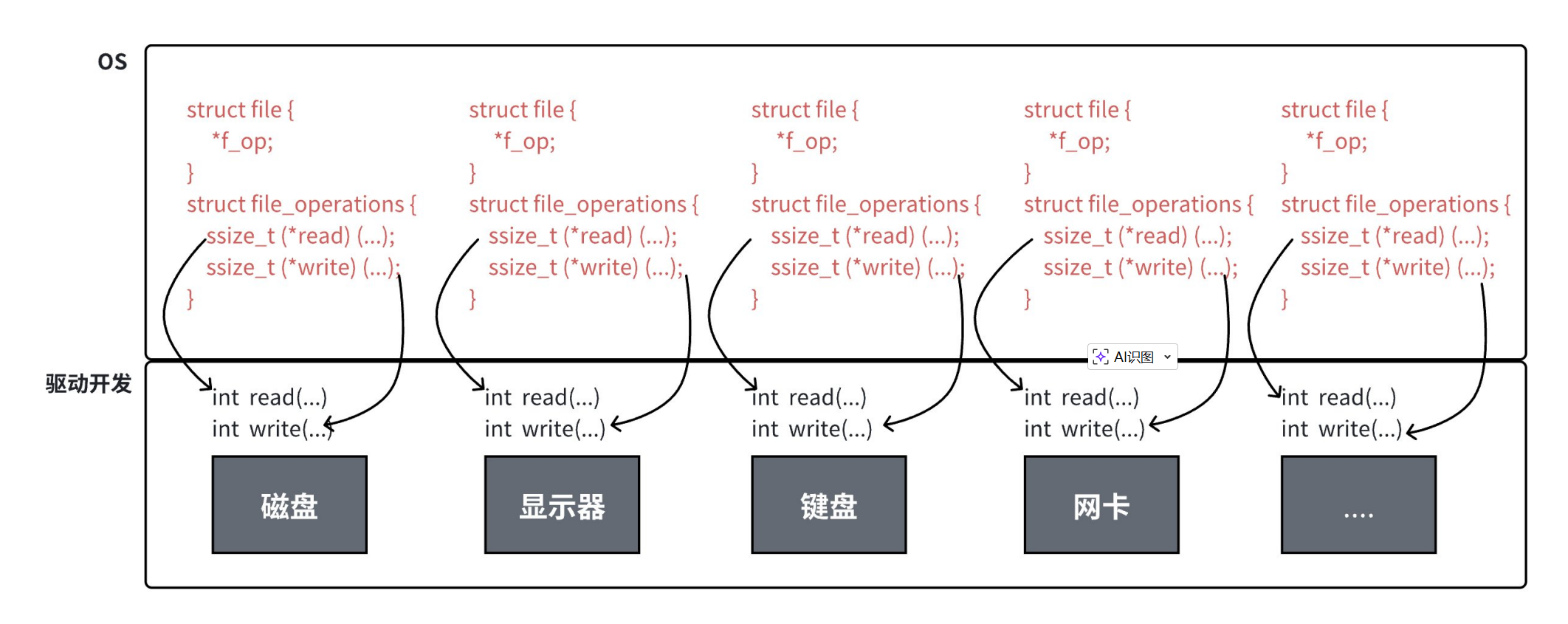
上图中的外设,每个设备都可以有自己的 read、write,但⼀定是对应着不同的操作方法!!
但通过 struct file 下 file_operation 中的各种函数回调,让我们开发者只用哪个 file 便可调取 Linux 系统中绝大部分的资源!!
这便是 "linux下一切皆文件" 的核心理解。
5. 缓冲区
5.1 什么是缓冲区
缓冲区是内存空间的⼀部分。也就是说,在内存空间中预留了一定的存储空间,这些存储空间用来缓冲输入或输出的数据,
这部分预留的空间就叫做缓冲区。缓冲区根据其对应的是输入设备还是输出设备,分为输入缓冲区和输出缓冲区。
5.2 为什么要引入缓冲区机制
读写文件时,如果不会开辟对文件操作的缓冲区,直接通过系统调用对磁盘进行操作(读、写等),
那么每次对文件进行一次读写操作时,都需要使用读写系统调用来处理此操作,即需要执行一次系统调用,
执行一次系统调用将涉及到 CPU 状态的切换,即从用户空间切换到内核空间,实现进程上下文的切换,
这将损耗⼀定的 CPU 时间,频繁的磁盘访问对程序的执行效率造成很大的影响。为了减少使用系统调用的次数,提高效率,
我们就可以采用缓冲机制。比如我们从磁盘里取信息,可以在磁盘文件进行操作时,
可以一次从文件中读出大量的数据到缓冲区中,以后对这部分的访问就不需要再使用系统调用了,
等缓冲区的数据取完后再去磁盘中读取,这样就可以减少磁盘的读写次数,
再加上计算机对缓冲区的操作大大快于对磁盘的操作,故应用缓冲区可大大提高计算机的运行速度。
又比如,我们使用打印机打印文档,由于打印机的打印速度相对较慢,我们先把文档输出到打印机相应的缓冲区,
打印机再自行逐步打印,这时我们的 CPU 可以处理别的事情。可以看出,缓冲区就是⼀块内存区,
它⽤在输⼊输出设备和 CPU 之间,用来缓存数据。它使得低速的输入输出设备和高速的 CPU 能够协调工作,
避免低速的输入输出设备占用 CPU ,解放出 CPU ,使其能够高效率工作。
5.3 缓冲类型
标准 I/O 提供了 3 种类型的缓冲区。
-
全缓冲区:这种缓冲方式要求填满整个缓冲区后才进行 I/O 系统调用操作。对于磁盘文件的操作通常使用全缓冲的方式访问。
-
行缓冲区:在行缓冲情况下,当在输入和输出中遇到换行符时,标准 I/O 库函数将会执行系统调用操作。当所操作的流涉及一个终端时(例如标准输入和标准输出),使用行缓冲方式。因为标准 I/O 库每行的缓冲区长度是固定的,所以只要填满了缓冲区,即使还没有遇到换行符,也会执行 I/O 系统调用操作,默认行缓冲区的大小为 1024 。
-
无缓冲区:无缓冲区是指标准 I/O 库不对字符进行缓存,直接调用系统调用。标准出错流 stderr 通常是不带缓冲区的,这使得出错信息能够尽快地显示出来。
除了上述列举的默认刷新方式,下列特殊情况也会引发缓冲区的刷新:
-
缓冲区满时;
-
执行 flush 语句;
-
进程结束
示例如下:
cpp
#include <stdio.h>
#include <string.h>
#include <sys/types.h>
#include <sys/stat.h>
#include <fcntl.h>
#include <unistd.h>
int main()
{
    close(1);
    int fd = open("log.txt", O_WRONLY | O_CREAT | O_TRUNC, 0666);
    if (fd < 0)
    {
        perror("open");
        return 0;
    }
    printf("hello world: %d\n", fd);
    close(fd);
    return 0;
}
我们本来想使用重定向思维,让本应该打印在显示器上的内容写到 "log.txt" 文件中,但我们发现,程序运行结束后,
文件中并没有被写入内容:
bash
[chengkl4@VM-8-12-centos buffer]$ ./myfile
[hyb@VM-8-12-centos buffer]$ ls
log.txt makefile myfile myfile.c
[chengkl4@VM-8-12-centos buffer]$ cat log.txt
[chengkl4@VM-8-12-centos buffer]$
这是由于我们将1号描述符重定向到磁盘文件后,缓冲区的刷新方式成为了全缓冲。而我们写入的内容并没有填满整个缓冲区,
导致并不会将缓冲区的内容刷新到磁盘文件中。怎么办呢?可以使用 fflush 强制刷新下缓冲区。
cpp
#include <stdio.h>
#include <string.h>
#include <sys/types.h>
#include <sys/stat.h>
#include <fcntl.h>
#include <unistd.h>
int main()
{
    close(1);
    int fd = open("log.txt", O_WRONLY | O_CREAT | O_TRUNC, 0666);
    if (fd < 0)
    {
        perror("open");
        return 0;
    }
    printf("hello world: %d\n", fd);
    fflush(stdout);
    close(fd);
    return 0;
}
还有⼀种解决方法,刚好可以验证⼀下 stderr 是不带缓冲区的,代码如下:
cpp
#include <stdio.h>
#include <string.h>
#include <sys/types.h>
#include <sys/stat.h>
#include <fcntl.h>
#include <unistd.h>
int main()
{
    close(2);
    int fd = open("log.txt", O_WRONLY | O_CREAT | O_TRUNC, 0666);
    if (fd < 0)
    {
        perror("open");
        return 0;
    }
    perror("hello world");
    close(fd);
    return 0;
}
这种方式便可以将 2 号文件描述符重定向至文件,由于 stderr 没有缓冲区,"hello world" 不用 fflash 就可以写入文件:
bash
[chengkl4@VM-8-12-centos buffer]$ ./myfile
[chengkl4@VM-8-12-centos buffer]$ cat log.txt
hello world: Success
5.4 FILE
-
因为 IO 相关函数与系统调用接口对应,并且库函数封装系统调用,所以本质上,访问文件都是通过 fd 访问的。
-
所以 C 库当中的 FILE 结构体内部,必定封装了 fd 。
来段代码在研究⼀下:
cpp
#include <stdio.h>
#include <string.h>
int main()
{
	const char *msg0="hello printf\n";
	const char *msg1="hello fwrite\n";
	const char *msg2="hello write\n";

	printf("%s", msg0);
	fwrite(msg1, strlen(msg0), 1, stdout);
	write(1, msg2, strlen(msg2));
	fork();
	return 0;
}
运行出结果:
cpp
hello printf
hello fwrite
hello write
但如果对进程实现输出重定向呢? ./hello > file , 我们发现结果变成了:
cpp
hello write
hello printf
hello fwrite
hello printf
hello fwrite
我们发现 printf 和 fwrite (库函数)都输出了 2 次,而 write 只输出了⼀次(系统调用)。
为什么呢?肯定和 fork 有关!
-
一般 C 库函数写入文件时是全缓冲的,而写入显示器是行缓冲。
-
printf fwrite 库函数 + 会自带缓冲区(进度条例子就可以说明),当发生重定向到普通文件时,数据的缓冲方式由行缓冲变成了全缓冲。
-
而我们放在缓冲区中的数据,就不会被立即刷新,甚至fork之后
-
但是进程退出之后,会统一刷新,写入文件当中。
-
但是
fork的时候,父子数据会发生写时拷贝,所以当你父进程准备刷新的时候,子进程也就有了同样的一份数据,随即产生两份数据。 -
write 没有变化,说明没有所谓的缓冲。
综上: printf fwrite 库函数会自带缓冲区,而 write 系统调用没有带缓冲区。另外,我们这里所说的缓冲区,
都是用户级缓冲区。其实为了提升整机性能,OS 也会提供相关内核级缓冲区,不过不再我们讨论范围之内。
那这个缓冲区谁提供呢? printf fwrite 是库函数, write 是系统调调用,库函数在系统调用的"上层", 是对系统调用的"封装",
但是 write 没有缓冲区,而 printf fwrite 有,足以说明,该缓冲区是二次加上的,又因为是 C ,所以由 C 标准库提供。
如果有兴趣,可以看看 FILE 结构体:
typedef struct _IO_FILE FILE; 在 /usr/include/stdio.h
cpp
struct _IO_FILE
{
    int _flags; /* High-order word is _IO_MAGIC; rest is flags.
                     */
#define _IO_file_flags _flags
    // 缓冲区相关
    /* The following pointers correspond to the C++ streambuf protocol. */
    /* Note: Tk uses the _IO_read_ptr and _IO_read_end fields directly. */
    char *_IO_read_ptr;   /* Current read pointer */
    char *_IO_read_end;   /* End of get area. */
    char *_IO_read_base;  /* Start of putback+get area. */
    char *_IO_write_base; /* Start of put area. */
    char *_IO_write_ptr;  /* Current put pointer. */
    char *_IO_write_end;  /* End of put area. */
    char *_IO_buf_base;   /* Start of reserve area. */
    char *_IO_buf_end;    /* End of reserve area. */
    /* The following fields are used to support backing up and undo. */
    char *_IO_save_base;   /* Pointer to start of non-current get area. */
    char *_IO_backup_base; /* Pointer to first valid character of backup area
                            */
    char *_IO_save_end;    /* Pointer to end of non-current get area. */
    struct _IO_marker *_markers;
    struct _IO_FILE *_chain;
    int _fileno; // 封装的⽂件描述符
#if 0
int _blksize;
#else
    int _flags2;
#endif
    _IO_off_t _old_offset; /* This used to be _offset but it's too small. */
#define __HAVE_COLUMN      /* temporary */
    /* 1+column number of pbase(); 0 is unknown. */
    unsigned short _cur_column;
    signed char _vtable_offset;
    char _shortbuf[1];
    /* char* _save_gptr; char* _save_egptr; */
    _IO_lock_t *_lock;
#ifdef _IO_USE_OLD_IO_FILE
}