直接上代码
cpp
if (!m_visible || !mMapCanvas) {
        return;
    }

    painter->save();

    // 使用固定像素大小绘制图例
    int legendWidth = 200;
    int legendHeight = 350;
    int margin = 20;

    // 获取画布大小
    QSize canvasSize = mMapCanvas->size();

    // 计算图例在屏幕上的位置(左下角)
    int x = margin;
    int y = canvasSize.height() - legendHeight - margin;

    // 创建屏幕坐标的矩形
    QRectF screenRect(x, y, legendWidth, legendHeight);

    // 绘制背景
    painter->setBrush(QColor(255, 255, 255, 210));
    painter->setPen(QPen(Qt::black, 1));
    painter->drawRoundedRect(screenRect, 5, 5);

    // 绘制标题
    painter->setFont(m_font);
    painter->setPen(Qt::black);
    QFontMetrics fm(m_font);

    // 图例标题
    QString title1 = QStringLiteral("图例");
    int offset = 10;
    QRectF titleRect1(screenRect.x() + 10, screenRect.y() + offset, screenRect.width() - 20, fm.height());
    painter->drawText(titleRect1, Qt::AlignCenter, title1);

    // 土壤含水量标题
    QString title2 = QStringLiteral("土壤含水量");
    QRectF titleRect2(screenRect.x() + 10, screenRect.y() + offset + 30, screenRect.width() - 20, fm.height());
    painter->drawText(titleRect2, Qt::AlignCenter, title2);

    // 绘制色带和数值范围
    double colorBarHeight = legendHeight * 0.75;
    double colorBarWidth = 30;
    double colorBarX = screenRect.x() + 20;
    double colorBarY = screenRect.y() + 60 + offset;
    double colorStep = colorBarHeight / m_colors.size();
    double labelX = colorBarX + colorBarWidth + 15;

    // 计算每个颜色块对应的数值范围
    double valueStep = (m_max - m_min) / m_colors.size();
    //painter->setBrush(Qt::NoBrush);
    for (int i = 0; i < m_colors.size(); i++) {
        // 绘制颜色块
        QRectF colorRect(colorBarX, colorBarY + i * colorStep, colorBarWidth, colorStep);

        painter->fillRect(colorRect, m_colors[i]);

        // 绘制颜色块边框
        painter->setPen(QPen(Qt::black));
        painter->drawRect(colorRect);

        // 计算数值范围
        double rangeMin = m_min + i * valueStep;
        double rangeMax = m_min + (i + 1) * valueStep;

        // 绘制数值范围标签
        QString label = QString::number(rangeMin, 'f', 6) + QStringLiteral(" ~ ") + QString::number(rangeMax, 'f', 6);
        QRectF labelRect(labelX, colorBarY + i * colorStep, screenRect.width() - labelX+40, colorStep);
        painter->drawText(labelRect, Qt::AlignLeft | Qt::AlignVCenter, label);
    }

    painter->restore();
上述代码是进行图例绘制,大致效果如下
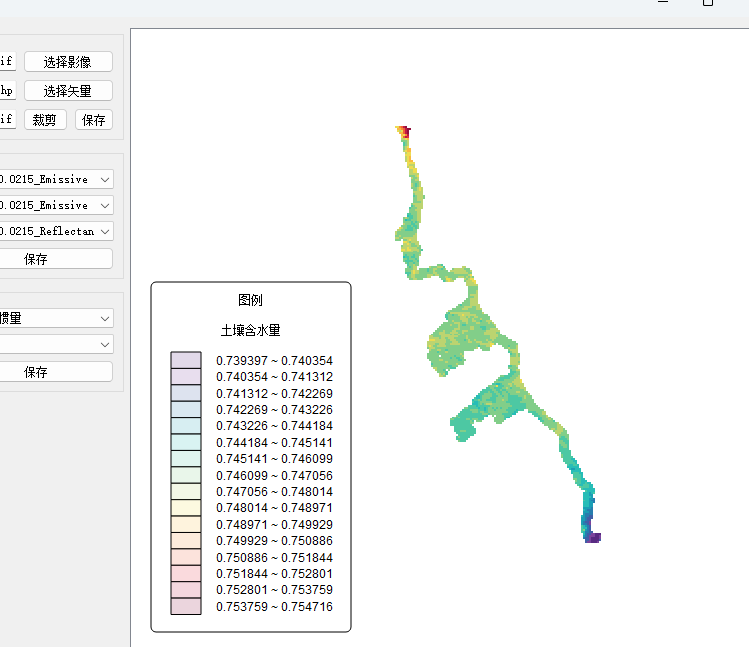
但是很明显可以看到,图例颜色不对,很模糊。感觉像是有透明度的意思,查看代码发现painter->setBrush(QColor(255, 255, 255, 210));这一句有透明度,但是这一句设置的不应该影响最终绘制啊,因为下面有这一句painter->fillRect(colorRect, m_colorsi);这一句才是真正填充使用的颜色,但是神奇事情发生了,fillRect这一句的颜色压根不起作用,完全受控于painter->setBrush(QColor(255, 255, 255, 210));这是怎么回事,于是去问deepseek给出的答案也是不对,我就怀疑是不是qt的bug,但是它坚持这不是Qt的bug,好小子,这么坚持。于是开始上网搜,也没搜到个所以然。后来又问deepseek,我把我的所有测试告诉它。他给的答案其中有一个是,后面的绘制遮盖了前面。
但是后面没啥东西了啊,也就一个drawrect,他只绘制边框又不填充,算了,把它注释掉试一下,结果,一试,还真是这的问题,立马发给deepseek,得到了如下答案

长知识了!