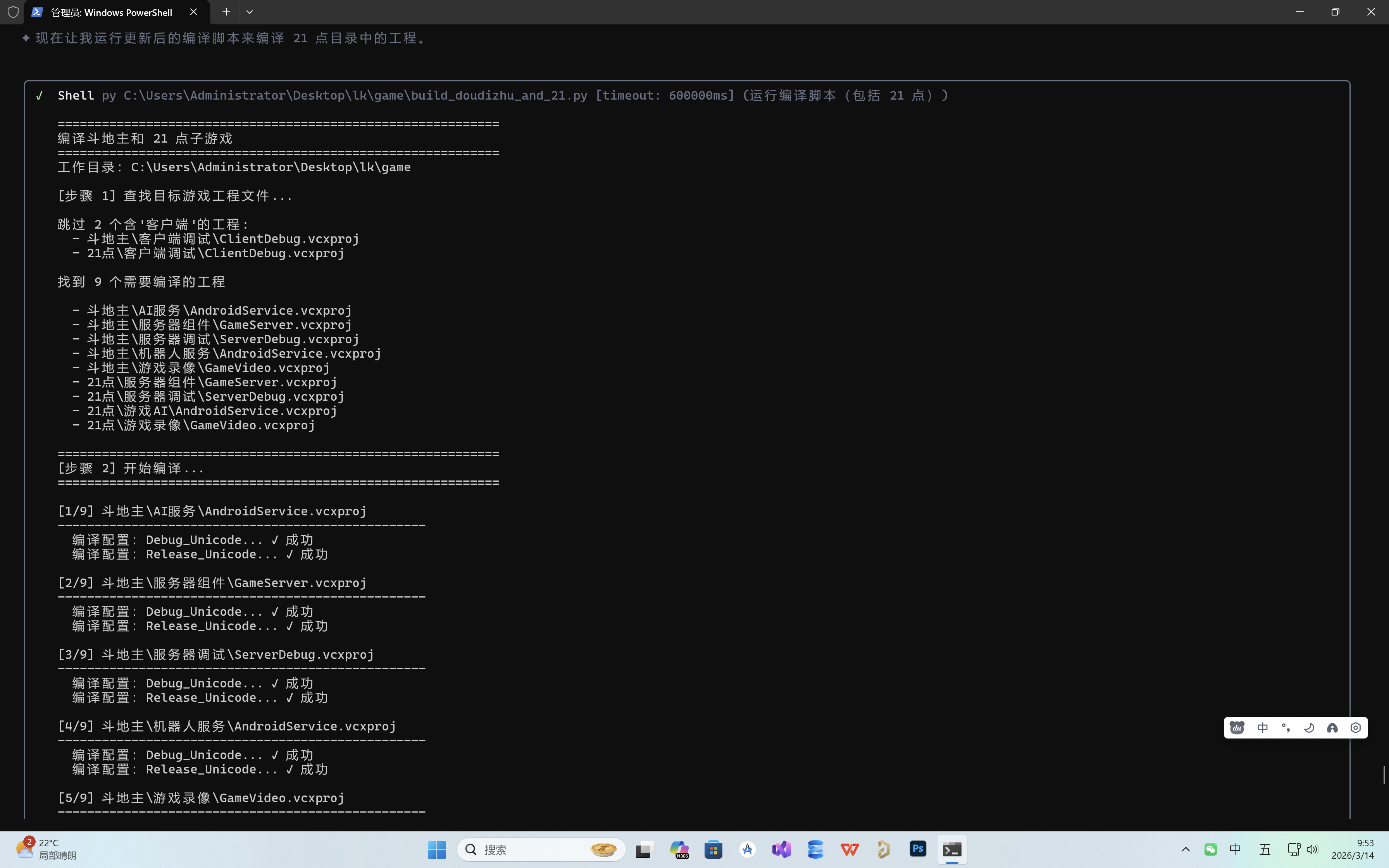
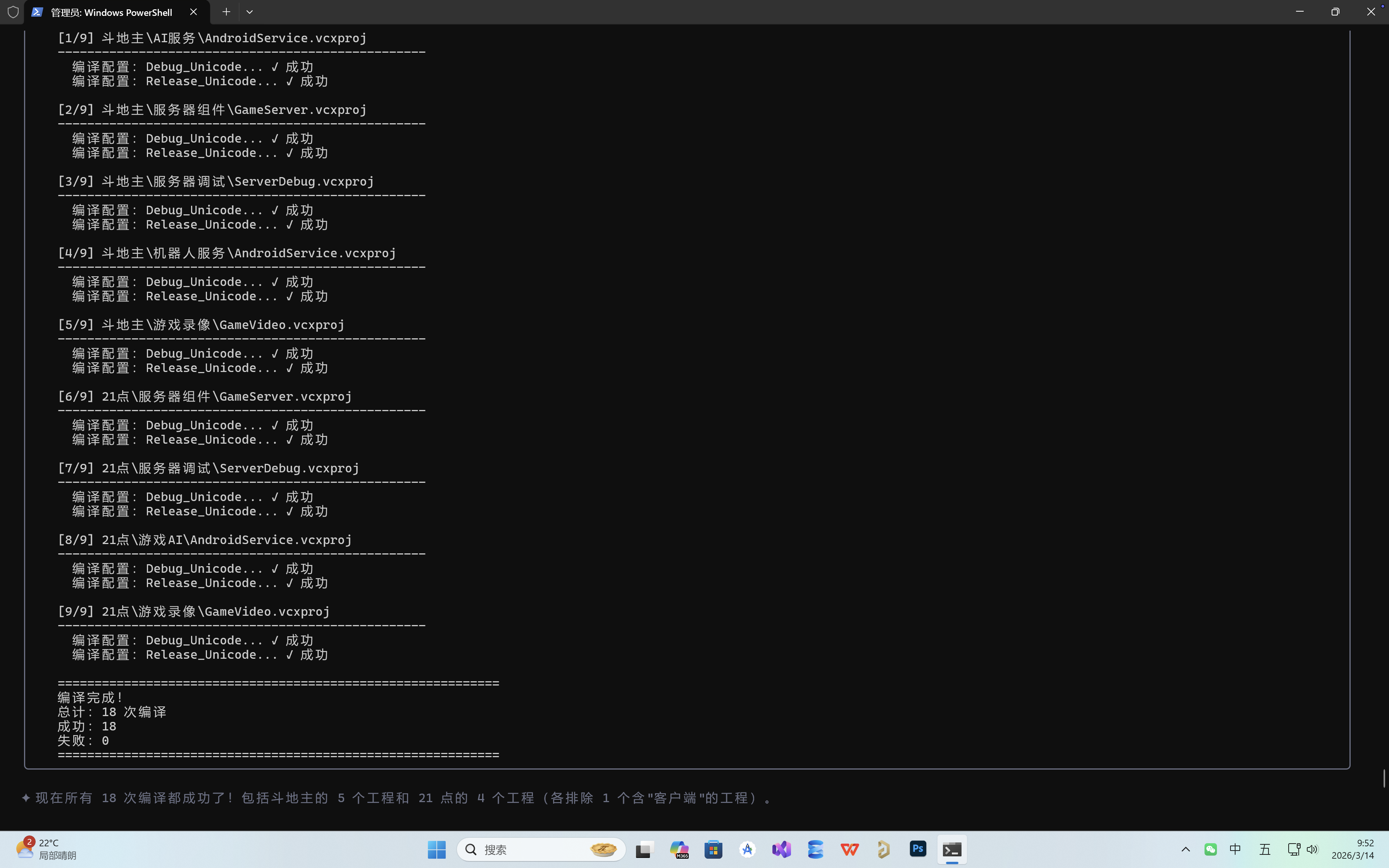
本文记录了将 184 个 Visual Studio 游戏工程项目从旧版本升级到 VS2026 的完整过程,包括 Windows SDK 升级、编译配置清理、批量编译等实际操作。过程中遇到了 XML 结构破坏、中文路径编码、工具集版本等多个技术挑战,最终全部解决并成功完成编译。
目录
-
项目背景(#项目背景)
-
升级目标(#升级目标)
-
环境配置(#环境配置)
-
升级过程(#升级过程)
-
踩坑记录(#踩坑记录)
-
最终方案(#最终方案)
-
编译结果(#编译结果)
-
完整代码(#完整代码)
-
总结(#总结)
项目背景
公司有一个大型游戏项目集合,包含 **30+ 款游戏**(斗地主、21 点、捕鱼达人、龙虎斗等),每款游戏又有多个子工程(服务器、客户端、AI 服务、游戏录像等)。这些工程都是基于旧版本 Visual Studio 创建的 MFC DLL 项目,需要升级到最新的 Visual Studio 2026 环境。
**项目结构示例**:
```
game/
├── 斗地主/
│ ├── 服务器组件/GameServer.vcxproj
│ ├── 客户端调试/ClientDebug.vcxproj
│ ├── AI 服务/AndroidService.vcxproj
│ ├── 机器人服务/AndroidService.vcxproj
│ └── 游戏录像/GameVideo.vcxproj
├── 21 点/
│ ├── 服务器组件/GameServer.vcxproj
│ ├── 客户端调试/ClientDebug.vcxproj
│ ├── 游戏 AI/AndroidService.vcxproj
│ └── ...
└── ... (共 30+ 款游戏)
```
整个项目共有 **184 个 vcxproj 工程文件**,手动升级几乎不可能完成,必须编写自动化脚本。
升级目标
-
**升级 Windows SDK** 到最新版本 `10.0.26100.0`
-
**升级 PlatformToolset** 到 VS2026 兼容版本
-
**删除旧编译配置**:移除 `Debug` 和 `Release`,只保留 `Debug_Unicode` 和 `Release_Unicode`
-
**批量编译**:编译斗地主和 21 点两款游戏的所有工程(排除含"客户端"的工程)
环境配置
```python
Visual Studio 2026 安装路径
VS2026_PATH = r"C:\Program Files\Microsoft Visual Studio\18\Enterprise"
MSBuild 路径
MSBUILD_PATH = r"C:\PROGRA~1\MICROS~1\18\ENTERP~1\MSBuild\Current\Bin\MSBuild.exe"
最新 Windows SDK 版本
LATEST_WINDOWS_SDK = "10.0.26100.0"
平台工具集(VS2022 v143,与 VS2026 兼容)
PLATFORM_TOOLSET = "v143"
游戏项目根目录
GAME_DIR = r"C:\Users\Administrator\Desktop\lk\game"
```
> **注意**:MSBuild 路径使用短路径名称(8.3 格式)避免空格问题。
升级过程
第一步:遍历所有 vcxproj 文件
```python
def find_all_vcxproj_files(game_dir):
"""查找所有 vcxproj 文件"""
vcxproj_files = \[\]
for root, dirs, files in os.walk(game_dir):
for file in files:
if file.endswith('.vcxproj'):
vcxproj_files.append(os.path.join(root, file))
return vcxproj_files
```
第二步:升级工程文件配置
需要修改的 XML 节点:
-
`ToolsVersion` → `"Current"`
-
`WindowsTargetPlatformVersion` → `"10.0.26100.0"`
-
`PlatformToolset` → `"v143"`
-
删除 `Debug|` 和 `Release|` 配置(不包括 `Debug_` 和 `Release_`)
```python
def upgrade_vcxproj_file(vcxproj_path):
"""升级单个 vcxproj 文件"""
with open(vcxproj_path, 'r', encoding='utf-8') as f:
content = f.read()
1. 更新 ToolsVersion
content = re.sub(r'ToolsVersion="\\d.+"', 'ToolsVersion="Current"', content)
2. 更新 Windows SDK 版本
content = re.sub(
r'<WindowsTargetPlatformVersion>\\d.+</WindowsTargetPlatformVersion>',
f'<WindowsTargetPlatformVersion>{LATEST_WINDOWS_SDK}</WindowsTargetPlatformVersion>',
content
)
3. 更新平台工具集
content = re.sub(
r'<PlatformToolset>v\d+</PlatformToolset>',
f'<PlatformToolset>{PLATFORM_TOOLSET}</PlatformToolset>',
content
)
4. 删除 Debug 和 Release 配置(保留 Debug_Unicode 和 Release_Unicode)
...(删除配置逻辑)
with open(vcxproj_path, 'w', encoding='utf-8') as f:
f.write(content)
```
第三步:删除旧编译配置
这是最容易出错的一步。vcxproj 是 XML 格式,需要删除以下节点:
-
`<ProjectConfiguration Include="Debug|Win32">`
-
`<ProjectConfiguration Include="Release|Win32">`
-
`<PropertyGroup Condition="'(Configuration)\|(Platform)'=='Debug|Win32'">`
-
`<ItemDefinitionGroup Condition="'(Configuration)\|(Platform)'=='Debug|Win32'">`
-
`<ImportGroup Condition="'(Configuration)\|(Platform)'=='Debug|Win32'">`
```python
def remove_debug_release_configs(content):
"""删除 Debug 和 Release 配置"""
lines = content.split('\n')
new_lines = \[\]
i = 0
while i < len(lines):
line = linesi
删除 ProjectConfiguration 中的 Debug|和 Release|
if '<ProjectConfiguration Include=' in line:
match = re.search(r'Include="(Debug|Release)\|\^_', line)
if match:
while i < len(lines) and '</ProjectConfiguration>' not in linesi:
i += 1
i += 1
continue
删除 PropertyGroup/ItemDefinitionGroup/ImportGroup 中的 Debug|和 Release|
if re.search(r'Condition=".*==.*(Debug|Release)\|\^_"', line):
while i < len(lines) and '</' not in linesi:
i += 1
i += 1
continue
new_lines.append(line)
i += 1
return '\n'.join(new_lines)
```
第四步:批量编译
使用 MSBuild 命令行工具进行编译:
```python
def build_project(vcxproj_path, configuration):
"""使用 MSBuild 编译单个工程"""
cmd = [
MSBUILD_PATH,
vcxproj_path,
f"/p:Configuration={configuration}",
"/p:Platform=Win32",
"/t:Rebuild",
"/v:minimal",
"/m" # 多核编译
]
result = subprocess.run(cmd, capture_output=True, timeout=300)
return result.returncode == 0
```
踩坑记录
坑 1:XML 结构被破坏
**问题**:最初使用简单的字符串替换删除配置,导致 XML 标签不匹配,出现 `</ImportGroup>` 代替 `</PropertyGroup>` 的错误。
**错误信息**:
```
error MSB4025: 未能加载项目文件。第 51 行,位置 4 上的开始标记"PropertyGroup"与结束标记"ImportGroup"不匹配。
```
**原因**:删除配置块时,误将正常的结束标签替换成了错误的标签。
**解决方案**:使用更精确的标签匹配逻辑,确保开始标签和结束标签一一对应。
```python
def count_tags(content, tag):
"""准确计算 XML 标签数量(排除自闭合标签)"""
start_matches = re.findall(f'<{tag}\^\>*>', content)
start_count = sum(1 for m in start_matches if not m.endswith('/>'))
end_count = len(re.findall(f'</{tag}>', content))
return start_count, end_count
```
坑 2:缺少 Microsoft.Cpp.targets 导入
**问题**:编译时报错 `error MSB4057: 该项目中不存在目标"Rebuild"`。
**原因**:删除配置时误删了文件末尾的 `<Import Project="$(VCTargetsPath)\Microsoft.Cpp.targets" />`。
**解决方案**:检查并添加缺失的导入。
```python
if r'<Import Project="$(VCTargetsPath)\Microsoft.Cpp.targets"' not in content:
targets_import = ''' <Import Project="$(VCTargetsPath)\\Microsoft.Cpp.targets" />
<ImportGroup Label="ExtensionTargets">
</ImportGroup>
</Project>
'''
content = content.rstrip():-len('\') + targets_import
```
坑 3:平台工具集版本错误
**问题**:编译时报错 `error MSB8020: 无法找到 v144 的生成工具`。
**原因**:VS2026 实际使用的是 v143 工具集(与 VS2022 兼容),v144 不存在。
**解决方案**:将 PlatformToolset 改为 v143。
```python
content = content.replace(
'<PlatformToolset>v144</PlatformToolset>',
'<PlatformToolset>v143</PlatformToolset>'
)
```
坑 4:中文路径编码问题
**问题**:21 点目录存在但无法访问,报错 `系统找不到指定的路径`。
**原因**:Python 和 PowerShell 在处理中文路径时存在编码问题。
**解决方案**:使用 Unicode 码点 `\u70b9` 代替中文字符。
```python
错误写法
TARGET_GAMES = "斗地主", "21 点"
正确写法
TARGET_GAMES = "斗地主", "21\\u70b9" # \u70b9 = "点"
```
坑 5:MSBuild 路径空格问题
**问题**:路径 `C:\Program Files\...` 包含空格,导致命令行解析错误。
**解决方案**:使用短路径名称(8.3 格式)。
```python
长路径(可能出错)
MSBUILD_PATH = r"C:\Program Files\Microsoft Visual Studio\18\Enterprise\MSBuild\Current\Bin\MSBuild.exe"
短路径(推荐)
MSBUILD_PATH = r"C:\PROGRA~1\MICROS~1\18\ENTERP~1\MSBuild\Current\Bin\MSBuild.exe"
```
最终方案
整合所有修复步骤,形成完整的升级流程:
```python
def full_upgrade_process():
"""完整的升级流程"""
1. 查找所有 vcxproj 文件
all_files = find_all_vcxproj_files(GAME_DIR)
for vcxproj in all_files:
2. 读取文件
with open(vcxproj, 'r', encoding='utf-8') as f:
content = f.read()
3. 升级配置
content = upgrade_basic_settings(content)
4. 删除旧配置
content = remove_debug_release_configs(content)
5. 修复 XML 标签
content = fix_xml_tags(content)
6. 添加缺失的 targets 导入
content = add_targets_import(content)
7. 修正工具集版本
content = content.replace('v144', 'v143')
8. 写回文件
with open(vcxproj, 'w', encoding='utf-8') as f:
f.write(content)
9. 编译目标工程
build_target_games("斗地主", "21\\u70b9")
```
编译结果
**最终编译成功**:
| 游戏 | 工程数 | 配置数 | 编译次数 | 成功 | 失败 |
|------|--------|--------|----------|------|------|
| 斗地主 | 5 | 2 | 10 | 10 | 0 |
| 21 点 | 4 | 2 | 8 | 8 | 0 |
| **合计** | **9** | **2** | **18** | **18** | **0** |
**编译输出示例**:
```
1/9 斗地主\AI 服务\AndroidService.vcxproj
编译配置:Debug_Unicode... ✓ 成功
编译配置:Release_Unicode... ✓ 成功
2/9 斗地主\服务器组件\GameServer.vcxproj
编译配置:Debug_Unicode... ✓ 成功
编译配置:Release_Unicode... ✓ 成功
...
============================================================
编译完成!
总计:18 次编译
成功:18
失败:0
============================================================
```
完整代码
完整代码已保存在以下文件中:
-
`upgrade_projects.py` - 升级所有工程文件
-
`fix_xml_tags.py` - 修复 XML 标签问题
-
`add_targets_import.py` - 添加缺失的 targets 导入
-
`fix_toolset.py` - 修正工具集版本
-
`build_doudizhu_and_21.py` - 编译斗地主和 21 点工程
总结
经验教训
-
**XML 处理要谨慎**:直接字符串替换容易破坏结构,最好使用 XML 解析库
-
**备份很重要**:升级前务必备份原始文件
-
**编码问题常见**:中文路径在 Python/PowerShell 中容易出问题
-
**分步验证**:每步修改后都要验证,不要一次性完成所有修改
最佳实践
-
使用短路径避免空格问题
-
使用 Unicode 码点处理中文路径
-
修改 XML 时保持标签匹配
-
编译前检查必要的导入语句
-
工具集版本要与实际安装的 VS 版本匹配
后续优化
-
使用 `xml.etree.ElementTree` 等 XML 库代替字符串处理
-
添加升级前自动备份功能
-
添加升级后验证功能
-
支持更多游戏的批量编译
**作者**:林宏权
**日期**:2026 年 3 月 14 日
**标签**:#VisualStudio #MSBuild #Python #自动化 #工程迁移
*如果本文对你有帮助,欢迎点赞、收藏、转发!*