0 前言
在我们收集的电脑系统信息中,不仅包括当前系统日期和时间,还需要收集系统启动时间。
1 思路
在 Linux 系统上,获取系统启动时间可以通过多种方法实现,比较常见步骤是:
1.1 获取系统自启动以来的时间
一种方法是使用**sysinfo 函数,**这个函数会返回一个sysinfo结构体数据,其中包括了系统运行的有关信息。
cpp
struct sysinfo {
    long uptime;             // 系统启动时间(秒)
    unsigned long loads[3];  // 系统负载,1分钟、5分钟、15分钟的平均负载
    unsigned long totalram;  // 总物理内存(单位:KB)
    unsigned long freeram;   // 空闲内存(单位:KB)
    unsigned long sharedram; // 共享内存(单位:KB)
    unsigned long bufferram; // 缓冲内存(单位:KB)
    unsigned long totalswap; // 总交换空间(单位:KB)
    unsigned long freeswap;  // 空闲交换空间(单位:KB)
    unsigned short procs;   // 当前进程数
    unsigned long totalhigh; // 总高内存(单位:KB)
    unsigned long freehigh;  // 空闲高内存(单位:KB)
    unsigned int mem_unit;   // 内存单位的因子,通常是1(即1KB)
    char _f[20-sizeof(long)*6-sizeof(int)]; // 填充用,为了保持结构体大小不变
};
其中的uptime成员存储有系统自启动以来的时间(以秒为单位)。
另一种方法是使用使用 /proc/uptime 文件。这个文件包含了系统自启动以来的时间(以秒为单位)和系统空闲时间(以秒为单位)。
1.2 获取系统当前时间
我们可以通过time函数获取系统当前时间。
1.3 计算系统启动的时间
我使用系统当前时间 - 系统自启动以来的时间 = 系统启动时间
1.4 格式化输出
使用 localtime 和 strftime 将系统启动时间转换为易读的格式。
2 演示代码
cpp
/*
* 程序名称:boot_time
* 功能描述:获取Linux系统启动时间
* 实现原理:通过sysinfo 函数 或 读取/proc文件系统中的进程信息文件实现
× 文件名称:boot_time.c
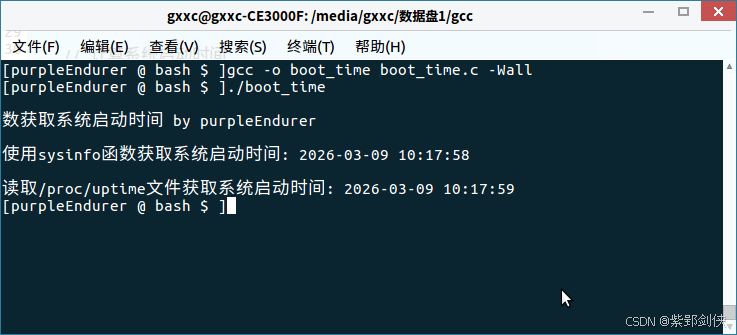
* 编译命令:gcc -o boot_time boot_time.c -Wall
* 运行方式:./boot_time 或 sudo ./boot_time(推荐root权限)
* 作 者:purpleEndurer
* 日 期:
* 20260309 创建
*/
#include <stdio.h>
#include <stdlib.h>
#include <time.h>
#include <sys/sysinfo.h>//方法1
#include <string.h> //方法2
#include <unistd.h> //方法2
/*使用sysinfo 函数获取系统启动时间
*/
void show_boot_time1()
{
struct sysinfo info;
sysinfo(&info); //这个函数用于获取系统运行的各种信息,包括系统启动时间。
// 获取当前时间
time_t now = time(NULL);
// 计算系统启动时间
time_t boot_time = now - info.uptime;
// 将时间转换为更易读的格式
struct tm *boot_tm = localtime(&boot_time);
char buffer[80];
strftime(buffer, sizeof(buffer), "%Y-%m-%d %H:%M:%S", boot_tm);
printf("\n使用sysinfo函数获取系统启动时间: %s\n", buffer);
} // show_boot_time1()
/*
读取 /proc/uptime 文件
*/
int show_boot_time2()
{
FILE *fp = fopen("/proc/uptime", "r");
if (fp == NULL)
{
perror("未能打开/proc/uptime");
return 1;
}
double uptime, idle;
if (fscanf(fp, "%lf %lf", &uptime, &idle) != 2)
{
perror("未能读取/proc/uptime");
fclose(fp);
return 1;
}
fclose(fp);
// 获取当前时间并减去 uptime 得到系统启动时间
time_t now = time(NULL);
time_t boot_time = now - (time_t)uptime;
struct tm *boot_tm = localtime(&boot_time);
char buffer[80];
strftime(buffer, sizeof(buffer), "%Y-%m-%d %H:%M:%S", boot_tm);
printf("\n读取/proc/uptime文件获取系统启动时间: %s\n", buffer);
return 0;
} // show_boot_time2()
int main()
{
printf("\n数获取系统启动时间 by purpleEndurer\n");
show_boot_time1();
show_boot_time2();
return 0;
}3 程序运行截图