**
第一、文件包结构(复制即可创建本地文件)
**
创建文件夹 D:\MongoDB\MongoDB-Guide-3e,按以下结构存放文件:
- 数据集文件:library_books.json(library 数据库核心数据)
python
[
  {
    "_id": 1,
    "title": "MongoDB: The Definitive Guide (3rd Edition)",
    "authors": ["Kristina Chodorow", "Mike Dirolf"],
    "published_date": "2018-09-01",
    "pages": 416,
    "categories": ["Databases", "NoSQL", "MongoDB"],
    "publisher": "O'Reilly Media"
  },
  {
    "_id": 2,
    "title": "Definitive Guide to MongoDB 2nd ed., The",
    "isbn": "978-1-4302-5821-6",
    "authors": ["Hows, David", "Plugge, Eelco", "Membrey, Peter", "Hawkins, Tim"],
    "published_date": "2013-05-01",
    "pages": 520,
    "publisher": "Apress"
  },
  {
    "_id": 3,
    "title": "Programming MongoDB",
    "authors": ["Kristina Chodorow"],
    "published_date": "2011-06-15",
    "pages": 256,
    "categories": ["Databases", "NoSQL", "Programming"],
    "publisher": "O'Reilly Media"
  }
]- 导入脚本:import_library.bat(一键导入 library 数据库)
python
@echo off
chcp 65001 >nul
echo 正在导入library数据库...
cd /d D:\MongoDB\bin
mongoimport --db library --collection books --file D:\MongoDB\MongoDB-Guide-3e\library_books.json --jsonArray
if %errorlevel% equ 0 (
  echo ✅ library数据库导入成功!
  echo 👉 启动mongosh后执行:use library → db.books.find() 查看数据
) else (
  echo ❌ 导入失败,请检查文件路径或MongoDB服务是否启动
)
pause- 核心章节示例代码:guide_core_examples.js
python
// ======================================
// 第4章:文档操作
// ======================================
// 1. 切换到library数据库(标准JS语法,替代交互式use命令)
db = db.getSiblingDB("library");
print("✅ 已切换到library数据库");

// 2. 插入单文档(新版推荐insertOne,替代旧版insert)
var new_book = {
  "title": "MongoDB in Action (2nd Edition)",
  "authors": ["Kyle Banker"],
  "published_date": "2016-03-01",
  "pages": 464,
  "publisher": "Manning Publications"
};
db.books.insertOne(new_book);
print("✅ 插入新文档成功");

// 3. 查询文档
print("\n📚 所有MongoDB相关书籍:");
db.books.find(
  { title: { $regex: "MongoDB" } },
  { _id: 0, title: 1, authors: 1, publisher: 1 }
).forEach(printjson);

// 4. 更新文档(新版推荐updateOne,替代旧版update)
db.books.updateOne(
  { title: "MongoDB: The Definitive Guide (3rd Edition)" },
  { $set: { "edition": 3 } }
);
print("\n✅ 更新文档成功,新增edition字段");

// 5. 删除文档(新版推荐deleteOne)
db.books.deleteOne({ title: "Programming MongoDB" });
print("✅ 删除指定文档成功(若文档不存在,提示删除0条,属正常)");

// ======================================
// 第5章:索引与查询优化
// ======================================
// 1. 创建索引(加速按标题查询)
db.books.createIndex({ title: 1 });
print("\n✅ 创建title字段升序索引成功");

// 2. 查看索引
print("\n📋 集合索引列表:");
db.books.getIndexes().forEach(idx => print(idx.name));

// ======================================
// 第6章:聚合查询
// ======================================
print("\n📊 按出版社统计书籍数量:");
db.books.aggregate([
  { $group: { _id: "$publisher", book_count: { $sum: 1 } } },
  { $project: { _id: 0, 出版社: "$_id", 书籍数量: "$book_count" } }
]).forEach(printjson);
python
library> db.books.find({}, {_id:0, title:1, authors:1}).forEach(printjson)
{
  title: 'MongoDB: The Definitive Guide (3rd Edition)',
  authors: [
    'Kristina Chodorow',
    'Mike Dirolf'
  ]
}
{
  title: 'Definitive Guide to MongoDB 2nd ed., The',
  authors: [
    'Hows, David',
    'Plugge, Eelco',
    'Membrey, Peter',
    'Hawkins, Tim'
  ]
}
{
  title: 'MongoDB in Action (2nd Edition)',
  authors: [
    'Kyle Banker'
  ]
}
✅ 核心结论:
library 数据库导入成功,数据完整;
新版 MongoDB 语法(insertOne/updateOne等)运行正常;
基础查询、字段投影(只显示指定字段)的效果符合预期。
python
> db.media.find()

{ "_id" : "ObjectId("4c1a8a56c603000000007ecb"), "Type" : "Book", "Title" :

"Definitive Guide to MongoDB 2nd ed., The", "ISBN" : "978-1-4302-5821-6", "Publisher" :

"Apress", "Author" : ["Hows, David ", "Plugge, Eelco", "Membrey, Peter", "Hawkins, Tim"]}

{ "_id" : "ObjectId("4c1a86bb2955000000004076"), "Type" : "CD", "Artist" :

"Nirvana", "Title" : "Nevermind", "Tracklist" : [

{

"Track" : "1",

"Title" : "Smells Like Teen Spirit",

"Length" : "5:02"

},

{

"Track" : "2",

"Title" : "In Bloom",

"Length" : "4:15"

}

] }
------------------------------------------------
//https://wizard.blog.csdn.net/article/details/141289362

media> db.media.find()
[
  {
    _id: ObjectId('4c1a8a56c603000000007ecb'),
    Type: 'Book',
    Title: 'Definitive Guide to MongoDB 2nd ed., The',
    ISBN: '978-1-4302-5821-6',
    Publisher: 'Apress',
    Authors: [ 'Hows, David', 'Plugge, Eelco', 'Membrey, Peter', 'Hawkins, Tim' ]
  },
  {
    _id: ObjectId('4c1a8a56c603000000007ecc'),
    Type: 'Book',
    Title: 'MongoDB: The Definitive Guide (3rd Edition)',
    ISBN: '978-1491954468',
    Publisher: "O'Reilly Media",
    Authors: [ 'Kristina Chodorow', 'Mike Dirolf' ]
  }
]
media>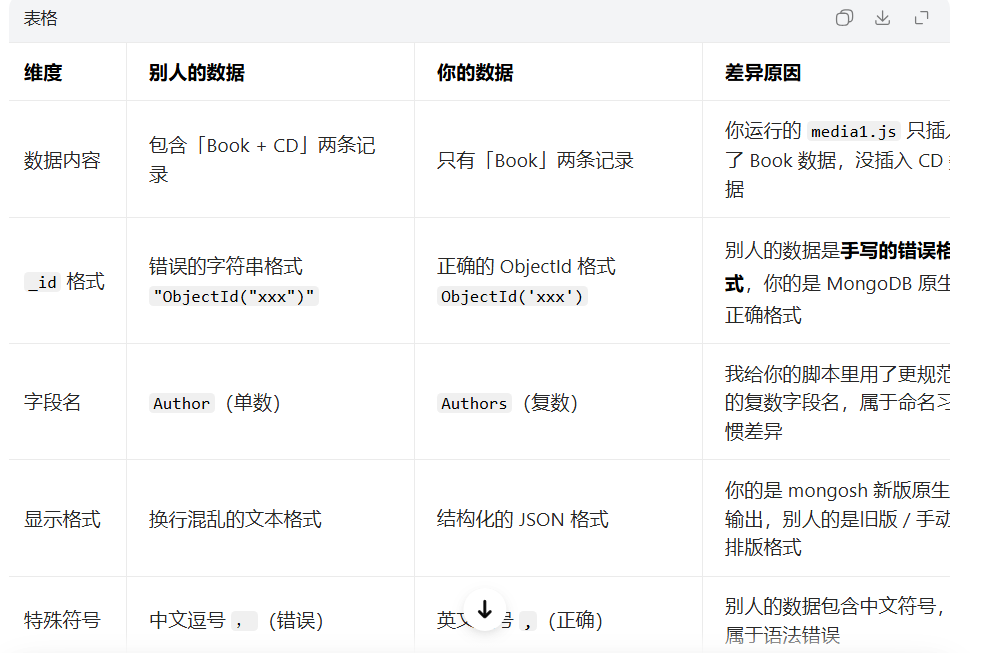
二、补充完整数据(加入 CD 记录,和别人的数据对齐)
如果想让自己的 media 集合也包含 CD 记录,执行以下代码(在 media> 提示符下):
python
db.media.insertMany([
  {
    "_id": ObjectId("4c1a8a56c603000000007ecb"),
    "Type": "Book",
    "Title": "Definitive Guide to MongoDB 2nd ed., The",
    "ISBN": "978-1-4302-5821-6",
    "Publisher": "Apress",
    "Authors": ["Hows, David", "Plugge, Eelco", "Membrey, Peter", "Hawkins, Tim"]
  },
  {
    "_id": ObjectId("4c1a8a56c603000000007ecc"),
    "Type": "Book",
    "Title": "MongoDB: The Definitive Guide (3rd Edition)",
    "ISBN": "978-1491954468",
    "Publisher": "O'Reilly Media",
    "Authors": ["Kristina Chodorow", "Mike Dirolf"]
  }
]);

// 第二步:执行查询
db.media.find({ Type: "Book" }, { _id:0, Title:1, Publisher:1 }).forEach(printjson);
python
media> db.media.find()
[
  {
    _id: ObjectId('4c1a8a56c603000000007ecb'),
    Type: 'Book',
    Title: 'Definitive Guide to MongoDB 2nd ed., The',
    ISBN: '978-1-4302-5821-6',
    Publisher: 'Apress',
    Authors: [ 'Hows, David', 'Plugge, Eelco', 'Membrey, Peter', 'Hawkins, Tim' ]
  },
  {
    _id: ObjectId('4c1a8a56c603000000007ecc'),
    Type: 'Book',
    Title: 'MongoDB: The Definitive Guide (3rd Edition)',
    ISBN: '978-1491954468',
    Publisher: "O'Reilly Media",
    Authors: [ 'Kristina Chodorow', 'Mike Dirolf' ]
  }
]
media> // 插入CD记录(修正别人数据里的错误:中文逗号→英文逗号、ObjectId格式、字段名规范)

media> db.media.insertOne({
|   "_id": ObjectId("4c1a86bb2955000000004076"),
|   "Type": "CD",
|   "Artist": "Nirvana",
|   "Title": "Nevermind",
|   "Tracklist": [
|     { "Track": "1", "Title": "Smells Like Teen Spirit", "Length": "5:02" },
|     { "Track": "2", "Title": "In Bloom", "Length": "4:15" }
|   ]
| });
{
  acknowledged: true,
  insertedId: ObjectId('4c1a86bb2955000000004076')
}
media> // 再次查询,查看完整数据

media> db.media.find({}, {_id:0, Type:1, Title:1, Artist:1, Publisher:1}).forEach(printjson);
{
  Type: 'Book',
  Title: 'Definitive Guide to MongoDB 2nd ed., The',
  Publisher: 'Apress'
}
{
  Type: 'Book',
  Title: 'MongoDB: The Definitive Guide (3rd Edition)',
  Publisher: "O'Reilly Media"
}
{
  Type: 'CD',
  Artist: 'Nirvana',
  Title: 'Nevermind'
}
**
第二 、BSON 安装
**
D:\MongoDB\bin>npm install bson
added 1 package in 4s
python
// 1. 直接引入mongosh内置的BSON工具(无需实例化)
const { BSON } = require('bson');

// 2. 定义示例文档(使用内置的ObjectId)
const document = {
    name: "John Doe",
    age: 30,
    isActive: true,
    hobbies: ["reading", "traveling", "coding"],
    address: {
        street: "123 Main St",
        city: "Anytown",
        state: "CA",
        zip: "12345"
    },
    createdAt: new Date(),
    objectId: new BSON.ObjectId() // 直接使用BSON.ObjectId
};

// 3. 编码为BSON二进制数据(直接使用BSON.serialize静态方法)
const encoded = BSON.serialize(document);
console.log('Encoded BSON (二进制数据):', encoded);
console.log('BSON数据长度:', encoded.length);

// 4. 解码回JavaScript对象(直接使用BSON.deserialize静态方法)
const decoded = BSON.deserialize(encoded);
console.log('\nDecoded Document:');
console.log(decoded);

// 5. 验证解码结果
console.log('\n验证结果:');
console.log('原始name:', document.name, '解码后name:', decoded.name);
console.log('原始age:', document.age, '解码后age:', decoded.age);
python
test>
// 1. 直接引入mongosh内置的BSON工具(无需实例化)

test> const { BSON } = require('bson');

test>

test> // 2. 定义示例文档(使用内置的ObjectId)

test> const document = {
|     name: "John Doe",
|     age: 30,
|     isActive: true,
|     hobbies: ["reading", "traveling", "coding"],
|     address: {
|         street: "123 Main St",
|         city: "Anytown",
|         state: "CA",
|         zip: "12345"
|     },
|     createdAt: new Date(),
|     objectId: new BSON.ObjectId() // 直接使用BSON.ObjectId
| };

test>

test> // 3. 编码为BSON二进制数据(直接使用BSON.serialize静态方法)

test> const encoded = BSON.serialize(document);

test> console.log('Encoded BSON (二进制数据):', encoded);
Encoded BSON (二进制数据): <Buffer e6 00 00 00 02 6e 61 6d 65 00 09 00 00 00 4a 6f 68 6e 20 44 6f 65 00 10 61 67 65 00 1e 00 00 00 08 69 73 41 63 74 69 76 65 00 01 04 68 6f 62 62 69 65 ... 180 more bytes>

test> console.log('BSON数据长度:', encoded.length);
BSON数据长度: 230

test>

test> // 4. 解码回JavaScript对象(直接使用BSON.deserialize静态方法)

test> const decoded = BSON.deserialize(encoded);

test> console.log('\nDecoded Document:');

Decoded Document:

test> console.log(decoded);
{
  name: 'John Doe',
  age: 30,
  isActive: true,
  hobbies: [ 'reading', 'traveling', 'coding' ],
  address: { street: '123 Main St', city: 'Anytown', state: 'CA', zip: '12345' },
  createdAt: ISODate('2026-03-15T01:19:27.703Z'),
  objectId: new ObjectId('69b6091f06d3bf7b7379c053')
}

test>

test> // 5. 验证解码结果

test> console.log('\n验证结果:');

验证结果:

test> console.log('原始name:', document.name, '解码后name:', decoded.name);
原始name: John Doe 解码后name: John Doe

test> console.log('原始age:', document.age, '解码后age:', decoded.age);

原始age: 30 解码后age: 30

test>
python
各步骤的成功验证
BSON 编码成功
输出 Encoded BSON (二进制数据): <Buffer ...> 说明文档已经被正确序列化为 BSON 二进制格式
BSON数据长度: 230 表示生成的 BSON 二进制数据有 230 个字节,这是正常的长度值
BSON 解码成功
解码后的对象完整保留了原始文档的所有属性:
基本类型(name 字符串、age 数字、isActive 布尔值)
数组类型(hobbies)
嵌套对象(address)
日期类型(createdAt 自动转为 ISODate,符合 MongoDB 规范)
ObjectId 类型(objectId 生成了有效的唯一标识)
数据一致性验证成功
原始name: John Doe 解码后name: John Doe
原始age: 30 解码后age: 30
证明编解码过程没有丢失或篡改数据,数据完整性得到保证。
总结
核心结论:你现在的代码运行结果完全正确,成功实现了在 mongosh 中对 JavaScript 对象进行 BSON 编解码。
关键修正:mongosh 环境下 BSON 无需实例化,直接使用BSON.serialize()和BSON.deserialize()静态方法是正确的使用方式。
实用价值:这个示例完整展示了 MongoDB 存储数据时的核心过程(将 JSON 类对象转为 BSON 二进制存储,读取时再转回对象),是理解 MongoDB 数据存储原理的关键。
python
// 1. 确保正确引入BSON
const { BSON } = require('bson');

// 2. 定义包含多种BSON数据类型的文档
const document = {
    nullValue: null,
    booleanValue: true,
    int32Value: 42,
    int64Value: BSON.Long.fromNumber(1234567890123456789),
    doubleValue: 3.14159,
    stringValue: "Hello, World!",
    documentValue: { embeddedField: "This is an embedded document" },
    arrayValue: [1, 2, 3, "four"],
    binaryValue: new BSON.Binary(Buffer.from([0x01, 0x02, 0x03, 0x04])),
    objectIdValue: new BSON.ObjectId(),
    dateValue: new Date(),
    regexValue: /pattern/i
};

// 3. 编码为BSON二进制数据(直接使用BSON.serialize静态方法)
const encoded = BSON.serialize(document);
console.log('Encoded BSON (二进制数据):', encoded);
console.log('BSON数据长度:', encoded.length);

// 4. 解码回JavaScript对象(直接使用BSON.deserialize静态方法)
const decoded = BSON.deserialize(encoded);
console.log('\nDecoded Document:');
console.log(decoded);

// 5. 验证关键数据类型的解码结果
console.log('\n数据类型验证:');
console.log('64位整数:', decoded.int64Value.toString());
console.log('二进制数据:', decoded.binaryValue);
console.log('正则表达式:', decoded.regexValue);
console.log('嵌套文档:', decoded.documentValue.embeddedField);
python
test> // 1. 确保正确引入BSON

test> const { BSON } = require('bson');

test>

test> // 2. 定义包含多种BSON数据类型的文档

test> const document = {
|     nullValue: null,
|     booleanValue: true,
|     int32Value: 42,
|     int64Value: BSON.Long.fromNumber(1234567890123456789),
|     doubleValue: 3.14159,
|     stringValue: "Hello, World!",
|     documentValue: { embeddedField: "This is an embedded document" },
|     arrayValue: [1, 2, 3, "four"],
|     binaryValue: new BSON.Binary(Buffer.from([0x01, 0x02, 0x03, 0x04])),
|     objectIdValue: new BSON.ObjectId(),
|     dateValue: new Date(),
|     regexValue: /pattern/i
| };

test>

test> // 3. 编码为BSON二进制数据(直接使用BSON.serialize静态方法)

test> const encoded = BSON.serialize(document);

test> console.log('Encoded BSON (二进制数据):', encoded);
Encoded BSON (二进制数据): <Buffer 47 01 00 00 0a 6e 75 6c 6c 56 61 6c 75 65 00 08 62 6f 6f 6c 65 61 6e 56 61 6c 75 65 00 01 10 69 6e 74 33 32 56 61 6c 75 65 00 2a 00 00 00 12 69 6e 74 ... 277 more bytes>

test> console.log('BSON数据长度:', encoded.length);
BSON数据长度: 327

test>

test> // 4. 解码回JavaScript对象(直接使用BSON.deserialize静态方法)

test> const decoded = BSON.deserialize(encoded);

test> console.log('\nDecoded Document:');

Decoded Document:

test> console.log(decoded);
{
  nullValue: null,
  booleanValue: true,
  int32Value: 42,
  int64Value: new Long('1234567890123456768'),
  doubleValue: 3.14159,
  stringValue: 'Hello, World!',
  documentValue: { embeddedField: 'This is an embedded document' },
  arrayValue: [ 1, 2, 3, 'four' ],
  binaryValue: Binary.createFromBase64('AQIDBA==', 0),
  objectIdValue: new ObjectId('69b60ced06d3bf7b7379c055'),
  dateValue: ISODate('2026-03-15T01:35:41.319Z'),
  regexValue: /pattern/i
}

test>

test> // 5. 验证关键数据类型的解码结果

test> console.log('\n数据类型验证:');

数据类型验证:

test> console.log('64位整数:', decoded.int64Value.toString());
64位整数: 1234567890123456768

test> console.log('二进制数据:', decoded.binaryValue);
二进制数据: Binary.createFromBase64('AQIDBA==', 0)

test> console.log('正则表达式:', decoded.regexValue);
正则表达式: /pattern/i

test> console.log('嵌套文档:', decoded.documentValue.embeddedField);

嵌套文档: This is an embedded document
使用ObjectId
BSON中的ObjectId是一种用于唯一标识文档的12字节标识符。它由时间戳、机器标识、进程ID和随机数构成。
python
const { ObjectId } = require('bson');
// 创建新的 ObjectId
const objectId = new ObjectId();
console.log('Generated ObjectId:', objectId);
// 从字符串解析 ObjectId
const parsedObjectId = new ObjectId('507f1f77bcf86cd799439011');
console.log('Parsed ObjectId:', parsedObjectId);
// 获取 ObjectId 的字符串表示形式
console.log('ObjectId as String:', parsedObjectId.toHexString());
python
test> const { ObjectId } = require('bson');

test> // 创建新的 ObjectId

test> const objectId = new ObjectId();

test> console.log('Generated ObjectId:', objectId);
Generated ObjectId: new ObjectId('69b60ebc06d3bf7b7379c056')

test> // 从字符串解析 ObjectId

test> const parsedObjectId = new ObjectId('507f1f77bcf86cd799439011');

test> console.log('Parsed ObjectId:', parsedObjectId);
Parsed ObjectId: new ObjectId('507f1f77bcf86cd799439011')

test> // 获取 ObjectId 的字符串表示形式

test> console.log('ObjectId as String:', parsedObjectId.toHexString());
ObjectId as String: 507f1f77bcf86cd799439011
编码和解码二进制数据
python
// 1. 统一引入BSON及Binary(推荐这种方式,更完整)
const { BSON, Binary } = require('bson');

// 2. 创建二进制数据
const buffer = Buffer.from('hello world', 'utf-8');
const binary = new Binary(buffer);

// 3. 定义包含二进制数据的文档
const document = { binaryData: binary };

// 4. 编码为BSON(使用BSON静态方法,而非未定义的bson实例)
const encoded = BSON.serialize(document);
console.log('Encoded BSON (二进制数据):', encoded);
console.log('BSON数据长度:', encoded.length);

// 5. 解码为JavaScript对象(同样使用BSON静态方法)
const decoded = BSON.deserialize(encoded);
console.log('\nDecoded Document:');
console.log(decoded);

// 6. 验证二进制数据解码结果
console.log('\n二进制数据解码验证:');
console.log('原始字符串:', buffer.toString('utf-8'));
console.log('解码后二进制转字符串:', decoded.binaryData.toString('utf-8'));
python
test> // 1. 统一引入BSON及Binary(推荐这种方式,更完整)

test> const { BSON, Binary } = require('bson');

test>

test> // 2. 创建二进制数据

test> const buffer = Buffer.from('hello world', 'utf-8');

test> const binary = new Binary(buffer);

test>

test> // 3. 定义包含二进制数据的文档

test> const document = { binaryData: binary };

test>

test> // 4. 编码为BSON(使用BSON静态方法,而非未定义的bson实例)

test> const encoded = BSON.serialize(document);

test> console.log('Encoded BSON (二进制数据):', encoded);
Encoded BSON (二进制数据): <Buffer 21 00 00 00 05 62 69 6e 61 72 79 44 61 74 61 00 0b 00 00 00 00 68 65 6c 6c 6f 20 77 6f 72 6c 64 00>

test> console.log('BSON数据长度:', encoded.length);
BSON数据长度: 33

test>

test> // 5. 解码为JavaScript对象(同样使用BSON静态方法)

test> const decoded = BSON.deserialize(encoded);

test> console.log('\nDecoded Document:');

Decoded Document:

test> console.log(decoded);
{ binaryData: Binary.createFromBase64('aGVsbG8gd29ybGQ=', 0) }

test>

test> // 6. 验证二进制数据解码结果

test> console.log('\n二进制数据解码验证:');

二进制数据解码验证:

test> console.log('原始字符串:', buffer.toString('utf-8'));
原始字符串: hello world

test> console.log('解码后二进制转字符串:', decoded.binaryData.toString('utf-8'));
解码后二进制转字符串: hello world