fetch API 用于发起 http 请求和处理响应。
fetch 是 XMLHttpRequest 的现代替代方案。与使用回调函数的 XMLHttpRequest 不同,fetch 基于 Promise,并且与现代 Web 的一些特性(例如 Service Workers 和 CORS(跨源资源共享))进行了集成。
js
async function getData() {
  const url = "https://example.org/products.json";
  try {
    const response = await fetch(url);
    if (!response.ok) {
      throw new Error(`Response status: ${response.status}`);
    }

    const result = await response.json();
    console.log(result);
  } catch (error) {
    // 请求被 reject 时会进入 catch
    console.error(error.message);
  }
}
使用 response.ok 判断 fetch 请求是否成功特别重要,因为当请求返回 404 或 500 时,fetch 返回的 Promise 不会被 reject 。
fetch 只会在无法发出请求(网络问题、CORS 失败、中止等)时 reject。当 fetch 请求被 reject 时,会被 catch 捕获。
js
async function testFetch() {
  try {
    const response = await fetch("http://localhost:9999/api/test");
    console.log("响应状态:", response.status);

    if (!response.ok) {
      // 抛出错误,由外层的 catch 处理
      throw new Error(`请求失败,状态码:${response.status}`);
    }

    const data = await response.json();
    console.log("数据:", data);
  } catch (error) {
    // 请求被 reject 后会被 catch 捕获
    console.error("出错了:", error.message);
  }
}

testFetch();
设置 fetch 的请求方法
fetch 的配置对象中有个 method 属性,专门配置 fetch 的请求方法,比如发起 post 请求,只要把 method 属性设置为 POST 就可以了
js
const response = await fetch("https://example.org/post", {
  method: "POST",
  // ...
});
设置 fetch 的请求体
fetch 配置对象中有个 body 属性,专门用于配置请求体,请求体的作用是向服务端发送数据的,比如 POST 或 PUT 请求的时候,向服务器传递有用的数据。
js
const response = await fetch("https://example.org/post", {
  method: "POST",
  body: JSON.stringify({ username: "example" }),
  // ...
});需要注意的是,GET 请求中是不能包含请求体的,如果 GET 请求需要向服务端发送数据的话,则可通过 URL 参数的方式传递。
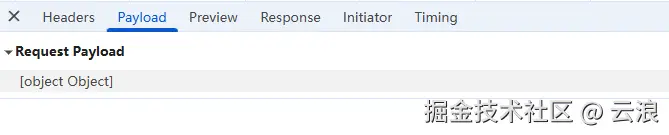
同时要将传递给 body 配置的原生 JS 对象用 JSON.stringify 包裹,因为 HTTP 协议传输的数据本质上是文本或二进制流,不支持直接传递 JS 对象。否则 JS 对象会自动序列化为 [object Object] 字符串,从而导致数据传递错误:
设置请求头
fetch 的配置对象中有个 headers 属性,用于设置请求头。
请求头(Request headers) 用于向服务器提供关于请求的信息。例如,在 POST 请求 中,Content-Type 请求头会告诉服务器请求体的数据格式。
js
const response = await fetch("https://example.org/post", {
  method: "POST",
  headers: {
    "Content-Type": "application/json",
  },
  body: JSON.stringify({ username: "example" }),
  // ...
});
在 GET 请求中发送数据
GET 请求没有请求体,因此不能像 POST 请求那样通过 body 配置发送数据。GET 请求是通过 URL 查询参数发送数据的。
有三种设置 GET 请求的查询参数
-
手动拼接
URL -
使用
URLSearchParams构建查询参数 -
使用
URL对象操作
手动拼接 URL 示例
js
const userId = 123;
const page = 2;
fetch(`https://api.example.com/users?id=${userId}&page=${page}`)
  .then((response) => response.json())
  .then((data) => console.log(data));
使用 URLSearchParams 构建查询参数示例
js
const params = new URLSearchParams({
  id: 123,
  page: 2,
  name: "John Doe", // 特殊字符会被自动编码
});

fetch(`https://api.example.com/users?${params}`)
  .then((response) => response.json())
  .then((data) => console.log(data));
使用 URL 对象操作示例
js
const url = new URL("https://api.example.com/users");
url.searchParams.append("id", 123);
url.searchParams.append("page", 2);

fetch(url)
  .then((response) => response.json())
  .then((data) => console.log(data));
处理响应体
使用 fetch 发送完请求后,会得到服务器的响应对象 Response,然后数据会在 Response 对象的响应体中。要读取响应体,需要调用 Response 提供的读取方法。
Response 对象提供了 5 种读取响应体的方法:
-
response.json(),读取 json 数据 -
response.text(),读取文本数据 -
response.blob(),读取二进制文件 -
response.arrayBuffer(),读取二进制数据 -
response.formData(),读取表单数据
以上 5 种方法都是异步的,并且都返回 Promise。
js
const response = await fetch("/api/data");
const data = await response.json();
js
const response = await fetch("/api/text");
const text = await response.text();
js
const response = await fetch("/image.png");
const blob = await response.blob();
js
// response.arrayBuffer()通常用于底层二进制处理
const response = await fetch("/file.bin");
const buffer = await response.arrayBuffer();
js
const response = await fetch("/form");
const formData = await response.formData();