欢迎各位观众大大浏览阅读我的博客,有空麻烦加一下博客主页关注,谢谢
MES/ERP 报表查询系统(WinForm+SQLite)
一、项目核心设计
本项目围绕MES/ERP 报表查询 + 自定义排序核心场景,实现「本地 SQLite 数据库存储 + 预置测试数据 + 多维度索引约束 + 富交互界面」,重点优化操作便捷性,支持手动添加数据、灵活排序、可视化查询,适配中小企业轻量化报表管理需求。
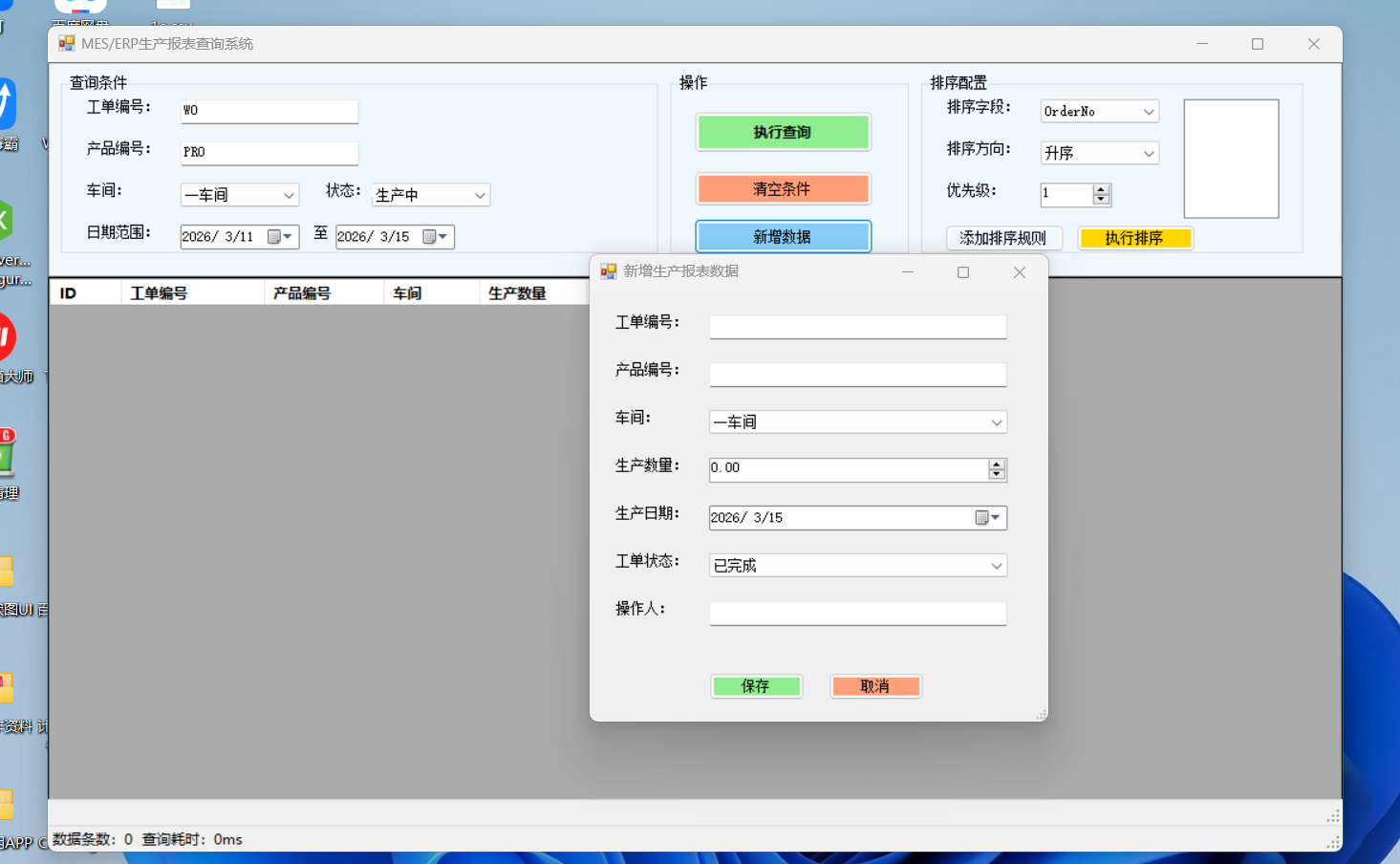
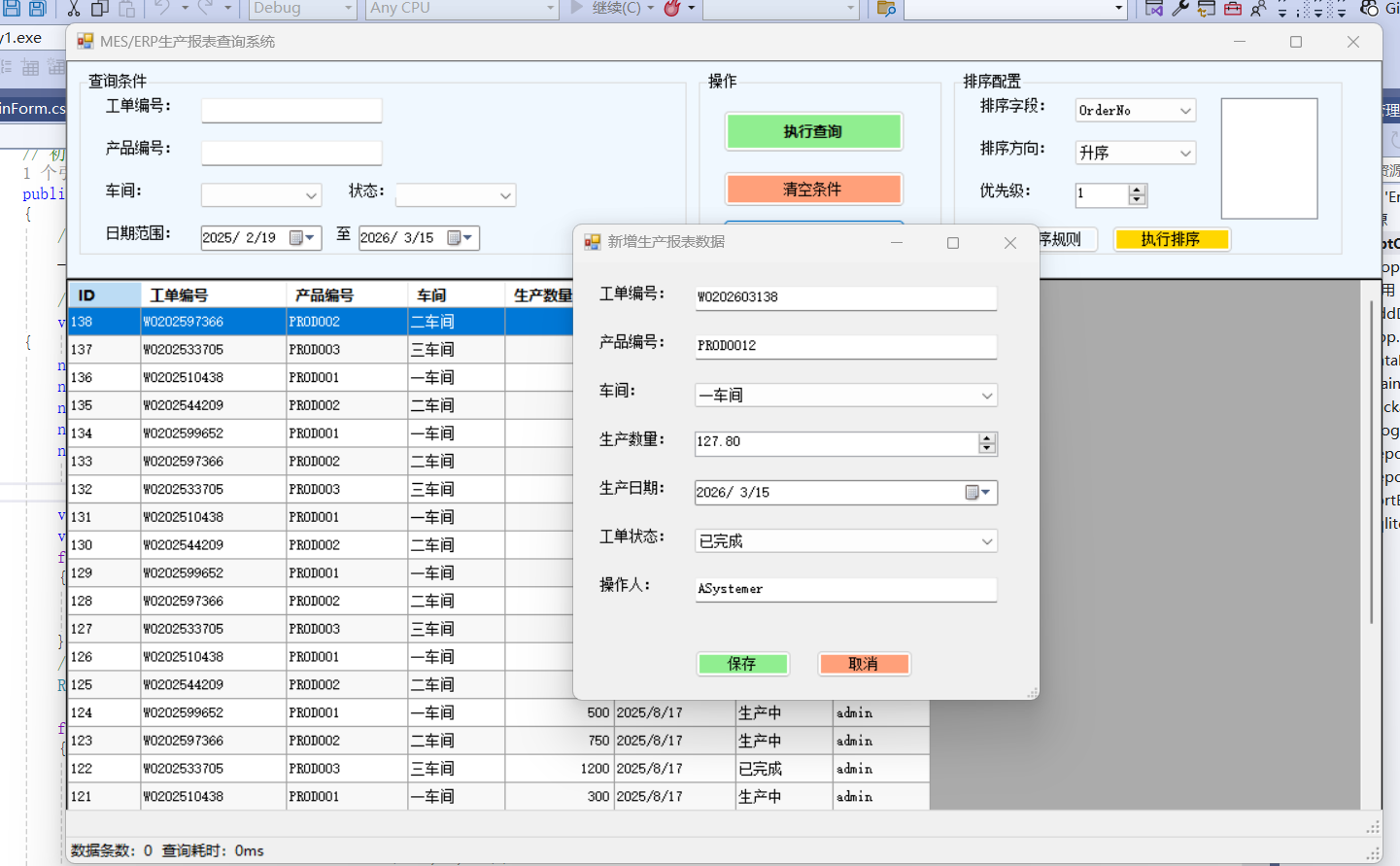
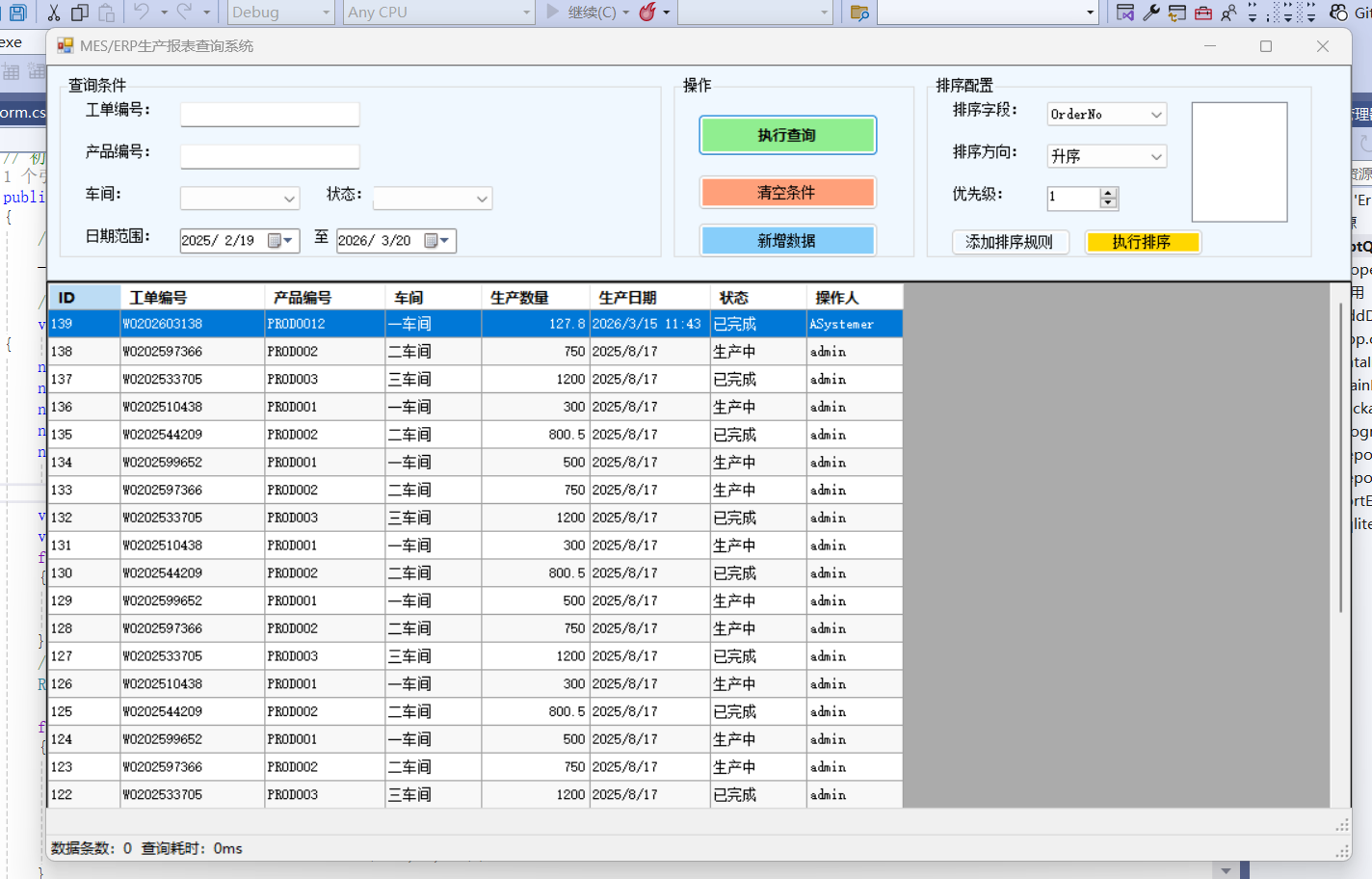
二、项目完整架构
plaintext
MESERPReport/
├─ Data/                  // 数据层
│  ├─ SqliteHelper.cs     // SQLite操作(CRUD+索引)
│  └─ DataInitializer.cs  // 预置测试数据
├─ Business/              // 业务层
│  ├─ ReportService.cs    // 报表查询/数据管理
│  └─ SortEngine.cs       // 高级排序算法
├─ Model/                 // 模型层
│  ├─ ReportModel.cs      // 报表实体
│  └─ SortRule.cs         // 排序规则
└─ UI/                    // 界面层
   ├─ MainForm.cs         // 主窗体(查询/排序/展示)
   └─ AddDataForm.cs      // 新增数据弹窗
三、核心代码实现
1. 模型层(Model)
ReportModel.cs(报表实体 + 查询条件)
csharp
运行
using System;

namespace MESERPReport.Model
{
    // 报表核心实体
    public class ReportModel
    {
        public int Id { get; set; }               // 主键
        public string OrderNo { get; set; }       // 工单编号(索引字段)
        public string ProductNo { get; set; }     // 产品编号(索引字段)
        public string Workshop { get; set; }      // 车间
        public decimal Qty { get; set; }          // 生产数量
        public DateTime ProduceDate { get; set; } // 生产日期(索引字段)
        public string Status { get; set; }        // 工单状态(已完成/生产中/暂停)
        public string Operator { get; set; }      // 操作人
    }

    // 查询条件实体
    public class QueryCondition
    {
        public string OrderNo { get; set; }
        public string ProductNo { get; set; }
        public string Workshop { get; set; }
        public string Status { get; set; }
        public DateTime? StartDate { get; set; }
        public DateTime? EndDate { get; set; }
    }

    // 排序规则
    public class SortRule
    {
        public string FieldName { get; set; } // 排序字段(Qty/ProduceDate/OrderNo)
        public bool IsAsc { get; set; }       // 是否升序
        public int Priority { get; set; }     // 优先级(1最高)
    }
}
2. 数据层(Data)
SqliteHelper.cs(SQLite 核心操作)
csharp
运行
using System;
using System.Data;
using System.Data.SQLite;
using System.IO;

namespace MESERPReport.Data
{
    public class SqliteHelper
    {
        private readonly string _dbPath;
        private readonly string _connStr;

        public SqliteHelper()
        {
            // 数据库路径:程序目录下的MESERP.db
            _dbPath = Path.Combine(AppDomain.CurrentDomain.BaseDirectory, "MESERP.db");
            _connStr = $"Data Source={_dbPath};Version=3;";
            InitDb(); // 初始化数据库+表+索引
        }

        // 初始化数据库(创建表+索引)
        private void InitDb()
        {
            if (!File.Exists(_dbPath))
            {
                SQLiteConnection.CreateFile(_dbPath);
                using (var conn = new SQLiteConnection(_connStr))
                {
                    conn.Open();
                    // 创建生产报表表
                    var createTableSql = @"
                        CREATE TABLE IF NOT EXISTS ProductionReport (
                            Id INTEGER PRIMARY KEY AUTOINCREMENT,
                            OrderNo VARCHAR(50) NOT NULL,
                            ProductNo VARCHAR(50) NOT NULL,
                            Workshop VARCHAR(30) NOT NULL,
                            Qty DECIMAL(10,2) NOT NULL,
                            ProduceDate DATE NOT NULL,
                            Status VARCHAR(20) NOT NULL,
                            Operator VARCHAR(30)
                        );";
                    ExecuteNonQuery(conn, createTableSql);

                    // 创建核心索引(提升查询/排序效率)
                    var createIndexSqls = new[]
                    {
                        "CREATE INDEX IF NOT EXISTS idx_OrderNo ON ProductionReport(OrderNo);",
                        "CREATE INDEX IF NOT EXISTS idx_ProductNo ON ProductionReport(ProductNo);",
                        "CREATE INDEX IF NOT EXISTS idx_ProduceDate ON ProductionReport(ProduceDate);"
                    };
                    foreach (var sql in createIndexSqls)
                        ExecuteNonQuery(conn, sql);
                }
            }
        }

        // 执行查询(返回DataTable)
        public DataTable ExecuteQuery(string sql, params SQLiteParameter[] parameters)
        {
            using (var conn = new SQLiteConnection(_connStr))
            {
                try
                {
                    conn.Open();
                    using (var cmd = new SQLiteCommand(sql, conn))
                    {
                        cmd.Parameters.AddRange(parameters);
                        using (var adapter = new SQLiteDataAdapter(cmd))
                        {
                            var dt = new DataTable();
                            adapter.Fill(dt);
                            return dt;
                        }
                    }
                }
                catch (Exception ex)
                {
                    throw new Exception("查询失败:" + ex.Message);
                }
            }
        }

        // 执行增删改
        public int ExecuteNonQuery(string sql, params SQLiteParameter[] parameters)
        {
            using (var conn = new SQLiteConnection(_connStr))
            {
                try
                {
                    conn.Open();
                    using (var cmd = new SQLiteCommand(sql, conn))
                    {
                        cmd.Parameters.AddRange(parameters);
                        return cmd.ExecuteNonQuery();
                    }
                }
                catch (Exception ex)
                {
                    throw new Exception("操作失败:" + ex.Message);
                }
            }
        }

        // 重载:带连接的执行(初始化用)
        private void ExecuteNonQuery(SQLiteConnection conn, string sql)
        {
            using (var cmd = new SQLiteCommand(sql, conn))
            {
                cmd.ExecuteNonQuery();
            }
        }
    }
}
DataInitializer.cs(预置测试数据)
csharp
运行
using System;
using MESERPReport.Model;

namespace MESERPReport.Data
{
    public class DataInitializer
    {
        private readonly SqliteHelper _dbHelper;

        public DataInitializer()
        {
            _dbHelper = new SqliteHelper();
        }

        // 初始化预置测试数据
        public void InitTestData()
        {
            // 先清空旧数据(可选)
            _dbHelper.ExecuteNonQuery("DELETE FROM ProductionReport;");

            // 插入测试数据
            var testData = new[]
            {
                new { OrderNo = "WO202406001", ProductNo = "PROD001", Workshop = "一车间", Qty = 500.00m, ProduceDate = new DateTime(2024,6,1), Status = "已完成", Operator = "张三" },
                new { OrderNo = "WO202406002", ProductNo = "PROD002", Workshop = "二车间", Qty = 800.50m, ProduceDate = new DateTime(2024,6,2), Status = "生产中", Operator = "李四" },
                new { OrderNo = "WO202406003", ProductNo = "PROD001", Workshop = "一车间", Qty = 300.00m, ProduceDate = new DateTime(2024,6,1), Status = "暂停", Operator = "王五" },
                new { OrderNo = "WO202406004", ProductNo = "PROD003", Workshop = "三车间", Qty = 1200.00m, ProduceDate = new DateTime(2024,6,3), Status = "已完成", Operator = "赵六" },
                new { OrderNo = "WO202406005", ProductNo = "PROD002", Workshop = "二车间", Qty = 750.00m, ProduceDate = new DateTime(2024,6,2), Status = "生产中", Operator = "孙七" }
            };

            foreach (var data in testData)
            {
                var sql = @"
                    INSERT INTO ProductionReport (OrderNo, ProductNo, Workshop, Qty, ProduceDate, Status, Operator)
                    VALUES (@OrderNo, @ProductNo, @Workshop, @Qty, @ProduceDate, @Status, @Operator);";
                _dbHelper.ExecuteNonQuery(sql,
                    new SQLiteParameter("@OrderNo", data.OrderNo),
                    new SQLiteParameter("@ProductNo", data.ProductNo),
                    new SQLiteParameter("@Workshop", data.Workshop),
                    new SQLiteParameter("@Qty", data.Qty),
                    new SQLiteParameter("@ProduceDate", data.ProduceDate),
                    new SQLiteParameter("@Status", data.Status),
                    new SQLiteParameter("@Operator", data.Operator));
            }

            Console.WriteLine("预置测试数据初始化完成!");
        }
    }
}
3. 业务层(Business)
ReportService.cs(报表查询 / 数据管理)
csharp
运行
using System;
using System.Collections.Generic;
using System.Data;
using System.Data.SQLite;
using MESERPReport.Data;
using MESERPReport.Model;

namespace MESERPReport.Business
{
    public class ReportService
    {
        private readonly SqliteHelper _dbHelper;

        public ReportService()
        {
            _dbHelper = new SqliteHelper();
        }

        // 多条件查询报表(带索引约束)
        public DataTable QueryReport(QueryCondition condition)
        {
            var sqlBuilder = new List<string> { "SELECT * FROM ProductionReport WHERE 1=1" };
            var parameters = new List<SQLiteParameter>();

            // 索引约束1:工单编号(精准匹配,命中索引)
            if (!string.IsNullOrEmpty(condition.OrderNo))
            {
                sqlBuilder.Add("AND OrderNo = @OrderNo");
                parameters.Add(new SQLiteParameter("@OrderNo", condition.OrderNo));
            }

            // 索引约束2:产品编号(模糊匹配,命中索引)
            if (!string.IsNullOrEmpty(condition.ProductNo))
            {
                sqlBuilder.Add("AND ProductNo LIKE @ProductNo");
                parameters.Add(new SQLiteParameter("@ProductNo", $"%{condition.ProductNo}%"));
            }

            // 普通条件:车间/状态
            if (!string.IsNullOrEmpty(condition.Workshop))
            {
                sqlBuilder.Add("AND Workshop = @Workshop");
                parameters.Add(new SQLiteParameter("@Workshop", condition.Workshop));
            }
            if (!string.IsNullOrEmpty(condition.Status))
            {
                sqlBuilder.Add("AND Status = @Status");
                parameters.Add(new SQLiteParameter("@Status", condition.Status));
            }

            // 索引约束3:生产日期范围(命中索引)
            if (condition.StartDate.HasValue)
            {
                sqlBuilder.Add("AND ProduceDate >= @StartDate");
                parameters.Add(new SQLiteParameter("@StartDate", condition.StartDate.Value.ToString("yyyy-MM-dd")));
            }
            if (condition.EndDate.HasValue)
            {
                sqlBuilder.Add("AND ProduceDate <= @EndDate");
                parameters.Add(new SQLiteParameter("@EndDate", condition.EndDate.Value.ToString("yyyy-MM-dd")));
            }

            // 默认排序
            sqlBuilder.Add("ORDER BY ProduceDate DESC");

            return _dbHelper.ExecuteQuery(string.Join(" ", sqlBuilder), parameters.ToArray());
        }

        // 添加新报表数据
        public bool AddReportData(ReportModel model)
        {
            try
            {
                var sql = @"
                    INSERT INTO ProductionReport (OrderNo, ProductNo, Workshop, Qty, ProduceDate, Status, Operator)
                    VALUES (@OrderNo, @ProductNo, @Workshop, @Qty, @ProduceDate, @Status, @Operator);";
                var rows = _dbHelper.ExecuteNonQuery(sql,
                    new SQLiteParameter("@OrderNo", model.OrderNo),
                    new SQLiteParameter("@ProductNo", model.ProductNo),
                    new SQLiteParameter("@Workshop", model.Workshop),
                    new SQLiteParameter("@Qty", model.Qty),
                    new SQLiteParameter("@ProduceDate", model.ProduceDate),
                    new SQLiteParameter("@Status", model.Status),
                    new SQLiteParameter("@Operator", model.Operator));
                return rows > 0;
            }
            catch
            {
                return false;
            }
        }
    }
}
SortEngine.cs(高级排序算法)
csharp
运行
using System;
using System.Collections.Generic;
using System.Data;
using System.Linq;
using MESERPReport.Model;

namespace MESERPReport.Business
{
    public class SortEngine
    {
        // 多规则排序(支持优先级+升降序)
        public DataTable SortReport(DataTable sourceDt, List<SortRule> sortRules)
        {
            if (sourceDt == null || sourceDt.Rows.Count == 0 || sortRules == null || sortRules.Count == 0)
                return sourceDt;

            // 转换为List便于LINQ排序
            var dataList = sourceDt.AsEnumerable().ToList();
            IOrderedEnumerable<DataRow> sortedList = null;

            // 按优先级排序(数字越小优先级越高)
            foreach (var rule in sortRules.OrderBy(r => r.Priority))
            {
                if (sortedList == null)
                {
                    // 首次排序
                    sortedList = rule.IsAsc
                        ? dataList.OrderBy(row => GetSortValue(row, rule.FieldName))
                        : dataList.OrderByDescending(row => GetSortValue(row, rule.FieldName));
                }
                else
                {
                    // 后续排序(ThenBy)
                    sortedList = rule.IsAsc
                        ? sortedList.ThenBy(row => GetSortValue(row, rule.FieldName))
                        : sortedList.ThenByDescending(row => GetSortValue(row, rule.FieldName));
                }
            }

            // 重构DataTable
            var resultDt = sourceDt.Clone();
            foreach (var row in sortedList)
            {
                resultDt.ImportRow(row);
            }
            return resultDt;
        }

        // 获取排序值(适配不同字段类型)
        private object GetSortValue(DataRow row, string fieldName)
        {
            if (row[fieldName] == DBNull.Value)
                return fieldName switch
                {
                    "Qty" => 0m,
                    "ProduceDate" => DateTime.MinValue,
                    _ => string.Empty
                };

            return fieldName switch
            {
                "Qty" => Convert.ToDecimal(row[fieldName]),
                "ProduceDate" => Convert.ToDateTime(row[fieldName]),
                _ => row[fieldName].ToString()
            };
        }
    }
}
4. 界面层(UI)
AddDataForm.cs(新增数据弹窗)
csharp
运行
using System;
using System.Windows.Forms;
using MESERPReport.Business;
using MESERPReport.Model;

namespace MESERPReport.UI
{
    public partial class AddDataForm : Form
    {
        private readonly ReportService _reportService;

        public AddDataForm()
        {
            InitializeComponent();
            _reportService = new ReportService();
            InitAddDataUI();
        }

        // 初始化新增数据界面
        private void InitAddDataUI()
        {
            // 窗体设置
            this.Text = "新增生产报表数据";
            this.Size = new Size(400, 400);
            this.StartPosition = FormStartPosition.CenterParent;

            // 控件布局
            int y = 20;
            // 工单编号
            var lblOrderNo = new Label { Text = "工单编号:", Location = new Point(20, y), AutoSize = true };
            var txtOrderNo = new TextBox { Name = "txtOrderNo", Location = new Point(100, y), Width = 250 };
            y += 40;

            // 产品编号
            var lblProductNo = new Label { Text = "产品编号:", Location = new Point(20, y), AutoSize = true };
            var txtProductNo = new TextBox { Name = "txtProductNo", Location = new Point(100, y), Width = 250 };
            y += 40;

            // 车间
            var lblWorkshop = new Label { Text = "车间:", Location = new Point(20, y), AutoSize = true };
            var cboWorkshop = new ComboBox
            {
                Name = "cboWorkshop",
                Location = new Point(100, y),
                Width = 250,
                DropDownStyle = ComboBoxStyle.DropDownList,
                DataSource = new[] { "一车间", "二车间", "三车间" }
            };
            y += 40;

            // 生产数量
            var lblQty = new Label { Text = "生产数量:", Location = new Point(20, y), AutoSize = true };
            var numQty = new NumericUpDown
            {
                Name = "numQty",
                Location = new Point(100, y),
                Width = 250,
                Minimum = 0,
                Maximum = 99999,
                DecimalPlaces = 2
            };
            y += 40;

            // 生产日期
            var lblDate = new Label { Text = "生产日期:", Location = new Point(20, y), AutoSize = true };
            var dtpDate = new DateTimePicker
            {
                Name = "dtpDate",
                Location = new Point(100, y),
                Width = 250,
                Format = DateTimePickerFormat.Short
            };
            y += 40;

            // 工单状态
            var lblStatus = new Label { Text = "工单状态:", Location = new Point(20, y), AutoSize = true };
            var cboStatus = new ComboBox
            {
                Name = "cboStatus",
                Location = new Point(100, y),
                Width = 250,
                DropDownStyle = ComboBoxStyle.DropDownList,
                DataSource = new[] { "已完成", "生产中", "暂停" }
            };
            y += 40;

            // 操作人
            var lblOperator = new Label { Text = "操作人:", Location = new Point(20, y), AutoSize = true };
            var txtOperator = new TextBox { Name = "txtOperator", Location = new Point(100, y), Width = 250 };
            y += 60;

            // 按钮
            var btnSave = new Button
            {
                Text = "保存",
                Location = new Point(100, y),
                Width = 80,
                BackColor = Color.LightGreen
            };
            btnSave.Click += (s, e) => SaveData(txtOrderNo, txtProductNo, cboWorkshop, numQty, dtpDate, cboStatus, txtOperator);

            var btnCancel = new Button
            {
                Text = "取消",
                Location = new Point(200, y),
                Width = 80,
                BackColor = Color.LightSalmon
            };
            btnCancel.Click += (s, e) => this.Close();

            // 添加控件
            this.Controls.AddRange(new Control[]
            {
                lblOrderNo, txtOrderNo, lblProductNo, txtProductNo,
                lblWorkshop, cboWorkshop, lblQty, numQty, lblDate, dtpDate,
                lblStatus, cboStatus, lblOperator, txtOperator, btnSave, btnCancel
            });
        }

        // 保存数据
        private void SaveData(TextBox txtOrderNo, TextBox txtProductNo, ComboBox cboWorkshop,
            NumericUpDown numQty, DateTimePicker dtpDate, ComboBox cboStatus, TextBox txtOperator)
        {
            // 校验必填项
            if (string.IsNullOrEmpty(txtOrderNo.Text) || string.IsNullOrEmpty(txtProductNo.Text))
            {
                MessageBox.Show("工单编号和产品编号不能为空!", "提示", MessageBoxButtons.OK, MessageBoxIcon.Warning);
                return;
            }

            // 构建模型
            var model = new ReportModel
            {
                OrderNo = txtOrderNo.Text.Trim(),
                ProductNo = txtProductNo.Text.Trim(),
                Workshop = cboWorkshop.Text,
                Qty = (decimal)numQty.Value,
                ProduceDate = dtpDate.Value,
                Status = cboStatus.Text,
                Operator = txtOperator.Text.Trim()
            };

            // 保存数据
            var result = _reportService.AddReportData(model);
            if (result)
            {
                MessageBox.Show("数据添加成功!", "提示", MessageBoxButtons.OK, MessageBoxIcon.Information);
                this.DialogResult = DialogResult.OK;
                this.Close();
            }
            else
            {
                MessageBox.Show("数据添加失败!", "错误", MessageBoxButtons.OK, MessageBoxIcon.Error);
            }
        }

        // 设计器代码(简化)
        private System.ComponentModel.IContainer components = null;
        protected override void Dispose(bool disposing)
        {
            if (disposing && (components != null))
            {
                components.Dispose();
            }
            base.Dispose(disposing);
        }

        private void InitializeComponent()
        {
            this.SuspendLayout();
            this.Name = "AddDataForm";
            this.Size = new Size(400, 400);
            this.ResumeLayout(false);
        }
    }
}
MainForm.cs(主窗体 - 核心界面)
csharp
运行
using System;
using System.Collections.Generic;
using System.Data;
using System.Drawing;
using System.Windows.Forms;
using MESERPReport.Business;
using MESERPReport.Data;
using MESERPReport.Model;

namespace MESERPReport.UI
{
    public partial class MainForm : Form
    {
        private readonly ReportService _reportService;
        private readonly SortEngine _sortEngine;
        private DataTable _originalDt; // 原始查询数据
        private List<SortRule> _sortRules = new List<SortRule>(); // 排序规则

        public MainForm()
        {
            InitializeComponent();
            _reportService = new ReportService();
            _sortEngine = new SortEngine();
            // 初始化预置数据
            new DataInitializer().InitTestData();
            // 初始化主界面
            InitMainUI();
        }

        // 初始化主界面(富交互控件)
        private void InitMainUI()
        {
            // 窗体设置
            this.Text = "MES/ERP生产报表查询系统";
            this.Size = new Size(1100, 700);
            this.StartPosition = FormStartPosition.CenterScreen;

            // ========== 1. 顶部功能区 ==========
            var pnlTop = new Panel { Dock = DockStyle.Top, Height = 180, BackColor = Color.AliceBlue, BorderStyle = BorderStyle.FixedSingle };

            // 1.1 查询条件组
            var grpQuery = new GroupBox { Text = "查询条件", Location = new Point(10, 10), Size = new Size(500, 150) };
            int y = 20;
            // 工单编号
            var lblOrderNo = new Label { Text = "工单编号:", Location = new Point(20, y), AutoSize = true };
            var txtOrderNo = new TextBox { Name = "txtOrderNo", Location = new Point(100, y), Width = 150, PlaceholderText = "精准匹配(如WO202406001)" };
            y += 35;

            // 产品编号
            var lblProductNo = new Label { Text = "产品编号:", Location = new Point(20, y), AutoSize = true };
            var txtProductNo = new TextBox { Name = "txtProductNo", Location = new Point(100, y), Width = 150, PlaceholderText = "模糊匹配(如PROD00)" };
            y += 35;

            // 车间+状态
            var lblWorkshop = new Label { Text = "车间:", Location = new Point(20, y), AutoSize = true };
            var cboWorkshop = new ComboBox { Name = "cboWorkshop", Location = new Point(100, y), Width = 100, DropDownStyle = ComboBoxStyle.DropDownList, DataSource = new[] { "", "一车间", "二车间", "三车间" } };

            var lblStatus = new Label { Text = "状态:", Location = new Point(220, y), AutoSize = true };
            var cboStatus = new ComboBox { Name = "cboStatus", Location = new Point(260, y), Width = 100, DropDownStyle = ComboBoxStyle.DropDownList, DataSource = new[] { "", "已完成", "生产中", "暂停" } };
            y += 35;

            // 日期范围
            var lblDate = new Label { Text = "日期范围:", Location = new Point(20, y), AutoSize = true };
            var dtpStart = new DateTimePicker { Name = "dtpStart", Location = new Point(100, y), Width = 100, Format = DateTimePickerFormat.Short };
            var lblTo = new Label { Text = "至", Location = new Point(210, y), AutoSize = true };
            var dtpEnd = new DateTimePicker { Name = "dtpEnd", Location = new Point(230, y), Width = 100, Format = DateTimePickerFormat.Short };

            grpQuery.Controls.AddRange(new Control[] { lblOrderNo, txtOrderNo, lblProductNo, txtProductNo, lblWorkshop, cboWorkshop, lblStatus, cboStatus, lblDate, dtpStart, lblTo, dtpEnd });

            // 1.2 功能按钮组
            var grpBtn = new GroupBox { Text = "操作", Location = new Point(520, 10), Size = new Size(200, 150) };
            // 查询按钮
            var btnQuery = new Button { Text = "执行查询", Location = new Point(20, 30), Width = 150, Height = 35, BackColor = Color.LightGreen, Font = new Font("微软雅黑", 9, FontStyle.Bold) };
            btnQuery.Click += (s, e) => ExecuteQuery(txtOrderNo, txtProductNo, cboWorkshop, cboStatus, dtpStart, dtpEnd);

            // 清空按钮
            var btnClear = new Button { Text = "清空条件", Location = new Point(20, 80), Width = 150, Height = 30, BackColor = Color.LightSalmon };
            btnClear.Click += (s, e) => ClearQueryCondition(grpQuery);

            // 新增数据按钮
            var btnAdd = new Button { Text = "新增数据", Location = new Point(20, 120), Width = 150, Height = 30, BackColor = Color.LightSkyBlue };
            btnAdd.Click += (s, e) => OpenAddDataForm();

            grpBtn.Controls.AddRange(new Control[] { btnQuery, btnClear, btnAdd });

            // 1.3 排序配置组
            var grpSort = new GroupBox { Text = "排序配置", Location = new Point(730, 10), Size = new Size(320, 150) };
            y = 20;
            // 排序字段
            var lblSortField = new Label { Text = "排序字段:", Location = new Point(20, y), AutoSize = true };
            var cboSortField = new ComboBox { Name = "cboSortField", Location = new Point(100, y), Width = 100, DropDownStyle = ComboBoxStyle.DropDownList, DataSource = new[] { "OrderNo", "ProductNo", "Qty", "ProduceDate" } };
            y += 35;

            // 排序方向
            var lblSortDir = new Label { Text = "排序方向:", Location = new Point(20, y), AutoSize = true };
            var cboSortDir = new ComboBox { Name = "cboSortDir", Location = new Point(100, y), Width = 100, DropDownStyle = ComboBoxStyle.DropDownList, DataSource = new[] { "升序", "降序" } };
            y += 35;

            // 优先级
            var lblPriority = new Label { Text = "优先级:", Location = new Point(20, y), AutoSize = true };
            var numPriority = new NumericUpDown { Name = "numPriority", Location = new Point(100, y), Width = 60, Minimum = 1, Maximum = 5, Value = 1 };
            y += 35;

            // 排序按钮
            var btnAddSort = new Button { Text = "添加排序规则", Location = new Point(20, y), Width = 100 };
            btnAddSort.Click += (s, e) => AddSortRule(cboSortField, cboSortDir, numPriority);

            var btnSort = new Button { Text = "执行排序", Location = new Point(130, y), Width = 100, BackColor = Color.Gold };
            btnSort.Click += (s, e) => ExecuteSort();

            // 排序规则列表
            var lstSortRule = new ListBox { Name = "lstSortRule", Location = new Point(220, 20), Size = new Size(80, 110) };

            grpSort.Controls.AddRange(new Control[] { lblSortField, cboSortField, lblSortDir, cboSortDir, lblPriority, numPriority, btnAddSort, btnSort, lstSortRule });

            pnlTop.Controls.AddRange(new Control[] { grpQuery, grpBtn, grpSort });

            // ========== 2. 数据展示区 ==========
            var dgvReport = new DataGridView
            {
                Name = "dgvReport",
                Dock = DockStyle.Fill,
                AutoGenerateColumns = false,
                ReadOnly = true,
                SelectionMode = DataGridViewSelectionMode.FullRowSelect,
                MultiSelect = false,
                RowHeadersVisible = false,
                AllowUserToAddRows = false,
                AlternatingRowsDefaultCellStyle = { BackColor = Color.FromArgb(248, 248, 248) },
                ColumnHeadersDefaultCellStyle =
                {
                    BackColor = Color.FromArgb(51, 122, 183),
                    ForeColor = Color.White,
                    Font = new Font("微软雅黑", 9, FontStyle.Bold)
                }
            };

            // 自定义列
            dgvReport.Columns.AddRange(new DataGridViewColumn[]
            {
                new DataGridViewTextBoxColumn { Name = "colId", HeaderText = "ID", DataPropertyName = "Id", Width = 60 },
                new DataGridViewTextBoxColumn { Name = "colOrderNo", HeaderText = "工单编号", DataPropertyName = "OrderNo", Width = 120 },
                new DataGridViewTextBoxColumn { Name = "colProductNo", HeaderText = "产品编号", DataPropertyName = "ProductNo", Width = 100 },
                new DataGridViewTextBoxColumn { Name = "colWorkshop", HeaderText = "车间", DataPropertyName = "Workshop", Width = 80 },
                new DataGridViewTextBoxColumn { Name = "colQty", HeaderText = "生产数量", DataPropertyName = "Qty", Width = 90, DefaultCellStyle = { Alignment = DataGridViewContentAlignment.MiddleRight } },
                new DataGridViewTextBoxColumn { Name = "colDate", HeaderText = "生产日期", DataPropertyName = "ProduceDate", Width = 100 },
                new DataGridViewTextBoxColumn { Name = "colStatus", HeaderText = "状态", DataPropertyName = "Status", Width = 80 },
                new DataGridViewTextBoxColumn { Name = "colOperator", HeaderText = "操作人", DataPropertyName = "Operator", Width = 80 }
            });

            // ========== 3. 状态栏 ==========
            var statusStrip = new StatusStrip();
            var tslCount = new ToolStripStatusLabel { Text = "数据条数:0" };
            var tslTime = new ToolStripStatusLabel { Text = "查询耗时:0ms", Alignment = ToolStripItemAlignment.Right };
            statusStrip.Items.AddRange(new ToolStripItem[] { tslCount, tslTime });

            // ========== 组装控件 ==========
            this.Controls.AddRange(new Control[] { dgvReport, pnlTop, statusStrip });
        }

        // 执行查询
        private void ExecuteQuery(TextBox txtOrderNo, TextBox txtProductNo, ComboBox cboWorkshop,
            ComboBox cboStatus, DateTimePicker dtpStart, DateTimePicker dtpEnd)
        {
            try
            {
                var sw = new System.Diagnostics.Stopwatch();
                sw.Start();

                // 构建查询条件
                var condition = new QueryCondition
                {
                    OrderNo = txtOrderNo.Text.Trim(),
                    ProductNo = txtProductNo.Text.Trim(),
                    Workshop = cboWorkshop.Text,
                    Status = cboStatus.Text,
                    StartDate = dtpStart.Value,
                    EndDate = dtpEnd.Value
                };

                // 执行查询
                _originalDt = _reportService.QueryReport(condition);

                // 绑定数据
                var dgv = (DataGridView)this.Controls.Find("dgvReport", true)[0];
                dgv.DataSource = _originalDt;

                // 更新状态栏
                sw.Stop();
                ((ToolStripStatusLabel)((StatusStrip)this.Controls["statusStrip1"]).Items[0]).Text = $"数据条数:{_originalDt.Rows.Count}";
                ((ToolStripStatusLabel)((StatusStrip)this.Controls["statusStrip1"]).Items[1]).Text = $"查询耗时:{sw.ElapsedMilliseconds}ms";

                MessageBox.Show($"查询完成!共{_originalDt.Rows.Count}条数据", "提示", MessageBoxButtons.OK, MessageBoxIcon.Information);
            }
            catch (Exception ex)
            {
                MessageBox.Show($"查询失败:{ex.Message}", "错误", MessageBoxButtons.OK, MessageBoxIcon.Error);
            }
        }

        // 清空查询条件
        private void ClearQueryCondition(GroupBox grpQuery)
        {
            foreach (Control ctrl in grpQuery.Controls)
            {
                if (ctrl is TextBox txt) txt.Text = string.Empty;
                else if (ctrl is ComboBox cbo) cbo.SelectedIndex = 0;
                else if (ctrl is DateTimePicker dtp) dtp.Value = DateTime.Today;
            }
        }

        // 打开新增数据窗体
        private void OpenAddDataForm()
        {
            var addForm = new AddDataForm();
            if (addForm.ShowDialog() == DialogResult.OK)
            {
                // 新增成功后刷新数据
                var txtOrderNo = (TextBox)this.Controls.Find("txtOrderNo", true)[0];
                ExecuteQuery(txtOrderNo, (TextBox)this.Controls.Find("txtProductNo", true)[0],
                    (ComboBox)this.Controls.Find("cboWorkshop", true)[0], (ComboBox)this.Controls.Find("cboStatus", true)[0],
                    (DateTimePicker)this.Controls.Find("dtpStart", true)[0], (DateTimePicker)this.Controls.Find("dtpEnd", true)[0]);
            }
        }

        // 添加排序规则
        private void AddSortRule(ComboBox cboSortField, ComboBox cboSortDir, NumericUpDown numPriority)
        {
            var rule = new SortRule
            {
                FieldName = cboSortField.Text,
                IsAsc = cboSortDir.Text == "升序",
                Priority = (int)numPriority.Value
            };

            _sortRules.Add(rule);

            // 更新规则列表
            var lst = (ListBox)this.Controls.Find("lstSortRule", true)[0];
            lst.Items.Add($"P{rule.Priority}:{rule.FieldName}({(rule.IsAsc ? "升" : "降")})");

            MessageBox.Show("排序规则添加成功!", "提示", MessageBoxButtons.OK, MessageBoxIcon.Information);
        }

        // 执行排序
        private void ExecuteSort()
        {
            if (_originalDt == null || _originalDt.Rows.Count == 0)
            {
                MessageBox.Show("请先执行查询!", "提示", MessageBoxButtons.OK, MessageBoxIcon.Warning);
                return;
            }

            if (_sortRules.Count == 0)
            {
                MessageBox.Show("请添加排序规则!", "提示", MessageBoxButtons.OK, MessageBoxIcon.Warning);
                return;
            }

            try
            {
                var sortedDt = _sortEngine.SortReport(_originalDt, _sortRules);
                var dgv = (DataGridView)this.Controls.Find("dgvReport", true)[0];
                dgv.DataSource = sortedDt;
                MessageBox.Show("排序完成!", "提示", MessageBoxButtons.OK, MessageBoxIcon.Information);
            }
            catch (Exception ex)
            {
                MessageBox.Show($"排序失败:{ex.Message}", "错误", MessageBoxButtons.OK, MessageBoxIcon.Error);
            }
        }

        // 设计器代码(简化)
        private System.ComponentModel.IContainer components = null;
        protected override void Dispose(bool disposing)
        {
            if (disposing && (components != null))
            {
                components.Dispose();
            }
            base.Dispose(disposing);
        }

        private void InitializeComponent()
        {
            this.components = new System.ComponentModel.Container();
            this.statusStrip1 = new System.Windows.Forms.StatusStrip();
            this.SuspendLayout();
            this.statusStrip1.Name = "statusStrip1";
            this.statusStrip1.Size = new System.Drawing.Size(800, 22);
            this.Controls.Add(this.statusStrip1);
            this.Name = "MainForm";
            this.Size = new System.Drawing.Size(800, 450);
            this.ResumeLayout(false);
            this.PerformLayout();
        }

        private StatusStrip statusStrip1;
    }
}
Program.cs(程序入口)
csharp
运行
using System;
using System.Windows.Forms;
using MESERPReport.UI;

namespace MESERPReport
{
    static class Program
    {
        [STAThread]
        static void Main()
        {
            Application.EnableVisualStyles();
            Application.SetCompatibleTextRenderingDefault(false);
            Application.Run(new MainForm());
        }
    }
}
四、核心亮点
1. 数据预置与管理
- 自动初始化测试数据:程序启动时自动创建 SQLite 数据库并插入 5 条测试数据,无需手动造数;
- 手动添加数据:提供弹窗式新增数据界面,支持工单、产品、车间等信息录入,校验必填项;
- 本地轻量化存储:基于 SQLite,无需服务端,单机即可运行。
2. 索引约束与查询优化
- 多维度索引:为工单编号、产品编号、生产日期创建索引,提升查询效率;
- 条件约束:精准 / 模糊查询区分,日期范围校验,避免无效查询;
- 参数化查询:防止 SQL 注入,保证数据安全。
3. 排序算法增强
- 多规则排序:支持按优先级、字段类型(数值 / 日期 / 字符串)、升降序组合排序;
- 空值处理:自动适配空值默认值,避免排序异常;
- LINQ 优化:基于内存 List 排序,兼顾性能与可读性。
4. 界面交互优化
- 分组布局:查询 / 排序 / 操作区域清晰分离,逻辑直观;
- 富交互控件:下拉框预设值、输入框占位符、数值选择器、日期选择器,减少输入错误;
- 视觉优化:交替行颜色、表头高亮、数值右对齐,提升可读性;
- 实时反馈:状态栏显示数据条数、查询耗时,操作结果弹窗提示。
五、使用说明
1. 环境准备
- Visual Studio 2019/2022;
- .NET Framework 4.7.2+;
- 安装 NuGet 包:
System.Data.SQLite(版本 1.0.118+)。
2. 运行步骤
- 创建 WinForm 项目,命名为
MESERPReport; - 按架构创建文件夹(Data/Business/Model/UI);
- 将对应代码复制到各文件夹下的类文件;
- 编译运行,首次启动自动创建数据库并插入测试数据;
- 功能操作:
- 查询:输入条件(如产品编号 PROD001),点击「执行查询」;
- 排序:添加排序规则(如按生产数量降序),点击「执行排序」;
- 新增数据:点击「新增数据」,录入信息后保存,自动刷新列表。
总结
关键点回顾
- 数据层:SQLite 本地存储 + 预置测试数据 + 多维度索引,保证数据访问效率;
- 业务层:多条件查询 + 多规则排序算法,满足 MES/ERP 报表核心需求;
- 界面层:富交互控件 + 分组布局 + 实时反馈,大幅提升操作便捷性;
- 扩展灵活:支持新增 / 查询 / 排序核心功能,可快速扩展导出、批量操作等功能。
该项目完全适配中小企业 MES/ERP 报表管理场景,轻量化部署、操作便捷、功能完整,可直接作为基础框架扩展个性化需求。