后端返回ws的流数据 前端需要播放

1.需要 web-view 创建一个单独的web-view
2.需要单独一个h5页面,是从unapp通过webplayerUrl跳转出来到这个h5中 h5就是我们播放视频的地方 接受流的地方
3.h5中需要到海康提供的插件 插件
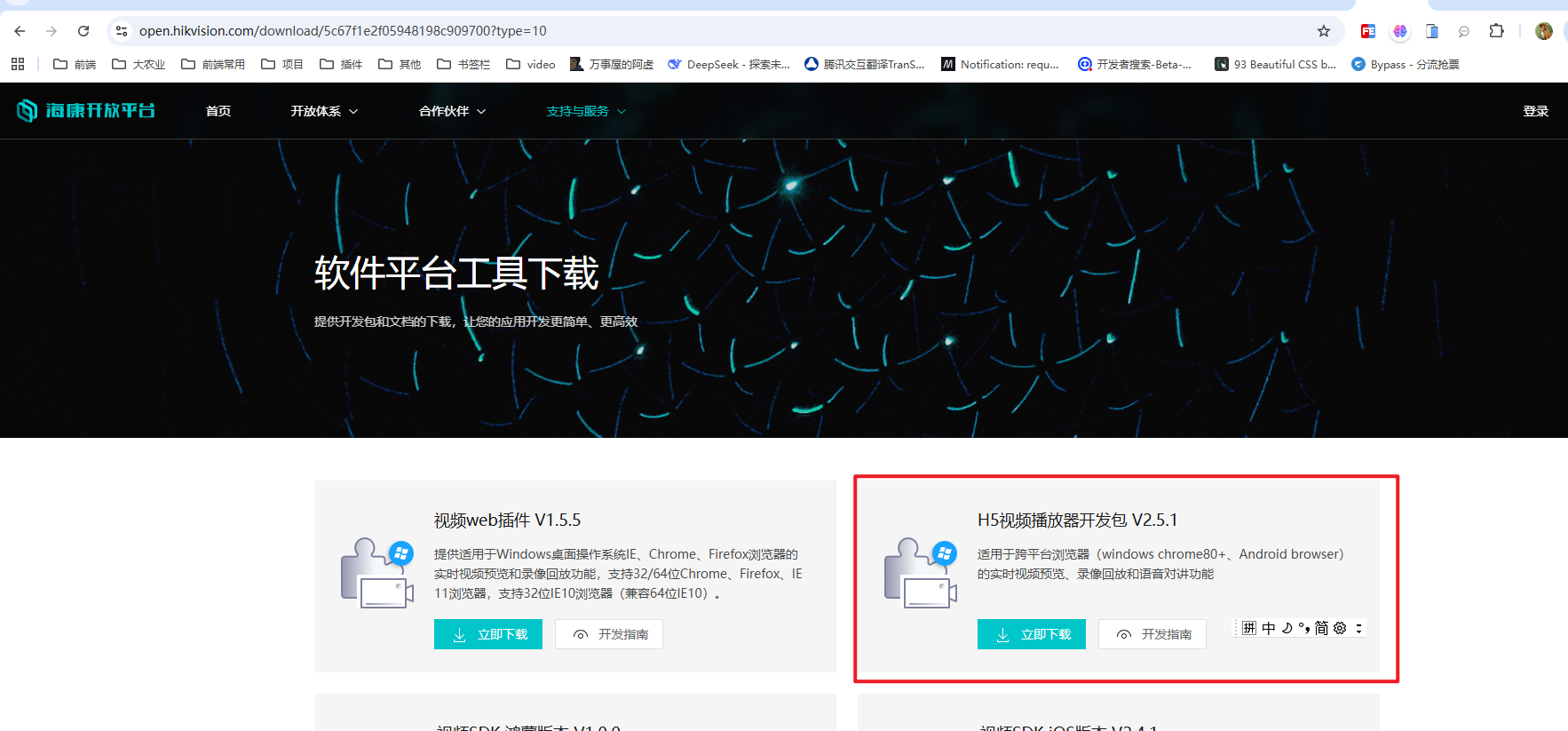
4.H5可以使用海康给提供的列子,或者自己改造下,注意在引入一些js文件要放在public\static下还有utils下面也放了h5player.min.js
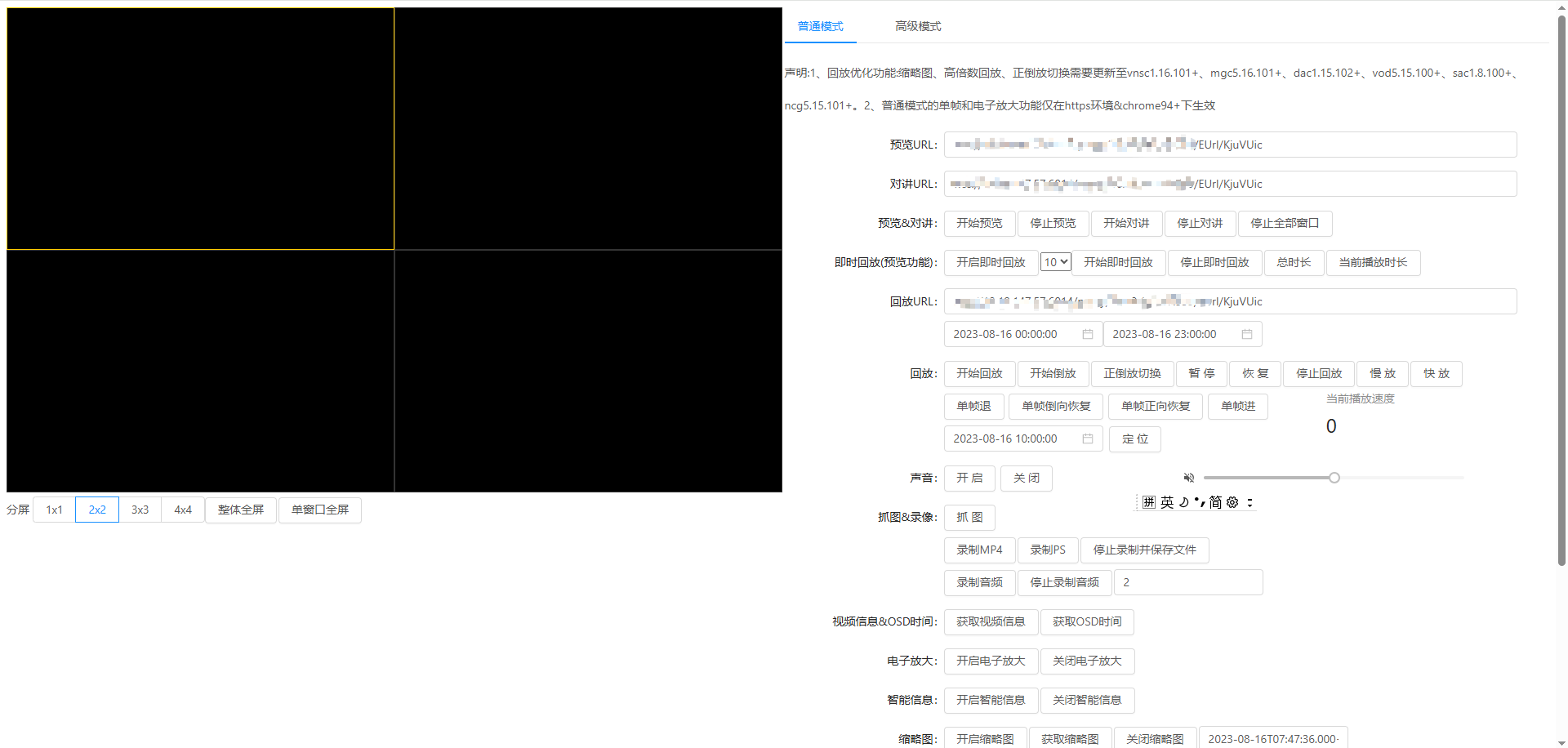
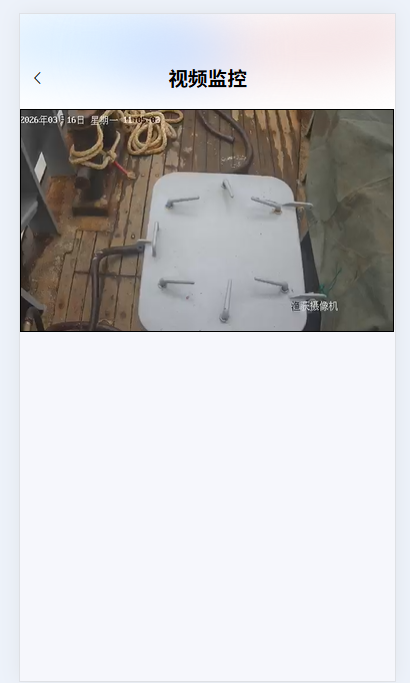
拿来我改造了下
<template>
  <view class="content-pages">
      <web-view :src="webplayerUrl"></web-view>
  </view>
</template>
<script>
import { deviceList, previewUrl } from "@/api/ship";
export default {
  components: {
  },
  data() {
    return {
      ws: null,
      webplayerUrl: null,
      canvas: null,
      ctx: null,
      canvasWidth: 375,
      canvasHeight: 210,
      isConnected: false,
      error: '',
      cameraIndexCode: '',
      wsUrl: "",
    };
  },
  onPageScroll({ scrollTop }) {
    const max = 60;
    if (scrollTop < max) {
      const num = scrollTop / max;
      const c = 255 - parseInt((255 - 51) * num);
      this.navBarColor = `rgb(${c}, ${c}, ${c})`;
      this.navBarBgColor = `rgba(255, 255, 255,${num})`;
      this.navBarOpacity = num.toFixed(3);
    } else {
      this.navBarColor = "rgb(51, 51, 51)";
      this.navBarBgColor = "rgba(255, 255, 255,1)";
      this.navBarOpacity = 1;
    }
  },
  onLoad(options) {
    console.log(options.deviceCode,'deviceCodedeviceCode');
    previewUrl({cameraIndexCode: options.deviceCode}).then((res) => {
      console.log(res.data, 'previewUrl');
      this.wsUrl = res.data;
      this.previewURLs();
    });

    // this.previewURLs();
  },

  methods: {
    // 获取视频流
previewURLs(){
		console.log("previewURLs",this.wsUrl);
		//本地起起来的h5地址
		 this.webplayerUrl="http://10.96.105.182:8080/#/video?cameraUrl="+this.wsUrl


},
    back() {
      uni.navigateBack();
    },
  },
};
</script>

<style lang="scss">
</style>
h5代码
<template>
  <div :class="['bg', activePage == 1 ? 'page-bg1' : '']">
    <div class="uns-navbar">
      <div class="f_h_x">
        <div class="lefts "><span class="el-icon-arrow-left icons" @click="balcks"></span></div>
        <div class="titles">视频监控</div>
        <div class="rights"></div>
      </div>

    </div>
    <div >
      <div id="player"></div>
    </div>

  </div>
</template>

<script>
const IS_MOVE_DEVICE = document.body.clientWidth < 992 // 是否移动设备
    const MSE_IS_SUPPORT = !!window.MediaSource // 是否支持mse
import {
  getShipTrajectory,
  getShipingLog,
  getShipVideoList,
  choose,
  listWarning,
  handleWarning,
  errorTouchWarning,dictTypeES,dictList,appWarningAnalysies,getInfo

} from "@/api/ship";
import '@/utils/h5player.min.js'
export default {
  data() {
    let self = this;
    return {
      activePage: 1,
      imgids: ["1972602088056504321"], // 修改这里,从null改为空数组
      handlingMethod: null,
      dialogVisible: false,
      showchuli: true,
      active: 1,
      timeArr: [new Date((+new Date()-7*24*60*60*1000)).toISOString().split("T")[0], new Date().toISOString().split("T")[0]],
      options1: [],
      options: [],
      options2: [],
      warningStatus:"",
      status: {
      "1971097454083141633": "未处理",
        "1971097505111044097": "已处理:已提醒",
        "1971097629816090626": " 误触",
      },
      arr1: [
        // {
        //   name: "检测到1人未穿救生衣",
        //   time1: "2025-09-14",
        //   time2: "10:00:00",
        //   status: "未处理",
        //   status1: "1",
        //   id: 1,
        // },
      ],
      arr2: [
        // {
        //   name: "岗位状态检测",
        //   num: "20",
        //   id: 1,
        // },

      ],
      startDatePicker: {
        disabledDate(time, timeArr) {
          return self.timeArr[1]
            ? time.getTime() > new Date(self.timeArr[1]) - 24 * 60 * 60 * 1000
            : false;
        },
      },
      endDatePicker: {
        disabledDate(time, timeArr) {
          return self.timeArr[0]
            ? time.getTime() < new Date(self.timeArr[0])
            : false;
        },
      },
      pointList: [], // 船舶轨迹
      shipingLogData: {}, // 捕捞日志
      videoList: [], // 监控列表
      shipName: "", // 船舶名称
      selectBreed: "jqy", // 选择的种类
      selectedItem: null, // 选中的告警项ID
      region: null, // 选中的告警项ID
      shipBaseInfo:null,
      itemInfo: null,
      form: {
        name: "",
        date: "",
      },
    };
  },
  watch: {},
  mounted() {
        this.$el.style.setProperty('display', 'block')
        this.init()
        this.createPlayer()
        this.realplay()
  },
  methods: {
    wholeFullScreen() {
          this.player.JS_FullScreenDisplay(true).then(
            () => { console.log(`wholeFullScreen success`) },
            e => { console.error(e) }
          )
        },
        //取url中的参数值
        GetQueryString(name) {
          var reg = new RegExp("(^|&)" + name + "=([^&]*)(&|$)", "i");
          var r = window.location.search.substr(1).match(reg);
          if (r != null) return unescape(r[2]);
          return null;
        },
        init() {
          // 设置播放容器的宽高并监听窗口大小变化
          window.addEventListener('resize', () => {
            this.player.JS_Resize()
          })
        },
        createPlayer() {
          this.player = new JSPlugin({
            szId: 'player',//父窗口id,需要英文字母开头 必填
            szBasePath: "./",// 必填,与h5player.min.js的引用路径一致
            iMaxSplit: 1,
            iCurrentSplit: 1,
            openDebug: true,
            mseWorkerEnable: false,//是否开启多线程解码,分辨率大于1080P建议开启,否则可能卡顿
            bSupporDoubleClickFull: true,//是否支持双击全屏,true-双击是全屏;false-双击无响应
            oStyle: {
              borderSelect: IS_MOVE_DEVICE ? '#000' : '#FFCC00',
            }
          })

          // 事件回调绑定
          this.player.JS_SetWindowControlCallback({
            windowEventSelect: function (iWndIndex) {  //插件选中窗口回调
              console.log('windowSelect callback: ', iWndIndex);
            },
            pluginErrorHandler: function (iWndIndex, iErrorCode, oError) {  //插件错误回调
              console.log('pluginError callback: ', iWndIndex, iErrorCode, oError);
            },
            windowEventOver: function (iWndIndex) {  //鼠标移过回调
              //console.log(iWndIndex);
            },
            windowEventOut: function (iWndIndex) {  //鼠标移出回调
              //console.log(iWndIndex);
            },
            windowEventUp: function (iWndIndex) {  //鼠标mouseup事件回调
              //console.log(iWndIndex);
            },
            windowFullCcreenChange: function (bFull) {  //全屏切换回调
              console.log('fullScreen callback: ', bFull);
            },
            firstFrameDisplay: function (iWndIndex, iWidth, iHeight) {  //首帧显示回调
              console.log('firstFrame loaded callback: ', iWndIndex, iWidth, iHeight);
            },
            performanceLack: function (iWndIndex) {  //性能不足回调
              console.log('performanceLack callback: ', iWndIndex);
            },
            StreamEnd: function (iWndIndex) {  //性能不足回调
              console.log('recv StreamEnd: ', iWndIndex);
            },
            StreamHeadChanged: function (iWndIndex) {
              console.log('recv StreamHeadChanged: ', iWndIndex);
            },
            ThumbnailsEvent: (iWndIndex, eventType, eventCode) => {
              console.log('recv ThumbnailsEvent: ' + iWndIndex + ", eventType:" + eventType + ", eventCode:" + eventCode);
            },
            InterruptStream: (iWndIndex, iTime) => {
              console.log('recv InterruptStream: ' + iWndIndex + ", iTime:" + iTime);
            },
            ElementChanged: (iWndIndex, szElementType) => {//回调采用的是video还是canvas
              console.log('recv ElementChanged: ' + iWndIndex + ", szElementType:" + szElementType);
            },
          });
        },
        /* 预览&对讲 */
        realplay() {
          let { cameraUrl }=this.$route.query
          console.log(cameraUrl,'cameraUrl----------------------');
          let { player, mode,  token } = this,
            index = player.currentWindowIndex,
            playURL = cameraUrl
          player.JS_SetTraceId(index, true)
          player.JS_Play(playURL, { playURL, mode, keepDecoder: 0, token }, index).then(
            () => {
              console.log('realplay success');
              player.JS_GetTraceId(index).then((id) => { console.log("traceid:", id) })
            },
            e => { console.error(e) }
          )
        },
        stopPlay() {
          this.player.JS_Stop().then(
            () => { this.playback.rate = 0; console.log('stop realplay success') },
            e => { console.error(e) }
          )
        },
    getInfo() {
      getInfo().then((res) => {
        if (res.code == 200) {
          let {user} = res.data;
          localStorage.setItem("userInfoApp", JSON.stringify(user));
        }
      });
    },
    balcks() {
     if (window.uni && window.uni.postMessage) {
      // uni.reLaunch({
			// 			url: '/entry/detail/index'
			// 		})
          uni.navigateBack();
            }
    },
    wuchu(id) {
      errorTouchWarning({ id: id }).then((res) => {
        if (res.code == 200) {
        this.handleClose();
        this.$toast.success('操作成功')
          this.listWarningList();
        }
      });
    },
    changedictTypeES() {
    dictList({dictTypes: "handling_method"}).then((res) => {
      if (res.code == 200) {

        this.options1 = res.data.handling_method.map((item) => {
          return {
            ...item,
            label: item.dictLabel,
            value: item.dictCode,
          };
        });
      }
    });
      },
    changedictdetection() {
    dictList({dictTypes: "detection_type"}).then((res) => {
      if (res.code == 200) {

        this.options2= res.data.detection_type.map((item) => {
          return {
            ...item,
            label: item.dictLabel,
            value: item.dictCode,
          };
        });
      }
    });
      },
    tijiao(id) {

      if (!this.handlingMethod) {
           this.$toast({
             message: '请选择处理方式',
             icon: ''
           })
          return;
      }
      this.$confirm("确认处理?")
        .then((_) => {
          handleWarning({ id: id,handlingMethod: this.handlingMethod }).then((res) => {
            if (res.code == 200) {
              this.handleClose();
                this.$toast({
                  message: '操作成功',
                  icon: ''
                })
              this.listWarningList();
            }
          });
        })
        .catch((_) => {});
    },
    listWarningList() {
      this.arr1 = []
      // 如果imgids数组为空,则传入空数组,否则使用imgids数组
      let arr = this.imgids.length > 0 ? this.imgids : []
      let id = this.options.find(item => item.value == this.form.region)?.id
      listWarning({
        trawlerId: id,
        startTime: this.timeArr[0]||'',
        endTime: this.timeArr[1]||'',
        detectionTypes: arr
      }).then((res) => {
        if (res.code == 200) {
          this.arr1 = res.data.map((item) => {
            return {
              ...item,
              name: item.warningAnalysisName,
              time1: item.triggerTime.split(" ")[0],
              time2: item.triggerTime.split(" ")[1],
              status: item.warningStatusName,
              status1: item.warningStatus,
              id: item.id,
            };
          });
        }
      });
    },
    getUrlParams(type) {
      // 通过 ? 分割获取后面的参数字符串
      let urlStr = location.href.split("?")[1];
      // 创建空对象存储参数
      let obj = {};
      // 再通过 & 将每一个参数单独分割出来
      let paramsArr = urlStr.split("&");
      for (let i = 0, len = paramsArr.length; i < len; i++) {
        // 再通过 = 将每一个参数分割为 key:value 的形式
        let arr = paramsArr[i].split("=");
        obj[arr[0]] = arr[1] || "";
      }
      if (typeof type === "string") {
        return obj[type] || "";
      }
      return obj;
    },
    handleClose(done) {
      this.handlingMethod = null;
      this.warningStatus = "";
      this.showchuli = true;
      this.dialogVisible = false;
    },
    selectItems(id) {
      console.log('id', id);
      // 检查id是否已经在数组中
      const index = this.imgids.indexOf(id);
      if (index > -1) {
        // 如果已经存在,则移除(取消选择)
        this.imgids.splice(index, 1);
      } else {
        // 如果不存在,则添加(选择)
        this.imgids.push(id);
      }
      this.listWarningList();
    },
    changeTime(val, type) {
      this.timeArr[type] = val;
      type==1&&this.$refs.kMap.getShipLine(this.form.region);
    },
    selectData(value) {
      this.active = value;
    },
    selectChange() {
      this.region = this.form.region;
      console.log('region',this.region);
      // this.getShipLine(this.form.region);
    this.getappWarningAnalysies();

    },
    chooseAee() {
      choose().then((res) => {
        if (res.code == 200) {
          this.options = res.data.map((item) => {
            return {
              ...item,
              label: item.name,
              value: item.registryNumber,
            };
          });
        }
      });
    },
    getappWarningAnalysies() {
      let id = this.options.find(item => item.value == this.form.region)?.id
      appWarningAnalysies({trawlerId: id||''}).then((res) => {
        if (res.code == 200) {
          this.options2= res.data.map((item) => {
          return {
            ...item,
            label: item.dictLabel,
            value: item.dictCount,
          };
        });
        }
      });
      },
    // 获取船舶监控列表
    getShipVideos(id) {
      const param = {
        trawlerId: id,
        deviceType: "1914262743520473089",
      };
      // const left = [38, 40, 38, 53, 61]
      // const top = [60, 70, 39, 62, 55]
      const left = [44, 50, 30, 70, 61];
      const top = [40, 50, 50, 40, 35];
      getShipVideoList(param).then((res) => {
        if (res.code == 200) {
          const list = res.rows.map((item, index) => {
            item.left = left[index];
            item.top = top[index];
            return item;
          });
          this.videoList = list;
        }
      });
    },
    // 根据监控id获取视频地址
    handleVideoUrl(code) {},
    // 船舶轨迹v
    getShipLine(v) {
      getShipTrajectory(v).then((res) => {

        if (res.code == 200) {
          this.pointList = res.data;
        }
      });
    },
    // 获取捕捞日志
    getShiping() {
      const param = {
        trawlerId: "1970416265257103362",
      };
      getShipingLog(param).then((res) => {
        if (res.code == 200) {
          this.shipingLogData = res.data.map((item) => {
            return {
              ...item,
              time: item.workStartTime.split(" ")[1],
              date: item.workStartTime.split(" ")[0].split("-")[2],
            };
          })[0];
        }
      });
    },
    back() {
      this.$router.push({ path: "/am" });
    },
    changeActive(value) {
      const name = this.$route.query.shipName;
      this.shipName = name;
      this.activePage = value;
    },
    // 处理告警项点击事件
    handleItemClick(item) {
      this.selectedItem = item.id; // 设置选中项
      this.itemInfo = item; // 设置选中项
      this.warningStatus = item.warningStatus; // 设置选中项
      setTimeout(() => {
        this.dialogVisible = true; // 显示弹窗
        this.changedictTypeES(); // 告警状态字典
      }, 300);
      // 这里可以添加具体的点击逻辑
      // 比如:显示详情、跳转页面、播放视频等
    },
  },
};
</script>
<style>
@media (max-width: 730px) {
 .el-message-box {
   width: 15rem !important;
   margin: 100px auto !important; /* 水平居中 */
 }
}
 @media screen and (max-width: 991px) {
      #player {
        width: 100vw;
        height: calc((100vw - 16px) * 5 / 8);
      }
    }

    @media screen and (min-width: 992px) {
      #player {
        width: 100vw;
        height: calc((50vw - 8px) * 5 / 8);
      }
    }
</style>
<style lang="scss" scoped>
.bg {
  width: 100%;
  height: 100%;
  // background: url("~@/assets/pageBg_new.png") no-repeat;
  // background-size: 100% 100%;
}
::v-deep .el-form-item {
    margin-bottom: 8px;
}
::v-deep .el-message-box {
   width: 15rem;
}
::v-deep .el-input--prefix .el-input__inner
 {
    padding-right: 10px;
    padding-left: 25px;
}
.f_ate{
      width: 100%;
      height: 100%;
      display: flex;
      flex-wrap: wrap;
}
.box1{
      height: 23px;
      margin: 0 5px 5px 0;
      flex: 0 0 calc((100% - 10px)/2);
    }
    .box1:nth-child(2n) {
          margin-right: 0;
      }
.uns-navbar{
    width: 100%;
    height: 5.9375rem;
    background: url("~@/assets/img/top_bg.png") no-repeat;
    background-size: cover;
    position: sticky;
    top: 0;
    z-index: 999;
    .f_h_x{
      display: flex;
      // justify-content: space-between;
    }
    .lefts{
      flex: 1;
      .icons{
        display: inline-block;
    font-size: 16px;
    height: 6rem;
    line-height: 8rem;
    padding-left: 10px;
      }
    }
    .titles{
      flex: 3;
      font-family: YouSheBiaoTiHei, YouSheBiaoTiHei;
      font-weight: 600;
      font-size: 1.23rem;
      color: #000;
      line-height: 8rem;
      height: 5rem;
      text-align: center;
      font-style: normal;
    }
    .rights{
      flex: 1;
    }

}
.status_x {
  width: 100%;
  height: 30px;
  line-height: 30px;
  text-align: center;
  border-radius: 5px;
  font-size: 14px;
}
.cc1 {
  border: 1px solid #82e611c4;
  color: #82e611c4;
}
.cc2 {
  border: 1px solid #e6a700;
  color: #e6a700;
}
::v-deep .el-dialog__footer {
  text-align: center;
}
.cont_txt {
  font-family: PingFang SC, PingFang SC;
  font-weight: 400;
  font-size: 14px;
  color: #333333;
  line-height: 30px;
  text-align: left;
  font-style: normal;
  margin-left: 10px;
}
.txt_timer {
  font-family: PingFang SC, PingFang SC;
  font-weight: 400;
  font-size: 14px;
  color: #333333;
  line-height: 30px;
  text-align: left;
  font-style: normal;
  margin-left: 10px;
}
.cont_txt1 {
  border-bottom: 1px dashed #cccccc;
}
.txt_time {
  font-family: PingFang SC, PingFang SC;
  font-weight: 400;
  font-size: 18px;
  color: #ec4c57;
  line-height: 39px;
  margin-left: 6px;
}
.dia_content {
  .dix_ff {
    display: flex;
    justify-content: space-between;
    .one {
      width: 19rem;
      height: 21rem;
      overflow: hidden;
    }
    .two {
      width: 100px;
      height: 90px;
      overflow: hidden;
    }
  }
}
::v-deep .el-dialog__body {
  padding: 10px;
}
::v-deep .el-dialog__header {
  // display: none;
}
.container {
  width: 100%;
  max-width: 100%;
  margin: 0 auto;
  background: #fff;
}
</style>