开发接口(授权)
一、概述
部分接口需要经过用户授权同意才能调用。我们把这些接口按使用范围分成多个scope,用户选择对scope进行授权,当授权给一个scope之后,其对应的所有接口都可以直接使用。此类接口调用时:
- 如果用户未接受或拒绝过此权限,会弹窗询问用户,用户单击同意后方可调用接口。
- 如果用户已授权,可以直接调用接口。
- 如果用户已拒绝授权,则不会出现弹窗,而会直接进入接口fail回调。
此类接口在权限中的对象scope的字段和接口的对应关系如表所示。
| scope | 对应接口 | 描述 |
|---|---|---|
cope.userInfo |
wx.getUserInfo | 用户信息(小程序已回收,请使用头像昵称填写,小游戏可继续调用) |
scope.userLocation |
wx.getLocation wx.startLocationUpdate MapContext.moveToLocation | 精确地理位置 |
scope.userFuzzyLocation |
wx.getFuzzyLocation | 模糊地理位置 |
scope.userLocationBackground |
wx.startLocationUpdateBackground | 后台定位 |
scope.address |
wx.chooseAddress | 通讯地址(已取消授权,可以直接调用对应接口) |
scope.invoiceTitle |
wx.chooseInvoiceTitle | 发票抬头(已取消授权,可以直接调用对应接口) |
scope.invoice |
wx.chooseInvoice | 获取发票(已取消授权,可以直接调用对应接口) |
scope.werun |
wx.getWeRunData | 微信运动步数 |
scope.record |
live-pusher组件 wx.startRecord wx.joinVoIPChat RecorderManager.start | 录音功能 |
scope.writePhotosAlbum |
wx.saveImageToPhotosAlbum wx.saveVideoToPhotosAlbum | 保存到相册 |
scope.camera |
camera组件 live-pusher组件 wx.createVKSession | 摄像头 |
scope.bluetooth |
wx.openBluetoothAdapter wx.createBLEPeripheralServer | 蓝牙 |
scope.addPhoneContact |
wx.addPhoneContact | 添加通讯录联系人 |
addPhoneCalendar |
wx.addPhoneRepeatCalendar wx.addPhoneCalendar | 系统日历 |
二、授权接口
2.1、wx.authorizeForMiniProgram
仅小程序插件中能调用该接口,用法同 wx.authorize。目前仅支持三种 scope(见下)。
参数:Object object
| 属性 | 类型 | 默认值 | 必填 | 说明 |
|---|---|---|---|---|
scope |
string | 是 | 需要获取权限的 scope,可选值如下: scope.record scope.writePhotosAlbum scope.camera |
|
success |
function | 否 | 接口调用成功的回调函数 | |
fail |
function | 否 | 接口调用失败的回调函数 | |
complete |
function | 否 | 接口调用结束的回调函数(调用成功、失败都会执行) |
js
wx.authorizeForMiniProgram({
  scope: 'scope.record',
  success () {
    // 用户已经同意小程序使用录音功能,后续调用 wx.startRecord 接口不会弹窗询问
    wx.startRecord()
  }
})
2.2、wx.authorize
提前向用户发起授权请求。调用后会立刻弹窗询问用户是否同意授权小程序使用某项功能或获取用户的某些数据,但不会实际调用对应接口。如果用户之前已经同意授权,则不会出现弹窗,直接返回成功。
参数:Object object
| 属性 | 类型 | 默认值 | 必填 | 说明 |
|---|---|---|---|---|
scope |
string | 是 | 需要获取权限的 scope | |
success |
function | 否 | 接口调用成功的回调函数 | |
fail |
function | 否 | 接口调用失败的回调函数 | |
complete |
function | 否 | 接口调用结束的回调函数(调用成功、失败都会执行) |
js
// 可以通过 wx.getSetting 先查询一下用户是否授权了 "scope.record" 这个 scope
wx.getSetting({
  success(res) {
    if (!res.authSetting['scope.record']) {
      wx.authorize({
        scope: 'scope.record',
        success () {
          // 用户已经同意小程序使用录音功能,后续调用 wx.startRecord 接口不会弹窗询问
          wx.startRecord()
        }
      })
    }
  }
})
三、设置接口
3.1、wx.openSetting
调起客户端小程序设置界面,返回用户设置的操作结果。设置界面只会出现小程序已经向用户请求过的权限。
参数:Object object
| 属性 | 类型 | 默认值 | 必填 | 说明 |
|---|---|---|---|---|
withSubscriptions |
Boolean | false | 否 | 是否同时获取用户订阅消息的订阅状态,默认不获取。注意:withSubscriptions 只返回用户勾选过订阅面板中的"总是保持以上选择,不再询问"的订阅消息。 |
success |
function | 否 | 接口调用成功的回调函数 | |
fail |
function | 否 | 接口调用失败的回调函数 | |
complete |
function | 否 | 接口调用结束的回调函数(调用成功、失败都会执行) |
object.success回调函数:
参数 Object res
| 属性 | 类型 | 说明 |
|---|---|---|
| authSetting | AuthSetting | 用户授权结果 |
| subscriptionsSetting | SubscriptionsSetting | 用户订阅消息设置,接口参数withSubscriptions值为true时才会返回。 |
注意:2.3.0 版本开始,用户发生点击行为后,才可以跳转打开设置页,管理授权信息。
调整后"打开小程序设置页"将支持以下两种实现方式:
方法1:使用 button 组件来使用此功能,示例代码如下:
js
<button open-type="openSetting" bindopensetting="callback">打开设置页</button>方法2:由点击行为触发wx.openSetting接口的调用,示例代码如下:
js
<button bindtap="openSetting">打开设置页</button> openSetting() { wx.openSetting()}3.2、wx.getSetting
获取用户的当前设置。返回值中只会出现小程序已经向用户请求过的权限。
参数:Object object
| 属性 | 类型 | 默认值 | 必填 | 说明 |
|---|---|---|---|---|
withSubscriptions |
Boolean | false | 否 | 是否同时获取用户订阅消息的订阅状态,默认不获取。注意:withSubscriptions 只返回用户勾选过订阅面板中的"总是保持以上选择,不再询问"的订阅消息。 |
success |
function | 否 | 接口调用成功的回调函数 | |
fail |
function | 否 | 接口调用失败的回调函数 | |
complete |
function | 否 | 接口调用结束的回调函数(调用成功、失败都会执行) |
object.success回调函数:
参数 Object res
| 属性 | 类型 | 说明 |
|---|---|---|
| authSetting | AuthSetting | 用户授权结果 |
| subscriptionsSetting | SubscriptionsSetting | 用户订阅消息设置,接口参数withSubscriptions值为true时才会返回。 |
| miniprogramAuthSetting | AuthSetting | 在插件中调用时,当前宿主小程序的用户授权结果 |
js
wx.getSetting({
  success (res) {
    console.log(res.authSetting)
    // res.authSetting = {
    //   "scope.userInfo": true,
    //   "scope.userLocation": true
    // }
  }
})
js
wx.getSetting({
  withSubscriptions: true,
  success (res) {
    console.log(res.authSetting)
    // res.authSetting = {
    //   "scope.userInfo": true,
    //   "scope.userLocation": true
    // }
    console.log(res.subscriptionsSetting)
    // res.subscriptionsSetting = {
    //   mainSwitch: true, // 订阅消息总开关
    //   itemSettings: {   // 每一项开关
    //     SYS_MSG_TYPE_INTERACTIVE: 'accept', // 小游戏系统订阅消息
    //     SYS_MSG_TYPE_RANK: 'accept'
    //     zun-LzcQyW-edafCVvzPkK4de2Rllr1fFpw2A_x0oXE: 'reject', // 普通一次性订阅消息
    //     ke_OZC_66gZxALLcsuI7ilCJSP2OJ2vWo2ooUPpkWrw: 'ban',
    //   }
    // }
  }
})
3.3、AuthSetting
用户授权设置信息
boolean scope.userInfo
是否授权用户信息,对应接口 wx.getUserInfoboolean scope.userLocation
是否授权精确地理位置,对应接口 wx.getLocation, wx.chooseLocationboolean scope.userFuzzyLocation
是否授权模糊地理位置,对应接口 wx.getFuzzyLocationboolean scope.address
是否授权通讯地址,已取消此项授权,会默认返回trueboolean scope.invoiceTitle
是否授权发票抬头,已取消此项授权,会默认返回trueboolean scope.invoice
是否授权获取发票,已取消此项授权,会默认返回trueboolean scope.werun
是否授权微信运动步数,对应接口 wx.getWeRunDataboolean scope.record
是否授权录音功能,对应接口 wx.getRecorderManagerboolean scope.writePhotosAlbum
是否授权保存到相册 wx.saveImageToPhotosAlbum, wx.saveVideoToPhotosAlbumboolean scope.camera
是否授权摄像头,对应camera 组件boolean scope.bluetooth
是否授权蓝牙,对应接口 wx.openBluetoothAdapter、wx.createBLEPeripheralServerboolean scope.addPhoneContact
是否添加通讯录联系人,对应接口 wx.addPhoneContactboolean scope.addPhoneCalendar
是否授权系统日历,对应接口 wx.addPhoneRepeatCalendar、wx.addPhoneCalendar
3.4、SubscriptionsSetting
订阅消息设置
Boolean mainSwitch
订阅消息总开关,true为开启,false为关闭Object itemSettings
每一项订阅消息的订阅状态。itemSettings对象的键为一次性订阅消息的模板id或系统订阅消息的类型,值为'accept'、'reject'、'ban'中的其中一种。'accept'表示用户同意订阅这条消息,'reject'表示用户拒绝订阅这条消息,'ban'表示已被后台封禁。
itemSettings 只返回用户勾选过订阅面板中的"总是保持以上选择,不再询问"的订阅消息。
js
wx.getSetting({
  withSubscriptions: true,
  success (res) {
    console.log(res.authSetting)
    // res.authSetting = {
    //   "scope.userInfo": true,
    //   "scope.userLocation": true
    // }
    console.log(res.subscriptionsSetting)
    // res.subscriptionsSetting = {
    //   mainSwitch: true, // 订阅消息总开关
    //   itemSettings: {   // 每一项开关
    //     SYS_MSG_TYPE_INTERACTIVE: 'accept', // 小游戏系统订阅消息
    //     SYS_MSG_TYPE_RANK: 'accept'
    //     zun-LzcQyW-edafCVvzPkK4de2Rllr1fFpw2A_x0oXE: 'reject', // 普通一次性订阅消息
    //     ke_OZC_66gZxALLcsuI7ilCJSP2OJ2vWo2ooUPpkWrw: 'ban',
    //   }
    // }
  }
})
四、示例
app.json
json
"permission": {
    "scope.userLocation": {
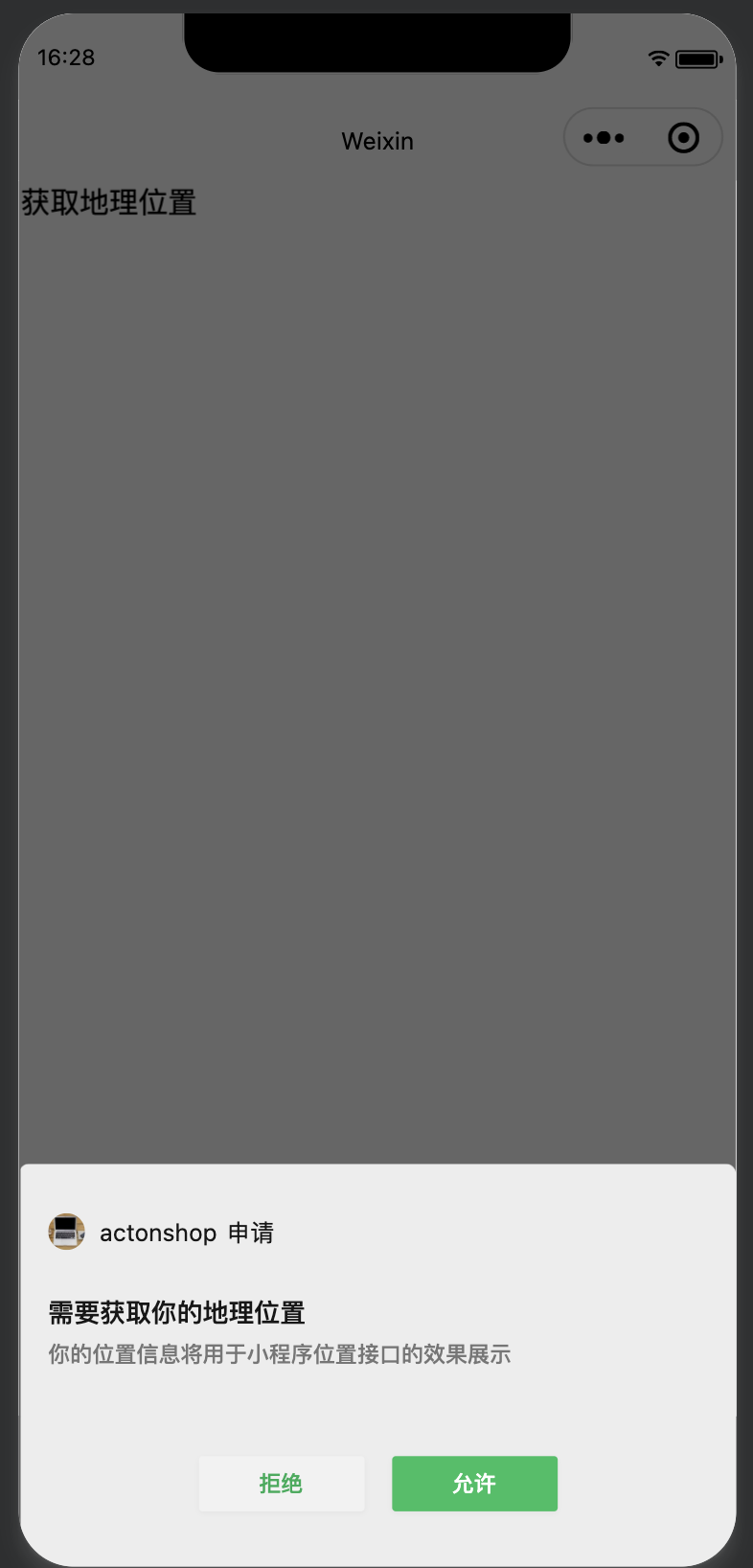
      "desc": "你的位置信息将用于小程序位置接口的效果展示"
    }
  },
  "requiredPrivateInfos": ["chooseLocation", "getLocation"],
html
<view class="body" bind:tap="location">获取地理位置</view>
<view class="body">{{context}}</view>
js
Page({
  onLoad: function() {
    context: ''
  },
  location: function(){
    wx.getSetting({
      success: (res)=>{
        console.log(res)
        if(!res.authSetting['scope.userLocation']) {
          wx.authorize({
            scope: 'scope.userLocation',
            success: (res)=>{
              wx.getLocation({
                success: (res)=>{
                  console.log("aa")
                  this.setData({
                    context: "你所在的精度是" + res.latitude + "你所在的维度是" + res.longitude
                  })
                }
              })
            }
          })
        }
      }
    })
  }
})