hello~ 很高兴见到大家! 这次带来的是Linux系统中关于进程间通信这部分的一些知识点,如果对你有所帮助的话,可否留下你宝贵的三连呢?
个 人 主 页 : 默|笙

文章目录
- 一、进程池
-
- [1.1 进程池介绍](#1.1 进程池介绍)
- [1.2 进程池代码](#1.2 进程池代码)
一、进程池
1.1 进程池介绍
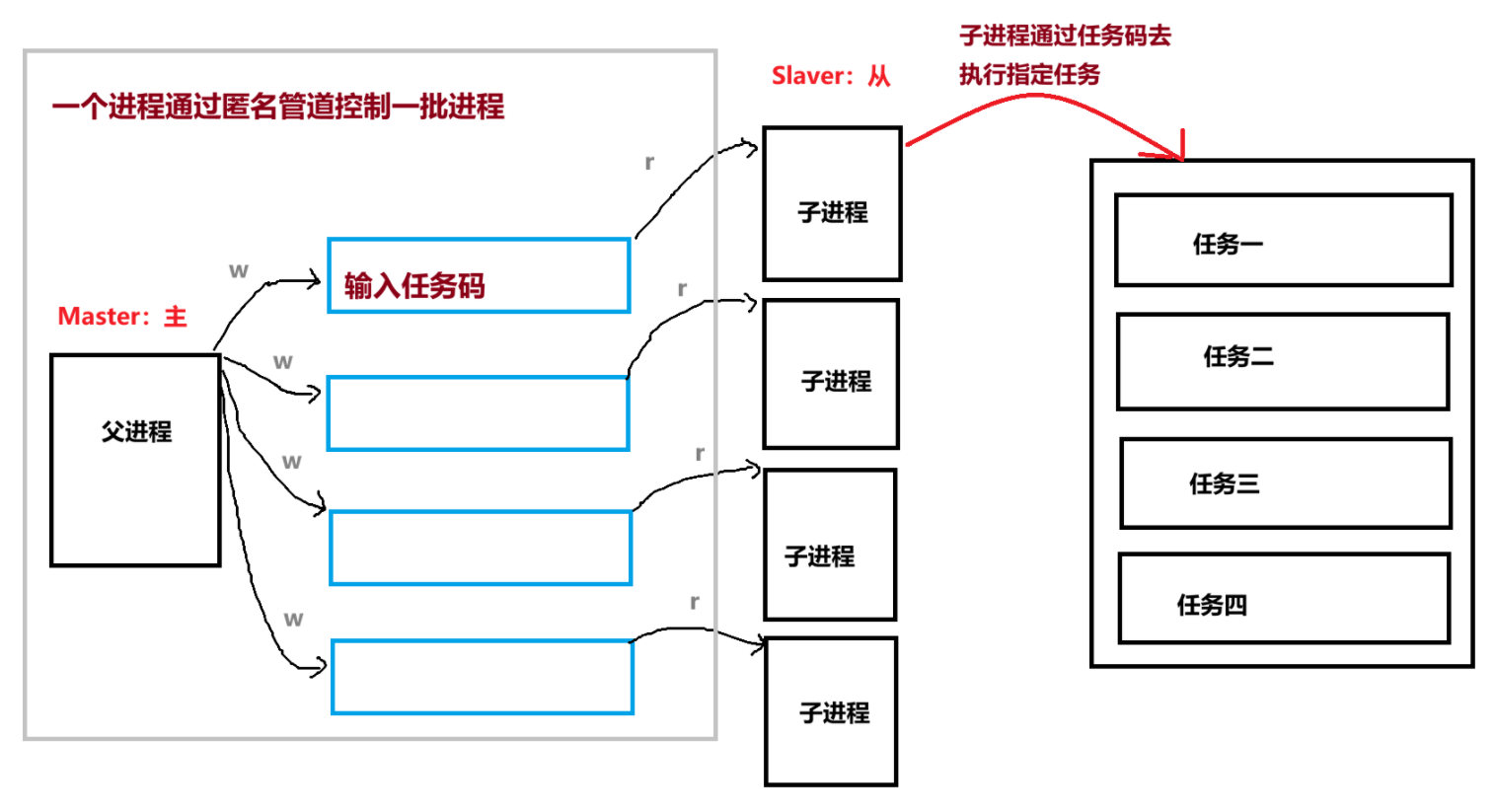
- 一个父进程可以创建多个子进程,且父进程能够与每一个创建的子进程建立独立的匿名管道(每个子进程对应一对管道读写端);利用匿名管道 "读端在管道为空时会阻塞等待写端写入" 的特性,父进程可以通过往指定子进程对应的管道写端中写入任务码(及任务参数),精准指定某个子进程执行对应的任务。
- 进程池的核心思想是:预先创建好一组固定数量的子进程并让其处于 "待命状态"(阻塞在管道读端等待任务),当有任务需要处理时,无需临时调用fork()创建子进程,直接通过管道向空闲子进程分发任务即可。跟预制菜一个道理。
1.2 进程池代码
- 首先得固定从管道里面进行读写都必须以四个字节也就是一个整数为单位。
- 指定某个子进程有轮询、随机和权重的方式,下面实现轮询模式,指定任务是随机指定。
cpp
#include <iostream>
#include <unistd.h>
#include <string>
#include <vector>
#include <cstdlib>
#include <functional>
#include <cstdio>
#include <ctime>
#include <sys/wait.h>

///////////////////////////////子进程要完成的4个任务/////////////////////////
void SyncDisk()
{
    std::cout << getpid() << ": 刷新数据到磁盘任务" << std::endl;
    sleep(1);
}

void Download()
{
    std::cout << getpid() << ": 下载数据到系统中" << std::endl;
    sleep(1);
}

void PrintLog()
{
    std::cout << getpid() << ": 打印日志到本地" << std::endl;
    sleep(1);
}

void UpdateStatus()
{
    std::cout << getpid() << ": 更新一次用户的状态" << std::endl;
    sleep(1);
}

typedef void (*task_t)(); // 函数指针
task_t tasks[4] = {SyncDisk, Download, PrintLog, UpdateStatus};

enum
{
    OK = 0,
    PIPE_ERROR,
    FORK_ERROR
};

void DoTask(int fd)
{
    while (true)
    {
        int task_code = 0;
        int n = read(fd, &task_code, sizeof(task_code));
        if (n == sizeof(task_code))
        {
            if (task_code < 4 && task_code >= 0)
            {
                tasks[task_code]();
            }
        }
        else if (n == 0)
        {
            // 父进程结束,子进程也要退出了
            std::cout << getpid() << "get quit..." << std::endl;
            break;
        }
        else
        {
            perror("read");
            break;
        }
    }
}

int gprocessnum = 5;
using cb_t = std::function<void(int)>;

class ProcessPoll
{
private:
    class Channel
    {
    public:
        Channel(int wfd, pid_t sub_pid) : _wfd(wfd), _sub_pid(sub_pid)
        {
            _sub_name = "sub - channel" + std::to_string(sub_pid);
        }
        ~Channel()
        {
        }
        std::string Name()
        {
            return _sub_name;
        }
        void PrintInfo()
        {
            printf("wfd: %d, who: %d, channel name: %s\n", _wfd, _sub_pid, _sub_name.c_str());
        }
        void ClosePipe()
        {
            close(_wfd);
        }
        void Write(int itask)
        {
            ssize_t n = write(_wfd, &itask, sizeof(itask));
            (void)n;
        }
        void Wait()
        {
            pid_t rid = waitpid(_sub_pid, nullptr, 0);
            (void)rid;
            std::cout << "回收子进程: " << _sub_pid << std::endl;
        }

    private:
        int _wfd;              // 该频道写端的文件描述符
        pid_t _sub_pid;        // 子进程的pid
        std::string _sub_name; // 子进程的名字
    };

public:
    ProcessPoll()
    {
        srand((unsigned int)time(nullptr) ^ getpid());
    }
    ~ProcessPoll()
    {
    }
    void Init(cb_t cb)
    {
        CreateProcessPoll(cb);
    }
    void Run()
    {
        // 父进程负责派发任务
        int cnt = 10;
        while (cnt--)
        {
            std::cout << "----------------------------------" << std::endl;
            // 选择一个任务
            int itask = SelectTask();
            // std::cout << "itask: " << itask << std::endl;
            //  选择一个管道
            int index = SelectChannel();
            // std::cout << "index: " << index << std::endl;

            // 开始分配任务
            printf("发送 %d to %s\n", itask, channels[index].Name().c_str());
            SendTask2Salver(itask, index);
            sleep(1);
        }
    }
    void Quit()
    {
        // 关闭写端
        for (auto &c : channels)
        {
            c.ClosePipe();
        }
        // 回收子进程
        for (auto &c : channels)
        {
            c.Wait();
        }
    }
    void Debug()
    {
        for (auto &c : channels)
        {
            c.PrintInfo();
        }
    }

private:
    void CreateProcessPoll(cb_t cb)
    {
        // 创建多个进程
        for (int i = 0; i < gprocessnum; i++)
        {
            int pipefd[2] = {0};
            int n = pipe(pipefd);
            if (n < 0)
            {
                std::cout << "pipe creat error" << std::endl;
                exit(PIPE_ERROR);
            }
            int id = fork();
            if (id < 0)
            {
                std::cout << "fork error" << std::endl;
                exit(FORK_ERROR);
            }
            else if (id == 0)
            {
                // 子进程要干的事情
                close(pipefd[1]);
                DoTask(pipefd[0]);
                exit(OK);
            }
            else
            {
                // 父进程要干的事情
                close(pipefd[0]);
                // 父进程会拿到子进程的id
                channels.emplace_back(pipefd[1], id);
                std::cout << "创建子进程:" << id << "成功" << std::endl;
                sleep(1);
            }
        }
    }
    int SelectTask()
    {
        int itask = rand() % 4;
        return itask;
    }
    int SelectChannel()
    {
        static int index = 0;
        int selected = index;
        index++;
        index %= channels.size();

        return selected;
    }
    void SendTask2Salver(int itask, int index)
    {
        if (itask >= 4 || itask < 0)
            return;
        if (index >= channels.size() || index < 0)
            return;
        // 向对应子进程之间的管道写入任务编号
        channels[index].Write(itask);
    }

private:
    std::vector<Channel> channels;
};
int main()
{
    // 创建并初始化进程池
    ProcessPoll pp;
    pp.Init(DoTask);

    pp.Debug();
    // 运行
    pp.Run();
    // 关闭回收
    pp.Quit();

    return 0;
}- 如果父进程要求子进程退出,而管道里还有尚未处理完的任务码,子进程会先把管道里的任务码全部读取并执行完毕,之后再退出。
- 为什么写端要全部关闭之后再对子进程进行回收而不是关闭一个写端回收一个子进程?请看下图。
cpp
//为什么不能够这样写呢?
for (auto &c : channels)
{
    c.ClosePipe();
    c.Wait();
}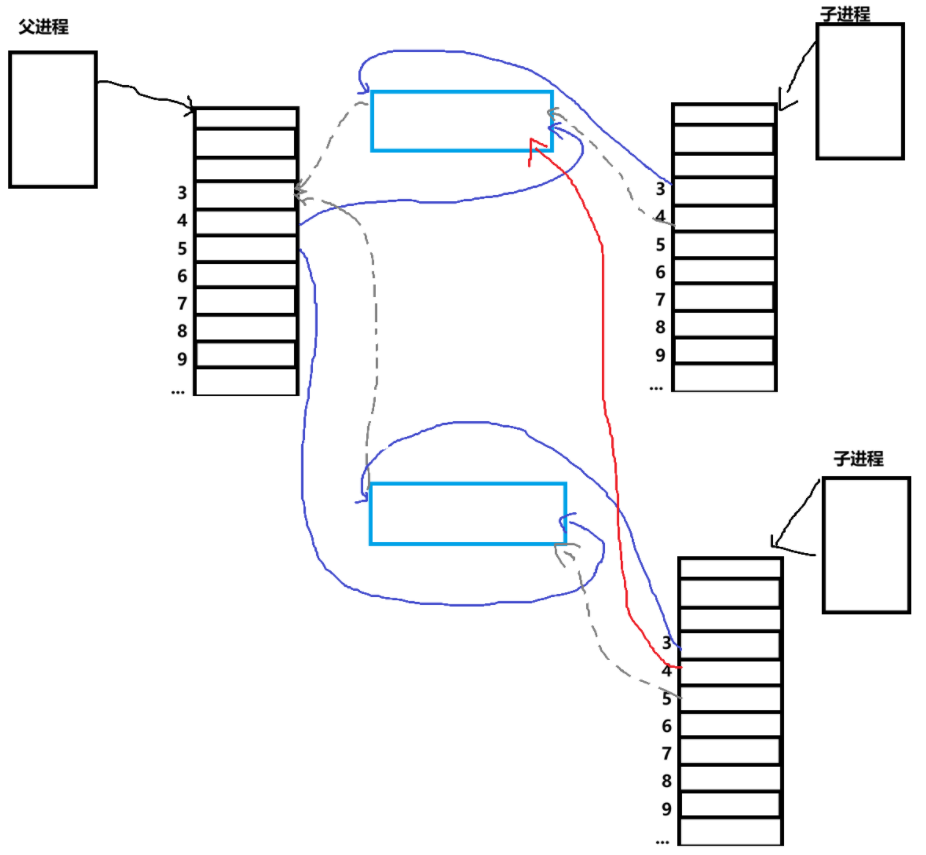
- 灰色标注的是管道创建后被关闭的端。可以看到父进程的 3 号文件描述符永远不会被使用,而所有子进程的 3 号文件描述符都是对应管道的读端。第一个 fork 出的子进程无异常,但 fork 第二个子进程时,它会拷贝父进程中指向第一个管道的写端 ------ 这意味着指向第一个管道写端的并非只有父进程,后续所有子进程都会持有该写端的拷贝。管道的销毁需要其写端引用计数器减至 0,若仅关闭父进程的写端、从第一个子进程开始回收,由于后续子进程都持有第一个管道的写端,第一个子进程的管道永远无法销毁;第二个子进程同理,后续创建的子进程都会持有指向它与父进程之间管道的写端,导致该管道也无法正常销毁。
- 要解决这个问题实现关一个写端回收一个子进程,要么从后往前开始进行回收,要么在创建子进程的时候将多出来的写端关闭。
cpp
//从后往前
int end = channels.size() - 1;
while (end)
{
    channels[end].ClosePipe();
    channels[end].Wait();
    end--;
}
cpp
//关闭多出来的写端,在子进程刚被创建之后就要进行关闭
else if (id == 0)
{
    // 子进程关闭历史wfd,影响的是自己的fd表
    if(!channels.empty())
    {
        for(auto &channel : channels)
            channel.ClosePipe();
    }
    // 子进程要干的事情
    close(pipefd[1]);
    DoTask(pipefd[0]);
    exit(OK);
}
//就能够正向关一个写端回收一个子进程了
for (auto &c : channels)
{
    c.ClosePipe();
    c.Wait();
}
今天的分享就到此结束啦,如果对读者朋友们有所帮助的话,可否留下宝贵的三连呢~~
让我们共同努力, 一起走下去!