一、 ComposeView 核心使用指南
ComposeView 是 Android 原生视图系统(View)和 Jetpack Compose 之间的 "桥梁",核心作用是在传统 View 布局(XML / 代码创建)中嵌入 Compose 界面,比如在 Activity/Fragment/ 自定义 View 中使用 Compose 写局部 UI。
1、前置条件(必配)
首先确保项目已集成 Compose,在 Module 的 build.gradle 中配置:
arduino
android {
   buildFeatures {
       compose true // 启用 Compose
   }

  composeOptions {
    kotlinCompilerExtensionVersion "1.5.3" // 需和 Kotlin 版本匹配(比如 Kotlin 1.9.0 对应 1.5.3)
   }
  }

dependencies {
 // Compose 核心依赖
 implementation "androidx.compose.ui:ui:1.6.0"
 implementation "androidx.compose.material:material:1.6.0"     implementation "androidx.activity:activity-compose:1.8.2" // 关联生命周期
}
二 、核心使用场景(按频率排序)
场景 1:在 XML 布局中嵌入 ComposeView(最常用)
步骤 1:编写 XML 布局(比如 activity_main.xml)
xml
<?xml version="1.0" encoding="utf-8"?>
<LinearLayout xmlns:android="http://schemas.android.com/apk/res/android"
    android:layout_width="match_parent"
    android:layout_height="match_parent"
    android:orientation="vertical">

    <!-- 原生 View -->
    <TextView
        android:layout_width="match_parent"
        android:layout_height="wrap_content"
        android:text="原生View区域"/>

    <!-- 嵌入 ComposeView -->
    <androidx.compose.ui.platform.ComposeView
        android:id="@+id/compose_view"
        android:layout_width="match_parent"
        android:layout_height="wrap_content"/>

</LinearLayout>
步骤 2:在 Activity/Fragment 中绑定并设置 Compose 内容
kotlin
// Activity 示例,
//注意:必须是FragmentActivity,选择AppCompatActivity会报Theme错误;
class MainActivity : FragmentActivity() {
    override fun onCreate(savedInstanceState: Bundle?) {
        super.onCreate(savedInstanceState)
        setContentView(R.layout.activity_main)

        // 找到 ComposeView 并设置 Compose 内容
        val composeView = findViewById<ComposeView>(R.id.compose_view)
        composeView.setContent {
            // 这里写 Compose 代码(和纯 Compose 写法完全一致)
            MaterialTheme {
                Column(
                    modifier = Modifier
                        .fillMaxWidth()
                        .padding(16.dp),
                    horizontalAlignment = Alignment.CenterHorizontally
                ) {
                    Text(text = "Compose 嵌入区域", fontSize = 20.sp)
                    Button(onClick = { Toast.makeText(this@MainActivity, "点击按钮", Toast.LENGTH_SHORT).show() }) {
                        Text("Compose 按钮")
                    }
                }
            }
        }
    }
}
场景 2:纯代码创建 ComposeView(无需 XML)
适合动态添加 Compose 界面到原生 View 容器中:
kotlin
//AppCompatActivity会报错
class MainActivity : FragmentActivity () {
    override fun onCreate(savedInstanceState: Bundle?) {
        super.onCreate(savedInstanceState)

        // 1. 创建 ComposeView 实例
        val composeView = ComposeView(this).apply {
            // 2. 设置 Compose 内容
            setContent {
                MaterialTheme {
                    Text("纯代码创建的 ComposeView", modifier = Modifier.padding(16.dp))
                }
            }
        }

        // 3. 将 ComposeView 添加到原生 View 容器(比如 LinearLayout)
        val rootLayout = LinearLayout(this).apply {
            orientation = LinearLayout.VERTICAL
            layoutParams = ViewGroup.LayoutParams(MATCH_PARENT, MATCH_PARENT)
        }
        rootLayout.addView(composeView)

        // 4. 设置为 Activity 布局
        setContentView(rootLayout))
    }
}
场景 3:在 Fragment 中使用 ComposeView
核心是绑定 viewLifecycleOwner,避免生命周期泄漏:
kotlin
class MyFragment : Fragment() {
    override fun onCreateView(
        inflater: LayoutInflater,
        container: ViewGroup?,
        savedInstanceState: Bundle?
    ): View {
        // 方式1:从 XML 加载(推荐)
        val view = inflater.inflate(R.layout.fragment_my, container, false)
        val composeView = view.findViewById<ComposeView>(R.id.compose_view)

        // 关键:关联 Fragment 的视图生命周期
        composeView.setViewCompositionStrategy(
            ViewCompositionStrategy.DisposeOnViewTreeLifecycleDestroyed
        )
        composeView.setContent {
            MaterialTheme {
                Text("Fragment 中的 ComposeView")
            }
        }
        return view
    }
}
场景 4:在自定义 View 中嵌入 ComposeView
scss
class MyCustomView @JvmOverloads constructor(
    context: Context,
    attrs: AttributeSet? = null,
    defStyleAttr: Int = 0
) : LinearLayout(context, attrs, defStyleAttr) {

    init {
        orientation = VERTICAL

        // 添加原生 View
        addView(TextView(context).apply {
            text = "自定义 View 中的原生文本"
            layoutParams = LayoutParams(MATCH_PARENT, WRAP_CONTENT)
        })

        // 添加 ComposeView
        val composeView = ComposeView(context).apply {
            layoutParams = LayoutParams(MATCH_PARENT, WRAP_CONTENT)
            setContent {
                MaterialTheme {
                    Text("自定义 View 中的 Compose 文本")
                }
            }
        }
        addView(composeView)
    }
}
三 、自己写的Demo
1、HomeActivity
kotlin
class HomeActivity: FragmentActivity (){

    @SuppressLint("MissingInflatedId")
    override fun onCreate(savedInstanceState: Bundle?) {
        super.onCreate(savedInstanceState)

        setContentView(R.layout.activity_home)

        val composeView = findViewById<ComposeView>(R.id.compose_view)
        //使用Compose写代码
        BuyCarUtils.bindComposeView(composeView)
    }
}
2、activity_home.xml
ini
<?xml version="1.0" encoding="utf-8"?>

<LinearLayout xmlns:android="http://schemas.android.com/apk/res/android"
    android:layout_width="match_parent"
    android:layout_height="match_parent"
    android:gravity="center"
    android:orientation="vertical"
    >
    <TextView
        android:layout_width="match_parent"
        android:layout_height="wrap_content"
        android:text="XML页面嵌套Compose代码"
        android:gravity="center"
        android:textSize="25dp"
        android:textColor="@color/purple_700"
        />
        <androidx.compose.ui.platform.ComposeView
            android:id="@+id/compose_view"
            android:layout_width="match_parent"
            android:layout_height="wrap_content"
            android:layout_marginTop="12dp"
            />

</LinearLayout>
3、BuyCarUtils
kotlin
object BuyCarUtils {

    @JvmStatic
    fun bindComposeView(composeView: ComposeView) {
        composeView.apply {
           setViewCompositionStrategy(ViewCompositionStrategy.DisposeOnViewTreeLifecycleDestroyed)
            setContent {
                AdapterDesignWidthByCompositionLocalProvider() {
                   BuyCarPage()
                }
            }
        }
    }
}

@Composable
private fun BuyCarPage() {
    Column (modifier = Modifier.padding(start = 12.dp).clickable {
        Log.d("lyy","---哈哈哈,点我了----")
    }){
        Text(text = "hello compose",
            color = Color.Black,
            fontSize = 15.sp,
        )

        Text(text = "hello 世界",
            color = Color.Black,
            fontSize = 15.sp,
        )
    }
}

@Preview(showBackground = true)
@Composable
private fun PreviewBuyCarPage() {
    BuyCarPage()
}
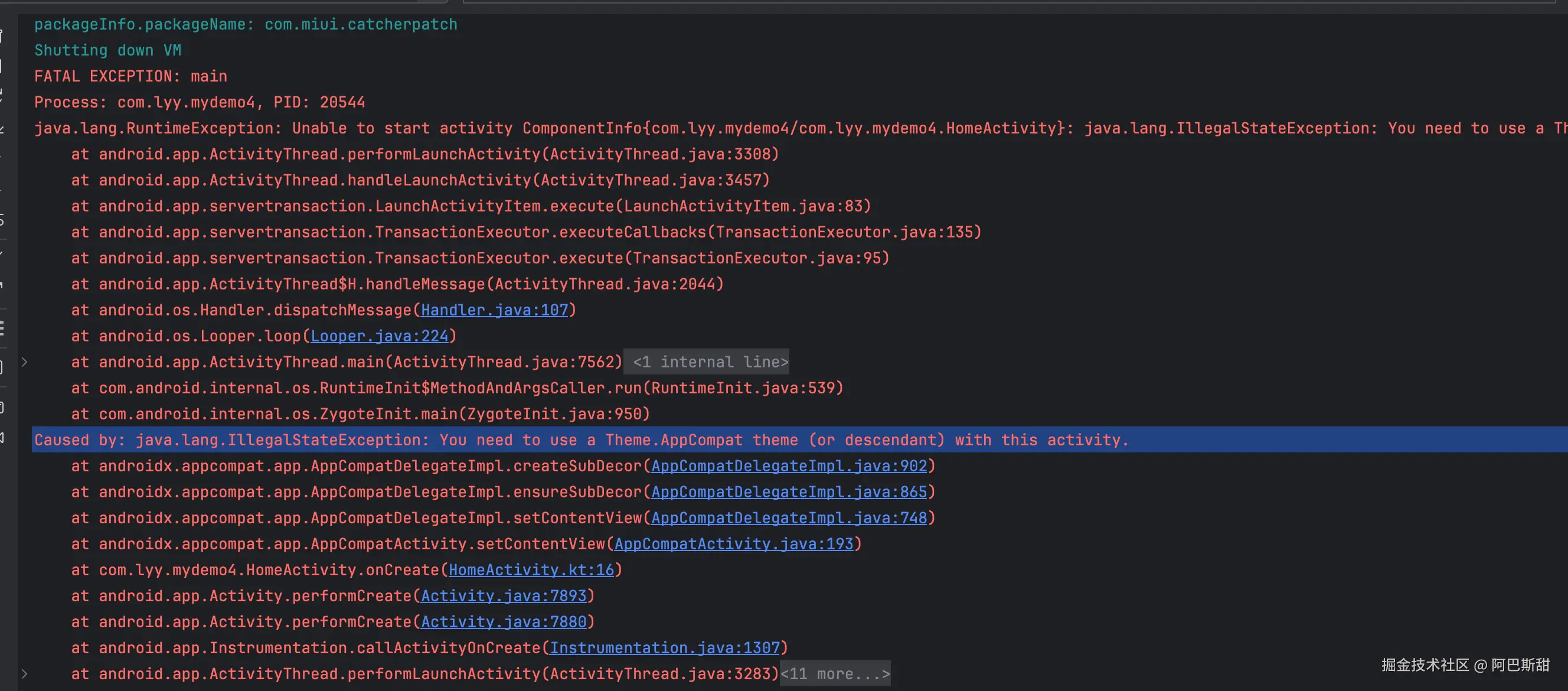
4、使用AppCompatActivity报错:
csharp
- Caused by: java.lang.IllegalStateException: You need to use a Theme.AppCompat theme (or descendant) with this activity.

- java.lang.RuntimeException: Unable to start activity ComponentInfo{com.lyy.mydemo4/com.lyy.mydemo4.HomeActivity}: java.lang.IllegalStateException: You need to use a Theme.AppCompat theme (or descendant) with this activity.
class HomeActivity: FragmentActivity (){