一、实现效果
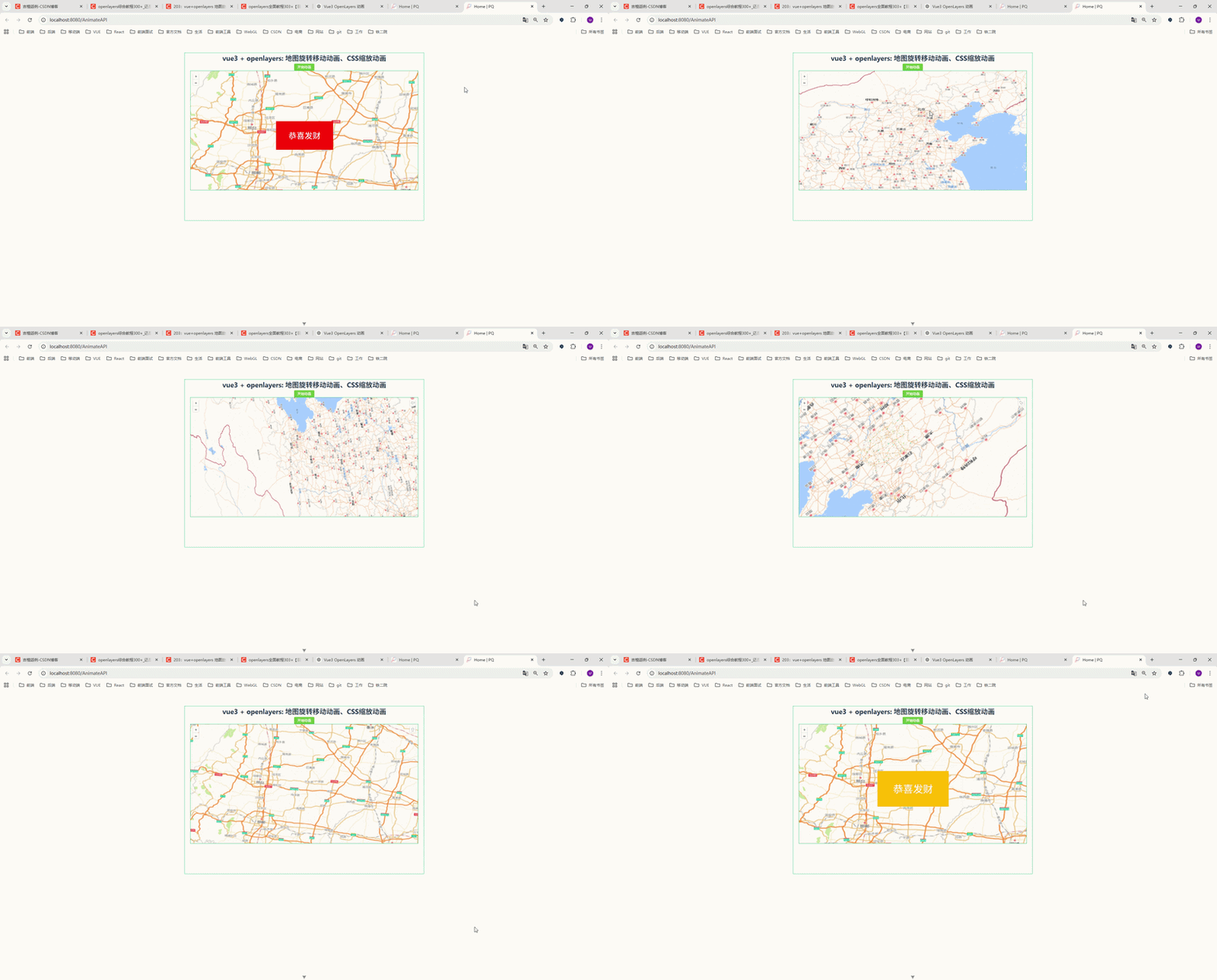
页面包含一个 按钮 + 地图 + 动画提示。
点击 开始动画 后,会执行以下流程:
1️⃣ 地图移动到指定位置
2️⃣ 地图开始旋转
3️⃣ 地图继续缩放移动
4️⃣ 动画结束后出现 CSS 动画提示
二、项目技术栈
本文示例使用技术:
| 技术 | 说明 |
|---|---|
| Vue3 | 前端框架 |
| OpenLayers | WebGIS 地图库 |
| Element Plus | UI组件 |
| CSS3 | 动画效果 |
三、完整代码实现
下面是 Vue3 + OpenLayers 完整示例代码。
javascript
<!--
 * @Author: 彭麒
 * @Date: 2026/3/17
 * @Email: 1062470959@qq.com
 * @Description: 此源码版权归吉檀迦俐所有,可供学习和借鉴或商用。
 -->
<template>
  <div class="container">
    <div class="w-full flex justify-center flex-wrap">
      <div class="font-bold text-[24px]">
        vue3 + openlayers: 地图旋转移动动画、CSS缩放动画
      </div>
    </div>
    <h4>
      <el-button type="success" size="small" @click="go">开始动画</el-button>
    </h4>

    <div id="vue-openlayers"></div>

    <div class="end" v-if="isEnd">
      恭喜发财
    </div>
  </div>
</template>

<script setup>
import { ref, onMounted } from "vue"
import 'ol/ol.css'
import Map from "ol/Map"
import View from "ol/View"
import Tile from "ol/layer/Tile"
import {createFastMapSource} from "@/utils/mapUtils";

// 状态
const isEnd = ref(false)

let map = null

// 开始动画
const go = () => {
  isEnd.value = false

  map.getView().animate(
      {
        zoom: 5,
        center: [116, 39],
        duration: 2000,
      },
      {
        zoom: 6,
        center: [114, 39],
        duration: 3000,
        rotation: Math.PI,
      },
      {
        zoom: 9,
        center: [115, 37],
        duration: 4000,
        rotation: 2 * Math.PI,
      },
      () => {
        isEnd.value = true
      }
  )
}

// 初始化地图
const initMap = () => {
  map = new Map({
    target: 'vue-openlayers',
    layers: [
      new Tile({
        source: createFastMapSource()
      })
    ],
    view: new View({
      projection: 'EPSG:4326',
      center: [114.064839, 22.548857],
      zoom: 4
    })
  })
}

onMounted(() => {
  initMap()
})
</script>

<style scoped>
.container {
  width: 840px;
  height: 590px;
  margin: 50px auto;
  border: 1px solid #42B983;
  position: relative;
}

#vue-openlayers {
  width: 800px;
  height: 420px;
  margin: 0 auto;
  border: 1px solid #42B983;
  position: relative;
}

.end {
  position: absolute;
  left: 320px;
  top: 240px;
  width: 200px;
  height: 100px;
  text-align: center;
  font-size: 28px;
  line-height: 100px;
  background-color: red;
  color: #fff;
  animation: myfirst 5s;
}

@keyframes myfirst {
  from {
    background: red;
    transform: scale(2);
  }
  to {
    background: yellow;
    transform: scale(1);
  }
}
</style>
四、OpenLayers animate 方法详解
OpenLayers 动画核心 API:
javascript
view.animate()官方方法:
javascript
view.animate(options1, options2, ..., callback)参数说明:
| 参数 | 作用 |
|---|---|
| center | 地图中心点 |
| zoom | 地图缩放级别 |
| rotation | 地图旋转角度 |
| duration | 动画持续时间 |
| easing | 动画缓动函数 |
1 地图移动动画
javascript
view.animate({
    center: [116,39],
    duration:2000
})
地图会 平滑移动到指定位置。
2 地图缩放动画
javascript
view.animate({
    zoom: 8,
    duration:2000
})
地图会 平滑缩放到指定级别。
3 地图旋转动画
javascript
view.animate({
    rotation: Math.PI
})
说明:
Math.PI = 180°
2 * Math.PI = 360°
4 连续动画
animate 支持 多个动画串联执行。
javascript
view.animate(
    {...},
    {...},
    {...}
)
执行顺序:
动画1 → 动画2 → 动画3
5 动画结束回调
javascript
view.animate(
    {...},
    {...},
    ()=>{console.log("动画结束")}
)
六、动画缓动函数
OpenLayers 提供多种缓动函数:
javascript
import {easeIn,easeOut,inAndOut,linear} from 'ol/easing'示例:
javascript
view.animate({
    zoom:8,
    duration:2000,
    easing: easeOut
})
效果:
| 缓动 | 说明 |
|---|---|
| easeIn | 逐渐加速 |
| easeOut | 逐渐减速 |
| linear | 匀速 |
| inAndOut | 先加速再减速 |
七、实际项目应用场景
在 WebGIS 项目中,地图动画经常用于:
1 飞行定位
javascript
view.animate({
    center: point,
    zoom: 16
})
2 自动巡航展示
依次飞行多个点位。
3 三维展示
地图旋转展示区域。
4 数据演示
逐步展示不同区域的数据。
八、总结
本文介绍了 Vue3 + OpenLayers 实现地图动画的方法,包括:
✔ 地图移动动画
✔ 地图缩放动画
✔ 地图旋转动画
✔ animate API 使用方法
✔ CSS 动画结合
核心 API:
view.animate()
在 WebGIS 项目中,合理使用动画可以显著提升:
-
用户体验
-
地图交互性
-
数据展示效果
如果你正在做 WebGIS / OpenLayers / Cesium 项目开发 ,这些动画技巧是 非常实用的能力。