板匹配是 OpenCV 中最基础也最实用的目标识别技术之一,小到识别一张图片中的可乐标志,大到提取银行卡、身份证上的数字信息,核心逻辑都可以复用。本文将从可乐标志识别这个简单案例入手,逐步拆解模板匹配的核心原理,再拓展到银行卡号、身份证号识别的实战场景。
一、入门案例:识别图片中的可乐标志
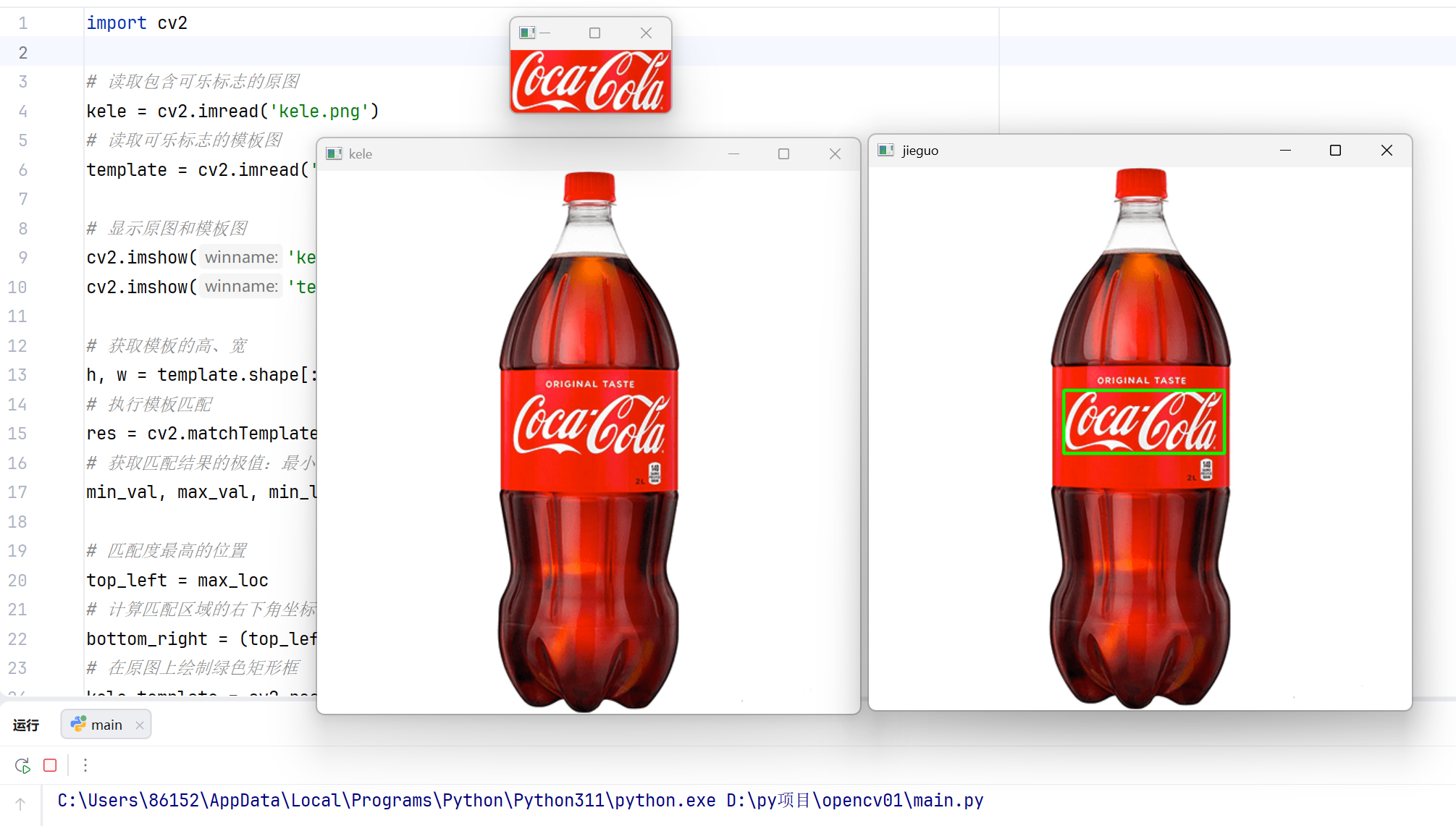
先通过一个极简案例,理解模板匹配的核心流程 ------ 用模板在原图中 "滑动" 比对,找到匹配度最高的区域并标注。
1.1 核心思路
- 读取可乐原图和可乐标志图;
- 使用cv2.matchTemplate计算原图每个位置与模板的匹配度;
- 用cv2.minMaxLoc找到匹配度最高的位置;
- 在原图上绘制矩形框,标注出可乐标志的位置。
1.2 完整代码
python
import cv2

# 读取包含可乐标志的原图
kele = cv2.imread('kele.png')
# 读取可乐标志的模板图
template = cv2.imread('template.png')

# 显示原图和模板图
cv2.imshow('kele', kele)
cv2.imshow('template', template)

# 获取模板的高、宽
h, w = template.shape[:2]
# 执行模板匹配
res = cv2.matchTemplate(kele, template, cv2.TM_CCOEFF_NORMED)
# 获取匹配结果的极值:最小值、最大值、最小值位置、最大值位置
min_val, max_val, min_loc, max_loc = cv2.minMaxLoc(res)

# 匹配度最高的位置
top_left = max_loc
# 计算匹配区域的右下角坐标
bottom_right = (top_left[0] + w, top_left[1] + h)
# 在原图上绘制绿色矩形框
kele_template = cv2.rectangle(kele, top_left, bottom_right, (0, 255, 0), 2)

cv2.imshow('jieguo', kele_template)
cv2.waitKey(0)
cv2.destroyAllWindows()
1.3结果展示
1.4代码关键解析
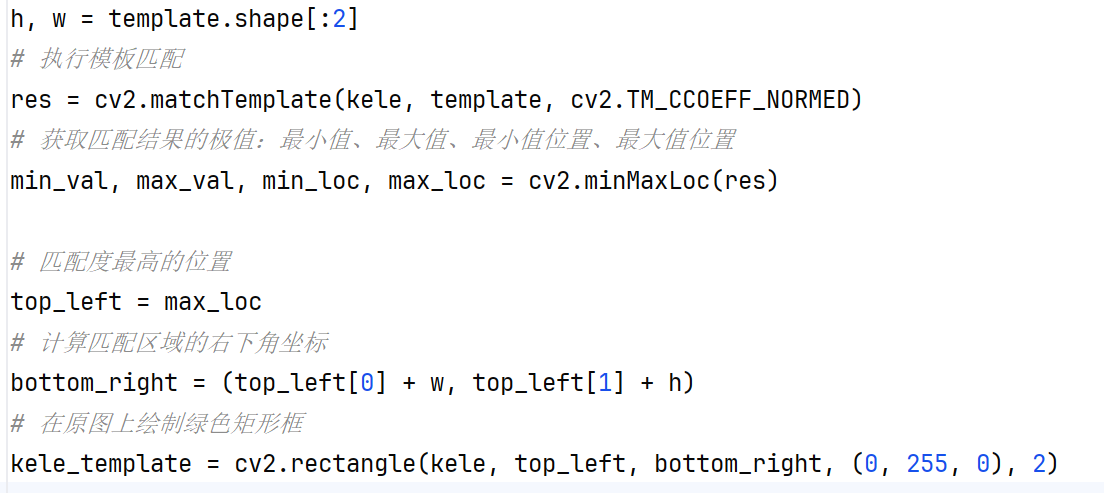
cv2.TM_CCOEFF_NORMED是归一化的匹配方法,结果更稳定,推荐优先使用;
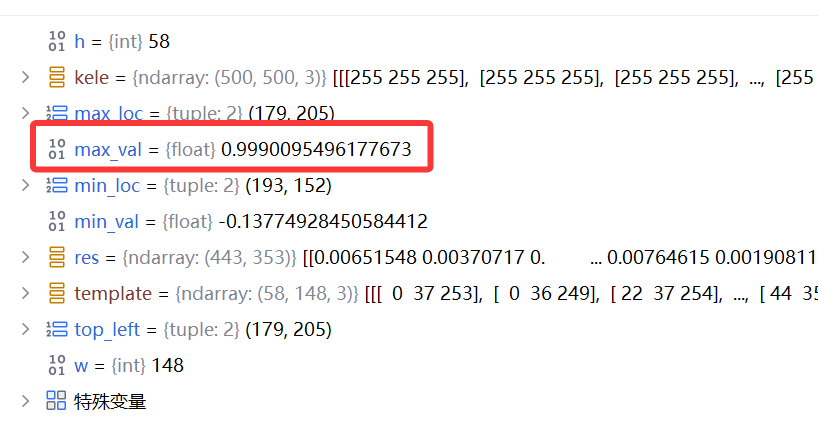
max_val越接近1,说明匹配越精准;若max_val低于0.8,可能是模板与原图差异较大;
通过调试模式我们可以看到max_val有0.9990,非常接近1,说明匹配非常精确
二、通用工具函数
在拓展到卡号 / 身份证号识别前,我们需要先封装两个高频工具函数(保存为myutils.py),后续代码直接复用:
python
import cv2

# 按指定方向排序轮廓
def sort_contours(cnts, method='left-to-right'):
    reverse = False
    i = 0
    # 判断是否反向排序
    if method == 'right-to-left' or method == 'bottom-to-top':
        reverse = True
    # 判断排序维度
    if method == 'top-to-bottom' or method == 'bottom-to-top':
        i = 1
    # 获取每个轮廓的外接矩形
    boundingBoxes = [cv2.boundingRect(c) for c in cnts]
    # 按指定维度排序轮廓
    (cnts, boundingBoxes) = zip(*sorted(zip(cnts, boundingBoxes),
                                        key=lambda b: b[1][i], reverse=reverse))
    return cnts, boundingBoxes

# 等比例缩放图像
def resize(image, width=None, height=None, inter=cv2.INTER_AREA):
    dim = None
    (h, w) = image.shape[:2]
    if width is None and height is None:
        return image
    if width is None:
        r = height / float(h)
        dim = (int(w * r), height)
    else:
        r = width / float(w)
        dim = (width, int(h * r))
    resized = cv2.resize(image, dim, interpolation=inter)
    return resized
三、实战 1:银行卡号识别
可乐标志识别是 "单目标匹配",而银行卡号识别是 "多目标 + 数字识别",核心是在模板匹配基础上增加轮廓检测,实现数字区域定位和单个数字分割。


3.1 实现思路
- 制作 0-9 数字模板库(从模板图中提取轮廓并排序);
- 预处理银行卡图像:顶帽操作突出数字、闭运算连接断裂数字、二值化增强对比度;
- 轮廓筛选定位卡号区域,分割单个数字;
- 模板匹配识别每个数字,拼接得到完整卡号。
3.2 完整代码
python
import numpy as np
import argparse
import cv2
import myutils  # 导入上面的工具函数

# 命令行参数配置(默认路径可根据自己的文件修改)
ap = argparse.ArgumentParser()
ap.add_argument("-i", "--image", default=r"card1.png",
                help="path to input image")
ap.add_argument("-t", "--template", default=r"kahao.png",
                help="path to template image")
args = vars(ap.parse_args())

# 银行卡号开头数字对应卡类型
FIRST_NUMBER = {
    '3': "American Express",
    '4': "Visa",
    '5': "MasterCard",
    '6': "Discover Card"
}


# 图像显示函数
def cv_show(name, img):
    cv2.imshow(name, img)
    cv2.waitKey(0)
    cv2.destroyWindow(name)

# 读取模板图像并预处理
img = cv2.imread(args["template"])
cv_show("Template Image", img)
ref = cv2.cvtColor(img, cv2.COLOR_BGR2GRAY)  # 转灰度
ref = cv2.threshold(ref, 10, 255, cv2.THRESH_BINARY_INV)[1]  # 二值化(反相)
cv_show("Binary Template", ref)

# 提取模板轮廓(仅提取外轮廓)
_, refCnts, hierarchy = cv2.findContours(ref.copy(), cv2.RETR_EXTERNAL,
                                         cv2.CHAIN_APPROX_SIMPLE)
cv2.drawContours(img, refCnts, -1, (0, 255, 0), 3)
cv_show('Template Contours', img)

# 按从左到右排序轮廓,生成0-9数字模板
refCnts = myutils.sort_contours(refCnts, method="left-to-right")[0]
digits = {}
for (i, c) in enumerate(refCnts):
    (x, y, w, h) = cv2.boundingRect(c)
    roi = ref[y:y + h, x:x + w]
    roi = cv2.resize(roi, (57, 88))  # 统一模板尺寸
    digits[i] = roi  # 存储数字模板

image = cv2.imread(args["image"])
cv_show("Original Card", image)
image = myutils.resize(image, width=300)  # 统一缩放尺寸
gray = cv2.cvtColor(image, cv2.COLOR_BGR2GRAY)
cv_show("Gray Card", gray)

# 顶帽操作:突出亮区域(数字),抑制暗背景
rectKernel = cv2.getStructuringElement(cv2.MORPH_RECT, (9, 3))
sqKernel = cv2.getStructuringElement(cv2.MORPH_RECT, (5, 5))
tophat = cv2.morphologyEx(gray, cv2.MORPH_TOPHAT, rectKernel)
cv_show("Tophat Result", tophat)

# 闭运算:连接数字的断裂部分(先膨胀后腐蚀)
closeX = cv2.morphologyEx(tophat, cv2.MORPH_CLOSE, rectKernel)
cv_show("Close Result 1", closeX)

# 二值化(OTSU自动找阈值)
thresh = cv2.threshold(closeX, 0, 255, cv2.THRESH_BINARY | cv2.THRESH_OTSU)[1]
cv_show("Threshold Result", thresh)

# 再次闭运算:强化数字连接
thresh = cv2.morphologyEx(thresh, cv2.MORPH_CLOSE, sqKernel)
cv_show("Close Result 2", thresh)

# 提取轮廓
_, cnts, h = cv2.findContours(thresh.copy(), cv2.RETR_EXTERNAL, cv2.CHAIN_APPROX_SIMPLE)
cnts_img = image.copy()
cv2.drawContours(cnts_img, cnts, -1, (0, 0, 255), 3)
cv_show("All Contours", cnts_img)

# 筛选卡号轮廓(根据宽高比、尺寸)
locs = []
for c in cnts:
    (x, y, w, h) = cv2.boundingRect(c)
    ar = w / float(h)
    # 卡号区域的宽高比通常在2.5~4之间,尺寸需根据实际调整
    if 2.5 < ar < 4.0 and (40 < w < 55) and (10 < h < 20):
        locs.append((x, y, w, h))

# 按从左到右排序卡号区域
locs = sorted(locs, key=lambda x: x[0])
output = []

for (gX, gY, gW, gH) in locs:
    groupOutput = []
    # 提取数字区域(适当扩大边界)
    group = gray[gY - 5:gY + gH + 5, gX - 5:gX + gW + 5]
    cv_show("Digit Group", group)

    # 二值化处理
    group = cv2.threshold(group, 0, 255, cv2.THRESH_BINARY | cv2.THRESH_OTSU)[1]
    cv_show("Group Threshold", group)

    # 提取单个数字轮廓
    group_, digitCnts, hierarchy = cv2.findContours(group.copy(), cv2.RETR_EXTERNAL,
                                                    cv2.CHAIN_APPROX_SIMPLE)
    digitCnts = myutils.sort_contours(digitCnts, method="left-to-right")[0]

    # 模板匹配识别每个数字
    for c in digitCnts:
        (x, y, w, h) = cv2.boundingRect(c)
        roi = group[y:y + h, x:x + w]
        roi = cv2.resize(roi, (57, 88))  # 匹配模板尺寸

        # 计算与每个数字模板的匹配得分
        scores = []
        for (digit, digitROI) in digits.items():
            result = cv2.matchTemplate(roi, digitROI, cv2.TM_CCOEFF)
            (_, score, _, _) = cv2.minMaxLoc(result)
            scores.append(score)

        # 取得分最高的数字作为识别结果
        groupOutput.append(str(np.argmax(scores)))

    # 绘制识别结果
    cv2.rectangle(image, (gX - 5, gY - 5), (gX + gW + 5, gY + gH + 5), (0, 0, 255), 1)
    cv2.putText(image, "".join(groupOutput), (gX, gY - 15),
                cv2.FONT_HERSHEY_SIMPLEX, 0.65, (0, 0, 255), 2)
    output.extend(groupOutput)

print("Credit Card Type: {}".format(FIRST_NUMBER.get(output[0], "Unknown")))
print("Credit Card #: {}".format("".join(output)))
cv2.imshow("Final Result", image)
cv2.waitKey(0)
cv2.destroyAllWindows()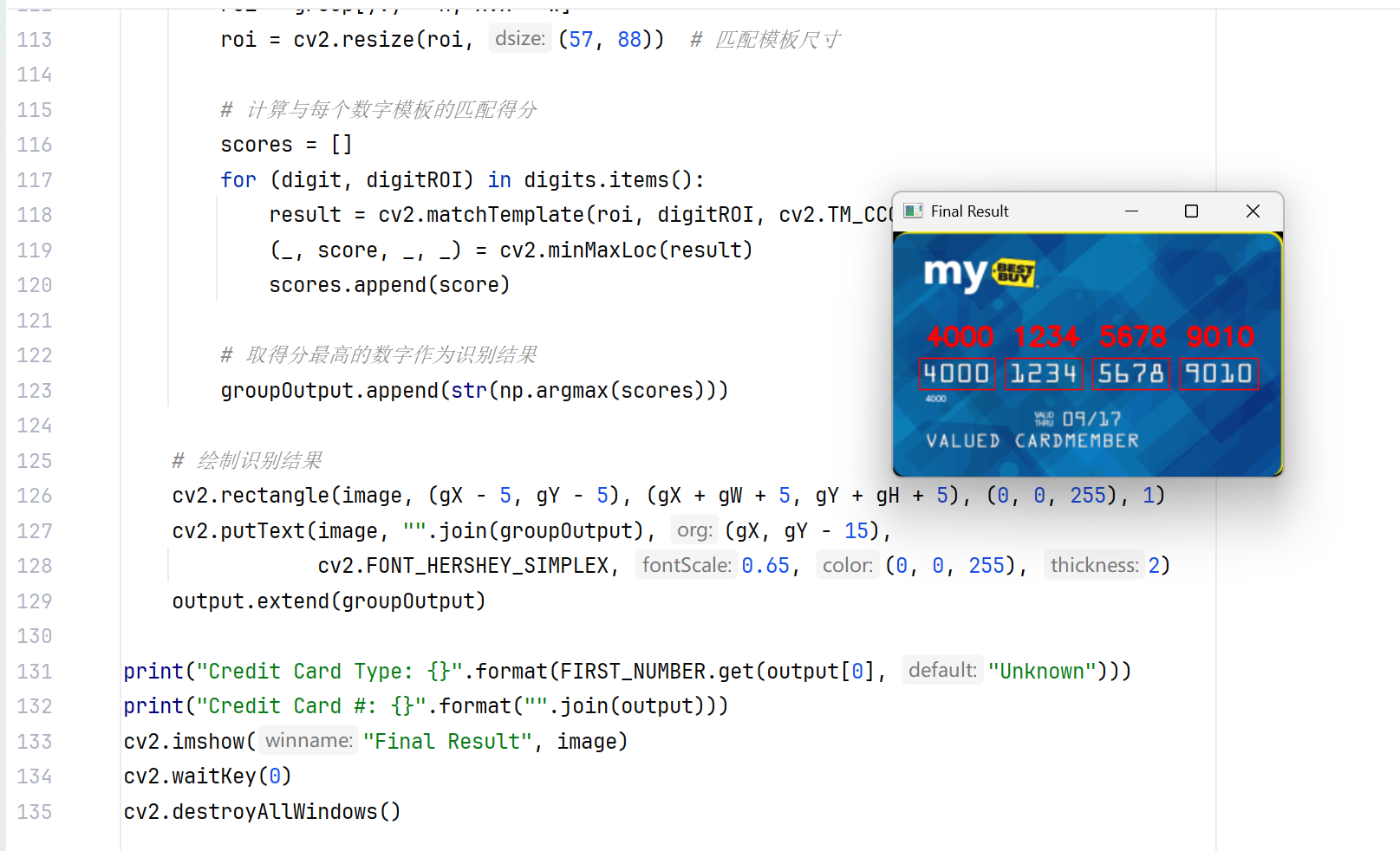
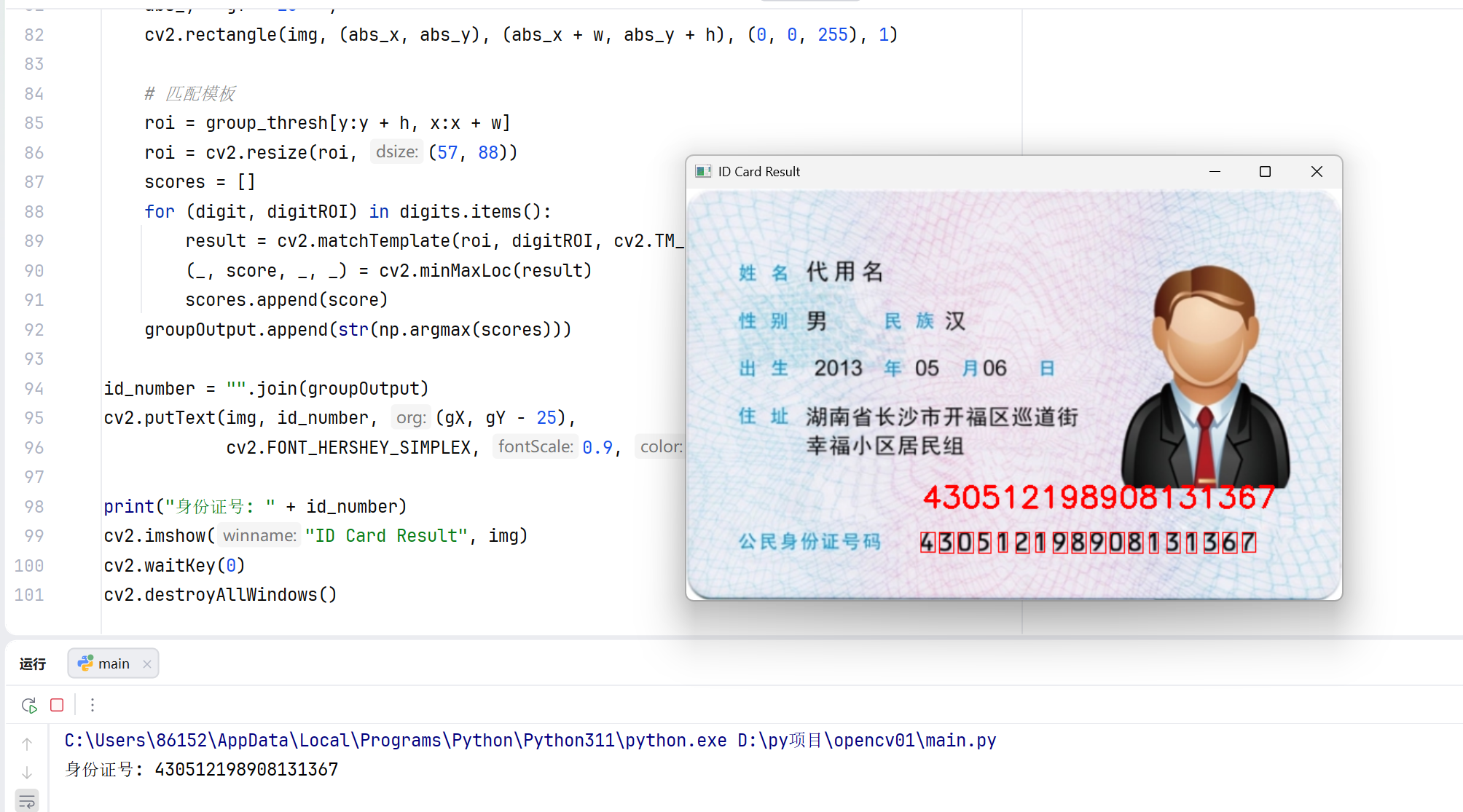
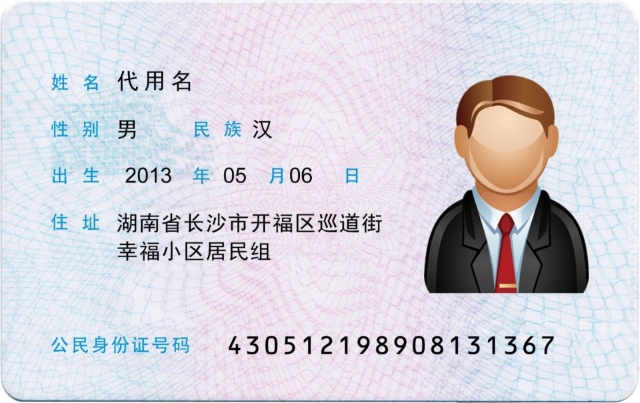
四、实战 2:身份证号识别
身份证号识别的核心逻辑与银行卡号一致,但需针对身份证的特征调整预处理和轮廓筛选规则。

4.1 实现思路
- 身份证号是 18 位连续数字,区域更集中,宽高比更大;
- 身份证背景复杂有文字、图案,需增加高斯模糊降噪;
- 轮廓筛选条件需适配身份证号的尺寸特征(宽高比 5~30)。
python
import numpy as np
import argparse
import cv2
import myutils

ap = argparse.ArgumentParser()
ap.add_argument("-i", "--image", default="sfz.jpg",
                help="path to input ID card image")
ap.add_argument("-t", "--template", default="haoma.png",
                help="path to template image (0-9 digits)")
args = vars(ap.parse_args())

template_img = cv2.imread(args["template"])
ref_gray = cv2.cvtColor(template_img, cv2.COLOR_BGR2GRAY)
ref_thresh = cv2.threshold(ref_gray, 10, 255, cv2.THRESH_BINARY_INV)[1]

_, ref_cnts, _ = cv2.findContours(ref_thresh.copy(), cv2.RETR_EXTERNAL,
                                  cv2.CHAIN_APPROX_SIMPLE)
ref_cnts = myutils.sort_contours(ref_cnts, method="left-to-right")[0]

digits = {}
for i, c in enumerate(ref_cnts):
    (x, y, w, h) = cv2.boundingRect(c)
    roi = ref_thresh[y:y + h, x:x + w]
    roi = cv2.resize(roi, (57, 88))
    digits[i] = roi

img = cv2.imread(args["image"])
img = myutils.resize(img, width=600)  # 缩放至宽度600
gray = cv2.cvtColor(img, cv2.COLOR_BGR2GRAY)
gray = cv2.GaussianBlur(gray, (3, 3), 0)  # 高斯模糊降噪

# 形态学操作突出数字
rectKernel = cv2.getStructuringElement(cv2.MORPH_RECT, (15, 6))  # 调整卷积核尺寸
sqKernel = cv2.getStructuringElement(cv2.MORPH_RECT, (3, 3))
tophat = cv2.morphologyEx(gray, cv2.MORPH_TOPHAT, rectKernel)
close1 = cv2.morphologyEx(tophat, cv2.MORPH_CLOSE, rectKernel)

# 二值化(调整阈值适配身份证)
thresh = cv2.threshold(close1, 60, 255, cv2.THRESH_BINARY | cv2.THRESH_OTSU)[1]
close2 = cv2.morphologyEx(thresh, cv2.MORPH_CLOSE, sqKernel)

_, cnts, _ = cv2.findContours(close2.copy(), cv2.RETR_EXTERNAL, cv2.CHAIN_APPROX_SIMPLE)

# 筛选身份证号轮廓
locs = []
for c in cnts:
    (x, y, w, h) = cv2.boundingRect(c)
    ar = w / float(h)
    if 5 < ar < 30 and (100 < w < 600) and (10 < h < 50):
        locs.append((x, y, w, h))

# 按y轴反向排序(身份证号通常在下方),取最下方的区域
locs = sorted(locs, key=lambda x: x[1], reverse=True)
(gX, gY, gW, gH) = locs[0]

groupOutput = []
# 提取身份证号区域(扩大边界,避免截断)
group = gray[max(0, gY - 10):min(gray.shape[0], gY + gH + 10),
             max(0, gX - 10):min(gray.shape[1], gX + gW + 10)]

# 预处理数字区域
group_thresh = cv2.threshold(group, 80, 255, cv2.THRESH_BINARY_INV | cv2.THRESH_OTSU)[1]
kernel = cv2.getStructuringElement(cv2.MORPH_RECT, (2, 2))
group_thresh = cv2.dilate(group_thresh, kernel, iterations=1)  # 膨胀增强数字

# 提取单个数字轮廓
_, digit_cnts, _ = cv2.findContours(group_thresh.copy(), cv2.RETR_EXTERNAL,
                                    cv2.CHAIN_APPROX_SIMPLE)
# 过滤小轮廓(噪声)
digit_cnts = [c for c in digit_cnts if cv2.boundingRect(c)[2] > 5 and cv2.boundingRect(c)[3] > 10]
digit_cnts = myutils.sort_contours(digit_cnts, method="left-to-right")[0]

# 模板匹配识别每个数字
for c in digit_cnts:
    (x, y, w, h) = cv2.boundingRect(c)
    if w < 5 or h < 10:
        continue
    # 计算绝对坐标,绘制矩形框
    abs_x = gX - 10 + x
    abs_y = gY - 10 + y
    cv2.rectangle(img, (abs_x, abs_y), (abs_x + w, abs_y + h), (0, 0, 255), 1)

    # 匹配模板
    roi = group_thresh[y:y + h, x:x + w]
    roi = cv2.resize(roi, (57, 88))
    scores = []
    for (digit, digitROI) in digits.items():
        result = cv2.matchTemplate(roi, digitROI, cv2.TM_CCOEFF)
        (_, score, _, _) = cv2.minMaxLoc(result)
        scores.append(score)
    groupOutput.append(str(np.argmax(scores)))

id_number = "".join(groupOutput)
cv2.putText(img, id_number, (gX, gY - 25),
            cv2.FONT_HERSHEY_SIMPLEX, 0.9, (0, 0, 255), 2)

print("身份证号: " + id_number)
cv2.imshow("ID Card Result", img)
cv2.waitKey(0)
cv2.destroyAllWindows()