添加功能
- 生成不同的题目
- 导出题目
1)后端新增 schema
修改 backend/app/schemas.py
新增:
python
class PaperQuestionItem(BaseModel):
    question: str
    answer: str
    steps: List[str]


class GeneratePaperRequest(BaseModel):
    knowledge_point: str
    count: int = 10
    difficulty: str = "中等"


class GeneratePaperResponse(BaseModel):
    knowledge_point: str
    difficulty: str
    questions: List[PaperQuestionItem]
2)新增出卷服务
新增 backend/app/paper_service.py
python
import json
from app.llm_service import client, MODEL
from app.rag_service import build_context


PAPER_SYSTEM_PROMPT = """
你是一位专业的初中数学老师。

请严格返回 JSON,不要返回 markdown,不要加 ```json。

格式如下:
{
  "knowledge_point": "知识点名称",
  "difficulty": "难度",
  "questions": [
    {
      "question": "题目1",
      "answer": "答案1",
      "steps": ["步骤1", "步骤2"]
    }
  ]
}

要求:
1. questions 必须是数组
2. 每道题都要有 question、answer、steps
3. steps 必须适合初中学生理解
4. 题目难度要和用户要求一致
5. 不要输出 JSON 以外的内容
"""


def _clean_json_text(content: str) -> str:
    content = (content or "").strip()

    if content.startswith("```json"):
        content = content.removeprefix("```json").strip()
    if content.startswith("```"):
        content = content.removeprefix("```").strip()
    if content.endswith("```"):
        content = content.removesuffix("```").strip()

    return content


def generate_paper(knowledge_point: str, count: int = 10, difficulty: str = "中等"):
    context = build_context(knowledge_point, top_k=3)

    user_content = (
        f"请围绕"{knowledge_point}"生成一份数学练习卷,"
        f"题量为 {count} 题,难度为"{difficulty}"。"
        "每道题都需要包含题目、答案、分步解析。"
    )

    if context:
        user_content += f"\n\n以下是可参考的知识库内容:\n{context}"

    resp = client.chat.completions.create(
        model=MODEL,
        temperature=0.5,
        messages=[
            {"role": "system", "content": PAPER_SYSTEM_PROMPT},
            {"role": "user", "content": user_content},
        ],
    )

    content = _clean_json_text(resp.choices[0].message.content or "")
    data = json.loads(content)

    if "knowledge_point" not in data or "difficulty" not in data or "questions" not in data:
        raise ValueError(f"试卷返回格式错误:{data}")

    if not isinstance(data["questions"], list):
        raise ValueError(f"questions 不是数组:{data}")

    return data
3)接口新增
修改 backend/app/main.py
3.1 补充 import
新增:
javascript
from app.paper_service import generate_paper
from app.schemas import GeneratePaperRequest, GeneratePaperResponse
3.2 新增生成试卷接口
less
@app.post("/api/generate-paper", response_model=GeneratePaperResponse)
def generate_paper_api(req: GeneratePaperRequest):
    try:
        result = generate_paper(req.knowledge_point, req.count, req.difficulty)
        return GeneratePaperResponse(**result)
    except Exception as e:
        raise HTTPException(status_code=500, detail=str(e))
3.3 新增导出试卷 HTML 接口
xml
@app.post("/api/export/paper", response_class=HTMLResponse)
def export_paper_html(req: GeneratePaperRequest):
    try:
        result = generate_paper(req.knowledge_point, req.count, req.difficulty)

        questions_html = ""
        for idx, item in enumerate(result["questions"], start=1):
            steps_html = "".join([f"<li>{step}</li>" for step in item["steps"]])
            questions_html += f"""
            <div class="card">
              <h3>第 {idx} 题</h3>
              <p><strong>题目:</strong>{item['question']}</p>
              <p><strong>答案:</strong>{item['answer']}</p>
              <div>
                <strong>解析:</strong>
                <ol>{steps_html}</ol>
              </div>
            </div>
            """

        html = f"""
        <!DOCTYPE html>
        <html lang="zh-CN">
        <head>
          <meta charset="UTF-8" />
          <title>{result['knowledge_point']} - 练习卷</title>
          <style>
            body {{
              font-family: -apple-system, BlinkMacSystemFont, "Segoe UI", sans-serif;
              margin: 0;
              padding: 24px;
              color: #222;
              background: #f7f8fa;
            }}
            .container {{
              max-width: 960px;
              margin: 0 auto;
              background: #fff;
              padding: 32px;
              border-radius: 16px;
            }}
            .print-bar {{
              margin-bottom: 24px;
            }}
            .print-btn {{
              padding: 10px 16px;
              border: none;
              background: #18a058;
              color: #fff;
              border-radius: 8px;
              cursor: pointer;
            }}
            .card {{
              background: #fafafa;
              border-radius: 12px;
              padding: 16px;
              margin-bottom: 16px;
            }}
            @media print {{
              body {{
                background: #fff;
                padding: 0;
              }}
              .container {{
                max-width: none;
                border-radius: 0;
                padding: 0;
              }}
              .print-bar {{
                display: none;
              }}
            }}
          </style>
        </head>
        <body>
          <div class="container">
            <div class="print-bar">
              <button class="print-btn" onclick="window.print()">打印 / 保存为 PDF</button>
            </div>

            <h1>{result['knowledge_point']} 专项练习卷</h1>
            <p><strong>难度:</strong>{result['difficulty']}</p>
            <p><strong>题量:</strong>{len(result['questions'])}</p>

            {questions_html}
          </div>
        </body>
        </html>
        """
        return html
    except Exception as e:
        raise HTTPException(status_code=500, detail=str(e))
4)前端 API 新增
修改 frontend/src/api/math.ts
新增类型:
typescript
export interface PaperQuestionItem {
  question: string
  answer: string
  steps: string[]
}

export interface GeneratePaperResponse {
  knowledge_point: string
  difficulty: string
  questions: PaperQuestionItem[]
}
新增请求方法:
javascript
export function generatePaper(knowledge_point: string, count = 10, difficulty = '中等') {
  return request.post<GeneratePaperResponse>('/api/generate-paper', {
    knowledge_point,
    count,
    difficulty,
  })
}

export function getExportPaperUrl() {
  return 'http://127.0.0.1:8000/api/export/paper'
}
5)前端新增出卷组件
新增 frontend/src/components/PaperPanel.vue
xml
<template>
  <div class="paper-panel">
    <div class="result-card">
      <h2>AI 自动出卷</h2>

      <div class="paper-form">
        <input
          :value="knowledgePoint"
          class="paper-input"
          placeholder="请输入知识点,例如:一元一次方程"
          @input="$emit('update:knowledgePoint', ($event.target as HTMLInputElement).value)"
        />

        <input
          :value="count"
          class="paper-count"
          type="number"
          min="1"
          max="20"
          @input="$emit('update:count', Number(($event.target as HTMLInputElement).value))"
        />

        <select
          :value="difficulty"
          class="paper-select"
          @change="$emit('update:difficulty', ($event.target as HTMLSelectElement).value)"
        >
          <option value="简单">简单</option>
          <option value="中等">中等</option>
          <option value="困难">困难</option>
        </select>

        <button class="submit-btn" :disabled="loading" @click="$emit('generate')">
          {{ loading ? '生成中...' : '生成试卷' }}
        </button>

        <button class="retry-btn" @click="$emit('export')">
          导出试卷
        </button>
      </div>
    </div>

    <div v-if="paper" class="result-card">
      <h2>{{ paper.knowledge_point }} 专项练习卷</h2>
      <p><strong>难度:</strong>{{ paper.difficulty }}</p>

      <div v-for="(item, index) in paper.questions" :key="index" class="paper-question">
        <h3>第 {{ index + 1 }} 题</h3>
        <p>{{ item.question }}</p>

        <h4>答案</h4>
        <p>{{ item.answer }}</p>

        <h4>解析</h4>
        <ol>
          <li v-for="(step, idx) in item.steps" :key="idx">{{ step }}</li>
        </ol>
      </div>
    </div>
  </div>
</template>

<script setup lang="ts">
import type { GeneratePaperResponse } from '../api/math'

defineProps<{
  knowledgePoint: string
  count: number
  difficulty: string
  loading: boolean
  paper: GeneratePaperResponse | null
}>()

defineEmits<{
  (e: 'update:knowledgePoint', value: string): void
  (e: 'update:count', value: number): void
  (e: 'update:difficulty', value: string): void
  (e: 'generate'): void
  (e: 'export'): void
}>()
</script>

<style scoped>
.paper-panel {
  margin-top: 24px;
}

.paper-form {
  display: flex;
  gap: 12px;
  flex-wrap: wrap;
  align-items: center;
}

.paper-input,
.paper-count,
.paper-select {
  height: 40px;
  padding: 0 12px;
  border: 1px solid #ddd;
  border-radius: 8px;
  outline: none;
  background: #fff;
}

.paper-input {
  flex: 1;
  min-width: 240px;
}

.paper-count {
  width: 100px;
}

.submit-btn {
  padding: 10px 18px;
  border: none;
  background: #18a058;
  color: #fff;
  border-radius: 8px;
  cursor: pointer;
}

.retry-btn {
  padding: 10px 18px;
  border: none;
  background: #2080f0;
  color: #fff;
  border-radius: 8px;
  cursor: pointer;
}

.result-card {
  margin-top: 24px;
  padding: 20px;
  background: #fafafa;
  border-radius: 8px;
}

.paper-question {
  padding: 16px 0;
  border-bottom: 1px solid #eee;
}
</style>
6)修改导航 Tab
修改 frontend/src/components/TabNav.vue
css
defineProps<{
  activeTab: 'solve' | 'history' | 'wrong' | 'report' | 'suggestion' | 'graph' | 'path' | 'paper'
}>()

defineEmits<{
  (e: 'change', value: 'solve' | 'history' | 'wrong' | 'report' | 'suggestion' | 'graph' | 'path' | 'paper'): void
}>()
tabList
css
{ label: '自动出卷', value: 'paper' },7)修改 frontend/src/App.vue
7.1 补充 import
新增:
javascript
import PaperPanel from './components/PaperPanel.vue'以及 API import 里补:
bash
generatePaper,
getExportPaperUrl,
type GeneratePaperResponse,
7.2 activeTab 类型补上 paper
csharp
const activeTab = ref<'solve' | 'history' | 'wrong' | 'report' | 'suggestion' | 'graph' | 'path' | 'paper'>('solve')7.3 新增状态
csharp
const paperKnowledgePoint = ref('')
const paperCount = ref(10)
const paperDifficulty = ref('中等')
const paperLoading = ref(false)
const generatedPaper = ref<GeneratePaperResponse | null>(null)
7.4 新增方法
ini
const handleGeneratePaper = async () => {
  if (!paperKnowledgePoint.value.trim()) return

  paperLoading.value = true
  try {
    const { data } = await generatePaper(
      paperKnowledgePoint.value,
      paperCount.value,
      paperDifficulty.value,
    )
    generatedPaper.value = data
  } catch (error: any) {
    console.error('生成试卷失败:', error)
    alert(error?.response?.data?.detail || '生成试卷失败')
  } finally {
    paperLoading.value = false
  }
}

const handleExportPaper = async () => {
  if (!paperKnowledgePoint.value.trim()) {
    alert('请先输入知识点')
    return
  }

  const url = getExportPaperUrl()
  const form = document.createElement('form')
  form.method = 'POST'
  form.action = url
  form.target = '_blank'

  const fields = {
    knowledge_point: paperKnowledgePoint.value,
    count: String(paperCount.value),
    difficulty: paperDifficulty.value,
  }

  Object.entries(fields).forEach(([key, value]) => {
    const input = document.createElement('input')
    input.type = 'hidden'
    input.name = key
    input.value = value
    form.appendChild(input)
  })

  document.body.appendChild(form)
  form.submit()
  document.body.removeChild(form)
}
7.5 修改 handleTabChange
ini
else if (tab === 'paper') {
  activeTab.value = 'paper'
}
7.6 在 template 里新增
ini
<PaperPanel
  v-else-if="activeTab === 'paper'"
  v-model:knowledgePoint="paperKnowledgePoint"
  v-model:count="paperCount"
  v-model:difficulty="paperDifficulty"
  :loading="paperLoading"
  :paper="generatedPaper"
  @generate="handleGeneratePaper"
  @export="handleExportPaper"
/>
8)启动看效果
重启后端
lua
uvicorn app.main:app --reload --port 8000重启前端
arduino
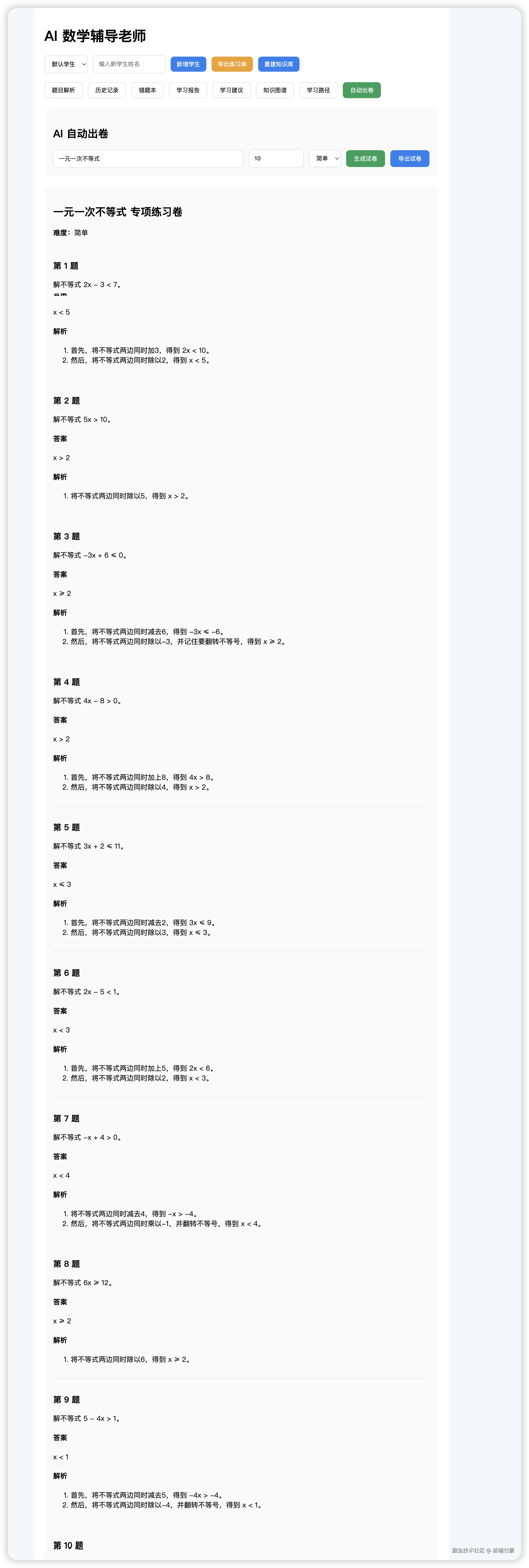
npm run dev输入一个知识点选择数量还有难度 可以生成题目
点击导出试卷

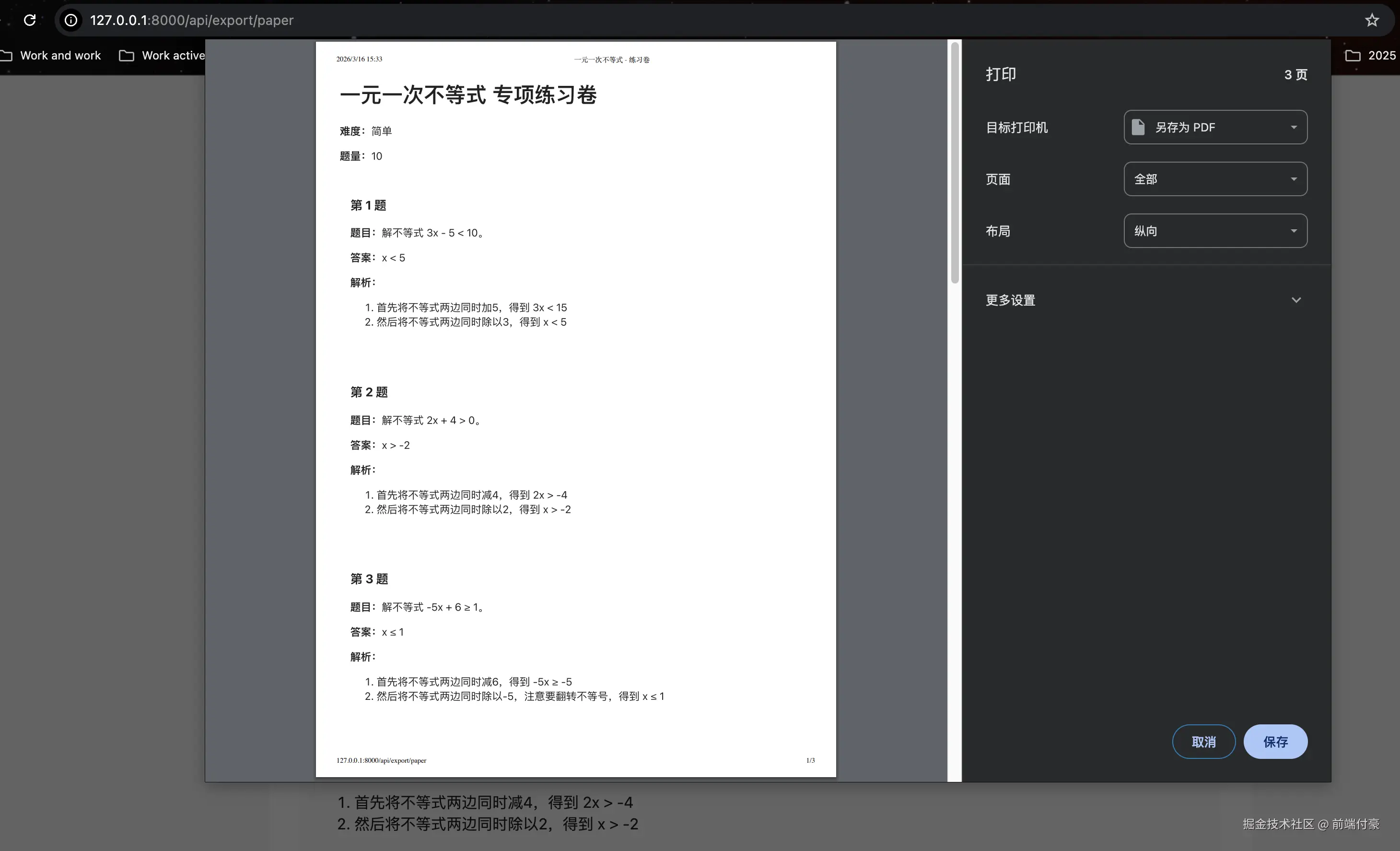
可以导出和打印
暂时完结后续再迭代~