Mistral Small 4 119B A6B
Mistral Small 4 是一款强大的混合模型,既能作为通用指令模型,也可作为推理模型。它将三种不同模型系列------指令型 、推理型 (原称Magistral)和开发型------的能力统一整合到单一模型中。
凭借其多模态能力、高效架构和灵活的模式切换,这款模型堪称适用于任何任务的强力通用模型。在延迟优化配置下,米斯特拉尔小型4代实现了端到端完成时间减少40% ;在吞吐量优化配置下,其每秒处理请求量较米斯特拉尔小型3代提升3倍。
如需进一步提升效率,可采用以下方案:
- 通过我们训练的Eagle头实现推测解码
mistralai/Mistral-Small-4-119B-2603-eagle - 采用我们的NVFP4检查点实现4比特浮点精度量化
mistralai/Mistral-Small-4-119B-2603-NVFP4
核心特性
Mistral Small 4 采用以下架构设计:
- 混合专家系统:128个专家模块,4个动态激活
- 1190亿参数 ,其中每token激活65亿参数
- 25.6万上下文长度
- 多模态输入:支持文本与图像输入,输出文本
- 指令与推理功能:支持函数调用(推理强度可按请求配置)
该模型具备以下能力:
- 推理模式:可在快速响应模式与深度推理模式间切换,根据需求提升计算性能
- 视觉分析:除文本外,还能解析图像内容并输出洞察
- 多语言支持:涵盖英语、法语、西班牙语、德语、意大利语、葡萄牙语、荷兰语、中文、日语、韩语、阿拉伯语等数十种语言
- 系统提示:对系统提示具有高度遵循性
- 智能代理:具备业界顶尖的代理能力,支持原生函数调用和JSON输出
- 速度优化:提供顶级性能和响应速度
- Apache 2.0许可证:开源许可,支持商业与非商业用途
- 大上下文窗口:支持25.6万token的上下文窗口
推荐设置
- 推理强度 :
'none'→ 禁用推理'high'→ 启用推理(复杂提示时推荐)
处理复杂任务时建议使用reasoning_effort="high"
- 温度参数:启用推理时建议0.7;禁用推理时根据任务需求在0.0至0.7间调整
应用场景
本模型适用于通用聊天助手、编程、代理任务及推理任务(需开启推理模式)。其多模态能力还可实现文档图像理解,支持数据提取与分析。
典型应用包括:
- 开发者:用于软件工程自动化及代码库探索的编程与代理功能
- 企业用户:构建通用聊天助手、智能代理及文档理解系统
- 研究人员:利用其数学计算与研究分析能力
该模型也适合针对专项任务进行定制化微调。
应用示例
- 通用聊天助手
- 文档解析与信息提取
- 编程代理
- 研究助手
- 定制化微调
- 及其他场景...
基准测试
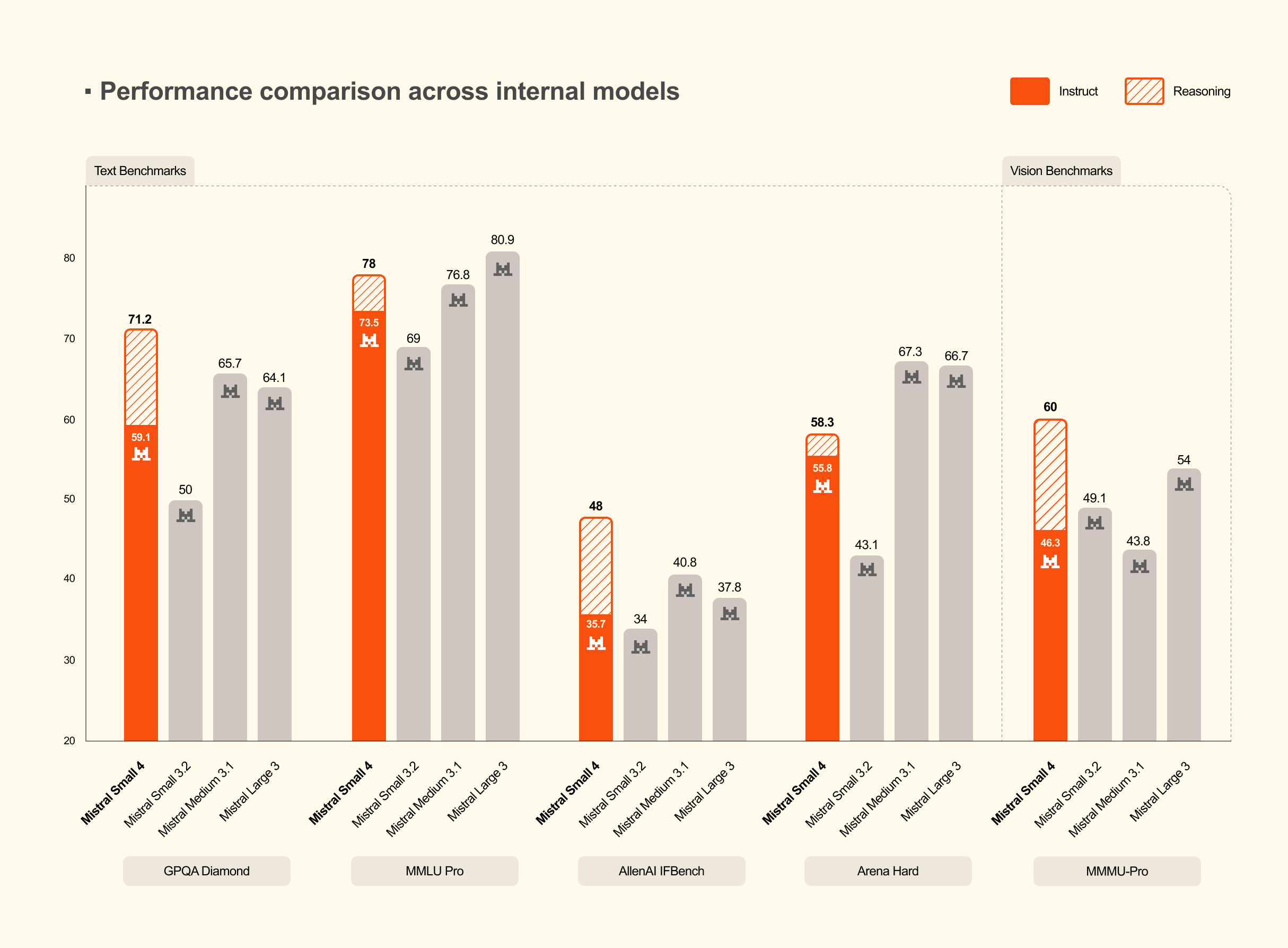
与内部模型对比
根据任务类型,可通过单请求级 参数reasoning_effort启用推理功能:
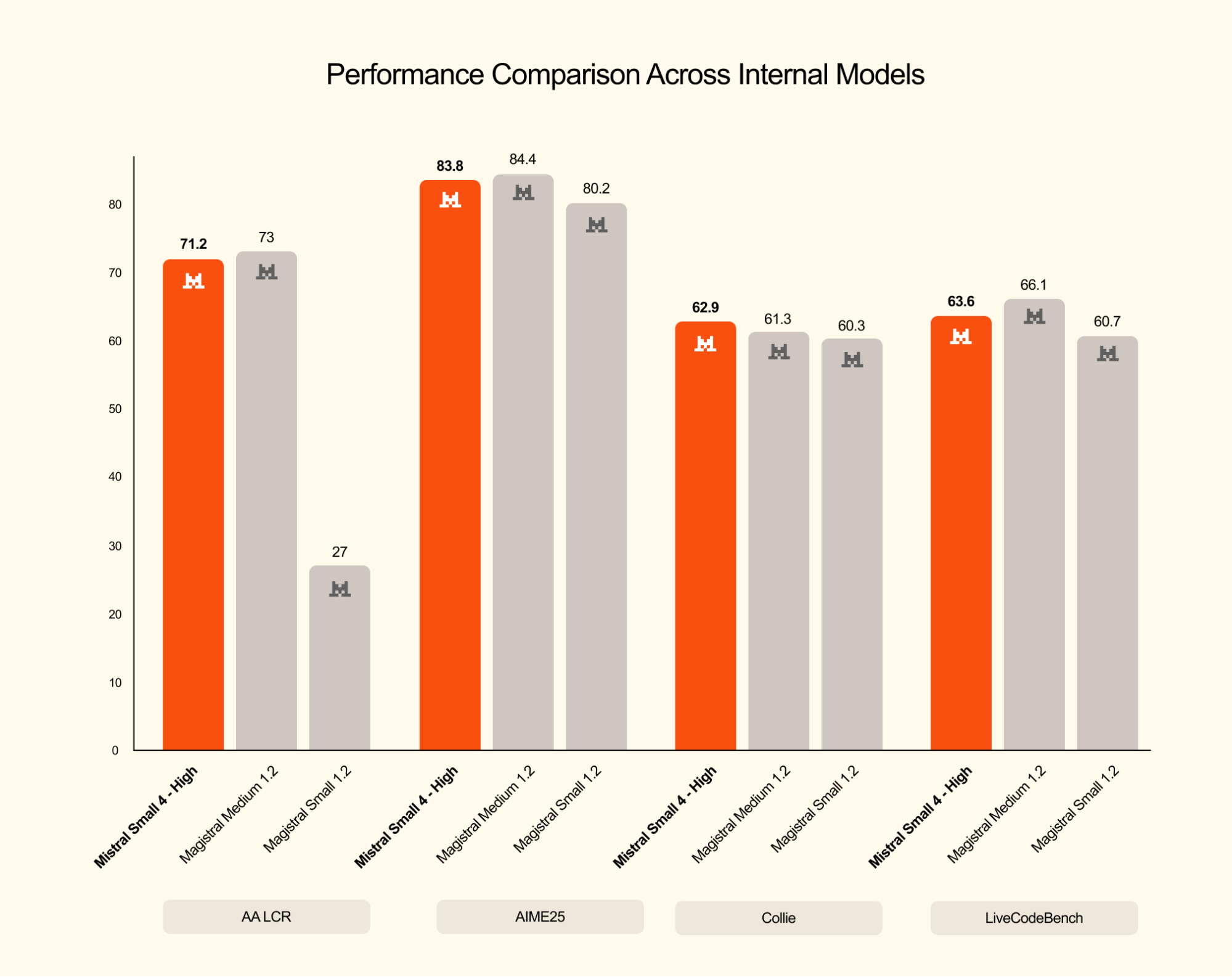
reasoning_effort="none":日常任务的快速轻量响应,等效于mistralai/Mistral-Small-3.2-24B-Instruct-2506的聊天风格reasoning_effort="high":复杂问题的分步深度推理,输出详尽程度等效于mistralai/Magistral-Small-2509等Magistral系列模型
推理模型比较
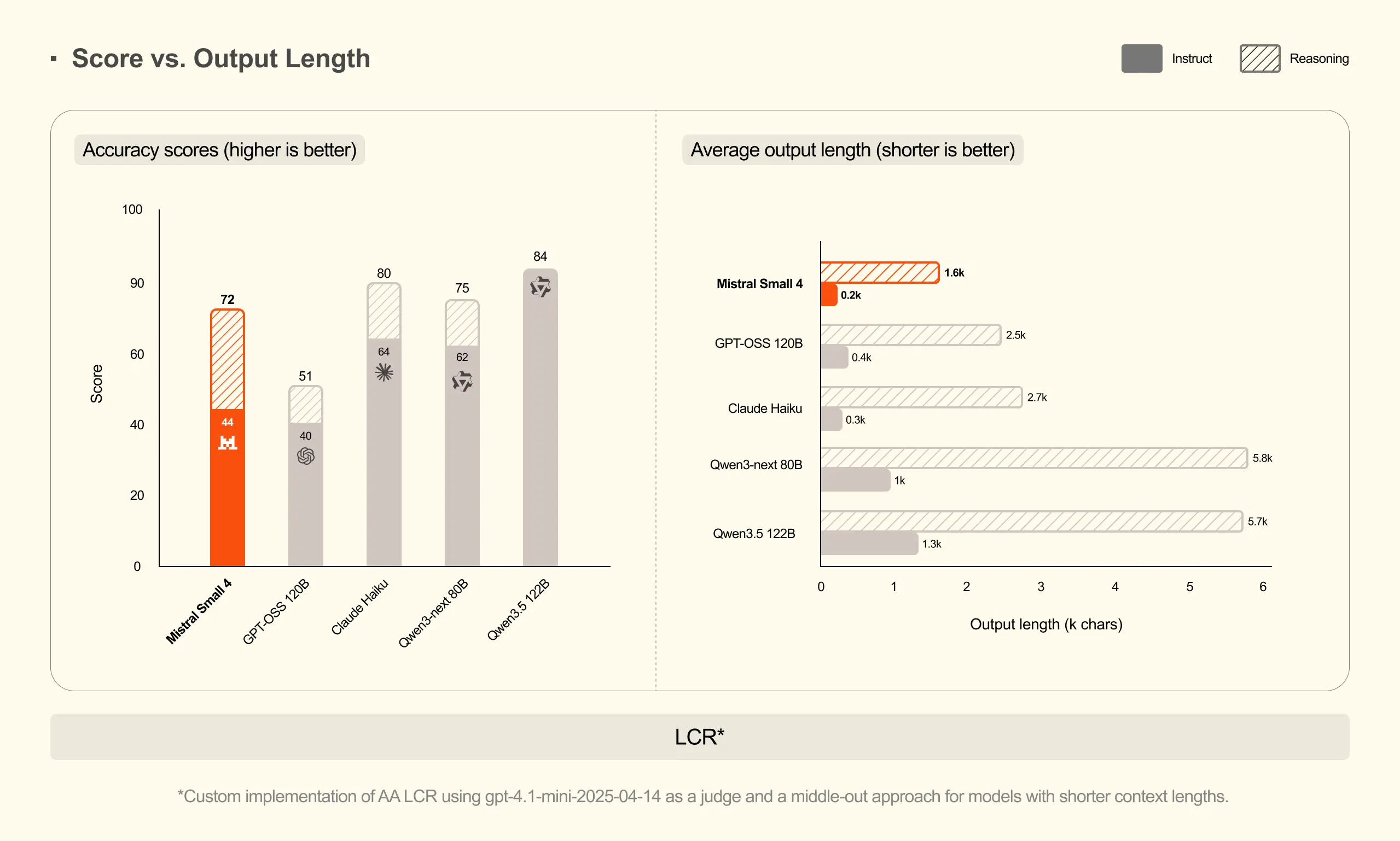
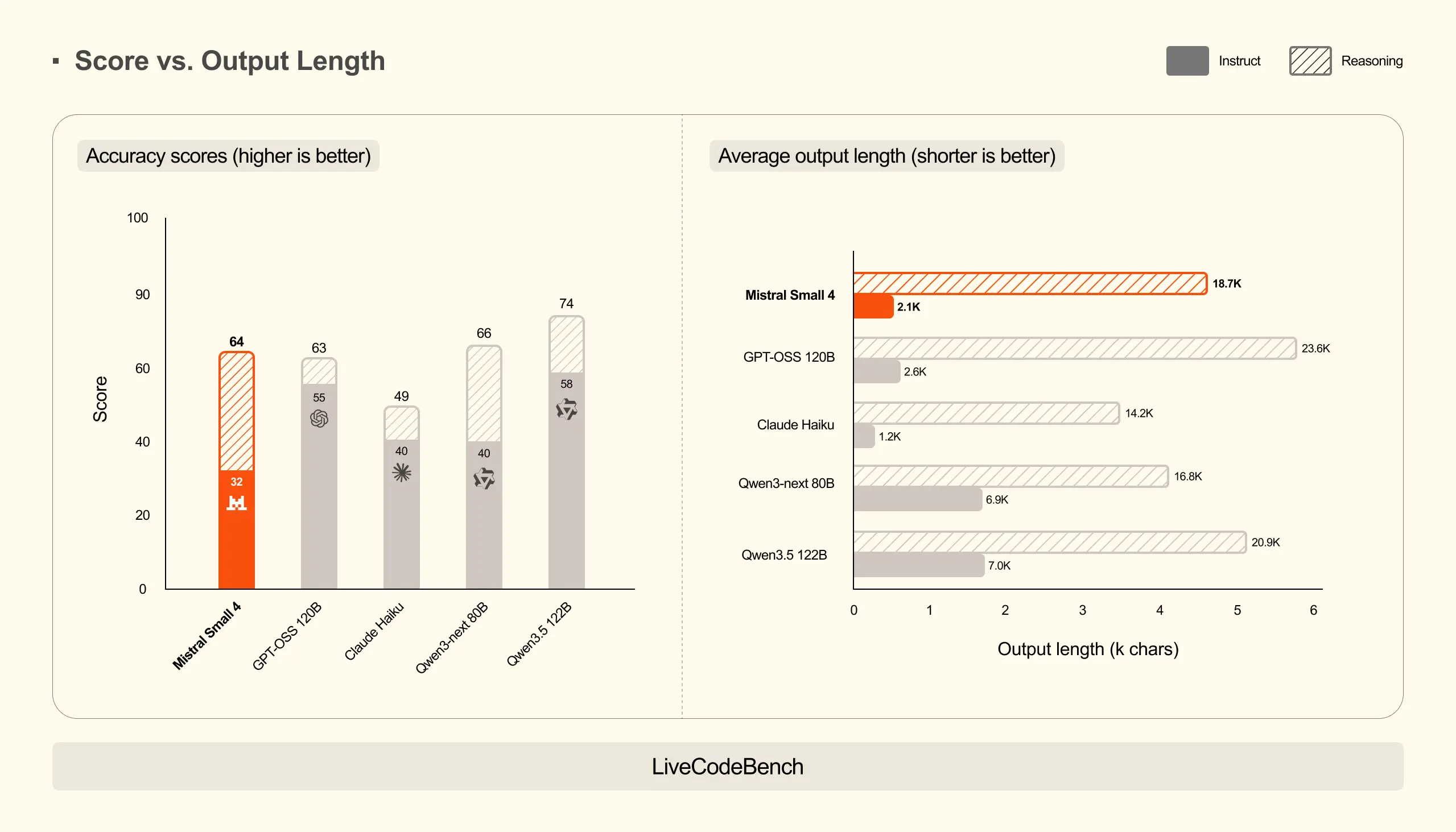
与其他模型的对比
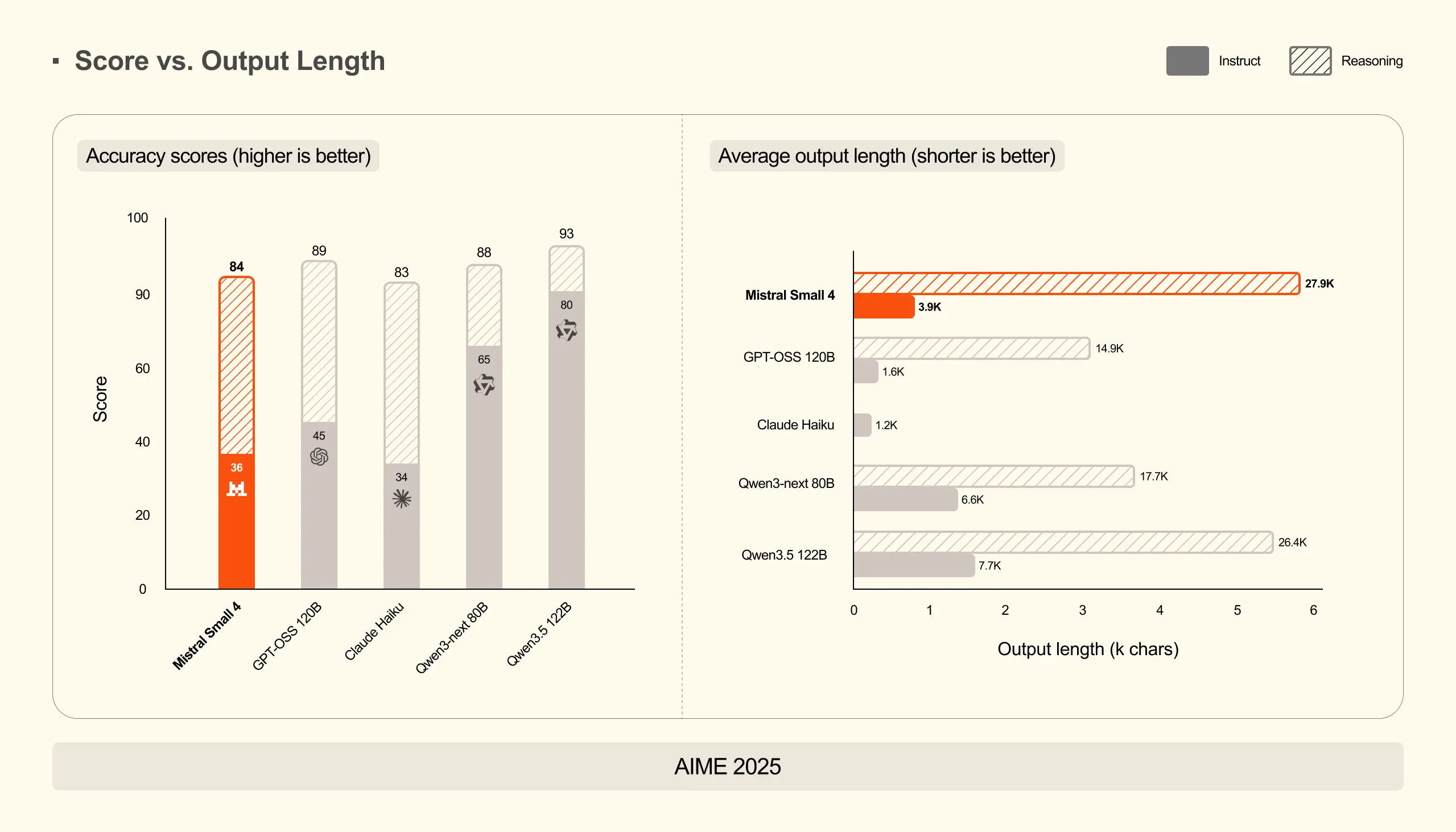
Mistral Small 4 凭借推理能力取得了极具竞争力的分数,在全部三项基准测试中均达到或超越了 GPT-OSS 120B 的表现,同时生成的输出内容显著更短。在 AA LCR 测试中,Mistral Small 4 仅用 1.6K 字符 便取得了 0.72 的分数,而 Qwen 系列模型需要生成 3.5-4 倍的输出量 (5.8-6.1K)才能达到相近性能。在 LiveCodeBench 测试中,Mistral Small 4 在减少 20% 输出量 的情况下仍优于 GPT-OSS 120B。这种高效性降低了延迟和推理成本,同时提升了用户体验。
使用方式
您可以在多个支持推理与微调的库中找到Mistral Small 4模型。在此我们要感谢所有贡献者和维护者帮助我们实现这一目标。
推理部署
该模型可通过以下方式部署:
使用说明
您可以在多个推理和微调库中找到对Mistral Small 4的支持。在此我们要感谢所有贡献者和维护者帮助我们实现这一目标。
推理部署
该模型可通过以下方式部署:
vllm(推荐): 参见此处llama.cpp: Unsloth的GGUF版本参见此链接LM studio: 参见此页面SGLang: (开发中 ⏳ -- 进度更新请关注此链接)transformers: 参见此处
若本地服务性能欠佳,我们推荐使用Mistral AI API以获得最佳表现。
微调
通过以下方式微调模型:
vLLM(推荐)
我们建议在生产环境中使用vLLM库运行Mistral Small 4模型进行推理。
安装
!提示
使用我们定制的Docker镜像,该镜像包含针对vLLM中工具调用和推理解析的修复补丁,并搭载最新版Transformers。我们正与vLLM团队合作,计划近期合并这些修复。
定制Docker镜像
使用以下Docker镜像:mistralllm/vllm-ms4:latest:
bash
docker pull mistralllm/vllm-ms4:latest
docker run -it mistralllm/vllm-ms4:latest
手动安装
或从该PR安装vllm:添加Mistral引导功能。
注意 :截至2026年3月16日,该PR预计将在1-2周内合并至
vllm主分支。更新进度可在此追踪。
-
克隆vLLM仓库:
bashgit clone --branch fix_mistral_parsing https://github.com/juliendenize/vllm.git -
使用预编译内核安装:
bashVLLM_USE_PRECOMPILED=1 pip install --editable . -
安装
transformers主分支版本:bashuv pip install git+https://github.com/huggingface/transformers.git确保已安装
mistral_common >= 1.10.0:bashpython -c "import mistral_common; print(mistral_common.__version__)"
启动模型服务
推荐采用服务端/客户端架构:
bash
vllm serve mistralai/Mistral-Small-4-119B-2603 --max-model-len 262144 --tensor-parallel-size 2 --attention-backend FLASH_ATTN_MLA \
  --tool-call-parser mistral --enable-auto-tool-choice --reasoning-parser mistral --max_num_batched_tokens 16384 --max_num_seqs 128 \
  --gpu_memory_utilization 0.8
测试服务连通性
指令遵循
Mistral Small 4 能够严格按照您的指令执行
python
from datetime import datetime, timedelta

from openai import OpenAI
from huggingface_hub import hf_hub_download

# Modify OpenAI's API key and API base to use vLLM's API server.
openai_api_key = "EMPTY"
openai_api_base = "http://localhost:8000/v1"

TEMP = 0.1

client = OpenAI(
    api_key=openai_api_key,
    base_url=openai_api_base,
)

models = client.models.list()
model = models.data[0].id


def load_system_prompt(repo_id: str, filename: str) -> str:
    file_path = hf_hub_download(repo_id=repo_id, filename=filename)
    with open(file_path, "r") as file:
        system_prompt = file.read()
    today = datetime.today().strftime("%Y-%m-%d")
    yesterday = (datetime.today() - timedelta(days=1)).strftime("%Y-%m-%d")
    model_name = repo_id.split("/")[-1]
    return system_prompt.format(name=model_name, today=today, yesterday=yesterday)


SYSTEM_PROMPT = load_system_prompt(model, "SYSTEM_PROMPT.txt")

messages = [
    {"role": "system", "content": SYSTEM_PROMPT},
    {
        "role": "user",
        "content": "Write me a sentence where every word starts with the next letter in the alphabet - start with 'a' and end with 'z'.",
    },
]

response = client.chat.completions.create(
    model=model,
    messages=messages,
    temperature=TEMP,
    reasoning_effort="none",
)

assistant_message = response.choices[0].message.content
print(assistant_message)
工具调用
让我们借助简单的Python计算器工具来解一些方程。
python
import json
from datetime import datetime, timedelta

from openai import OpenAI
from huggingface_hub import hf_hub_download

# Modify OpenAI's API key and API base to use vLLM's API server.
openai_api_key = "EMPTY"
openai_api_base = "http://localhost:8000/v1"

TEMP = 0.1

client = OpenAI(
    api_key=openai_api_key,
    base_url=openai_api_base,
)

models = client.models.list()
model = models.data[0].id


def load_system_prompt(repo_id: str, filename: str) -> str:
    file_path = hf_hub_download(repo_id=repo_id, filename=filename)
    with open(file_path, "r") as file:
        system_prompt = file.read()
    today = datetime.today().strftime("%Y-%m-%d")
    yesterday = (datetime.today() - timedelta(days=1)).strftime("%Y-%m-%d")
    model_name = repo_id.split("/")[-1]
    return system_prompt.format(name=model_name, today=today, yesterday=yesterday)


SYSTEM_PROMPT = load_system_prompt(model, "SYSTEM_PROMPT.txt")

image_url = "https://math-coaching.com/img/fiche/46/expressions-mathematiques.jpg"


def my_calculator(expression: str) -> str:
    return str(eval(expression))


tools = [
    {
        "type": "function",
        "function": {
            "name": "my_calculator",
            "description": "A calculator that can evaluate a mathematical expression.",
            "parameters": {
                "type": "object",
                "properties": {
                    "expression": {
                        "type": "string",
                        "description": "The mathematical expression to evaluate.",
                    },
                },
                "required": ["expression"],
            },
        },
    },
    {
        "type": "function",
        "function": {
            "name": "rewrite",
            "description": "Rewrite a given text for improved clarity",
            "parameters": {
                "type": "object",
                "properties": {
                    "text": {
                        "type": "string",
                        "description": "The input text to rewrite",
                    }
                },
            },
        },
    },
]

messages = [
    {"role": "system", "content": SYSTEM_PROMPT},
    {
        "role": "user",
        "content": [
            {
                "type": "text",
                "text": "Thanks to your calculator, compute the results for the equations that involve numbers displayed in the image.",
            },
            {
                "type": "image_url",
                "image_url": {
                    "url": image_url,
                },
            },
        ],
    },
]

response = client.chat.completions.create(
    model=model,
    messages=messages,
    temperature=TEMP,
    tools=tools,
    tool_choice="auto",
    reasoning_effort="none",
)

tool_calls = response.choices[0].message.tool_calls

results = []
for tool_call in tool_calls:
    function_name = tool_call.function.name
    function_args = tool_call.function.arguments
    if function_name == "my_calculator":
        result = my_calculator(**json.loads(function_args))
        results.append(result)

messages.append({"role": "assistant", "tool_calls": tool_calls})
for tool_call, result in zip(tool_calls, results):
    messages.append(
        {
            "role": "tool",
            "tool_call_id": tool_call.id,
            "name": tool_call.function.name,
            "content": result,
        }
    )


response = client.chat.completions.create(
    model=model,
    messages=messages,
    temperature=TEMP,
    reasoning_effort="none",
)

print(response.choices[0].message.content)
视觉推理
让我们看看Mistral Small 4是否知道何时该挑起争端!
python
from datetime import datetime, timedelta

from openai import OpenAI
from huggingface_hub import hf_hub_download

# Modify OpenAI's API key and API base to use vLLM's API server.
openai_api_key = "EMPTY"
openai_api_base = "http://localhost:8000/v1"

TEMP = 0.1

client = OpenAI(
    api_key=openai_api_key,
    base_url=openai_api_base,
)

models = client.models.list()
model = models.data[0].id


def load_system_prompt(repo_id: str, filename: str) -> str:
    file_path = hf_hub_download(repo_id=repo_id, filename=filename)
    with open(file_path, "r") as file:
        system_prompt = file.read()
    today = datetime.today().strftime("%Y-%m-%d")
    yesterday = (datetime.today() - timedelta(days=1)).strftime("%Y-%m-%d")
    model_name = repo_id.split("/")[-1]
    return system_prompt.format(name=model_name, today=today, yesterday=yesterday)


SYSTEM_PROMPT = load_system_prompt(model, "SYSTEM_PROMPT.txt")
image_url = "https://static.wikia.nocookie.net/essentialsdocs/images/7/70/Battle.png/revision/latest?cb=20220523172438"

messages = [
    {"role": "system", "content": SYSTEM_PROMPT},
    {
        "role": "user",
        "content": [
            {
                "type": "text",
                "text": "What action do you think I should take in this situation? List all the possible actions and explain why you think they are good or bad.",
            },
            {"type": "image_url", "image_url": {"url": image_url}},
        ],
    },
]


response = client.chat.completions.create(
    model=model,
    messages=messages,
    temperature=TEMP,
    reasoning_effort="high",
)

print(response.choices[0].message.content)
Transformers
安装
您需要安装Transformers的主分支才能使用Mistral Small 4。
bash
uv pip install git+https://github.com/huggingface/transformers.git推断
注意 :当前版本的Transformers暂不支持FP8格式。
权重数据已以FP8格式存储,预计未来会更新加载功能。在此期间,我们提供BF16量化代码片段以便使用。
一旦支持添加,我们将立即更新以下代码片段。
Python 推理代码片段
python
from pathlib import Path

import torch
from huggingface_hub import snapshot_download
from safetensors.torch import load_file
from tqdm import tqdm

from transformers import AutoConfig, AutoProcessor, Mistral3ForConditionalGeneration


def _descale_fp8_to_bf16(tensor: torch.Tensor, scale_inv: torch.Tensor) -> torch.Tensor:
    return (tensor.to(torch.bfloat16) * scale_inv.to(torch.bfloat16)).to(torch.bfloat16)


def _resolve_model_dir(model_id: str) -> Path:
    local = Path(model_id)
    if local.is_dir():
        return local
    return Path(snapshot_download(model_id, allow_patterns=["model*.safetensors"]))


def load_and_dequantize_state_dict(model_id: str) -> dict[str, torch.Tensor]:
    model_dir = _resolve_model_dir(model_id)

    shards = sorted(model_dir.glob("model*.safetensors"))

    full_state_dict: dict[str, torch.Tensor] = {}
    for shard in tqdm(shards, desc="Loading safetensors shards"):
        full_state_dict.update(load_file(str(shard)))

    scale_suffixes = ("weight_scale_inv", "gate_up_proj_scale_inv", "down_proj_scale_inv", "up_proj_scale_inv")
    activation_scale_suffixes = ("activation_scale", "gate_up_proj_activation_scale", "down_proj_activation_scale")

    keys_to_remove: set[str] = set()
    all_keys = list(full_state_dict.keys())

    for key in tqdm(all_keys, desc="Dequantizing FP8 weights to BF16"):
        if any(key.endswith(s) for s in scale_suffixes + activation_scale_suffixes):
            continue

        for scale_suffix in scale_suffixes:
            if scale_suffix == "weight_scale_inv":
                if not key.endswith(".weight"):
                    continue
                scale_key = key.rsplit(".weight", 1)[0] + ".weight_scale_inv"
            else:
                proj_name = scale_suffix.replace("_scale_inv", "")
                if not key.endswith(f".{proj_name}"):
                    continue
                scale_key = key + "_scale_inv"

            if scale_key in full_state_dict:
                full_state_dict[key] = _descale_fp8_to_bf16(full_state_dict[key], full_state_dict[scale_key])
                keys_to_remove.add(scale_key)

    for key in full_state_dict:
        if any(key.endswith(s) for s in activation_scale_suffixes):
            keys_to_remove.add(key)

    for key in tqdm(keys_to_remove, desc="Removing scale keys"):
        del full_state_dict[key]

    return full_state_dict


def load_config_without_quantization(model_id: str) -> AutoConfig:
    config = AutoConfig.from_pretrained(model_id)

    if hasattr(config, "quantization_config"):
        del config.quantization_config

    if hasattr(config, "text_config") and hasattr(config.text_config, "quantization_config"):
        del config.text_config.quantization_config

    return config


model_id = "mistralai/Mistral-Small-4-119B-2603"

config = load_config_without_quantization(model_id)
state_dict = load_and_dequantize_state_dict(model_id)

model = Mistral3ForConditionalGeneration.from_pretrained(
    None,
    config=config,
    state_dict=state_dict,
    device_map="auto",
)

processor = AutoProcessor.from_pretrained(model_id)

image_url = "https://static.wikia.nocookie.net/essentialsdocs/images/7/70/Battle.png/revision/latest?cb=20220523172438"

messages = [
    {
        "role": "user",
        "content": [
            {
                "type": "text",
                "text": "What action do you think I should take in this situation? List all the possible actions and explain why you think they are good or bad.",
            },
            {"type": "image_url", "image_url": {"url": image_url}},
        ],
    },
]

inputs = processor.apply_chat_template(
    messages, return_tensors="pt", tokenize=True, return_dict=True, reasoning_effort="high"
)
inputs = inputs.to(model.device)

output = model.generate(
    **inputs,
    max_new_tokens=1024,
    do_sample=True,
    temperature=0.7,
)[0]

# Setting `skip_special_tokens=False` to visualize reasoning trace between [THINK] [/THINK] tags.
decoded_output = processor.decode(output[len(inputs["input_ids"][0]) :], skip_special_tokens=False)
print(decoded_output)
许可证
本模型采用Apache 2.0许可证授权。
禁止以侵犯、盗用或违反任何第三方权利(包括知识产权)的方式使用本模型。