Java 打印pdf添加水印实现
添加水印工具类
import com.itextpdf.text.BaseColor;
import com.itextpdf.text.Element;
import com.itextpdf.text.pdf.*;
import lombok.extern.slf4j.Slf4j;
import org.apache.commons.lang3.StringUtils;
import java.io.FileInputStream;
import java.io.FileOutputStream;

@Slf4j
public class PdfUtils {

    /**
     * pdf添加文字水印
     * @param waterMark 水印内容
     * @param sourcePath 源文件路径
     * @param targetPath 目标文件路径
     * @param fontSize 字体大小
     */
    public static String addWatermark(String waterMark, String sourcePath, String targetPath, int fontSize) throws Exception {
        if (StringUtils.isBlank(waterMark) || StringUtils.isBlank(sourcePath) || StringUtils.isBlank(targetPath)) {
            return sourcePath;
        }
        PdfReader reader = null;
        PdfStamper stamp = null;
        try {
            //待加水印文件
            reader = new PdfReader(new FileInputStream(sourcePath));
            //加完水印输入的文件
            stamp = new PdfStamper(reader, new FileOutputStream(targetPath));
            // 设置字体(需要考虑pdf中文无法显示的问题),Itext内置了一些中文字体,STSongStd-Light,STSong-Light
            BaseFont font = BaseFont.createFont("STSong-Light", "UniGB-UCS2-H", true);

            //设置透明度
            PdfGState pdfGState = new PdfGState();
            pdfGState.setFillOpacity(0.5f);   //设置透明度为0.5,值的范围是0.0到1.0,其中0.0代表完全透明(即不可见),1.0代表完全不透明(即完全可见)

            // 源PDF文件的总页数
            int pageSize = reader.getNumberOfPages();

            //循环对每页添加水印
            for (int i = 1; i <= pageSize; i++) {
//            PdfContentByte under = stamp.getUnderContent(i);  //水印在之前的文本下,文本会盖住水印,如果需要文本水印一起出现,不要使用该方法
                PdfContentByte under = stamp.getOverContent(i);   //水印在之前的文本上

                //平铺水印
                for (int x = 100; x < 750; x += 200) { // 控制水印在横向上的间距
                    for (int y = 100; y < 1000; y += 300) { // 控制水印在纵向上的间距
                        under.beginText();     //开始
                        under.setFontAndSize(font, 40);    //应用字体,并将字体大小改为40
                        under.setColorFill(BaseColor.LIGHT_GRAY);     //设置字体颜色
                        under.setGState(pdfGState);  //将透明度应用到水印里
                        under.showTextAligned(Element.ALIGN_CENTER, waterMark, x, y, 45);//居中;水印内容;水印x坐标;水印y坐标;45°角
                        under.endText();
                    }
                }
            }
        }finally {
            if (stamp != null) {
                stamp.close();
            }
            if (reader != null) {
                reader.close();
            }
        }
        return targetPath;
    }
}
调用添加水印代码
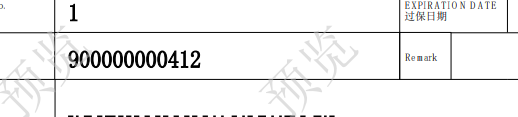
	    String waterMark = "预览";
        String sourcePath= "D:\\project\\code\\Att\\Templates\\111.pdf";
        String targetPath= "D:\\project\\code\\Att\\Templates\\222.pdf";
        String fontSize = 40;
        path = PdfUtils.addWatermark(waterMark, sourcePath, targetPath, fontSize);
打印如下: