文章目录
- [1. 概述](#1. 概述)
- [2. 工作原理](#2. 工作原理)
- [3. 快速开始](#3. 快速开始)
-
- [3.1 依赖配置](#3.1 依赖配置)
- [3.2 基础用法](#3.2 基础用法)
- [4. 搜索策略](#4. 搜索策略)
- [5. 性能基准](#5. 性能基准)
- [6. 适用场景选择](#6. 适用场景选择)
- 参考资料
1. 概述
随着 AI Agent 接入越来越多的服务(Slack、GitHub、Jira、MCP Server),工具库规模快速膨胀------典型的多服务器场景可轻松超过 50 个工具,不仅消耗大量 Token,模型在 30+ 个相似工具面前的选型准确率也显著下降。Tool Search Tool 方案实现 34%~64% 的 Token 节省,同时支持数百工具的按需动态发现。
Tool Search Tool 是 Anthropic 首创的工具发现模式:不再将所有工具定义一次性发送给模型,而是让模型按需检索。最初只提供一个"搜索工具",模型需要时调用它查询能力,由后台将匹配的工具定义动态注入上下文。
核心优势:
| 优势 | 说明 |
|---|---|
| Token 节省 | 只有被检索到的工具定义才发送给 LLM |
| 选型精度提升 | 模型从更小、更相关的工具集合中做选择,可靠性更高 |
| 可扩展性 | 管理数百工具而不会导致上下文膨胀 |
| 可移植性 | 兼容 OpenAI、Anthropic、Gemini、Ollama、Azure OpenAI 等 |
Tool Search Tool 项目基于 Spring AI 的**递归顾问(Recursive Advisors)**实现,跨所有 Spring AI 支持的 LLM 提供商工作。
2. 工作原理
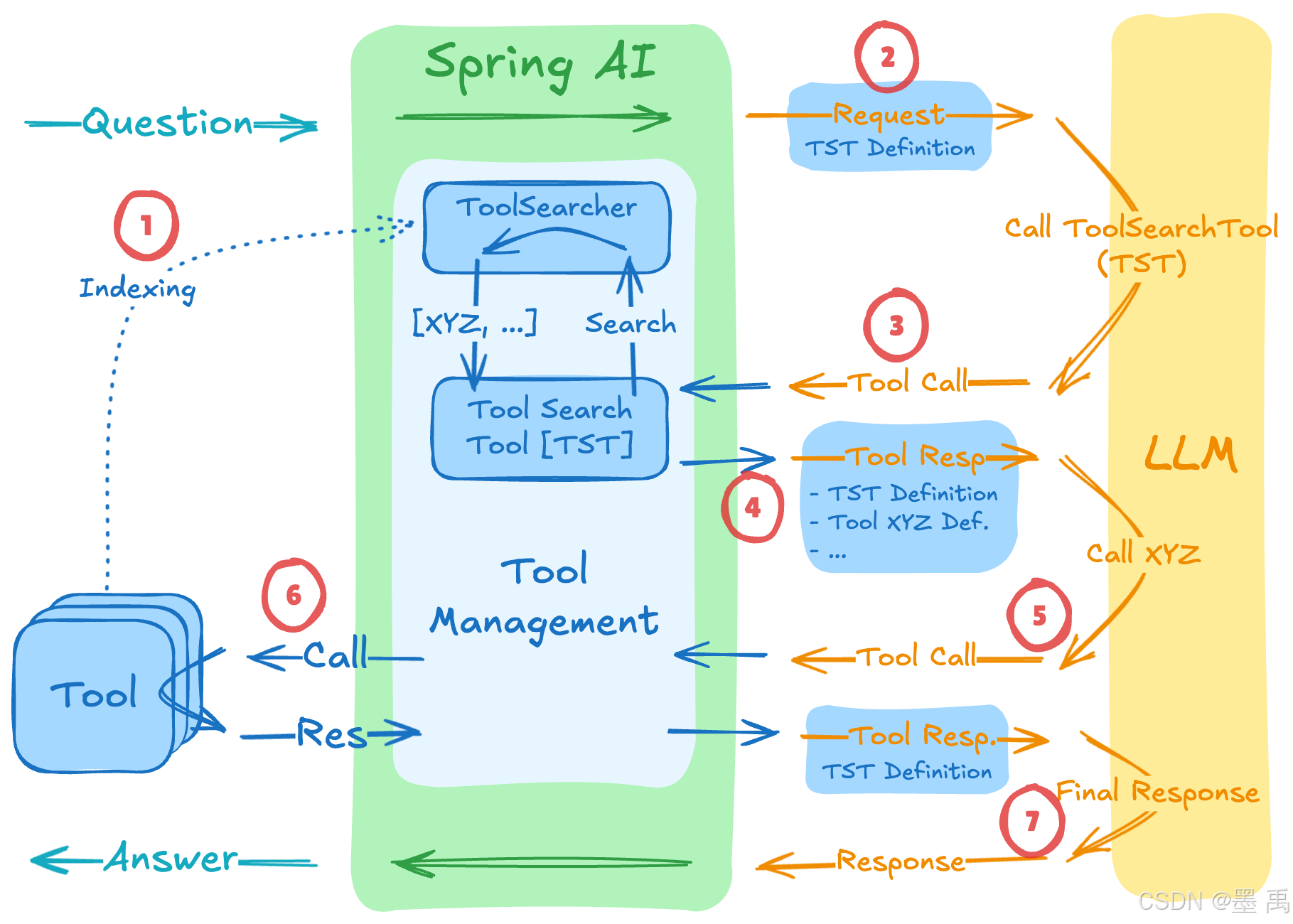
ToolSearchToolCallAdvisor 继承了 ToolCallAdvisor,实现动态工具发现:
- 索引阶段 → 会话初始化时,所有注册工具被索引到
ToolSearcher(但不发送给LLM) - 初始请求 → 仅将
Tool Search Tool这一个工具的定义发送给LLM - 发现调用 → 当
LLM需要某种能力时,调用搜索工具发起查询 - 搜索与展开 →
ToolSearcher找到匹配工具,将其定义追加到下一轮请求 - 工具调用 →
LLM同时看到搜索工具和已发现工具的完整定义 - 工具执行 → 执行已发现工具,返回结果
- 生成响应 →
LLM生成最终回答
3. 快速开始
3.1 依赖配置
xml
<!-- 核心依赖:选择你使用的 Spring AI 版本 -->
<dependency>
    <groupId>org.springaicommunity</groupId>
    <artifactId>tool-search-tool</artifactId>
    <version>2.0.0</version>
</dependency>

<!-- 选择一种搜索策略实现 -->
<dependency>
    <groupId>org.springaicommunity</groupId>
    <artifactId>tool-searcher-lucene</artifactId>
    <version>2.0.0</version>
</dependency>
v1.0.x兼容 Spring AI 1.1.x / Spring Boot 3;v2.0.x兼容 Spring AI 2.x / Spring Boot 4。
3.2 基础用法
java
@SpringBootApplication
public class Application {

    @Bean
    CommandLineRunner demo(ChatClient.Builder builder, ToolSearcher toolSearcher) {
        return args -> {
            var advisor = ToolSearchToolCallAdvisor.builder()
                .toolSearcher(toolSearcher)
                .build();

            ChatClient chatClient = builder
                .defaultTools(new MyTools())  // 数百工具已注册,但不发送给 LLM
                .defaultAdvisors(advisor)     // 激活 Tool Search Tool
                .build();

            var answer = chatClient.prompt("""
                Help me plan what to wear today in Amsterdam.
                Please suggest clothing shops that are open right now.
                """).call().content();

            System.out.println(answer);
        };
    }

    static class MyTools {
        @Tool(description = "Get the weather for a given location at a given time")
        public String weather(String location,
            @ToolParam(description = "YYYY-MM-DDTHH:mm") String atTime) {
            // implementation
        }

        @Tool(description = "Get clothing shop names for a given location at a given time")
        public List<String> clothing(String location,
                @ToolParam(description = "YYYY-MM-DDTHH:mm") String openAtTime) {
            // implementation
        }

        @Tool(description = "Current date and time for a given location")
        public String currentTime(String location) {
            // implementation
        }

        // ... 可能有数百个工具
    }
}
4. 搜索策略
ToolSearcher 接口支持多种搜索实现:
| 策略 | 实现 | 适用场景 |
|---|---|---|
| 语义搜索 | VectorToolSearcher |
自然语言查询、模糊匹配 |
| 关键词搜索 | LuceneToolSearcher |
精确词匹配、已知工具名 |
| 正则匹配 | RegexToolSearcher |
工具名模式匹配(如 get_*_data) |
5. 性能基准
在 28 个工具的测试场景下,Token 节省效果显著:
| 模型 | 启用 Tool Search | 未启用 | 节省比例 |
|---|---|---|---|
| Gemini | 2,165 tokens | 5,375 tokens | 60% |
| OpenAI | 4,706 tokens | 7,175 tokens | 34% |
| Anthropic | 6,273 tokens | 17,342 tokens | 64% |
6. 适用场景选择
| 推荐使用 Tool Search | 使用传统方案即可 |
|---|---|
| 系统中 20+ 工具 | 工具库小型(< 20 个) |
| 工具定义消耗 > 5K tokens | 所有工具在每个会话中都会用到 |
| 构建多 MCP Server 系统 | 工具定义非常紧凑 |
| 出现工具选型精度问题 |
参考资料
- Tool Search Tool Demo --- 完整可运行示例
- Anthropic Advanced Tool Use --- 原始模式描述
- Spring AI 递归顾问博客 --- 工具搜索实现的基石
- Pre-Select Tool Demo --- 无需 LLM 参与的确定性工具选择