目录
自动化需求
给esxi主机批量添加ISCSI动态目标,支持多VC,支持多个动态目标IP,支持重复动态目标IP跳过
版本:
python3.11
pyvmomi 9.0.0.0
pyvim 3.0.3
代码
import ssl
import os
import time
import concurrent.futures
from collections import defaultdict
from pyVim.connect import SmartConnect, Disconnect
from pyVmomi import vim
from openpyxl import load_workbook

# ================= 配置区域 =================
VC_CONFIGS = {
    '192.168.1.250': {
        'user': 'administrator@vsphere.local',
        'pwd': 'xiaozhou@666.com'
    },
    # 示例:添加第二个vCenter
    # '192.168.1.100': {
    #     'user': 'administrator@vsphere.local',
    #     'pwd': 'YourPasswordHere'
    # }
}

# 输入文件名称
INPUT_FILE = 'iscsi.xlsx'
# 并发配置(建议 5-10)
MAX_WORKERS = 5


# =======================================================================


def get_obj(content, vimtype, name=None):
    """获取对象函数"""
    container = content.viewManager.CreateContainerView(content.rootFolder, vimtype, True)
    return next((item for item in container.view if item.name == name), None) if name else container.view


def read_iscsi_config_from_xlsx():
    """
    从Excel读取iSCSI配置
    Excel格式:VC, ESXI主机, iSCSI动态发现IP(多个IP用逗号分隔)
    """
    configs = []
    xlsx_file_path = os.path.join(os.getcwd(), INPUT_FILE)

    if not os.path.exists(xlsx_file_path):
        print(f"错误: Excel文件不存在 '{xlsx_file_path}'")
        return configs

    try:
        wb = load_workbook(xlsx_file_path, read_only=True, data_only=True)
        ws = wb.active
        rows = list(ws.iter_rows(values_only=True))
        wb.close()

        if not rows:
            print("错误: Excel文件为空")
            return configs

        header = [str(h).strip() if h else '' for h in rows[0]]
        expected_headers = ['VC', 'ESXI主机', 'iSCSI动态发现IP']
        if header != expected_headers:
            print(f"警告: Excel表头格式不正确")
            print(f"期望: {expected_headers}")
            print(f"实际: {header}")
            return configs

        for row in rows[1:]:
            if len(row) >= 3:
                # 【修改】解析多个IP(逗号分隔)
                ip_str = str(row[2]).strip() if row[2] else ''
                target_ips = []
                if ip_str:
                    # 按逗号分割,去除空格
                    target_ips = [ip.strip() for ip in ip_str.split(',') if ip.strip()]

                config = {
                    'vc_ip': str(row[0]).strip() if row[0] else '',
                    'esxi_host': str(row[1]).strip() if row[1] else '',
                    'iscsi_target_ips': target_ips  # 【修改】改为列表
                }
                if config['vc_ip'] not in VC_CONFIGS:
                    print(f"警告: 跳过主机 '{config['esxi_host']}',VC '{config['vc_ip']}' 未配置")
                    continue
                if config['vc_ip'] and config['esxi_host'] and config['iscsi_target_ips']:
                    configs.append(config)
                    print(
                        f"读取配置: {config['esxi_host']} -> {len(config['iscsi_target_ips'])} 个目标: {', '.join(config['iscsi_target_ips'])}")
                else:
                    print(f"警告: 跳过无效行(缺少VC/主机/IP): {row}")
            else:
                print(f"警告: Excel行数据不完整: {row}")

    except Exception as e:
        print(f"读取Excel文件失败: {e}")

    return configs


def process_single_host(content, config):
    """
    处理单个ESXi主机:添加多个iSCSI动态发现目标并扫描
    返回: (成功/失败, 主机名, 消息)
    """
    esxi_host = config['esxi_host']
    target_ips = config['iscsi_target_ips']

    try:
        # 1. 获取ESXi主机对象
        host = get_obj(content, [vim.HostSystem], esxi_host)
        if not host:
            return False, esxi_host, f"找不到ESXi主机 '{esxi_host}'"

        # 2. 获取存储系统
        storage_system = host.configManager.storageSystem
        if not storage_system:
            return False, esxi_host, "无法获取存储系统"

        # 3. 查找iSCSI适配器
        iscsi_hba = None
        device_info = storage_system.storageDeviceInfo

        if not device_info or not device_info.hostBusAdapter:
            return False, esxi_host, "未找到存储适配器"

        for hba in device_info.hostBusAdapter:
            if isinstance(hba, vim.host.InternetScsiHba):
                iscsi_hba = hba
                break

        if not iscsi_hba:
            return False, esxi_host, "未找到iSCSI适配器"

        hba_device = iscsi_hba.device
        print(f"   [{esxi_host}] 找到iSCSI适配器: {hba_device}")

        # 4. 获取现有目标列表
        existing_targets = []
        if hasattr(iscsi_hba, 'configuredSendTarget') and iscsi_hba.configuredSendTarget:
            existing_targets = [t.address for t in iscsi_hba.configuredSendTarget]

        # 5. 【修改】循环添加多个目标
        added_count = 0
        skipped_count = 0
        failed_ips = []

        for target_ip in target_ips:
            if target_ip in existing_targets:
                print(f"   [{esxi_host}] 目标 {target_ip} 已存在,跳过")
                skipped_count += 1
                continue

            try:
                print(f"   [{esxi_host}] 正在添加动态发现目标: {target_ip}")
                send_target = vim.host.InternetScsiHba.SendTarget(
                    address=target_ip,
                    port=3260
                )
                storage_system.AddInternetScsiSendTargets(
                    iScsiHbaDevice=hba_device,
                    targets=[send_target]
                )
                print(f"   [{esxi_host}] 成功添加目标: {target_ip}")
                added_count += 1
            except Exception as e:
                print(f"   [{esxi_host}] 添加目标 {target_ip} 失败: {e}")
                failed_ips.append(f"{target_ip}({e})")
                continue

        # 6. 重新扫描存储适配器(只要有添加或有目标就扫描)
        if added_count > 0 or len(target_ips) > 0:
            print(f"   [{esxi_host}] 正在重新扫描存储适配器...")
            storage_system.RescanHba(hbaDevice=hba_device)
            print(f"   [{esxi_host}] 扫描完成")

        # 构建结果消息
        msg_parts = []
        if added_count > 0:
            msg_parts.append(f"新增{added_count}个")
        if skipped_count > 0:
            msg_parts.append(f"跳过{skipped_count}个")
        if failed_ips:
            msg_parts.append(f"失败{len(failed_ips)}个: {'; '.join(failed_ips)}")

        result_msg = ', '.join(msg_parts) if msg_parts else "无操作"

        return True, esxi_host, result_msg

    except Exception as e:
        return False, esxi_host, str(e)


def process_vcenter_tasks(vc_ip, vc_cred, host_list):
    """处理单个vCenter下的所有主机"""
    print(f"\n========== 开始处理 vCenter: {vc_ip} ==========")
    si = None
    context = ssl._create_unverified_context()

    try:
        # 连接vCenter
        si = SmartConnect(
            host=vc_ip,
            user=vc_cred['user'],
            pwd=vc_cred['pwd'],
            port=443,
            sslContext=context
        )
        content = si.content
        print(f"✅ 成功连接到 vCenter: {vc_ip}")
        print(f"🚀 开始并发处理 (并发数: {MAX_WORKERS})...")

        # 并发处理
        success_count = 0
        failed_count = 0
        failed_details = []

        with concurrent.futures.ThreadPoolExecutor(max_workers=MAX_WORKERS) as executor:
            future_to_host = {
                executor.submit(process_single_host, content, config): config
                for config in host_list
            }

            for i, future in enumerate(concurrent.futures.as_completed(future_to_host), 1):
                config = future_to_host[future]
                try:
                    success, host_name, message = future.result()
                    if success:
                        success_count += 1
                        print(f"✅ [{i}/{len(host_list)}] {host_name}: {message}")
                    else:
                        failed_count += 1
                        failed_details.append((host_name, message))
                        print(f"❌ [{i}/{len(host_list)}] {host_name}: {message}")
                except Exception as e:
                    failed_count += 1
                    failed_details.append((config['esxi_host'], str(e)))
                    print(f"❌ [{i}/{len(host_list)}] {config['esxi_host']}: {str(e)}")

        # 打印总结
        print(f"\n📊 {vc_ip} 处理完成总结:")
        print(f"   成功: {success_count} 台")
        print(f"   失败: {failed_count} 台")
        if failed_details:
            print(f"   失败详情:")
            for name, msg in failed_details:
                print(f"     - {name}: {msg}")

    except Exception as e:
        print(f"vCenter {vc_ip} 执行错误: {e}")
        import traceback
        traceback.print_exc()
    finally:
        if si:
            Disconnect(si)
            print(f"已断开 vCenter {vc_ip} 连接")


def main():
    print("=" * 60)
    print("🚀 ESXi主机批量添加iSCSI动态发现目标工具 (多IP版)")
    print("=" * 60)

    # 读取所有配置
    all_configs = read_iscsi_config_from_xlsx()
    if not all_configs:
        print("没有有效的配置数据")
        return

    # 按VC IP分组
    vc_groups = defaultdict(list)
    for config in all_configs:
        vc_groups[config['vc_ip']].append(config)

    print(f"\n共读取到 {len(all_configs)} 个主机配置")

    # 逐个处理每个vCenter
    for vc_ip, host_list in vc_groups.items():
        if vc_ip in VC_CONFIGS:
            process_vcenter_tasks(vc_ip, VC_CONFIGS[vc_ip], host_list)
        else:
            print(f"警告: 跳过未配置的vCenter: {vc_ip}")

    print("\n所有任务处理完毕")


if __name__ == "__main__":
    main()
使用方法
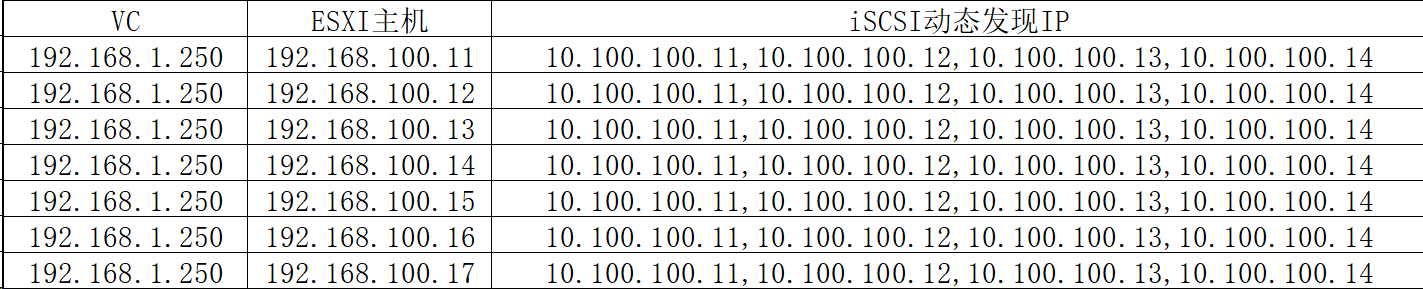
在代码内填入vc的有关信息,然后创建iscsi.xlsx(包含VC,ESXI主机,iSCSI动态发现IP
三列)在代码文件同目录,运行代码即可
iscsi.xlsx示意图如下:
脚本为ai编写,使用前请使用测试环境进行测试