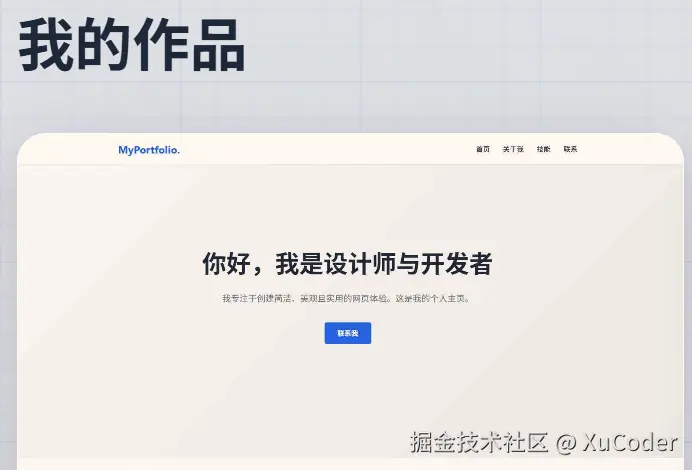
我的个人项目中有这么一个功能,就是个人作品页面需要显示详情页的预览截图,这样会显得更专业一点。
但是,截图之前是存在腾讯云COS中的,最近我的腾讯云 COS 到期了,我就开始寻找替代方案。
想换 Cloudflare R2 吧,听说很香零费用,结果还要信用卡验证,我这种没有国际信用卡的人直接被拒之门外。
经过一番调研和实践,我锁定了一个纯白嫖、零成本、高速度的方案:
GitHub 仓库存储 + jsDelivr CDN 加速。
本文将介绍一下如何在 Spring Boot 项目中集成这一方案。
技术选型
| 维度 | 腾讯云 COS | GitHub + jsDelivr |
|---|---|---|
| 存储费用 | 按量计费/资源包(需续费) | 完全免费 (建议单仓库 < 1GB,单文件 < 50MB,GitHub 有软限制) |
| 流量费用 | 下行流量贵(容易被盗链刷爆) | 完全免费 (jsDelivr 提供的全球加速) |
| 支付门槛 | 需实名、绑定支付方式 | 仅需一个 GitHub 账号 |
| 国内访问 | 速度快,但费钱 | 通过 jsDelivr 加速,速度极快 |
准备工作
- 创建一个新的公开仓库(Public),例如
ObjectStorage。 - 生成 Personal Access Token (PAT)
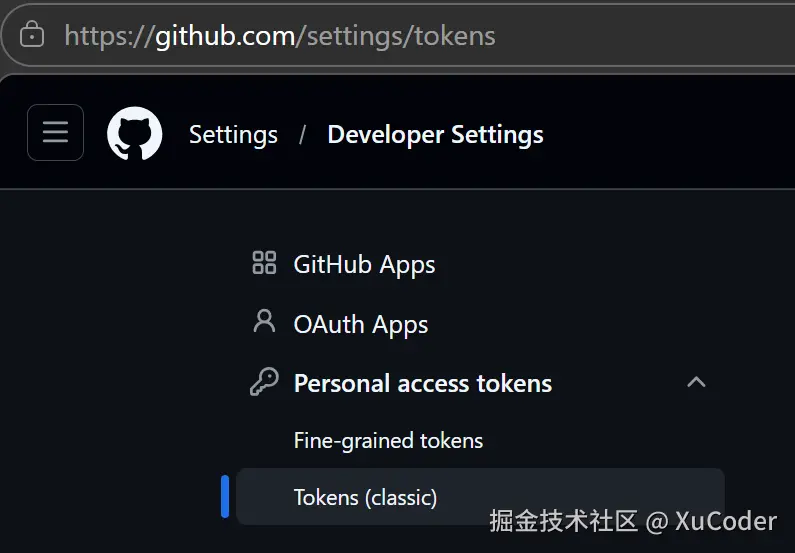
在Github账户进入【Settings】➡️【Developer settings】➡️【Personal access tokens】➡️【 Tokens (classic)】。
小贴士
创建Token时必须要勾选 repo 权限,并且创建的时候就得保存好生成的 Token,因为它只会出现一次。
图片截图上传成功后,访问链接格式为:
https://cdn.jsdelivr.net/gh/用户名/仓库名@分支名/文件路径
代码实现
引入依赖
需要 OkHttp 处理网络请求,FastJSON 处理 JSON 数据。
xml
<dependency>
    <groupId>com.squareup.okhttp3</groupId>
    <artifactId>okhttp</artifactId>
    <version>4.10.0</version>
</dependency>
<dependency>
    <groupId>com.alibaba</groupId>
    <artifactId>fastjson</artifactId>
    <version>2.0.32</version>
</dependency>
application-local
为了开源安全,将敏感信息放在 application-local.yml 中,并确保该文件在 .gitignore 中。
yaml
# application-local.yml
github:
  owner: github用户名
  repo: ObjectStorage
  branch: main
  token: ghp_你的TOKEN
GithubConfig
将原CosConfig加上@Deprecated,新增GithubConfig
java
import lombok.Data;
import org.springframework.boot.context.properties.ConfigurationProperties;
import org.springframework.context.annotation.Configuration;

@Data
@Configuration
@ConfigurationProperties(prefix = "github")
public class GithubConfig {
    private String owner;
    private String repo;
    private String branch;
    private String token;
}
GithubManager
为了模仿对象存储的 SDK,将文件转为 Base64 并调用 GitHub API 进行 PUT 上传。
讲原CosManager加上@Deprecated,新增GithubManager
java
@Component
@Slf4j
public class GithubManager {

    @Resource
    private GithubConfig githubConfig;

    private final OkHttpClient client = new OkHttpClient.Builder()
            .connectTimeout(15, TimeUnit.SECONDS)
            .readTimeout(15, TimeUnit.SECONDS)
            .build();

    /**
     * 上传文件到 GitHub 仓库
     *
     * @param key  存储路径
     * @param file 本地文件
     * @return jsDelivr CDN 访问地址
     */
    public String uploadFile(String key, File file) {
        // 1. 读取文件并转为 Base64
        byte[] fileBytes = FileUtil.readBytes(file);
        String base64Content = Base64.getEncoder().encodeToString(fileBytes);

        // 2. 构建 GitHub API 请求体
        JSONObject json = new JSONObject();
        json.put("message", "upload screenshot: " + file.getName());
        json.put("content", base64Content);
        json.put("branch", githubConfig.getBranch());

        // 注意:GitHub API 路径开头不能有 /
        if (key.startsWith("/")) {
            key = key.substring(1);
        }

        String url = String.format("https://api.github.com/repos/%s/%s/contents/%s",
                githubConfig.getOwner(), githubConfig.getRepo(), key);

        RequestBody body = RequestBody.create(
                json.toJSONString(),
                MediaType.parse("application/json; charset=utf-8")
        );

        Request request = new Request.Builder()
                .url(url)
                .addHeader("Authorization", "token " + githubConfig.getToken())
                .put(body)
                .build();

        // 3. 发送请求
        try (Response response = client.newCall(request).execute()) {
            if (response.isSuccessful()) {
                // 返回 jsDelivr CDN 链接
                return String.format("https://cdn.jsdelivr.net/gh/%s/%s@%s/%s",
                        githubConfig.getOwner(),
                        githubConfig.getRepo(),
                        githubConfig.getBranch(),
                        key);
            } else {
                log.error("GitHub 上传失败, 错误码: {}, 详情: {}", response.code(), response.body().string());
                return null;
            }
        } catch (IOException e) {
            log.error("GitHub 上传网络异常", e);
            return null;
        }
    }
}
GithubScreenshotServiceImpl
为了保留原ScreenshotServiceImpl的逻辑,新增一个GithubScreenshotServiceImpl同样也实现ScreenshotService 接口。
java
/**
 * GithubScreenshotServiceImpl类实现了ScreenshotService接口,提供网页截图生成并上传到 GitHub 的服务
 */
@Service("githubScreenshotService") // 指定 Bean 名称,防止和原 COS 实现冲突
@Slf4j
public class GithubScreenshotServiceImpl implements ScreenshotService {

    @Resource
    private GithubManager githubManager; // 注入新写的 GithubManager

    @Override
    public String generateAndUploadScreenshot(String webUrl) {
        ThrowUtils.throwIf(StrUtil.isBlank(webUrl), ErrorCode.PARAMS_ERROR, "网页URL不能为空");
        log.info("开始生成网页截图(GitHub方案),URL:{}", webUrl);

        // 1. 调用工具方法保存网页截图到本地
        String localScreenshotPath = WebScreenshotUtils.saveWebPageScreenshot(webUrl);
        ThrowUtils.throwIf(StrUtil.isBlank(localScreenshotPath), ErrorCode.OPERATION_ERROR, "本地截图生成失败");

        try {
            // 2. 调用方法将本地截图上传到 GitHub
            String githubUrl = uploadScreenshotToGithub(localScreenshotPath);
            ThrowUtils.throwIf(StrUtil.isBlank(githubUrl), ErrorCode.OPERATION_ERROR, "截图上传 GitHub 失败");

            log.info("网页截图生成并上传 GitHub 成功: {} -> {}", webUrl, githubUrl);
            return githubUrl;
        } finally {
            // 3. 清理本地文件
            cleanupLocalFile(localScreenshotPath);
        }
    }

    private String uploadScreenshotToGithub(String localScreenshotPath) {
        if (StrUtil.isBlank(localScreenshotPath)) {
            return null;
        }

        File screenshotFile = new File(localScreenshotPath);
        if (!screenshotFile.exists()) {
            log.error("截图文件不存在: {}", localScreenshotPath);
            return null;
        }

        // 生成文件名
        String fileName = UUID.randomUUID().toString().substring(0, 8) + "_compressed.jpg";
        // 生成 GitHub 存储路径
        String githubKey = generateScreenshotKey(fileName);

        // 调用 GitHub 管理器
        return githubManager.uploadFile(githubKey, screenshotFile);
    }

    private String generateScreenshotKey(String fileName) {
        String datePath = LocalDate.now().format(DateTimeFormatter.ofPattern("yyyy/MM/dd"));
        // 注意:GitHub 路径不建议以 / 开头
        return String.format("screenshots/%s/%s", datePath, fileName);
    }

    private void cleanupLocalFile(String localFilePath) {
        File localFile = new File(localFilePath);
        if (localFile.exists()) {
            File parentDir = localFile.getParentFile();
            FileUtil.del(parentDir);
            log.info("本地截图临时文件已清理: {}", localFilePath);
        }
    }
}
小贴士
这里有一个问题需要注意,@Deprecated 只是给程序员看的"警告"标签,它并不能阻止 Spring 扫描并加载这个 Bean。
所以,为了避免Spring 在启动时发现有两个类都实现了 ScreenshotService 接口,并且都加上了 @Service 注解。当其他地方需要注入 ScreenshotService 时,Spring 不知道该选哪一个的问题。
需要在ScreenshotServiceImpl类中添加@Deprecated 的同时,把@Service 注解注释掉。
java
// @Service  <-- 把这个注释掉,Spring 就不会把它当成一个 Bean 加载了
@Slf4j
@Deprecated
public class ScreenshotServiceImpl implements ScreenshotService {
    // ... 原有的代码
}
之后项目的预览界面就可以看到截图了: