滑动拼图验证组件
- [1. 前提介绍](#1. 前提介绍)
1. 前提介绍
本项目是应用taro框架,使用Canvas 画布组件微信开发文档,来实现的
(注:此组件目前是纯前端校验,没涉及后端)
2. 最终实现效果图
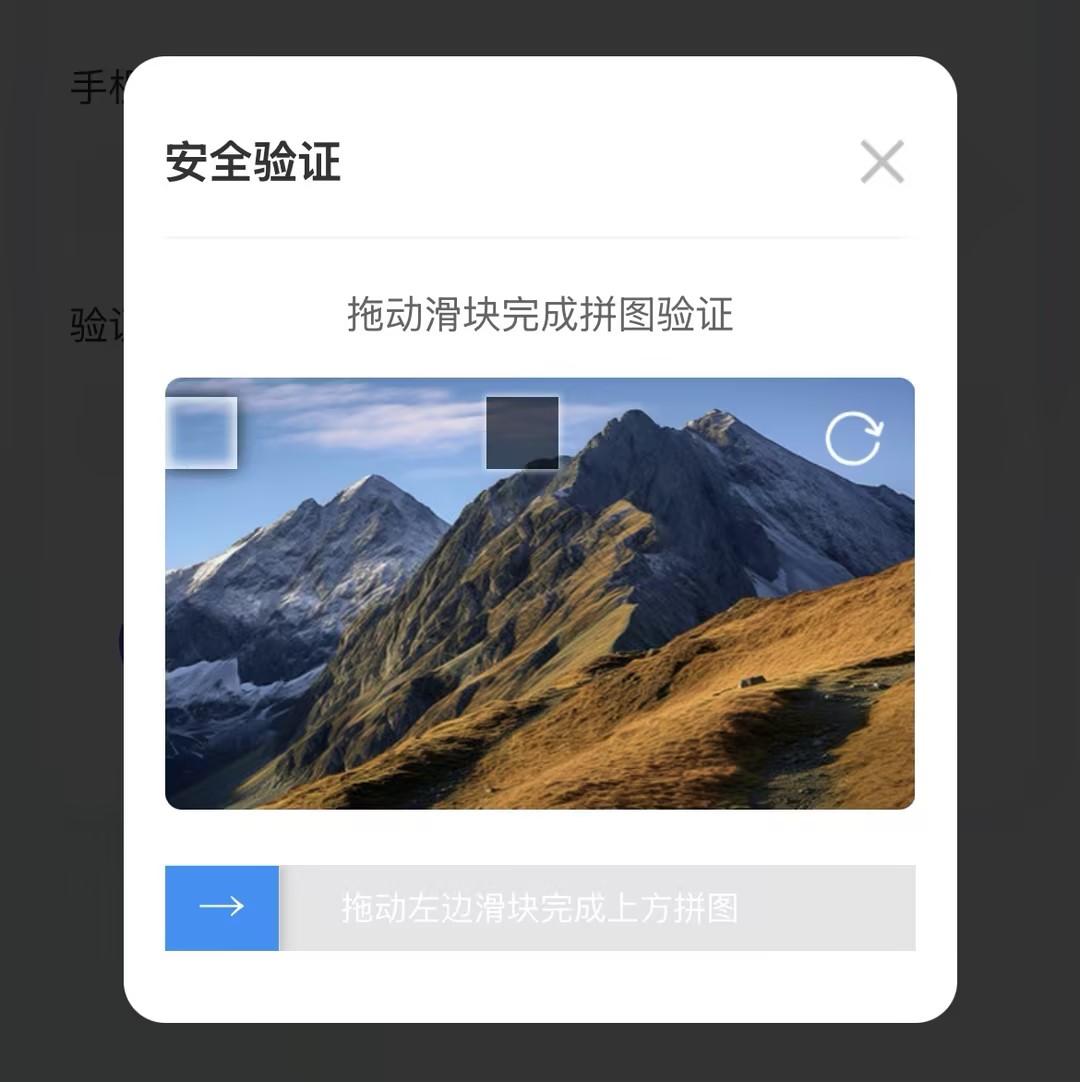
3. 封装验证组件并使用
1.编写组件
话不多说,直接上代码
bash
view
<template>
  <!-- 滑动验证弹窗 -->
  <view class="mask puzzleVerify-mask" v-if="visible" :catch-move="true">
    <view class="continer_box puzzleVerify-content">
      <!-- 弹窗头部 -->
      <view class="modal-header">
        <text class="modal-title">安全验证</text>
        <view class="modal-close" @tap="onClose">
          <image
            style="width: 100%; height: 100%"
            src="https://yunqi-dy-public.tos-cn-beijing.volces.com/files/20260317/13bb166726b5446fba307934cdb0bf71.png"
          />
        </view>
      </view>
      <view class="puzzleVerify-box">
        <!-- 提示文字 -->
        <view class="puzzle-tip">
          <text class="tip-text">拖动滑块完成拼图验证</text>
        </view>
        <!-- 拼图图片部分 -->
        <view
          class="canvas_img"
          id="canvas_img"
          :style="{ position: 'relative', zIndex: 0 }"
        >
          <!-- 背景图片 -->
          <!-- <canvas
            :style="{
              width: canvas_width + 'px',
              height: canvas_height + 'px',
              border: '1rpx solid transparent',
            }"
            id="firstCanvas"
            type="2d"
          ></canvas> -->
          <canvas id="firstCanvas" type="2d"></canvas>
          <!-- 被抠方块 -->
          <view
            class="canvas_view"
            :style="{
              left: canfile_x + 'px',
              top: canfile_y + 'px',
              position: 'absolute',
              zIndex: 3,
            }"
          ></view>
          <!-- 可移动空格 -->
          <image
            class="canfile_image"
            :style="{
              top: canfile_y + 'px',
              left:
                (slide_clientX > canvas_width - 50
                  ? canvas_width - 50
                  : slide_clientX) + 'px',
              position: 'absolute',
              zIndex: 4,
            }"
            :src="canfile_image"
          />

          <image
            class="refresg-icon"
            src="https://yunqi-dy-public.tos-cn-beijing.volces.com/files/20260317/27a0a2ac09074b62b941f0e1288ed3b7.png"
            @tap="onDrawCanvas"
          />
        </view>
      </view>
      <!-- 滑块 -->
      <view class="canvas-slide">
        <view
          class="canvas-slide-width"
          :style="{
            width: [2, 3].includes(slide_status)
              ? '100%'
              : slide_clientX > canvas_width
              ? canvas_width
              : slide_clientX + 'px',
            background:
              slide_status == 2
                ? '#52CCBA'
                : slide_status == 3
                ? '#F57A7A'
                : '',
          }"
        >
        </view>
        <view
          v-if="slide_status == 0 || slide_status == 1"
          class="canvas-slide-btn fcc"
          @touchstart="onSliderStart"
          @touchmove="onSliderMove"
          @touchend="onSliderEnd"
          :style="{
            left:
              slide_clientX > canvas_width
                ? canvas_width
                : slide_clientX + 'px',
          }"
        >
          <view>→</view>
        </view>
        <view
          class="canvas-slide-tip"
          v-if="slide_status == 0 || slide_status == 1"
          >拖动左边滑块完成上方拼图</view
        >
        <view v-else class="canvas-slide-tip canvas-slide-tip2">
          {{ slide_status == 2 ? "验证成功" : "验证失败,请重试" }}
        </view>
      </view>
    </view>
  </view>
</template>
<script>
import Taro from "@tarojs/taro";
import "./puzzleVerify.scss";
export default {
  props: {
    value: {
      type: Boolean,
      default: false,
    },
  },
  data() {
    return {
      visible: false,
      canvas_width: 0,
      canvas_height: 0,
      slidebel: false, //滑动弹窗
      canfile_image: "", //裁剪图片
      canfile_x: "", //被抠方块的水平位置
      canfile_y: "", //被抠方块的垂直位置
      slide_clientX: 0, //移动位置
      slide_status: 0, //0 停止操作   1 触发长按   2 正确   3 错误

      puzzleImages: [
        "https://i.postimg.cc/JDjqt4tw/bg1.jpg",
        "https://i.postimg.cc/3J5HYcPP/bg4.png",
        "https://i.postimg.cc/zBs4DyPQ/bg2.png",
      ],
    };
  },
  watch: {
    value(newVal) {
      this.visible = newVal;
      if (newVal) {
        setTimeout(() => {
          const query = Taro.createSelectorQuery();
          query
            .select("#canvas_img")
            .boundingClientRect((rect) => {
              if (rect) {
                console.log("rect>>", rect);
                this.canvas_width = rect.width;
                this.canvas_height = Math.floor(rect.width * 0.5); // 宽高比 2:1
                setTimeout(() => {
                  this.onDrawCanvas();
                }, 200);
              }
            })
            .exec((rect) => {});
        }, 500);
      }
    },
  },
  methods: {
    onClose() {
      this.$emit("input", false);
    },
    // 画布
    onDrawCanvas(e) {
      var that = this;
      //获取图片条数的随机数
      var imgIndex = Math.floor(Math.random() * this.puzzleImages.length);
      this.canfile_x = Math.round(
        Math.random() * (this.canvas_width - 120) + 60
      );
      this.canfile_y = Math.round(
        Math.random() * ((this.canvas_width * 13) / 28 - 60)
      );
      this.canfile_image = "";
      Taro.createSelectorQuery()
        .select("#firstCanvas") // 在 WXML 中填入的 id
        .fields({ node: true, size: true })
        .exec((res) => {
          // Canvas 对象
          const canvas = res[0].node;
          // 渲染上下文
          const ctx = canvas.getContext("2d");

          // Canvas 画布的实际绘制宽高
          const width = res[0].width;
          const height = res[0].height;

          // 初始化画布大小
          const dpr = wx.getWindowInfo().pixelRatio;
          canvas.width = width * dpr;
          canvas.height = height * dpr;
          ctx.scale(dpr, dpr);

          const image = canvas.createImage();
          // 设置图片src
          image.src = this.puzzleImages[imgIndex];
          // 图片加载完成回调
          image.onload = () => {
            // 将图片完整绘制到 canvas 上
            ctx.drawImage(image, 0, 0, width, height);

            // 绘制完成后,可以添加一些调试信息
            console.log("图片绘制完成,尺寸:", image.width, image.height);
            console.log("Canvas尺寸:", width, height);
          };

          //一定要加延时器,不然图片会生成失败
          setTimeout(() => {
            // 生成图片
            Taro.canvasToTempFilePath(
              {
                canvas,
                x: that.canfile_x,
                y: that.canfile_y,
                width: 60,
                height: 60,
                success: (res) => {
                  // 生成的图片临时文件路径
                  that.canfile_image = res.tempFilePath;
                  console.log("tempFilePath>>", that.canfile_image);
                },
              },
              this
            );
          }, 500);
        });
    },
    // 滑动开始
    onSliderStart(e) {
      this.slide_status = 1;
    },
    // 滑动中
    onSliderMove(e) {
      this.slide_clientX =
        e.touches[0].clientX - 30 < 1 ? 0 : e.touches[0].clientX - 30;
    },
    //滑动结束
    onSliderEnd(e) {
      var that = this;
      var cliextX;
      var maxX = this.canvas_width - 30;
      if (that.slide_clientX < 1) {
        that.slide_status = 0;
        return false;
      }
      if (that.slide_clientX > maxX) {
        cliextX = maxX;
      } else {
        cliextX = that.slide_clientX;
      }
      if (that.canfile_x + 5 > cliextX && that.canfile_x - 5 < cliextX) {
        that.slide_status = 2;
        that.slide_clientX = that.canfile_x;
        setTimeout(function () {
          that.slidebel = false;
        }, 500);
        wx.showToast({
          icon: "success",
          title: "验证成功",
        });
        this.$emit("onSuccess");
        this.onClose();
      } else {
        that.slide_status = 3;
      }
      setTimeout(function () {
        that.slide_status = 0;
        that.slide_clientX = 0;
      }, 500);
    },
  },
};
</script>
bash
/* 拼图滑动验证 */
.puzzleVerify-mask {
  .puzzleVerify-content {
    position: relative;
    padding: 50rpx 30rpx !important;
    box-sizing: border-box;
  }

  /* 弹窗头部 */
  .modal-header {
    display: flex;
    align-items: center;
    justify-content: space-between;
    padding: 0rpx 0rpx 30rpx;
    border-bottom: 2rpx solid #f5f5f5;

    .modal-title {
      font-size: 32rpx;
      font-weight: 600;
      color: #333333;
    }

    .modal-close {
      width: 48rpx;
      height: 48rpx;
    }
  }

  .puzzleVerify-box {
    padding-top: 30rpx;
    .puzzle-tip {
      text-align: center;
      margin-bottom: 24rpx;

      .tip-text {
        font-size: 28rpx;
        color: #666666;
      }
    }
    .canvas_img {
      position: relative;
      width: 100%;
      height: 300rpx;
      margin-bottom: 40rpx;
      border-radius: 12rpx;
      overflow: hidden;
      background: #f8f9fa;
    }
    #firstCanvas {
      z-index: 1 !important;
      width: 100%;
      height: 100%;
    }

    /* 被抠的空格 */
    .canvas_view {
      width: 50px;
      height: 50px;
      position: absolute;
      background: rgba(0, 0, 0, 0.6);
      z-index: 2;
      box-shadow: 0 0 5px 2px rgba(255, 255, 255, 0.5);
    }
    /* 移动的空格 */
    .canfile_image {
      width: 50px;
      height: 50px;
      position: absolute;
      left: 0;
      z-index: 3;
      box-shadow: 0px 0px 15px rgba(0, 0, 0, 0.8);
      box-sizing: border-box;
    }
    .canfile_image::before {
      content: "";
      position: absolute;
      width: 100%;
      height: 100%;
      box-shadow: 0 0 8px 5px rgba(255, 255, 255, 0.8) inset;
    }

    .refresg-icon {
      position: absolute;
      top: 20rpx;
      right: 20rpx;
      width: 48rpx;
      height: 48rpx;
      z-index: 5;
    }
  }
}

.canvas-slide {
  width: 100%;
  height: 60rpx;
  background: #e5e5e5;
  text-align: center;
  position: relative;
  font-size: 26rpx;
  overflow: hidden;

  /* 滑条上滑块经过的部分 */
  .canvas-slide-width {
    position: absolute;
    left: 0;
    top: 0;
    height: 60rpx;
    background-color: #1991fa;
    width: 0;
    border-top: 1px solid #ddd;
    border-bottom: 1px solid #ddd;
    z-index: 2;
  }
  /* 滑块 */
  .canvas-slide-btn {
    width: 80rpx;
    height: 60rpx;
    background-color: #1991fa;
    font-size: 36rpx;
    font-weight: 700;
    position: absolute;
    left: 0;
    top: 0;
    border: 1px solid #ddd;
    color: #fff;
    box-shadow: 0 0 10px rgba(0, 0, 0, 0.3);
    z-index: 2;
  }

  .canvas-slide-tip {
    width: 100%;
    position: absolute;
    top: 50%;
    left: 50%;
    transform: translate(-50%, -50%);
    text-align: center;
    font-size: 24rpx;
    color: #fff;
    transition: color 0.3s ease;
    z-index: 1;
  }
  .canvas-slide-tip.canvas-slide-tip2 {
    z-index: 4;
  }
}
2.引入并使用
bash
<template>
 <view>
 <view @tap="onShowVerity">获取验证码</view>
  <puzzleVerify v-model="isShowVerify" @onSuccess="onVerifySuccess" />
 </view>
</template>
<script>
import puzzleVerify from "@/components/puzzleVerify/puzzleVerify.vue";
export default {
  components: {
    puzzleVerify
  },
  data() {
    return {
      isShowVerify: false, //安全校验弹窗
    };
  },
  methods: {
    onVerifySuccess() {
      console.log("验证通过-------------");
    },
    onShowVerity() {
      this.isShowVerify = true;
    },
  }
};
</script>
4. 总结
注:上面的方式是有应用到实际项目当中去的,正常获取流程是没问题的,如果在开发在过程中遇到问题可以发出来一起交流呢