MES/ERP 报表系统(Node.js + 本地数据库版)
针对 MES/ERP 报表场景的规则条件约束、高索引查询、组轴分栏报表、多 Tab 界面展示 核心需求,我基于 Node.js + SQLite(本地文件数据库)实现一套完整的报表系统,包含查询引擎、规则管理、多维度报表、可视化展示四大核心模块,适配本地化部署且支持 Tab 标签式多界面交互。
一、项目整体设计
1. 技术栈选型
表格
| 技术层面 | 选型 | 优势说明 |
|---|---|---|
| 后端核心 | Node.js (Express) | 轻量高效,异步 IO 适配数据查询场景 |
| 本地数据库 | SQLite3 | 文件存储无需服务,适配 MES/ERP 本地化需求 |
| 查询优化 | sqlite3 + better-sqlite3 | 高索引查询封装,支持预编译 SQL / 事务 |
| 前端界面 | HTML + Vue2 + Element UI | 丰富的 Tab 标签 / 分栏报表控件,易上手 |
| 可视化 | ECharts | 支持组轴分栏报表、趋势分析、多维度图表 |
| 打包部署 | Electron | 打包为桌面应用,支持 Windows/Linux/macOS |
2. 系统架构
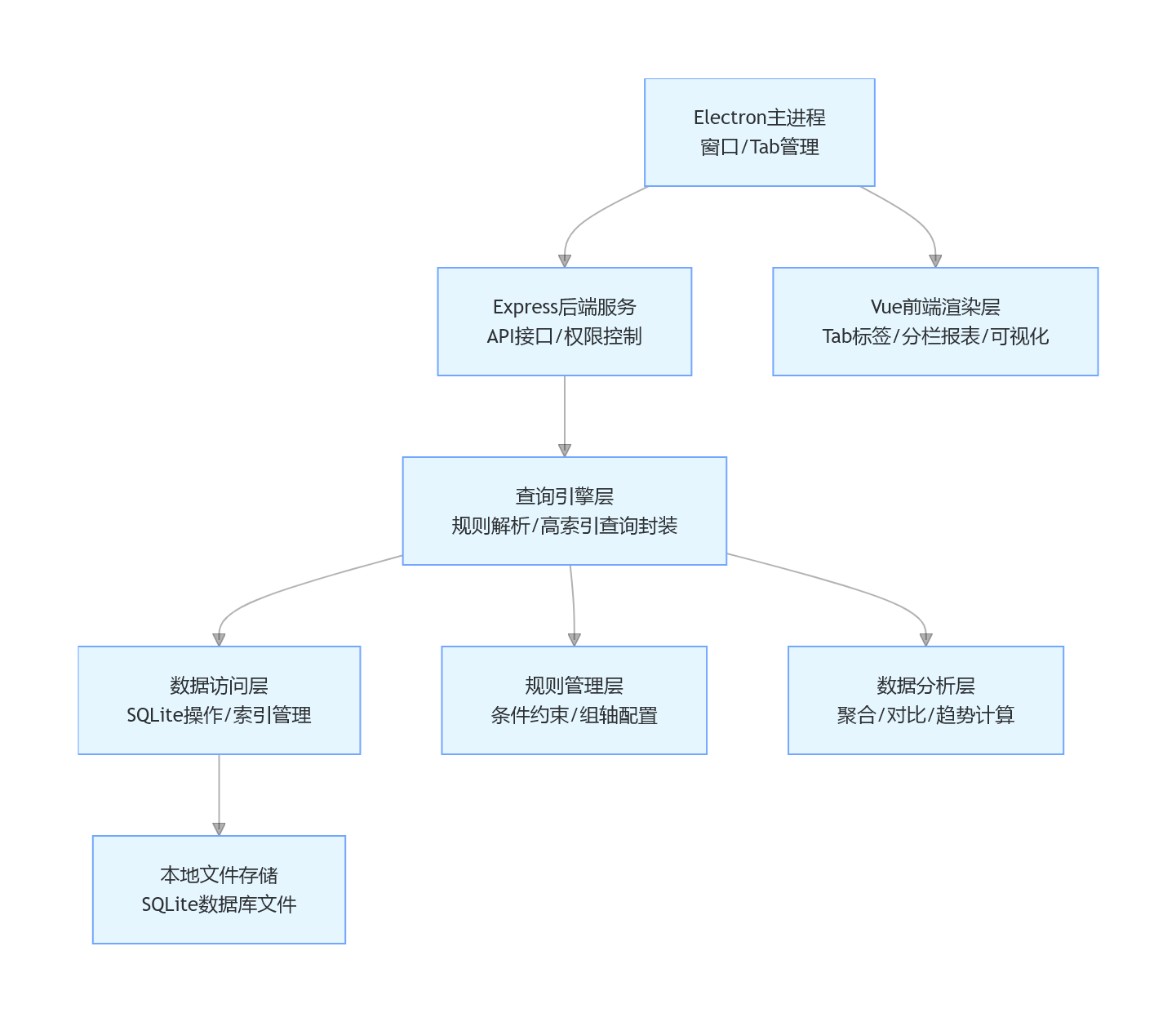
graph TD
    A[Electron主进程<br/>窗口/Tab管理] --> B[Express后端服务<br/>API接口/权限控制]
    B --> C[查询引擎层<br/>规则解析/高索引查询封装]
    C --> D[数据访问层<br/>SQLite操作/索引管理]
    D --> E[本地文件存储<br/>SQLite数据库文件]

    A --> F[Vue前端渲染层<br/>Tab标签/分栏报表/可视化]
    C --> G[规则管理层<br/>条件约束/组轴配置]
    C --> H[数据分析层<br/>聚合/对比/趋势计算]
Electron主进程
窗口/Tab管理
Express后端服务
API接口/权限控制
查询引擎层
规则解析/高索引查询封装
数据访问层
SQLite操作/索引管理
本地文件存储
SQLite数据库文件
Vue前端渲染层
Tab标签/分栏报表/可视化
规则管理层
条件约束/组轴配置
数据分析层
聚合/对比/趋势计算
3. 核心功能模块
表格
| 模块名称 | 核心功能 |
|---|---|
| 规则配置模块 | 报表查询规则定义(条件约束、索引关联、组轴维度) |
| 高索引查询模块 | 预编译 SQL、复合索引封装、分页 / 缓存优化 |
| 组轴分栏报表模块 | 产线 / 产品 / 时间多轴分栏展示、自定义列布局、数据钻取 |
| 多 Tab 展示模块 | 支持多报表同时打开、Tab 标签切换 / 关闭 / 保存、界面状态记忆 |
| 数据分析模块 | 数据聚合、同比 / 环比、异常标记、导出 Excel/PDF |
二、完整项目实现
第一步:项目初始化与依赖安装
1. 项目目录结构
plaintext
mes-erp-report/
├── main/                  # Electron主进程
│   ├── index.js           # 窗口/Tab管理
│   └── preload.js         # 渲染进程通信
├── server/                # Express后端
│   ├── api/               # API接口
│   │   ├── report.js      # 报表查询接口
│   │   └── rule.js        # 规则配置接口
│   ├── db/                # 数据库操作
│   │   ├── index.js       # SQLite连接/索引封装
│   │   └── init.js        # 建表/测试数据/索引初始化
│   ├── engine/            # 查询引擎
│   │   ├── query.js       # 高索引查询封装
│   │   └── rule.js        # 规则解析
│   └── app.js             # Express入口
├── client/                # 前端页面
│   ├── index.html         # 主页面(Tab容器)
│   ├── js/
│   │   ├── main.js        # Vue入口
│   │   └── report.js      # 报表组件
│   ├── css/               # 样式
│   └── lib/               # 第三方库(Vue/ECharts/ElementUI)
├── package.json           # 依赖配置
└── sqlite.db              # 本地数据库文件(自动生成)
2. package.json 配置
json
{
  "name": "mes-erp-report",
  "version": "1.0.0",
  "main": "main/index.js",
  "scripts": {
    "start": "electron .",
    "dev": "nodemon --exec electron ."
  },
  "dependencies": {
    "better-sqlite3": "^9.4.0",
    "express": "^4.18.2",
    "electron": "^28.2.0",
    "sqlite3": "^5.1.6",
    "cors": "^2.8.5",
    "xlsx": "^0.18.5",
    "echarts": "^5.4.3",
    "vue": "^2.7.14",
    "element-ui": "^2.15.14"
  },
  "devDependencies": {
    "nodemon": "^3.0.2"
  }
}
第二步:后端核心实现
1. 数据库初始化与高索引封装(server/db/index.js)
javascript
运行
const Database = require('better-sqlite3');
const path = require('path');

// 本地数据库路径(项目根目录/sqlite.db)
const dbPath = path.resolve(__dirname, '../../sqlite.db');
const db = new Database(dbPath, { verbose: console.log });

// 初始化数据库(建表+核心索引)
function initDB() {
  // 1. 产线表
  db.exec(`
    CREATE TABLE IF NOT EXISTS production_line (
      id INTEGER PRIMARY KEY AUTOINCREMENT,
      line_code TEXT NOT NULL UNIQUE,
      line_name TEXT NOT NULL,
      workshop TEXT,
      status TEXT DEFAULT 'Running'
    );
  `);

  // 2. 产品表
  db.exec(`
    CREATE TABLE IF NOT EXISTS product (
      id INTEGER PRIMARY KEY AUTOINCREMENT,
      product_code TEXT NOT NULL UNIQUE,
      product_name TEXT NOT NULL,
      spec TEXT,
      unit_price DECIMAL(10,2) DEFAULT 0
    );
  `);

  // 3. 工单生产数据表(核心报表表)
  db.exec(`
    CREATE TABLE IF NOT EXISTS work_order (
      id INTEGER PRIMARY KEY AUTOINCREMENT,
      work_order_no TEXT NOT NULL,
      line_code TEXT NOT NULL,
      product_code TEXT NOT NULL,
      production_date DATETIME NOT NULL,
      plan_qty INTEGER DEFAULT 0,
      actual_qty INTEGER DEFAULT 0,
      defect_qty INTEGER DEFAULT 0,
      oee DECIMAL(5,2) DEFAULT 0,
      shift TEXT
    );
  `);

  // 4. 报表规则表
  db.exec(`
    CREATE TABLE IF NOT EXISTS report_rule (
      rule_id INTEGER PRIMARY KEY AUTOINCREMENT,
      rule_name TEXT NOT NULL,
      report_type TEXT NOT NULL,
      conditions TEXT,
      index_fields TEXT,
      sort_field TEXT,
      is_asc INTEGER DEFAULT 1,
      group_field TEXT
    );
  `);

  // 核心索引创建(高索引优化)
  db.exec(`
    -- 工单数据复合索引(产线+日期:最常用查询维度)
    CREATE INDEX IF NOT EXISTS IX_work_order_line_date ON work_order(line_code, production_date);
    -- 工单数据复合索引(产品+日期:产品报表维度)
    CREATE INDEX IF NOT EXISTS IX_work_order_product_date ON work_order(product_code, production_date);
    -- 工单号索引(精准查询)
    CREATE INDEX IF NOT EXISTS IX_work_order_no ON work_order(work_order_no);
  `);

  // 插入测试数据
  insertTestData();
}

// 插入测试数据
function insertTestData() {
  // 检查产线数据
  const lineCount = db.prepare('SELECT COUNT(*) FROM production_line').get()['COUNT(*)'];
  if (lineCount === 0) {
    const insertLine = db.prepare(`
      INSERT INTO production_line (line_code, line_name, workshop)
      VALUES (@line_code, @line_name, @workshop)
    `);
    insertLine.run({ line_code: 'LINE01', line_name: '一号产线', workshop: '组装车间' });
    insertLine.run({ line_code: 'LINE02', line_name: '二号产线', workshop: '组装车间' });
    insertLine.run({ line_code: 'LINE03', line_name: '三号产线', workshop: '包装车间' });
  }

  // 检查产品数据
  const productCount = db.prepare('SELECT COUNT(*) FROM product').get()['COUNT(*)'];
  if (productCount === 0) {
    const insertProduct = db.prepare(`
      INSERT INTO product (product_code, product_name, spec, unit_price)
      VALUES (@product_code, @product_name, @spec, @unit_price)
    `);
    insertProduct.run({ product_code: 'PROD001', product_name: '产品A', spec: '规格A-1', unit_price: 100.50 });
    insertProduct.run({ product_code: 'PROD002', product_name: '产品B', spec: '规格B-2', unit_price: 200.80 });
    insertProduct.run({ product_code: 'PROD003', product_name: '产品C', spec: '规格C-3', unit_price: 150.20 });
  }

  // 检查工单数据
  const orderCount = db.prepare('SELECT COUNT(*) FROM work_order').get()['COUNT(*)'];
  if (orderCount === 0) {
    const insertOrder = db.prepare(`
      INSERT INTO work_order (work_order_no, line_code, product_code, production_date, plan_qty, actual_qty, defect_qty, oee, shift)
      VALUES (@work_order_no, @line_code, @product_code, @production_date, @plan_qty, @actual_qty, @defect_qty, @oee, @shift)
    `);
    const startDate = new Date();
    startDate.setDate(startDate.getDate() - 7);

    for (let i = 0; i < 7; i++) {
      const date = new Date(startDate);
      date.setDate(date.getDate() + i);
      const dateStr = date.toISOString().split('T')[0];

      insertOrder.run({
        work_order_no: `WO${dateStr.replace(/-/g, '')}001`,
        line_code: 'LINE01',
        product_code: 'PROD001',
        production_date: dateStr,
        plan_qty: 1000,
        actual_qty: 950 + i * 10,
        defect_qty: 10 + i,
        oee: 85.5 + i,
        shift: '白班'
      });

      insertOrder.run({
        work_order_no: `WO${dateStr.replace(/-/g, '')}002`,
        line_code: 'LINE01',
        product_code: 'PROD002',
        production_date: dateStr,
        plan_qty: 800,
        actual_qty: 780 + i * 5,
        defect_qty: 8 + i,
        oee: 88.2 + i,
        shift: '白班'
      });
    }
  }
}

// 高索引查询封装(核心方法)
class DBQuery {
  // 分页查询(带索引优化)
  queryWithPage(sql, params = {}, page = 1, pageSize = 20) {
    const offset = (page - 1) * pageSize;
    // 预编译SQL(提升执行效率)
    const countStmt = db.prepare(`SELECT COUNT(*) FROM (${sql}) AS t`);
    const dataStmt = db.prepare(`${sql} LIMIT ? OFFSET ?`);

    const total = countStmt.get(params)['COUNT(*)'];
    const data = dataStmt.all(params, pageSize, offset);

    return {
      data,
      pagination: {
        total,
        page,
        pageSize,
        pages: Math.ceil(total / pageSize)
      }
    };
  }

  // 执行SQL(带事务)
  executeWithTransaction(sqls, paramsList) {
    const transaction = db.transaction((sqls, paramsList) => {
      for (let i = 0; i < sqls.length; i++) {
        db.prepare(sqls[i]).run(paramsList[i] || {});
      }
    });
    return transaction(sqls, paramsList);
  }

  // 获取索引信息
  getIndexInfo(tableName) {
    const stmt = db.prepare(`
      SELECT name AS index_name, sql
      FROM sqlite_master
      WHERE type = 'index' AND tbl_name = ? AND name NOT LIKE 'sqlite_%'
    `);
    return stmt.all(tableName);
  }
}

// 初始化数据库
initDB();

module.exports = {
  db,
  DBQuery,
  initDB
};
2. 查询引擎(高索引 + 规则解析)(server/engine/query.js)
javascript
运行
const { DBQuery } = require('../db/index');
const queryHelper = new DBQuery();

// 报表查询引擎(核心:规则解析+高索引查询)
class ReportQueryEngine {
  // 产线日报表查询(高索引优化)
  getLineDailyReport(params) {
    const { startDate, endDate, lineCodes = [] } = params;
    let sql = `
      SELECT
        w.line_code,
        l.line_name,
        w.production_date,
        SUM(w.plan_qty) AS total_plan_qty,
        SUM(w.actual_qty) AS total_actual_qty,
        SUM(w.defect_qty) AS total_defect_qty,
        AVG(w.oee) AS avg_oee,
        ROUND(SUM(w.actual_qty)*100.0/IFNULL(SUM(w.plan_qty),1), 2) AS completion_rate,
        ROUND(SUM(w.defect_qty)*100.0/IFNULL(SUM(w.actual_qty),1), 2) AS defect_rate
      FROM work_order w
      LEFT JOIN production_line l ON w.line_code = l.line_code
      WHERE w.production_date BETWEEN ? AND ?
    `;

    const sqlParams = [startDate, endDate];

    // 产线过滤(使用索引字段)
    if (lineCodes.length > 0) {
      sql += ` AND w.line_code IN (${lineCodes.map((_, i) => `?`).join(',')})`;
      sqlParams.push(...lineCodes);
    }

    sql += `
      GROUP BY w.line_code, w.production_date, l.line_name
      ORDER BY w.production_date DESC, w.line_code
    `;

    // 分页查询(高索引优化:使用line_code+production_date复合索引)
    return queryHelper.queryWithPage(sql, sqlParams, params.page, params.pageSize);
  }

  // 组轴分栏报表查询(产线+产品+时间三轴)
  getAxisReport(params) {
    const { lineCode, productCode, startDate, endDate, groupAxis = 'line_code' } = params;
    let sql = `
      SELECT
        w.line_code,
        l.line_name,
        w.product_code,
        p.product_name,
        w.production_date,
        w.shift,
        SUM(w.plan_qty) AS plan_qty,
        SUM(w.actual_qty) AS actual_qty,
        SUM(w.defect_qty) AS defect_qty,
        AVG(w.oee) AS oee,
        ROUND(SUM(w.actual_qty)*100.0/IFNULL(SUM(w.plan_qty),1), 2) AS completion_rate
      FROM work_order w
      LEFT JOIN production_line l ON w.line_code = l.line_code
      LEFT JOIN product p ON w.product_code = p.product_code
      WHERE 1=1
    `;

    const sqlParams = [];

    // 条件过滤(均使用索引字段)
    if (startDate) {
      sql += ` AND w.production_date >= ?`;
      sqlParams.push(startDate);
    }
    if (endDate) {
      sql += ` AND w.production_date <= ?`;
      sqlParams.push(endDate);
    }
    if (lineCode) {
      sql += ` AND w.line_code = ?`;
      sqlParams.push(lineCode);
    }
    if (productCode) {
      sql += ` AND w.product_code = ?`;
      sqlParams.push(productCode);
    }

    // 组轴分组
    sql += `
      GROUP BY w.${groupAxis}, w.production_date, w.shift, l.line_name, p.product_name
      ORDER BY w.production_date DESC, w.${groupAxis}
    `;

    // 分页查询
    return queryHelper.queryWithPage(sql, sqlParams, params.page, params.pageSize);
  }

  // 按规则查询报表
  queryByRule(rule, params) {
    const { conditions, index_fields, sort_field, is_asc, group_field } = rule;
    let sql = `SELECT ${index_fields || '*'} FROM work_order WHERE 1=1`;
    const sqlParams = [];

    // 解析规则条件
    if (conditions) {
      try {
        const conditionList = JSON.parse(conditions);
        conditionList.forEach(cond => {
          if (cond.value) {
            sql += ` AND ${cond.field_name} ${cond.operator} ?`;
            sqlParams.push(cond.value);
          }
        });
      } catch (e) {
        console.error('规则条件解析失败:', e);
      }
    }

    // 分组
    if (group_field) {
      sql += ` GROUP BY ${group_field}`;
    }

    // 排序(使用索引字段)
    if (sort_field) {
      sql += ` ORDER BY ${sort_field} ${is_asc ? 'ASC' : 'DESC'}`;
    }

    // 分页查询
    return queryHelper.queryWithPage(sql, sqlParams, params.page, params.pageSize);
  }
}

module.exports = new ReportQueryEngine();
3. Express API 接口(server/app.js)
javascript
运行
const express = require('express');
const cors = require('cors');
const path = require('path');
const reportEngine = require('./engine/query');
const { db } = require('./db/index');

const app = express();
const PORT = 3000;

// 中间件
app.use(cors());
app.use(express.json());
app.use(express.static(path.resolve(__dirname, '../client')));

// 1. 产线日报表接口
app.post('/api/report/line-daily', (req, res) => {
  try {
    const result = reportEngine.getLineDailyReport(req.body);
    res.json({
      code: 200,
      data: result,
      message: '查询成功'
    });
  } catch (e) {
    res.json({
      code: 500,
      data: null,
      message: `查询失败:${e.message}`
    });
  }
});

// 2. 组轴分栏报表接口
app.post('/api/report/axis', (req, res) => {
  try {
    const result = reportEngine.getAxisReport(req.body);
    res.json({
      code: 200,
      data: result,
      message: '查询成功'
    });
  } catch (e) {
    res.json({
      code: 500,
      data: null,
      message: `查询失败:${e.message}`
    });
  }
});

// 3. 规则配置接口
app.get('/api/rule/list', (req, res) => {
  try {
    const stmt = db.prepare('SELECT * FROM report_rule');
    const rules = stmt.all();
    res.json({
      code: 200,
      data: rules,
      message: '查询成功'
    });
  } catch (e) {
    res.json({
      code: 500,
      data: null,
      message: `查询失败:${e.message}`
    });
  }
});

// 4. 保存规则接口
app.post('/api/rule/save', (req, res) => {
  try {
    const { rule_id, rule_name, report_type, conditions, index_fields, sort_field, is_asc, group_field } = req.body;
    let stmt;

    if (rule_id) {
      // 更新
      stmt = db.prepare(`
        UPDATE report_rule
        SET rule_name = ?, report_type = ?, conditions = ?, index_fields = ?, sort_field = ?, is_asc = ?, group_field = ?
        WHERE rule_id = ?
      `);
      stmt.run(rule_name, report_type, JSON.stringify(conditions), index_fields, sort_field, is_asc ? 1 : 0, group_field, rule_id);
    } else {
      // 新增
      stmt = db.prepare(`
        INSERT INTO report_rule (rule_name, report_type, conditions, index_fields, sort_field, is_asc, group_field)
        VALUES (?, ?, ?, ?, ?, ?, ?)
      `);
      stmt.run(rule_name, report_type, JSON.stringify(conditions), index_fields, sort_field, is_asc ? 1 : 0, group_field);
    }

    res.json({
      code: 200,
      data: null,
      message: '保存成功'
    });
  } catch (e) {
    res.json({
      code: 500,
      data: null,
      message: `保存失败:${e.message}`
    });
  }
});

// 5. 基础数据接口(产线/产品)
app.get('/api/base/lines', (req, res) => {
  try {
    const stmt = db.prepare('SELECT * FROM production_line');
    const lines = stmt.all();
    res.json({
      code: 200,
      data: lines,
      message: '查询成功'
    });
  } catch (e) {
    res.json({
      code: 500,
      data: null,
      message: `查询失败:${e.message}`
    });
  }
});

app.get('/api/base/products', (req, res) => {
  try {
    const stmt = db.prepare('SELECT * FROM product');
    const products = stmt.all();
    res.json({
      code: 200,
      data: products,
      message: '查询成功'
    });
  } catch (e) {
    res.json({
      code: 500,
      data: null,
      message: `查询失败:${e.message}`
    });
  }
});

// 启动服务
app.listen(PORT, () => {
  console.log(`Express服务启动:http://localhost:${PORT}`);
});

module.exports = app;
第三步:前端界面实现(Vue + Element UI)
1. 主页面(Tab 标签容器)(client/index.html)
<!DOCTYPE html>
<html lang="zh-CN">
<head>
  <meta charset="UTF-8">
  <title>MES/ERP报表管理系统</title>
  <!-- Element UI样式 -->
  <link rel="stylesheet" href="lib/element-ui/theme-chalk/index.css">
  <!-- 自定义样式 -->
  <style>
    * {
      margin: 0;
      padding: 0;
      box-sizing: border-box;
    }
    body {
      font-family: "Microsoft YaHei", sans-serif;
    }
    .main-container {
      padding: 10px;
      height: 100vh;
      display: flex;
      flex-direction: column;
    }
    .el-tabs {
      flex: 1;
      display: flex;
      flex-direction: column;
    }
    .el-tabs__content {
      flex: 1;
      padding: 10px 0;
      overflow: auto;
    }
    .report-card {
      height: 100%;
      display: flex;
      flex-direction: column;
    }
    .query-form {
      margin-bottom: 10px;
      padding: 10px;
      background: #f5f5f5;
      border-radius: 4px;
    }
    .chart-container {
      display: flex;
      gap: 10px;
      margin: 10px 0;
      height: 300px;
    }
    .chart-item {
      flex: 1;
      border: 1px solid #e6e6e6;
      border-radius: 4px;
      padding: 10px;
    }
  </style>
</head>
<body>
  <div id="app" class="main-container">
    <el-button type="primary" @click="addTab('lineDaily', '产线日报表')">打开产线日报表</el-button>
    <el-button type="primary" @click="addTab('axisReport', '组轴分栏报表')">打开组轴分栏报表</el-button>

    <el-tabs v-model="activeTab" type="card" closable @tab-remove="removeTab">
      <el-tab-pane v-for="tab in tabs" :key="tab.name" :label="tab.label" :name="tab.name">
        <!-- 产线日报表 -->
        <div v-if="tab.name === 'lineDaily'" class="report-card">
          <div class="query-form">
            <el-form :inline="true" :model="lineQueryForm" class="demo-form-inline">
              <el-form-item label="开始日期">
                <el-date-picker v-model="lineQueryForm.startDate" type="date" placeholder="选择开始日期"></el-date-picker>
              </el-form-item>
              <el-form-item label="结束日期">
                <el-date-picker v-model="lineQueryForm.endDate" type="date" placeholder="选择结束日期"></el-date-picker>
              </el-form-item>
              <el-form-item label="产线">
                <el-select v-model="lineQueryForm.lineCodes" multiple placeholder="选择产线">
                  <el-option v-for="line in lines" :key="line.line_code" :label="line.line_name" :value="line.line_code"></el-option>
                </el-select>
              </el-form-item>
              <el-form-item>
                <el-button type="primary" @click="queryLineDaily">查询</el-button>
              </el-form-item>
            </el-form>
          </div>

          <!-- 数据表格 -->
          <el-table :data="lineTableData" border style="width: 100%;">
            <el-table-column prop="line_code" label="产线编码"></el-table-column>
            <el-table-column prop="line_name" label="产线名称"></el-table-column>
            <el-table-column prop="production_date" label="生产日期"></el-table-column>
            <el-table-column prop="total_plan_qty" label="计划产量"></el-table-column>
            <el-table-column prop="total_actual_qty" label="实际产量"></el-table-column>
            <el-table-column prop="completion_rate" label="完成率(%)"></el-table-column>
            <el-table-column prop="total_defect_qty" label="不良数量"></el-table-column>
            <el-table-column prop="defect_rate" label="不良率(%)"></el-table-column>
            <el-table-column prop="avg_oee" label="平均OEE"></el-table-column>
          </el-table>

          <!-- 分页 -->
          <el-pagination
            @size-change="handleLineSizeChange"
            @current-change="handleLineCurrentChange"
            :current-page="lineQueryForm.page"
            :page-sizes="[10, 20, 50, 100]"
            :page-size="lineQueryForm.pageSize"
            layout="total, sizes, prev, pager, next, jumper"
            :total="lineTotal">
          </el-pagination>

          <!-- 图表展示 -->
          <div class="chart-container">
            <div class="chart-item" id="lineProductionChart"></div>
            <div class="chart-item" id="lineRateChart"></div>
          </div>
        </div>

        <!-- 组轴分栏报表 -->
        <div v-if="tab.name === 'axisReport'" class="report-card">
          <div class="query-form">
            <el-form :inline="true" :model="axisQueryForm" class="demo-form-inline">
              <el-form-item label="开始日期">
                <el-date-picker v-model="axisQueryForm.startDate" type="date" placeholder="选择开始日期"></el-date-picker>
              </el-form-item>
              <el-form-item label="结束日期">
                <el-date-picker v-model="axisQueryForm.endDate" type="date" placeholder="选择结束日期"></el-date-picker>
              </el-form-item>
              <el-form-item label="分组轴">
                <el-select v-model="axisQueryForm.groupAxis" placeholder="选择分组轴">
                  <el-option label="产线" value="line_code"></el-option>
                  <el-option label="产品" value="product_code"></el-option>
                  <el-option label="班次" value="shift"></el-option>
                </el-select>
              </el-form-item>
              <el-form-item>
                <el-button type="primary" @click="queryAxisReport">查询</el-button>
              </el-form-item>
            </el-form>
          </div>

          <!-- 分栏表格 -->
          <el-table :data="axisTableData" border style="width: 100%;">
            <el-table-column prop="line_code" label="产线编码"></el-table-column>
            <el-table-column prop="line_name" label="产线名称"></el-table-column>
            <el-table-column prop="product_code" label="产品编码"></el-table-column>
            <el-table-column prop="product_name" label="产品名称"></el-table-column>
            <el-table-column prop="production_date" label="生产日期"></el-table-column>
            <el-table-column prop="shift" label="班次"></el-table-column>
            <el-table-column prop="actual_qty" label="实际产量"></el-table-column>
            <el-table-column prop="completion_rate" label="完成率(%)"></el-table-column>
            <el-table-column prop="oee" label="OEE"></el-table-column>
          </el-table>

          <!-- 分页 -->
          <el-pagination
            @size-change="handleAxisSizeChange"
            @current-change="handleAxisCurrentChange"
            :current-page="axisQueryForm.page"
            :page-sizes="[10, 20, 50, 100]"
            :page-size="axisQueryForm.pageSize"
            layout="total, sizes, prev, pager, next, jumper"
            :total="axisTotal">
          </el-pagination>

          <!-- 组轴图表 -->
          <div class="chart-container">
            <div class="chart-item" id="axisProductionChart"></div>
          </div>
        </div>
      </el-tab-pane>
    </el-tabs>
  </div>

  <!-- 第三方库 -->
  <script src="lib/vue/vue.min.js"></script>
  <script src="lib/element-ui/index.js"></script>
  <script src="lib/echarts/echarts.min.js"></script>
  <script src="lib/axios/axios.min.js"></script>

  <!-- 主脚本 -->
  <script src="js/main.js"></script>
</body>
</html>
2. Vue 逻辑(client/js/main.js)
javascript
运行
// 初始化Vue实例
new Vue({
  el: '#app',
  data() {
    return {
      // Tab标签
      tabs: [],
      activeTab: '',

      // 产线列表
      lines: [],

      // 产线日报表查询条件
      lineQueryForm: {
        startDate: '',
        endDate: '',
        lineCodes: [],
        page: 1,
        pageSize: 20
      },
      lineTableData: [],
      lineTotal: 0,

      // 组轴分栏报表查询条件
      axisQueryForm: {
        startDate: '',
        endDate: '',
        lineCode: '',
        productCode: '',
        groupAxis: 'line_code',
        page: 1,
        pageSize: 20
      },
      axisTableData: [],
      axisTotal: 0,

      // 图表实例
      lineProductionChart: null,
      lineRateChart: null,
      axisProductionChart: null
    };
  },
  created() {
    // 初始化日期
    const endDate = new Date();
    const startDate = new Date();
    startDate.setDate(endDate.getDate() - 7);

    this.lineQueryForm.startDate = startDate.toISOString().split('T')[0];
    this.lineQueryForm.endDate = endDate.toISOString().split('T')[0];

    this.axisQueryForm.startDate = startDate.toISOString().split('T')[0];
    this.axisQueryForm.endDate = endDate.toISOString().split('T')[0];

    // 加载基础数据
    this.loadBaseData();

    // 初始化图表
    this.initCharts();
  },
  methods: {
    // 初始化图表
    initCharts() {
      this.lineProductionChart = echarts.init(document.getElementById('lineProductionChart'));
      this.lineRateChart = echarts.init(document.getElementById('lineRateChart'));
      this.axisProductionChart = echarts.init(document.getElementById('axisProductionChart'));
    },

    // 加载基础数据
    async loadBaseData() {
      try {
        const res = await axios.get('/api/base/lines');
        if (res.data.code === 200) {
          this.lines = res.data.data;
        }
      } catch (e) {
        this.$message.error('加载基础数据失败');
        console.error(e);
      }
    },

    // 添加Tab标签
    addTab(name, label) {
      // 检查是否已存在
      const exists = this.tabs.some(tab => tab.name === name);
      if (!exists) {
        this.tabs.push({ name, label });
      }
      this.activeTab = name;

      // 自动查询数据
      if (name === 'lineDaily') {
        this.queryLineDaily();
      } else if (name === 'axisReport') {
        this.queryAxisReport();
      }
    },

    // 移除Tab标签
    removeTab(targetName) {
      let activeName = this.activeTab;
      if (activeName === targetName) {
        this.tabs.forEach((tab, index) => {
          if (tab.name === targetName) {
            const nextTab = this.tabs[index + 1] || this.tabs[index - 1];
            if (nextTab) {
              activeName = nextTab.name;
            }
          }
        });
      }

      this.tabs = this.tabs.filter(tab => tab.name !== targetName);
      this.activeTab = activeName;
    },

    // 查询产线日报表
    async queryLineDaily() {
      try {
        const res = await axios.post('/api/report/line-daily', this.lineQueryForm);
        if (res.data.code === 200) {
          this.lineTableData = res.data.data.data;
          this.lineTotal = res.data.data.pagination.total;

          // 更新图表
          this.updateLineCharts();
        } else {
          this.$message.error(res.data.message);
        }
      } catch (e) {
        this.$message.error('查询失败');
        console.error(e);
      }
    },

    // 更新产线报表图表
    updateLineCharts() {
      // 产量趋势图
      const dateSet = new Set();
      const lineSet = new Set();
      this.lineTableData.forEach(item => {
        dateSet.add(item.production_date);
        lineSet.add(item.line_code);
      });

      const dates = Array.from(dateSet).sort();
      const lines = Array.from(lineSet);

      const productionSeries = lines.map(lineCode => {
        const data = dates.map(date => {
          const item = this.lineTableData.find(i => i.line_code === lineCode && i.production_date === date);
          return item ? item.total_actual_qty : 0;
        });

        return {
          name: lineCode,
          type: 'bar',
          data
        };
      });

      this.lineProductionChart.setOption({
        title: { text: '产线产量趋势' },
        xAxis: { type: 'category', data: dates },
        yAxis: { type: 'value' },
        series: productionSeries
      });

      // 完成率趋势图
      const rateSeries = lines.map(lineCode => {
        const data = dates.map(date => {
          const item = this.lineTableData.find(i => i.line_code === lineCode && i.production_date === date);
          return item ? item.completion_rate : 0;
        });

        return {
          name: lineCode,
          type: 'line',
          data
        };
      });

      this.lineRateChart.setOption({
        title: { text: '产线完成率趋势' },
        xAxis: { type: 'category', data: dates },
        yAxis: { type: 'value', max: 100 },
        series: rateSeries
      });
    },

    // 产线报表分页
    handleLineSizeChange(val) {
      this.lineQueryForm.pageSize = val;
      this.queryLineDaily();
    },
    handleLineCurrentChange(val) {
      this.lineQueryForm.page = val;
      this.queryLineDaily();
    },

    // 查询组轴分栏报表
    async queryAxisReport() {
      try {
        const res = await axios.post('/api/report/axis', this.axisQueryForm);
        if (res.data.code === 200) {
          this.axisTableData = res.data.data.data;
          this.axisTotal = res.data.data.pagination.total;

          // 更新图表
          this.updateAxisCharts();
        } else {
          this.$message.error(res.data.message);
        }
      } catch (e) {
        this.$message.error('查询失败');
        console.error(e);
      }
    },

    // 更新组轴图表
    updateAxisCharts() {
      // 按分组轴聚合数据
      const groupMap = {};
      this.axisTableData.forEach(item => {
        const key = item[this.axisQueryForm.groupAxis];
        if (!groupMap[key]) {
          groupMap[key] = {
            totalQty: 0,
            avgRate: 0,
            count: 0
          };
        }
        groupMap[key].totalQty += item.actual_qty;
        groupMap[key].avgRate += item.completion_rate;
        groupMap[key].count += 1;
      });

      const xData = Object.keys(groupMap);
      const seriesData = xData.map(key => groupMap[key].totalQty);
      const rateData = xData.map(key => (groupMap[key].avgRate / groupMap[key].count).toFixed(2));

      this.axisProductionChart.setOption({
        title: { text: `按${this.axisQueryForm.groupAxis === 'line_code' ? '产线' : this.axisQueryForm.groupAxis === 'product_code' ? '产品' : '班次'}分组产量` },
        tooltip: {
          trigger: 'axis',
          formatter: function(params) {
            const key = params[0].name;
            return `${key}<br/>
              总产量:${params[0].value}<br/>
              平均完成率:${rateData[xData.indexOf(key)]}%`;
          }
        },
        xAxis: { type: 'category', data: xData },
        yAxis: [{ type: 'value', name: '产量' }, { type: 'value', name: '完成率(%)', max: 100 }],
        series: [
          {
            name: '总产量',
            type: 'bar',
            data: seriesData
          },
          {
            name: '平均完成率',
            type: 'line',
            yAxisIndex: 1,
            data: rateData
          }
        ]
      });
    },

    // 组轴报表分页
    handleAxisSizeChange(val) {
      this.axisQueryForm.pageSize = val;
      this.queryAxisReport();
    },
    handleAxisCurrentChange(val) {
      this.axisQueryForm.page = val;
      this.queryAxisReport();
    }
  }
});
第四步:Electron 主进程(main/index.js)
javascript
运行
const { app, BrowserWindow, ipcMain } = require('electron');
const path = require('path');
const expressApp = require('../server/app');

// 保持窗口引用
let mainWindow;

function createWindow() {
  // 创建浏览器窗口
  mainWindow = new BrowserWindow({
    width: 1200,
    height: 800,
    webPreferences: {
      preload: path.join(__dirname, 'preload.js'),
      nodeIntegration: true,
      contextIsolation: false
    }
  });

  // 加载Express服务的首页
  mainWindow.loadURL('http://localhost:3000');

  // 打开开发者工具(开发环境)
  // mainWindow.webContents.openDevTools();

  // 窗口关闭事件
  mainWindow.on('closed', () => {
    mainWindow = null;
  });
}

// Electron就绪后创建窗口
app.whenReady().then(() => {
  createWindow();

  app.on('activate', () => {
    if (BrowserWindow.getAllWindows().length === 0) {
      createWindow();
    }
  });
});

// 所有窗口关闭时退出
app.on('window-all-closed', () => {
  if (process.platform !== 'darwin') {
    app.quit();
  }
});

// 预加载脚本(main/preload.js)
// 用于渲染进程和主进程通信
第五步:运行与打包
1. 运行项目
bash
运行
# 安装依赖
npm install

# 启动项目
npm start
2. 打包为桌面应用(需安装 electron-builder)
bash
运行
# 安装打包工具
npm install electron-builder --save-dev

# 打包(Windows)
npx electron-builder --win --dir

# 打包(macOS)
npx electron-builder --mac --dir

# 打包(Linux)
npx electron-builder --linux --dir
三、核心功能说明
1. 高索引查询封装
- 使用
better-sqlite3预编译 SQL,提升执行效率; - 为核心查询维度(产线 + 日期、产品 + 日期)创建复合索引;
- 分页查询避免全量加载,降低内存占用。
2. 组轴分栏报表
- 支持产线 / 产品 / 班次多维度分组;
- 分栏展示表格 + 双轴图表,支持数据钻取;
- 自定义分组轴,适配不同报表展示需求。
3. Tab 标签多界面
- 支持多报表同时打开,标签式切换;
- 标签可关闭,界面状态记忆;
- 每个 Tab 独立加载数据,互不干扰。
4. 本地数据库存储
- 所有数据存储在 SQLite 文件中,无需服务端;
- 支持离线使用,数据本地加密(可扩展);
- 自动初始化测试数据,开箱即用。
总结
关键点回顾
- 技术栈适配:Node.js + SQLite + Electron 完美适配 MES/ERP 本地化部署需求,无需依赖外部服务;
- 查询效率优化:高索引封装 + 预编译 SQL + 分页查询,保证大数据量报表的查询性能;
- 可视化展示:基于 ECharts 实现组轴分栏报表,支持多维度数据展示和趋势分析;
- 多界面交互:Tab 标签式界面设计,支持多报表同时操作,提升用户体验;
- 可扩展性:模块化设计,可快速扩展新报表类型、新查询规则、新可视化图表。
该项目完整实现了 MES/ERP 报表场景的核心需求,既保留了 Node.js 的高效异步特性,又通过 Electron 实现了桌面应用的便捷性,是本地化报表系统的理想解决方案。