1. 背景与意义
在现代 Web 应用中,数据传输安全是至关重要的环节。传统的 HTTPS 协议虽然提供了基础的安全保障,但在某些高安全要求的场景(如金融交易、敏感信息传输)下,需要对业务数据进行端到端的二次加密,确保即使 HTTPS 通道被突破,数据内容仍然保持机密性。
本文介绍的 RSA + AES 混合加密方案,结合了非对称加密和对称加密的优势,既能保证密钥安全分发,又能兼顾大数据量的加密性能。
二、加密方案概述
2.1 为什么选择混合加密?
| 加密类型 | 优点 | 缺点 | 适用场景 |
|---|---|---|---|
| RSA(非对称) | 安全性高,无需预共享密钥 | 加密速度慢,有长度限制 | 密钥分发、数字签名 |
| AES(对称) | 加密速度快,适合大数据量 | 需要安全传输密钥 | 业务数据加密 |
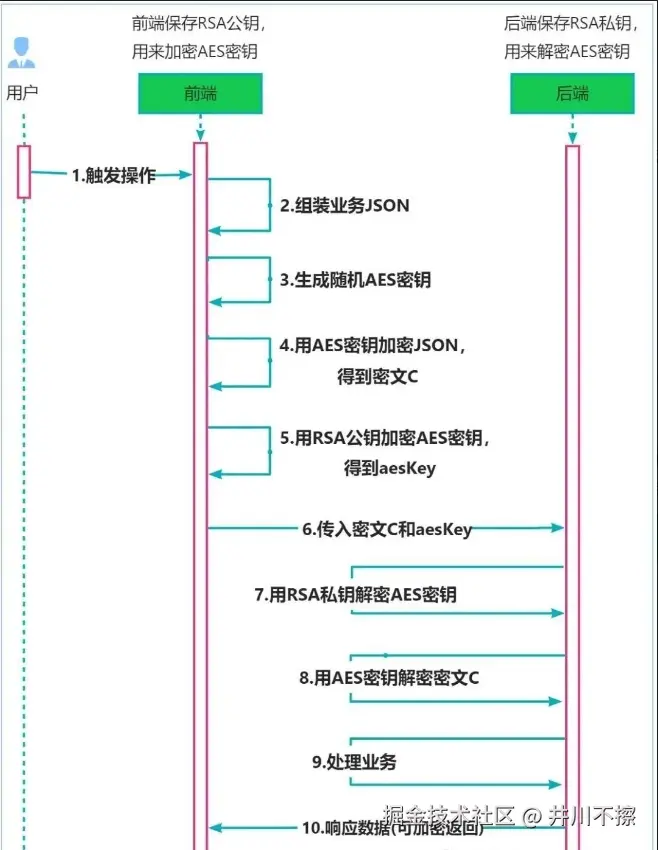
混合加密方案:用 RSA 加密 AES 密钥,用 AES 加密业务数据,兼顾安全性与性能。
2.2 整体架构图
javascript
┌─────────────────────────────────────────────────────────────────┐
│                         前端(浏览器)                          │
├─────────────────────────────────────────────────────────────────┤
│  1. 获取后端RSA公钥并验证其哈希值(保证哈希算法与后端一致)         │
│  2. 组装业务 JSON                                               │
│  3. 生成随机 AES 密钥                                           │
│  4. 用 AES 密钥加密 JSON → 密文 C                               │
│  5. 用 RSA 公钥加密 AES 密钥 → encryptedKey                     │
│  6. 发送 { cipherText: C, encryptedKey: xxx }                  │
└─────────────────────────────────────────────────────────────────┘
                                    │
                                    ▼
┌─────────────────────────────────────────────────────────────────┐
│                         后端(服务器)                          │
├─────────────────────────────────────────────────────────────────┤
│  7. 用 RSA 私钥解密 encryptedKey → AES 密钥                     │
│  8. 用 AES 密钥解密密文 C → 业务 JSON                           │
│  9. 处理业务逻辑                                                │
│ 10. 响应数据(可选择加密返回)                                  │
└─────────────────────────────────────────────────────────────────┘
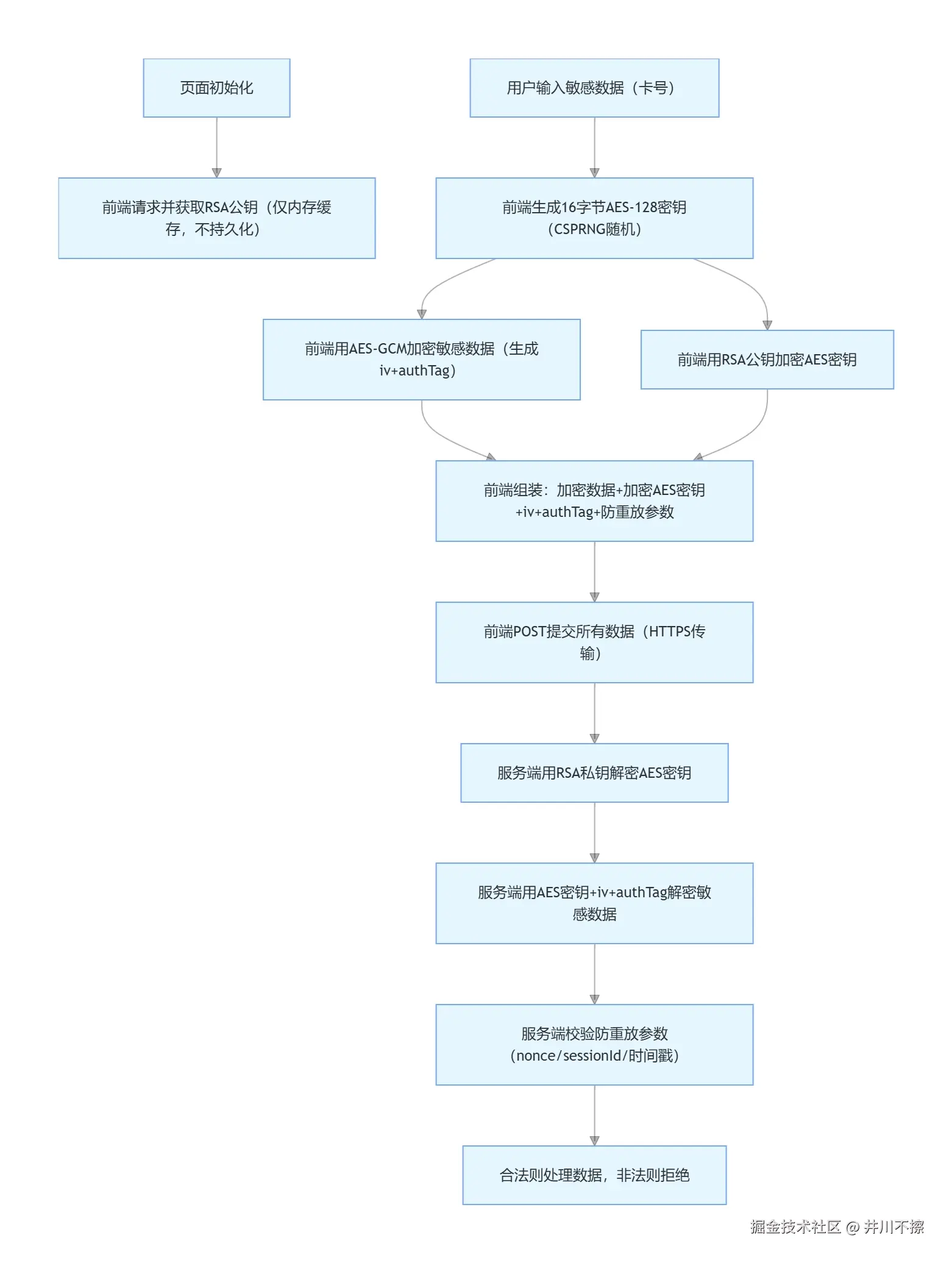
流程图
三、前端实现详解
3.1 获取RSA公钥+公钥校验
ts
// utils/RSA.ts
// 获取公钥+公钥校验(PCI Req 8:公钥校验)
export const getRsaPublicKeyFn = async (): Promise<string> => {
  // 1. 基础数据准备(Web环境)
  // 从后端获取RSA公钥(Web场景:页面初始化时拉取,缓存到内存,禁止持久化)
  const { public_key } = await getRsaPublicKey()
  // 计算获取到的公钥的哈希值
  const receivedPublicKeyHash = await calculateSHA256Hash(public_key);
  console.log("前端计算的公钥哈希值:", receivedPublicKeyHash);
  console.log("环境变量中的公钥哈希值:", import.meta.env.VITE_PUBLIC_KEY_HASH);

  // 4. 对比哈希值,验证公钥是否被篡改
  if (receivedPublicKeyHash === import.meta.env.VITE_PUBLIC_KEY_HASH) {
    console.log("✅ 公钥校验通过,未被篡改!");
    // 校验通过后,才能使用该公钥进行后续的AES密钥加密
    return public_key;
  } else {
    console.error("❌ 公钥哈希值不匹配,公钥可能被篡改!");
    throw new Error("公钥校验失败,拒绝使用");
  }
};

// 计算字符串的SHA256哈希值(转为十六进制)
export async function calculateSHA256Hash(publicKeyPem: string): Promise<string> {
  try {
    // 1. 将字符串转为 UTF-8 二进制(Go 的 []byte(str) 等价 UTF-8 编码)
    const encoder = new TextEncoder();
    const binary = encoder.encode(publicKeyPem.replace(/\r\n/g, '\n').trim());

    // 2. 计算 SHA256 哈希
    const hashBuffer = await crypto.subtle.digest("SHA-256", binary);

    // 3. 转换为十六进制字符串(补零确保两位)
    const hashArray = Array.from(new Uint8Array(hashBuffer));
    const hashHex = hashArray.map(b => b.toString(16).padStart(2, "0")).join("");

    return hashHex;
  } catch (error) {
    console.error("SHA256 计算失败:", error);
    throw new Error("哈希计算失败,请检查输入");
  }
}


// 页面操作
//  页面加载时获取RSA公钥
onMounted(async () => {
    publicKey.value = await getRsaPublicKeyFn();
})
3.2 生成随机 AES 密钥
typescript
// utils/AES.ts

/**
 * 生成合规的256位AES密钥(含内存清空)
 * @returns {Object} aesKey(CryptoKey) + aesKeyBase64(Base64)
 */
export const generateCompliantAes256Key = async (): Promise<GenerateAes256KeyResult> => {
  let aesKey: CryptoKey | null = null;
  let aesKeyRaw: ArrayBuffer | null = null;
  let aesKeyUint8: Uint8Array | null = null;
  let aesKeyBase64: string | null = null;
  let decodedBase64: Uint8Array | null = null;

  try {
    // 1. 生成256位AES-GCM密钥
    aesKey = await crypto.subtle.generateKey(
      { name: "AES-GCM", length: 256 },
      true,
      ["encrypt", "decrypt"],
    );

    // 2. 提取密钥为原始二进制
    aesKeyRaw = await crypto.subtle.exportKey("raw", aesKey);
    aesKeyUint8 = new Uint8Array(aesKeyRaw);

    // 3. PCI合规校验:密钥长度必须为32字节
    if (aesKeyUint8.length !== 32) {
      throw new Error(`[PCI合规] AES-256密钥长度必须为32字节,当前:${aesKeyUint8.length}`);
    }

    // 4. 转换为Base64格式
    aesKeyBase64 = btoa(String.fromCharCode(...aesKeyUint8));

    // 5. 二次校验
    decodedBase64 = Uint8Array.from(atob(aesKeyBase64), (c) => c.charCodeAt(0));
    if (decodedBase64.length !== 32) {
      throw new Error(`[PCI合规] AES密钥Base64转换后长度异常,当前:${decodedBase64.length}`);
    }

    console.log("✅ AES-256密钥生成成功(符合PCI DSS 4.0要求)");
    return {
      aesKey: aesKey as CryptoKey,
      aesKeyBase64: aesKeyBase64 as string
    };
  } catch (error) {
    console.error("❌ AES-256密钥生成失败(PCI合规校验不通过):", error);
    throw error;
  } finally {
    // ------------------------------
    // 清空密钥相关内存(PCI核心要求)
    // ------------------------------
    if (aesKeyRaw) clearMemory(new Uint8Array(aesKeyRaw));
    if (aesKeyUint8) clearMemory(aesKeyUint8);
    if (decodedBase64) clearMemory(decodedBase64);

    // 清空临时变量
    aesKeyRaw = null;
    aesKeyUint8 = null;
    decodedBase64 = null;
  }
};
3.2 AES 加密业务数据
ts
/**
 * AES加密敏感数据(卡号/CVV2等)- GCM模式(PCI 4.0推荐)
 * @param formData 明文敏感数据
 * @param aesKey 前端生成的AES密钥(CryptoKey对象,256位)
 * @param aesKeyBase64 (冗余参数,仅兼容调用逻辑)
 * @returns { encryptedData: 密文(Base64), iv: 向量(Base64), authTag: 认证标签(Base64) }
 */
export const aesEncrypt = async (formData: PaymentFormData, aesKey: CryptoKey,): Promise<AESEncryptResult> => {
  let pureData: PaymentFormData = {
    trade_sn: '',
    card_num: '',
    holder_name: '',
    expiry_year: '',
    expiry_month: '',
    cvv: ''
  };
  let iv: Uint8Array<ArrayBuffer> | null = null;
  let ivBase64: string | null = null;
  let formDataBuffer: Uint8Array<ArrayBuffer> | null = null;
  let encryptedBuffer: ArrayBuffer | null = null;
  let encryptedDataBuffer: Uint8Array | null = null;
  let authTagBuffer: Uint8Array | null = null;
  let encryptedDataBase64: string | null = null;
  let authTagBase64: string | null = null;

  if (!formData.trade_sn || !formData.card_num || !formData.holder_name || !formData.expiry_year || !formData.expiry_month || !formData.cvv) {
    throw new Error(`[PCI合规] 敏感数据不能为空`);
  }

  try {
    // 1. 双重XSS过滤:确保数据纯净
    // 直接调用分类型xssFilter,无需正则判断(更精准)
    pureData.trade_sn = xssFilter(formData.trade_sn, 'trade_sn');
    pureData.card_num = xssFilter(formData.card_num, 'card_num');
    pureData.holder_name = xssFilter(formData.holder_name, 'holder_name');
    pureData.expiry_year = xssFilter(formData.expiry_year, 'expiry_year');
    pureData.expiry_month = xssFilter(formData.expiry_month, 'expiry_month');
    pureData.cvv = xssFilter(formData.cvv, 'cvv');

    // 空值校验:任一核心字段过滤后为空则抛错
    if (!pureData.card_num || !pureData.cvv) {
      throw new Error('[PCI合规] 卡号/CVV过滤后为空,无法加密');
    }

    // 2. 生成12字节随机IV(PCI合规)
    iv = crypto.getRandomValues(new Uint8Array(12));
    ivBase64 = btoa(String.fromCharCode(...iv));
    console.log("🚀 ~ aesEncrypt ~ ivBase64:", ivBase64)

    // 3. AES-GCM加密(原生API)
    const formDataStr = JSON.stringify(pureData);
    console.log("🚀 ~ aesEncrypt ~ formDataStr:", formDataStr)
    const encoder = new TextEncoder();
    formDataBuffer = encoder.encode(formDataStr);
    encryptedBuffer = await crypto.subtle.encrypt(
      { name: "AES-GCM", iv: iv, tagLength: 128 },
      aesKey,
      formDataBuffer
    );

    // 4. 分离密文和authTag
    encryptedDataBuffer = new Uint8Array(encryptedBuffer.slice(0, encryptedBuffer.byteLength - 16));
    authTagBuffer = new Uint8Array(encryptedBuffer.slice(encryptedBuffer.byteLength - 16));

    // 5. 转换为Base64格式
    encryptedDataBase64 = btoa(String.fromCharCode(...encryptedDataBuffer));
    authTagBase64 = btoa(String.fromCharCode(...authTagBuffer));
    console.log("🚀 ~ aesEncrypt ~ encryptedDataBase64:", encryptedDataBase64)
    console.log("🚀 ~ aesEncrypt ~ authTagBase64:", authTagBase64)

    // 返回加密结果(仅返回必要的Base64字符串,不返回原始二进制)
    return {
      encryptedData: encryptedDataBase64,
      iv: ivBase64,
      authTag: authTagBase64
    };
  } catch (error) {
    console.error('[PCI合规] AES加密失败:', error);
    throw new Error('敏感数据加密失败,请重试');
  } finally {
    // ------------------------------
    // 核心:清空所有敏感内存(PCI DSS 4.0强制要求)
    // ------------------------------
    // 清空明文/过滤后数据
    pureData = clearMemory(pureData);

    // 清空二进制数据(逐字节置0,最关键)
    if (iv) clearMemory(iv);
    if (formDataBuffer) clearMemory(formDataBuffer);
    if (encryptedBuffer) clearMemory(new Uint8Array(encryptedBuffer));
    if (encryptedDataBuffer) clearMemory(encryptedDataBuffer);
    if (authTagBuffer) clearMemory(authTagBuffer);

    // 清空Base64临时变量
    ivBase64 = clearMemory(ivBase64);
    encryptedDataBase64 = clearMemory(encryptedDataBase64);
    authTagBase64 = clearMemory(authTagBase64);

    console.log("✅ 敏感数据内存已清空(符合PCI DSS 4.0要求)");
  }
};
3.3 RSA 公钥加密 AES 密钥
typescript
/**
 * 4. RSA加密AES密钥(防止密钥明文传输,符合PCI Req 3.6)
 * @param aesKey 前端生成的AES密钥(Base64格式)
 * @param publicKey 后端下发的RSA公钥(2048位,PEM格式)
 * @returns 加密后的AES密钥
 */
export const rsaEncryptAesKey = (aesKey: string, publicKey: string): string => {
  // 声明所有敏感变量(便于finally块统一清空)
  let keyBuffer: any = null;
  let encryptor: any = null;
  let encryptedKey: string | false | null = null;
  let tempAesKey: string | null = aesKey; // 临时引用明文AES密钥
  let tempPublicKey: string | null = publicKey; // 临时引用公钥

  // 前置校验:避免无效加密
  if (!aesKey || !publicKey) throw new Error('AES密钥/公钥不能为空');

  try {
    // ========== 原有PCI合规校验逻辑(保留) ==========
    // 校验1:AES密钥必须为16字节(128位)/32字节(256位,兼容你之前的256位密钥)
    keyBuffer = CryptoJS.enc.Base64.parse(aesKey);
    if (![16, 32].includes(keyBuffer.sigBytes)) { // 兼容128/256位密钥
      throw new Error(`[PCI合规] AES密钥必须为16字节(128位)或32字节(256位),当前:${keyBuffer.sigBytes}字节`);
    }

    // 严格校验RSA公钥格式(2048位PEM格式,PCI Req 3.5)
    if (
      !publicKey.includes("-----BEGIN PUBLIC KEY-----") ||
      !publicKey.includes("-----END PUBLIC KEY-----") ||
      publicKey.length < 200
    ) {
      throw new Error("[PCI合规] RSA公钥必须为2048位PEM格式");
    }

    // ========== RSA加密核心逻辑(保留) ==========
    const encryptor = new JSEncrypt({ default_key_size: "2048" });
    encryptor.setPublicKey(publicKey);
    encryptedKey = encryptor.encrypt(aesKey);

    if (!encryptedKey) {
      throw new Error("RSA加密AES密钥失败(PCI合规校验失败)");
    }

    return encryptedKey;
  } catch (error) {
    console.error('[PCI合规] RSA加密AES密钥失败:', error);
    throw new Error('RSA加密密钥失败,请检查公钥格式或密钥长度');
  } finally {
    // ========== 核心改造:彻底清空所有敏感内存(PCI核心要求) ==========
    // 1. 清空明文AES密钥(最核心:切断引用+覆盖)
    tempAesKey = clearMemory(tempAesKey);
    aesKey = clearMemory(aesKey); // 直接清空入参的明文密钥

    // 2. 清空Base64解析后的密钥二进制(逐字节置0)
    if (keyBuffer && keyBuffer.words) {
      // CryptoJS WordArray:覆盖内部存储的密钥数据
      keyBuffer.words.fill(0);
      keyBuffer.sigBytes = 0;
    }

    // 3. 清空RSA公钥(切断引用)
    tempPublicKey = clearMemory(tempPublicKey);
    publicKey = clearMemory(publicKey);

    // 4. 清空加密器对象(切断引用,防止残留密钥)
    if (encryptor) {
      encryptor = clearMemory(encryptor);
    }

    // 5. 清空临时变量(切断所有引用)
    keyBuffer = null;
    encryptedKey = null;

    console.log("✅ RSA加密环节敏感内存已清空(符合PCI DSS 4.0要求)");
  }
};
3.4 xss过滤
ts
import type { PaymentFormData } from '@/api/pay';
import DOMPurify from 'dompurify';

/**
 * 通用XSS过滤核心函数(仅做输入清洗,不做业务校验)
 * @param input 原始输入
 * @param filterType 数据类型:cardNumber/cardName/year/month/cvv
 * @returns 过滤后的干净数据(仅移除危险字符,保留基础格式)
 */
export const xssFilter = (
    input: string,
    filterType: keyof PaymentFormData
): string => {
    // 1. 空值/非字符串兜底
    if (typeof input !== 'string' || input.trim() === '') {
        console.warn(`[PCI合规] XSS过滤:${filterType}输入为空或非字符串`);
        return '';
    }

    // 2. 预处理:移除Unicode危险字符、控制字符
    const preProcessed = input
        .replace(/[\u2000-\u200F\u2028-\u202F\u3000]/g, '') // 移除Unicode空白符
        .replace(/[\xFF\xFE\x00-\x1F]/g, '') // 移除控制字符/不可打印字符
        .trim();

    // 3. 基础XSS净化(禁用所有HTML标签/属性,仅保留纯文本)
    const pureInput = DOMPurify.sanitize(preProcessed, {
        USE_PROFILES: { html: false, svg: false, mathMl: false },
        FORBID_TAGS: ['*'],
        FORBID_ATTR: ['*'],
        ALLOWED_TAGS: [],
        ALLOWED_ATTR: [],
        RETURN_TRUSTED_TYPE: false,
    });

    // 4. 分类型过滤(仅保留该类型允许的字符,不做长度/范围校验)
    let filteredInput = '';
    switch (filterType) {
        case 'trade_sn':
            // 仅保留半角数字和英文字母(移除空格/分隔符/全角字符/特殊符号等)
            filteredInput = pureInput.replace(/[^a-zA-Z0-9]/g, '');
            break;

        case 'card_num':
            // 仅保留半角数字(移除空格/分隔符/全角数字等),不校验长度
            filteredInput = pureInput.replace(/[^\d]/g, '');
            break;

        case 'holder_name':
            // 保留:中英文、空格、点号,移除危险符号,不校验长度
            filteredInput = pureInput
                .replace(/[<>"'&;()\\/`$%@*=+{}[\]|~^]/g, '')
                .replace(/[^\u4e00-\u9fa5a-zA-Z\s.]/g, '');
            break;

        case 'expiry_year':
            // 仅保留数字(移除分隔符),不校验长度/范围
            filteredInput = pureInput.replace(/[^\d]/g, '');
            break;

        case 'expiry_month':
            // 仅保留数字(移除分隔符),不校验长度/范围
            filteredInput = pureInput.replace(/[^\d]/g, '');
            break;

        case 'cvv':
            // 仅保留半角数字,不校验长度
            filteredInput = pureInput.replace(/[^\d]/g, '');
            break;
    }

    // 5. 审计日志(脱敏展示)
    if (input !== filteredInput) {
        console.info(
            `[PCI合规] XSS过滤:${filterType}已净化`,
            { original: input.slice(0, 20), filtered: filteredInput.slice(0, 20) }
        );
    }

    return filteredInput;
};
3.5 添加防重放 + 内存清空函数
ts
// utils/index.ts

import type { AntiReplayParams } from "@/types/crypto";
import CryptoJS from "crypto-js";


/**
 * 内存清空工具函数(PCI DSS 4.0核心要求)
 * 覆盖敏感数据所在的变量/数组,防止内存驻留泄露
 * @param target 待清空的目标(字符串/数组/Uint8Array等)
 */
export const clearMemory = (target: any): any => {
    if (typeof target === 'string') {
        // 字符串:用空字符覆盖(JS字符串不可变,需重新赋值)
        return '';
    } else if (target instanceof Uint8Array) {
        // Uint8Array(密钥/IV/密文):逐字节置0(核心清空逻辑)
        for (let i = 0; i < target.length; i++) {
            target[i] = 0;
        }
    } else if (Array.isArray(target)) {
        // 数组:清空并填充空值
        target.length = 0;
        target.fill(null);
    } else if (typeof target === 'object' && target !== null) {
        // 对象:遍历属性置空
        for (const key in target) {
            if (target.hasOwnProperty(key)) {
                target[key] = null;
            }
        }
    }
};

/**
 * 5. 生成Web端设备指纹(适配无POS硬件的场景)
 * 基于浏览器特征生成唯一标识(非绝对唯一,但满足PCI轻量鉴权)
 */
const generateDeviceFingerprint = (): string => {
    const navigatorInfo = [
        navigator.userAgent,
        navigator.language,
        navigator.platform,
        navigator.hardwareConcurrency,
        screen.width,
        screen.height,
        screen.colorDepth,
    ].join("_");
    // 哈希处理:避免明文传输设备信息(PCI Req 6.2)
    return CryptoJS.SHA256(navigatorInfo).toString();
};

/**
 * 6:生成防重放参数(独立抽离,适配前端生成AES密钥场景)
 * 保留PCI合规要求的核心参数:会话ID+设备指纹+随机数+时间戳
 */
export const generateAntiReplayParams = (): AntiReplayParams => {
    // 单次会话唯一ID(防重放核心:每个请求生成唯一值)
    let sessionId: string = CryptoJS.lib.WordArray.random(32).toString();
    // 设备指纹(绑定请求来源,防止跨设备重放)
    let deviceFingerprint: string = generateDeviceFingerprint();
    // 随机数(不可预测性,防止按规律伪造)
    let nonce: string = CryptoJS.lib.WordArray.random(16).toString();
    // 时间戳(后端校验有效期,比如5分钟内有效)
    const timestamp = Date.now();

    // 缓存供提交时使用
    (window as any).PCI_SESSION_ID = sessionId;
    (window as any).PCI_DEVICE_FP = deviceFingerprint;

    // 返回前清空临时变量(防重放参数本身非敏感,但缓存需管控)
    const returnParams = { sessionId, deviceFingerprint, nonce, timestamp };
    // 切断临时变量引用
    sessionId = '';
    deviceFingerprint = '';
    nonce = '';

    return returnParams;
};
四、完整的代码
1. AES.ts
ts
import type { AESEncryptResult, GenerateAes256KeyResult } from "@/types/crypto";
import { clearMemory } from ".";
import { xssFilter } from "./xssFilter";
import type { PaymentFormData } from "@/api/pay";

/**
 * 生成合规的256位AES密钥(含内存清空)
 * @returns {Object} aesKey(CryptoKey) + aesKeyBase64(Base64)
 */
export const generateCompliantAes256Key = async (): Promise<GenerateAes256KeyResult> => {
  let aesKey: CryptoKey | null = null;
  let aesKeyRaw: ArrayBuffer | null = null;
  let aesKeyUint8: Uint8Array | null = null;
  let aesKeyBase64: string | null = null;
  let decodedBase64: Uint8Array | null = null;

  try {
    // 1. 生成256位AES-GCM密钥
    aesKey = await crypto.subtle.generateKey(
      { name: "AES-GCM", length: 256 },
      true,
      ["encrypt", "decrypt"],
    );

    // 2. 提取密钥为原始二进制
    aesKeyRaw = await crypto.subtle.exportKey("raw", aesKey);
    aesKeyUint8 = new Uint8Array(aesKeyRaw);

    // 3. PCI合规校验:密钥长度必须为32字节
    if (aesKeyUint8.length !== 32) {
      throw new Error(`[PCI合规] AES-256密钥长度必须为32字节,当前:${aesKeyUint8.length}`);
    }

    // 4. 转换为Base64格式
    aesKeyBase64 = btoa(String.fromCharCode(...aesKeyUint8));

    // 5. 二次校验
    decodedBase64 = Uint8Array.from(atob(aesKeyBase64), (c) => c.charCodeAt(0));
    if (decodedBase64.length !== 32) {
      throw new Error(`[PCI合规] AES密钥Base64转换后长度异常,当前:${decodedBase64.length}`);
    }

    console.log("✅ AES-256密钥生成成功(符合PCI DSS 4.0要求)");
    return {
      aesKey: aesKey as CryptoKey,
      aesKeyBase64: aesKeyBase64 as string
    };
  } catch (error) {
    console.error("❌ AES-256密钥生成失败(PCI合规校验不通过):", error);
    throw error;
  } finally {
    // ------------------------------
    // 清空密钥相关内存(PCI核心要求)
    // ------------------------------
    if (aesKeyRaw) clearMemory(new Uint8Array(aesKeyRaw));
    if (aesKeyUint8) clearMemory(aesKeyUint8);
    if (decodedBase64) clearMemory(decodedBase64);

    // 清空临时变量
    aesKeyRaw = null;
    aesKeyUint8 = null;
    decodedBase64 = null;
  }
};

/**
 * AES加密敏感数据(卡号/CVV2等)- GCM模式(PCI 4.0推荐)
 * @param formData 明文敏感数据
 * @param aesKey 前端生成的AES密钥(CryptoKey对象,256位)
 * @param aesKeyBase64 (冗余参数,仅兼容调用逻辑)
 * @returns { encryptedData: 密文(Base64), iv: 向量(Base64), authTag: 认证标签(Base64) }
 */
export const aesEncrypt = async (formData: PaymentFormData, aesKey: CryptoKey,): Promise<AESEncryptResult> => {
  let pureData: PaymentFormData = {
    trade_sn: '',
    card_num: '',
    holder_name: '',
    expiry_year: '',
    expiry_month: '',
    cvv: ''
  };
  let iv: Uint8Array<ArrayBuffer> | null = null;
  let ivBase64: string | null = null;
  let formDataBuffer: Uint8Array<ArrayBuffer> | null = null;
  let encryptedBuffer: ArrayBuffer | null = null;
  let encryptedDataBuffer: Uint8Array | null = null;
  let authTagBuffer: Uint8Array | null = null;
  let encryptedDataBase64: string | null = null;
  let authTagBase64: string | null = null;

  if (!formData.trade_sn || !formData.card_num || !formData.holder_name || !formData.expiry_year || !formData.expiry_month || !formData.cvv) {
    throw new Error(`[PCI合规] 敏感数据不能为空`);
  }

  try {
    // 1. 双重XSS过滤:确保数据纯净
    // 直接调用分类型xssFilter,无需正则判断(更精准)
    pureData.trade_sn = xssFilter(formData.trade_sn, 'trade_sn');
    pureData.card_num = xssFilter(formData.card_num, 'card_num');
    pureData.holder_name = xssFilter(formData.holder_name, 'holder_name');
    pureData.expiry_year = xssFilter(formData.expiry_year, 'expiry_year');
    pureData.expiry_month = xssFilter(formData.expiry_month, 'expiry_month');
    pureData.cvv = xssFilter(formData.cvv, 'cvv');

    // 空值校验:任一核心字段过滤后为空则抛错
    if (!pureData.card_num || !pureData.cvv) {
      throw new Error('[PCI合规] 卡号/CVV过滤后为空,无法加密');
    }

    // 2. 生成12字节随机IV(PCI合规)
    iv = crypto.getRandomValues(new Uint8Array(12));
    ivBase64 = btoa(String.fromCharCode(...iv));
    console.log("🚀 ~ aesEncrypt ~ ivBase64:", ivBase64)

    // 3. AES-GCM加密(原生API)
    const formDataStr = JSON.stringify(pureData);
    console.log("🚀 ~ aesEncrypt ~ formDataStr:", formDataStr)
    const encoder = new TextEncoder();
    formDataBuffer = encoder.encode(formDataStr);
    encryptedBuffer = await crypto.subtle.encrypt(
      { name: "AES-GCM", iv: iv, tagLength: 128 },
      aesKey,
      formDataBuffer
    );

    // 4. 分离密文和authTag
    encryptedDataBuffer = new Uint8Array(encryptedBuffer.slice(0, encryptedBuffer.byteLength - 16));
    authTagBuffer = new Uint8Array(encryptedBuffer.slice(encryptedBuffer.byteLength - 16));

    // 5. 转换为Base64格式
    encryptedDataBase64 = btoa(String.fromCharCode(...encryptedDataBuffer));
    authTagBase64 = btoa(String.fromCharCode(...authTagBuffer));
    console.log("🚀 ~ aesEncrypt ~ encryptedDataBase64:", encryptedDataBase64)
    console.log("🚀 ~ aesEncrypt ~ authTagBase64:", authTagBase64)

    // 返回加密结果(仅返回必要的Base64字符串,不返回原始二进制)
    return {
      encryptedData: encryptedDataBase64,
      iv: ivBase64,
      authTag: authTagBase64
    };
  } catch (error) {
    console.error('[PCI合规] AES加密失败:', error);
    throw new Error('敏感数据加密失败,请重试');
  } finally {
    // ------------------------------
    // 核心:清空所有敏感内存(PCI DSS 4.0强制要求)
    // ------------------------------
    // 清空明文/过滤后数据
    pureData = clearMemory(pureData);

    // 清空二进制数据(逐字节置0,最关键)
    if (iv) clearMemory(iv);
    if (formDataBuffer) clearMemory(formDataBuffer);
    if (encryptedBuffer) clearMemory(new Uint8Array(encryptedBuffer));
    if (encryptedDataBuffer) clearMemory(encryptedDataBuffer);
    if (authTagBuffer) clearMemory(authTagBuffer);

    // 清空Base64临时变量
    ivBase64 = clearMemory(ivBase64);
    encryptedDataBase64 = clearMemory(encryptedDataBase64);
    authTagBase64 = clearMemory(authTagBase64);

    console.log("✅ 敏感数据内存已清空(符合PCI DSS 4.0要求)");
  }
};
2. RSA.ts
ts
import { getRsaPublicKey } from "@/api/pay";
import { clearMemory } from ".";
import CryptoJS from "crypto-js";
import JSEncrypt from "jsencrypt";

// 计算字符串的SHA256哈希值(转为十六进制)
export async function calculateSHA256Hash(publicKeyPem: string): Promise<string> {
  try {
    // 1. 将字符串转为 UTF-8 二进制(Go 的 []byte(str) 等价 UTF-8 编码)
    const encoder = new TextEncoder();
    const binary = encoder.encode(publicKeyPem.replace(/\r\n/g, '\n').trim());

    // 2. 计算 SHA256 哈希
    const hashBuffer = await crypto.subtle.digest("SHA-256", binary);

    // 3. 转换为十六进制字符串(补零确保两位)
    const hashArray = Array.from(new Uint8Array(hashBuffer));
    const hashHex = hashArray.map(b => b.toString(16).padStart(2, "0")).join("");

    return hashHex;
  } catch (error) {
    console.error("SHA256 计算失败:", error);
    throw new Error("哈希计算失败,请检查输入");
  }
}

// 3. 获取公钥+公钥校验(PCI Req 8:公钥校验)
export const getRsaPublicKeyFn = async (): Promise<string> => {
  // 1. 基础数据准备(Web环境)
  // 从后端获取RSA公钥(Web场景:页面初始化时拉取,缓存到内存,禁止持久化)
  const { public_key } = await getRsaPublicKey()
  // 计算获取到的公钥的哈希值
  const receivedPublicKeyHash = await calculateSHA256Hash(public_key);
  console.log("前端计算的公钥哈希值:", receivedPublicKeyHash);
  console.log("环境变量中的公钥哈希值:", import.meta.env.VITE_PUBLIC_KEY_HASH);

  // 4. 对比哈希值,验证公钥是否被篡改
  if (receivedPublicKeyHash === import.meta.env.VITE_PUBLIC_KEY_HASH) {
    console.log("✅ 公钥校验通过,未被篡改!");
    // 校验通过后,才能使用该公钥进行后续的AES密钥加密
    return public_key;
  } else {
    console.error("❌ 公钥哈希值不匹配,公钥可能被篡改!");
    throw new Error("公钥校验失败,拒绝使用");
  }
};

/**
 * 4. RSA加密AES密钥(防止密钥明文传输,符合PCI Req 3.6)
 * @param aesKey 前端生成的AES密钥(Base64格式)
 * @param publicKey 后端下发的RSA公钥(2048位,PEM格式)
 * @returns 加密后的AES密钥
 */
export const rsaEncryptAesKey = (aesKey: string, publicKey: string): string => {
  // 声明所有敏感变量(便于finally块统一清空)
  let keyBuffer: any = null;
  let encryptor: any = null;
  let encryptedKey: string | false | null = null;
  let tempAesKey: string | null = aesKey; // 临时引用明文AES密钥
  let tempPublicKey: string | null = publicKey; // 临时引用公钥

  // 前置校验:避免无效加密
  if (!aesKey || !publicKey) throw new Error('AES密钥/公钥不能为空');

  try {
    // ========== 原有PCI合规校验逻辑(保留) ==========
    // 校验1:AES密钥必须为16字节(128位)/32字节(256位,兼容你之前的256位密钥)
    keyBuffer = CryptoJS.enc.Base64.parse(aesKey);
    if (![16, 32].includes(keyBuffer.sigBytes)) { // 兼容128/256位密钥
      throw new Error(`[PCI合规] AES密钥必须为16字节(128位)或32字节(256位),当前:${keyBuffer.sigBytes}字节`);
    }

    // 严格校验RSA公钥格式(2048位PEM格式,PCI Req 3.5)
    if (
      !publicKey.includes("-----BEGIN PUBLIC KEY-----") ||
      !publicKey.includes("-----END PUBLIC KEY-----") ||
      publicKey.length < 200
    ) {
      throw new Error("[PCI合规] RSA公钥必须为2048位PEM格式");
    }

    // ========== RSA加密核心逻辑(保留) ==========
    const encryptor = new JSEncrypt({ default_key_size: "2048" });
    encryptor.setPublicKey(publicKey);
    encryptedKey = encryptor.encrypt(aesKey);

    if (!encryptedKey) {
      throw new Error("RSA加密AES密钥失败(PCI合规校验失败)");
    }

    return encryptedKey;
  } catch (error) {
    console.error('[PCI合规] RSA加密AES密钥失败:', error);
    throw new Error('RSA加密密钥失败,请检查公钥格式或密钥长度');
  } finally {
    // ========== 核心改造:彻底清空所有敏感内存(PCI核心要求) ==========
    // 1. 清空明文AES密钥(最核心:切断引用+覆盖)
    tempAesKey = clearMemory(tempAesKey);
    aesKey = clearMemory(aesKey); // 直接清空入参的明文密钥

    // 2. 清空Base64解析后的密钥二进制(逐字节置0)
    if (keyBuffer && keyBuffer.words) {
      // CryptoJS WordArray:覆盖内部存储的密钥数据
      keyBuffer.words.fill(0);
      keyBuffer.sigBytes = 0;
    }

    // 3. 清空RSA公钥(切断引用)
    tempPublicKey = clearMemory(tempPublicKey);
    publicKey = clearMemory(publicKey);

    // 4. 清空加密器对象(切断引用,防止残留密钥)
    if (encryptor) {
      encryptor = clearMemory(encryptor);
    }

    // 5. 清空临时变量(切断所有引用)
    keyBuffer = null;
    encryptedKey = null;

    console.log("✅ RSA加密环节敏感内存已清空(符合PCI DSS 4.0要求)");
  }
};
3. xssFilter.ts
ts
import type { PaymentFormData } from '@/api/pay';
import DOMPurify from 'dompurify';

/**
 * 通用XSS过滤核心函数(仅做输入清洗,不做业务校验)
 * @param input 原始输入
 * @param filterType 数据类型:cardNumber/cardName/year/month/cvv
 * @returns 过滤后的干净数据(仅移除危险字符,保留基础格式)
 */
export const xssFilter = (
    input: string,
    filterType: keyof PaymentFormData
): string => {
    // 1. 空值/非字符串兜底
    if (typeof input !== 'string' || input.trim() === '') {
        console.warn(`[PCI合规] XSS过滤:${filterType}输入为空或非字符串`);
        return '';
    }

    // 2. 预处理:移除Unicode危险字符、控制字符
    const preProcessed = input
        .replace(/[\u2000-\u200F\u2028-\u202F\u3000]/g, '') // 移除Unicode空白符
        .replace(/[\xFF\xFE\x00-\x1F]/g, '') // 移除控制字符/不可打印字符
        .trim();

    // 3. 基础XSS净化(禁用所有HTML标签/属性,仅保留纯文本)
    const pureInput = DOMPurify.sanitize(preProcessed, {
        USE_PROFILES: { html: false, svg: false, mathMl: false },
        FORBID_TAGS: ['*'],
        FORBID_ATTR: ['*'],
        ALLOWED_TAGS: [],
        ALLOWED_ATTR: [],
        RETURN_TRUSTED_TYPE: false,
    });

    // 4. 分类型过滤(仅保留该类型允许的字符,不做长度/范围校验)
    let filteredInput = '';
    switch (filterType) {
        case 'trade_sn':
            // 仅保留半角数字和英文字母(移除空格/分隔符/全角字符/特殊符号等)
            filteredInput = pureInput.replace(/[^a-zA-Z0-9]/g, '');
            break;

        case 'card_num':
            // 仅保留半角数字(移除空格/分隔符/全角数字等),不校验长度
            filteredInput = pureInput.replace(/[^\d]/g, '');
            break;

        case 'holder_name':
            // 保留:中英文、空格、点号,移除危险符号,不校验长度
            filteredInput = pureInput
                .replace(/[<>"'&;()\\/`$%@*=+{}[\]|~^]/g, '')
                .replace(/[^\u4e00-\u9fa5a-zA-Z\s.]/g, '');
            break;

        case 'expiry_year':
            // 仅保留数字(移除分隔符),不校验长度/范围
            filteredInput = pureInput.replace(/[^\d]/g, '');
            break;

        case 'expiry_month':
            // 仅保留数字(移除分隔符),不校验长度/范围
            filteredInput = pureInput.replace(/[^\d]/g, '');
            break;

        case 'cvv':
            // 仅保留半角数字,不校验长度
            filteredInput = pureInput.replace(/[^\d]/g, '');
            break;
    }

    // 5. 审计日志(脱敏展示)
    if (input !== filteredInput) {
        console.info(
            `[PCI合规] XSS过滤:${filterType}已净化`,
            { original: input.slice(0, 20), filtered: filteredInput.slice(0, 20) }
        );
    }

    return filteredInput;
};
4. index.ts
ts
import type { AntiReplayParams } from "@/types/crypto";
import CryptoJS from "crypto-js";


/**
 * 内存清空工具函数(PCI DSS 4.0核心要求)
 * 覆盖敏感数据所在的变量/数组,防止内存驻留泄露
 * @param target 待清空的目标(字符串/数组/Uint8Array等)
 */
export const clearMemory = (target: any): any => {
    if (typeof target === 'string') {
        // 字符串:用空字符覆盖(JS字符串不可变,需重新赋值)
        return '';
    } else if (target instanceof Uint8Array) {
        // Uint8Array(密钥/IV/密文):逐字节置0(核心清空逻辑)
        for (let i = 0; i < target.length; i++) {
            target[i] = 0;
        }
    } else if (Array.isArray(target)) {
        // 数组:清空并填充空值
        target.length = 0;
        target.fill(null);
    } else if (typeof target === 'object' && target !== null) {
        // 对象:遍历属性置空
        for (const key in target) {
            if (target.hasOwnProperty(key)) {
                target[key] = null;
            }
        }
    }
};

/**
 * 5. 生成Web端设备指纹(适配无POS硬件的场景)
 * 基于浏览器特征生成唯一标识(非绝对唯一,但满足PCI轻量鉴权)
 */
const generateDeviceFingerprint = (): string => {
    const navigatorInfo = [
        navigator.userAgent,
        navigator.language,
        navigator.platform,
        navigator.hardwareConcurrency,
        screen.width,
        screen.height,
        screen.colorDepth,
    ].join("_");
    // 哈希处理:避免明文传输设备信息(PCI Req 6.2)
    return CryptoJS.SHA256(navigatorInfo).toString();
};

/**
 * 6:生成防重放参数(独立抽离,适配前端生成AES密钥场景)
 * 保留PCI合规要求的核心参数:会话ID+设备指纹+随机数+时间戳
 */
export const generateAntiReplayParams = (): AntiReplayParams => {
    // 单次会话唯一ID(防重放核心:每个请求生成唯一值)
    let sessionId: string = CryptoJS.lib.WordArray.random(32).toString();
    // 设备指纹(绑定请求来源,防止跨设备重放)
    let deviceFingerprint: string = generateDeviceFingerprint();
    // 随机数(不可预测性,防止按规律伪造)
    let nonce: string = CryptoJS.lib.WordArray.random(16).toString();
    // 时间戳(后端校验有效期,比如5分钟内有效)
    const timestamp = Date.now();

    // 缓存供提交时使用
    (window as any).PCI_SESSION_ID = sessionId;
    (window as any).PCI_DEVICE_FP = deviceFingerprint;

    // 返回前清空临时变量(防重放参数本身非敏感,但缓存需管控)
    const returnParams = { sessionId, deviceFingerprint, nonce, timestamp };
    // 切断临时变量引用
    sessionId = '';
    deviceFingerprint = '';
    nonce = '';

    return returnParams;
};
5. crypto.ts
ts
/**
 * PCI SQD-D 合规 前后端加密传输工具类
 * 适配Web网页无token场景:移除token依赖,改用会话ID+设备指纹鉴权
 * 符合PCI DSS 4.0要求:AES-128-GCM + RSA-2048 + 严格XSS过滤 + 密钥管控
 * 依赖:crypto-js jsencrypt dompurify
 */
import { rsaEncryptAesKey } from "./RSA";
import { aesEncrypt, generateCompliantAes256Key } from "./AES";
import { clearMemory, generateAntiReplayParams } from ".";
import type { AESEncryptResult, AntiReplayParams, EncryptedData } from "@/types/crypto";
import type { PaymentFormData } from "@/api/pay";

/**
 * 完整加密流程(前端生成AES密钥 + 防重放参数)
 */
export const pciEncrypt = async (sensitiveData: PaymentFormData, publicKey: string): Promise<EncryptedData> => {
  // 声明所有敏感变量(便于finally块统一清空)
  let antiReplayParams: AntiReplayParams | null = null;
  let aesKey: CryptoKey | null = null;
  let aesKeyBase64: string | null = null;
  let tempSensitiveData: PaymentFormData | null = sensitiveData;
  let encryptedResult: AESEncryptResult | null = null;
  let encryptedAesKey: string | null = null;

  try {
    // 1. 生成防重放参数(核心:保留PCI要求的唯一性校验)
    antiReplayParams = generateAntiReplayParams();

    // 2. 前端生成合规AES密钥(替代后端获取)
    const keyResult = await generateCompliantAes256Key();
    aesKey = keyResult.aesKey;
    aesKeyBase64 = keyResult.aesKeyBase64;
    console.log("🚀 ~ aesKey:", aesKey)
    console.log("🚀 ~ aesKeyBase64:", aesKeyBase64)

    // 3. AES加密数据(仅传aesKey,移除冗余的aesKeyBase64参数)
    console.log('加密前', tempSensitiveData);
    encryptedResult = await aesEncrypt(
      tempSensitiveData as PaymentFormData,
      aesKey as CryptoKey
    );
    console.log("🚀 ~ tempSensitiveData:", tempSensitiveData)
    console.log("🚀 ~ aesKey:", aesKey)
    console.log("🚀 ~ encryptedResult:", encryptedResult)

    // 4. RSA加密AES密钥(符合PCI Req 3.6,防止密钥明文传输)
    encryptedAesKey = rsaEncryptAesKey(aesKeyBase64 as string, publicKey);

    // 5. 组装返回结果
    return {
      value1: encryptedAesKey,
      value2: encryptedResult.iv + encryptedResult.encryptedData,
      value3: encryptedResult.authTag,
      value4: JSON.stringify({
        ...antiReplayParams,
      }),
    };
  } catch (error) {
    console.error('[PCI合规] 完整加密流程失败:', error);
    throw new Error('敏感数据加密失败,请检查参数或重试');
  } finally {
    // ========== 核心:全链路清空敏感内存(PCI DSS 4.0强制要求) ==========
    // 1. 清空明文敏感数据(字符串直接置空)
    tempSensitiveData = null;
    // 入参sensitiveData是函数参数,执行完自动销毁,无需处理

    // 2. 清空AES密钥(CryptoKey对象+Base64格式)
    if (aesKey) {
      clearMemory(aesKey); // 清空CryptoKey对象属性
      aesKey = null; // 切断引用
    }
    if (aesKeyBase64) {
      aesKeyBase64 = ''; // Base64密钥置空
    }

    // 3. 清空加密结果临时变量(切断引用)
    if (encryptedResult) {
      encryptedResult.encryptedData = '';
      encryptedResult.iv = '';
      encryptedResult.authTag = '';
      encryptedResult = null;
    }

    // 4. 清空RSA加密后的密钥(仅临时变量,返回值保留)
    if (encryptedAesKey) {
      encryptedAesKey = '';
    }

    // 5. 清空防重放参数临时变量(返回值保留,仅清空引用)
    if (antiReplayParams) {
      antiReplayParams.sessionId = '';
      antiReplayParams.deviceFingerprint = '';
      antiReplayParams.nonce = '';
      antiReplayParams = null;
    }

    // 6. 清空window缓存的防重放参数(PCI要求:不长期留存)
    (window as any).PCI_SESSION_ID = '';
    (window as any).PCI_DEVICE_FP = '';

    console.log("✅ 完整加密流程敏感内存已清空(符合PCI DSS 4.0要求)");
  }
};
七、总结
RSA + AES 混合加密方案的核心优势:
| 优势 | 说明 |
|---|---|
| 安全性 | 即使 RSA 私钥泄露,历史数据也无法被解密(前向安全) |
| 性能 | AES 对称加密处理大数据量,性能优异 |
| 易用性 | 前端只需持有公钥,无需管理私钥 |
| 灵活性 | 可扩展支持签名、防重放等安全特性 |
适用场景:
- 金融交易数据(支付信息、账户信息)
- 医疗健康数据(患者隐私信息)
- 企业核心业务数据(财务报表、客户资料)
- 任何需要端到端加密的高安全场景
注意事项:
- RSA 密钥长度建议 2048 位以上
- AES 密钥长度建议 256 位
- 使用安全的随机数生成器
- 定期轮换 RSA 密钥对
- 在生产环境使用 HTTPS + 混合加密双重保障
通过这套方案,可以确保业务数据在全链路传输过程中的机密性,满足 PCI-DSS、HIPAA 等高安全标准的要求。