一、最终效果
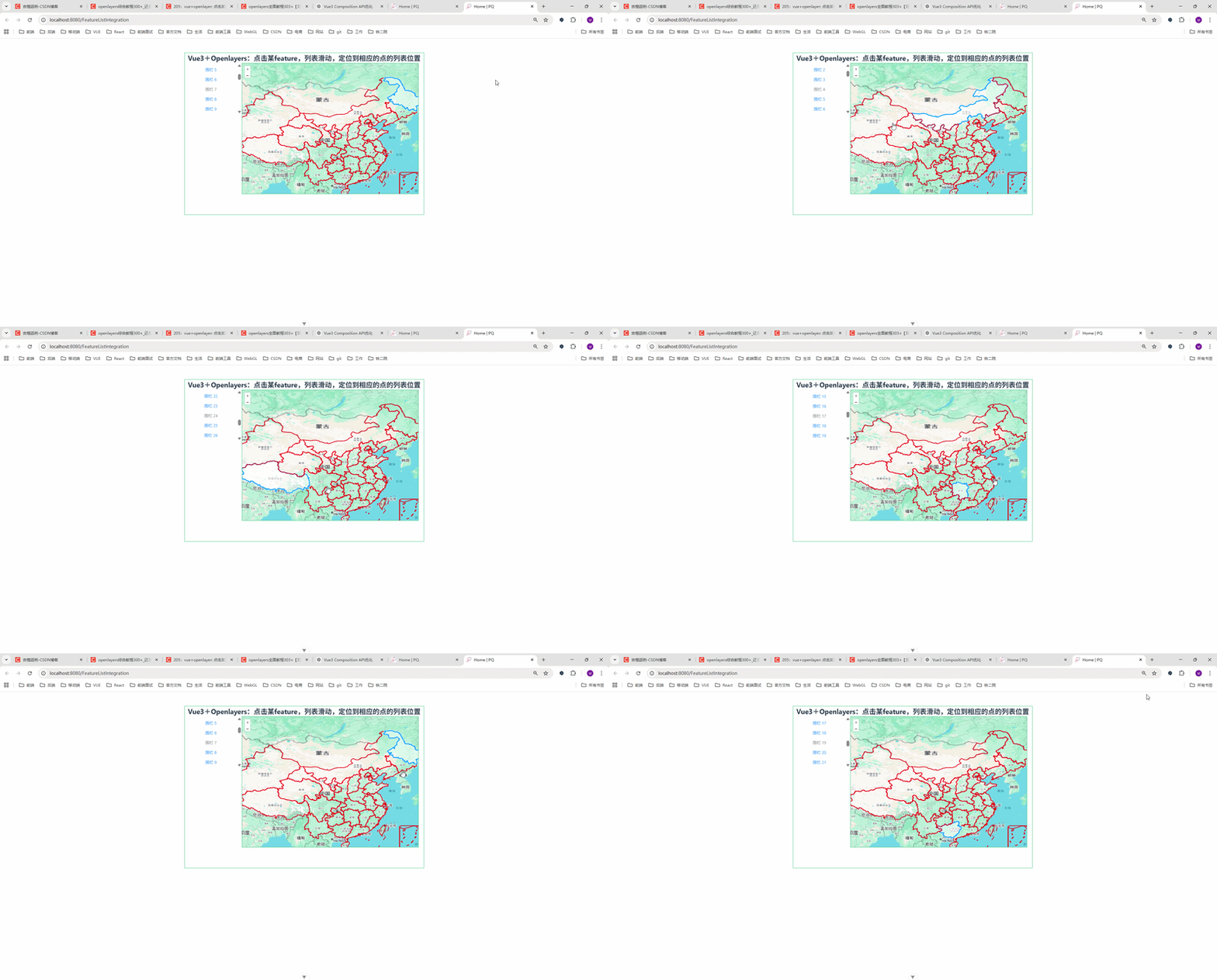
🎯 实现功能
-
点击地图上的多边形(Feature)
-
列表自动滚动到对应位置
-
当前项高亮显示
-
鼠标悬浮 Feature 变为 pointer
👉 核心体验:地图 → 列表联动
二、前言
在 WebGIS 项目中,经常会遇到这样一个需求:
👉 点击地图上的某个要素(Feature)
👉 右侧列表自动滚动并定位到对应数据项
这个交互在以下场景非常常见:
-
无人机巡检系统 ✈️
-
电子围栏管理 🗺️
-
设备点位管理系统 📍
-
GIS 可视化大屏
本篇文章带你用 Vue3 + OpenLayers 实现一个完整、丝滑的联动效果。
三、核心实现思路
整个功能其实就三步:
1️⃣ Feature 和列表建立索引关系
new Feature({
  geometry: item.area,
  listindex: i,
  name: item.descName,
});
👉 关键点:
给每个 Feature 绑定 listindex
2️⃣ 点击地图获取 Feature
const feature = map.value.forEachFeatureAtPixel(
  e.pixel,
  (feature) => feature
);
👉 OpenLayers 核心 API
3️⃣ 滚动到对应 DOM
const el = document.getElementById("pos" + i);
el && el.scrollIntoView({ behavior: "smooth", block: "center" });
🔥 重点:
比 window.location.hash 更优雅!
四、完整代码实现
javascript
<!--
 * @Author: 彭麒
 * @Date: 2026/3/19
 * @Email: 1062470959@qq.com
 * @Description: 此源码版权归吉檀迦俐所有,可供学习和借鉴或商用。
 -->
<template>
  <div class="container">
    <div class="w-full flex justify-center flex-wrap">
      <div class="font-bold text-[24px]">
        Vue3+Openlayers:点击某feature,列表滑动,定位到相应的点的列表位置
      </div>
    </div>
    <div class="list">
      <div
          v-for="(item, index) in list"
          :key="index"
          :id="'pos' + index"
          style="margin: 10px 10px 0;"
      >
        <el-link :type="item.show ? 'primary' : 'info'">
          {{ item.descName }}
        </el-link>
      </div>
    </div>

    <div id="vue-openlayers"></div>
  </div>
</template>

<script setup>
import { ref, onMounted } from "vue";

import "ol/ol.css";
import { Map, View } from "ol";
import TileLayer from "ol/layer/Tile";
import VectorLayer from "ol/layer/Vector";
import VectorSource from "ol/source/Vector";
import XYZ from "ol/source/XYZ";
import Feature from "ol/Feature";
import { Style, Fill, Stroke } from "ol/style";
import { Select } from "ol/interaction";
import GeoJSON from "ol/format/GeoJSON";
import fData from "@/assets/map/china.json";
const map = ref(null);
const source = new VectorSource({ wrapX: false });
const select = ref(null);
const list = ref([]);
const drawfeatures = ref([]);

const initload = () => {
  drawfeatures.value = new GeoJSON().readFeatures(fData, {
    dataProjection: "EPSG:4326",
    featureProjection: "EPSG:4326",
  });

  updateList();
  showPolygons();
};

// 更新列表
const updateList = () => {
  list.value = [];

  drawfeatures.value.forEach((feature, index) => {
    const g = feature.getGeometry();

    list.value.push({
      descName: "围栏 " + index,
      show: true,
      area: g,
    });
  });
};

// 显示多边形
const showPolygons = () => {
  const features = list.value.map((item, i) => {
    return new Feature({
      geometry: item.area,
      listindex: i,
      name: item.descName,
    });
  });

  source.addFeatures(features);
};

// 点击 feature → 滚动列表
const clickFeature = () => {
  map.value.on("click", (e) => {
    const feature = map.value.forEachFeatureAtPixel(
        e.pixel,
        (feature) => feature
    );

    // 鼠标样式
    map.value.getTargetElement().style.cursor = feature
        ? "pointer"
        : "auto";

    if (feature) {
      const i = feature.get("listindex");

      // 滚动定位(推荐替代 hash)
      const el = document.getElementById("pos" + i);
      el && el.scrollIntoView({ behavior: "smooth", block: "center" });

      list.value.forEach((item, index) => {
        item.show = index !== i;
      });
    } else {
      list.value.forEach((item) => (item.show = true));
    }
  });
};

// 初始化地图
const initMap = () => {
  const iconStyle = new Style({
    stroke: new Stroke({
      color: "red",
      width: 2,
    }),
    fill: new Fill({
      color: "rgba(255,0,0,0)",
    }),
  });

  const googleLayer = new TileLayer({
    source: new XYZ({
      url: "https://www.google.com/maps/vt?lyrs=m&gl=en&x={x}&y={y}&z={z}",
      crossOrigin: "anonymous",
    }),
  });

  const drawLayer = new VectorLayer({
    source,
    style: iconStyle,
  });

  map.value = new Map({
    target: "vue-openlayers",
    layers: [googleLayer, drawLayer],
    view: new View({
      projection: "EPSG:4326",
      center: [110.4116821, 41.7966156],
      zoom: 3,
    }),
  });

  clickFeature();

  select.value = new Select();
  map.value.addInteraction(select.value);
};

onMounted(() => {
  initMap();
  initload();
});
</script>

<style scoped>
.container {
  width: 840px;
  height: 570px;
  margin: 50px auto;
  border: 1px solid #42B983;
}

#vue-openlayers {
  width: 620px;
  height: 460px;
  margin: 0 auto;
  border: 1px solid #42B983;
  float: left;
}

.list {
  width: 200px;
  height: 180px;
  margin: 0 auto;
  float: left;
  overflow-y: auto;
}
</style>
五、关键优化点(面试加分项🔥)
✅ 1. scrollIntoView 优于 hash
❌ 不推荐:
window.location.hash = "#pos" + i;✅ 推荐:
el.scrollIntoView({ behavior: "smooth" });✅ 2. 数据驱动 UI
item.show = index !== i;👉 Vue 响应式自动更新 UI
✅ 3. Feature 绑定业务数据
feature.get("listindex")👉 地图 → 业务数据的桥梁
✅ 4. 解耦设计(高级)
可以进一步抽成:
-
useMap()
-
useFeatureClick()
-
useListSync()
👉 适合大型项目
六、可扩展功能(建议你写进简历)
🔥 你可以继续升级:
-
点击列表 → 地图定位(反向联动)
-
Feature 高亮选中(改变样式)
-
hover 提示
-
海量数据优化(WebGL / 分层加载)
-
地图聚合 / 分组展示
七、总结
本文实现了一个非常实用的 GIS 交互功能:
✅ 地图点击
✅ 列表联动
✅ 平滑滚动定位
✅ Vue3 响应式驱动
👉 核心一句话总结:
"通过 Feature 绑定索引,实现地图与列表的双向映射"