一.源码总览
cpp
#include <iostream>
extern "C"
{
#include <libavformat/avformat.h>
}

int main()
{
    //1.打开输入文件
    const char* infile = "E:/videos/test.mp4";
    char outfile[] = "E:/videos/test.mov";
    AVFormatContext* ic = nullptr;
    int ret = avformat_open_input(&ic, infile, NULL, NULL);
    if (ret < 0)
    {
        char errbuf[1024];
        av_strerror(ret, errbuf, sizeof(errbuf));
        std::cout << "avformat_open_input failed : " << errbuf << std::endl;
        return -1;
    }

    // 扒开包裹看详细参数
    ret = avformat_find_stream_info(ic, nullptr);
    if (ret < 0)
    {
        std::cout << "获取流信息失败" << std::endl;
        avformat_close_input(&ic);
        return -1;
    }

    //2.创建输出上下文
    AVFormatContext* oc = nullptr;
    ret = avformat_alloc_output_context2(&oc,NULL,NULL,outfile);
    if (ret < 0)
    {
        char errbuf[1024];
        av_strerror(ret, errbuf, sizeof(errbuf));
        std::cout << "avformat_alloc_output_context2 failed : " << errbuf << std::endl;
        return -1;
    }

    //3.添加流
    AVStream* videoStream = avformat_new_stream(oc, NULL);
    AVStream* audioStream = avformat_new_stream(oc, NULL);

    //4.复制参数
    avcodec_parameters_copy(videoStream->codecpar, ic->streams[0]->codecpar);
    avcodec_parameters_copy(audioStream->codecpar, ic->streams[1]->codecpar);

    //5.标签清零
    videoStream->codecpar->codec_tag = 0;
    audioStream->codecpar->codec_tag = 0;
    av_dump_format(ic, 0, infile, 0);
    std::cout << "=====================================" << std::endl;
    av_dump_format(oc, 0, outfile, 1);

    //6.打开输出文件io,写入头部信息
    ret = avio_open(&oc->pb, outfile, AVIO_FLAG_WRITE);
    if (ret < 0)
    {
        std::cout << "avio open failed!" << std::endl;
        return -1;
    }

    //写入头
    ret = avformat_write_header(oc, NULL);
    if (ret < 0)
    {
        char errbuf[1024];
        av_strerror(ret, errbuf, sizeof(errbuf));
        std::cout << "avformat_write_header failed: " << errbuf << std::endl;
    }

    //写入帧数据
    AVPacket* pkt = av_packet_alloc();
    for (;;)
    {
        int re = av_read_frame(ic, pkt);        //读取帧
        if (re < 0)
            break;

        //根据time_base不同,进行转换
        pkt->pts = av_rescale_q_rnd(pkt->pts,
            ic->streams[pkt->stream_index]->time_base,
            oc->streams[pkt->stream_index]->time_base,
            (AVRounding)(AV_ROUND_NEAR_INF | AV_ROUND_PASS_MINMAX)
        );
        pkt->dts = av_rescale_q_rnd(pkt->dts,
            ic->streams[pkt->stream_index]->time_base,
            oc->streams[pkt->stream_index]->time_base,
            (AVRounding)(AV_ROUND_NEAR_INF | AV_ROUND_PASS_MINMAX)
        );
        pkt->pos = -1;
        pkt->duration = av_rescale_q_rnd(pkt->duration,
            ic->streams[pkt->stream_index]->time_base,
            oc->streams[pkt->stream_index]->time_base,
            (AVRounding)(AV_ROUND_NEAR_INF | AV_ROUND_PASS_MINMAX)
        );

        av_interleaved_write_frame(oc, pkt);    //写入帧
        av_packet_unref(pkt);
    }
    av_write_trailer(oc);

    av_packet_free(&pkt);
    avio_close(oc->pb);
    avformat_close_input(&ic);
    avformat_free_context(oc);

    return 0;
}
二、流程拆解
第一步:打开输入文件,摸底源文件 (输入管家)
在内存中建立"输入大管家"。它像 X 光机一样扫描 MP4,摸清了里面有 H.264 视频轨和 AAC 音频轨,拿到了第一手资料。

对应代码块:
cpp
    //1.打开输入文件
    const char* infile = "E:/videos/test.mp4";
    char outfile[] = "E:/videos/test.mov";
    AVFormatContext* ic = nullptr;
    int ret = avformat_open_input(&ic, infile, NULL, NULL);
    if (ret < 0)
    {
        char errbuf[1024];
        av_strerror(ret, errbuf, sizeof(errbuf));
        std::cout << "avformat_open_input failed : " << errbuf << std::endl;
        return -1;
    }

    // 扒开包裹看详细参数
    ret = avformat_find_stream_info(ic, nullptr);
    if (ret < 0)
    {
        std::cout << "获取流信息失败" << std::endl;
        avformat_close_input(&ic);
        return -1;
    }
第二步:创建输出文件上下文凭空捏造图纸 (输出空壳)
在内存中新建一个针对 MOV 格式的"输出空壳"。注意:此时这只是个内存图纸,硬盘上依然什么都没有发生。

对应代码块:
cpp
    //2.创建输出上下文
    AVFormatContext* oc = nullptr;
    ret = avformat_alloc_output_context2(&oc,NULL,NULL,outfile);
    if (ret < 0)
    {
        char errbuf[1024];
        av_strerror(ret, errbuf, sizeof(errbuf));
        std::cout << "avformat_alloc_output_context2 failed : " << errbuf << std::endl;
        return -1;
    }
第三步:克隆轨道数据
根据旧管家探明的参数,在新管家这里铺设对应的视频/音频轨道,并 1:1 复印参数说明书。清除旧标签,准备生成新暗号。

对应代码块:
cpp
    //3.添加流
    AVStream* videoStream = avformat_new_stream(oc, NULL);
    AVStream* audioStream = avformat_new_stream(oc, NULL);

    //4.复制参数
    avcodec_parameters_copy(videoStream->codecpar, ic->streams[0]->codecpar);
    avcodec_parameters_copy(audioStream->codecpar, ic->streams[1]->codecpar);

    //5.标签清零
    videoStream->codecpar->codec_tag = 0;
    audioStream->codecpar->codec_tag = 0;
第四步:点亮硬盘,写入文件头
关键时刻!打通内存到硬盘的 I/O 管道,在硬盘真正创建 test.mov 文件,并把图纸上的"轨道参数说明书"写在文件的最头部。

对应代码块:
cpp
   //6.打开输出文件io,写入头部信息
   ret = avio_open(&oc->pb, outfile, AVIO_FLAG_WRITE);
   if (ret < 0)
   {
       std::cout << "avio open failed!" << std::endl;
       return -1;
   }

   //写入头
   ret = avformat_write_header(oc, NULL);
   if (ret < 0)
   {
       char errbuf[1024];
       av_strerror(ret, errbuf, sizeof(errbuf));
       std::cout << "avformat_write_header failed: " << errbuf << std::endl;
   }
第五步:死循环搬运与时间换算
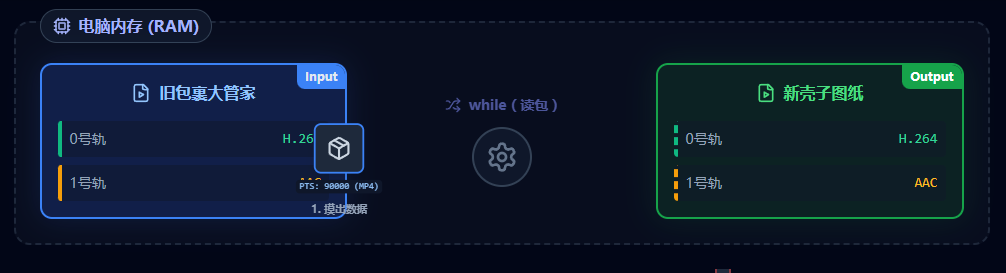
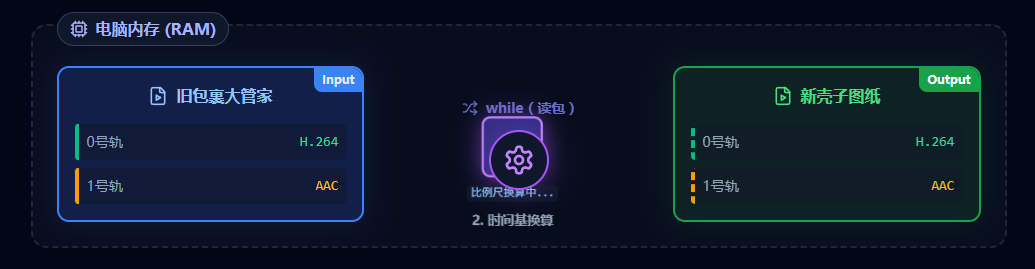
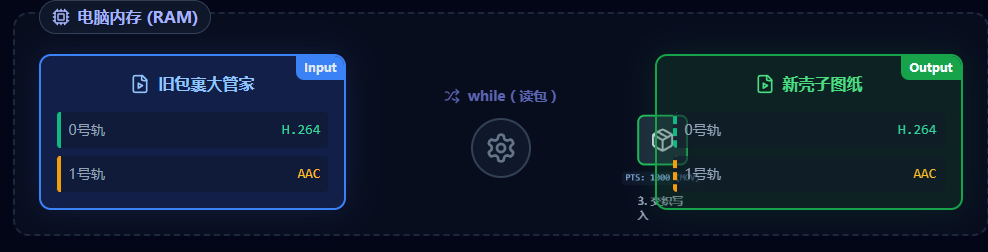
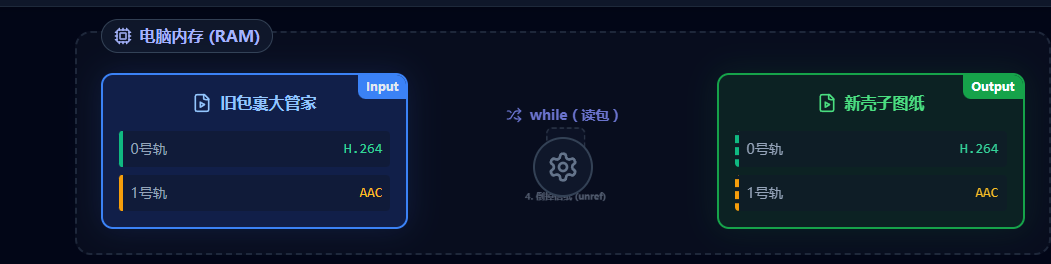
买一个"结实的空信封(Packet)"。不断从旧管家摸出数据,经过"时间比例尺"的精准换算,变成 MOV 的时间,再交织写入新文件,最后倒空信封复用。
这里由于MP4与MOV的时间基数(time_base)不同,需要换算一下pts,bts,duration等。(具体自行查询)
对应代码块:
cpp
    //写入帧数据
    AVPacket* pkt = av_packet_alloc();
    for (;;)
    {
        int re = av_read_frame(ic, pkt);        //读取帧
        if (re < 0)
            break;

        //根据time_base不同,进行转换
        pkt->pts = av_rescale_q_rnd(pkt->pts,
            ic->streams[pkt->stream_index]->time_base,
            oc->streams[pkt->stream_index]->time_base,
            (AVRounding)(AV_ROUND_NEAR_INF | AV_ROUND_PASS_MINMAX)
        );
        pkt->dts = av_rescale_q_rnd(pkt->dts,
            ic->streams[pkt->stream_index]->time_base,
            oc->streams[pkt->stream_index]->time_base,
            (AVRounding)(AV_ROUND_NEAR_INF | AV_ROUND_PASS_MINMAX)
        );
        pkt->pos = -1;
        pkt->duration = av_rescale_q_rnd(pkt->duration,
            ic->streams[pkt->stream_index]->time_base,
            oc->streams[pkt->stream_index]->time_base,
            (AVRounding)(AV_ROUND_NEAR_INF | AV_ROUND_PASS_MINMAX)
        );

        av_interleaved_write_frame(oc, pkt);    //写入帧
        av_packet_unref(pkt);
    }
第六步:写入文件尾,全剧终
极其致命的收尾!把最重要的轨道索引表写入文件尾端(救活文件)。然后销毁信封、拔掉管道、拆除所有内存管家,完美退场。

代码:
cpp
av_write_trailer(oc);